 Alternatives guide
Klap alternative: free downloads and cost per clip, compared
The best free Klap alternative is OpusClip or Vizard, since both gave us a watermarked download from a free plan and Klap's trial gave us none. If you want the most clips for $29 a month, stay on Klap: 100 clips, against about 25 on BlitzReels Starter. Pick BlitzReels if you also want AI-generated video in one tool.
- Video Clipping
- Reviewed November 4, 2026
At a glance
Klap BlitzReels
- What the plan counts
- Clips generated. Source length doesn't count.Credits. Source minutes and export minutes both count.
- Clips for the entry price
- $29 a month for 100 clips.$29 a month for about 25 clips; varies by source.
- Download before paying
- No. Trial clips are preview and edit only.Yes. 3 watermarked 720p exports in the trial.
- A year on the entry plan
- $174 billed yearly, or $348 paid monthly.$204 billed yearly, or $348 paid monthly.
5 Klap alternatives, by what you want instead
Klap counts the clips it generates, and most rivals count the minutes you feed in. Both bills start at $29 a month on Klap Basic and BlitzReels Starter, so the unit decides what you get. For a 60-minute linked video with 10 one-minute clips, 10 such videos fit in a Klap month and 2 fit in a BlitzReels month, or 4 if you upload the file. That's worked from public plan facts on November 4, 2026, and it isn't a test. On our 9:35 test video that day, free paths returned 6 clips on Klap with no download, 13 on OpusClip and 10 on Vizard. Clip count says nothing about quality.
- 1
BlitzReels
A file before you pay, and AI video in the same tool
The 7-day free trial gives one import up to 60 minutes, 3 clips and 3 watermarked 720p exports. Images, video, voice and music use the same credits. You get fewer clips per dollar than Klap: Starter is $29 a month or $204 billed yearly, for about 25 clips. There's no free plan after the trial.
- 2
OpusClip
A free plan with a 1080p download
In our November 4 test on the 9:35 video, the free plan returned 13 clips and a 1080x1920 download with a moving watermark. Free gives 60 credits a month, and a credit is one source minute. Pro is $29 a month or $14.50 billed yearly. Its terms limit free use to personal, non-commercial use, which matters if you're paid for clips.
- 3
Vizard
A free try with no account
In our November 4 test, it returned 10 clips with no account and a 720x1280 download with a burned-in watermark. Free gives 60 credits a month, and a credit is one uploaded minute. Creator is $29 a month or $14.50 billed yearly, with no watermark.
- 4
Ssemble
The lowest paid yearly bill here, $72
Pro is $6 a month billed yearly, with 360 video credits a year. One credit covers a segment of up to 20 minutes, so a 60-minute video needs you to pick the part to clip. It has one social account on Pro and no free plan.
- 5
quso.ai
A free plan that can publish to TikTok
Free gives 75 credits a month at 720p with a watermark, and a credit is about one processed minute. Essential is $39 a month with 300 credits and scheduling to 7 platforms. Try a download on your own video before relying on it.
Reviewed November 4, 2026. Sources checked: Klap pricingKlap for clippersKlap AI clip generatorKlap MCP serverKlap API pricingOpusClip pricingJune test videoNovember test video
Pick Klap when
You post at volume and clips are the whole job. Basic was $29 a month or $174 a year on November 4, 2026, for 100 clips a month. Source length doesn't count, and scheduling to five networks comes with every plan.
Pick BlitzReels when
You want a file before you pay, you also make AI images, video or voice, or your sources are Instagram, TikTok, X or Facebook links. Expect fewer clips per dollar, and scheduling only from Growth.
Best next step
Take one 10 to 30 minute video you own. Preview what Klap makes from it on the free video, then run it through OpusClip's or Vizard's free path and the BlitzReels trial. Compare the clips yourself, because scores from different apps don't compare.
What We Saw Inside Klap
These screenshots come from a product walkthrough reviewed on November 4, 2026. They show the flow we used, including the limits we ran into.
Manual test, then browser test
Virgile, BlitzReels founder, tested Klap with a real long-form video.
We used a real 81-minute French founder interview about growing an app from roughly 0 to 200k MRR with organic short-form content. It is exactly the kind of long expert recording a founder, agency, coach, or course creator would want to turn into Shorts, Reels, TikToks, and LinkedIn clips.
1:21:28 · French
What we did
- 1Pasted the YouTube link into Klap from a fresh trial account.
- 2Opened the create-shorts modal and reviewed source language, clip length, caption presets, and advanced options.
- 3Generated the clips, then inspected the ranked results list, virality scores, transcript previews, editor, download action, and scheduling flow.
- 4Opened the editor to check transcript corrections, caption themes, timeline controls, and AI framing.
- 5Clicked download to test the free/export path, which opened an upgrade modal in this account.
Klap generated 14 shorts from the source video. The top clip scored 93/100, the editor exposed useful transcript/caption/framing controls, scheduling surfaced LinkedIn, Instagram, TikTok, and YouTube, and download was gated by an upgrade modal during our June 14, 2026 test. A second run on November 4, 2026, on a 9:35 French video, returned 6 shorts scored 60 to 78, and download opened the same kind of upgrade prompt.
14
generated clips
93/100
top virality score
1
download gate tested
4
publishing options surfaced
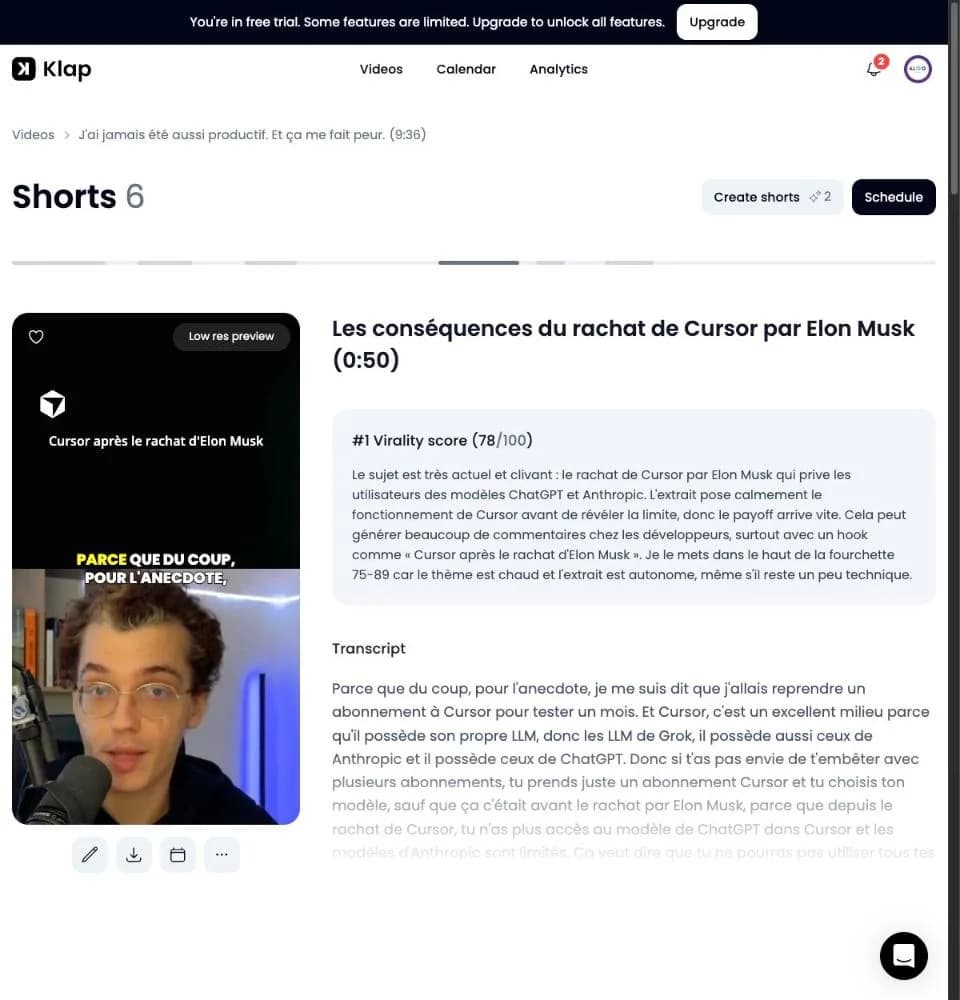
November 2026 results
A second run on a 9:35 French video returned 6 shorts, scored 60 to 78 on Klap's virality score.
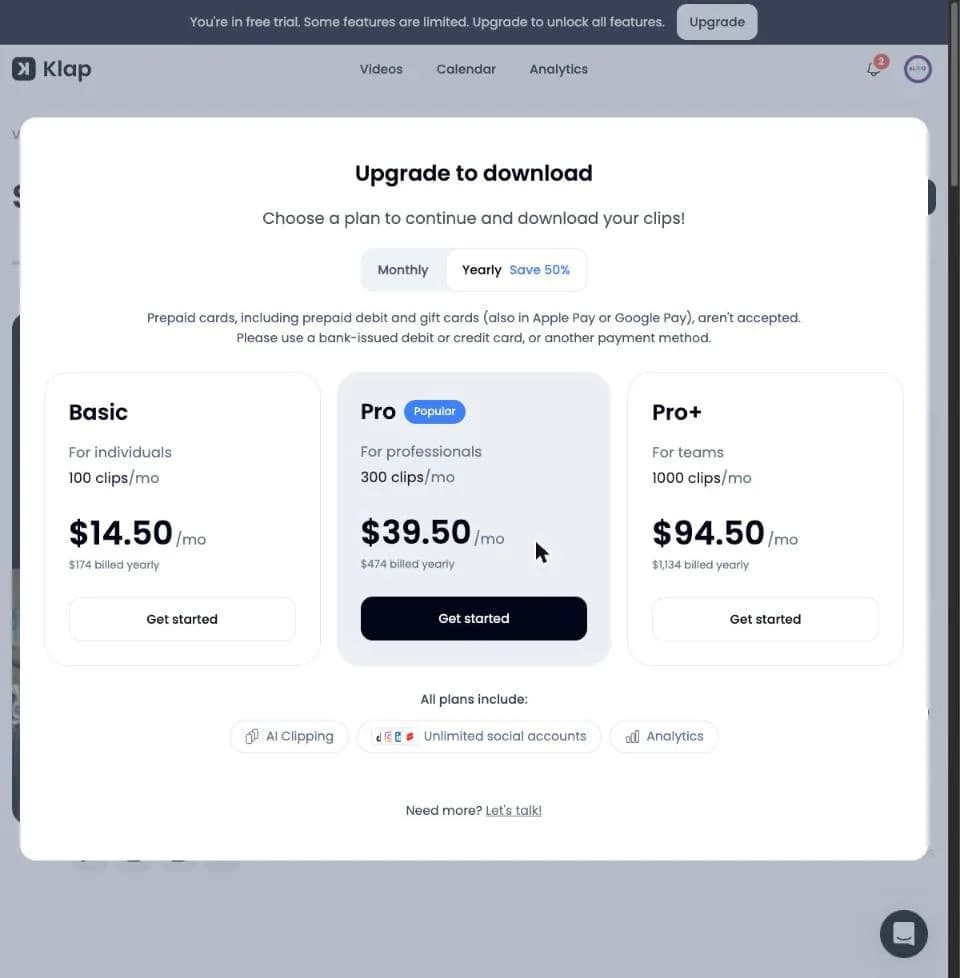
November 2026 download prompt
Download still opened Upgrade to download in November 2026, with Basic listed at $14.50 a month on yearly billing.
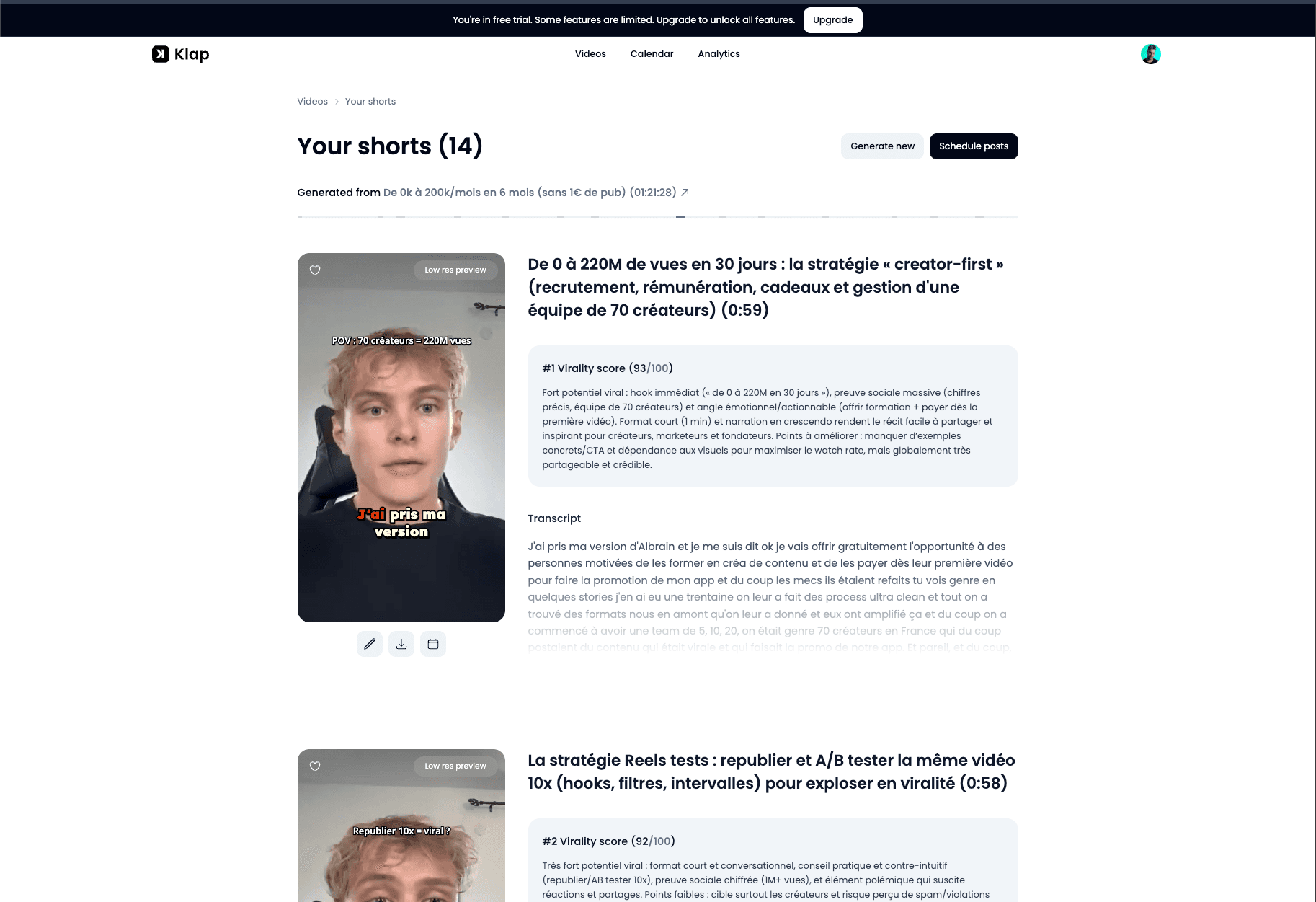
Generated shorts list
Klap produced 14 clips, ranked them with virality scores, and exposed edit, download, and schedule actions.
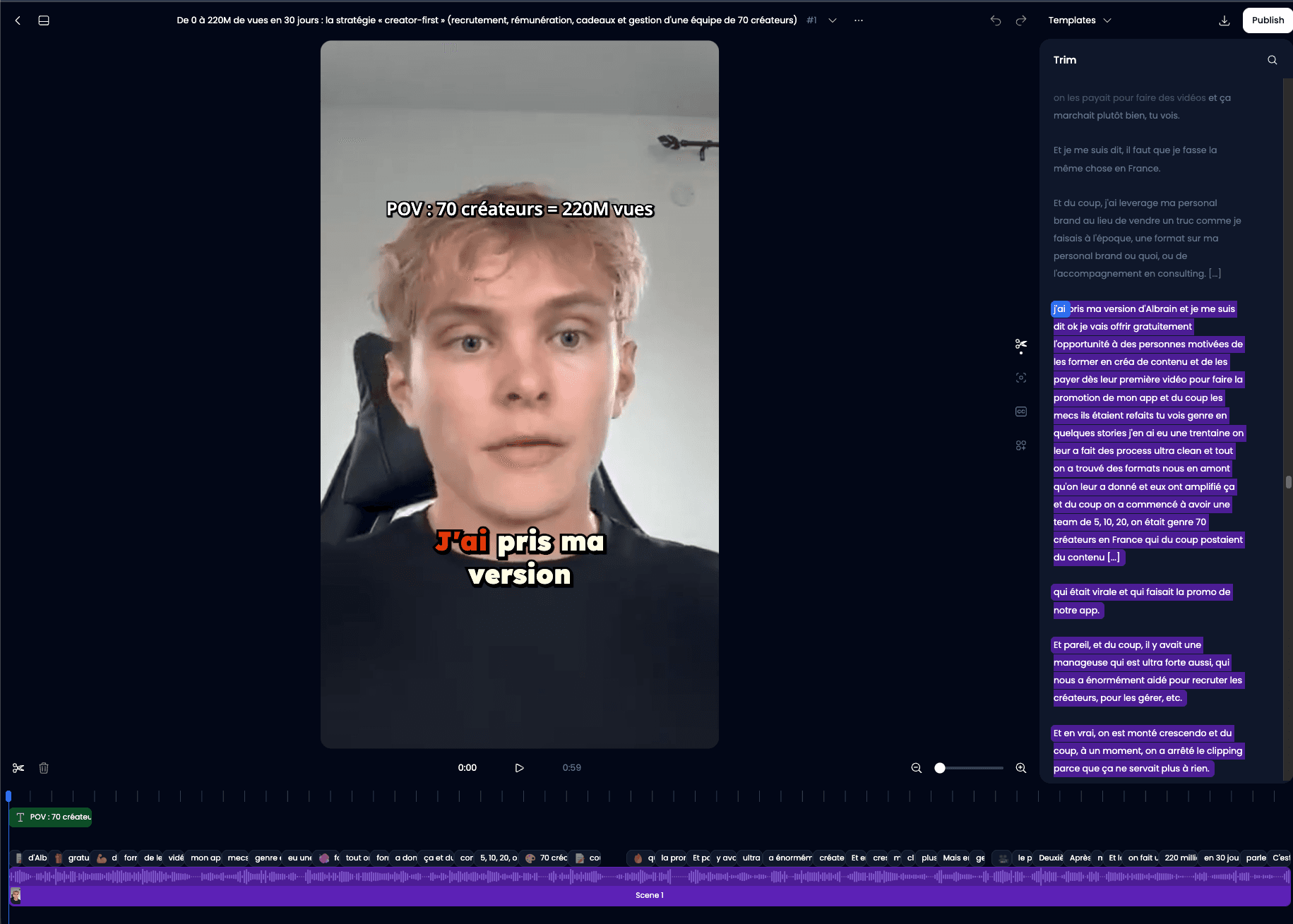
Editor controls
The editor supports transcript fixes, caption theme/template controls, trim/timeline work, and automatic framing.
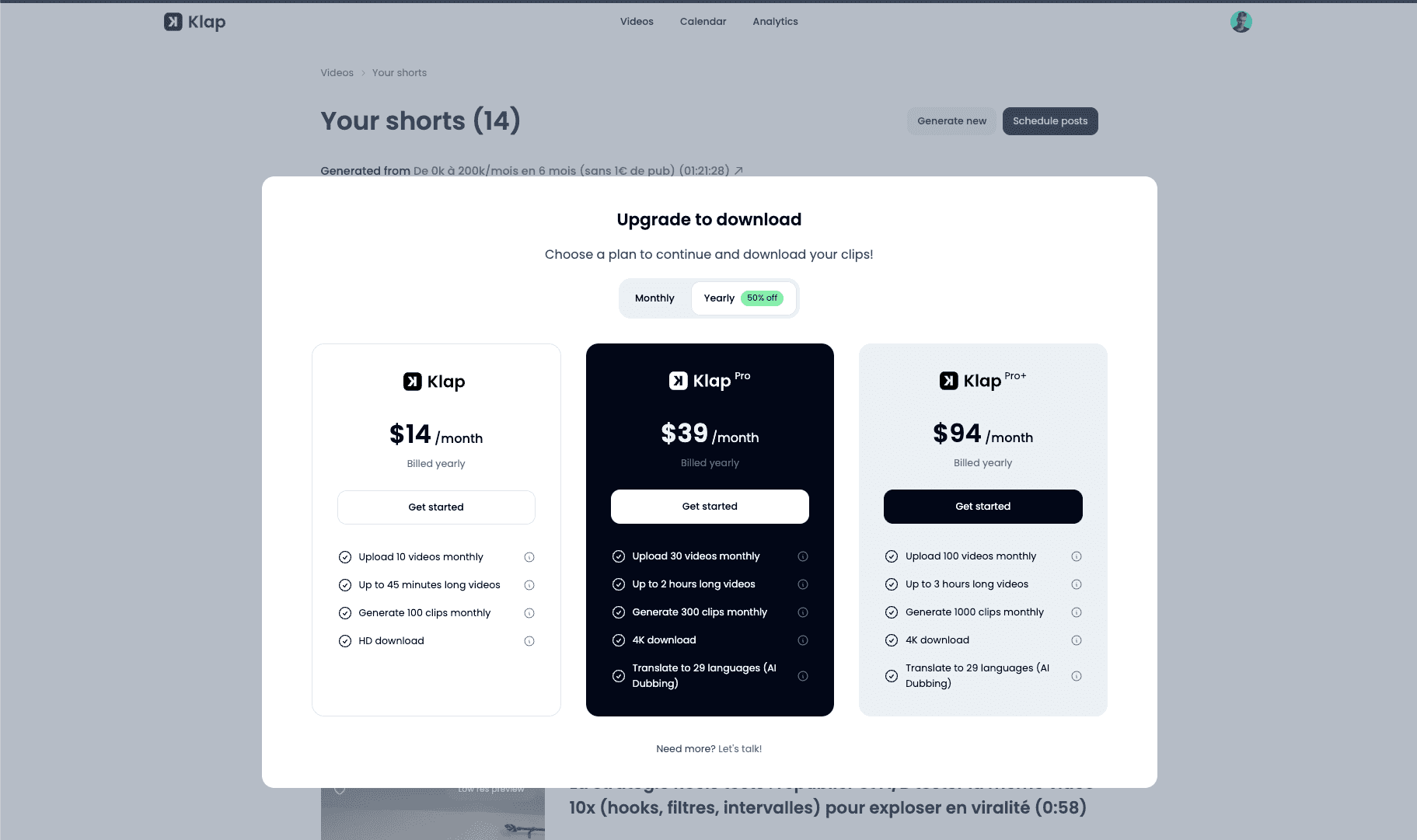
Download paywall
In the June 2026 test, download opened an upgrade modal despite Klap marketing one free video.
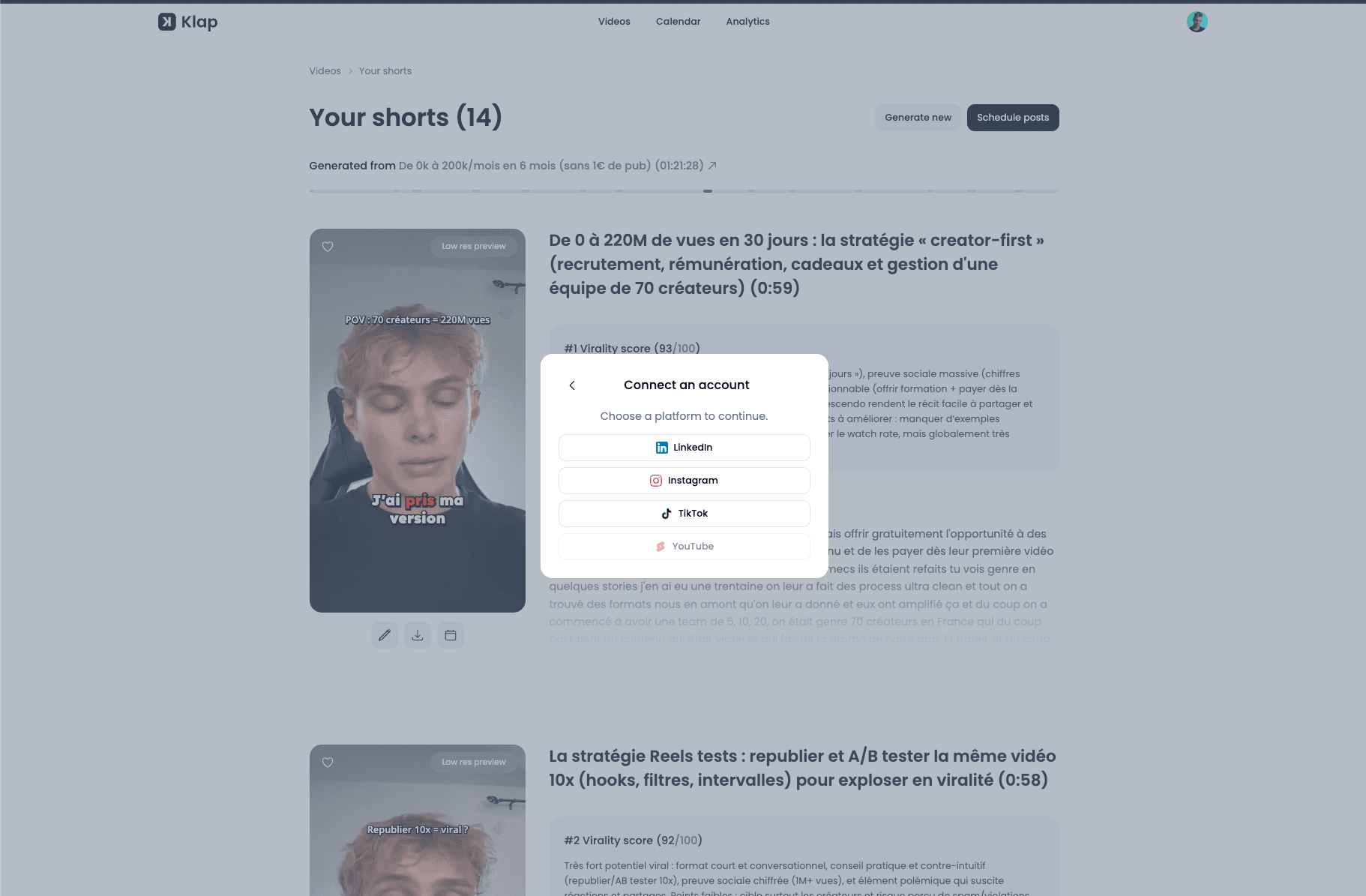
Scheduling platforms
Scheduling surfaced LinkedIn, Instagram, TikTok, and YouTube; YouTube appeared disabled or coming soon.
What Klap looks like today
Public pages we captured on November 4, 2026. They show how Klap presents itself and its prices that day. They aren't a product test.
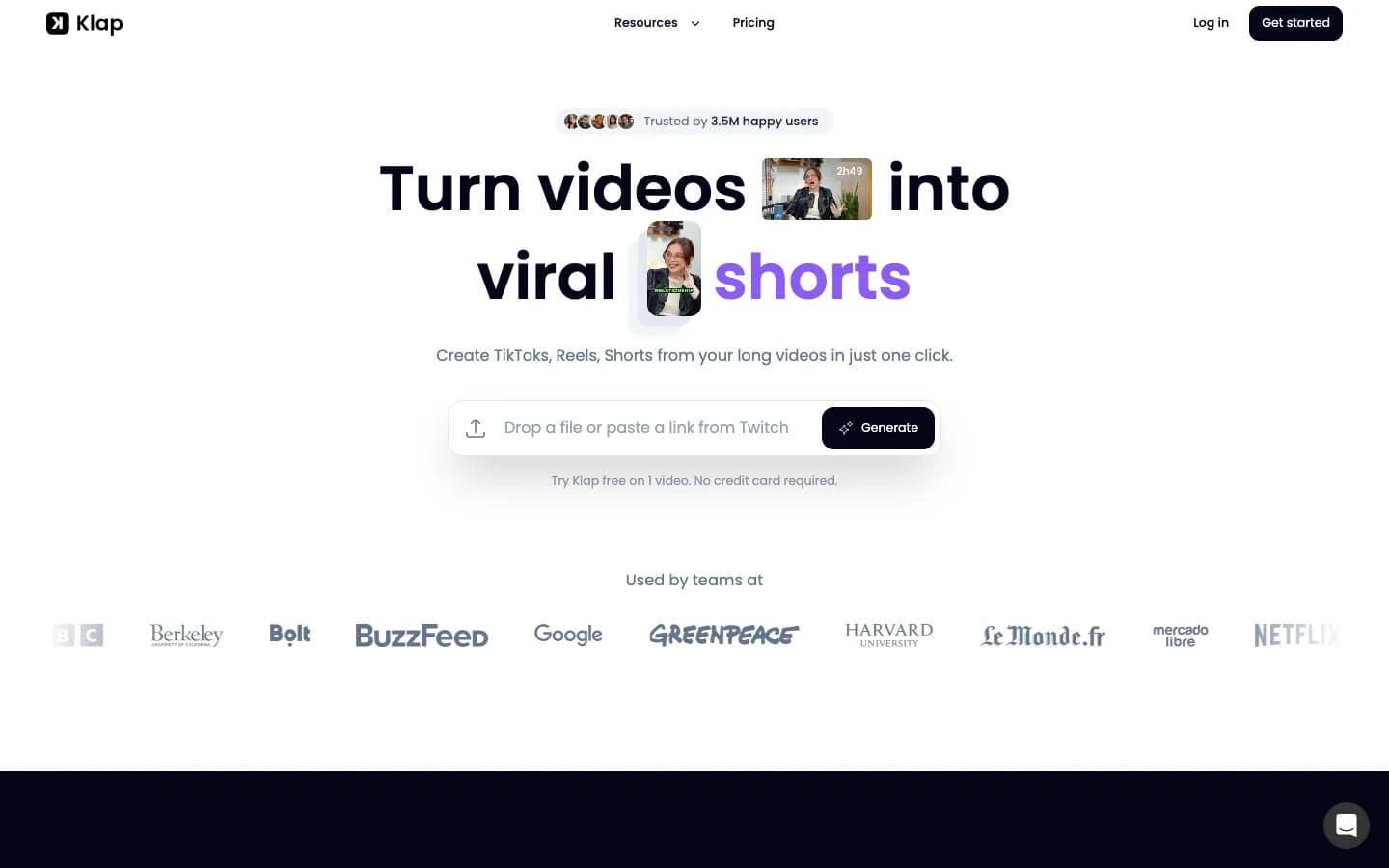
Klap homepage
klap.app, captured November 4, 2026.
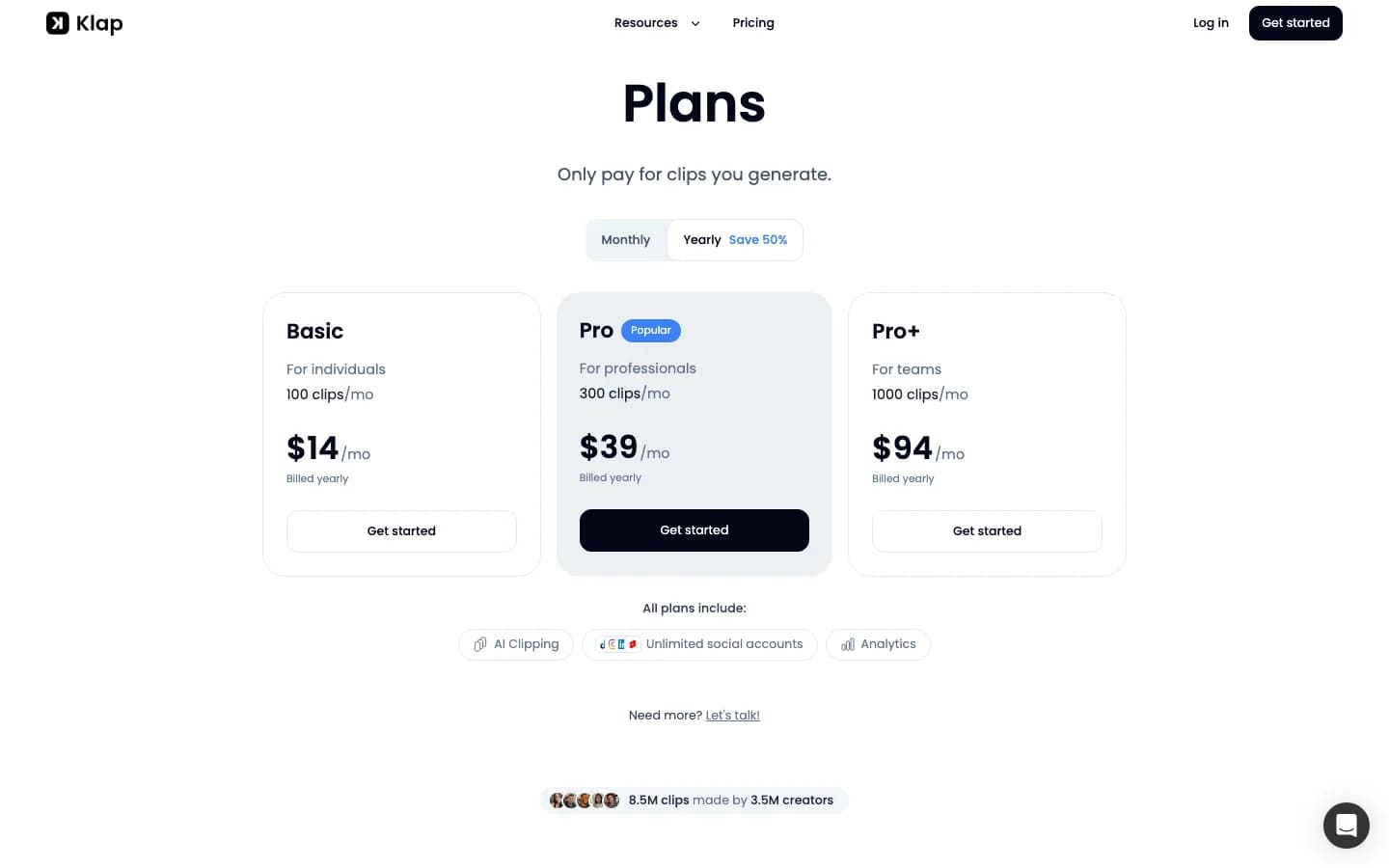
Klap pricing page
klap.app, captured November 4, 2026.
What is Klap?
Klap is an AI clipping tool from ZIGG, a French company. You paste a link or upload a video, and it picks moments from the speech, reframes them to vertical, adds animated captions and gives each clip a 0 to 100 Virality Score. Plans count generated clips, and source videos can run up to 3 hours. Every plan includes an editor, analytics and scheduling to five networks. It also offers an MCP server and a separately billed REST API.
What is BlitzReels?
BlitzReels turns long videos into short clips in the browser. It ranks moments with AI, adds captions and vertical framing, and opens each clip on a timeline before export. Paid plans also generate images, video, voice and music on the same credits. Processing isn't instant, and imports can need a retry. It has no desktop app and no dubbing, and there's no free plan after the 7-day trial. Credits cover source minutes and exports, so it costs more per clip than Klap.
Klap vs BlitzReels
Klap counts generated clips and BlitzReels counts source and export minutes in credits, so start with the first four rows.
| Feature | Klap | BlitzReels |
|---|---|---|
| What the plan counts | Clips generated. Source length doesn't count. | Credits. Source minutes and export minutes both count. |
| Clips for the entry price | $29 a month for 100 clips. | $29 a month for about 25 clips; varies by source. |
| Download before paying | No. Trial clips are preview and edit only. | Yes. 3 watermarked 720p exports in the trial. |
| A year on the entry plan | $174 billed yearly, or $348 paid monthly. | $204 billed yearly, or $348 paid monthly. |
| Long sources | Yes. Up to 3 hours on its pricing page, at no extra allowance. Some tool pages still say 4 hours. | Partly. Longer sources cost more: a 3-hour link uses 210 of Starter's 250 credits with 10 clips. |
| Link sources | Yes. YouTube, Twitch, Vimeo, Loom, Google Drive, Dropbox and direct links, plus uploads. | Partly. YouTube, Vimeo, Instagram, TikTok, X, Facebook and Google Drive, plus uploads. No Twitch links. |
| Clip ranking | Yes. A 0 to 100 Virality Score on each clip. | Yes. Moments are ranked by hook, payoff, clarity and context. Neither ranking can promise views. |
| Captions and dubbing | Partly. 99+ languages on its pricing page, 52 on older pages, and caption translation. Today's pricing lists no dubbing. | Partly. Editable captions in 35+ languages. No dubbing. |
| Editing and clean export | Yes. An editor with b-roll and hook titles, up to 4K, with no watermark on paid plans. | Yes. A timeline for captions, trims and crops, up to 4K, with no watermark on Starter. |
| Posting and scheduling | Yes. TikTok, YouTube, Instagram, LinkedIn and Facebook on every plan, with unlimited accounts. | Partly. Post to YouTube, TikTok and LinkedIn from Starter; schedule from Growth. Instagram access is allowlisted. |
| AI generation | No. Klap says it isn't a text-to-video tool. | Yes. Images, video, voice and music on credits. |
| API and MCP | Yes. The MCP server uses your plan; the REST API is billed separately per operation. | Yes. REST API, SDK, CLI and MCP on every paid plan. |
Pros & Cons
Strengths and weaknesses of both tools.
Klap
Pros
- More clips for the price: 100 for $29 a month on Basic, and yearly billing takes 50% off.
- Long sources don't use up the plan, up to 3 hours each.
- Scheduling to TikTok, YouTube, Instagram, LinkedIn and Facebook on every plan, with unlimited accounts.
- Yearly plans get the whole year's clips at once: 1,200 on Basic.
- A full refund in the first month on monthly and yearly plans, per its pricing page.
Cons
- The trial can't produce a file you can post.
- Every generated clip counts, including those you throw away.
- It needs speech to find moments, and it doesn't generate video.
- Its own pages disagree on languages and source length.
BlitzReels
Pros
- A watermarked file from the free trial.
- AI generation and clipping on one credit balance.
- Links from Instagram, TikTok, X and Facebook.
- No watermark and up to 4K on Starter.
Cons
- Fewer clips per dollar: about 25 on $29 Starter, against 100 on Klap Basic, and about 80 on $79 Growth, against 300 on Klap Pro.
- Scheduling starts at Growth, $79 a month. Klap includes it at $29.
- No Twitch links: stream recordings have to be uploaded as files.
- Credits reset monthly with no rollover. Top-ups never expire, but they cost extra.
- Processing isn't instant, imports can need a retry, and it has no desktop app, no dubbing and no free plan after the trial.
Pricing Comparison
Side-by-side pricing for BlitzReels and Klap.
BlitzReels plans
- Starter
- $29/mo
- Growth
- $79/mo
- Agency
- $199/mo
Klap plans
- Free trial
- 1 video, no card. Preview and edit only, no download or posting
- Basic
- $29 a month, or $14.50 a month billed yearly ($174). 100 clips a month
- Pro
- $79 a month, or $39.50 a month billed yearly ($474). 300 clips a month
- Pro+
- $189 a month, or $94.50 a month billed yearly ($1,134). 1,000 clips a month
- REST API
- Billed separately: $0.44 per input video, $0.32 per short, $0.48 per export
- Read on
- November 4, 2026, in US dollars, on klap.app/pricing. Plan cards can round the yearly monthly price down
What BlitzReels does differently from Klap
You can get a file before paying: 3 watermarked 720p exports in the 7-day free trial, with nothing charged until day 8. Klap's trial stops at preview and edit.
AI images, video, voice and music sit in the same workspace and use the same credits as clipping. Klap sends that job to other tools.
It takes Instagram, TikTok, X and Facebook links, which Klap's source lists don't name. Clip only videos you're allowed to clip.
Every clip opens on a timeline for caption, trim and crop edits, and exports up to 4K with no watermark on Starter.
Common Klap Limitations
Tradeoffs to consider when comparing Klap
The trial gives you no file. Klap's pricing page says the 1 free video can be previewed and edited, and that downloading and posting need a paid plan. Download opened an upgrade prompt in our June and November 2026 runs.
Each short Klap generates counts as one clip, even if you never post it. You can choose how many you want from each video, so set that number first. Klap says 30 to 60 minute videos typically give 17 clips.
It relies on speech. Klap's site says it works on content where there's speech, because that's how it finds moments, so videos without speech are a poor fit.
It doesn't generate video. Klap's clip generator page says it isn't a text-to-video tool and points those users to Invideo or Canva.
The REST API costs more than the plans. At $0.44 per input video, $0.32 per short and $0.48 per export, a 10-clip job is $8.44, against $2.90 worth of Basic at monthly billing. The MCP server uses your plan instead.
Its pages disagree. Pricing says 99+ languages and 3-hour sources; tool pages say 52 languages and 4 hours. The homepage says a one-minute video gives about 5 clips, and the clippers page says 8 from 10 to 30 minutes. We got 6 from 9:35 and 14 from 81 minutes.
Klap or BlitzReels?
Klap is the right call if clips are the whole job: its $29 plan fit more clips than BlitzReels in every case we worked, and scheduling comes with it. If you won't pay before you hold a file, try OpusClip or Vizard free, and read OpusClip's terms if you're paid for clips. Pick BlitzReels when you also want AI-generated video in one tool, or when your sources are Instagram, TikTok, X or Facebook links, and accept the higher cost per clip.
How to try BlitzReels after Klap
- 1
Download what you want to keep
BlitzReels can't import Klap projects or templates. If you've paid for Klap, export your clips before you cancel. Your plan stays active to the end of the period you paid for.
- 2
Check your refund window
Klap's pricing page gives a full refund in the first month on monthly and yearly plans. After that, a yearly plan refunds 1/12 per full unused month, up to your last 3. Read section 10 of its terms first.
- 3
Run one video through the trial
Paste the same link or upload the same file in the BlitzReels trial, up to 60 minutes. Then check it against the credit math: a linked hour with 10 one-minute clips uses 90 of Starter's 250 credits, and Growth has 750.
Next pages, by what you're comparing
Klap is strong on clips per dollar, so these pages cover the other reasons to move.
Klap Alternatives FAQ
What is the best free Klap alternative?
OpusClip and Vizard, because both gave us a download from a free plan on November 4, 2026. OpusClip's was 1080x1920 with a moving watermark, and Vizard's was 720x1280 with a burned-in watermark and needed no account. Klap's trial gave us none. OpusClip's terms limit free use to personal, non-commercial use.
Is Klap free?
No, not to download or post. As of November 4, 2026, Klap lets you try 1 video free with no card, and you can preview and edit the clips. Downloading and posting need a paid plan, from $14.50 a month billed yearly. Download opened an upgrade prompt in both of our test runs.
How much does Klap cost?
On November 4, 2026, Basic was $29 a month for 100 clips, Pro $79 for 300 and Pro+ $189 for 1,000. Yearly billing halves that: $174, $474 and $1,134 a year. Klap's plan cards can round $14.50 down to $14. Some reviews still report input minutes, but its pricing page counts clips.
Does Klap charge per clip or per minute?
Per clip. As of November 4, 2026, Klap's pricing page says each short it generates counts as one clip and that source length doesn't use up your plan. That makes long videos cheap, and it means discarded clips still count. OpusClip, Vizard and quso.ai count source minutes, and BlitzReels counts source and export minutes in credits.
Is Klap cheaper than BlitzReels?
Yes, per clip. For a 60-minute link with 10 one-minute clips, 10 videos fit in a $29 Klap month, or 5 if you take its typical 17 clips. BlitzReels fits 2, or 4 uploaded. That's about $0.29 against $1 a clip at monthly prices. A 3-hour link fits 1; a 10-minute link with 5 clips fits 10 against Klap's 20. Worked November 4, 2026.
What are Klap's weaknesses compared to competitors?
Three are checkable on November 4, 2026. Its trial gives no file, while OpusClip and Vizard let you download on a free plan. It doesn't generate video, by its own description. It relies on speech to find moments. We didn't judge clip quality, and our test recorded scores only on Klap's own scale, so quality isn't on this list.
Klap vs OpusClip: which should you pick?
Pick Klap for long sources at volume and OpusClip for a free plan with a download. On November 4, 2026, both were $29 a month at that tier. A 60-minute video with 10 clips uses 10 of Klap Basic's 100 clips, or 60 of OpusClip Pro's 300 source minutes, so 10 such videos fit against 5.
Does Klap have an API or MCP server?
Yes, both. As of November 4, 2026, Klap's MCP server has 18 tools and uses your plan. Its REST API is billed separately at $0.44 per input video, $0.32 per short and $0.48 per export, so a 10-clip job is $8.44. BlitzReels includes a REST API, SDK, CLI and MCP on every paid plan, drawing on your credits.
Is this a hands-on Klap review?
Partly. We ran Klap on June 14 and November 4, 2026, and saw its results, editor, scheduling screen and download prompt. June returned 14 clips with a top score of 93/100; November returned 6 scored 60 to 78. We didn't pay, so we haven't seen an export, and we didn't judge clip quality or time the runs.
Other Alternatives

Opus Clip
Video Clipping
OpusClip turns long videos into captioned vertical clips and charges one credit per source minute. Compare it with BlitzReels on price, editing, exports and posting.
Compare workflow
Vizard
Video Clipping
Vizard is an AI clipping tool at vizard.ai that turns long videos into captioned vertical shorts, with an editor and social scheduling, for creators who clip a lot of source minutes on a small budget.
Compare workflow
Riverside
Video Clipping
Riverside is a remote recording studio at riverside.com that records each guest on a separate track and adds editing, AI clips, hosting and live streaming, for creators who interview people.
Compare workflow
StreamLadder
Video Clipping
StreamLadder is a browser clip editor and AI clipper at streamladder.com that turns Twitch and Kick streams into vertical clips, for streamers growing on TikTok, Reels and Shorts.
Compare workflow
Ssemble
Video Clipping
Ssemble is an AI clipping tool at ssemble.com that turns long talking videos into captioned shorts and posts them, for clippers and creators who process a lot of video on a low budget.
Compare workflow
quso.ai
Video Clipping
quso.ai, called Vidyo.ai until its rename, is a browser tool that clips long videos into captioned shorts and adds scheduling, a content planner and social analytics, for creators who want clipping and posting on one bill.
Compare workflowCreate
Create your next short-form video now.
Start with one raw clip or a long-form recording. BlitzReels gives you the captions, clipping, cleanup, and export tools in one place.
Create my first shortNew short-form project
Drop video or paste a URL
Upload source video
Clip, caption, reframe, clean up, export