 Alternatives guide
Kling AI alternatives, including one that still runs Kling
The best Kling AI alternative is BlitzReels if you want Kling 3.0 alongside Veo 3.1, Seedance 2.5 and Hailuo on one credit balance, next to clipping and a timeline editor. For Seedance alone, use Dreamina. For Veo, use Google Flow. If you only need Kling, stay on Kling: its own app costs less per clip and already has Kling 4.0.
- AI Video Generation
- Reviewed November 4, 2026
At a glance
 Kling AI
 BlitzReels
- Kling models
- Yes. Its full range, including Kling 4.0 and 4.0 Flash.Partly. Kling 2.1, 2.6, O1, 3.0 and O3. Kling 4.0 isn't promised yet.
- Other model families
- No. Its public model list names Kling models only.Yes. Veo 3.1, Seedance 2.5, Hailuo, Luma Ray and Wan share one balance.
- 10 seconds of 4K Kling
- $4.00. 300 credits on Standard at $8.80 a month.$14.62. 126 credits on Starter at $29 a month, from an image.
- Free access
- Yes. Basic is $0 with free credits on login, watermarked and non-commercial.No. A 7-day free trial with 10 AI credits, then a paid plan.
7 Kling AI alternatives for generating video
BlitzReels isn't the only tool hosting several models: Runway, Luma and Higgsfield do too. Where a tool publishes both a plan price and a credit rate, we worked out what a clip costs at its monthly price. Prices are as read on November 4, 2026, and some vary by region.
- 1
BlitzReels
Kling and other models on one credit balance, plus clipping and editing
Runs Kling 3.0 and O3, Veo 3.1, Seedance 2.5, Hailuo, Luma Ray and Wan on credits. Starter is $29 a month for 250. Ten seconds of Kling 3.0 at 1080p with audio uses 50.4 credits, about $5.85. That is more per clip than Kling's own app.
- 2
Runway
Its own Gen models, with Kling 3.0 and Veo 3.1 also hosted
Standard is $15 a month, or $12 billed yearly, for 625 credits. Gen-4.5 uses 60 credits per 5 seconds, so 10 seconds works out to about $2.88 on monthly Standard. The free plan gives 125 one-time credits.
- 3
Google Flow (Veo 3.1)
Veo 3.1 with free daily credits
Every account gets 50 Flow credits a day, and Google AI Pro at $19.99 a month adds 1,000. A Veo 3.1 Fast clip uses 20 credits outside Ultra and stops at 8 seconds. Non-subscribers may be unable to generate video at peak hours.
- 4
Dreamina (Seedance 2.5)
Seedance 2.5 directly, with free daily credits in the US
Dreamina lists Seedance 2.5 at 37 credits a second at 720p and gives US free accounts 120 credits a day. Basic renews at $15 a month for 1,575 credits, so 10 seconds works out to about $3.52. Regional prices vary.
- 5
Hailuo
MiniMax's own Hailuo video models
Hailuo's subscription terms list Standard at $14.99 a month for 1,000 credits, and free users' downloads carry a watermark. Its live plans page wasn't readable on November 4, 2026, so check the price first.
- 6
Luma
Ray video, with third-party models on the same credits
Plus is $30 a month, or $25 billed yearly, for 10,000 credits. Ray3.2 starts at 300 credits for 10 seconds at 720p and 1,200 at 1080p, so from $0.90 and $3.60 on monthly Plus. The pricing page shows no free plan.
- 7
Higgsfield
Many hosted models with time-limited unlimited offers
Its explainer lists Kling 3.0, Seedance 2.0 and Wan 2.7 among its models, with zero-credit windows of 1 to 7 days that work in the web app only. Its pricing page wasn't readable on November 4, 2026, so we give no plan price.
Reviewed November 4, 2026. Sources checked: Kling AI plansKling credit guideKling credits policyKling API video pricesKling 4.0 user guideKling free credits FAQDreamina Seedance pricesGoogle Flow credits
Pick Kling AI when
You mostly use Kling, want it for less per clip than on BlitzReels, or need Kling 4.0 with its 30-second generations. Ten seconds of 4K works out to $4.00 on Standard.
Pick BlitzReels when
You switch between Kling 3.0, Veo 3.1, Seedance 2.5 and Hailuo and want one credit balance, then want to cut the result in a timeline editor or clip your long videos too.
Best next step
Generate one clip on Kling's free credits first. To compare other models on BlitzReels, plan on Starter, since the only Kling clip the trial's 10 credits cover is 5 seconds of Kling 2.1.
What Kling AI looks like today
Public pages we captured on November 4, 2026. They show how Kling AI presents itself and its prices that day. They aren't a product test.
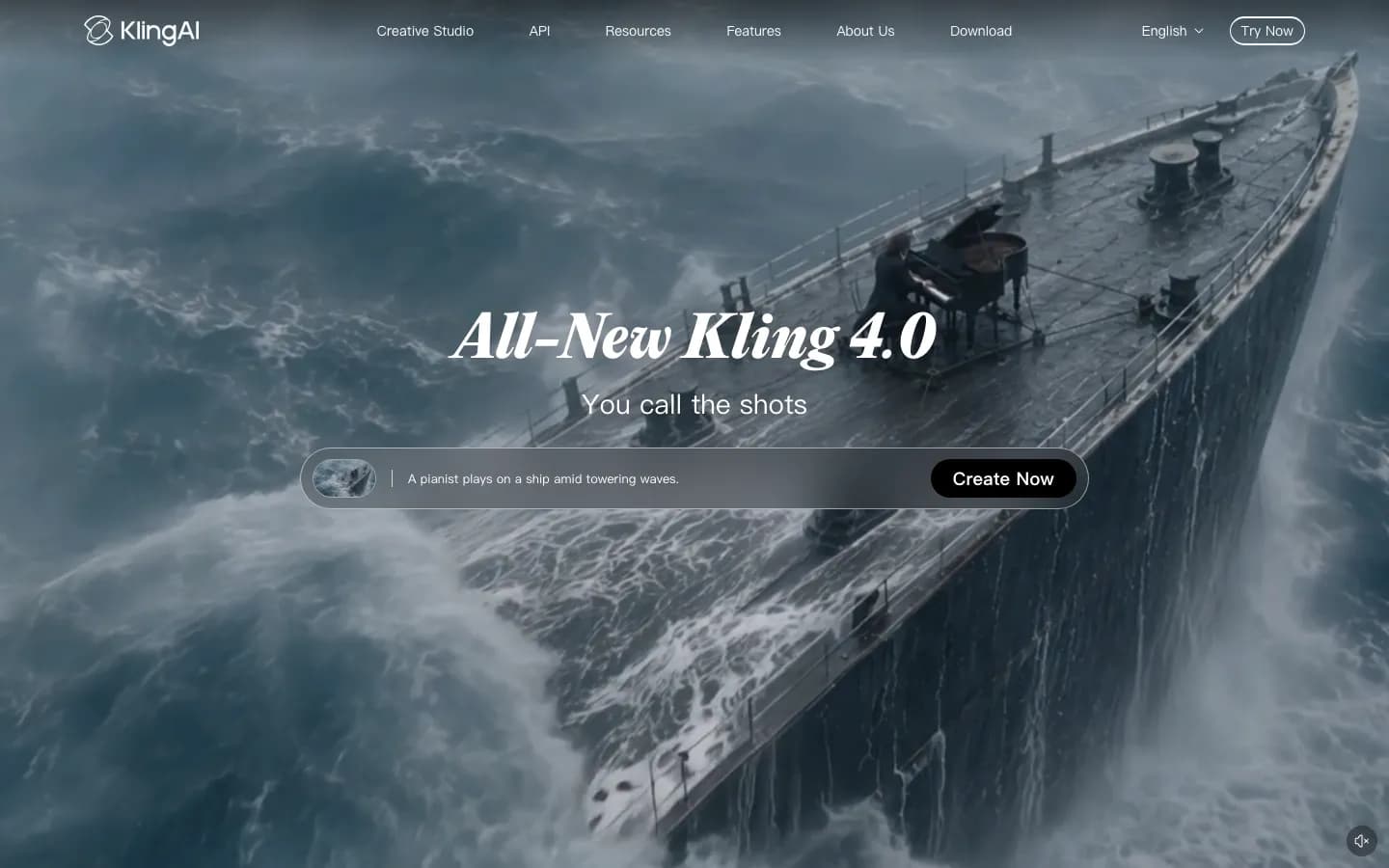
Kling AI homepage
kling.ai, captured November 4, 2026.
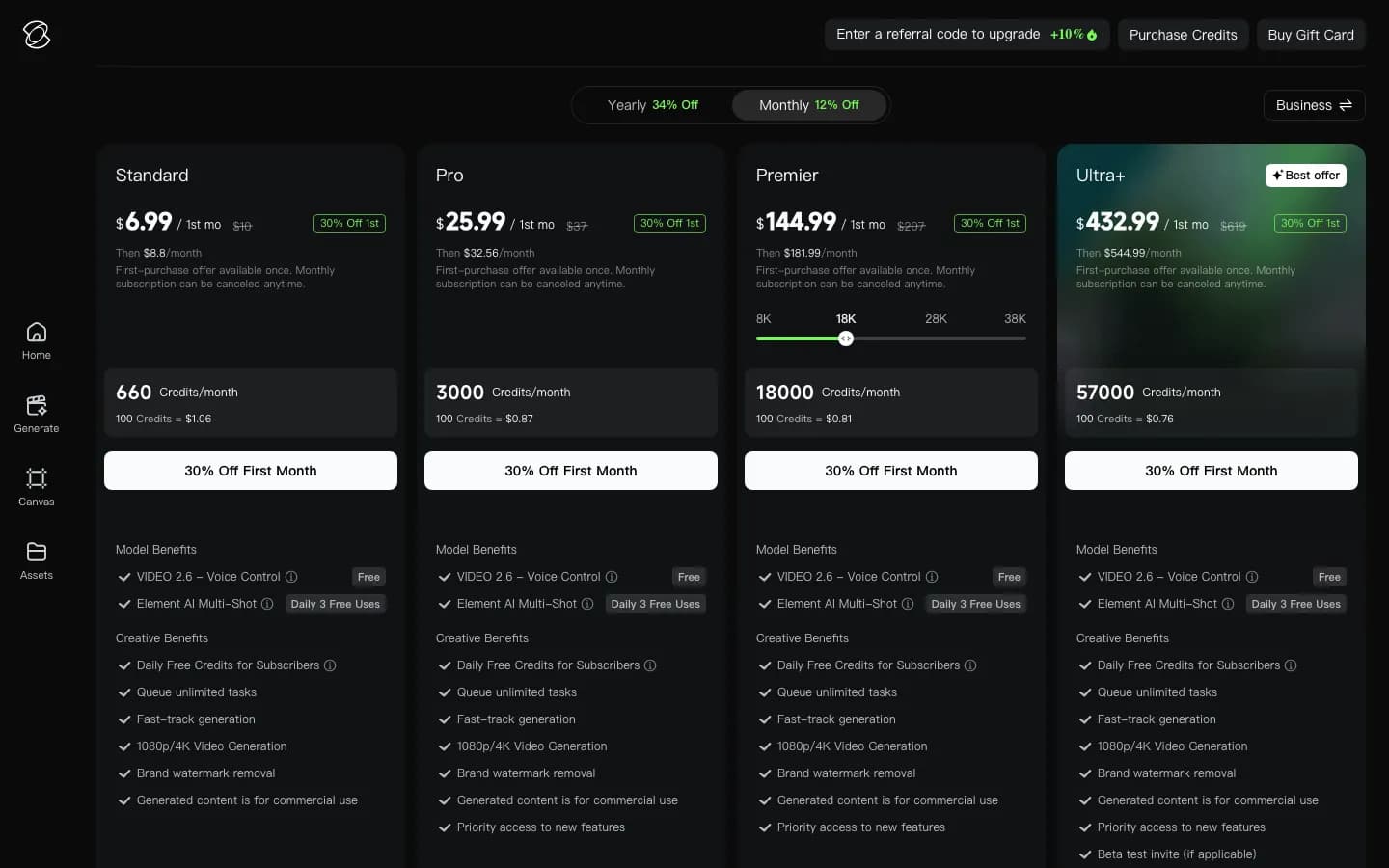
Kling AI pricing page
kling.ai, captured November 4, 2026.

What is Kling AI?
Kling AI is a video and image generator from Kuaishou, launched in June 2024. It turns prompts and images into clips with native audio. Kling 4.0 generates 3 to 30 seconds and takes up to 10 keyframes and 15 reference inputs, while Kling 3.0 generates up to 15 seconds and can output 4K. Kling also sells an API, and its site offers Canvas, MCP and CLI. On November 4, 2026, Basic was free and Standard was $8.80 a month after a $6.99 first month.
What is BlitzReels?
BlitzReels is a browser tool that turns long videos into short clips, with an AI Studio for generating images, video, voiceover, music and sound effects. AI Studio spends credits, and Starter is $29 a month for 250. The 7-day trial needs no card and includes one import up to 60 source minutes, three clips, three 720p watermarked exports and 10 AI credits. There is no free plan afterwards, and it has no desktop app, dubbing or remote recording studio.
Kling AI vs BlitzReels
Generating on Kling's own app against generating Kling and other models through BlitzReels, with prices as read on November 4, 2026.
| Feature | Kling AI | BlitzReels |
|---|---|---|
| Kling models | Yes. Its full range, including Kling 4.0 and 4.0 Flash. | Partly. Kling 2.1, 2.6, O1, 3.0 and O3. Kling 4.0 isn't promised yet. |
| Other model families | No. Its public model list names Kling models only. | Yes. Veo 3.1, Seedance 2.5, Hailuo, Luma Ray and Wan share one balance. |
| 10 seconds of 4K Kling | $4.00. 300 credits on Standard at $8.80 a month. | $14.62. 126 credits on Starter at $29 a month, from an image. |
| Free access | Yes. Basic is $0 with free credits on login, watermarked and non-commercial. | No. A 7-day free trial with 10 AI credits, then a paid plan. |
| 10 seconds of 1080p Kling 3.0 with audio | $1.68 on its API price table. The app's 1080p credit rate isn't on its public pages. | $5.85. 50.4 credits on Starter. |
| 30-second single generation | Yes. Kling 4.0 generates 3 to 30 seconds. | Partly. Seedance 2.5 and Wan 3.0 reach 30 seconds; Kling 3.0 stops at 15. |
| Keyframes and references | Yes. Kling 4.0 takes up to 10 keyframes and 15 reference inputs. | Partly. End frames on many models, and up to 9 reference images on Seedance 2.0. |
| Credit rollover | Partly. Plan credits last one month; purchased credits last two years. | No. Plan credits reset monthly. Top-ups are $12 for 100 credits. |
| Timeline editing after generating | Partly. It has Canvas and video editing; a timeline editor isn't on its public pages. | Yes. Generated clips go to your library and can be added to a timeline project. |
| Clipping long videos | No. Kling 4.0 video editing takes inputs of up to 30 seconds in total. | Yes. It is the main job, with moment selection, vertical reframing and captions. |
| Commercial use and watermark | Yes. Commercial use and watermark removal start at Standard. | Partly. Paid exports have no watermark; commercial use follows each model's license. |
| API and agent access | Yes. API, MCP and CLI, for Kling models. | Yes. REST API, SDK, CLI and MCP on paid plans, across its models. |
Pros & Cons
Strengths and weaknesses of both tools.
Kling AI
Pros
- Direct pricing: Standard is $8.80 a month for 660 credits after a $6.99 first month
- Kling 4.0 is live, with generations of 3 to 30 seconds
- A free Basic plan, with free credits at sign-up and on monthly login
- Standard already includes 1080p and 4K video, watermark removal and commercial use
Cons
- Its public model list names Kling models only
- Free output is watermarked and not for commercial use
- The app's 720p and 1080p credit rates aren't on its public pages
- Long-video clipping, captions and a timeline editor aren't listed on its public pages
BlitzReels
Pros
- Kling and other model families on one credit balance
- Clipping, captions and a timeline editor in the same browser workspace
- Voiceover, music and sound effects on the same credits
- REST API, SDK, CLI and MCP on paid plans
Cons
- A Kling clip costs more than on Kling's own app: 10 seconds of 4K is $14.62 on Starter against $4.00 on Standard
- No free plan after the trial, and its 10 AI credits don't cover a 10-second Kling generation
- Kling 4.0 isn't promised yet, and new Kling models reach BlitzReels through a third-party provider
- Plan credits reset monthly with no rollover
- No desktop app, dubbing or remote recording studio
Pricing Comparison
Side-by-side pricing for BlitzReels and Kling AI.
BlitzReels plans
- Starter
- $29/mo
- Growth
- $79/mo
- Agency
- $199/mo
Kling AI plans
- Basic
- $0, free forever. Free credits on login, amount not published
- Standard
- $6.99 first month, then $8.80 a month, or $79.20 a year. 660 credits a month
- Pro
- $25.99 first month, then $32.56 a month, or $293.04 a year. 3,000 credits a month
- Premier 8K
- $64.99 first month, then $80.96 a month, or $728.64 a year. 8,000 credits a month
- Premier 18K
- $144.99 first month, then $181.99 a month. 18,000 credits a month
- Premier 28K and 38K
- On the plan page's slider. Prices not captured
- Ultra+
- $432.99 first month, then $544.99 a month. 57,000 credits a month
- Team
- Charged per seat per month. Price not captured
- Credit top-up
- $1 buys 66 credits at standard pricing, valid for 2 years
What BlitzReels does differently from Kling AI
One balance across model families. Starter's 250 credits can go on Kling 3.0, Veo 3.1, Seedance 2.5, Hailuo, Luma Ray or Wan, without a second subscription.
Generated clips are saved to your media library, and you can add them to a timeline project to trim them, add captions and export.
It clips long videos in the same workspace, with moment selection, vertical reframing and animated captions.
REST API, SDK, CLI and MCP reach the same model list, so an agent can change model without a second account.
Common Kling AI Limitations
Tradeoffs to consider when comparing Kling AI
Kling's public model list names only Kling models, so trying Veo or Seedance means a second account and a second balance.
Free use has limits. Kling's credit guide says Basic output is not for commercial use, and watermark removal is a paid benefit. Kling doesn't publish how many free credits you get.
You can't price most clips before signing in. Kling's public guide gives 30 credits a second for 4K and estimates 33 720p videos on Standard without stating their length. Its 720p and 1080p rates aren't on the public pages we read.
Introductory prices apply once. Standard is $6.99 for the first month and then $8.80, plan credits last one month, and only purchased credits last longer, at two years.
Kling 4.0 video editing takes up to 5 clips with a 30-second total, and clipping long videos isn't on its public pages.
Kling AI or BlitzReels?
Stay on Kling if it's the only model you use. Its own app costs less per clip, gives you free credits to start and already offers Kling 4.0 with 30-second generations. Pick BlitzReels if you switch between models, or if you also clip long videos and want it all on one credit balance, at a higher price per clip.
How to try BlitzReels after Kling AI
- 1
Keep your Kling account for now
Don't cancel yet. Save the prompt and image from one clip you liked, and spend your plan credits first, because they last one month.
- 2
Regenerate that clip on BlitzReels
Open AI Studio, choose Kling V3 Pro and set 10 seconds. The model picker shows the cost first: 50.4 credits. That needs Starter, because the only Kling clip the trial's 10 credits cover is 5 seconds of Kling 2.1, from an image.
- 3
Try another model, then finish the clip
Run the same idea through Seedance 2.5 or Veo 3.1. Add the clip you keep from your media library to a timeline project, add captions and export.
AI video on BlitzReels
Model pages and comparisons to read before spending credits.
Kling AI Alternatives FAQ
What is the best Kling AI alternative?
It depends on the model you want. BlitzReels fits if you want Kling 3.0 plus Veo 3.1, Seedance 2.5 and Hailuo on one credit balance. Dreamina is the direct route to Seedance 2.5, and Google Flow to Veo 3.1. If you only use Kling, stay on Kling, because its own app costs less per clip.
Is Kling free?
Yes, with limits. On November 4, 2026, Kling's Basic plan was $0, and its FAQ says new users get free credits at sign-up and can claim more by logging in each month. Kling doesn't publish the amount. Basic output isn't for commercial use, and watermark removal is a paid benefit. Daily login credits are for subscribers.
What is Kling AI pricing?
On November 4, 2026, kling.ai listed Standard at $6.99 for the first month, then $8.80 a month for 660 credits. Pro was $25.99, then $32.56 for 3,000. Premier at 18,000 credits was $144.99, then $181.99. Ultra+ was $432.99, then $544.99 for 57,000. Basic is free, and yearly billing is listed at 34% off.
What does a 10-second Kling video cost?
Worked from public prices read November 4, 2026: Kling's July 28 guide lists 4K at 30 credits a second, so 10 seconds is 300 credits, or $4.00 on Standard. BlitzReels uses 126 credits, or $14.62 on Starter. At 1080p with audio, Kling's API table gives $1.68 and BlitzReels $5.85. Kling's app doesn't publish its 1080p rate, so we couldn't work that out.
Does BlitzReels use Kling?
Yes. BlitzReels runs Kling 2.1, 2.6, O1, 3.0 and O3 through a third-party provider, alongside Veo 3.1, Seedance 2.5, Hailuo, Luma Ray and Wan. All of them draw on one credit balance, and Starter's credits cover 4 clips a month of Kling 3.0 at 10 seconds and 1080p. Kling 4.0 isn't promised yet, so if you need it today, use Kling's own app.
What is the Kling video generator?
It is the tool on kling.ai, from Kuaishou, that turns a prompt or image into video with native audio. Kling 4.0 makes clips of 3 to 30 seconds. Kling 3.0 makes 3 to 15 seconds and can output 4K. You spend credits per generation, and the rate depends on model, resolution, length and audio.
Kling vs Seedance: which should I use?
We haven't compared their output, so run your own prompt on both. On paper, Kling 4.0 and Seedance 2.5 both reach 30 seconds. On November 4, 2026, Dreamina's prices put 10 seconds of Seedance 2.5 at 720p at about $3.52 on Basic. On BlitzReels, one 10-second test of Kling 3.0 and Seedance 2.5 uses 192.3 credits.
Can I try Kling on BlitzReels for free?
Partly. The free 7-day trial includes 10 AI credits, which cover one 5-second Kling 2.1 clip from an image at 9.3 credits. A 10-second Kling generation doesn't fit. The trial also gives one import up to 60 source minutes, three clips and three 720p watermarked exports. After that you need Starter, at $29 a month.
Other Alternatives

invideo
Text-to-Video
invideo, long known as InVideo AI, is a browser video editor at invideo.io with AI agents, a multitrack timeline and more than 200 image, video and audio models, paid for in credits.
Compare workflow
HeyGen
AI Avatars
HeyGen is an AI video platform that turns a script into a talking avatar video, with digital twins, lip-synced translation and a long-video clipping tool, for people who want a presenter on screen without filming.
Compare workflow
AutoShorts
Faceless Video
AutoShorts.ai is a faceless video generator that creates short videos from a topic or prompt and posts them to TikTok, YouTube and Instagram on a schedule.
Compare workflow
Opus Clip
Video Clipping
OpusClip turns long videos into captioned vertical clips and charges one credit per source minute. Compare it with BlitzReels on price, editing, exports and posting.
Compare workflow
CapCut
Video Editors
CapCut is a video editor with phone, desktop and web versions, for creators who edit short videos by hand with templates, effects and captions.
Compare workflow
VEED
Video Editors
VEED (veed.io) is a browser video editor with subtitles, AI clips, dubbing, avatars and AI video generation, for creators and marketers who want one tool for many video jobs.
Compare workflowCreate
Create your next short-form video now.
Start with one raw clip or a long-form recording. BlitzReels gives you the captions, clipping, cleanup, and export tools in one place.
Create my first shortNew short-form project
Drop video or paste a URL
Upload source video
Clip, caption, reframe, clean up, export