 Alternatives guide
quso.ai (Vidyo.ai) alternatives: what two long videos cost
The best quso.ai (formerly Vidyo.ai) alternative for clips alone is OpusClip Starter, which covers two 60-minute videos a month for $15. For scheduling, OpusClip Pro and Klap cost less than quso Essential. BlitzReels fits at $29 if you want Instagram and TikTok links as sources. Stay on quso if you use its free plan, planner and calendar together.
- Video Clipping
- Reviewed November 4, 2026
At a glance
 quso.ai
 BlitzReels
- Two 60-minute videos a month
- $32 on Lite with add-on credits, or $39 on Essential.$29 on Starter, using 180 of 250 credits.
- Scheduling
- Yes. Seven platforms from Essential at $39.Partly. Post to YouTube, TikTok and LinkedIn from Starter; schedule from Growth. Instagram access is allowlisted.
- Free plan
- Yes. 75 credits a month in the US; some countries get one-time packs.No. A 7-day free trial, then a paid plan.
- Social analytics
- Yes. Listed on Growth at $49.Partly. An analytics tab covers connected accounts, but no plan sells it as a feature.
5 quso.ai alternatives, costed on the same two videos
quso.ai charges about one credit per source minute, so two 60-minute videos a month use 120 credits. That doesn't fit Lite's 100 credits: it costs $32 with add-on credits, or $39 on Essential, the first plan that schedules. Below, the same job on five tools, worked from public prices on November 4, 2026 and assuming 10 one-minute clips per video. This is arithmetic and not a test, and your clip count will vary by video.
- 1
BlitzReels
Clips from Instagram or TikTok links, $29 for this job
The two videos use 180 of Starter's 250 credits as links, or 120 as uploads, because exports cost credits too. Post to YouTube, TikTok and LinkedIn from Starter; schedule from Growth. Instagram access is allowlisted. Scheduling means Growth at $79, which is more than quso's $39. There's no free plan after the 7-day trial.
- 2
OpusClip
The lowest month-to-month bill for this job, $15
Starter has 150 credits a month at one credit per source minute, so both videos fit. It posts to YouTube Shorts, TikTok and Instagram Reels. Pro schedules to nine networks, including all seven quso lists, at $29 monthly or $14.50 a month billed yearly ($174), with 300 credits. Free gives 60 credits, enough for one video.
- 3
Klap
Scheduling and post analytics on the first plan
Klap counts clips, not source minutes: Basic has 100 clips a month, and a source can run up to 3 hours. Every plan lists scheduling to TikTok, YouTube, Instagram, LinkedIn and Facebook, plus post analytics. Basic is $29 monthly or $14.50 billed yearly ($174). The free try covers one video, with no downloads.
- 4
Vizard
A large credit allowance with scheduling, billed yearly
Creator is shown at $14.50 a month, $174 billed yearly, against a struck-through $29, with credits from 600 a month. It lists 4K, no watermark, scheduling and 6 social accounts. Free has 60 credits, 720p exports and 3-day storage, so one 60-minute video fits.
- 5
Submagic
Captions on short videos you've already cut
Plans cap video length at 2 minutes on Starter ($19), 5 on Pro ($39) and 30 on Business ($69). Long videos go through Magic Clips, which its cost article prices at 8 credits each, while its how-to calls it an add-on subscription. Confirm that before you budget for 60-minute sources.
Reviewed November 4, 2026. Sources checked: quso.ai pricingquso.ai: Vidyo.ai renamequso.ai help: How credits workquso.ai full product factsOpusClip pricingKlap pricingVizard pricingSubmagic: cost article
Pick quso.ai when
You post to Facebook, X, Pinterest or Instagram from one calendar and want clipping on the same bill. Essential at $39 does that for less than BlitzReels Growth at $79.
Pick BlitzReels when
You make two or so long videos a month, post to YouTube, TikTok or LinkedIn yourself, and don't need a calendar. Starter at $29 covers it, and it takes Instagram and TikTok links as sources.
Best next step
List the platforms you schedule to each week. If that list goes beyond YouTube, TikTok and LinkedIn, BlitzReels won't replace your calendar. Then count your source minutes against each plan's credits before you pay.
What quso.ai looks like today
Public pages we captured on November 4, 2026. They show how quso.ai presents itself and its prices that day. They aren't a product test.
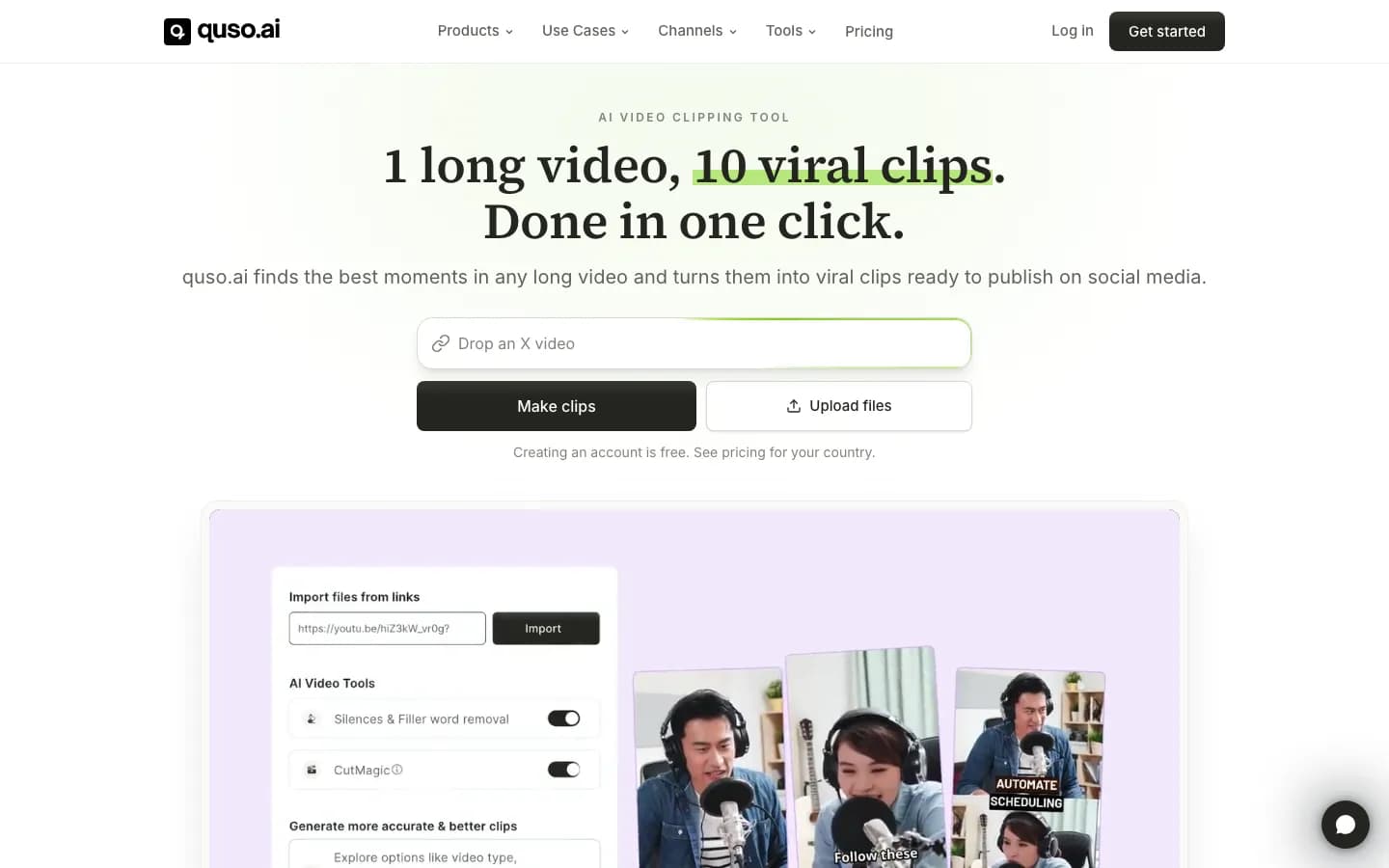
quso.ai homepage
quso.ai, captured November 4, 2026.
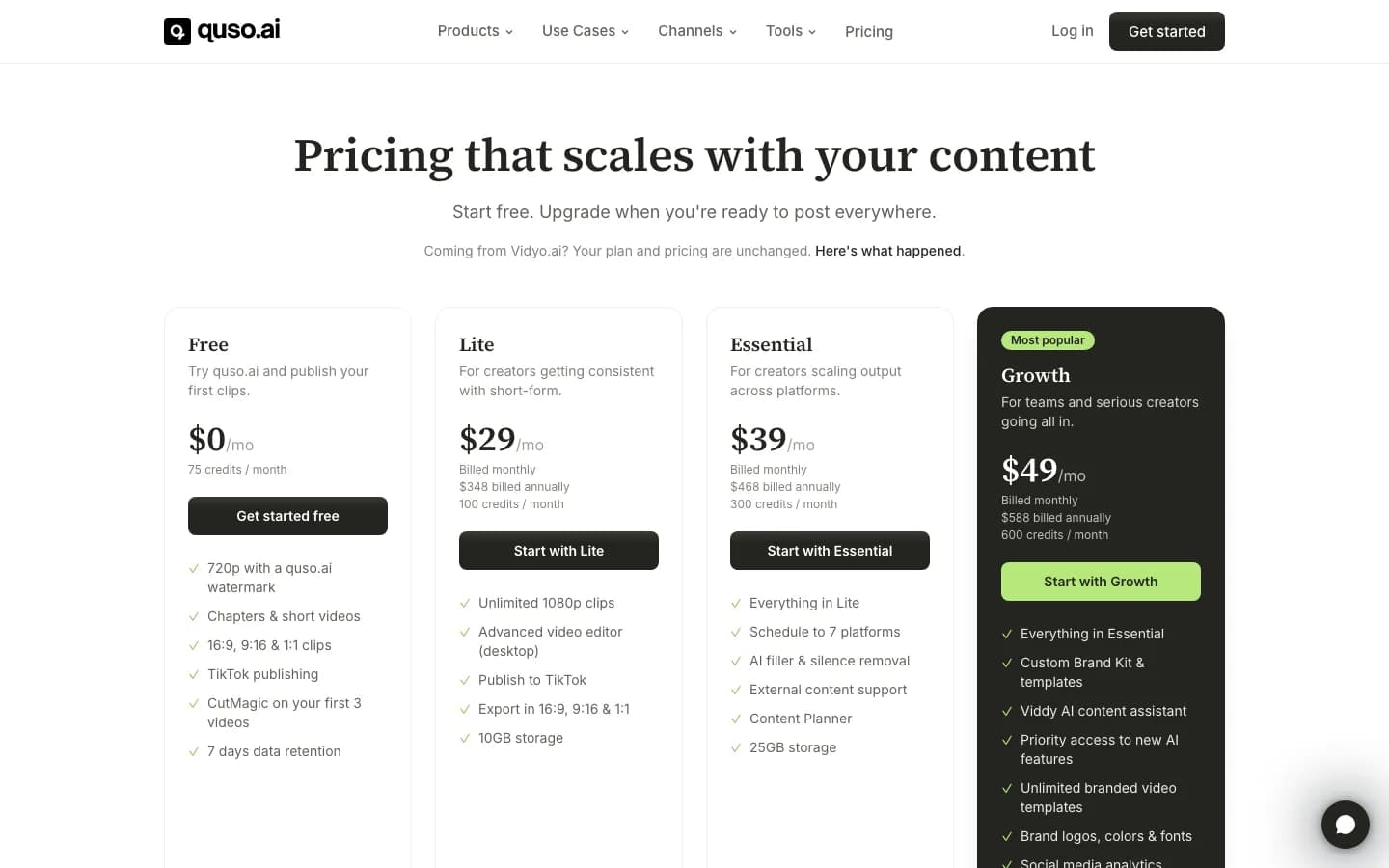
quso.ai pricing page
quso.ai, captured November 4, 2026.

What is quso.ai?
quso.ai is the current name of Vidyo.ai, and vidyo.ai now redirects to quso.ai. It turns a long video into candidate clips with a virality score, vertical framing and captions, which you review before posting. It also makes 16:9 chapters and written posts from the same recording. Paid plans add scheduling to TikTok, Facebook, Instagram, LinkedIn, X, YouTube and Pinterest, a content planner and social analytics, depending on the plan. Its site says over 4 million creators use it.
What is BlitzReels?
BlitzReels turns long videos into short clips in the browser. It picks moments with AI, adds captions and vertical framing, and opens each draft in a timeline editor. Paid plans also generate images, video, voice and music. Its publishing is narrower than quso's. Post to YouTube, TikTok and LinkedIn from Starter; schedule from Growth. Instagram access is allowlisted. It has no desktop app, dubbing or remote recording studio, and no free plan after a 7-day trial.
quso.ai vs BlitzReels
quso.ai sells clipping plus a social calendar and BlitzReels sells clipping with narrower publishing, so read the scheduling and credit rows first.
| Feature | quso.ai | BlitzReels |
|---|---|---|
| Two 60-minute videos a month | $32 on Lite with add-on credits, or $39 on Essential. | $29 on Starter, using 180 of 250 credits. |
| Scheduling | Yes. Seven platforms from Essential at $39. | Partly. Post to YouTube, TikTok and LinkedIn from Starter; schedule from Growth. Instagram access is allowlisted. |
| Free plan | Yes. 75 credits a month in the US; some countries get one-time packs. | No. A 7-day free trial, then a paid plan. |
| Social analytics | Yes. Listed on Growth at $49. | Partly. An analytics tab covers connected accounts, but no plan sells it as a feature. |
| A year on the first paid plan | $348 on Lite, the same as 12 monthly payments. | $204 on Starter billed yearly, or $348 paid monthly. |
| A year with scheduling | $468 on Essential. | $564 on Growth billed yearly. |
| Import sources | Yes. YouTube, Vimeo, X, Facebook, Twitch, Rumble, Loom, LinkedIn, Zoom, Drive, Dropbox and files, on every plan. | Partly. YouTube, Vimeo, Instagram, TikTok, X and Facebook links, plus uploads. |
| Exports included in the source charge | Yes. Its help says editing, publishing and downloading use no further credits. | No. Exports use 3 credits per started minute on top of the source. |
| Clean export | Yes. 1080p without a watermark from Lite; Free is 720p with one. | Yes. Up to 4K without a watermark on Starter; trial exports are 720p with one. |
| AI clip selection | Yes. Candidate clips get a virality score out of 100. | Yes. Moments are ranked by hook, payoff, clarity and context. |
| Captions | Yes. 99 languages for AI Captions, 20+ for AI Clips projects. | Yes. Editable captions in 35+ languages. |
| AI generation | Yes. Script to video and AI Influencer avatar videos. | Yes. Images, video, voice and music, on credits. |
Pros & Cons
Strengths and weaknesses of both tools.
quso.ai
Pros
- A free plan with 75 credits a month in the US, and no card.
- Scheduling to seven platforms from one calendar, from Essential.
- Every import source works on the free plan, including Twitch, Zoom, Loom and Dropbox.
- Editing, publishing and downloading use no extra credits once a video is in.
- Lower prices once you need a calendar: $39 against BlitzReels Growth at $79.
Cons
- Lite's 100 credits fall short of two 60-minute videos.
- Lite publishes to TikTok only.
- Free-plan availability and pricing change by country.
- AI Clips needs a video over 3 minutes with spoken words, and audio-only files can't be clipped.
BlitzReels
Pros
- Two 60-minute videos fit on Starter, with room for about 23 more one-minute exports.
- Instagram and TikTok links work as sources.
- Up to 4K with no watermark on Starter.
- A timeline editor on every draft, and API, CLI and MCP access on paid plans.
Cons
- It can't post to Facebook, X or Pinterest, so it won't replace quso's calendar for those.
- Scheduling starts at Growth, $79 a month. Instagram access is allowlisted.
- No free plan after the trial. The trial covers one import up to 60 source minutes, three clips and three 720p watermarked exports, plus 10 AI credits.
- It lacks Twitch, Rumble, Loom, LinkedIn, Zoom and Dropbox links, a desktop app, dubbing and a remote recording studio.
- Processing isn't instant, imports can need a retry, and exports draw on the same credits as sources.
Pricing Comparison
Side-by-side pricing for BlitzReels and quso.ai.
BlitzReels plans
- Starter
- $29/mo
- Growth
- $79/mo
- Agency
- $199/mo
quso.ai plans
- Free
- $0 a month, 75 credits a month in the US
- Lite
- $29 a month, or $348 billed annually, 100 credits a month
- Essential
- $39 a month, or $468 billed annually, 300 credits a month
- Growth
- $49 a month, or $588 billed annually, 600 credits a month
- Add-on credits
- $0.15 a credit, may vary by region
- Read on
- November 4, 2026, in US dollars. Tax may be added at checkout
What BlitzReels does differently from quso.ai
For this job without a calendar, Starter is $29 a month against $32 on quso Lite with add-on credits. Longer exports narrow that gap, since BlitzReels charges for them.
Paying yearly, Starter is $204, or $17 a month. quso Lite shows $348, and its 1,200 credits fall 240 short of this job, which comes to $384 with add-ons.
It takes Instagram and TikTok links as sources, and neither is on quso's import list. Clip only videos you're allowed to clip.
Starter exports up to 4K without a watermark. quso's plan cards list 1080p.
REST API, SDK, CLI and MCP come with every paid plan. Recording Sets, marked Alpha, sync separate camera tracks from uploaded files.
Common quso.ai Limitations
Tradeoffs to consider when comparing quso.ai
Lite's 100 credits cover 100 source minutes, so two 60-minute videos don't fit. At the listed $0.15 per add-on credit, which may vary by region, the missing 20 cost $3.
Scheduling starts at Essential, $39 a month. Lite connects TikTok only, and social analytics and custom brand kits wait for Growth at $49.
The free plan exports 720p with a watermark, caps downloads at 5 minutes per clip, publishes to TikTok only at up to 25 posts a month, and keeps data for 7 days.
The free plan depends on where you are. quso's FAQ says some countries get 75 credits a month and others buy one-time credit packs, with no subscription. Its help says currency follows your location and can't be changed by hand.
Monthly plan credits don't roll over, though add-on credits don't expire. The yearly price shown on November 4, 2026 was 12 times the monthly price, so the yearly plan showed no discount. Yearly plans do get all credits upfront.
quso's pages disagree in places. Its scheduler FAQ says each paid plan covers all six platforms, while its pricing and help pages say Lite is TikTok only and name seven platforms. Its help also lists a mobile Plus plan that the pricing page doesn't show.
quso.ai or BlitzReels?
Stay on quso.ai if its free plan, content planner and calendar are all part of your week, since leaving means replacing each one. BlitzReels isn't the replacement for scheduling: it charges $79 to schedule to fewer platforms than quso Essential at $39, and OpusClip Pro lists nine networks at $29. For clips alone from two long videos a month, OpusClip Starter costs $15. BlitzReels Starter at $29 makes sense when you need Instagram or TikTok links as sources or 4K exports.
How to try BlitzReels after quso.ai
- 1
Write down where you post
BlitzReels posts to YouTube, TikTok and LinkedIn. If you rely on Facebook, X or Pinterest, keep quso's calendar or plan a separate scheduler before you cancel anything.
- 2
Download the clips you want to keep
quso's free plan keeps data for 7 days, so save anything you need first. Export your finished clips as MP4 files, since drafts and calendars don't carry over between the two tools.
- 3
Run one video you've already clipped
The BlitzReels trial covers one import up to 60 source minutes, three clips and three 720p watermarked exports, with nothing charged for 7 days. Compare those clips with your quso clips from the same source.
Next pages, by what you need
Pick the page that matches the part of quso.ai you're replacing.
quso.ai Alternatives FAQ
What is the best quso.ai alternative?
It depends on what you use. For clips alone, OpusClip Starter covers two 60-minute videos a month for $15. Klap lists scheduling and post analytics on every plan from $14.50 billed yearly. BlitzReels Starter at $29 takes Instagram and TikTok links. These prices were read on November 4, 2026. Compare them against your own source minutes and platforms.
What happened to Vidyo.ai?
Vidyo.ai was renamed quso.ai, and vidyo.ai now redirects to quso.ai, as checked on November 4, 2026. quso's rename page dates the change to January 2025, and its announcement post is dated December 5, 2024. It says logins, plans, credits and projects carried over, so existing accounts sign in at app.quso.ai.
What are the best Vidyo.ai alternatives?
Vidyo.ai and quso.ai are one product, so quso itself isn't an alternative to it, whatever its rename page suggests. The real options are OpusClip, Klap, Vizard, Submagic and BlitzReels. Each has a different cost shape, so compare them on your own monthly source minutes and the platforms you post to, using prices read November 4, 2026.
Is quso.ai free?
Yes in the US, as of November 4, 2026: the free plan gives 75 credits a month with no card. Exports are 720p with a watermark, and it publishes to TikTok only. quso's FAQ says some countries get one-time credit packs instead, so check its pricing page from where you are before you plan around it.
How much does quso.ai cost?
On November 4, 2026, quso.ai listed Free at $0, Lite at $29 a month with 100 credits, Essential at $39 with 300, and Growth at $49 with 600. Yearly billing was shown as $348, $468 and $588, which is 12 times the monthly price. Add-on credits are listed at $0.15 each. quso says pricing depends on your country.
What do two 60-minute videos a month cost on quso.ai and BlitzReels?
Worked from public numbers on November 4, 2026: quso needs 120 credits, so $32 on Lite with add-ons or $39 on Essential. BlitzReels uses 180 credits on Starter at $29, with 10 one-minute exports per video. Add scheduling and it flips: quso stays $39, and BlitzReels Growth is $79. Longer exports also use more BlitzReels credits.
Can BlitzReels replace quso.ai's social media tools?
Only partly. Post to YouTube, TikTok and LinkedIn from Starter; schedule from Growth. Instagram access is allowlisted. quso schedules to seven platforms from Essential at $39, and adds a content planner and, on Growth, social analytics. If you post to Facebook, X or Pinterest, keep quso or use a separate scheduler alongside BlitzReels. OpusClip Pro also lists scheduling to those networks. Facts read November 4, 2026.
Vidyo.ai vs OpusClip: which should you pick?
OpusClip costs less for clips alone, and quso offers more free-plan sources. On November 4, 2026, OpusClip Starter was $15 for 150 credits, against quso Lite at $29 for 100. Both charge about one credit per source minute. quso's free plan takes every import source, while OpusClip's free plan takes YouTube and local files.
Does this page use test results for quso.ai?
No. This page reports no hands-on results, so it makes no claim about which tool picks better clips or works faster. Everything here comes from public pages read on November 4, 2026. To judge the clips, run one of your own videos through its free plan and the BlitzReels trial.
Other Alternatives

Opus Clip
Video Clipping
OpusClip turns long videos into captioned vertical clips and charges one credit per source minute. Compare it with BlitzReels on price, editing, exports and posting.
Compare workflow
Vizard
Video Clipping
Vizard is an AI clipping tool at vizard.ai that turns long videos into captioned vertical shorts, with an editor and social scheduling, for creators who clip a lot of source minutes on a small budget.
Compare workflow
Klap
Video Clipping
Klap is an AI clipping tool at klap.app that turns long spoken videos into ranked, captioned vertical shorts, with plans that count generated clips instead of source minutes, for creators and clippers who post at volume.
Compare workflow
Riverside
Video Clipping
Riverside is a remote recording studio at riverside.com that records each guest on a separate track and adds editing, AI clips, hosting and live streaming, for creators who interview people.
Compare workflow
StreamLadder
Video Clipping
StreamLadder is a browser clip editor and AI clipper at streamladder.com that turns Twitch and Kick streams into vertical clips, for streamers growing on TikTok, Reels and Shorts.
Compare workflow
Ssemble
Video Clipping
Ssemble is an AI clipping tool at ssemble.com that turns long talking videos into captioned shorts and posts them, for clippers and creators who process a lot of video on a low budget.
Compare workflowCreate
Create your next short-form video now.
Start with one raw clip or a long-form recording. BlitzReels gives you the captions, clipping, cleanup, and export tools in one place.
Create my first shortNew short-form project
Drop video or paste a URL
Upload source video
Clip, caption, reframe, clean up, export