 Alternatives guide
Ssemble AI: what it is, what it costs, and 5 alternatives
Ssemble is a browser tool that cuts long talking videos into captioned shorts and posts them to TikTok, YouTube, Instagram and X. It suits clippers who process many long videos on a small budget: plans start at $6 a month billed yearly, with no free plan or refunds. To try a tool free first, look at OpusClip or Vizard. BlitzReels costs more, with a 7-day free trial and 4K exports.
- Video Clipping
- Reviewed November 4, 2026
At a glance
 Ssemble
 BlitzReels
- A year of two 60-minute videos a month
- $72 on Pro billed yearly, or $180 paid monthly.$204 on Starter billed yearly, or $348 paid monthly.
- Free access
- No. Two demo projects, then a paid plan.Partly. A 7-day free trial. No free plan after it.
- Refunds
- No. Purchases are final, apart from EU and UK legal rights.Partly. Refund requests get a support review; statutory rights are unaffected.
- Top export size
- Partly. 1080p at most, even from a 4K source.Yes. Up to 4K with no watermark on Starter.
5 Ssemble alternatives, by what two 60-minute videos a month cost
Ssemble costs the least here, and BlitzReels costs more than most. For two 60-minute videos a month with 10 one-minute clips each, a year costs $72 on Ssemble Pro, $174 on OpusClip Pro, Klap Basic or Vizard Creator, $204 on BlitzReels Starter and $468 on quso.ai Essential, billed yearly. This is arithmetic from public prices on November 4, 2026. It isn't a test of clips or speed.
- 1
BlitzReels
Trying your own video before paying, then 4K exports, at $204 a year
Starter is $29 a month or $204 billed yearly. This workload uses 180 of its 250 monthly credits, and a third linked video wouldn't fit. It takes YouTube, Vimeo, Instagram, TikTok, X and Facebook links plus uploads, but not Twitch or Kick. Processing isn't instant, and imports can need a retry.
- 2
OpusClip
A free plan to start, then $174 a year
Free gives 60 credits a month with a watermark, and one credit covers one source minute, so one 60-minute video fits. Starter is $15 a month, monthly only, for 150 credits. Pro is $29 a month or $14.50 billed yearly, and adds Twitch links and scheduling.
- 3
Klap
Paying per clip, at $174 a year
Basic is $29 a month or $174 billed yearly for 100 clips a month, so these 20 clips use a fifth of it. Source length doesn't use up the plan, up to 3 hours a video. One video is free to preview, but downloads need a plan. Its pricing page offers a refund in your first month.
- 4
Vizard
A free tier, then 4K at $174 a year
Free gives 60 credits a month and 720p exports. Creator is $29 a month or $174 billed yearly, from 600 credits a month, with no watermark, 4K exports, scheduling and six social accounts. One credit covers one uploaded minute.
- 5
quso.ai
Scheduling to 7 platforms, at $468 a year
Free gives 75 credits a month at 720p with a watermark. A credit is about one processed minute, so Lite's 100 credits fall short here. Essential is $39 a month or $468 billed yearly for 300 credits. That's the highest bill on this list.
Reviewed November 4, 2026. Sources checked: Ssemble pricingSsemble: Free trial is not supportedSsemble: How credits workSsemble: No refund policySsemble: How to submit your videoSsemble termsSsemble's OpusClip reviewSsemble on Trustpilot
Pick Ssemble when
You clip long talking videos often, cost decides it, and you can accept paying before you test. Pro was $6 a month billed yearly on November 4, 2026, with scheduling, API access and one social account.
Pick BlitzReels when
You want to try your own video before paying, or you need 4K exports, links from Instagram, TikTok, X or Facebook, or AI image and video generation. It costs more, and scheduling starts at Growth.
Best next step
Buy one month of Ssemble Pro at $15, not a year, because purchases are final. Run the same 60-minute video through it and the BlitzReels trial, then compare only the clips you'd post.
What Ssemble looks like today
Public pages we captured on November 4, 2026. They show how Ssemble presents itself and its prices that day. They aren't a product test.
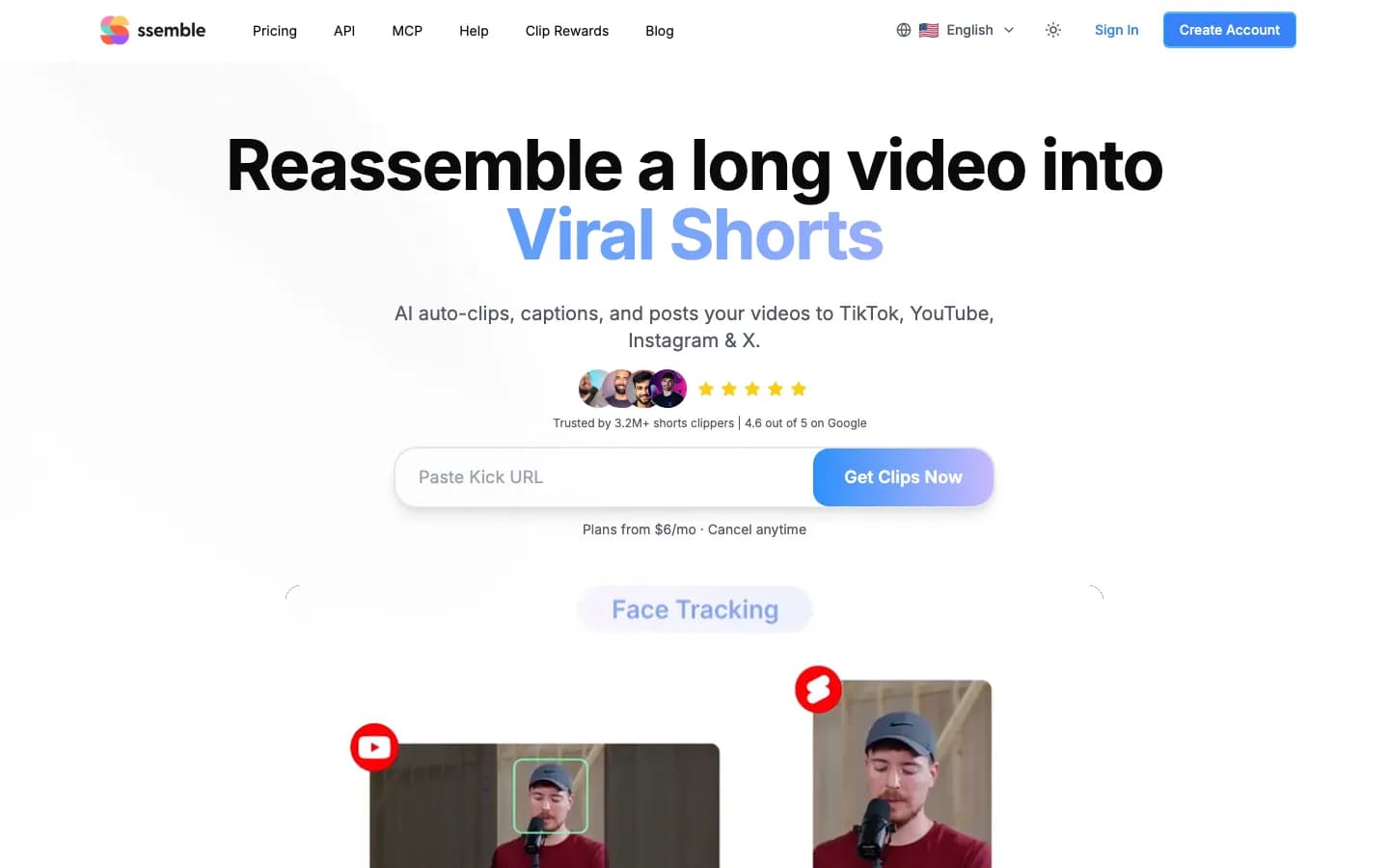
Ssemble homepage
ssemble.com, captured November 4, 2026.
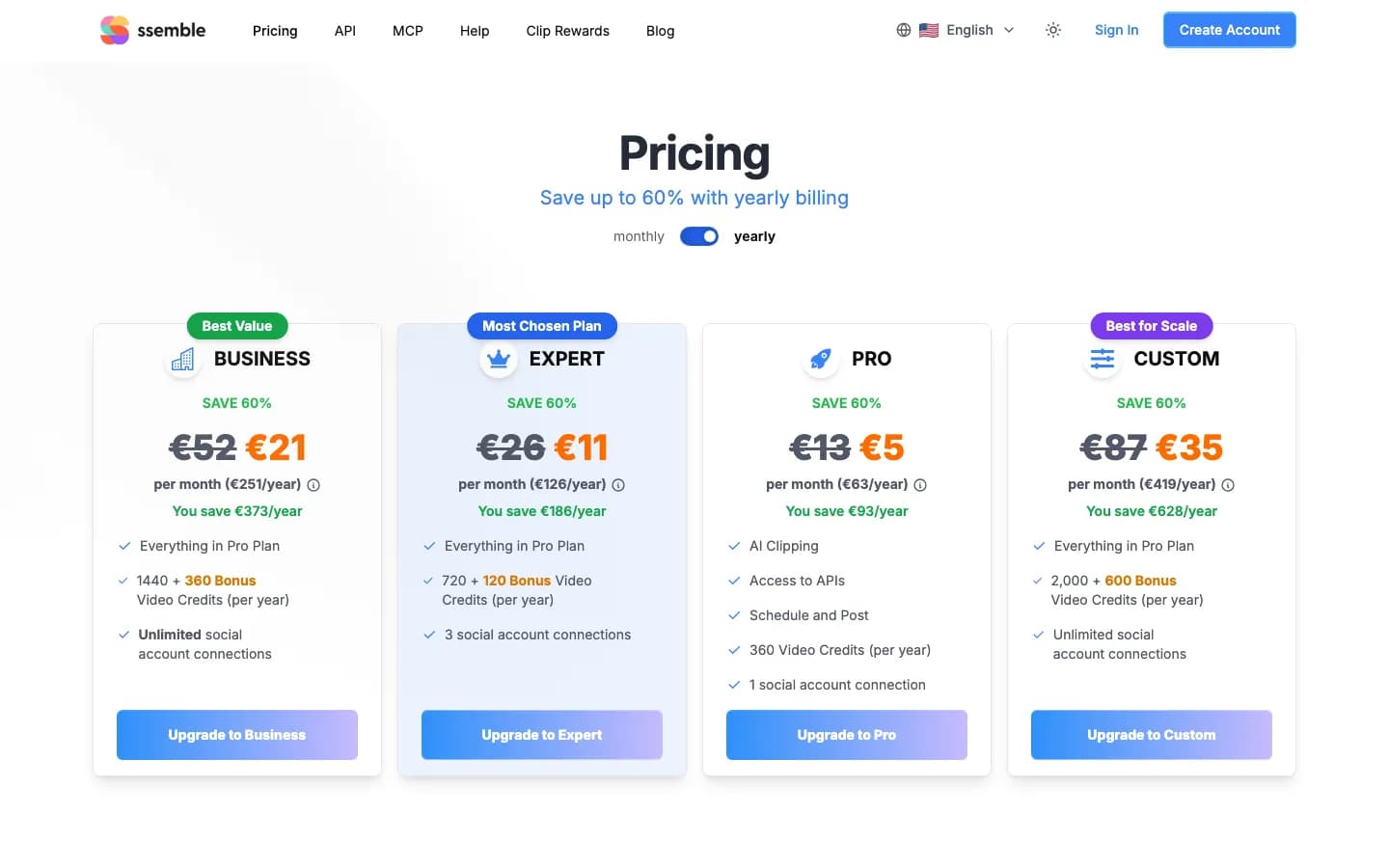
Ssemble pricing page
ssemble.com, captured November 4, 2026. Prices appear in euros because we loaded the page from France.

What is Ssemble?
Ssemble is an AI clipping tool at ssemble.com, run by Ssemble Inc. in San Francisco. Paste a YouTube, Vimeo, Kick or Twitch link or upload a file, and it picks moments, adds captions and face tracking, then posts to TikTok, YouTube, Instagram and X. Clippers also use Channel Automation, which watches a YouTube channel for new uploads, a gameplay overlay and Clip Rewards campaigns. Ssemble says it has 3.2M+ users, which is its own figure.
What is BlitzReels?
BlitzReels turns long videos into short clips in the browser. It picks moments with AI, adds captions and vertical framing, and opens each draft in a timeline editor. Paid plans also generate images, video, voice and music, and include a REST API, SDK, CLI and MCP. Processing isn't instant, and imports can need a retry. It has no desktop app, dubbing or remote recording studio, and no free plan after a 7-day trial.
Ssemble vs BlitzReels
Ssemble leads on cost and automation, BlitzReels on free access, refunds and export size, and no row here says which picks better clips.
| Feature | Ssemble | BlitzReels |
|---|---|---|
| A year of two 60-minute videos a month | $72 on Pro billed yearly, or $180 paid monthly. | $204 on Starter billed yearly, or $348 paid monthly. |
| Free access | No. Two demo projects, then a paid plan. | Partly. A 7-day free trial. No free plan after it. |
| Refunds | No. Purchases are final, apart from EU and UK legal rights. | Partly. Refund requests get a support review; statutory rights are unaffected. |
| Top export size | Partly. 1080p at most, even from a 4K source. | Yes. Up to 4K with no watermark on Starter. |
| One 60-minute video, by share of the plan | $0.60 billed yearly or $1.50 paid monthly, at 3 credits. | $6.12 billed yearly or $10.44 paid monthly, at 90 credits with 10 one-minute exports. |
| Link sources | Yes. YouTube, public and unlisted Vimeo, and Kick and Twitch past broadcasts. YouTube Shorts aren't supported. | Partly. YouTube, Vimeo, Instagram, TikTok, X and Facebook. No Twitch or Kick. |
| File uploads | Partly. MP4, MOV or WebM, 1 to 30 minutes, up to 1 GB. | Yes. Up to 20 GB per file, with length metered by credits. The trial stops at 60 source minutes. |
| Posting and scheduling | Yes. Post and schedule to TikTok, YouTube, Instagram and X from Pro. Each X post uses 1 credit, and Pro connects one account. | Partly. Post to YouTube, TikTok and LinkedIn from Starter; schedule from Growth. Instagram access is allowlisted. |
| Automatic channel clipping | Yes. Channel Automation watches a YouTube channel, clips new uploads and posts clips above a score you set. | No. You start each video yourself, or script it through the API. |
| Editing after the AI | Yes. Cut by transcript, trim on a timeline, restyle captions, change layout and add B-roll. | Yes. Every draft opens in a timeline editor. |
| Paid clipping campaigns | Yes. Clip Rewards pays per 1,000 verified views, at rates each campaign sets. | No. It has no campaign marketplace. |
| AI generation | Partly. AI Templates make set video formats, at 2 credits a scene or 10 a minute. | Yes. Images, video, voice and music on paid plans. |
Pros & Cons
Strengths and weaknesses of both tools.
Ssemble
Pros
- $6 a month billed yearly on Pro, the lowest entry price on this page.
- Scheduling, posting to X, API access and an MCP server from its cheapest plan.
- Twitch and Kick links for past broadcasts.
- Channel Automation clips and posts new uploads from a YouTube channel.
- Clipper extras: gameplay overlay, Sports Mode and Clip Rewards campaigns.
Cons
- No free plan, no trial and final purchases, so you pay before you can test your own video.
- Exports stop at 1080p.
- Its help says it works only for talking videos.
- Pro connects one social account; three accounts means Expert, and more means Business.
- Trustpilot showed 3.3 from 35 reviews on November 4, 2026, with 52% at one star. That's a small sample.
BlitzReels
Pros
- A 7-day free trial on your own video.
- Refund requests get a support review, and statutory rights are unaffected.
- No watermark and up to 4K on Starter.
- Links from Instagram, TikTok, X and Facebook, as well as YouTube and Vimeo.
- AI image, video, voice and music generation, plus a REST API, SDK, CLI and MCP on paid plans.
Cons
- It costs more: $204 against $72 a year for the same two videos a month, and every export minute uses credits.
- No Twitch or Kick links, and no X publishing.
- Scheduling starts at Growth, $79 a month. Instagram access is allowlisted.
- No free plan after the trial, and trial exports are 720p with a watermark.
- No desktop app, dubbing or remote recording studio. Processing isn't instant, and imports can need a retry.
Pricing Comparison
Side-by-side pricing for BlitzReels and Ssemble.
BlitzReels plans
- Starter
- $29/mo
- Growth
- $79/mo
- Agency
- $199/mo
Ssemble plans
- Pro
- $15 a month, or $6 a month billed yearly ($72). 30 credits a month or 360 a year, 1 social account
- Expert
- $30 a month, or $12 a month billed yearly ($144). 70 credits a month or 840 a year, 3 social accounts
- Business
- $60 a month, or $24 a month billed yearly ($288). 150 credits a month or 1,800 a year, unlimited social accounts
- Custom
- $100 a month, or $40 a month billed yearly ($480). 2,600 credits a year; the monthly view shows 2,600 a month, so confirm before you buy
- Free plan
- None. Its help centre says there's no free plan or trial
- Read on
- November 4, 2026. Shown in euros from France; dollars from the page's US copy
What BlitzReels does differently from Ssemble
You can try your own video before paying: 7 days free with $0 charged today, one import up to 60 source minutes, three clips, three 720p watermarked exports and 10 AI credits.
Refund requests get a support review. Ssemble's purchases are final.
Exports go up to 4K with no watermark on Starter. Ssemble stops at 1080p.
It takes links from Instagram, TikTok, X and Facebook, which Ssemble's source list doesn't include. Clip only videos you're allowed to clip.
Paid plans add AI image, video, voice and music generation in the same workspace, and posting reaches LinkedIn, which Ssemble's publishing help doesn't list.
Common Ssemble Limitations
Tradeoffs to consider when comparing Ssemble
There's no free plan or trial, according to its help centre. A new account shows two demo projects, and you can't make clips from your own video until you subscribe.
Purchases are final. The refund policy names credits spent on clips you don't like, though EU and UK legal rights still apply.
Its help says the clipper works only for talking videos and lists gaming, music and videos without a face as bad fits. Another help page lists gaming streams among its YouTube sources, so test yours first.
Exports stop at 1080p, even from a 4K source. Uploads stop at 30 minutes and 1 GB, so a longer file has to be cut first or come in by link.
A video over 20 minutes splits into separate 20-minute projects at 1 credit each. A 5-minute video still uses a full credit, so the low rate helps most on long sources.
Monthly credits expire in 30 days and yearly credits after 12 months. Deleting a clip returns no credit, and projects with no clip edits for 2 months are deleted.
Ssemble or BlitzReels?
Ssemble is the right call if you clip long talking videos in volume and cost decides it: the same workload is $72 a year there against $204 on BlitzReels Starter, and it schedules from its cheapest plan. It's a harder buy if you want to test before paying, since there's no trial and purchases are final. Pick BlitzReels for the 7-day free trial, 4K exports and links from Instagram, TikTok, X and Facebook. We haven't compared their clips, so run the same video through both.
How to try BlitzReels after Ssemble
- 1
Use what you've already paid for
Ssemble's purchases are final, and after you cancel, remaining credits last until their original expiry. Download the clips you want to keep, because projects with no clip edits for 2 months are deleted.
- 2
Run one video through the trial
Start the free 7-day BlitzReels trial with a video you've already clipped in Ssemble. It covers one import up to 60 source minutes, three clips and three 720p watermarked exports. For a Twitch or Kick video, upload the file, because BlitzReels can't take those links.
- 3
Compare the clips, then the bill
Keep only the clips you'd post, then count your monthly source minutes. Starter's 250 credits cover two 60-minute linked videos with 10 one-minute exports each, and little more. If you clip more than that, Ssemble stays much cheaper.
Next pages to read
Compare more clippers, or see how the clipping works in BlitzReels before you start the trial.
Ssemble Alternatives FAQ
What is Ssemble AI?
Ssemble AI is a browser tool that turns long videos into short captioned clips and posts them to TikTok, YouTube, Instagram and X. You paste a YouTube, Vimeo, Kick or Twitch link or upload a file. Its help pages, read November 4, 2026, say it works only for talking videos, so it suits podcasts, commentary and interviews.
Is Ssemble free?
No. On November 4, 2026, Ssemble's help centre said it has no free plan or free trial, and a new account can't make clips until it subscribes. You can log in to see two demo projects. Some directories still list a free plan, but the official pages don't. The cheapest way in is one month of Pro at $15.
Ssemble pricing: how much does it cost?
On November 4, 2026, Pro was $15 a month or $6 billed yearly ($72), Expert $30 or $12, Business $60 or $24, and Custom $100 or $40. One credit covers up to 20 source minutes, so a 60-minute video uses 3 credits. The "from $6" on its homepage is the yearly rate.
Is Ssemble legit?
Yes. It's a working product from Ssemble Inc., a Delaware corporation, with public help pages, an API and a claimed Trustpilot profile. That doesn't settle whether it suits you. A Trustpilot review dated October 25, 2026 complains of a refused refund on a yearly plan, and purchases are final, so buy one month first.
Ssemble reviews: what do users say?
Reviews are split and the samples are small. On November 4, 2026, Trustpilot showed 3.3 from 35 reviews, with 52% at one star and 34% at five. G2 showed 3.5 from 2 reviews. Ssemble's own site quotes 4.6 on Google. We didn't run Ssemble, so this page isn't a hands-on review.
Is Ssemble cheaper than BlitzReels?
Yes. Two 60-minute videos a month with 10 one-minute clips each cost $72 a year on Ssemble Pro or $180 paid monthly, against $204 or $348 on BlitzReels Starter. That uses 6 of Ssemble's 30 monthly credits and 180 of BlitzReels' 250. It's worked from prices on November 4, 2026, not a test.
Is Ssemble better than OpusClip?
We can't say, because we haven't compared their clips. Ssemble's March 2026 OpusClip review calls the quality comparable, but its CEO wrote it and it quotes older prices. On cost, a 60-minute video is about $0.60 on Ssemble Pro billed yearly and $2.90 on OpusClip Pro billed yearly, on November 4, 2026. OpusClip has a free plan; Ssemble doesn't.
Can I use Ssemble for commercial work?
Yes, on a paid plan. Its terms, read November 4, 2026, limit general use to personal, non-commercial use and license commercial use to users of paid services. Since Ssemble has no free plan, you'd be on a paid plan to make clips anyway. You still need the rights to whatever you clip, because the terms bar infringing content.
Does Ssemble pay you to clip?
Ssemble runs Clip Rewards, which pays per 1,000 verified views at rates each campaign sets. On November 4, 2026, the page quoted $0.10 to $15 in one place and roughly $0.35 to $4 in its FAQ. A clip needs 1,000 views to earn, and the minimum payout is $10. Views aren't guaranteed, and BlitzReels has no equivalent.
Other Alternatives

Opus Clip
Video Clipping
OpusClip turns long videos into captioned vertical clips and charges one credit per source minute. Compare it with BlitzReels on price, editing, exports and posting.
Compare workflow
Vizard
Video Clipping
Vizard is an AI clipping tool at vizard.ai that turns long videos into captioned vertical shorts, with an editor and social scheduling, for creators who clip a lot of source minutes on a small budget.
Compare workflow
Klap
Video Clipping
Klap is an AI clipping tool at klap.app that turns long spoken videos into ranked, captioned vertical shorts, with plans that count generated clips instead of source minutes, for creators and clippers who post at volume.
Compare workflow
Riverside
Video Clipping
Riverside is a remote recording studio at riverside.com that records each guest on a separate track and adds editing, AI clips, hosting and live streaming, for creators who interview people.
Compare workflow
StreamLadder
Video Clipping
StreamLadder is a browser clip editor and AI clipper at streamladder.com that turns Twitch and Kick streams into vertical clips, for streamers growing on TikTok, Reels and Shorts.
Compare workflow
quso.ai
Video Clipping
quso.ai, called Vidyo.ai until its rename, is a browser tool that clips long videos into captioned shorts and adds scheduling, a content planner and social analytics, for creators who want clipping and posting on one bill.
Compare workflowCreate
Create your next short-form video now.
Start with one raw clip or a long-form recording. BlitzReels gives you the captions, clipping, cleanup, and export tools in one place.
Create my first shortNew short-form project
Drop video or paste a URL
Upload source video
Clip, caption, reframe, clean up, export