 Alternatives guide
Submagic alternatives, after running Magic Clips on a real video
The best Submagic alternative depends on your job: keep Submagic for captions and effects on short videos, and look at OpusClip, Vizard or BlitzReels if you mostly clip long ones. On November 4, 2026, Magic Clips gave us 18 clips, the top three scoring 94 to 95 on its own score, then an upgrade prompt at export on a 2025 account. A new account may differ.
- Caption Tools
- Reviewed November 4, 2026
At a glance
 Submagic
 BlitzReels
- Free path
- Partly. 3 short trial uploads, no card. Our 2025 account hit an upgrade prompt at export; a new one may differ.Partly. 7-day free trial: one video up to 60 minutes, 3 clips, 3 watermarked 720p exports.
- A year on the entry plan
- $144 on Starter billed yearly, or $228 paid monthly, per member.$204 on Starter billed yearly, or $348 paid monthly.
- Caption styles
- Yes. 35+ templates and 123 languages, by its own count.Yes. 10 built-in looks you can adjust, in 35+ languages.
- Long video to clips
- Yes. Magic Clips, though its pages disagree on the billing.Yes. 1 credit per linked source minute, 3 per export minute.
6 Submagic alternatives, with what each one costs
A year billed yearly costs $144 on Submagic Starter, $276 on Pro and $492 on Business, against $174 on OpusClip Pro or Vizard Creator and $204 on BlitzReels Starter. Long videos are harder to price on Submagic, because its pages disagree. At 8 credits per clip, an 18-clip run like ours would use 144 credits, more than Pro's 120 a month. If 8 credits covers the whole run, Starter gets 5 runs a month. On BlitzReels, a 60-minute link with 10 one-minute exports uses about 90 of 250 credits. These are worked from public rates on November 4, 2026, and they aren't a test.
- 1
BlitzReels
Clipping long videos, from $204 a year
Paste a link or upload a file, and it ranks moments, adds captions and vertical framing, and opens each draft in a timeline editor. It has 10 built-in caption looks, manual zooms and no dubbing, so it isn't the pick for caption-heavy short edits. Starter is $29 a month or $204 billed yearly, with 250 credits a month.
- 2
OpusClip
Clipping long videos, with a free plan, $174 a year once paid
Pro is $29 monthly or $14.50 a month billed yearly, with 300 credits a month. Starter is $15, monthly only, with 150 credits. Free gives 60 credits a month with a watermark. It takes YouTube links, and it returned a free 1080p watermarked file in our separate test.
- 3
Vizard
Clipping with a free start, $174 a year once paid
Free gives 60 credits a month and 720p exports. Creator is $29 monthly or $14.50 a month billed yearly, with no watermark and 4K exports. One credit covers one minute of video.
- 4
Captions
Caption styles on a phone
It lists 100+ caption templates and 100+ languages on Max, $24.99 a month on iOS, and one template on Free. Max also turns a long video into a batch of clips. The prices shown are for iOS plans.
- 5
CapCut
Manual editing on a free plan
The free plan covers basic editing, and you do more of the work by hand. Pro is shown at USD 19.99 for reference, with final pricing after sign-in. Its plans and features vary by region and platform.
- 6
Descript
Editing a video like a document, from $192 a year
Text-based editing sits at the centre of the product, and Create Clips makes shorts. Hobbyist is $16 a month billed annually with 10 media hours and 1080p. Free gives 60 minutes a month.
Reviewed November 4, 2026. Sources checked: Submagic pricingSubmagic: credits per featureSubmagic: how to use Magic ClipsSubmagic API: upload Magic ClipsSubmagic: size and length limitsSubmagic: free trialSubmagic: free first postSubmagic AI captions
Pick Submagic when
Your videos are already short, and the job is captions and effects. Submagic lists 35+ caption templates, AI zooms, B-roll and hook titles, and its Starter plan was $60 a year cheaper than BlitzReels Starter on November 4, 2026.
Pick BlitzReels when
You start from long videos and want to work out the credit cost first: 1 credit per linked source minute and 3 per export minute, on 250 credits a month. You'll get fewer caption looks, and you'll add zooms by hand.
Best next step
Run one real long video through Magic Clips, then check Submagic's usage tab to see what it charged and try the export. Run the same video through a BlitzReels trial before you pay for either.
What We Saw Inside Submagic
These screenshots come from a product walkthrough reviewed on November 4, 2026. They show the flow we used, including the limits we ran into.
Browser test
The BlitzReels team ran Magic Clips on Submagic's trial plan.
We used our own public talking-head video, which is short enough to fit a free plan. This run checks the free path, not long-form clip quality.
9:35 · French
What we did
- 1Opened Magic Clips in an existing trial account from 2025 and pasted the YouTube link.
- 2Kept the defaults and generated the clips.
- 3Reviewed the results, then tried to export the top clip.
Magic Clips returned 18 clips, and the top three scored 94 to 95 on Submagic's own score. Export opened an upgrade prompt, so we have no file to measure. This account had already exported in 2025, so a new account may get a free export. We didn't score clip quality.
18
clips returned
94–95
top three Submagic scores
No
export on this account
2025
account's previous export
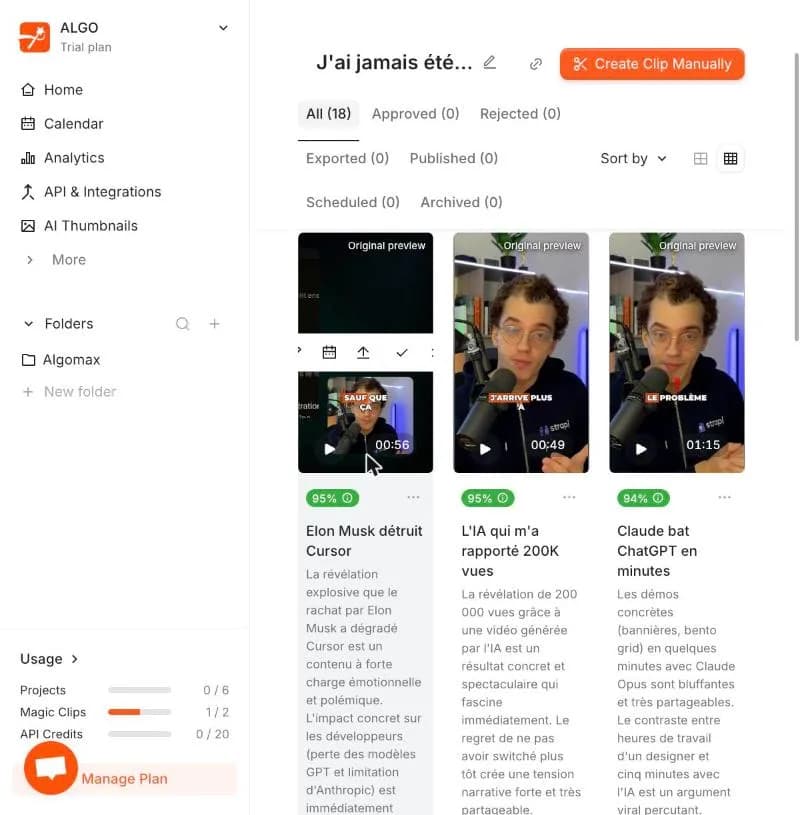
Clip results
Magic Clips returned 18 clips from the YouTube link. The top three scored 94 to 95 on Submagic's own score.

Export prompt
Export opened an upgrade prompt on this account, which had already exported in 2025. A new account may differ.
What Submagic looks like today
Public pages we captured on November 4, 2026. They show how Submagic presents itself and its prices that day. They aren't a product test.
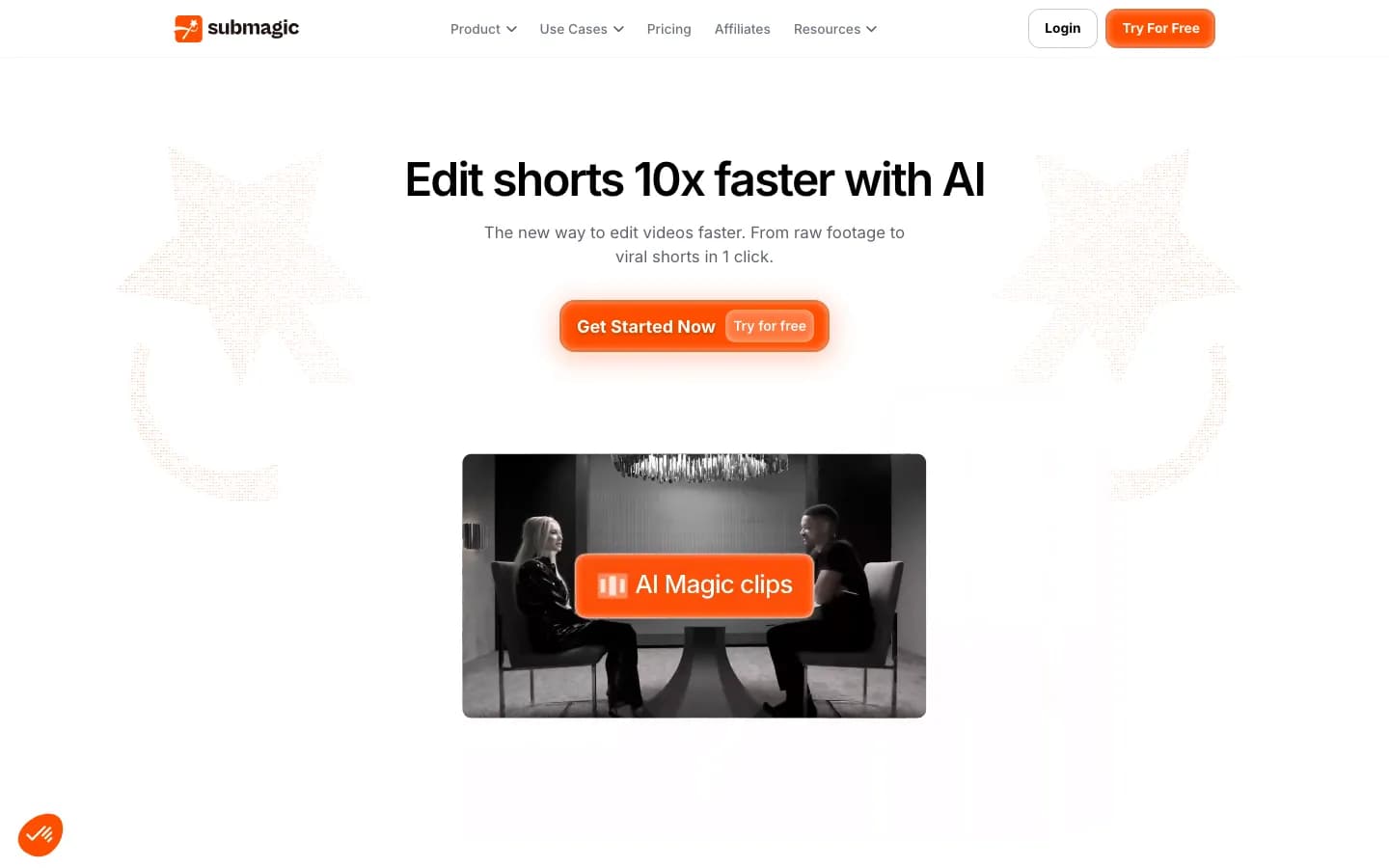
Submagic homepage
submagic.co, captured November 4, 2026.
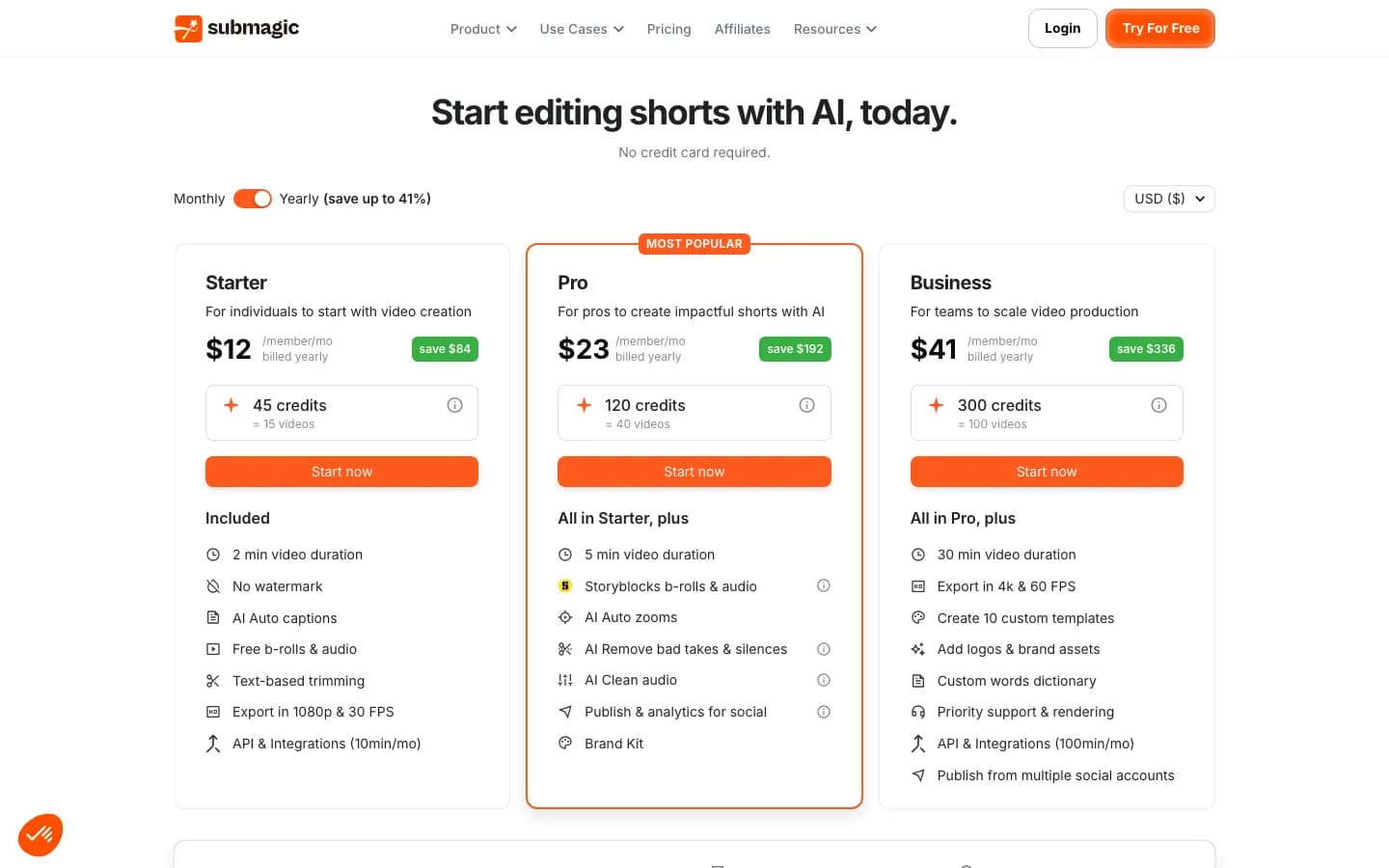
Submagic pricing page
submagic.co, captured November 4, 2026.

What is Submagic?
Submagic is a browser editor for short videos at submagic.co, for creators who want captions and effects added for them. It lists 35+ animated caption templates and 123 languages, plus AI zooms, B-roll, silence and bad-take removal, hook titles and eye contact correction. Magic Clips turns a long video or YouTube link into scored clips. It also publishes to social accounts, and has an API and an MCP server. Starter allows 2 minutes per video, Pro 5 and Business 30.
What is BlitzReels?
BlitzReels turns long videos into short clips in the browser. Paste a link or upload a file, and it ranks moments, adds captions and vertical framing, and opens each draft in a timeline editor. It has 10 built-in caption looks you can adjust, and it also generates images, video, voice and music on credits. It lacks a desktop app and dubbing, and has no free plan after a 7-day trial. Processing isn't instant, and imports can need a retry.
Submagic vs BlitzReels
Submagic lists more caption templates and automatic effects, and BlitzReels takes longer sources and exports 4K on its entry plan, so read the rows for your job.
| Feature | Submagic | BlitzReels |
|---|---|---|
| Free path | Partly. 3 short trial uploads, no card. Our 2025 account hit an upgrade prompt at export; a new one may differ. | Partly. 7-day free trial: one video up to 60 minutes, 3 clips, 3 watermarked 720p exports. |
| A year on the entry plan | $144 on Starter billed yearly, or $228 paid monthly, per member. | $204 on Starter billed yearly, or $348 paid monthly. |
| Caption styles | Yes. 35+ templates and 123 languages, by its own count. | Yes. 10 built-in looks you can adjust, in 35+ languages. |
| Long video to clips | Yes. Magic Clips, though its pages disagree on the billing. | Yes. 1 credit per linked source minute, 3 per export minute. |
| Length of one video | Partly. 2 minutes on Starter, 5 on Pro, 30 on Business. API docs list 120 for Magic Clips uploads. | Yes. Links up to 5 hours; uploads up to 20 GB. |
| Automatic effects | Yes. AI zooms, B-roll, silence and bad-take removal, hook titles and eye contact correction, mostly from Pro. | Partly. Emojis, plus auto B-roll, transitions, silence and mistake removal on paid plans. Zooms are manual. |
| Editing | Yes. Cut by editing the transcript, with timeline trimming in Magic Clips. | Yes. Every draft opens in a timeline editor, with editable caption words. |
| Dubbing and translation | Yes. Caption translation and voice dubbing, on credits. | No. Captions only. |
| Publishing | Yes. From Pro, scheduling included. TikTok, Instagram and YouTube; its pages differ on LinkedIn, Facebook and X. | Partly. Post to YouTube, TikTok and LinkedIn from Starter; schedule from Growth. Instagram access is allowlisted. |
| Export quality | Yes. 1080p at 30 FPS on Starter, up to 4K at 60 FPS on Business. | Yes. Up to 4K with no watermark on Starter. |
| AI generation | Partly. AI B-roll, images and AI actors on credits. | Yes. Images, video, voice and music on credits. |
| API and agents | Yes. 10 API minutes on Starter and Pro, 100 on Business, plus an MCP server. | Yes. REST API, SDK, CLI and MCP on every paid plan. |
Pros & Cons
Strengths and weaknesses of both tools.
Submagic
Pros
- 35+ caption templates and 123 languages, by its own count, and you can upload your own fonts.
- Automatic zooms, B-roll, silence removal, hook titles and eye contact correction in one editor.
- Voice dubbing and caption translation, which BlitzReels doesn't have.
- The lower entry price: Starter was $144 billed yearly on November 4, 2026.
- Magic Clips returned 18 clips in our test, with Submagic's own scores.
Cons
- Its pages disagree on how Magic Clips is billed.
- Length caps of 2, 5 and 30 minutes per video, by plan.
- No native phone app, and each team member pays a full seat.
- Export asked us to upgrade on a 2025 account. A new account may differ.
BlitzReels
Pros
- Clips from links or uploads, with AI moment selection, captions and vertical framing.
- A timeline editor for every draft.
- No watermark and up to 4K on Starter.
- Post to YouTube, TikTok and LinkedIn from Starter; schedule from Growth. Instagram access is allowlisted.
Cons
- 10 built-in caption looks against Submagic's 35+ templates, and zooms are manual.
- No dubbing, no desktop app, and no free plan after the trial.
- Starter costs $60 more a year than Submagic Starter, and scheduling starts on Growth, $564 billed yearly, against $276 for Submagic Pro.
- Credits reset monthly with no rollover.
- Processing isn't instant, and imports can need a retry.
Pricing Comparison
Side-by-side pricing for BlitzReels and Submagic.
BlitzReels plans
- Starter
- $29/mo
- Growth
- $79/mo
- Agency
- $199/mo
Submagic plans
- Free trial
- 3 short uploads, no card; a plan removes the watermark
- Starter
- $19 a month, or $12 a month billed yearly ($144), per member
- Pro
- $39 a month, or $23 a month billed yearly ($276), per member
- Business
- $69 a month, or $41 a month billed yearly ($492), per member
- Custom
- Custom, through sales
- Extra API minutes
- Packs from $57 a month for 250
- Read on
- November 4, 2026, in USD. The page also offers euros
What BlitzReels does differently from Submagic
You can work out the cost by source minute. A 60-minute link with 10 one-minute exports uses about 90 of Starter's 250 credits. That's worked from our rates, and clip counts vary by video.
It takes links from YouTube, Vimeo, Instagram, TikTok, X and Facebook, plus uploads. Submagic's guide lists YouTube links, uploads and public Google Drive links. Clip only videos you're allowed to clip.
YouTube links can run up to 5 hours and uploads up to 20 GB. Submagic's API docs list 120 minutes and 10 GB for Magic Clips uploads, and its self-serve plan caps stop at 30 minutes.
Up to 4K with no watermark on Starter, $204 billed yearly. Submagic lists 4K and 60 FPS on Business, $492 billed yearly.
REST API, SDK, CLI and MCP come with every paid plan, along with AI image, video, voice and music generation on credits.
Common Submagic Limitations
Tradeoffs to consider when comparing Submagic
Each video is capped at 2 minutes on Starter, 5 on Pro and 30 on Business, for upload and export, per Submagic's help updated October 28, 2026. A 10-minute video with captions needs Business, $492 billed yearly.
Submagic's pages price Magic Clips three ways. The cost article says 8 credits per clip, the how-to guide calls it an add-on subscription, and the API docs say 1 Magic Clips credit per project.
Credits go fast once you add AI features. An upload costs 3, and Submagic's own example of the full AI suite on one video costs 17, out of Starter's 45 a month. The "15 videos" figure assumes captions only.
Plans are priced per member, so three people on Pro pay $828 a year billed yearly.
AI zooms, silence and bad-take removal, clean audio and publishing start on Pro, according to the plan cards. Starter has text-based trimming and free B-roll.
There's no native iOS or Android app. Submagic's help says you can upload from a phone browser, then edit on a computer.
Submagic or BlitzReels?
Submagic is the right call if your videos are short and the work is captions and effects: it lists more caption templates and automatic effects than BlitzReels, and its Starter plan costs $60 less a year. If you mainly clip long videos, its pages disagree on what Magic Clips costs, so run one real video and check your usage tab. Our test got 18 clips and an upgrade prompt on a 2025 account, and a new account may differ.
How to try BlitzReels after Submagic
- 1
Export what you've finished in Submagic
Download your finished videos before you change plans. Your Submagic templates won't carry over, so note the fonts and colors you want to keep.
- 2
Run the same long video through a trial
Paste the link you used in Magic Clips. The 7-day trial covers one video up to 60 minutes, 3 clips and 3 watermarked 720p exports. Processing isn't instant, and imports can need a retry.
- 3
Compare the captions before you move
Pick the closest of the 10 built-in looks and adjust it. If you need more templates, dubbing or automatic zooms, stay with Submagic for those videos.
Next pages, by job
Pick the page that matches what you're replacing: long-video clipping or captions on short videos.
Submagic Alternatives FAQ
What is the best Submagic alternative?
It depends on the job. For long videos, look at OpusClip, Vizard or BlitzReels, which all take links or uploads. For a free editor, try CapCut. For captions on a phone, try Captions. If your videos are short and you want captions and effects added for you, Submagic may still fit best, as of November 4, 2026.
Submagic pricing: how much does it cost?
On November 4, 2026, Starter was $19 a month or $12 billed yearly ($144), Pro $39 or $23 ($276), and Business $69 or $41 ($492), each per member. Plans include 45, 120 or 300 credits a month. An upload costs 3 credits, and AI features cost more. Custom plans go through sales.
Is Submagic free?
Only as a trial, as of November 4, 2026. Its help describes 3 short uploads with no card, and says a subscription removes the watermark. Its scheduler page also offers one free post. In our test, a 2025 account hit an upgrade prompt at export, so a new account may differ. Vizard, OpusClip and CapCut have free plans.
Submagic review: is it worth paying for?
It suits you if you post short videos and want captions and effects done for you. Its site shows 4.7 out of 5 on G2 from 80+ reviews, which is its own figure. Our test covered Magic Clips only and got no file, so this isn't a full review. Start with the 3 trial uploads.
How much do Magic Clips cost on Submagic?
Submagic's pages don't agree, as of November 4, 2026. Its cost article says 8 credits per clip, its how-to guide calls Magic Clips an add-on subscription, and its API docs say 1 Magic Clips credit per project. At 8 per clip, 18 clips would use 144 credits, more than Pro's 120. Check your usage tab after one run.
Submagic vs OpusClip: which should you pick?
Pick by your starting point. Submagic is built around short uploads with captions and effects, and OpusClip around clipping long videos. On November 4, 2026, Submagic Starter was $144 a year, and OpusClip Pro $174 with 300 credits a month. OpusClip also has a free plan with a watermark, while Submagic has a trial.
Does Submagic have a mobile app?
No. Submagic's help, updated October 28, 2026, says it has no native iOS or Android app. You can upload from a phone browser, then edit on a computer. BlitzReels has no store-listed app either, and runs in the browser. If you edit on a phone, look at Captions or CapCut.
Does Submagic have an API?
Yes. On November 4, 2026, Starter and Pro included 10 API minutes a month and Business 100, with packs from $57 a month for 250 minutes. Its docs say Magic Clips through the API needs a Magic Clips subscription. It also has an MCP server. BlitzReels includes a REST API, SDK, CLI and MCP on every paid plan.
Is BlitzReels better than Submagic?
We can't say on clip quality, because we didn't score any clips. Submagic lists more caption templates and automatic effects, adds dubbing, and starts cheaper. BlitzReels has a cost you can work out by source minute, 4K on its entry plan and AI generation. Its processing isn't instant, and imports can need a retry.
Other Alternatives

Captions app
Caption Tools
Captions is an AI video editor and generator by Mirage, for creators who record talking videos on a phone, finish them with AI or generate AI actors, with a Clips feature for long videos.
Compare workflow
Opus Clip
Video Clipping
OpusClip turns long videos into captioned vertical clips and charges one credit per source minute. Compare it with BlitzReels on price, editing, exports and posting.
Compare workflow
Vizard
Video Clipping
Vizard is an AI clipping tool at vizard.ai that turns long videos into captioned vertical shorts, with an editor and social scheduling, for creators who clip a lot of source minutes on a small budget.
Compare workflow
Klap
Video Clipping
Klap is an AI clipping tool at klap.app that turns long spoken videos into ranked, captioned vertical shorts, with plans that count generated clips instead of source minutes, for creators and clippers who post at volume.
Compare workflow
Riverside
Video Clipping
Riverside is a remote recording studio at riverside.com that records each guest on a separate track and adds editing, AI clips, hosting and live streaming, for creators who interview people.
Compare workflow
StreamLadder
Video Clipping
StreamLadder is a browser clip editor and AI clipper at streamladder.com that turns Twitch and Kick streams into vertical clips, for streamers growing on TikTok, Reels and Shorts.
Compare workflowCreate
Create your next short-form video now.
Start with one raw clip or a long-form recording. BlitzReels gives you the captions, clipping, cleanup, and export tools in one place.
Create my first shortNew short-form project
Drop video or paste a URL
Upload source video
Clip, caption, reframe, clean up, export