---
title: "Ai B Roll"
canonical: "https://blitzreels.com/blog/ai-b-roll"
---
# Ai B Roll
URL: https://blitzreels.com/blog/ai-b-roll
Markdown URL: https://blitzreels.com/blog/ai-b-roll.md
Published: 2026-08-26
Author: BlitzReels
Ai b roll. Discover how AI B-Roll transforms short-form video creation. Learn practical workflows, tool comparisons, and tips for TikTok, Reels, and YouTube
Tags: ai b roll, short-form video, video editing, content creation, AI tools

A founder records a 45-second talking-head video for LinkedIn or TikTok. The hook lands, the explanation is useful, then the speaker pauses, repeats a phrase, and stares at the lens while searching for the next sentence. The timeline has a dead spot that makes the whole clip feel slower than it sounded during recording.
An **AI B-roll** insert can cover that pause without a reshoot. A close-up of hands writing, a product screen, a city detail, or a relevant generated shot gives the editor a clean bridge while captions, the voice, and the main idea continue underneath. The fix works best as one decision inside a larger pipeline, record, transcribe, caption, cut, insert, reframe, resize, and publish.
The practical question isn't whether AI can add motion. It can. The better question is whether the editor should **retrieve a clip that already exists** or **generate a new one** for that exact moment. The answer affects realism, licensing, continuity, speed, and how much human review the finished short needs. Creators repurposing longer recordings can also use a workflow such as [repurposing long videos with AI](https://blitzreels.com/blog/how-to-repurpose-long-videos-with-ai), then make B-roll decisions after the strongest clips and hooks have been selected.
## Table of Contents
- [The Short-Form Moment Where AI B-Roll Saves the Edit](#the-short-form-moment-where-ai-b-roll-saves-the-edit)
- [The rescue happens inside the edit](#the-rescue-happens-inside-the-edit)
- [What AI B-Roll Means for Short-Form Creators](#what-ai-b-roll-means-for-short-form-creators)
- [Supporting visuals around the main story](#supporting-visuals-around-the-main-story)
- [Retrieval B-Roll vs Generative B-Roll and When to Use Each](#retrieval-b-roll-vs-generative-b-roll-and-when-to-use-each)
- [Start with the footage that already exists](#start-with-the-footage-that-already-exists)
- [Adding AI B-Roll to a Short-Form Workflow Step by Step](#adding-ai-b-roll-to-a-short-form-workflow-step-by-step)
- [Start with the spoken material](#start-with-the-spoken-material)
- [Choose, place, and polish](#choose-place-and-polish)
- [Finish for mobile playback](#finish-for-mobile-playback)
- [Best AI B-Roll Tools for Short-Form Video Compared](#best-ai-b-roll-tools-for-short-form-video-compared)
- [BlitzReels for the complete short](#blitzreels-for-the-complete-short)
- [Runway for custom visual sequences](#runway-for-custom-visual-sequences)
- [Pika for stylized volume](#pika-for-stylized-volume)
- [Stock plus editor for dependable realism](#stock-plus-editor-for-dependable-realism)
- [The Honest Limits of AI B-Roll in Short-Form Content](#the-honest-limits-of-ai-b-roll-in-short-form-content)
- [Quality breaks at the edges](#quality-breaks-at-the-edges)
- [Licensing needs a deliberate check](#licensing-needs-a-deliberate-check)
- [A Practical AI B-Roll Checklist for Your Next Short](#a-practical-ai-b-roll-checklist-for-your-next-short)
## The Short-Form Moment Where AI B-Roll Saves the Edit
A founder's dead spot usually appears in a predictable place. The speaker finishes one thought, takes a breath, glances away, and starts the next point. Removing the pause may create a jump cut, but leaving it untouched makes a short feel unfinished. AI B-roll gives the editor another option: cover the cutaway with a visual that supports the sentence rather than pretending the pause never happened.
Short-form viewers encounter a constant stream of visual changes. The opening hook still carries the main responsibility, and a cutaway can't rescue a weak idea. But during a dense talking-head explanation, a relevant visual can re-anchor attention when the speaker changes topic or the edit removes a section of silence. A 2026 study of short-form viewing identified **stable, segmented, and fragmented visual-attention modes**, which supports using B-roll as a deliberate pattern interrupt instead of placing it at fixed intervals ([short-form attention research](https://cejsh.icm.edu.pl/cejsh/element/bwmeta1.element.cejsh-ecce6a5b-88bb-4e1e-ac96-b11ba0d6f663)).
### The rescue happens inside the edit
The useful sequence looks less like “generate a video” and more like this:
- **Find the hook:** Keep the strongest opening line and add a title card when the idea needs immediate context.
- **Transcribe the recording:** Captions expose pauses, filler words, repeated points, and awkward transitions.
- **Cut the weak material:** Remove empty space before deciding where a visual bridge is necessary.
- **Insert selectively:** Add B-roll where the cutaway clarifies, illustrates, or smooths a transition.
- **Resize and reframe:** Prepare the clip for vertical viewing while keeping the face and captions clear.
- **Review the export:** Check caption timing, visual continuity, safe zones, and licensing before publishing.
AI B-roll saves time mainly at the **search, selection, and placement** stages. It doesn't decide whether a visual is truthful, whether it matches the speaker's tone, or whether a flashy shot distracts from the message. Those decisions still need a human eye.
> **Practical rule:** Use B-roll to hide an edit or explain an idea, not to decorate every sentence.
## What AI B-Roll Means for Short-Form Creators
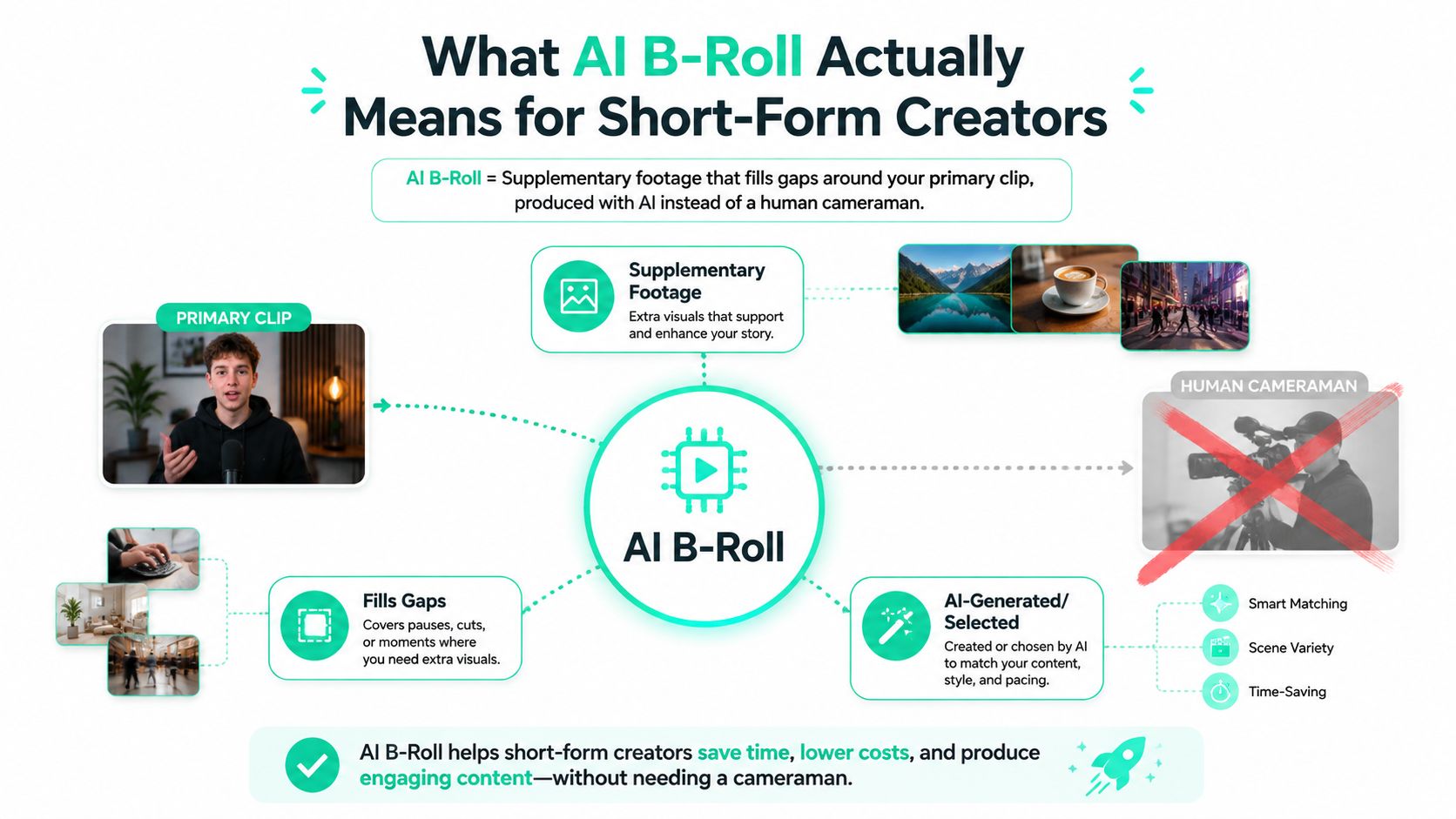
**AI B-roll** is supplementary footage that supports a primary clip, found or produced with artificial intelligence rather than selected and placed entirely by a human editor. The primary material may be a talking head, podcast excerpt, screen recording, interview answer, or voiceover. The added visual should reinforce the words, clarify an idea, or make a transition feel intentional.
Traditional B-roll involves extra coverage, stock searches, licensing checks, downloads, trimming, and timeline placement. During a shoot, a creator might capture hands typing, workspace details, product shots, or street footage. An editor may also sort an archive or search a stock library before finding a usable cutaway. AI-assisted editing reduces the search and placement work by matching transcript language to existing assets or generating a shot from a prompt. It does not remove the need to check accuracy, continuity, or usage rights.
### Supporting visuals around the main story
Short-form creators follow a simple production pattern. The talking head, voiceover, or screen recording remains the anchor, while AI B-roll supplies supporting visuals that add proof, texture, rhythm, or relief from a fixed frame.
A founder discussing customer onboarding could show a workflow screen or a team reviewing a document. A creator explaining focus could use a desk detail or calendar view. A marketer describing a product feature could show the interface, provided the footage represents the actual product accurately. These inserts belong in the same workflow as recording, transcribing, captioning, cutting, resizing, and publishing. They are an edit decision, not a separate content format.
Synthetic footage also needs a quality check. Guidance on [how professionals detect AI media](https://www.aivideodetector.com/blog/what-is-ai-generated-content) can help editors spot unnatural motion, inconsistent details, and visual signals that make a cutaway look untrustworthy. A technically impressive shot can still weaken a short if viewers notice the hands, text, reflections, or product details drifting.
The term covers two paths:
1. **Retrieval B-roll:** AI searches stock footage or the creator's library, then places an existing clip.
2. **Generative B-roll:** A text-to-video model creates a new shot from a written description.
That distinction shapes the main edit trade-offs. A practical [B-roll definition](https://blitzreels.com/glossary/b-roll) separates supporting footage from the primary story, while the source choice affects whether the result feels documentary, branded, abstract, or visibly synthetic. Retrieval usually deserves the first search for real products, places, and screen content. Generation is better reserved for concepts or scenes that existing footage cannot represent clearly. Both still require a human review before export.
## Retrieval B-Roll vs Generative B-Roll and When to Use Each
Retrieval B-roll searches for footage that already exists. The source may be a stock library such as Pexels or Storyblocks, or a creator's own archive of product shots, screen recordings, locations, and behind-the-scenes clips. AI can read nearby transcript language, identify visual concepts, and surface matching assets. The editor still needs to confirm that the selected clip says what the speaker means.
Generative B-roll starts with a prompt. Tools such as Runway, Pika, or Sora synthesize a new shot that nobody filmed. This approach helps when the concept is abstract, the scene is impossible to capture, or the required visual needs a particular mood that a stock search won't provide.
| Dimension | Retrieval B-Roll | Generative B-Roll |
|---|---|---|
| **Source** | Existing stock or creator-owned footage | A newly synthesized clip from a text prompt |
| **Speed** | Usually fast once the library is searchable | Requires generation and often review of multiple variations |
| **Visual continuity** | More likely to match real locations, products, and human motion | Can drift in lighting, texture, anatomy, and object details |
| **Licensing** | Easier to audit when the library supplies clear usage terms | Depends on the model's terms, plan, source material, and commercial permissions |
| **Best use** | Realistic cutaways, branded footage, products, places, and documentary context | Abstract concepts, impossible scenes, custom atmospheres, and visuals unavailable in a library |
### Start with the footage that already exists
Retrieval generally wins when the video needs credibility. A real screen recording can show a feature more accurately than an AI imitation. A creator's own product footage preserves the correct shape, color, and branding. Stock footage also gives the editor a clearer licensing trail, although every asset still needs a usage check.
Generative footage earns its place when retrieval fails. It can visualize an idea such as data moving through a system, a conceptual future workplace, or a stylized transition that isn't available in the archive. The trade-off is that the editor must inspect every frame for artifacts and avoid implying that a generated scene documents a real event.
> **Decision rule:** Start with retrieval. Switch to generation only when the required shot cannot be found or filmed without losing the point.
A searchable personal archive makes retrieval more useful over time. A [B-roll library workflow](https://blitzreels.com/docs/broll-library) gives creators a place to organize reusable footage rather than treating every short as a fresh stock search.
## Adding AI B-Roll to a Short-Form Workflow Step by Step
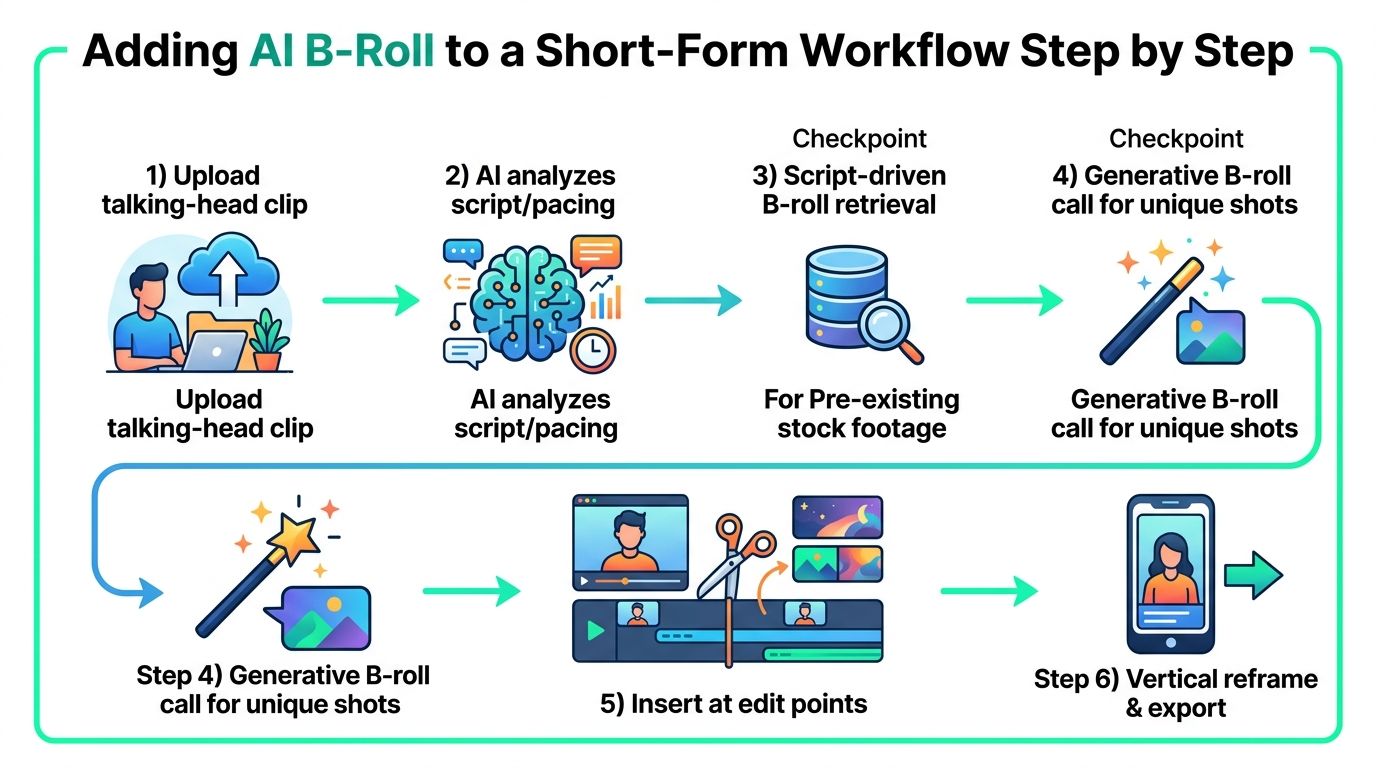
AI B-roll works best when the transcript and edit already provide structure. The editor shouldn't ask a model to rescue an uncut recording. The process below places B-roll at clear checkpoints, so every insert has a reason to exist.
### Start with the spoken material
1. **Upload the recording.** Begin with the talking-head clip, podcast excerpt, screen capture, or voiceover. The audio becomes the source for transcription and pacing decisions.
2. **Generate the transcript and captions.** A caption timeline exposes every pause, filler phrase, repeated idea, and sentence that can support a visual. Captions also reveal whether the hook appears early enough to make the opening understandable without sound.
3. **Cut before inserting.** Remove empty pauses and weak repetitions first. If a jump cut creates an obvious visual seam, mark that point as a possible B-roll location.
4. **Mark meaningful edit points.** Prioritize topic changes, examples, product references, and moments where a visual can carry information that the speaker is describing.
The B-roll insert should stay short enough to preserve the face as the story's anchor. Generative coverage is often limited to short pieces, and independent coverage places many current AI outputs in the **4 to 10 second range** ([retrieval and generative B-roll comparison](https://frameos.studio/blog/ai-b-roll)). That limitation can work well for a cutaway, but it makes long explanatory overlays awkward.
### Choose, place, and polish
At each marked point, search the creator's library or a licensed stock source first. If no suitable clip exists, write a narrow prompt describing the subject, action, camera movement, and visual tone. A generated shot works better when the prompt asks for one clear action rather than a crowded sequence with several subjects.
Place the cutaway over the edit, then watch the transition with sound. A subtle zoom on the talking head before the insert can make the change feel intentional. A light camera movement or a restrained sound effect can preserve continuity, but effects shouldn't compete with the caption or the spoken line.
The editor should also maintain an asset system. Teams that [organize 3D files and metadata](https://sculpty.ai/blog/digital-asset-library) use the same underlying principle for B-roll, consistent names, searchable tags, project folders, and clear rights information. Better organization improves retrieval more reliably than adding another generation model.
### Finish for mobile playback
Export short-form videos in the common **9:16 vertical format at 1080 × 1920 pixels** for TikTok, Instagram Reels, and YouTube Shorts ([vertical video specifications](https://portrait.spectatr.ai/blog/video-specs-cheat-sheet)). Auto-reframing should keep the speaker's face centered when a widescreen source becomes vertical. The editor must still inspect the crop, because automatic framing can miss a secondary subject, product detail, or important screen area.
Burn in captions after timing has been checked. Keep text and key visuals inside the central safe zone, because platform interface overlays can cover edge content ([mobile safe-zone guidance](https://posteverywhere.ai/blog/social-media-aspect-ratios)). Before publishing, watch the export without pausing. Check the hook, caption sync, cutaway meaning, audio continuity, crop, and rights.
## Best AI B-Roll Tools for Short-Form Video Compared
A short-form creator rarely needs the most cinematic generator for every edit. The useful tool is the one that fits the existing pipeline, especially when the job includes clipping, captions, title cards, templates, reframing, resizing, and quick publishing.
| Tool | Render Speed | Native 9:16 Export | Caption Integration | Best For |
|---|---|---|---|---|
| **BlitzReels** | Fast workflow for automated cutaways and editing | Yes, with vertical resizing and reframing | Captions and transcript-led editing in the same workflow | Creators who need clipping, captions, B-roll, and social exports together |
| **Runway** | Slower generation, with strong cinematic output | Available through the wider editing workflow, but not the central strength | Requires a separate caption workflow | Custom, polished short clips where visual quality matters most |
| **Pika** | Fast for short stylized generations | Useful for vertical-first experiments, with possible quality compromises | Limited compared with a full caption editor | Quick stylized motion and concept tests |
| **Stock plus editor stack** | Fast retrieval, slower manual keywording and placement | Depends on the editor | Depends on the editor | Maximum continuity and clearer asset licensing |
### BlitzReels for the complete short
BlitzReels combines transcript-based editing, captions, clipping, B-roll insertion, auto-reframing, resizing, title cards, templates, and fast exports in one workflow. It can search a B-roll library and add contextual supporting footage, which suits creators who want the cutaway decision to happen alongside the caption timeline rather than in a separate generation application. Its generative range is shallower than a specialist platform, so unusual cinematic shots may need another tool.
### Runway for custom visual sequences
Runway is a stronger fit when a short needs a distinctive generated shot, controlled movement, or a cinematic visual that stock footage can't supply. The drawback is workflow friction. The generated clip still needs to move into an editor with a caption track, hook treatment, reframing, and platform export.
### Pika for stylized volume
Pika suits creators testing fast, stylized motion ideas. It can provide visual variety without the heavier process associated with a cinematic generation platform. Editors should inspect resolution, motion artifacts, and brand consistency, then allow for an upscale or finishing pass when the output doesn't hold up beside the camera footage.
### Stock plus editor for dependable realism
A Pexels, Storyblocks, or owned-footage library paired with CapCut or Premiere remains a practical choice. Real footage usually integrates more naturally with a real talking head, and the licensing record is easier to review. The cost is manual work, keywording, downloads, trimming, and placement.
For a broader view of editing applications, a guide to the [best video editing tools for YouTubers](https://isolate.audio/articles/video-editing-software-for-content-creators) can help teams compare editors beyond their B-roll features. Creators focused on an integrated AI workflow can also review [AI video editors](https://blitzreels.com/best/ai-video-editors) before choosing where captions, clipping, and visual inserts should live.
## The Honest Limits of AI B-Roll in Short-Form Content
AI B-roll doesn't automatically improve retention, watch time, or conversion. The strongest evidence supports a narrower conclusion: a relevant cutaway can make an edit clearer and less monotonous, but novelty alone doesn't replace a strong hook, useful information, or a believable delivery. The short-form attention research described earlier points to pattern changes and re-anchoring, not a guaranteed performance lift from synthetic footage.
### Quality breaks at the edges
Current generative tools often produce useful clips in the **3 to 10 second range**, while longer and more consistent sequences remain an emerging capability ([2026 AI video editing trends](https://visualixai.com/blog/ai-video-editing-trends-2026)). That span is enough to cover a jump cut or illustrate a sentence. It isn't enough to replace a real demonstration, preserve a complex interaction, or sustain a multi-step scene.
Motion artifacts also remain a problem. Hands, text, logos, faces, reflections, and connected objects can change between frames. A generated clip may look attractive in isolation but fail beside the speaker because the lighting, lens perspective, color grade, or camera height doesn't match.
### Licensing needs a deliberate check
Retrieval assets come with their own license requirements, but the source is usually visible and the usage terms can be inspected. Generative tools vary in how they handle commercial use, training data, prompts, reference images, and generated outputs. A monetized short or client project shouldn't rely on assumptions about ownership or permission.
AI B-roll clearly helps when it covers a clean edit, adds a concrete visual example, or creates a shot unavailable in the archive. A stock clip, screen recording, product photo, or plain cutaway remains smarter when factual accuracy, recognizable people, branding, or visual continuity matters more than novelty.
## A Practical AI B-Roll Checklist for Your Next Short
A reliable checklist keeps AI B-roll from becoming another editing distraction. The sequence should follow the actual production path, from the first recording decision through the final mobile export.
1. **Make the source decision:** Choose owned footage or licensed retrieval when the visual needs to be real. Reserve generation for an abstract, unavailable, or deliberately stylized shot.
2. **Review script pacing:** Read the transcript with captions visible. Mark pauses, jump cuts, repeated points, topic shifts, and sentences that need visual proof.
3. **Prepare the library:** Tag product shots, screen recordings, locations, hands, workspaces, and recurring brand visuals. Store licensing notes with the assets.
4. **Match the source to the claim:** Search for a clip that directly supports the spoken words. Generate only when retrieval can't show the intended idea.
5. **Place the insert at the edit point:** Use the cutaway to bridge a jump, clarify a concept, or vary a dense talking-head stretch. Remove it if the viewer learns nothing from it.
6. **Check the transition:** Compare lighting, color, motion, scale, and audio. Add a restrained zoom or sound effect only when it improves continuity.
7. **Reframe for vertical:** Export at **9:16 and 1080 × 1920 pixels** for the common short-form format, following the cited platform specification guidance ([vertical format reference](https://portrait.spectatr.ai/blog/video-specs-cheat-sheet)). Keep faces, captions, and key visuals within the central safe zone.
8. **Review the finished file:** Confirm caption timing, hook clarity, title-card readability, crop accuracy, asset rights, and whether any generated detail looks misleading.
The [publishable clip QA checklist](https://blitzreels.com/guide/publishable-clip-qa-checklist) can provide a final review structure before a short goes live. The simplest rule remains the most useful: **if the cutaway doesn't change the information the viewer receives, use retrieval or a simpler visual; if it shows something no camera captured, generate it.**
---
BlitzReels brings transcription, captions, clipping, title cards, templates, AI B-roll insertion, auto-reframing, resizing, and vertical export into a short-form editing workflow. Visit [BlitzReels](https://blitzreels.com) to turn a raw recording into a publishable TikTok, Reel, Short, or LinkedIn clip without sending every cutaway through a separate tool.