---
title: "AI Content Repurposing for B2B Teams"
canonical: "https://blitzreels.com/blog/ai-content-repurposing"
---
# AI Content Repurposing for B2B Teams
URL: https://blitzreels.com/blog/ai-content-repurposing
Markdown URL: https://blitzreels.com/blog/ai-content-repurposing.md
Published: 2026-07-27
Author: BlitzReels
Learn how AI content repurposing turns webinars, podcasts, and demos into short-form clips, captions, and resized cuts for B2B teams.
Tags: ai content repurposing, video clipping, short-form content, B2B marketing, workflow automation

The webinar ended at 4:58 p.m., and by Monday morning the inbox already had the same quiet emergency. Someone needed LinkedIn clips, someone else wanted a newsletter snippet, sales wanted a customer-proof cut, and the social team wanted a vertical version that didn't look like it had been dragged through a conference-room projector. That gap between one long recording and ten short-form needs is where **ai content repurposing** earns its keep, especially when AI handles detection first and a real editor finishes the job.
Teams that get this right don't ask one tool to do everything. They use AI to find the moments worth clipping, then a finishing layer to add captions, hooks, reframing, title cards, and platform-safe exports. That two-stage pipeline is the difference between moving fast and publishing something that looks automated in all the wrong ways.
## Table of Contents
- [The Friday Afternoon Webinar Problem](#the-friday-afternoon-webinar-problem)
- [The output isn't one asset, it's a stack](#the-output-isnt-one-asset-its-a-stack)
- [What AI Content Repurposing Means for B2B Teams](#what-ai-content-repurposing-means-for-b2b-teams)
- [Four jobs define the workflow](#four-jobs-define-the-workflow)
- [The Four Core Jobs AI Must Do Well](#the-four-core-jobs-ai-must-do-well)
- [Clip detection has to find a hook, not a sentence break](#clip-detection-has-to-find-a-hook-not-a-sentence-break)
- [Reframing and captions are the finishing test](#reframing-and-captions-are-the-finishing-test)
- [Resizing has to hit platform shape cleanly](#resizing-has-to-hit-platform-shape-cleanly)
- [Matching Source Format to AI Workflow](#matching-source-format-to-ai-workflow)
- [Why the same engine doesn't mean the same workflow](#why-the-same-engine-doesnt-mean-the-same-workflow)
- [An End-to-End AI Repurposing Workflow](#an-end-to-end-ai-repurposing-workflow)
- [Ingest, detect, and narrow the candidate list](#ingest-detect-and-narrow-the-candidate-list)
- [Finish in the editor layer before shipping](#finish-in-the-editor-layer-before-shipping)
- [Selection Quality as the Real Bottleneck](#selection-quality-as-the-real-bottleneck)
- [Score before you generate](#score-before-you-generate)
- [What not to repurpose matters as much as what to repurpose](#what-not-to-repurpose-matters-as-much-as-what-to-repurpose)
- [Metrics That Separate Reach From Pipeline](#metrics-that-separate-reach-from-pipeline)
- [The measurement map that teams can actually use](#the-measurement-map-that-teams-can-actually-use)
- [Putting the Editor Layer to Work](#putting-the-editor-layer-to-work)
- [What the stack usually includes](#what-the-stack-usually-includes)
- [A practical operating checklist](#a-practical-operating-checklist)
## The Friday Afternoon Webinar Problem
The webinar host logs off, the recording lands in a shared drive, and the team immediately starts a silent relay race. Product wants a demo cut, marketing wants carousels, social wants shorts, and demand gen wants something they can tuck into next week's newsletter. The source asset is valuable, but the deadline pressure is spread across channels, and none of them accept a raw hour-long file.
That is the practical problem **ai content repurposing** solves for B2B teams. It turns one recording into a set of channel-native pieces without pretending that the raw source is already usable everywhere. The important shift is not just speed, it's output capacity, which is why a 2024 B2B benchmark study found AI content production delivered a **median 4.2x lift** in published assets per writer per quarter, with uplift ranging from **3.1x** at **$10M to $50M** in revenue to **5.1x** at **$250M to $500M** ([benchmark study](https://www.thestarrconspiracy.com/insights/benchmarks/ai-content-production-benchmarks-b2b-2024)).
### The output isn't one asset, it's a stack
A single webinar often needs different outputs for different jobs. A LinkedIn clip might need a strong hook and captions. A YouTube Short might need tighter pacing and cleaner framing. A newsletter excerpt needs context, while a carousel needs a crisp idea sequence.
> **Practical rule:** if the final file still looks like a webinar excerpt, it isn't repurposed yet. It's just smaller.
That's why a one-tool mindset usually falls short. AI can flag promising moments, but a finished clip still needs human judgment around pacing, framing, voice, and whether the cut works on the target platform. For a broader view of repurposing video into short-form distribution, the workflow in [webinar to short clips](https://www.blitzreels.com/use-cases/webinar-to-short-clips) is the right mental model.
The useful outcome is not “one recording, many files” in the abstract. It's a repeatable pipeline where AI finds the moments and an editor layer turns them into platform-ready assets that can ship on time.
## What AI Content Repurposing Means for B2B Teams
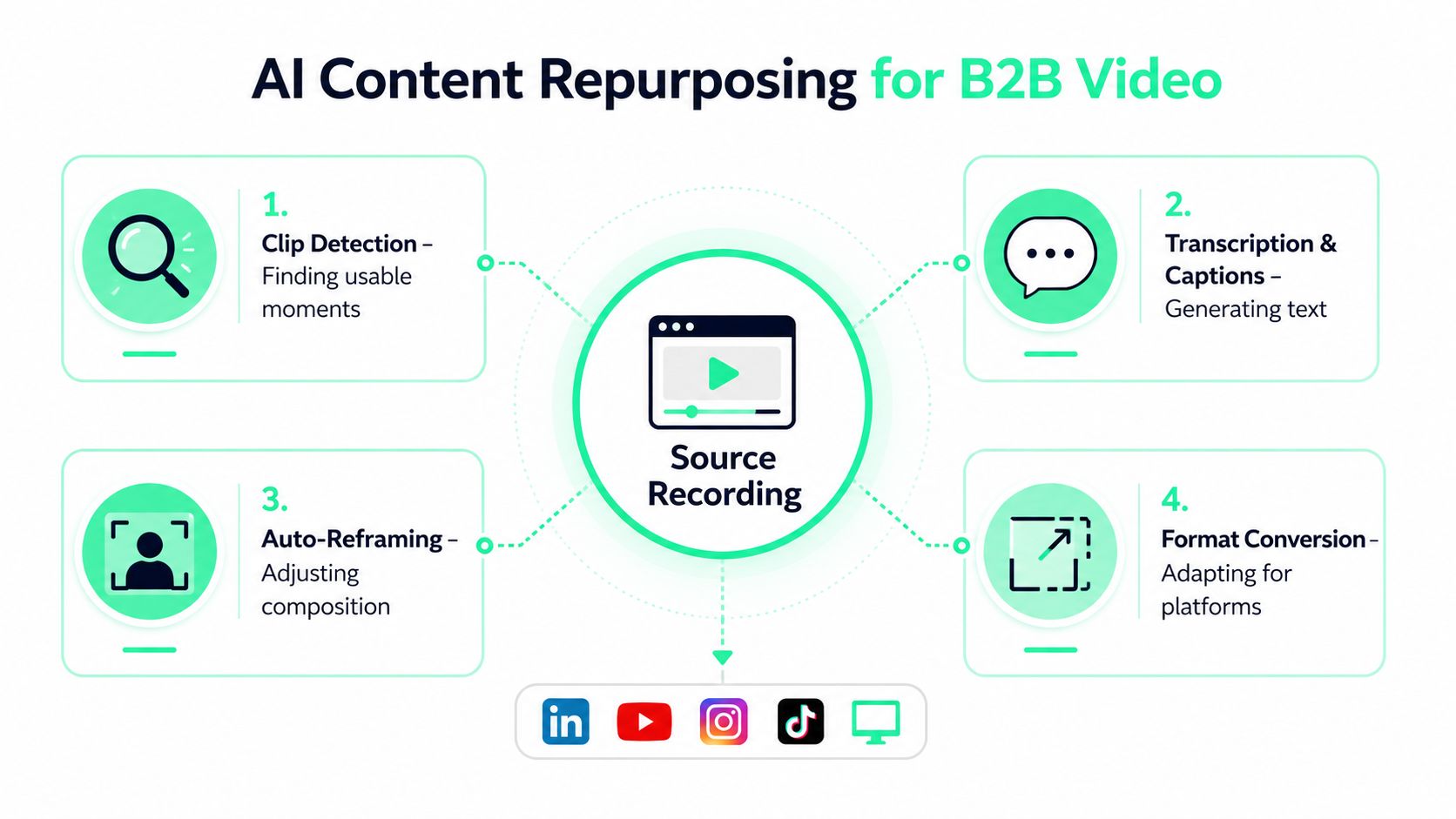
For B2B video workflows, **ai content repurposing** means using AI to detect usable moments in long recordings, then turning those moments into clips, captions, reframed video, and correctly sized exports. In practice, that starts with long-form assets like webinars, podcasts, demos, and customer calls, where the hard part is not generating more copy. It is finding the right visual and verbal moments, then shaping them so the platform can carry the message without distortion.
The strongest teams treat the process as two stages. AI handles detection, transcription, and candidate cuts. A BlitzReels-style editor layer handles the brand-safe finishing work, where framing, pacing, captions, and export checks get reviewed before anything ships. That split matters because a tool can be fast and still be wrong in ways a marketer will notice immediately.
### Four jobs define the workflow
The technical stack usually has to do four jobs well. First, it has to identify the moment worth clipping. Second, it has to generate transcripts and captions that are accurate enough to trust. Third, it has to keep the speaker framed properly when the format changes. Fourth, it has to resize the output without stretching faces or leaving awkward borders.
A useful reference for channel-native repurposing is [maximize video ad campaigns](https://sovran.ai/blog/repurposing-video-content), because it reinforces the same principle, one source, different outputs, different distribution goals. The logic is simple, but the execution is not, especially once a team has to keep the clip aligned with the channel, the audience, and the original message at the same time.
The practical definition also matters because B2B teams do not need the same thing from every asset. A podcast clip may live or die on a single strong statement. A demo clip may depend on whether the product action is visible after reframing. A customer call may need heavier review because names, context, and claims carry more risk.
> The right question is not “can AI repurpose this video.” It is “can AI isolate the moment, and can the editor layer finish it without weakening the original point?”
That is the distinction [content repurposing glossary](https://www.blitzreels.com/glossary/content-repurposing) helps teams align on when they are comparing tools, briefs, and expectations across marketing, creative, and ops. AI proposes the cuts. The editor layer finishes the work. The best systems keep those responsibilities separate, which preserves speed without handing brand safety to a black box.
## The Four Core Jobs AI Must Do Well
A repurposing pipeline fails fast when it gets the basics wrong. If the chosen clip starts on a dead sentence, the viewer leaves. If the speaker's face gets chopped at the chin, the short feels sloppy. If captions lag or mistranscribe a product name, trust drops. If the export doesn't fit the platform, the whole piece looks improvised.
### Clip detection has to find a hook, not a sentence break
Good detection surfaces a real opening, usually a claim, tension point, comparison, or concise takeaway. Bad detection stops at arbitrary transcript boundaries and creates clips that technically contain speech but never really start.
That's why clip detection should be judged on whether the first two seconds make sense without context. In B2B, that often means the cut needs a stronger opener than the source recording naturally offers. A useful clip usually begins where a viewer would lean in, not where a transcription engine happened to pause.
### Reframing and captions are the finishing test
Auto-reframing has to keep the speaker in the safe zone across vertical and square formats, while still preserving gestures that add emphasis. The viewer should not feel like the camera is fighting the person speaking. Captions need a different standard, they must be readable, timed cleanly, and styled in a way that still feels like the brand.
A practical workflow is to treat captions as editorial, not cosmetic. If the line breaks are awkward or the punctuation makes the speaker sound robotic, the clip loses momentum. That matters more in short-form than in long-form, because there's less room for the viewer to recover.
### Resizing has to hit platform shape cleanly
Resizing is not a trivial export step. The output has to land in the right aspect ratio with no stretched faces, no accidental letterboxing, and no awkward crop that hides a product screen or a presenter's hands. A solid editor layer handles this last pass so the AI-detected clip doesn't break when it moves from source recording to TikTok, Reels, Shorts, or LinkedIn.
> **Editing rule:** if the output needs explanation before it can be watched, the crop or captioning isn't done yet.
This is also where finishing tools matter most. A product like BlitzReels sits in the editor layer, after detection, and is used to finalize captions, zooms, hooks, title cards, reframing, and resizing for short-form export. The separation matters because detection tools are not always the same tools that should own the final brand look.
## Matching Source Format to AI Workflow
Webinars, podcasts, demos, and customer calls all look like “long-form video,” but they behave very differently when repurposed. The AI engine can be identical across all four and still produce very different risk profiles. That's because the source format decides what can be extracted safely and what must be reviewed by a human.
The source format also determines the pilot. Teams that start with the loudest marketing format usually make the wrong choice. The better move is to start with the format they already have in volume, because volume plus repeatability matters more than novelty.
The blog on [how directory submissions build trust](https://startupsubmit.app/directory-submission-service/) is a useful reminder that distribution confidence often comes from repeated, structured exposure. Repurposing works the same way, the format that gets used consistently tends to teach the workflow fastest.
| Source format | AI clip detection | Reframing needs | Caption risk | Human review tier |
| --- | --- | --- | --- | --- |
| Webinar | Strong on single-speaker sections and structured Q&A | Moderate, especially when slides share the frame | Medium, due to technical terms and named features | Standard review |
| Podcast | Strong on opinionated statements and narrative turns | Moderate to high if speakers overlap | Medium, because conversational phrasing can drift | Standard review |
| Product demo | Strong on step-by-step moments and visible actions | High, because screen content and speaker framing both matter | Medium to high if UI labels or product names appear | Careful review |
| Customer call | Strong on emotionally clear moments, weaker on context | High, especially with multiple speakers | High, due to names, promises, and off-the-record nuance | Highest review tier |
### Why the same engine doesn't mean the same workflow
A podcast clip can often survive if the speaker is framed cleanly and the quote lands. A customer call clip usually can't. It may contain useful proof, but it also carries the highest chance of exposing private context or a claim that shouldn't be published without approval.
That is why the pilot should usually follow the easiest clean source, not the most exciting one. A webinar or product demo often gives the fastest learning loop because the structure is clearer and the clip boundaries are easier to validate. Once the team learns how the engine behaves on one source type, it can expand to messier inputs with better control.
The internal guide on [how to clip a Zoom recording](https://www.blitzreels.com/blog/how-to-clip-a-zoom-recording) fits neatly here, because Zoom-style sources tend to be the place where teams discover whether their cuts are usable or merely technically extracted.
## An End-to-End AI Repurposing Workflow
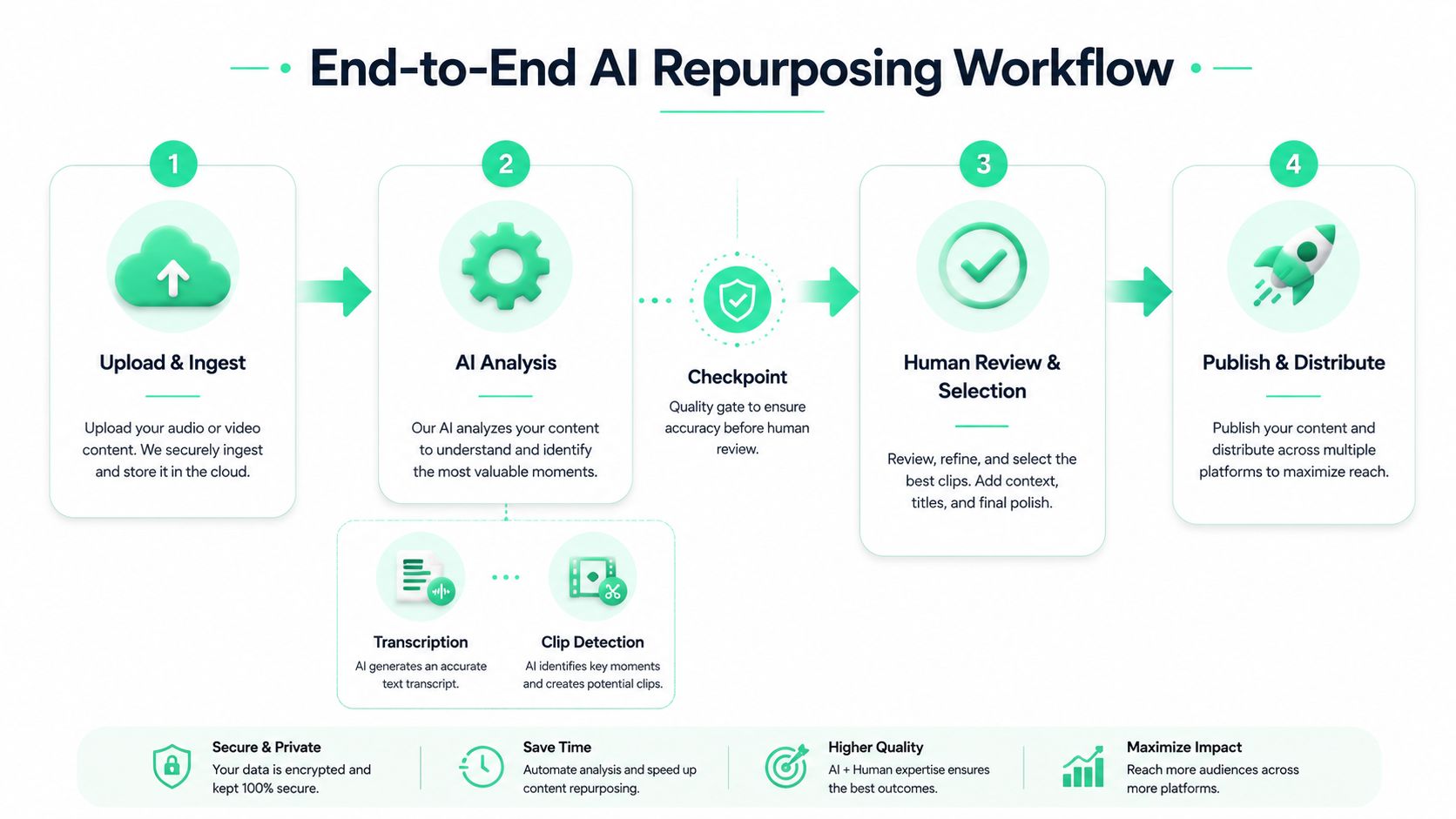
A workable workflow starts with the source file and ends with performance logging. The middle matters more than the steps themselves, because each checkpoint decides whether the clip is good enough to move forward or needs a human pass before it goes any further.
### Ingest, detect, and narrow the candidate list
The recording gets uploaded first, then the AI engine runs transcription and clip detection. At this stage, the goal is not publication. The goal is to produce a shortlist of moments that might become clips, plus transcripts and timestamps that make review faster.
That's where tools like [turn long video into shorts](https://www.blitzreels.com/blog/turn-long-video-into-shorts) become operationally useful, because they frame the task as a pipeline, not a one-off edit. The same logic applies whether the source is a webinar, a demo, or a podcast.
### Finish in the editor layer before shipping
Once the candidate moments are selected, the editor layer takes over. Captions get styled, hooks get rewritten if needed, faces get reframed, title cards get added, and the aspect ratio gets converted for the target channel. A toolset like BlitzReels belongs here, after AI has done the extraction work, because it handles the last-mile finishing that makes shorts feel deliberate rather than machine-generated.
A practical workflow often looks like this:
1. **Upload the source** into the clip pipeline.
2. **Run AI analysis** for transcription and clip detection.
3. **Review and select** the moments that deserve publication.
4. **Finalize in the editor** with captions, zooms, hooks, title cards, and resizing.
5. **Publish and log** the result so the team can compare performance later.
The process also needs a human checkpoint for brand safety and factual accuracy. That pass should catch sensitive customer names, unsupported claims, awkward phrasing, or anything that needs legal or product approval before it leaves the editing queue. For teams managing multiple source formats, a workflow reference like [Martini creative AI video workflows](https://astorie.ai/en/workflows/ai-product-video) can be useful as a comparison point for how different stacks structure the same basic pipeline.
The final step is easy to skip and expensive to ignore. Logging which clip came from which source, which channel it was published to, and what happened afterward is what makes the workflow improve instead of repeat.
## Selection Quality as the Real Bottleneck
AI doesn't remove the hardest part of repurposing. It moves the bottleneck from editing time to source selection. That shift is easy to miss, and it explains why some teams publish faster without improving output quality.
A practical repurposing system works in two stages. AI handles detection, transcription, and candidate extraction. A finishing layer, including tools like BlitzReels, handles the brand-safe cleanup that makes a short feel deliberate instead of machine-cut. If the source selection is weak, the second stage just helps a team produce more weak clips.
### Score before you generate
Selection needs a filter before it needs a generator. The filter should weigh three signals together, organic traffic, engagement, and sales utility. Traffic matters, but it can't carry the decision by itself. A source with modest reach can still be a better repurposing candidate if it supports a key offer, answers a recurring objection, or reinforces a product message the sales team keeps hearing.
That is why the most-viewed asset should not automatically win. The next ten source files are usually the ones that balance audience interest with business usefulness, even if they are not the obvious leaderboard items. One independent experiment on repurposing recommends scoring content on those signals before a two-week pilot, and that approach holds up because it forces a team to choose with intent instead of recycling by habit.
A marketing ops team can score candidates with a simple rubric. Give each source a rating for discovery potential, message fit, and downstream use in sales or customer education. Then sort the library by the combined score, not by ego or recency. That process usually surfaces assets that are strong on narrative value but easy to overlook in a pure analytics view.
### What not to repurpose matters as much as what to repurpose
The clip that looks easiest to cut is often the wrong one to send through the pipeline again. A polished webinar segment can still be too generic to drive a useful short. A less flashy moment, like a sharp product explanation or a real customer objection, often performs better because it gives the editor something specific to work with.
That is where the two-stage model pays off. AI can identify promising segments at speed, but a human still needs to reject moments that sound flat, overused, or too vague to carry a standalone post. The editor layer then shapes the surviving candidates into something that matches channel norms, brand tone, and compliance needs. That division of labor matters because it keeps repurposing from turning into volume for volume's sake.
> **Decision rule:** repurpose the asset that will make the next channel piece sharper, not the one with the highest view count.
That rule is useful because it puts judgment ahead of throughput. It also keeps the team honest about trade-offs. Some high-traffic pieces are poor raw material, while some lower-traffic assets create stronger shorts because they contain a clean thesis, a concrete proof point, or a better hook for the first three seconds. The pipeline improves only when selection improves first.
## Metrics That Separate Reach From Pipeline
B2B teams often stop at views because views are easy to see. That leaves out the part that matters for revenue. Reach metrics show exposure, but they do not show whether repurposed clips moved a prospect closer to a deal.
A better measurement plan separates vanity metrics from business impact. On LinkedIn, completion rate and saves deserve more attention than raw impressions. On YouTube Shorts, watch-through and subscriber movement matter more than a single spike in views. On Reels, shares and profile visits are stronger signals than likes alone. At the CRM layer, clip-level assisted pipeline connects publishing work to revenue activity.
A 2024 benchmark study found AI content production delivered a **median 4.2x lift** in published assets per writer per quarter ([benchmark study](https://www.thestarrconspiracy.com/insights/benchmarks/ai-content-production-benchmarks-b2b-2024)). That output gain only matters if the team also knows whether those extra assets contributed to pipeline, not just reach.
### The measurement map that teams can actually use
| Channel | Reach metric | Business signal |
| --- | --- | --- |
| LinkedIn | Completion rate, saves | Demo requests, content-driven meetings |
| YouTube Shorts | Watch-through, subscriber delta | Returning viewers who later convert |
| Reels | Shares, profile visits | Site visits or booked meetings from the channel |
| CRM | N/A | Clip-level assisted pipeline, sales-cited clips |
Before AI turns on, the team needs a baseline. The baseline can be simple, but it has to exist. Without it, every improvement becomes a story instead of a comparison, and the review later turns into opinion management instead of measurement. That is a common failure point in repurposing programs, because high output can hide weak content selection or weak distribution.
> Baseline first, then publish. Without a before-and-after frame, repurposing success becomes hard to prove and easy to overclaim.
The practical win is clarity. Reach shows whether people watched, but pipeline shows whether the content helped move a prospect. B2B teams need both, and they need them tied to the same source asset so the content operation can learn what to clip next. The editor layer, including the [AI agent editor](https://www.blitzreels.com/features/ai-agent-editor), matters here because it finalizes the clip after detection and selection, which makes the output easier to compare against downstream results.
## Putting the Editor Layer to Work
The cleanest operating model is simple. AI handles detection, the editor layer handles finishing, and a human keeps control over anything that touches brand, compliance, or strategic claims. That structure keeps speed high without asking one system to solve every problem.
### What the stack usually includes
A B2B team that ships shorts consistently usually combines four tool categories. First, an AI clip detection engine to find moments in webinars, podcasts, demos, and calls. Second, transcription and caption generation. Third, an editor layer for reframing, resizing, hooks, title cards, and visual cleanup. Fourth, a scheduler and analytics layer so published clips can be tracked against the baseline.
That's also the place where all-in-one tools and best-of-breed stacks diverge. All-in-one platforms are easier to manage, but best-of-breed setups often give more control when the team wants a separate detection step and a separate finishing step. If the workflow needs tighter brand control, the split stack is usually easier to govern.
The [AI agent editor](https://www.blitzreels.com/features/ai-agent-editor) fits as the finishing layer in that model, not as a replacement for source selection or review. It's the place where captions, reframing, resizing, hooks, and title cards get finalized for TikTok, Reels, YouTube Shorts, and LinkedIn after the clip has already been selected.
### A practical operating checklist
- **Start narrow.** Pick one source format and one channel before expanding.
- **Score inputs first.** Use traffic, engagement, and sales utility to decide what enters the pipeline.
- **Keep human review.** Brand safety and high-stakes claims still need a person.
- **Measure against baseline.** Compare the AI-assisted workflow to manual production, not to an idealized guess.
- **Separate detection from finishing.** Let AI propose the cuts, then let the editor layer finish them.
BlitzReels belongs in that second layer because it handles the finishing work that makes repurposed clips feel intentional instead of raw. For teams trying to move webinar, podcast, demo, and customer-call footage into short-form distribution without losing control, that separation is the practical place to start.
---
If your team is trying to turn webinars, podcasts, demos, or customer calls into shorts without handing brand safety over to a single black box, BlitzReels is built for the finishing layer. It takes the AI-detected clip and helps with captions, reframing, resizing, hooks, and title cards so the output is ready for TikTok, Reels, YouTube Shorts, and LinkedIn. Visit [BlitzReels](https://blitzreels.com) to see how the workflow fits into your repurposing stack.