---
title: "Unleash Viral Content with AI Short-Form Video Generator"
canonical: "https://blitzreels.com/blog/ai-short-form-video-generator"
---
# Unleash Viral Content with AI Short-Form Video Generator
URL: https://blitzreels.com/blog/ai-short-form-video-generator
Markdown URL: https://blitzreels.com/blog/ai-short-form-video-generator.md
Published: 2026-05-21
Author: BlitzReels
Explore how an AI short-form video generator works and pick the best one. Create viral TikToks, Reels, and Shorts faster in 2026.
Tags: ai short-form video generator, ai video editor, short form video, repurpose video, social media video

A familiar short-form routine looks like this. Record a podcast, webinar, demo, or talking-head video. Open the editor. Scrub through the timeline. Find one usable moment. Add captions. Resize for vertical. Reposition the crop because the speaker drifts out of frame. Export for TikTok, then fix the layout again for Reels and Shorts.
That process breaks fast when a team wants to post every day. The bottleneck usually isn't ideas. It's the pile of repetitive editing work between recording and publishing.
That's where an **ai short-form video generator** earns its place. These tools aren't interesting because they can “make videos with AI.” They matter because they cut the slowest parts out of the daily workflow: clipping, captioning, reframing, resizing, and turning one source asset into multiple publishable outputs. Short-form under 60 seconds already accounts for **67% of all AI-generated video content**, and short-form AI videos generate **2.7x more engagement than static image posts**, according to a [2026 AI video statistics roundup](https://vivideo.ai/blog/ai-video-statistics-2026).
For creators and marketers, that changes the operating model. Instead of treating each post like a standalone edit, the better approach is to build a repeatable idea-to-publish loop.
## Table of Contents
- [The End of Tedious Video Editing](#the-end-of-tedious-video-editing)
- [The real problem isn't editing quality](#the-real-problem-isnt-editing-quality)
- [What changes after adoption](#what-changes-after-adoption)
- [Understanding the Core Technology](#understanding-the-core-technology)
- [Transcription turns footage into something editable](#transcription-turns-footage-into-something-editable)
- [Analysis decides what deserves to become a clip](#analysis-decides-what-deserves-to-become-a-clip)
- [Assembly handles the social-first finish](#assembly-handles-the-social-first-finish)
- [Key Features That Accelerate Your Workflow](#key-features-that-accelerate-your-workflow)
- [The features that actually save time](#the-features-that-actually-save-time)
- [What sounds good on a landing page but matters less](#what-sounds-good-on-a-landing-page-but-matters-less)
- [Common Use Cases for Creators and Marketers](#common-use-cases-for-creators-and-marketers)
- [The expert with a backlog of long videos](#the-expert-with-a-backlog-of-long-videos)
- [The social manager keeping channels active](#the-social-manager-keeping-channels-active)
- [The founder shipping product content fast](#the-founder-shipping-product-content-fast)
- [How to Choose the Right AI Video Generator](#how-to-choose-the-right-ai-video-generator)
- [Start with the workflow, not the feature list](#start-with-the-workflow-not-the-feature-list)
- [A practical comparison lens](#a-practical-comparison-lens)
- [Best Practices for High-Performing AI Videos](#best-practices-for-high-performing-ai-videos)
- [Use AI for speed, then apply editorial judgment](#use-ai-for-speed-then-apply-editorial-judgment)
- [Turn faster production into better testing](#turn-faster-production-into-better-testing)
## The End of Tedious Video Editing
The old short-form workflow punished consistency. One strong clip could still take too long to prepare because every step needed manual attention. A creator had to listen through the source file, mark in and out points, write captions, style captions, create title cards, crop for vertical, and check whether the subject stayed centered.
That's manageable for one post. It's exhausting for daily publishing.
An ai short-form video generator changes the job by collapsing those separate tasks into one pass. The tool can scan the recording, find candidate moments, generate subtitles, resize for vertical output, and produce clips that are close enough to final for a quick review instead of a ground-up edit. That shift matters more than any individual feature because it removes the constant friction that slows down publishing.
### The real problem isn't editing quality
Most creators don't quit short-form because they can't come up with topics. They quit because the process around each post is too heavy.
A single talking-head video often creates the same chain of chores:
- **Clip hunting:** Rewatching the full source just to find one sharp moment.
- **Caption cleanup:** Fixing timing, line breaks, and styling so subtitles feel native.
- **Reframing work:** Repairing awkward crops after turning horizontal footage into vertical.
- **Platform resizing:** Making separate exports that fit TikTok, Reels, Shorts, LinkedIn, and other feeds.
That's why teams are leaning into AI-first editing workflows such as the one discussed in [this breakdown of letting AI handle the edits](https://www.blitzreels.com/blog/let-ai-handle-the-edits-your-new-video-workflow). The payoff isn't abstract. It's fewer manual decisions per video.
> **Practical rule:** If a short-form tool still makes the editor touch every caption, crop, and cut by hand, it hasn't solved the real production problem.
### What changes after adoption
The strongest tools don't replace taste. They remove repetition.
That means the human editor can spend time on the parts that affect performance: the hook, the first title card, the pacing of the opening seconds, whether the clip should start on a question or a claim, and whether the ending gives people a reason to keep watching the next post.
The result is a better operating rhythm. Record once. Generate several usable cuts. Pick the best. Refine quickly. Publish more often without turning the editing queue into a full-time job.
## Understanding the Core Technology
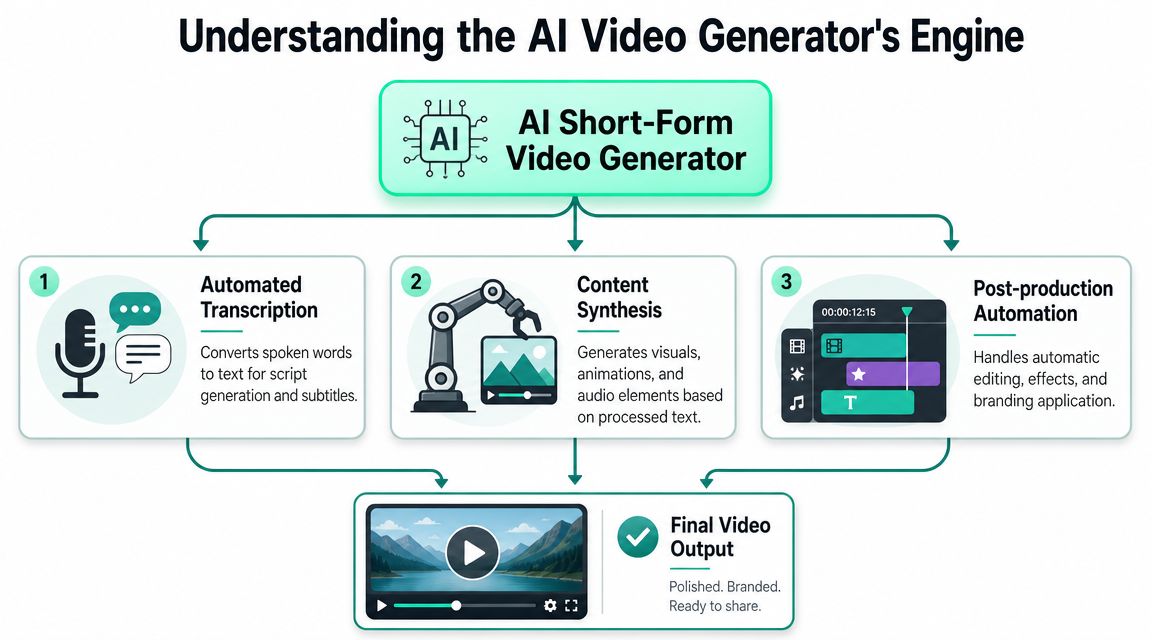
A good ai short-form video generator works less like a magic button and more like an efficient production assistant. It watches the source material, organizes it, identifies promising moments, and then packages those moments for short-form platforms.
That process usually comes down to three technical layers.
### Transcription turns footage into something editable
The first job is transcription. Once spoken audio becomes text, the video stops being a black box and becomes searchable.
That matters because text gives the system structure. Instead of dragging through a timeline and guessing where the useful part starts, the tool can map words to timestamps, identify topic shifts, and let an editor jump directly to claims, questions, punchlines, or product mentions.
For anyone comparing tools, resources that explain how to [generate short-form content with AI](https://www.taja.ai/ai-short-form-content-generator) are useful because they show how much of the workflow depends on turning raw speech into usable text first.
### Analysis decides what deserves to become a clip
After transcription, the better systems analyze the transcript and the visuals together. Highlight detection is then applied.
Vizard describes a workflow where the system transcribes the video, identifies highlights, detects speakers' faces, and adjusts the ratio for TikTok, Instagram, YouTube Shorts, and other platforms in its [AI clips generator workflow](https://vizard.ai/tools/ai-clips-generator). That technical sequence matters because each step solves a different bottleneck. Transcription creates a searchable map. Highlight detection reduces manual review. Face detection helps the crop stay useful after the frame changes.
A weak tool may still produce clips, but they often feel random. It might cut before the payoff, miss the cleanest sentence, or choose a section that reads fine as text but drags on video.
> The best clips usually come from moments with a self-contained idea, a clear start, and a visual frame that survives the jump to vertical.
### Assembly handles the social-first finish
The last layer is automated assembly. Here, the tool turns analysis into an actual publishable asset.
That includes tasks such as:
1. **Reframing for 9:16:** Keeping the active speaker centered after converting horizontal footage.
2. **Caption timing:** Matching subtitles to speech well enough that they read naturally.
3. **Visual packaging:** Applying title cards, templates, and pacing choices that fit swipe-based feeds.
The difference between average and strong output shows up here. A mediocre tool gives a technically correct export. A better one produces something that already looks like it belongs on social.
That distinction is why auto-reframing matters so much for webinars, interviews, and podcasts recorded in 16:9. If the subject drifts after cropping, the clip feels broken even if the words are good. Manual keyframing can fix that, but it doesn't scale well when a team needs many clips every week.
## Key Features That Accelerate Your Workflow
Feature lists often blur together. Every tool claims captions, repurposing, AI editing, and social exports. The key question is simpler: which features remove the most friction from the daily production loop?
A useful answer starts with what the team is trying to avoid. Teams generally want fewer repetitive edits, fewer export headaches, and less time spent turning decent footage into platform-ready short clips.
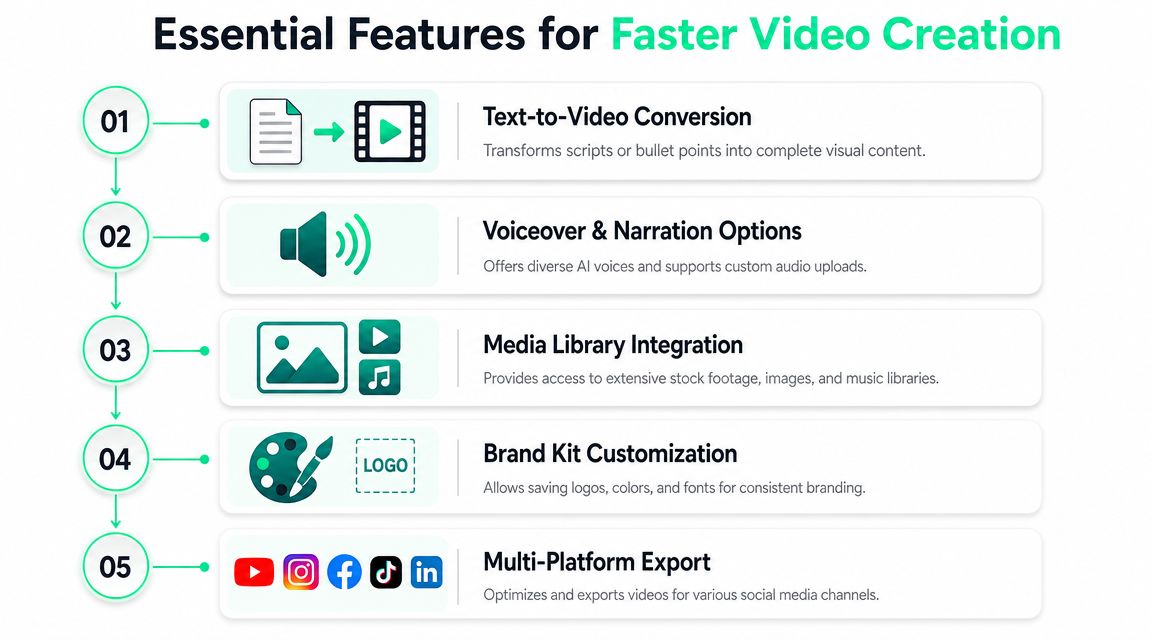
Top generators increasingly package creation as a prompt-to-publish pipeline, with an output envelope of **15 to 60 seconds** for vertical export, and Steve AI notes the common performance sweet spot across TikTok, Reels, and Shorts is **30 to 60 seconds** in its [AI video generator guidance](https://www.steve.ai). That's why the best features aren't random extras. They're built around short, fast, mobile-first content.
### The features that actually save time
Some capabilities create immediate operational value. These are the ones worth prioritizing.
- **Auto-clipping and highlight detection:** This reduces the worst kind of editing time, which is review time. Instead of watching every minute of a long source file, the editor starts with candidate clips that already have a reason to exist.
- **Dynamic captions and subtitle styling:** Captions aren't just accessibility furniture. They carry the message for sound-off viewers, reinforce emphasis, and shape the visual identity of the clip. Good tools make it easy to apply readable subtitle presets, branded colors, and on-screen emphasis without rebuilding styles every time.
- **Auto-reframing and resizing:** A short that works in 16:9 often fails in 9:16 unless the crop follows the speaker correctly. Resizing should also account for title-safe space, subtitle placement, and whether the composition still feels intentional after the conversion.
- **Prompt-to-video and AI scripting:** Some teams aren't repurposing footage at all. They need faceless explainers, promo clips, or simple visual stories generated from an idea, script, or prompt. That's a different workflow, but still part of the same daily content machine.
- **Templates and brand kits:** This is where consistency comes from. Saved title cards, fonts, color rules, logo treatments, and caption styles stop every editor from reinventing the same visual system.
Teams with large back catalogs also use repurposing workflows to [unlock content library value](https://contesimal.ai/blog/content-repurposing-ai/) instead of letting webinars, interviews, and demos sit unused after the first publish.
### What sounds good on a landing page but matters less
Not every flashy feature changes the day-to-day workflow.
| Feature type | Why it matters less in practice | What matters more |
|---|---|---|
| Novel AI effects | Looks impressive in demos, but rarely solves production bottlenecks | Faster clipping, captioning, and resizing |
| Huge media libraries | Useful, but secondary if the clip itself isn't strong | Hook quality and pacing |
| One-click “viral” claims | No tool can guarantee performance from generation alone | Reliable editing speed and easy iteration |
A better benchmark is whether the tool helps an editor move from rough source to usable post without a long cleanup pass. That's why systems built around practical editing automation, such as [AI agent editing workflows](https://www.blitzreels.com/features/ai-agent-editor), are often more valuable than feature-heavy tools with weak execution.
> A tool earns its place when it removes repeated work, not when it adds more options to click through.
## Common Use Cases for Creators and Marketers
The easiest way to understand an ai short-form video generator is to look at the jobs people give it. The value changes depending on whether the user is repurposing long footage, maintaining a publishing calendar, or creating new content from simple inputs.
SundaySky highlights speed, cost-efficiency, personalization, scalability, and global reach as core benefits of AI video generation in its [AI video generator overview](https://sundaysky.com/blog/ai-video-generator/). In short-form work, those benefits show up as practical use cases rather than abstract advantages.
### The expert with a backlog of long videos
Podcasters, consultants, educators, and interview-based creators usually have more raw material than posting capacity. They don't need more recording sessions first. They need a faster way to mine what they already have.
A typical workflow looks like this:
- **Upload one long recording:** A webinar, interview, livestream, or course session.
- **Let the tool identify candidate moments:** Questions, sharp answers, strong claims, useful anecdotes.
- **Turn those moments into social clips:** Add captions, reframe vertically, and package with a simple opener.
This is why recommendation roundups such as [HypeScribe's AI tool recommendations](https://www.hypescribe.com/blog/best-ai-tools-for-content-creators) often separate repurposing tools from pure prompt-to-video tools. They solve different problems.
### The social manager keeping channels active
A social media manager doesn't just need one polished clip. The job usually requires a repeatable stream of assets.
That means short-form AI tools become scheduling support by reducing production drag. The manager can take one source recording, create multiple cuts, tailor them for different feeds, and keep the posting calendar full with less manual editing. Use cases like [TikTok video production workflows](https://www.blitzreels.com/use-cases/tiktok-videos) fit here because the demand is volume plus consistency, not just isolated creative output.
> A daily posting strategy falls apart when every asset still needs handcrafted editing from scratch.
### The founder shipping product content fast
Founders and small marketing teams often need quick feature announcements, demo snippets, launch updates, or thought-leadership clips. They usually don't need cinematic editing. They need speed and clarity.
For this group, AI is useful in two different ways. One workflow repurposes existing Zoom recordings, product walkthroughs, or Loom videos into short clips. The other starts from a script or prompt and generates a faceless short with captions, visuals, and voiceover.
Course creators fit somewhere between those two. They can cut teaching material into teasers, answer common audience questions with short clips, and reuse existing recordings to promote paid content without opening a full editing suite every time.
## How to Choose the Right AI Video Generator
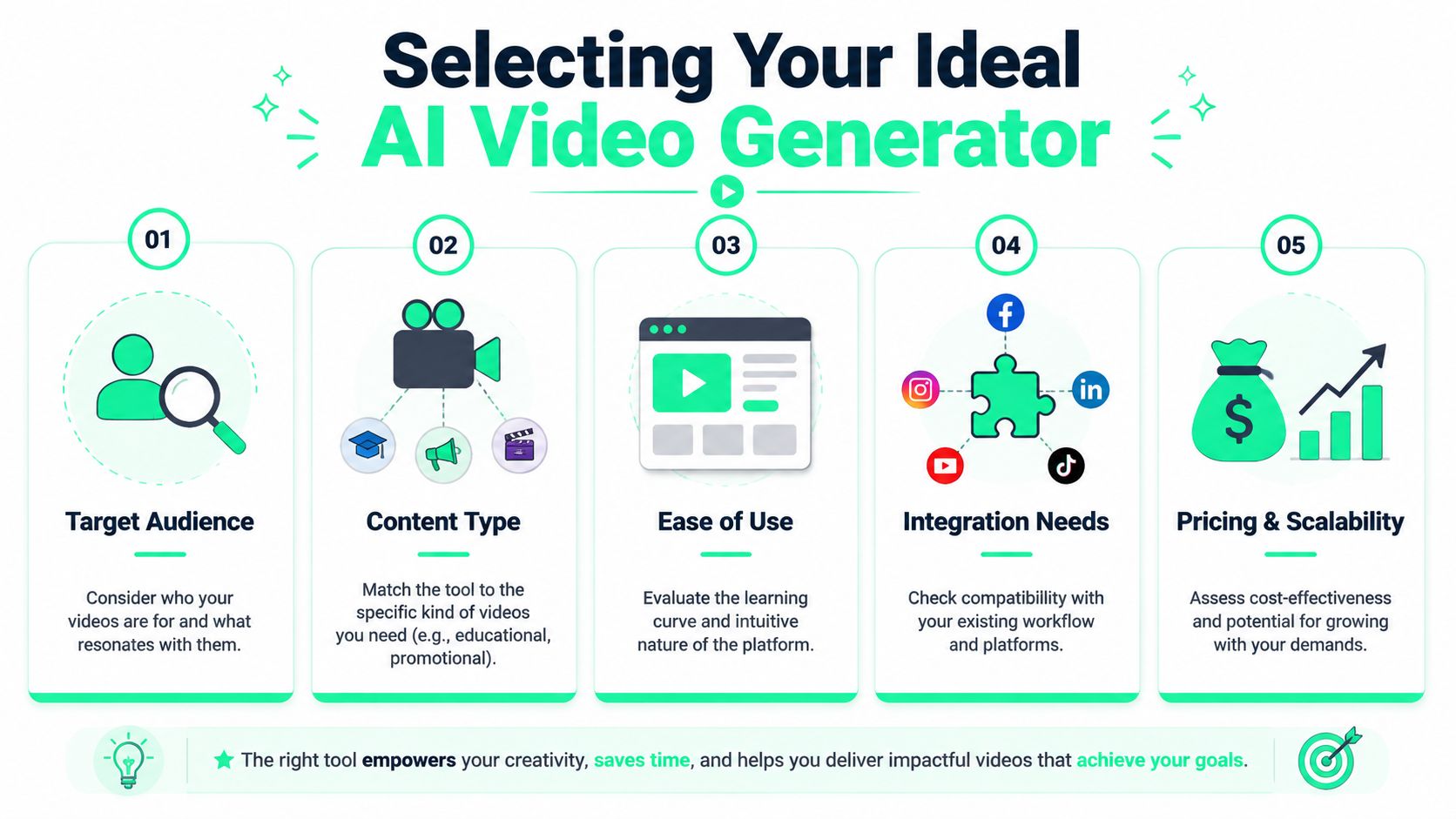
Most buyers compare tools the wrong way. They line up features, count how many boxes each product checks, and stop there. That misses the essential question.
As ShortGenius points out in its [AI short-form video generator guide](https://shortgenius.com/tools/ai-short-form-video-generator), the more important issue isn't which tool can generate a clip. It's which workflow reliably turns AI-generated clips into better-performing content. That means evaluating workflow fit, not just output capability.
### Start with the workflow, not the feature list
Some tools are best at repurposing existing footage. Others are stronger at script-to-video or prompt-driven generation. Choosing the wrong category creates frustration fast.
A buyer should test four things first:
1. **Primary workflow fit**
If the team mainly uploads podcasts, webinars, demos, or interviews, repurposing quality matters most. If the team creates faceless explainers from prompts, script generation and scene assembly matter more.
2. **Caption quality and control**
Auto-captions are table stakes. The test is whether line breaks are readable, timing feels natural, and styles can match brand expectations without tedious tweaking.
3. **Reframing intelligence**
This is a hidden make-or-break factor. If the crop loses the speaker, cuts off hand gestures, or jumps awkwardly between people, the final short feels low quality even when the transcript is strong.
4. **Editing speed after generation**
A tool shouldn't dump the user into a cleanup marathon. Small edits are fine. A full rescue operation is not.
### A practical comparison lens
The table below is a better buying framework than a giant feature checklist.
| Evaluation area | Strong fit looks like | Weak fit looks like |
|---|---|---|
| Repurposing | Pulls clean clips from long footage with minimal review | Produces random excerpts that need heavy trimming |
| Captions | Readable, branded, easy to restyle | Accurate words but awkward timing and layout |
| Reframing | Keeps faces centered and vertical crops usable | Subject drifts, framing feels accidental |
| Prompt workflow | Generates usable drafts from concise inputs | Needs long prompting and still feels generic |
| Pricing model | Matches production volume and team habits | Charges in a way that punishes iteration |
There's also a practical trade-off between simplicity and control. Beginner-friendly tools are faster to adopt, but some advanced teams may outgrow them if they need finer styling, more review control, or deeper workflow integration. That's where side-by-side product comparisons such as [AI video tool comparisons](https://www.blitzreels.com/compare) become useful, especially when a team is deciding whether it needs a repurposing editor, a prompt-to-video system, or both.
> Buy for the bottleneck. If the pain is clipping and captions, don't optimize for generative visuals first.
## Best Practices for High-Performing AI Videos
AI can speed up production. It can't rescue weak editorial choices. A fast workflow only becomes valuable when it produces clips people watch.
That's why the best teams treat an ai short-form video generator as a production multiplier, not a substitute for judgment.
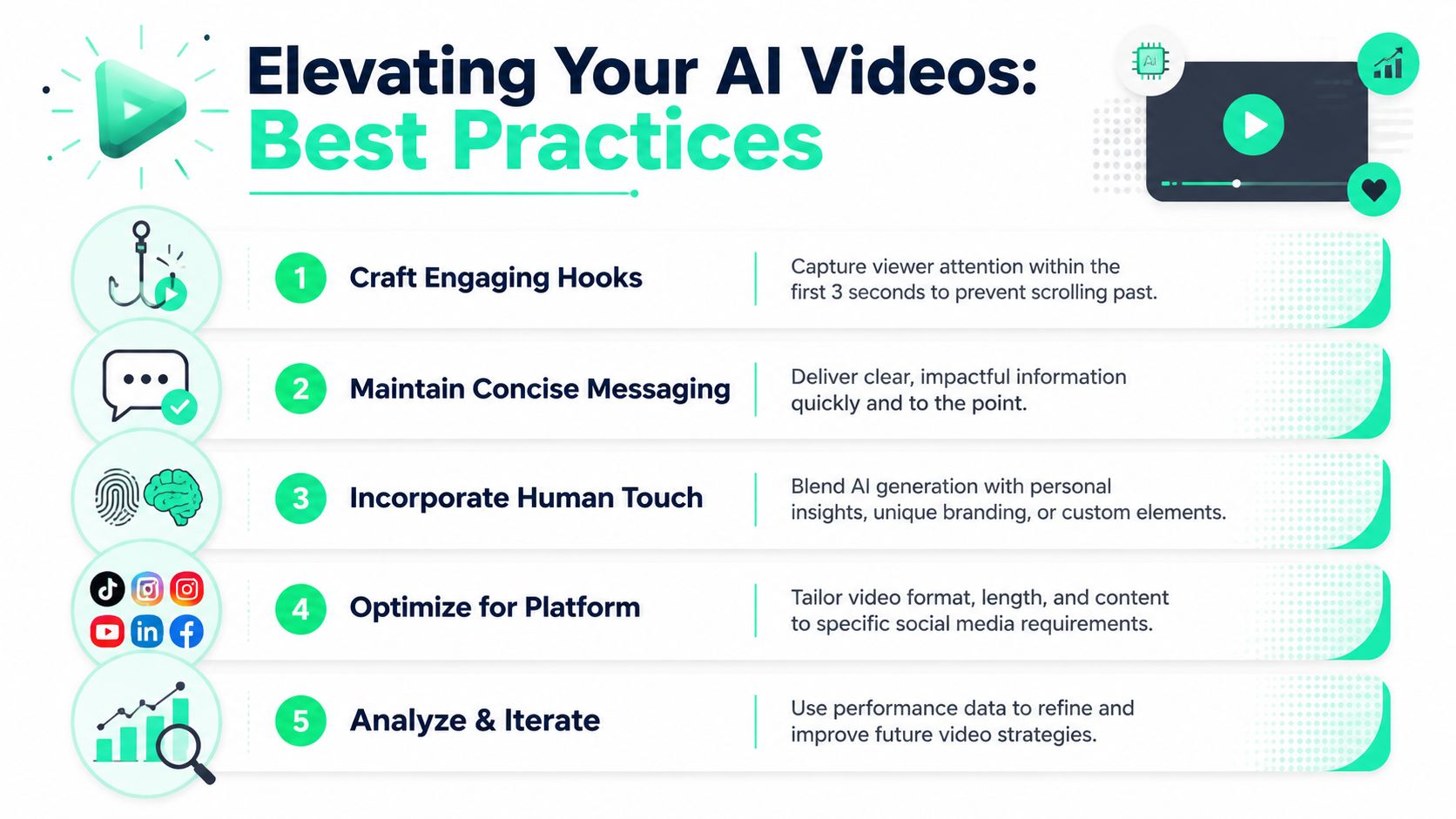
A practical visual summary helps here.
### Use AI for speed, then apply editorial judgment
The strongest short-form clips usually follow a few basic rules:
- **Start with a hook:** The opener has to earn the next few seconds. A strong first line, title card, or visual setup matters more than a polished transition later.
- **Keep one idea per clip:** Trying to fit too much into one short weakens clarity.
- **Design for silent viewing:** Large captions, clean subtitle timing, and visually clear framing do heavy lifting when audio is off.
- **Review every export:** AI often gets close. It still misses nuance, emphasis, or awkward cut points.
This is also where human polish matters most. A slight trim to tighten the opening, a better title card, or a cleaner caption break can make a generated clip feel intentional instead of automated.
For teams refining that finish, [these short-form editing techniques](https://www.blitzreels.com/blog/10-quick-pro-techniques-for-polished-short-form-videos) are often more useful than adding another AI layer.
A quick video reference can help reinforce what polished short-form execution looks like.
### Turn faster production into better testing
Speed matters most when it leads to more iteration. That means testing different hooks, title cards, durations, and framing choices instead of publishing one version and hoping for the best.
The better workflow is simple. Generate several candidate clips. Pick a few with different openings. Adjust captions and title cards. Publish, review performance, and feed those lessons into the next batch.
That's the promise of AI short-form tools. They don't just help teams make more videos. They make it realistic to improve videos through faster repetition.
---
BlitzReels is built for that exact record-to-publish loop. It helps creators and teams turn raw footage into short-form videos with clipping, captions, reframing, resizing, title cards, templates, and fast edits in one workflow. For anyone looking to publish more consistently without getting buried in manual editing, [BlitzReels](https://blitzreels.com) is worth a look.