---
title: "AI Video Clip Generator Explained for Short Form"
canonical: "https://blitzreels.com/blog/ai-video-clip-generator"
---
# AI Video Clip Generator Explained for Short Form
URL: https://blitzreels.com/blog/ai-video-clip-generator
Markdown URL: https://blitzreels.com/blog/ai-video-clip-generator.md
Published: 2026-09-11
Author: BlitzReels
Learn what an AI video clip generator does, how it works, and how to use it for TikTok, Reels, and Shorts — with workflows, features, and BlitzReels tips.
Tags: ai video clip generator, AI video editing, short form video, video repurposing, BlitzReels

An hour-long podcast is recorded, the webinar deck is polished, and the interview contains several sharp insights. Then the files sit untouched because someone still has to find the strongest moments, cut them cleanly, resize them for vertical viewing, add captions, write hooks, and export versions for TikTok, Instagram Reels, YouTube Shorts, and LinkedIn.
That gap is where an **AI video clip generator** earns its place. It doesn't replace editorial judgment, and it isn't the same as a text-to-video system that invents new scenes from a prompt. Its practical job is to help a creator or marketing team turn existing long-form footage into usable short-form content with less manual searching and repetitive editing.
The category has also moved beyond novelty. One industry estimate valued the AI video generator market at **USD 788.5 million in 2025** and projects **USD 3.44 billion by 2033**, while another estimate put the 2025 market at **USD 716.8 million** and forecasts **USD 3.35 billion by 2034**. Both projections indicate roughly fourfold expansion over the coming decade, although their regional findings differ. One places Asia Pacific at **31.0% of 2025 revenue**, while the other identifies North America with **41.0%**, evidence that adoption isn't limited to one market. ([Grand View Research market analysis](https://www.grandviewresearch.com/industry-analysis/ai-video-generator-market-report))
This guide treats clipping as a **video operations workflow**, not a one-click trick. It starts with what the software does, moves through the underlying process and features that affect quality, then applies the ideas to common creator and business use cases. It finishes with a publishing workflow, agentic automation through MCP and APIs, and a practical checklist for choosing a tool.
## Table of Contents
- [Introduction Why Short Form Needs Smarter Clipping](#introduction-why-short-form-needs-smarter-clipping)
- [What an AI Video Clip Generator Actually Does](#what-an-ai-video-clip-generator-actually-does)
- [The job is selection plus presentation](#the-job-is-selection-plus-presentation)
- [What it isn't](#what-it-isnt)
- [How AI Video Clip Generators Work Under the Hood](#how-ai-video-clip-generators-work-under-the-hood)
- [Ingest and transcript creation](#ingest-and-transcript-creation)
- [Finding a complete idea](#finding-a-complete-idea)
- [Reframing and captioning](#reframing-and-captioning)
- [Key Features That Separate Good Generators From Basic Ones](#key-features-that-separate-good-generators-from-basic-ones)
- [Selection quality comes first](#selection-quality-comes-first)
- [Presentation controls affect usability](#presentation-controls-affect-usability)
- [Automation is a production feature](#automation-is-a-production-feature)
- [Real World Use Cases for Short Form Creators and Teams](#real-world-use-cases-for-short-form-creators-and-teams)
- [From conversation to platform-native clip](#from-conversation-to-platform-native-clip)
- [Integrating an AI Clip Generator Into Your Publishing Workflow](#integrating-an-ai-clip-generator-into-your-publishing-workflow)
- [A browser workflow for human review](#a-browser-workflow-for-human-review)
- [Adding an agentic layer](#adding-an-agentic-layer)
- [Limitations Privacy and How to Choose the Right Tool](#limitations-privacy-and-how-to-choose-the-right-tool)
- [A practical buying checklist](#a-practical-buying-checklist)
## Introduction Why Short Form Needs Smarter Clipping
A founder finishes a thoughtful interview with a customer. The recording contains a strong objection, a useful product explanation, and a memorable answer about the problem the company solves. A social manager opens the timeline, drags through the recording, rewinds several times, writes down timestamps, and starts making separate cuts for each platform.
By the time the first vertical clip is ready, the recording has become a production burden rather than a content source. The same problem affects solo podcasters, webinar teams, sales enablement groups, and marketers who need a steady stream of posts but don't have a dedicated editor for every episode.
Short-form publishing creates several jobs at once:
- **Selection:** Find a complete idea, not merely an energetic sentence.
- **Structure:** Start with a hook and remove pauses or setup that doesn't help the viewer.
- **Framing:** Keep the active speaker visible after converting a horizontal recording to vertical.
- **Legibility:** Add accurate captions, readable styling, and suitable title cards.
- **Distribution:** Export the right version for TikTok, Reels, Shorts, LinkedIn, and other destinations.
An AI video clip generator can assist with each of those tasks, but the quality of the result depends on how connected they are. A tool that finds a promising timestamp but loses the speaker during reframing still creates work. A fast caption generator that misrepresents a product term introduces review risk. A clip that looks good in the editor but has no validation or export workflow leaves the hardest operational step unfinished.
> **Practical rule:** Treat AI as an assistant editor that prepares decisions for review, not as a publishing button that removes responsibility.
The [short-form video guide](https://blitzreels.com/blog/short-form-video) provides useful context for the broader format. The sections ahead focus on the narrower question that matters in daily production: how a generator turns long-form material into clips that can be reviewed, branded, validated, and published repeatedly.
## What an AI Video Clip Generator Actually Does
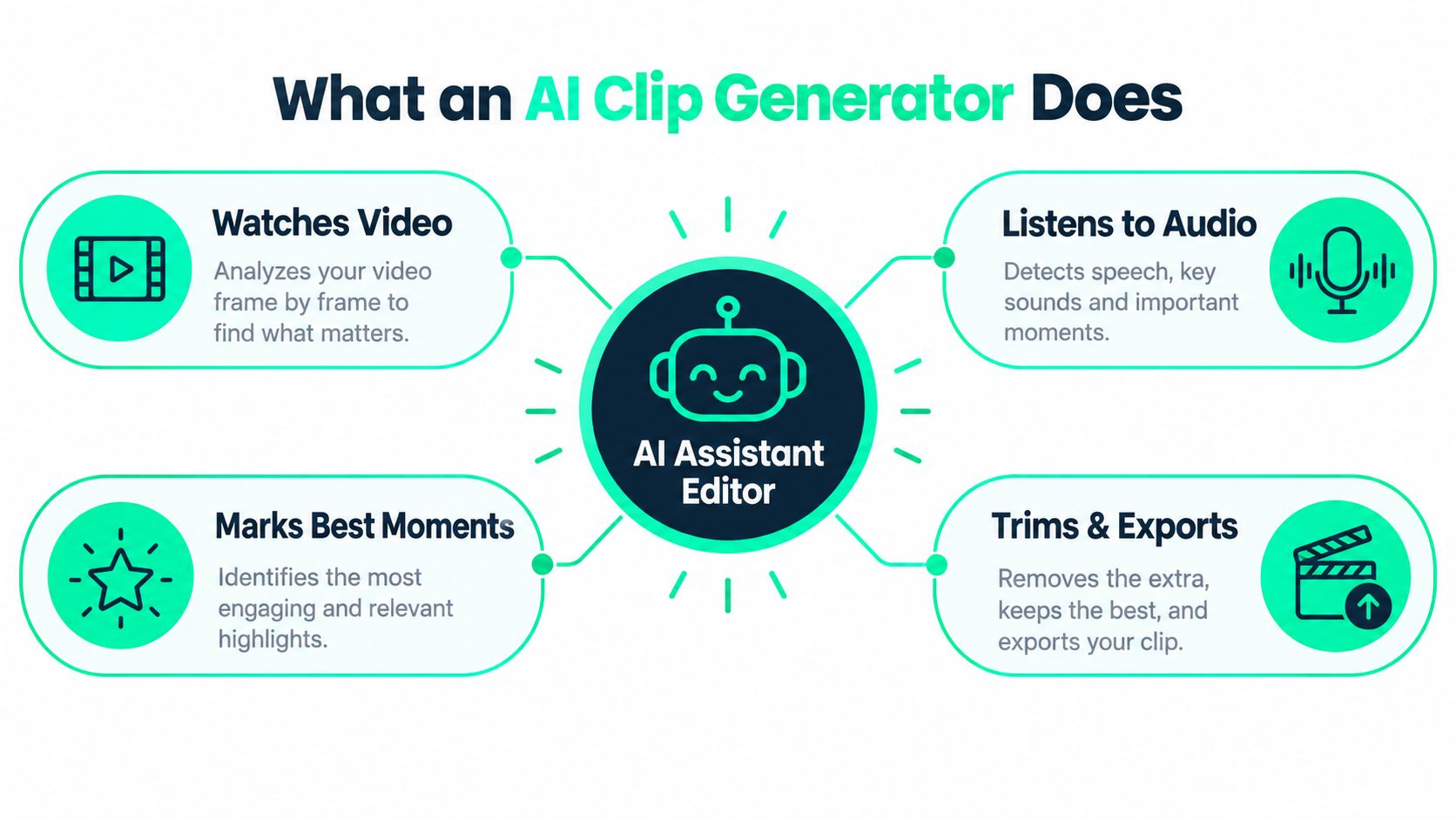
A useful analogy is an assistant editor who watches an entire recording, listens to the conversation, marks promising passages, and prepares rough cuts. The assistant doesn't choose every moment with movement. It tries to identify a self-contained idea, then shapes that idea into a short video.
That process usually begins with a podcast, webinar, interview, sales call, livestream, or YouTube video. The system analyzes the audio and visual track, creates a transcript, identifies possible highlights, and proposes clips. It can then trim the selected passage, reframe the picture for a vertical layout, generate captions, apply a template, and prepare an export.
### The job is selection plus presentation
A basic clipper may find a sentence and cut around it. A more capable system considers whether the sentence has enough context, whether the answer reaches a clear point, and whether the opening can work as a hook. It may also suggest a title card, identify a useful caption treatment, or add supporting B-roll from a media library.
That distinction matters because a short video isn't just a shorter file. It has its own opening, pacing, composition, and reading experience. The viewer may encounter the clip without knowing the original episode, so the edit needs to stand on its own.
> An AI clip generator should reduce the search and assembly work while leaving the final editorial decision with a human.
### What it isn't
A **text-to-video generator** creates new visual material from instructions. An AI clip generator generally works from footage that already exists. A professional non-linear editor, such as an NLE, gives an editor deep manual control over tracks, effects, audio, and timing. A clip generator prioritizes faster discovery and repeatable social formatting.
The [AI video generator for YouTube Shorts guide](https://blitzreels.com/blog/ai-video-generator-for-youtube-shorts) covers a related platform use case. For repurposing, the central question is simpler: can the system preserve meaning while making the source easier to publish in a native short-form format?
## How AI Video Clip Generators Work Under the Hood
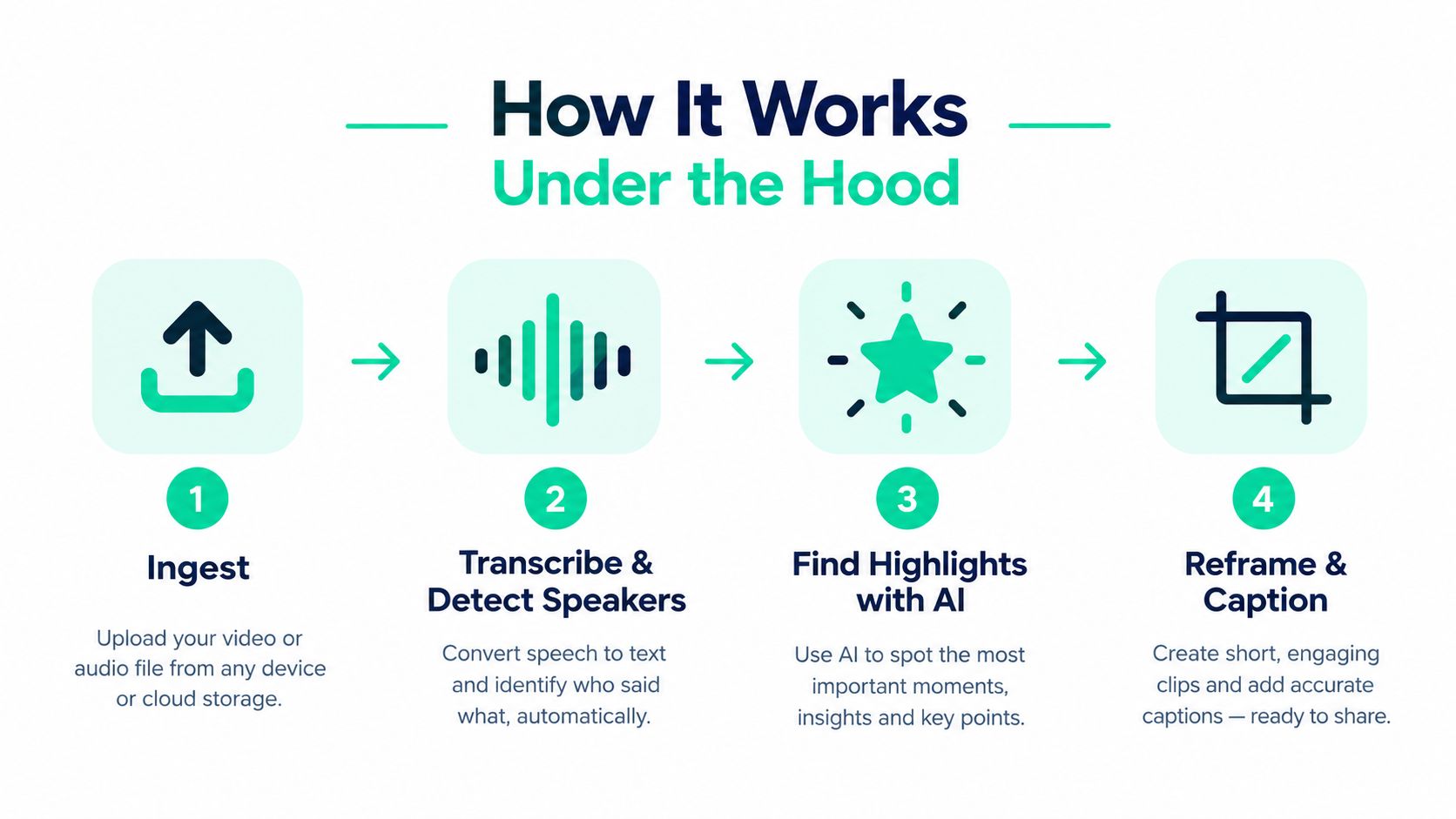
A reliable workflow starts before the first cut. The system needs to ingest the source, understand its speech, identify the participants, detect meaningful passages, and then transform the selected material without damaging the story.
### Ingest and transcript creation
The first stage accepts a video or audio source and separates its components. The software may extract speech, detect speakers, identify scene changes, and create a searchable transcript. Speaker detection becomes especially useful in interviews, where the crop may need to move between participants rather than remain fixed at the center of the frame.
Transcript quality affects more than captions. If the words are wrong, highlight selection becomes less reliable, transcript editing becomes frustrating, and the human reviewer has to compare every line against the audio. A transcript-native workflow lets an editor remove filler, shorten a response, or adjust the opening by editing text rather than scrubbing through the timeline.
### Finding a complete idea
Highlight detection should evaluate meaning, not just visual change. A scene cut, raised voice, or camera movement can signal activity, but it doesn't necessarily produce a useful social clip. Research built around social-media summarization supports this distinction. HyV-Summ was designed specifically for social video summarization, while VideoXum includes **14K long videos** and **140K aligned video-text summary pairs**, demonstrating the importance of semantic consistency in short-form selection. ([Social-video summarization research](https://www.sciencedirect.com/science/article/abs/pii/S0925231224016230))
A practical pipeline therefore looks for a thought with an opening, development, and conclusion. It might identify a product demonstration, a contrarian answer, or a clear explanation, then propose boundaries that keep the idea intact.
### Reframing and captioning
After selection, face and subject tracking help convert a wide recording into a vertical composition. The crop may follow a single speaker, switch between speakers, or use a split layout. Captions are then generated, styled, and positioned for mobile viewing. The editor may add a hook, title card, branded colors, logo treatment, or B-roll to make the clip feel intentional rather than automatically cropped.
The full sequence is **upload, analyze, select, reframe, caption, template, validate, and export**. Skipping validation creates avoidable problems, including captions that cover a face, a cut that begins before the sentence makes sense, or an export that doesn't match the destination.
Throughput also matters. A 2026 comparison of nine paid clipping tools tested on the same **90-minute podcast** tracked entry time, time to first clip, source-length limits, export caps, caption-language support, translation, dubbing, APIs, and MCP support. The benchmark shows why production performance depends on input handling and downstream automation as much as model quality. ([2026 AI video-clipping benchmark](https://reap.video/reports/state-of-top-ai-video-clipping-tools-2026))
Teams evaluating model behavior can review [AI model documentation](https://blitzreels.com/docs/ai-models), then test the workflow against their own recordings rather than relying on a demo source.
## Key Features That Separate Good Generators From Basic Ones
Feature lists can obscure the primary buying question. A basic tool may generate a clip quickly, but production teams need to know whether the output survives review, branding, platform formatting, and repeated publishing.
| Feature | Basic Tool | Production Ready |
|---|---|---|
| Highlight selection | Finds energetic or visually distinct moments | Preserves complete ideas and supports transcript review |
| Long-form handling | Limited source length or unclear processing behavior | Handles demanding recordings with visible processing status |
| Reframing | Center crop or simple vertical conversion | Tracks speakers and preserves the active subject |
| Captions | Automatic text with limited correction | Editable transcript, readable styling, and reusable presets |
| Hooks and title cards | Fixed opening treatment | Adjustable hooks, title cards, and brand rules |
| B-roll and media | Little or no media support | Searchable media libraries and timeline placement |
| Languages | Limited caption support | Caption languages, translation, and optional dubbing controls |
| Exports | Few formats or restrictive caps | Platform-ready exports with clear limits and status |
| Automation | Manual upload and download | API, SDK, CLI, or MCP support for repeatable operations |
### Selection quality comes first
A beautifully formatted clip is still weak if the selected passage doesn't make sense. Reviewers should read the proposed transcript before opening the visual editor. The strongest candidates usually answer a question, explain a decision, demonstrate a process, or create a clear tension that resolves within the clip.
Long-input support deserves special attention for podcasts, webinars, and interviews. A generator that handles only short sources may suit casual creators, but teams repurposing substantial recordings need transparent limits, processing expectations, and export behavior.
### Presentation controls affect usability
Vertical reframing isn't just a resize command. The crop must keep a face, product, whiteboard, or demonstration visible. Captions need safe placement, consistent line length, readable contrast, and a style that matches the brand. Templates should speed up production without forcing every clip into an identical visual pattern.
Multilingual output can expand reuse, but translation requires review because names, technical terms, idioms, and product language can shift meaning. Dubbing adds another layer of approval. Caption-language support should therefore be evaluated as part of the editorial workflow, not treated as a checkbox.
### Automation is a production feature
A team that publishes occasionally may be comfortable with manual exports. A team processing a regular flow of recordings needs integrations, status checks, and predictable outputs. APIs, structured command-line interfaces, SDKs, and MCP support become useful when an agent or internal system needs to create clips, update captions, validate a project, and confirm that rendering finished.
## Real World Use Cases for Short Form Creators and Teams
A solo podcaster may start with one recorded episode and a simple goal: create a batch of short clips without watching the entire file repeatedly. The generator surfaces possible moments, the creator reads each transcript, adjusts the opening, applies a caption preset, checks the vertical crop, and exports a set of candidates. The repeatable outcome is a review queue rather than a blank editing timeline.
A webinar team has a different need. The recording may include a product explanation, audience questions, and several sections that make sense only in the original presentation. The editor can select moments with enough context, add a title card that identifies the topic, insert supporting media, and produce platform-specific versions instead of posting a raw excerpt.
### From conversation to platform-native clip
For podcasts and interviews, speaker tracking is often more important than decorative effects. A two-person exchange can lose its rhythm if the crop stays fixed on one person. The editor should check each speaker transition, caption timing, and the first few seconds of the clip before approving the export.
For TikTok, the native vertical format is **1080×1920 pixels with a 9:16 aspect ratio**, and subtitle guidance recommends keeping text in the middle band, away from the bottom interface and top status area. ([TikTok caption and format guidance](https://kompozy.io/guides/tiktok-captions)) The same principles help with Reels and Shorts because viewers need to read without UI elements covering the words.
A short clip often works best when it reaches its point quickly. Industry coverage describes the practical sweet spot as roughly **5 to 30 seconds**, even though some systems support longer outputs. ([AI video trends coverage](https://www.genmedialab.com/news/ai-video-trends-2026/)) That range isn't a guarantee of performance. It gives editors a useful starting constraint for testing whether an idea can stand alone.
A social manager preparing TikTok, Reels, Shorts, and LinkedIn versions might change the opening copy for each destination while preserving the core footage. TikTok's caption field supports up to **2,200 characters**, but only about the first **100 to 150 characters** appear before truncation, so concise opening copy matters in the publishing step. ([TikTok platform specifications](https://xroadstudio.com/platform-specs/tiktok))
Teams working from webinars can also consult [Sift AI's video filter guide](https://www.getsift.ai/blog/instagram-filters-for-videos) when deciding whether visual filters support the intended platform style or distract from the message.
For a repeatable webinar workflow, [webinar-to-short-clips guidance](https://blitzreels.com/use-cases/webinar-to-short-clips) can help teams define the source, selection, review, and export stages. The tangible outcome is a clip package with a clear hook, readable captions, approved framing, and copy that fits each platform.
## Integrating an AI Clip Generator Into Your Publishing Workflow
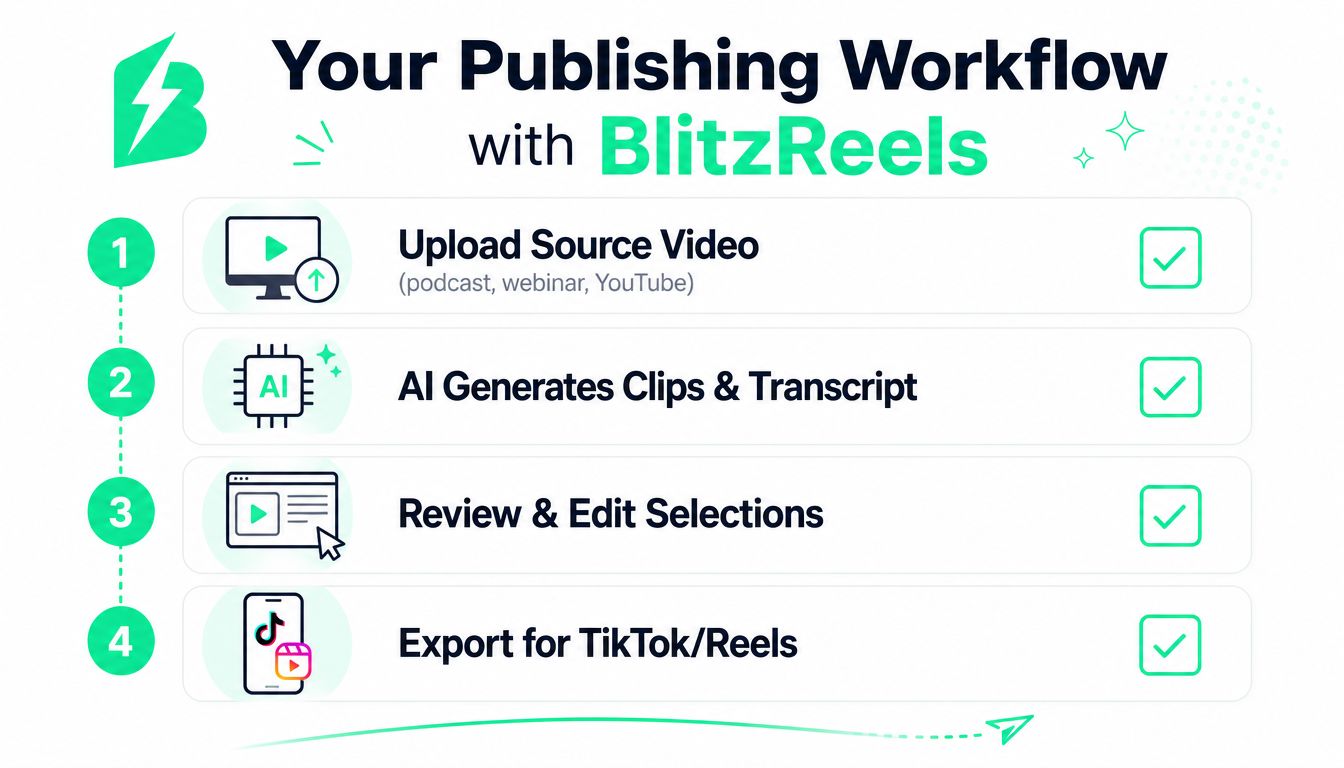
A useful workflow begins with the source, not the prompt. A creator uploads a podcast, webinar, interview, call, or YouTube video, then lets the system create a transcript and propose clips. The first review should happen at the idea level, because a weak selection can't be rescued by better animation.
### A browser workflow for human review
A practical sequence includes:
1. **Upload the source:** Bring in the recording or select an existing workspace asset.
2. **Inspect proposed clips:** Read the transcript and check whether each selection has enough context.
3. **Edit the words:** Remove filler, tighten the start, correct names, and adjust caption text.
4. **Refine the timeline:** Add B-roll or media, title cards, branded elements, and music where appropriate.
5. **Resize and reframe:** Prepare a vertical 1080×1920 composition for TikTok, Reels, or Shorts, then create other platform versions as needed.
6. **Validate the result:** Watch the complete clip, check caption placement, inspect speaker framing, and confirm that the hook appears immediately.
7. **Export and verify:** Start the cloud render, review the finished file, and confirm the export status before publishing.
BlitzReels fits this model as an **agentic AI video editor** with browser-based human review and final control. Its workflow supports clipping, transcript and caption editing, timeline changes, B-roll or media, reframing, templates, validation, and cloud exports for short-form destinations.
### Adding an agentic layer
Developer teams can expose the same operations to Claude, Codex, Cursor, or another agent through BlitzReels' native hosted OAuth MCP server, REST API, TypeScript SDK, CLI with structured JSON, OpenAPI, `llms.txt`, and agent skills. The Model Context Protocol's Streamable HTTP transport uses a single endpoint for JSON-RPC over HTTP POST and can optionally upgrade to Server-Sent Events for streaming. ([Streamable HTTP transport explanation](https://mcp.directory/blog/oauth-21-for-remote-mcp-servers-streamable-http-explained-2026))
An agent can inspect projects, find source assets, create clips, edit transcripts and captions, modify timeline items, add media, validate output, start exports, and verify render status. Human reviewers can then approve the actual creative result instead of manually repeating every mechanical operation.
Architecture still matters:
- **Hosted cloud editors** keep projects, rendering, review, and integrations in one managed environment.
- **Local MCP editors** keep more of the workflow on a user's machine, which may suit teams with local media requirements.
- **Professional-NLE integrations** hand rough cuts or assets to tools built for deep finishing control.
- **FFmpeg servers** provide programmable media processing, but they generally require a separate layer for semantic selection, transcript editing, review, and project management.
The [video repurposing tool guide](https://blitzreels.com/blog/video-repurposing-tool) offers another way to frame the workflow. The important design choice is to connect selection, editing, validation, and rendering instead of automating only the first cut.
## Limitations Privacy and How to Choose the Right Tool
AI still needs human review for three reasons. First, a transcript can mishear a name, product term, or technical phrase. Second, a model can select a sentence that sounds compelling but loses its original context. Third, brand and compliance decisions require judgment about claims, permissions, sensitive information, and whether a speaker intended a statement for public distribution.
Privacy deserves the same attention as editing speed. Teams should identify who owns the source recording, whether every speaker consented to repurposing, how uploaded media is handled, and which internal or customer details appear in calls and webinars. A workflow that can export quickly still fails if it publishes confidential information or uses a clip outside the permission granted for the original recording.
### A practical buying checklist
Before choosing a tool, test it with representative source material and check:
- **Source handling:** Can it accept the length, format, and audio conditions of real recordings?
- **First-clip speed:** How long does analysis take before a reviewer can inspect a candidate?
- **Selection quality:** Does each clip preserve a complete thought, or does it merely detect activity?
- **Caption support:** Can editors correct captions, control styling, and use the required languages?
- **Translation and dubbing:** Are these available when the publishing plan needs them, and can humans review the result?
- **Reframing:** Does the crop follow speakers and important visual details in vertical layouts?
- **Exports:** Are resolution, platform formats, render status, and usage caps clearly documented?
- **Automation:** Does the tool offer an API, SDK, CLI, MCP, or another reliable integration path?
- **Pricing:** Can the team understand what counts toward processing, storage, exports, and collaboration?
The market context supports a measured pilot. Current estimates place the category in the hundreds of millions of dollars, with projections reaching several billion dollars over the next decade. ([Grand View Research market analysis](https://www.grandviewresearch.com/industry-analysis/ai-video-generator-market-report)) That indicates a maturing software category, not proof that every generator will fit every workflow.
A sensible pilot uses real recordings, a defined review owner, a small set of brand templates, and a publishing cadence the team can sustain. Keep the edit human-led when the material involves legal risk, sensitive customers, nuanced claims, or high-production storytelling. Use automation where the work is repetitive and inspectable, especially transcript preparation, clip creation, caption updates, resizing, validation, and render tracking.
---
BlitzReels provides an agentic AI video editor for creating, editing, captioning, resizing, and repurposing branded clips from podcasts, webinars, interviews, calls, and YouTube videos. Visit [BlitzReels](https://blitzreels.com) to connect browser review with hosted OAuth MCP, REST API, SDK, CLI, and cloud export workflows for short-form publishing.