---
title: "AI Video Editor for TikTok: Edit Shorts 10x Faster in 2026"
canonical: "https://blitzreels.com/blog/ai-video-editor-for-tiktok"
---
# AI Video Editor for TikTok: Edit Shorts 10x Faster in 2026
URL: https://blitzreels.com/blog/ai-video-editor-for-tiktok
Markdown URL: https://blitzreels.com/blog/ai-video-editor-for-tiktok.md
Published: 2026-05-22
Author: BlitzReels
Discover how an AI video editor for TikTok can automate captions, clipping, and resizing. Learn key features and a workflow to create viral shorts faster.
Tags: ai video editor, tiktok editor, short form video, video editing ai, blitzreels

You film a 20-second TikTok in five minutes, then spend 45 minutes fixing the parts viewers notice first. The pause before the hook. The caption timing that lands half a beat late. The frame that cuts off your face just enough to feel sloppy. Short-form editing gets slow because tiny decisions stack up, and each one affects whether someone keeps watching or swipes.
An AI video editor for TikTok helps because those edits shape retention, not just speed. Auto-cuts can tighten the first two seconds. Caption syncing can keep viewers reading instead of dropping. Reframing can keep the subject centered so the video feels native to vertical from the first frame. Used well, these tools function as retention engineering for short-form video, helping raise watch time and earn more replays while cutting production time.
That trade-off matters. Faster output only helps if the finished video holds attention. Teams trying to publish consistently usually need both, which is why many creators now build an [AI editing workflow that cuts video production time in half](https://www.blitzreels.com/blog/ai-tools-that-halve-your-video-editing-time) instead of treating AI as a basic convenience feature.
## Table of Contents
- [Why Your TikToks Take Too Long to Edit](#why-your-tiktoks-take-too-long-to-edit)
- [The real time sink isn't the timeline](#the-real-time-sink-isnt-the-timeline)
- [Understanding How an AI Video Editor Works](#understanding-how-an-ai-video-editor-works)
- [What the software is actually doing](#what-the-software-is-actually-doing)
- [Why that process matters on TikTok](#why-that-process-matters-on-tiktok)
- [Core AI Features That Drive TikTok Engagement](#core-ai-features-that-drive-tiktok-engagement)
- [Captions aren't a compliance feature](#captions-arent-a-compliance-feature)
- [Clipping determines whether the hook exists](#clipping-determines-whether-the-hook-exists)
- [Reframing and visual inserts protect attention](#reframing-and-visual-inserts-protect-attention)
- [Create a Viral TikTok in Minutes with BlitzReels](#create-a-viral-tiktok-in-minutes-with-blitzreels)
- [A practical five-step workflow](#a-practical-five-step-workflow)
- [Where human refinement still matters](#where-human-refinement-still-matters)
- [How to Choose the Right AI Video Editor](#how-to-choose-the-right-ai-video-editor)
- [A neutral checklist that actually matters](#a-neutral-checklist-that-actually-matters)
- [Where short-form creators should be skeptical](#where-short-form-creators-should-be-skeptical)
- [Best Practices for AI-Powered Video Creation](#best-practices-for-ai-powered-video-creation)
- [Use AI for the first draft, not final taste](#use-ai-for-the-first-draft-not-final-taste)
- [Build repeatable systems around your style](#build-repeatable-systems-around-your-style)
- [Don't confuse activity with improvement](#dont-confuse-activity-with-improvement)
- [Frequently Asked Questions About AI Video Editors](#frequently-asked-questions-about-ai-video-editors)
- [Can AI edit a TikTok without human input](#can-ai-edit-a-tiktok-without-human-input)
- [Will TikTok penalize AI-generated or AI-edited content](#will-tiktok-penalize-ai-generated-or-ai-edited-content)
- [What should an AI video editor for TikTok actually include](#what-should-an-ai-video-editor-for-tiktok-actually-include)
- [How much does an AI video editor cost](#how-much-does-an-ai-video-editor-cost)
- [How can a creator keep a unique brand style when using templates](#how-can-a-creator-keep-a-unique-brand-style-when-using-templates)
## Why Your TikToks Take Too Long to Edit
A creator records a ninety-second talking clip that should become a twenty-second TikTok. The raw material is already there. What slows everything down is the manual cleanup. Someone has to find the strongest line, cut the pauses, build captions that are readable on a phone, and reframe the speaker so the face doesn't drift out of the center.
That process gets worse when one clip needs multiple versions. A single idea might need a punchier hook, a cleaner title card, a shorter middle, and a different crop for a second test. None of that work is hard in isolation. It's repetitive, and repetitive work is what turns short-form publishing into a bottleneck.
### The real time sink isn't the timeline
Often, editing software is blamed. The bigger issue is decision fatigue.
- **Hook selection:** The strongest line is rarely where recording started.
- **Caption cleanup:** Auto-transcripts need emphasis, line breaks, and pacing.
- **Visual framing:** Wide footage often looks weak when forced into vertical.
- **Versioning:** Testing different openings or title cards creates duplicate labor.
> **Practical rule:** If every TikTok starts from a blank timeline, posting consistency usually collapses before content quality does.
An AI editor helps because it removes the lowest-yield work first. It can surface candidate highlights, generate captions, resize footage, and produce an initial cut that's close enough to refine instead of build from scratch. That first draft is where most time disappears in manual workflows.
A useful way to think about it is this: TikTok editing isn't one task. It's a chain of micro-decisions. The longer that chain stays manual, the harder it is to publish consistently without burning out. For a deeper breakdown of where the time goes, this guide on [AI tools that halve your video editing time](https://www.blitzreels.com/blog/ai-tools-that-halve-your-video-editing-time) maps the friction points well.
## Understanding How an AI Video Editor Works
A usable AI video editor does more than speed up editing. It makes early retention decisions before you touch the timeline.
That distinction matters on TikTok because the first seconds usually determine whether a viewer keeps watching, replays the opening, or scrolls. AI editing systems are built to process signals that affect those outcomes fast: speech timing, visual focus, scene changes, and text placement. In practice, the software is handling the repeatable parts of retention engineering so the editor can spend time on the choices that need taste.
TikTok's own creation tools have pushed in this direction over the last few years, with features aimed at clipping, reframing, and generating draft structure from longer footage. That shift is significant because AI editing is no longer a side workflow for power users. It is now part of how short-form platforms expect videos to be produced.
### What the software is actually doing
Most AI editors run through a sequence like this:
1. **Audio analysis.** The tool transcribes speech, maps pacing, and identifies pauses, emphasis, and sentence boundaries.
2. **Visual analysis.** It detects faces, motion, shot changes, and where the subject should sit in a vertical frame.
3. **Segment selection.** It marks candidate clip points based on topic shifts, punchlines, strong phrasing, or changes in energy.
4. **Draft assembly.** It generates captions, applies crops, trims dead space, and outputs a first cut that is already watchable.
The software is not replacing editorial judgment. It is pattern matching at scale.
That is useful because weak TikTok edits usually fail in predictable ways. The hook starts half a second late. The speaker's face drifts off-center. Captions appear in bulky blocks that take too long to read. AI can catch those issues early and produce a draft with fewer retention leaks.
### Why that process matters on TikTok
Manual editing often treats every step as a production task. On TikTok, each step also affects watch time.
A tighter first cut reduces empty space before the payoff. Better reframing keeps the subject visually anchored, which lowers the chance of a fast swipe. Cleaner caption timing makes the video easier to follow with sound off, and easier to rewatch when the pacing feels intentional. If you track performance closely, those small choices are often the difference between a video that stalls and one that earns extra distribution.
Here is the practical view:
| Editing task | Manual outcome | AI-assisted outcome |
|---|---|---|
| Caption timing | Readable after manual cleanup | Draft subtitles aligned to speech rhythm |
| Vertical reframing | Depends on hand-set crop choices | Subject kept centered from the first pass |
| Clip selection | Slow review of raw footage | Stronger moments surfaced early |
| Draft structure | Built shot by shot | Usable rough cut ready for refinement |
I treat AI as the first-pass editor, not the final editor. That keeps the workflow honest. The machine handles speed and consistency. The human decides what deserves emphasis, what should be cut even if it is accurate, and whether the opening is strong enough to earn another second of attention.
For a plain-language breakdown of how these systems are organized, the [BlitzReels concepts documentation](https://www.blitzreels.com/docs/concepts) is a useful reference. If you are also benchmarking performance, this guide on how to [improve TikTok campaigns with REACH](https://reach-influencers.com/tiktok-engagement-rate/) helps connect editing decisions to engagement signals.
## Core AI Features That Drive TikTok Engagement
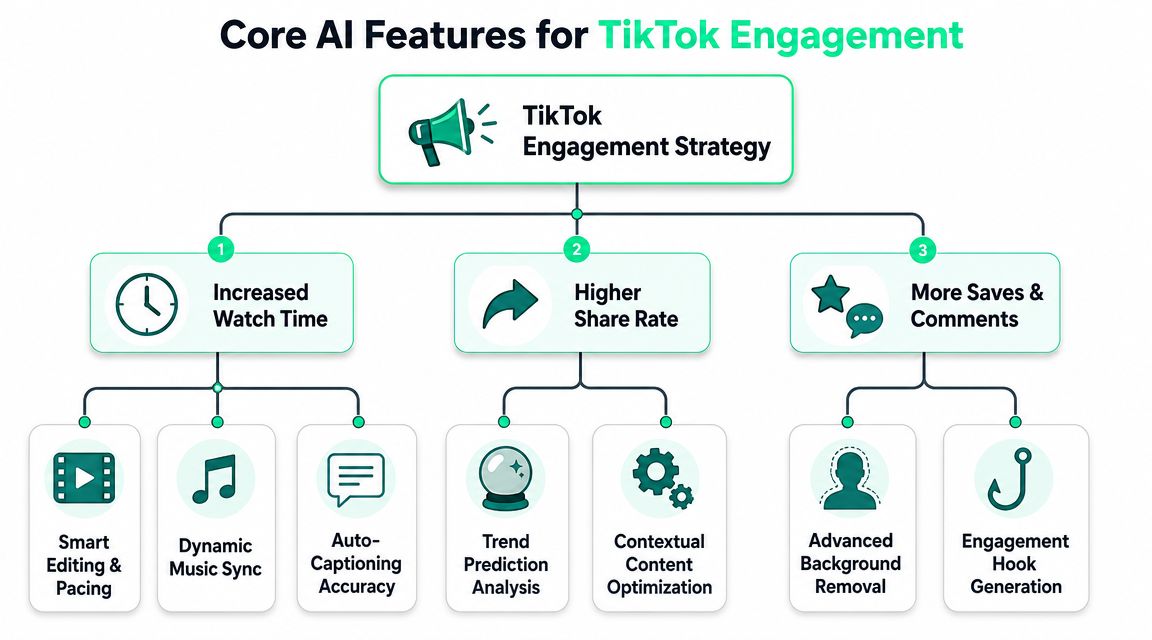
Speed is the obvious reason people adopt AI editing. It's not the most important one. The more valuable question is whether a feature changes how long viewers stay with the video.
That's where most AI tool marketing misses the point. As noted by [Vizard's discussion of retention-focused editing](https://vizard.ai), the market is crowded with “make videos faster” messaging, while far fewer tools explain how edits affect retention. For TikTok, that difference matters because choices like subtitle density, face centering, and B-roll insertion can act as **measurable levers** for reducing early drop-off.
### Captions aren't a compliance feature
On TikTok, captions do more than transcribe. They control reading rhythm.
If the subtitle block is too dense, the viewer has to work. If it's too sparse, the clip feels flat. Good AI captioning gives editors a draft they can tighten into short, visual phrases. That helps the eye move with the message instead of lagging behind it.
Useful caption decisions include:
- **Short line grouping:** Easier to scan during fast speech
- **Keyword emphasis:** Directs attention to the claim or punchline
- **On-beat timing:** Makes the spoken line feel sharper
- **Safe placement:** Prevents overlap with TikTok interface elements
For a more campaign-level lens on what engagement signals matter around shares, saves, and interaction patterns, this breakdown on how to [improve TikTok campaigns with REACH](https://reach-influencers.com/tiktok-engagement-rate/) adds useful context.
### Clipping determines whether the hook exists
A lot of weak TikToks fail before the viewer even knows the topic. The edit starts too early. There's a greeting, a setup line, or a slow sentence that belongs in the trash.
AI clipping helps by surfacing the likely “start here” moments. It doesn't guarantee a great opening, but it reduces the time wasted digging through footage for one. Editors still need to choose the version that creates curiosity, tension, or specificity.
A stronger opening usually comes from one of these patterns:
- **Start with the problem.**
- **Lead with the surprising claim.**
- **Show the result before the explanation.**
- **Cut the intro phrase entirely.**
### Reframing and visual inserts protect attention
A bad crop makes a video feel amateur immediately. On mobile, viewers notice when a face sits too low, too far off-center, or gets clipped by the interface. Reframing isn't cosmetic. It affects whether the frame feels stable enough to keep watching.
B-roll and visual inserts do a different job. They reset attention. If a talking-head segment runs too long, a quick supporting visual can keep the pace alive without changing the spoken message.
> A retention edit isn't the one that looks smartest on the timeline. It's the one that gives the viewer a reason not to swipe.
For creators testing subtitle styles specifically, this article on [crafting viral TikToks with AI captions in 2026](https://www.blitzreels.com/blog/crafting-viral-tiktoks-with-ai-captions-in-2026) is worth reading because it connects caption design choices to actual short-form pacing.
## Create a Viral TikTok in Minutes with BlitzReels
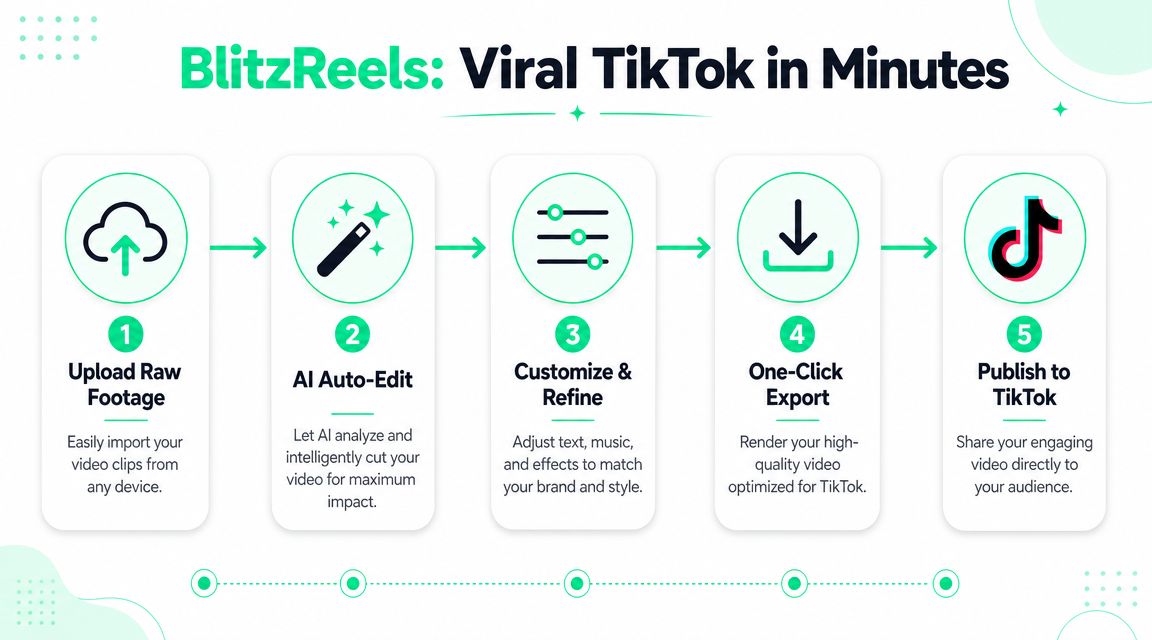
The most practical AI workflow starts with rough footage and ends with a vertical draft that's already close to publish-ready. That means one tool should handle ingest, clipping, captions, reframing, and export in the same pass. According to [InVideo's explanation of end-to-end TikTok editing workflows](https://invideo.io/make/tiktok-video-editor/), an effective AI editor automates the whole short-form assembly line, from script or video input to scene generation, captions, and TikTok-ready export. That matters because the opening hook and pacing are where short-form engagement is most sensitive.
A process like that is what short-form creators need from [BlitzReels editor](https://www.blitzreels.com/editor): upload raw footage, get a clipped draft, refine the captions and framing, then export a vertical version without rebuilding the edit manually.
### A practical five-step workflow
1. **Upload the source file**
Start with a podcast segment, webcam clip, product demo, screen recording, or talking-head video. Clean source audio helps transcription, but the bigger win is having enough spoken material for the system to identify strong cut points.
2. **Let the AI build the first draft**
The tool transcribes the audio, detects candidate highlights, and applies an initial vertical crop. This first pass should already remove obvious pauses and surface several workable openings.
3. **Fix the hook before anything else**
Don't start with fonts or colors. Start with the first sentence and the first frame. If the opening doesn't create curiosity, no amount of styling will rescue retention later.
A quick product walk-through can help visualize what that flow looks like in practice:
### Where human refinement still matters
Once the draft exists, the editing priority shifts.
- **Tune caption pacing:** Break long lines into sharper beats.
- **Adjust reframing:** Check face position against title cards and TikTok UI.
- **Insert visual resets:** Add B-roll or zoom changes where a monologue starts to flatten.
- **Choose a title card that earns the next second:** Useful title cards create tension, not clutter.
A strong short usually comes from this order of operations:
| Priority | What to adjust | Why it matters |
|---|---|---|
| First | Hook and opening frame | Determines whether the scroll stops |
| Second | Caption timing and emphasis | Improves readability and rhythm |
| Third | Crop and face position | Keeps the frame clear on mobile |
| Fourth | Visual variety | Prevents the middle from feeling static |
> **Editing sequence:** Fix retention problems before design polish. A clean hook beats a fancy template every time.
Templates still matter, especially when creators publish often. But the useful template isn't the loudest one. It's the one that standardizes title cards, caption style, and spacing so the editor can spend less energy on repeated formatting and more on the opening and pacing.
## How to Choose the Right AI Video Editor
Most AI editors look similar on the landing page. The difference shows up after the upload. Some are built for novelty generation. Some are decent subtitle tools. Some can support a repeatable short-form workflow across TikTok, Reels, and Shorts.
The first filter should be technical fit. TikTok's baseline format is **vertical 9:16 at 1080x1920**, with **MP4 and MOV** as supported upload types, as outlined in [LTX Studio's TikTok editor specification guide](https://ltx.studio/platform/tiktok-video-editor). If a tool can't reliably resize, normalize, and reframe for that output, it's already creating more work than it removes.
### A neutral checklist that actually matters
When comparing tools, these questions are more useful than feature grids full of buzzwords:
- **Does it handle vertical reframing well?**
Face tracking and subject centering matter more than flashy transitions.
- **Can it produce usable captions fast?**
Not just transcripts. Real subtitle styling, timing, and layout controls.
- **Does it support clipping and repurposing?**
This matters if source footage comes from podcasts, interviews, webinars, or longer takes.
- **How easy is versioning?**
TikTok often rewards iteration. Testing two hooks shouldn't require rebuilding the whole edit.
- **Is export friction low?**
Social creators need quick exports in common formats without awkward resizing surprises.
A broader roundup like [PostClaw on AI for social media](https://www.postclaw.io/blog/ai-tools-for-social-media-marketing) can help if the goal is comparing editing tools with adjacent scheduling and social workflow options.
### Where short-form creators should be skeptical
Some tools are great at generating a draft but weak at refinement. Others have strong manual editors but barely automate anything useful. That trade-off matters because TikTok editing lives in the middle. The draft has to appear quickly, and the finishing controls have to be good enough to shape retention.
Here's a simple comparison lens:
| Tool type | Strength | Weakness |
|---|---|---|
| Template-heavy editors | Fast to start | Can feel generic fast |
| Auto-caption tools | Good for subtitles | Weak on clipping and structure |
| AI generators | Fast ideation | Often need cleanup for brand consistency |
| Short-form workflow editors | Better balance of speed and control | Still need human judgment on hooks |
For creators weighing a direct alternative, this comparison of [CapCut vs BlitzReels for TikTok creators](https://www.blitzreels.com/blog/capcut-vs-blitzreels-which-video-editor-is-best-for-tiktok-creators-in-2025) is useful because it focuses on editing workflow trade-offs rather than generic feature lists.
## Best Practices for AI-Powered Video Creation
The strongest creators don't use AI to avoid editing. They use it to avoid wasting judgment on mechanical work. That difference is becoming more important as AI video production moves into the mainstream. A **2025 survey cited by Glean found that nearly 52% of TikTok ads were either AI-generated or customized with AI tools**, which signals that AI-assisted video production is now a standard part of platform-native marketing workflows at scale, according to [Glean's analysis of video content creation tools](https://www.glean.com/perspectives/best-video-content-creation-tools).

### Use AI for the first draft, not final taste
A good rule is simple: let AI create the rough cut, then let the editor shape the experience. The machine can transcribe, clip, resize, and suggest structure. It can't reliably decide which phrase sounds on-brand, which pause adds tension, or which joke needs a beat longer to land.
That human layer is where the video stops feeling generic.
- **Review the first three seconds manually**
- **Rewrite title cards that sound templated**
- **Trim captions for reading speed, not transcript accuracy**
- **Remove visual clutter that distracts from the point**
### Build repeatable systems around your style
The fastest workflows usually come from presets. Not just templates for colors and fonts, but repeatable editorial choices.
For example, a creator might standardize:
- opening title card style
- caption placement
- default zoom behavior
- B-roll pacing
- end-screen call-to-action format
That doesn't make videos repetitive. It makes the editing process lighter. Then the creator can spend saved time on scripting, hooks, and trend adaptation instead of rebuilding visual identity every time.
If the content also gets repurposed beyond TikTok, platform specs become part of the system. For instance, anyone adapting shorts into Instagram should keep a reference like [learn Instagram video specs on taap.bio](https://taap.bio/blog/instagram-video-file-format) bookmarked so exports don't break on secondary channels.
> The creators getting the most from AI aren't outsourcing taste. They're protecting it by automating everything around it.
### Don't confuse activity with improvement
More posts don't automatically mean better results. AI makes volume easier, but low-retention videos still stay low-retention videos. The useful habit is to review which edits correlate with stronger holds: a tighter hook, fewer words on screen, clearer face framing, or a better visual reset in the middle.
That's the right use of AI in short-form. Not just faster production. Better production loops.
## Frequently Asked Questions About AI Video Editors
### Can AI edit a TikTok without human input
Yes, an AI tool can generate a complete draft without manual editing. It can clip footage, add captions, apply a vertical crop, and export a postable file.
That doesn't mean the result will be the strongest version. Human review still matters most in the hook, title card wording, subtitle pacing, and whether the clip creates curiosity in the opening seconds.
### Will TikTok penalize AI-generated or AI-edited content
There's no useful reason to assume TikTok punishes content just because AI helped make it. What matters more is whether the video holds attention, feels native to the platform, and delivers a clear idea quickly.
Low-quality AI output can underperform, but that's a quality problem, not an “AI” problem. Stiff voiceover, generic visuals, and cluttered captions usually fail because they're weak creative choices.
### What should an AI video editor for TikTok actually include
A practical tool should cover the full short-form workflow, not just one piece of it. The most useful features are:
- **Auto-clipping:** Finds candidate moments worth turning into shorts
- **Captions:** Produces readable subtitle drafts with timing
- **Reframing:** Keeps the subject centered in a vertical crop
- **Resizing:** Exports clean social formats without awkward borders
- **Hook support:** Makes it easier to test better openings
- **Templates:** Speeds up repeated formatting and branding
If a tool only does one of those well, creators usually end up stitching together multiple apps.
### How much does an AI video editor cost
Pricing varies a lot by tool and plan, so broad claims aren't useful here. Some tools have free tiers with limits. Others charge for exports, features, or AI usage.
The better question is whether the tool replaces enough repetitive work to justify itself. For most creators, the biggest value comes from fewer manual caption passes, faster clipping, easier resizing, and less time rebuilding edits for each platform.
### How can a creator keep a unique brand style when using templates
Templates should handle structure, not personality. A creator keeps brand style by customizing the parts viewers notice: wording, humor, pacing, visual references, and emphasis.
A simple method works well:
1. Keep one or two template systems for layout.
2. Rewrite every hook manually.
3. Adjust caption emphasis to match speaking style.
4. Use recurring visual cues consistently.
That balance gives the speed of automation without making every post feel interchangeable.
---
BlitzReels is one option for creators who want a practical short-form workflow that covers clipping, captions, reframing, resizing, and repurposing in one place. For anyone publishing regularly on TikTok, Reels, or Shorts, the useful test isn't whether AI can edit a video. It's whether the tool helps produce stronger openings, cleaner pacing, and more repeatable posting without adding new friction. See how [BlitzReels](https://blitzreels.com) fits that workflow.