---
title: "Boost Workflow: AI Video Editor Online Guide 2026"
canonical: "https://blitzreels.com/blog/ai-video-editor-online"
---
# Boost Workflow: AI Video Editor Online Guide 2026
URL: https://blitzreels.com/blog/ai-video-editor-online
Markdown URL: https://blitzreels.com/blog/ai-video-editor-online.md
Published: 2026-05-28
Author: BlitzReels
Discover how an AI video editor online transforms your workflow. Explore key features, benefits, and create high-performing short videos fast in 2026.
Tags: ai video editor online, short form video, ai video editing, video content creation, social media video

A short-form creator usually doesn't lose momentum when recording. The slowdown starts after that. One clip needs dead space trimmed. Another needs captions cleaned up. A third has to be resized for TikTok, Instagram Reels, YouTube Shorts, and LinkedIn. Then the title card feels weak, the framing is off in vertical, and publishing slips another day.
That's why interest in an **AI video editor online** has moved from curiosity to workflow necessity. The category itself is already substantial. The **AI in video editing market** was valued at about **US$0.9 billion in 2023** and is projected to reach **US$4.4 billion by 2033**, with a **17.2% CAGR** over 2024 to 2033, according to [this video editing market summary](https://electroiq.com/stats/video-editing-statistics). That same summary notes strong cloud adoption, which fits how most creators now want to work: in a browser, fast, collaborative, and built for publishing speed.
Short-form creators don't need another complicated editor. They need software that removes friction from the record, edit, caption, resize, and publish loop. A practical look at that shift appears in this [AI-led video workflow breakdown](https://www.blitzreels.com/blog/let-ai-handle-the-edits-your-new-video-workflow), which reflects how many creators now think about editing. Less timeline labor, more output.
## Table of Contents
- [The End of the Endless Editing Loop](#the-end-of-the-endless-editing-loop)
- [What Exactly Is an Online AI Video Editor](#what-exactly-is-an-online-ai-video-editor)
- [A smart assistant, not a magic button](#a-smart-assistant-not-a-magic-button)
- [How the editing role changes](#how-the-editing-role-changes)
- [Key AI Features That Accelerate Short-Form Content](#key-ai-features-that-accelerate-short-form-content)
- [Features that save the most time](#features-that-save-the-most-time)
- [Features that help the video hold attention](#features-that-help-the-video-hold-attention)
- [What sounds good in demos but often disappoints](#what-sounds-good-in-demos-but-often-disappoints)
- [How to Choose the Right AI Video Editor for You](#how-to-choose-the-right-ai-video-editor-for-you)
- [The buying mistake most creators make](#the-buying-mistake-most-creators-make)
- [AI Video Editor Selection Criteria](#ai-video-editor-selection-criteria)
- [A practical way to narrow the list](#a-practical-way-to-narrow-the-list)
- [Example Workflow Creating a Viral Short with BlitzReels](#example-workflow-creating-a-viral-short-with-blitzreels)
- [Start with the source video](#start-with-the-source-video)
- [Build the short around the hook](#build-the-short-around-the-hook)
- [Finish for platform fit, not just export](#finish-for-platform-fit-not-just-export)
- [From Faster Edits to Better Performance](#from-faster-edits-to-better-performance)
## The End of the Endless Editing Loop
Manual short-form editing breaks down in predictable places. The creator records a podcast snippet, webinar answer, product demo, or talking-head rant. Then the actual work begins. Cut the pauses. Add captions. Resize to vertical. Fix the crop. Add a hook. Export. Re-export.
None of that is hard in theory. It's just repetitive enough to kill consistency.
A browser-based AI editor changes that rhythm. Instead of scrubbing frame by frame, the creator starts with a transcript, suggested clips, auto-generated captions, and a layout that already understands vertical formats. The shift matters because social posting rewards consistency more than editing heroics.
> **Practical rule:** If a workflow makes simple repurposing feel heavy, the posting schedule will usually collapse before the content strategy does.
Short-form teams feel this first, but solo creators do too. The bottleneck usually isn't recording enough material. It's turning recorded material into enough publishable assets without opening a full traditional timeline for every clip.
Three tasks create the most drag:
- **Repetitive trimming:** Removing silences, filler words, and awkward starts takes attention that should go into choosing stronger moments.
- **Caption formatting:** Basic subtitles aren't enough for Shorts, Reels, and TikTok. Creators usually need readable styling, emphasis, timing, and brand consistency.
- **Platform resizing:** Horizontal footage has to survive the jump to vertical without cutting off faces, products, or on-screen demos.
That's why online AI editors have become mainstream software, not a side experiment. The market growth cited earlier supports what creators already feel in practice. This isn't just about editing faster. It's about making regular posting realistic.
## What Exactly Is an Online AI Video Editor
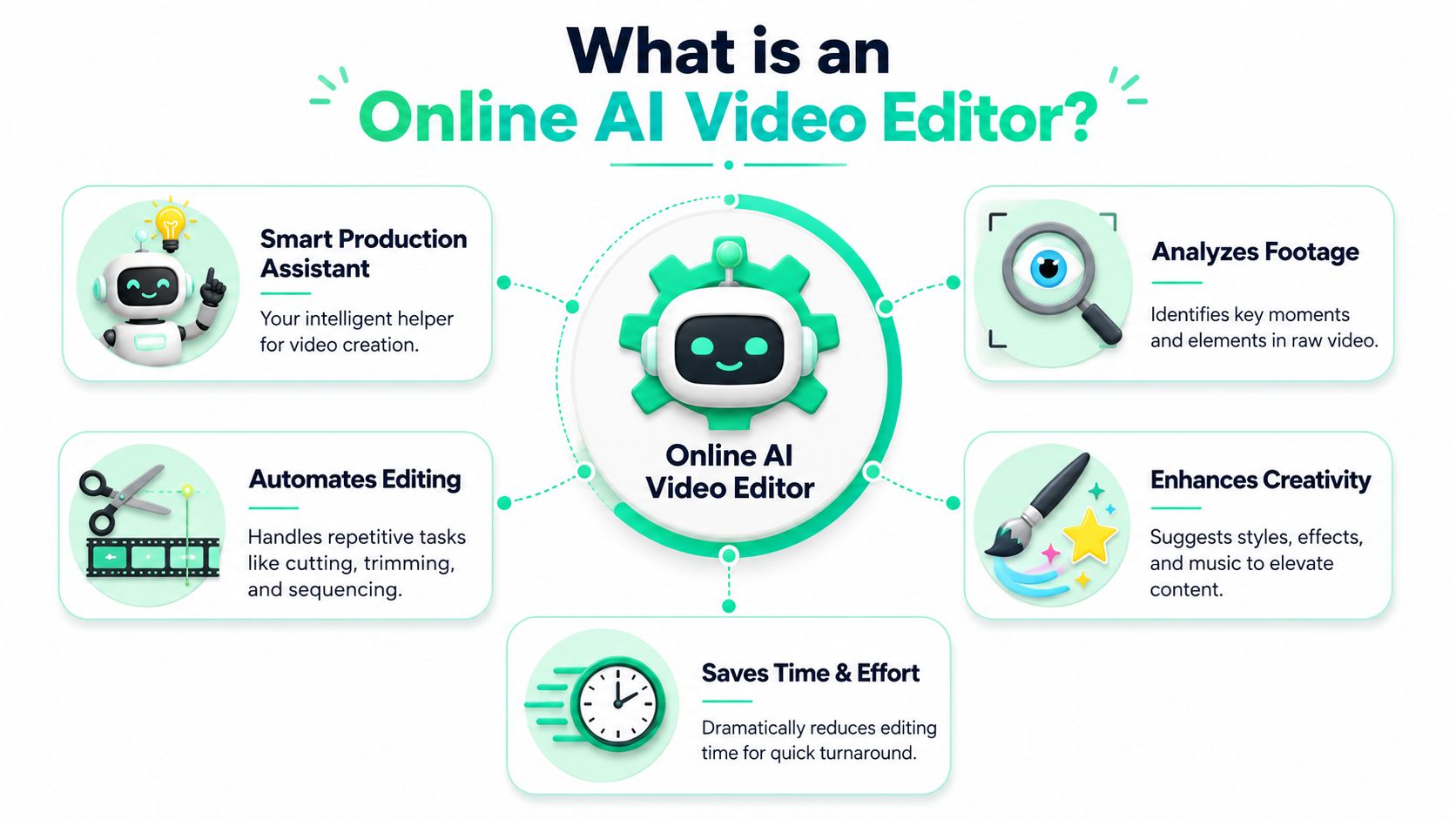
An online AI video editor is best understood as a **smart production assistant** inside the editing process. It doesn't replace judgment. It handles the pattern recognition and repetitive assembly work that used to eat most of the session.
### A smart assistant, not a magic button
The underlying mechanics are more practical than mystical. AI video editors combine **speech-to-text transcription, computer vision, and natural-language controls** so the software can trim silences, generate captions, detect faces, and reframe shots for different aspect ratios, as described in [Coursera's overview of AI for video production](https://www.coursera.org/learn/ai-for-video-production).
That combination matters because short-form editing is rarely one task. A tool needs to understand what's being said, what's visible on screen, and where attention should go in a vertical layout. Good products merge those signals instead of forcing the editor to solve each piece separately.
A useful mental model looks like this:
- **Speech recognition** finds words worth clipping and turns spoken audio into editable text.
- **Visual analysis** identifies faces, text on screen, speakers, and framing needs.
- **Prompt or text-based control** lets the creator steer edits without deep timeline work.
For teams trying to standardize this kind of production, this [guide to AI video editing for teams](https://www.trupeer.ai/blog/ai-video-editing) gives a helpful adjacent view of where workflow gains tend to come from across collaborative publishing.
### How the editing role changes
With traditional software, the editor spends most of the time constructing the first usable version. With an AI video editor online, the software often produces that rough cut first. The creator then rejects weak choices, tightens strong ones, rewrites the opening hook, and adjusts captions or crops.
That's a better use of human attention.
> The fastest AI editors don't win because they automate everything. They win when they automate the boring parts and leave the important choices easy to control.
The strongest use case is repurposing long recordings into short clips. A webinar, interview, podcast, or screen recording already contains multiple ideas. AI systems can scan words, audio, and visual cues in parallel, which is why they can surface candidate moments much faster than manual review.
What they still don't do perfectly is preserve nuance every time. A clip can be technically clean and still miss the point of the original answer. That's why the creator's job shifts from manual cutting to editorial supervision. The tool supplies speed. The human protects meaning.
## Key AI Features That Accelerate Short-Form Content
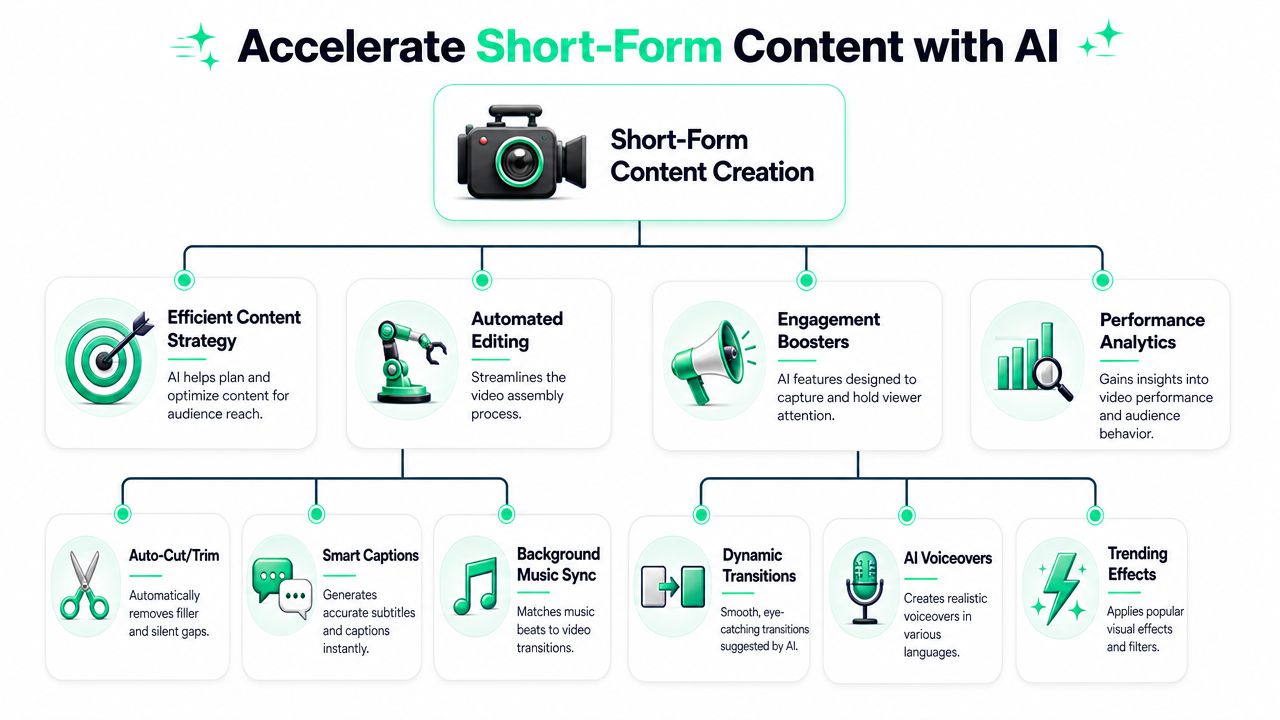
Short-form creators don't need every AI feature. They need the features that remove friction between raw footage and a publishable vertical clip. The core technical advantage comes from automating high-friction post-production steps such as **caption generation, aspect-ratio conversion, scene selection, and visual enhancement**, as reflected in [Microsoft Azure AI Video Indexer](https://azure.microsoft.com/en-us/products/ai-video-indexer).
### Features that save the most time
The biggest time-savers are usually the least glamorous.
- **AI clipping:** This is the feature that matters most for repurposing. The tool scans a long recording and surfaces moments that already feel self-contained. That's far more useful than dumping the user into a blank timeline with a transcript and no ranking.
- **Auto-captions with styling:** Basic subtitles are easy to find. What saves time is captioning that already supports bold emphasis, line breaks that fit mobile screens, and easy preset styling.
- **Auto-reframing:** Widescreen footage often looks broken in 9:16 if the crop doesn't follow the speaker. Face-aware reframing removes a lot of manual keyframing.
- **One-click resizing:** Shorts teams constantly move between aspect ratios. Fast resizing helps creators reuse the same asset without rebuilding the composition each time.
A good feature stack should shorten the path to first draft. It shouldn't create a new pile of settings to manage.
For a practical feature-focused perspective, this [look at AI editing features for scaling content output](https://www.blitzreels.com/blog/ai-video-editing-features-to-scale-your-content-output) matches what high-frequency short-form publishers tend to value most.
### Features that help the video hold attention
Speed gets the clip made. Attention gets it watched.
The most useful engagement features usually sit around the opening seconds and the visual pacing:
- **Hook and title card support:** A strong opener can come from the spoken line itself, but many clips need a clearer first screen. Good tools make title overlays fast to add and easy to test.
- **Template-driven styling:** Templates are underrated. They keep caption design, spacing, color, and motion consistent across a publishing batch.
- **Visual inserts and B-roll cues:** Smart inserts can help break up static talking-head footage, especially in educational or product content.
- **Speaker-centered crops:** Viewers tolerate simple editing. They don't tolerate a crop that loses the speaker's eyes, reaction, or demo area.
Some creators also explore adjacent creative workflows such as [generate videos with AI face swap](https://testimonial.to/ai-face-swap-technology-create-high-quality-videos-in-minutes/all) when they need alternate presentation formats, though that sits outside the core short-form editing stack and needs careful judgment about brand fit and trust.
> **Editor's note:** For social clips, clean pacing beats fancy effects almost every time. A tight first sentence, readable captions, and stable framing usually matter more than extra transitions.
### What sounds good in demos but often disappoints
Several AI features look impressive in product demos and underdeliver in day-to-day use.
First, fully automatic clip selection can miss context. A line may sound punchy on its own but depend on the sentence before it. Second, over-designed caption animation can make a clip feel noisier, not stronger. Third, generative scene changes and aggressive visual replacement can alter the original meaning of an educational, professional, or trust-sensitive clip.
Short-form creators should treat AI as a speed layer, not an excuse to stop editing. The best workflows keep three human checks in place:
1. **Does the opening line still make sense without setup**
2. **Does the crop support the point being made**
3. **Do captions increase clarity instead of visual clutter**
If the answer to any of those is no, the edit isn't finished, even if the export is technically ready.
## How to Choose the Right AI Video Editor for You
Most creators compare AI editors the wrong way. They focus on feature volume instead of workflow fit. A tool can list captions, clipping, templates, and resizing, then still feel slow if those pieces don't work well together.
The better question is simpler. What kind of short-form work needs to happen every week, and where does the current process stall?
### The buying mistake most creators make
A creator repurposing podcasts needs different strengths than a brand making direct-to-camera product clips. A social media manager handling founder videos needs different controls than a faceless content publisher. The “best” AI video editor online depends on whether the job starts with long footage, raw camera takes, screen recordings, or idea-first templates.
That's why broad roundup lists rarely help much. A criteria-based view is more honest. This [directory of AI video editors](https://www.blitzreels.com/best/ai-video-editors) is useful for scanning options, but the final choice still comes down to production style.
> Buy for the bottleneck, not the demo. If caption cleanup eats the week, prioritize caption control. If repurposing is the problem, prioritize transcript clipping and reframing.
### AI Video Editor Selection Criteria
| Criteria | What to Look For | Why It Matters for Short-Form |
|---|---|---|
| Content starting point | Support for long-form repurposing, raw uploads, or both | Some tools are strong at clipping recordings. Others are better for building quick shorts from scratch |
| Caption control | Editable transcript, style presets, emphasis options, readable mobile layouts | Captions are part of the creative, not just accessibility text |
| Reframing and resizing | Reliable vertical crops, face tracking, fast aspect ratio switching | A clip that looks fine in landscape can fail immediately on mobile |
| Hook and title workflow | Easy title cards, opening text overlays, quick intro edits | The first seconds usually decide whether the clip earns attention |
| Template quality | Reusable short-form templates for different platforms | Consistency matters when publishing often |
| Manual override | Fast timeline or text-based corrections | AI picks the first draft. Humans still need to correct weak choices |
| Export fit | Clean exports for TikTok, Reels, Shorts, and LinkedIn | Friction at export slows publishing and creates duplicate work |
| Ease of use | Browser speed, low setup, short learning curve | A powerful tool that feels heavy won't get used consistently |
| Pricing model | Clear subscription or usage logic | Frequent publishers need predictable cost and output planning |
### A practical way to narrow the list
A quick selection process works better than prolonged tool shopping.
- **If the main job is repurposing long recordings,** prioritize transcript-led clipping, silence removal, and strong vertical reframing.
- **If the main job is daily creator posting,** prioritize caption presets, title cards, mobile-first templates, and export speed.
- **If the workflow involves teams,** prioritize shared templates, review simplicity, and predictable styling.
- **If the content is trust-sensitive,** look closely at how much the tool auto-edits versus how easily the editor can preserve context.
Many creators also overlook the emotional side of software choice. If an editor makes experimentation feel expensive, output drops. If it makes rough drafts cheap and quick, creators test more hooks, more angles, and more posting formats. That matters as much as the spec sheet.
## Example Workflow Creating a Viral Short with BlitzReels
By **2025, approximately 40% of video editors** are expected to use **AI-driven tools** for tasks like color grading and audio automation, according to [this industry analysis on video creation tools](https://www.glean.com/perspectives/best-video-content-creation-tools). For short-form publishing, that broader shift shows up most clearly in faster rough cuts, auto-captioning, and reusable social formatting.
### Start with the source video
The workflow starts with a source file that already contains usable ideas. That could be a podcast recording, webinar answer, screen recording, product demo, or direct-to-camera monologue. The first step is upload.
Once the video is in, the tool generates a transcript and identifies likely cut points. That changes the editing posture immediately. Instead of hunting through a waveform, the editor can scan language and jump to moments with a clear opinion, lesson, or punchline.
For creators who need a setup reference before testing a platform, the [BlitzReels quickstart guide](https://www.blitzreels.com/docs/quickstart) shows the basic sequence cleanly.
### Build the short around the hook
A short clip usually earns attention or loses it in the opening beat. The selected clip should begin with a statement that feels complete, surprising, useful, or emotionally direct. If the raw line is strong but the first frame isn't, a title card can carry that burden.
A practical production sequence looks like this:
1. **Choose the moment with a standalone idea.** Podcast banter often needs trimming before it becomes a social clip.
2. **Let captions render early.** Seeing the text often reveals whether the clip is concise.
3. **Apply a readable style preset.** Bold, on-beat captions work better when they feel deliberate, not decorative.
4. **Check the vertical crop.** Faces, gestures, and product visuals should stay centered.
5. **Add a title hook only if needed.** If the spoken first line already lands, extra text can dilute it.
6. **Tighten the end.** Most shorts benefit from cutting out the soft landing after the point has been made.
For idea generation upstream of editing, some creators use outside resources such as [BlogTok for TikTok content inspiration](https://blogtok.app/blog/10-tiktok-content-ideas-for-2026) to pressure-test formats and hook angles before clipping source material.
> A viral short usually doesn't feel “edited.” It feels immediate. The craft is in removing drag between the first frame and the point.
### Finish for platform fit, not just export
Export isn't the end of the workflow. Platform fit is.
A clip for TikTok or Reels may need harder caption styling than a clip intended for LinkedIn. A founder video may need a cleaner title card than a creator rant. A product short may need more space around the demo area and less aggressive zoom.
The final review should cover four things:
- **Opening clarity:** Does the first second create enough context to continue watching?
- **Caption readability:** Can someone understand it quickly with sound off?
- **Framing:** Does the crop support the point, or fight it?
- **Ending:** Does the clip stop with intention, not drift out?
That's where AI editing proves its value. It gets the short close fast. The creator still decides whether the clip deserves to be published.
## From Faster Edits to Better Performance
Fast editing is useful, but it isn't the primary objective. The harder question is whether AI-edited shorts improve retention, watch time, and distribution outcomes. That tension matters because many tools promise efficiency long before they prove performance. A thoughtful discussion of that gap appears in this [analysis on whether AI editing improves video outcomes](https://www.youtube.com/watch?v=dbiyuJ-u1os).
The practical takeaway is simple. Automation should create space for better judgment. If AI handles clipping, captions, resizing, and rough assembly, the creator can spend more time on hooks, packaging, pacing, and publishing consistency.
That's where the upside sits.
Creators who treat AI as a shortcut to generic content often end up with clean but forgettable videos. Creators who use it to remove mechanical work usually get something better. More reps. More tests. More polished shorts. More room to repurpose strong ideas across platforms. This broader [AI repurposing approach for multiplying video content](https://www.blitzreels.com/blog/multiply-your-video-content-with-ai-repurposing) captures that strategic shift well.
---
BlitzReels is built for creators and teams who want less editing friction and more publish-ready short-form output. If the goal is to turn recordings into captioned, resized, vertical clips faster, [BlitzReels](https://blitzreels.com) is worth trying.