---
title: "Automatic Caption Generator: A Complete Guide"
canonical: "https://blitzreels.com/blog/automatic-caption-generator"
---
# Automatic Caption Generator: A Complete Guide
URL: https://blitzreels.com/blog/automatic-caption-generator
Markdown URL: https://blitzreels.com/blog/automatic-caption-generator.md
Published: 2026-08-03
Author: BlitzReels
Learn how an automatic caption generator boosts engagement and accuracy for TikTok, Reels, and Shorts in 2026.
Tags: automatic caption generator, video captions, short-form video, AI subtitles, caption styling

The market for **AI subtitle generation** was worth **USD 1.03 billion in 2023** and is projected to reach **USD 7.42 billion by 2032**, with a **24.5% CAGR** over the forecast period, which tells you something blunt about where short-form video has landed. Captions aren't a decorative layer anymore. They're part of the delivery system for every clip that has to survive silent scrolling, compressed attention spans, and ruthless feed competition.
That shift also explains why so many teams now lean on an **automatic caption generator** instead of hand-typing subtitles line by line. Modern systems can hit **90% to 98% accuracy** on clear audio in common languages like English, Spanish, and Mandarin, which is good enough to change production economics for creators who publish constantly. The question isn't whether captions matter, it's whether the tool fits the way short-form video gets made.
## Table of Contents
- [Why Captions Are the Primary Hook in Short-Form Video](#why-captions-are-the-primary-hook-in-short-form-video)
- [Why retention starts with legibility](#why-retention-starts-with-legibility)
- [How Automatic Caption Generators Work](#how-automatic-caption-generators-work)
- [From audio to word sequence](#from-audio-to-word-sequence)
- [A good example of tool-oriented capture](#a-good-example-of-tool-oriented-capture)
- [What to Look for in a Caption Generator for Short-Form Content](#what-to-look-for-in-a-caption-generator-for-short-form-content)
- [Key Selection Criteria](#key-selection-criteria)
- [A Practical Workflow for Captioning Short-Form Videos](#a-practical-workflow-for-captioning-short-form-videos)
- [The review pass that saves the upload](#the-review-pass-that-saves-the-upload)
- [Burned-in text or subtitle file](#burned-in-text-or-subtitle-file)
- [Styling Captions That Hold Viewer Attention](#styling-captions-that-hold-viewer-attention)
- [What Helps the Eye Move](#what-helps-the-eye-move)
- [Style choices that usually fail](#style-choices-that-usually-fail)
- [When Auto-Captions Are Not Good Enough](#when-auto-captions-are-not-good-enough)
- [A simple decision rule](#a-simple-decision-rule)
- [What changes the risk level](#what-changes-the-risk-level)
- [Scaling Captions Across Platforms and Languages](#scaling-captions-across-platforms-and-languages)
- [What scales and what doesn't](#what-scales-and-what-doesnt)
## Why Captions Are the Primary Hook in Short-Form Video
A clip can have a clean cut, tight pacing, and a strong opening line, then still lose people because the first frame does not communicate fast enough. Captions have shifted from an accessibility feature to the **primary attention mechanism** in short-form feeds. On mobile, viewers often decide whether to stay before the audio matters, so the text on screen has to carry meaning immediately.
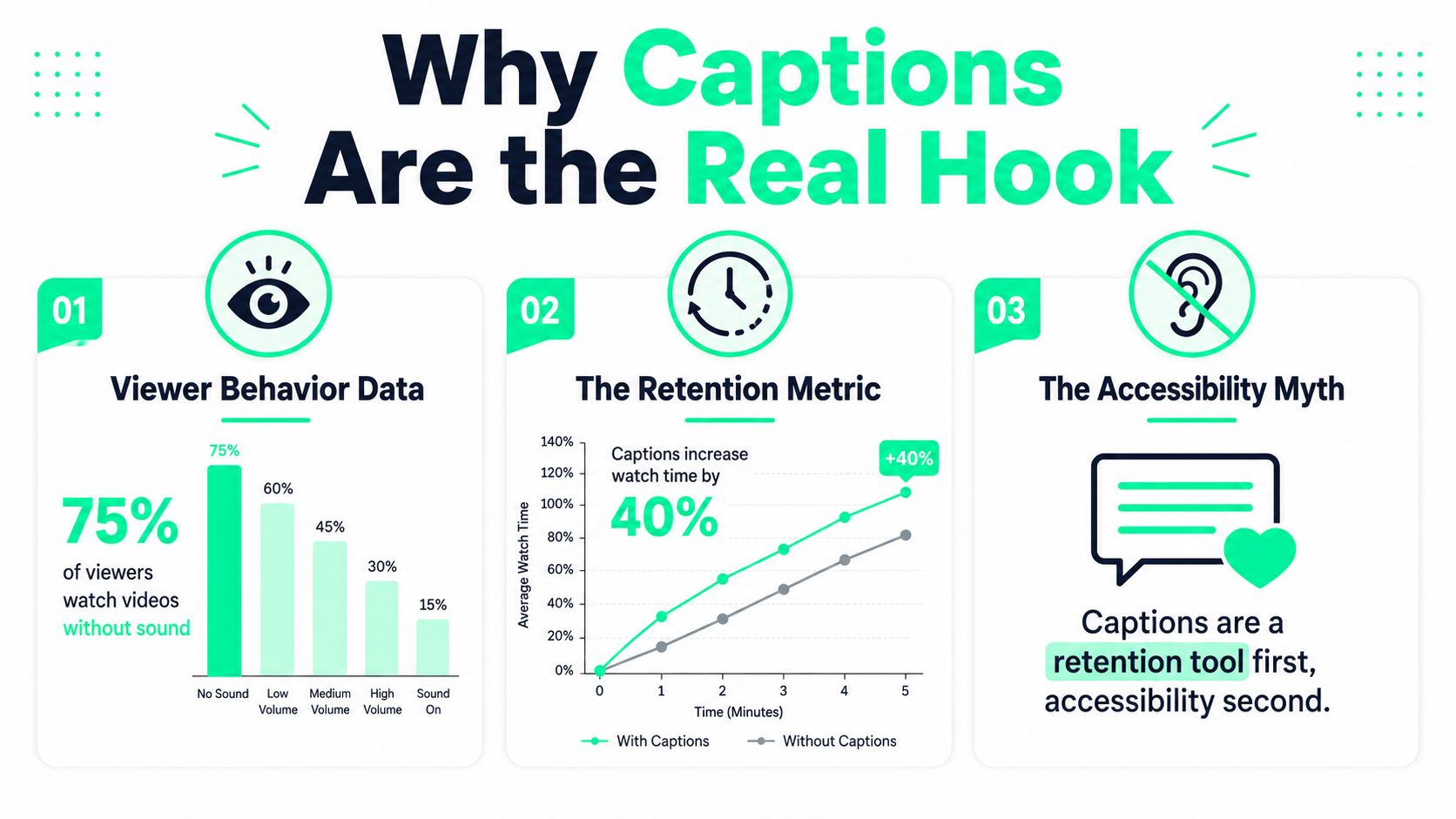
> **Practical rule:** if a clip only makes sense with sound on, it is already behind.
The old habit is to treat captions as a post-production chore. That may work on long-form uploads where the viewer opts in, but short-form behaves differently. A creator can lose the opening seconds to silence, clutter, or weak visual hierarchy, and no amount of polish later in the timeline can recover that missed start.
### Why retention starts with legibility
A viewer on TikTok, Reels, Shorts, or LinkedIn does not need a transcript. They need a readable line of thought. Caption placement, line length, and timing have to work together, because the job of a caption is to make the next beat obvious before the viewer swipes away.
Creators who treat captions as a pacing tool use them to expose the hook, support the punchline, and keep the eye moving through the frame. MrBeast's team is a useful example. Their captions are not decoration, they are part of the edit rhythm, so the viewer gets the setup fast and never waits for the point. A flat subtitle layer does the opposite. It adds text without helping the clip move, which is why the frame can feel busy without becoming clearer.
The strategic link is simple. If captions are the interface, then the **automatic caption generator** is not just a transcription tool. It becomes part of the retention stack, right alongside clipping, reframing, and the opening title card. For a practical breakdown of how captions affect engagement behavior on social feeds, see [how captions drive engagement on TikTok and Instagram](https://www.blitzreels.com/blog/how-captions-drive-engagement-on-tiktok-and-instagram). If you need a tool reference, the **WaveGen.ai caption maker** fits into that workflow without changing the pacing decisions that keep viewers watching.
## How Automatic Caption Generators Work
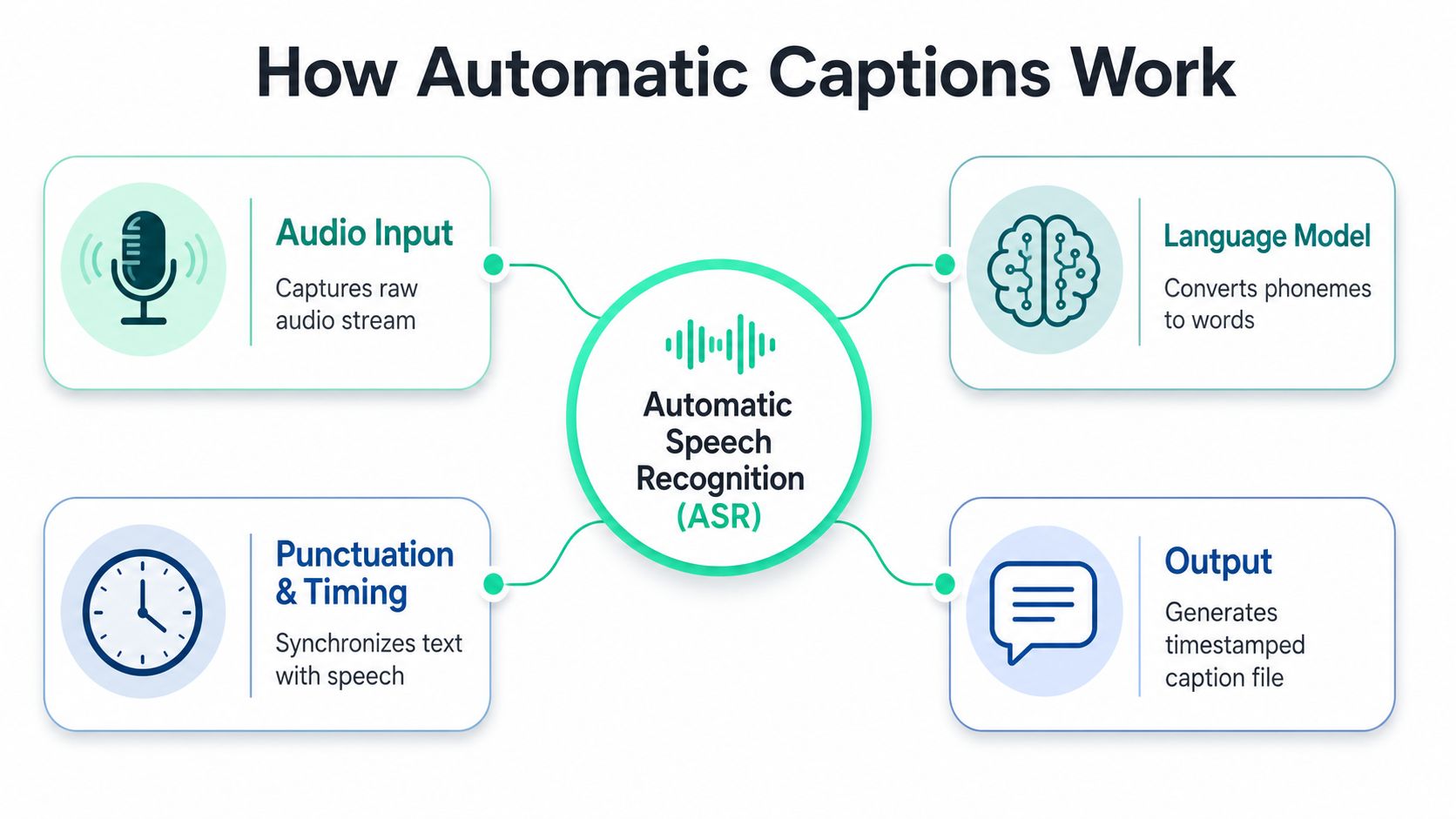
An **automatic caption generator** usually starts with **Automatic Speech Recognition**, or **ASR**, which converts spoken audio into timestamped text. Canva describes auto captions as computer-generated transcriptions produced with ASR, and ScreenPal frames the same process as identifying spoken dialogue and turning it into on-screen text for viewers to read. That basic mechanism is easy to understand, but the difference between a usable caption file and a frustrating one comes from what happens after the first transcript pass.
### From audio to word sequence
Technically, stronger systems often use an **encoder-decoder pipeline**. A convolutional vision encoder extracts spatial features from frames, then an LSTM or transformer decoder turns those features into word sequences token by token, which matters because the model has to learn both meaning and order, not just isolated words. In video captioning, temporal modeling helps the system recognize motion and event order, which is why a caption tool that ignores timing often feels late or oddly disconnected from the scene.
For a deeper walkthrough of transcription handling in video workflows, the guide on [how to transcribe video to text](https://www.blitzreels.com/blog/how-to-transcribe-video-to-text) is a useful companion.
> The model can be fast and still feel wrong if the timing layer doesn't respect speech rhythm.
That's the failure mode creators run into most often. Fast speakers, overlapping voices, or cut-heavy edits can make text lag behind the spoken line, which creates a visual stutter even when the words are mostly correct. A solid caption generator doesn't just recognize words, it keeps the captions aligned with the edit cadence.
### A good example of tool-oriented capture
Some tools make this architecture easier to judge because they expose the workflow more clearly. A resource like [WaveGen.ai caption maker](https://wavegen.ai/ai-caption-generator) is useful as a reference point for how teams package speech-to-text, editing, and export into one pass. The main thing to look for is not whether the tool sounds intelligent, but whether it gives enough control to fix timing, punctuation, and readability before publishing.
The most practical takeaway is that caption quality is partly model quality and partly workflow quality. The generator can only work with the audio it hears, but the editor can rescue a lot if the tool lets creators inspect the transcript quickly and adjust it without friction.
## What to Look for in a Caption Generator for Short-Form Content
Short-form teams need a different tool than webinar editors. Long-form platforms often optimize for transcript fidelity, collaboration, and archive use, while short-form tools have to move quickly, style text for a phone screen, and export in formats that fit TikTok, Reels, Shorts, and LinkedIn without a second round of rework. The wrong tool wastes time even when the transcript is technically good.
| Criterion | Long-Form Tools | Short-Form Optimized Tools |
|---|---|---|
| Generation speed | Acceptable for slower, batch-oriented workflows | Fast enough for same-day publishing |
| Conversational accuracy | Strong on clean narration, weaker on messy clips | Better tuned for casual speech and edits |
| Styling flexibility | Often limited or buried in advanced menus | Visible controls for bold text, colors, and motion |
| Export options | Transcript-first, file-focused | Sidecar subtitles, burned-in captions, platform-ready outputs |
| Editing workflow fit | Often separate from clipping or resizing | Built to sit beside reframing, clipping, and repurposing |
### Key Selection Criteria
**Generation speed** becomes a real filter when a trend is moving and the clip has to ship fast. An industry guide published in 2026 says most auto-caption tools can generate captions for **1 hour of video in under 5 minutes**, which shows how quickly the category has moved compared with manual workflows. That speed matters less for archives and more for creators trying to publish in the same cycle as the trend.
**Accuracy on conversational audio** is where a lot of tools start to break down. Short-form content is rarely recorded like a studio podcast, so cross-talk, filler words, and casual phrasing are normal. A good generator keeps the transcript readable even when the audio is messy. **Styling flexibility** changes how the clip feels on screen. Overdesigned captions can pull attention away from the speaker, while clean caption design can make a rough cut feel intentional instead of improvised.
**Platform-ready export options** save a second round of cleanup. VEED's workflow, for example, follows the familiar upload, generate, customize, and export path, while tools that support SRT or VTT make it easier to reuse captions elsewhere. For a useful comparison built around social video, the [AI caption generator for social media](https://sleekpost.com/blog/ai-social-media-caption-generator) overview is worth a look because it frames the trade-offs around feed-first publishing instead of desktop editing.
**Integration with clipping, reframing, and resizing** is the hidden difference-maker. A tool that only subtitles a clip still leaves the hardest production work undone. A short-form stack should help with hook selection, cropping, and vertical formatting so the editor is not manually stitching separate tools together for every post. For a direct product-level reference, [BlitzReels AI caption generator](https://www.blitzreels.com/ai-caption-generator) shows what an integrated short-form workflow looks like when captioning sits next to editing instead of apart from it.
> A caption tool should reduce decisions, not create a second editing job.
## A Practical Workflow for Captioning Short-Form Videos
The cleanest caption workflow is still fairly simple, upload, generate, review, export. The friction shows up in the details, especially when the source clip has slang, names, or noisy room sound that the model doesn't hear cleanly. Teams lose time not in generation, but in the review pass where they realize the transcript is technically complete and still not publishable.
### The review pass that saves the upload
The first decision is language and dialect. CapCut, for example, lets users choose spoken language and can optionally enable bilingual subtitles and auto-highlight keywords before generation, while ScreenPal says it supports **88 dialects** for speech-to-text captioning. That matters because a tool that misreads regional pronunciation or mixed-language delivery will need more cleanup than the editor expected.
The second pass is timing. Clean studio audio with a single English speaker can reach **90% to 95% accuracy** in the 2026 guide, and a practical post-edit pass of about **15 minutes** is often enough to fix the rest. That estimate is useful because it keeps expectations realistic. A creator still has to scan for proper nouns, filler words, and line breaks that crowd the frame.
A useful real-world sequence looks like this.
1. **Upload the raw clip.** Import the source file, then confirm the tool picked the right spoken language.
2. **Generate the transcript.** Let the model build the first pass without touching style yet.
3. **Edit for meaning and timing.** Fix names, tighten awkward breaks, and remove any caption that hangs too long.
4. **Export the right format.** Burn captions in when the platform needs a styled result, or export SRT or VTT when the subtitle file needs to travel with the video.
### Burned-in text or subtitle file
The export choice depends on where the clip is going. Burned-in captions are convenient for social feeds because the style stays intact, but SRT files are better when the same asset needs to be reused or re-edited later. Tools like VEED, Kapwing, and Adobe Express all support some version of caption export, which is why export flexibility matters as much as the transcription itself.
A caption workflow also sits inside a wider editing loop. The same clip may need trimming, reframing to vertical, a hook in the first line, and a title card before captions even become visible. That's why the fastest teams treat captioning as one stage in a short-form assembly line, not a standalone task.
## Styling Captions That Hold Viewer Attention
Most caption styling advice stops at pick a font and choose a color. That's too shallow for short-form, where the text itself becomes part of the pacing. Styling should be judged by whether it helps the viewer track the thought, not whether it looks flashy in a screenshot.
A small screen punishes weak hierarchy. If every word has the same weight, the eye has nowhere to land. If every line animates the same way, the caption track starts to compete with the footage instead of supporting it.
### What Helps the Eye Move
**Keyword highlighting** works because it gives the viewer a fast anchor inside a dense sentence. **Word-by-word reveals** can help when the speech cadence is steady, but they need restraint, because over-animated captions start to feel like motion graphics instead of subtitles. **Emoji callouts** can reinforce emotional beats in casual content, but they can also dilute authority if the tone is technical or brand-sensitive.
Platform context changes the trade-off. TikTok and Reels often tolerate heavier styling because the feeds reward instant visual energy, while LinkedIn usually benefits from cleaner spacing and less decoration. YouTube Shorts sits in the middle, but the safest rule is still to keep the caption readable without forcing the viewer to decode the layout.
For a deeper style breakdown, [a data-driven guide to styling video captions](https://www.blitzreels.com/blog/a-data-driven-guide-to-styling-video-captions) is useful because it treats visual choices as part of watch behavior, not just branding. BlitzReels also fits into this part of the workflow because it can generate bold, on-beat captions with emoji callouts, then let the editor fine-tune colors, zooms, crops, and overlays without rebuilding the clip from scratch.
### Style choices that usually fail
- **Over-animated words** can distract from the speaker if every syllable pops.
- **Tiny fonts** look neat in desktop previews and collapse on phones.
- **Too much density** makes the frame feel crowded, especially on vertical video.
- **Fancy effects without timing control** create motion, but not clarity.
> If the caption style is the first thing people notice, it's probably doing too much work.
The best caption design is invisible in a good way. It helps the viewer understand the line, track the hook, and keep moving through the clip without feeling like the video is shouting for attention.
## When Auto-Captions Are Not Good Enough
Automatic captions are good enough for a lot of social content, but not every use case deserves the same trust level. The gap between clear studio audio and real-world footage is where most mistakes live, especially when speakers overlap, accents are strong, jargon is heavy, or the clip switches languages mid-sentence. That's the point where a fast transcript stops being a convenience and starts becoming a risk.
YouTube explicitly notes that automatic captions may include inappropriate words and that settings review may be needed. That warning matters because it confirms what creators already see in practice, the system is helpful, but it's not a substitute for judgment when the content has compliance, legal, or brand sensitivity attached to it.
### A simple decision rule
Auto-captions with a quick review pass are usually fine when the goal is reach, speed, and social engagement. They're especially practical for clips where a creator can correct obvious names, fix one or two timing issues, and republish quickly.
Manual review becomes necessary when the clip includes regulated claims, medical or financial language, legal terms, or public-facing statements where one mistaken word can change the meaning. The same is true for multilingual clips where code-switching matters, because machine output often flattens nuance even when the transcript looks clean at a glance.
### What changes the risk level
- **Background noise** makes the first pass less reliable.
- **Multiple speakers** increase speaker-label and overlap errors.
- **Technical jargon** creates terminology mistakes that look small but sound wrong.
- **Mixed-language delivery** can break meaning even when the wording seems close.
The practical move is to define captioning standards by content type. A fast, styled auto-caption is fine for a trending clip. A sensitive client video, a regulated statement, or an accessibility-critical asset deserves a slower review path, and sometimes a manual transcript. The tool is only as trustworthy as the use case it serves.
## Scaling Captions Across Platforms and Languages
A caption file that works on one platform can miss on another. TikTok, Instagram Reels, YouTube Shorts, and LinkedIn reward different caption density, pacing, and visual clutter, so a single subtitle pass usually needs platform-specific cleanup before it performs well. Once a creator repurposes one recording into multiple shorts, caption handling stops being just transcription and becomes part of distribution.
The better tools now do more than output text. They package captions for the format the clip will live in, with auto-resizing for 9:16, 1:1, and 16:9, multilingual caption generation, and styles that hold together when the frame changes.
For teams that run captions through a programmatic workflow, [API-based caption generation](https://renderio.dev/tools/add-subtitles-to-video) shows how repeated subtitle tasks can be automated without rebuilding the same steps by hand every time. For a broader approach to localization, [automating multilingual video captions accurately](https://www.blitzreels.com/blog/automating-multilingual-video-captions-accurately) is worth reading because it treats translation quality, review, and repurposing as one process instead of separate jobs.
### What scales and what doesn't
Machine translation can be good enough when the clip is light on jargon and the audience mainly needs fast comprehension. Native review matters more when the content uses idioms, technical language, or code-switching that a machine system may flatten even if the transcript looks clean.
Repurposing offers a major advantage. A long recording can become several platform-specific shorts if the creator handles caption density, framing, and hook text separately for each destination. One transcript can support multiple edits, but only if the workflow keeps captions, clipping, and resizing connected instead of treating them as unrelated tasks.
Teams that publish at volume usually win by standardizing the repeatable parts, not by trying to make every file perfect. Platform presets, caption templates, and quick review passes keep output consistent, while multilingual support extends reach without forcing a full rebuild for every edit.
BlitzReels is built for that short-form workflow, with automatic captions, clipping, reframing, resizing, and fast editing in one place. If the goal is to turn raw footage into platform-ready TikToks, Reels, Shorts, or LinkedIn clips without slowing the process down, visit [BlitzReels](https://blitzreels.com) and see how the captioning and repurposing tools fit into a faster publishing loop.