---
title: "Clip YouTube Video: The 2026 Creator Guide"
canonical: "https://blitzreels.com/blog/clip-youtube-video"
---
# Clip YouTube Video: The 2026 Creator Guide
URL: https://blitzreels.com/blog/clip-youtube-video
Markdown URL: https://blitzreels.com/blog/clip-youtube-video.md
Published: 2026-05-20
Author: BlitzReels
Learn how to clip youtube video in 2026. Use native tools & AI for TikTok, Reels & Shorts. Master the workflow.
Tags: clip youtube video, video clipping, youtube shorts, repurpose video, content creation

A lot of creators already have the raw material. The problem isn't making more content. It's that a strong webinar, interview, tutorial, or YouTube upload sits in the library untouched because turning it into short-form clips feels slow, messy, and too manual.
That's why “clip youtube video” is the wrong question to stop at. Trimming a moment out of a long upload is easy. Turning that moment into a publish-ready Short, Reel, TikTok, or LinkedIn video with a clean crop, readable captions, a sharp hook, and the right format is where most workflows break down.
## Table of Contents
- [Why "Clipping" is Only Half the Battle](#why-clipping-is-only-half-the-battle)
- [Using YouTube's Native Clipping and Editing Tools](#using-youtubes-native-clipping-and-editing-tools)
- [The Clip button and what it actually does](#the-clip-button-and-what-it-actually-does)
- [The YouTube Studio editor and where it helps](#the-youtube-studio-editor-and-where-it-helps)
- [How to Create Standalone Video Files from YouTube](#how-to-create-standalone-video-files-from-youtube)
- [The three main methods](#the-three-main-methods)
- [Comparison of YouTube Clipping Methods](#comparison-of-youtube-clipping-methods)
- [What professionals usually optimize for](#what-professionals-usually-optimize-for)
- [The Modern Workflow for Repurposing Clips into Shorts](#the-modern-workflow-for-repurposing-clips-into-shorts)
- [Start with moments, not minutes](#start-with-moments-not-minutes)
- [Reframe for mobile before polishing](#reframe-for-mobile-before-polishing)
- [Add the elements that make a clip watchable](#add-the-elements-that-make-a-clip-watchable)
- [Understanding Rights Permissions and Best Practices](#understanding-rights-permissions-and-best-practices)
- [What to do before clipping any video](#what-to-do-before-clipping-any-video)
- [Use analytics to find your own best moments](#use-analytics-to-find-your-own-best-moments)
- [FAQ About Clipping YouTube Videos](#faq-about-clipping-youtube-videos)
- [Can someone clip another person's YouTube video and post it on social media?](#can-someone-clip-another-persons-youtube-video-and-post-it-on-social-media)
- [What's the fastest way to turn one long YouTube video into multiple short clips?](#whats-the-fastest-way-to-turn-one-long-youtube-video-into-multiple-short-clips)
- [Is YouTube's Clip feature enough for Shorts or Reels?](#is-youtubes-clip-feature-enough-for-shorts-or-reels)
- [What makes a clipped video feel weak even when the source content is good?](#what-makes-a-clipped-video-feel-weak-even-when-the-source-content-is-good)
- [Should every YouTube clip be posted in the same format everywhere?](#should-every-youtube-clip-be-posted-in-the-same-format-everywhere)
## Why "Clipping" is Only Half the Battle
Creators usually hit the same wall. They have a useful long video with several strong moments inside it, but every clip still needs reframing, captions, resizing, title cards, and a clean intro before it's worth posting anywhere else.
That matters because YouTube is massive. It was founded by three former PayPal employees, and by May 2019 users were uploading **more than 500 hours of video every minute**, which makes it an enormous source of long-form footage for repurposing into Shorts, Reels, and TikTok clips, as noted in YouTube's history. The opportunity isn't access to footage. The bottleneck is turning that footage into platform-ready assets quickly enough to publish consistently.
A manual trim gives a creator a fragment. A real short-form workflow produces a finished deliverable. That means the subject is centered in a vertical frame, captions are readable without sound, and the first seconds make someone stop scrolling.
> **Practical rule:** A good clip pulled from YouTube still isn't a good short until it's been reformatted for the feed it's entering.
The biggest mistake is treating clipping as the finish line. It's only the extraction step. The hard part is adaptation, especially when one source video needs to become several assets for different platforms and posting windows.
A stronger mindset is to treat every long upload as a source file, not a final file. That's the same logic behind [why repurposed clips drive more engagement than originals](https://www.blitzreels.com/blog/why-repurposed-clips-drive-more-engagement-than-originals). The clip itself matters, but speed, packaging, and format-fit usually decide whether it gets posted or abandoned in the drafts folder.
## Using YouTube's Native Clipping and Editing Tools
YouTube does offer built-in tools, and they're useful in narrow situations. They're just not a full short-form production system.
### The Clip button and what it actually does
The native **Clips** feature works well for quick sharing. A viewer or creator can select a segment from a video, create a clip, and share that moment with a link. But it has hard limits. YouTube's native Clips feature only supports segments between **5 and 60 seconds**, and it creates a **shareable link rather than a downloadable file**, according to this breakdown of [YouTube clipping limits and creator options](https://shortgenius.com/blog/how-to-get-clips-from-youtube-videos).
That's the key trade-off. A clip link is handy for sending someone a moment inside a YouTube video. It isn't the same as generating an asset for Shorts, Reels, or TikTok.
Short-form publishing usually needs extra steps:
- **Vertical reframing:** A horizontal frame rarely survives untouched on mobile-first feeds.
- **Caption styling:** Native clip sharing doesn't create on-screen captions for reposting.
- **Export control:** A share link can't replace a standalone video file in a posting workflow.
### The YouTube Studio editor and where it helps
Inside YouTube Studio, creators can open the **Editor**, use **Trim & Cut**, and save changes either to the current upload or as a new video. That's useful when the goal is to clean up a full video, remove dead air, or cut out a section permanently.
It's less useful when the goal is to clip youtube video content into several distinct social assets. Studio isn't built for rapid batch repurposing. It also doesn't solve title cards, branded templates, or social-ready caption layouts.
> Native YouTube tools are good for platform maintenance. They're not built for high-output short-form packaging.
For creators comparing approaches before moving into a faster workflow, [Mallary.ai's clipping techniques](https://mallary.ai/blog/how-to-take-clips-from-youtube-videos) are a useful reference because they show where simple extraction ends and editing work begins.
One recurring miss is subtitles. If a creator relies on YouTube alone, the next job is still making the clip understandable off-sound, which is why many teams look for ways to [automate YouTube subtitles and reach a global audience](https://www.blitzreels.com/blog/automate-youtube-subtitles-and-reach-a-global-audience) before they start distributing short-form edits elsewhere.
## How to Create Standalone Video Files from YouTube
Once native clipping runs into its limits, the next question is practical. How does a creator get an actual file they can edit, resize, caption, and upload elsewhere?
There are three common paths. Each one has trade-offs.
### The three main methods
**Screen recording** is the fastest fallback when nothing else is available. It works, but quality can slip, accidental UI elements can appear, and the process gets tedious if several clips are needed from one source.
**Downloader sites or browser tools** can be fast, but they introduce risk. File quality, reliability, and safety vary. They also raise obvious rights questions if the source video isn't the creator's own content.
**AI clipping platforms** are the modern production route. A practical workflow is to import the source video or paste the URL, let AI scan for highlight-worthy moments, review and refine the segments, then apply brand elements and export in vertical **9:16** formats for Shorts, TikTok, and Reels, as described in [this clipping workflow guide](https://www.choppity.com/blog/how-to-clip-youtube-videos/).
### Comparison of YouTube Clipping Methods
| Method | Speed | Quality | Ease of Use | Best For |
|---|---|---|---|---|
| Screen recording | Quick for one-off captures | Variable, depends on playback and recording setup | Simple, but repetitive | Emergency captures and rough drafts |
| Downloader websites | Often fast | Inconsistent | Easy when they work | Occasional file grabs with caution |
| AI clipping platforms | Fast once the workflow is set | Strong, because clips can be edited before export | Easier at scale | Repurposing long videos into multiple short-form assets |
The core dividing line is output. If the result still needs separate trimming, reframing, subtitles, and resizing in another app, the first step didn't save much time.
### What professionals usually optimize for
Most serious workflows optimize for four things at once:
- **File control:** The output needs to be a standalone video, not just a link.
- **Format readiness:** Vertical crops and platform sizing need to happen before export.
- **Editing speed:** Good moments should be found quickly, not scrubbed manually for hours.
- **Repeatability:** The same process should work every week without adding friction.
That's why many creators end up using purpose-built tools rather than patching together recording and download steps. For example, [effective YouTube clipping strategies](https://timeskip.io/blog/clip-in-youtube) are helpful when evaluating how much of the process should be automated versus done by hand.
A practical option in that category is [BlitzReels' video to MP4 tool](https://www.blitzreels.com/tools/video-to-mp4), which fits the basic need to turn source footage into a workable file before moving into editing and formatting. The important part isn't the conversion alone. It's whether that file can move straight into a short-form workflow without extra cleanup.
## The Modern Workflow for Repurposing Clips into Shorts
Most tutorials stop too early. They explain how to cut a moment out of a video, then leave the creator holding a raw horizontal segment that still won't perform on short-form feeds.
Many tutorials only answer **“how do I trim a video?”** and not **“how do I turn a long recording into a platform-native short fast enough to post consistently?”** Recent creator workflows are shifting toward **AI clipping, auto-captioning, and auto-reframing** as standard expectations, as discussed in [this workflow-focused video](https://www.youtube.com/watch?v=AA-QKdBfweE).
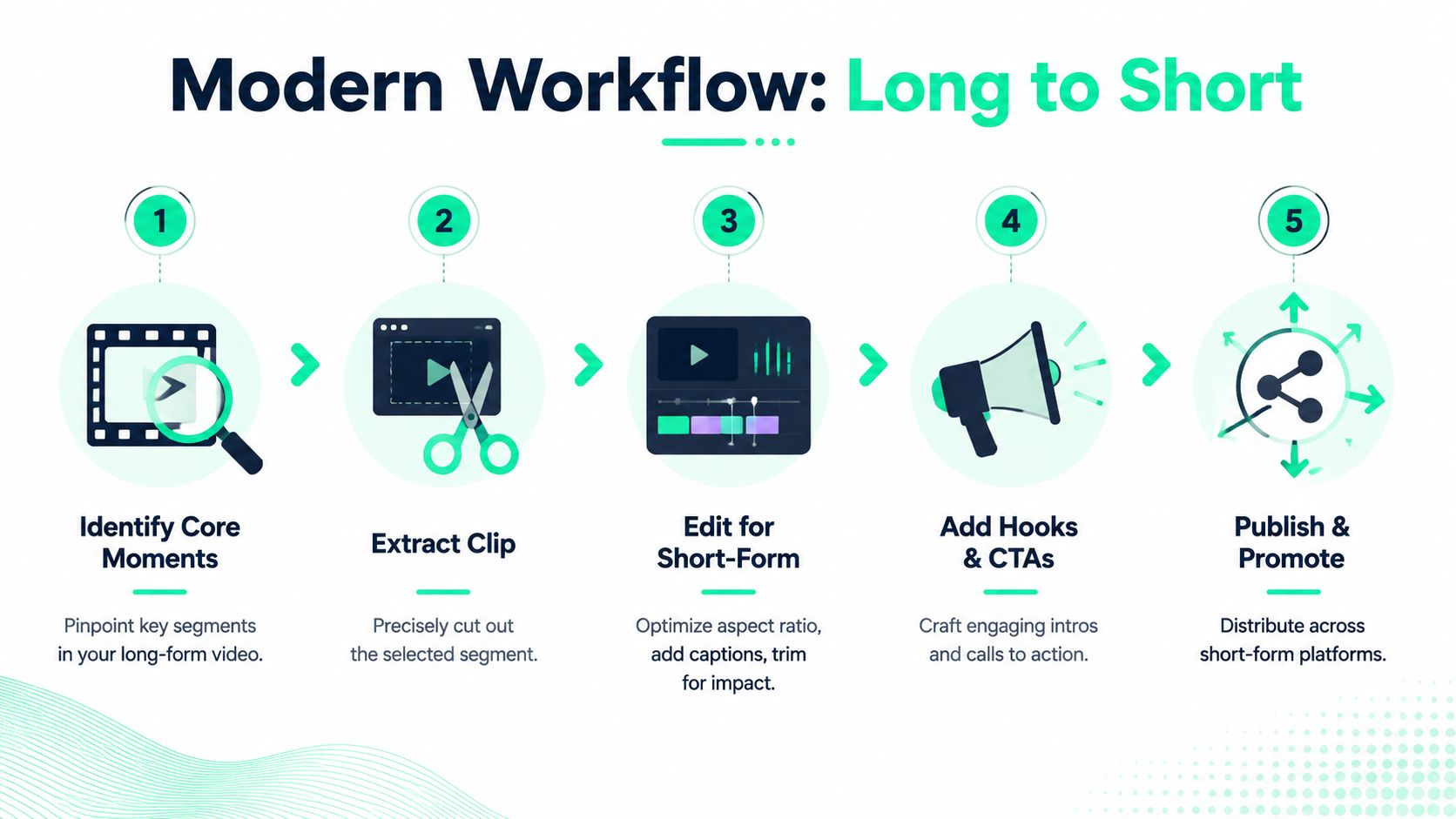
A cleaner workflow looks like this.
### Start with moments, not minutes
The first pass shouldn't be “cut from minute 12 to minute 13.” It should be “find the moment with tension, surprise, clarity, or a clean takeaway.”
Good clips usually have one strong idea and one obvious hook. Weak clips often include too much setup, no payoff, or a slow opening that only works because the full video gave it context.
Creators who repurpose at scale often review generated suggestions first, then tighten them manually. That's faster than building every cut from scratch, and it usually surfaces moments that would've been missed on a timeline scrub.
### Reframe for mobile before polishing
A horizontal talking-head clip often dies because the speaker is tiny in a vertical crop. Reframing has to preserve the subject, not just force the frame into 9:16.
That means:
- **Keep the focal point centered:** Faces, gestures, and products need to stay inside the crop.
- **Cut visual dead space:** Empty background makes a short feel slower.
- **Resize for the actual destination:** Shorts, Reels, and TikTok all reward phone-friendly composition.
Here's a visual walkthrough of the process in action.
### Add the elements that make a clip watchable
A clipped segment becomes a social-ready short when packaging is handled well. Three additions usually matter most.
1. **Captions that carry the message**
A lot of short-form viewing happens with the sound low or off. Captions shouldn't be an afterthought. They should be large enough to scan, timed cleanly, and styled consistently.
2. **A title card or opening hook**
If the first line of the clip isn't clear on its own, a title card can frame it. This works well for interviews, educational clips, and commentary where the strongest idea needs immediate context.
3. **An ending that directs attention**
The clip doesn't need a hard sell. It does need a clean ending. That might be a final statement, a prompt to watch the full video, or a subtle branded end frame.
> A short clip that starts fast, stays readable, and ends clean usually beats a longer edit packed with extra context.
For creators building this into a repeatable system, [how to repurpose long videos with AI](https://www.blitzreels.com/blog/how-to-repurpose-long-videos-with-ai) is a useful next step because it maps the shift from one-off edits to a workflow that can keep up with regular publishing.
## Understanding Rights Permissions and Best Practices
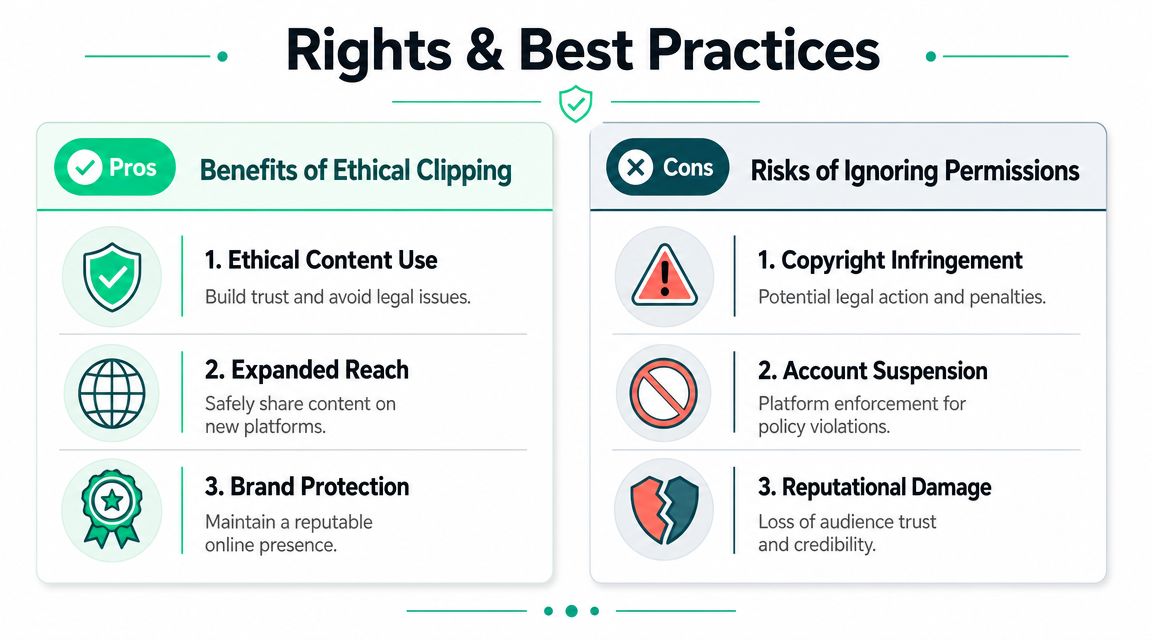
Clipping gets risky fast when creators treat every YouTube video as fair game. The safest workflow starts with a simple rule. Repurpose content that belongs to the channel, the brand, or a creator who has granted permission.
Fair Use is often misunderstood. It isn't blanket approval to repost someone else's video because only a small segment was used. It's a legal defense evaluated case by case, which means it's not a reliable operating system for a content calendar.
### What to do before clipping any video
A practical checklist helps keep the workflow clean:
- **Start with owned footage:** Webinars, podcasts, interviews, product demos, and creator uploads are the easiest to repurpose safely.
- **Get permission when needed:** If another creator's footage is involved, written approval is far better than assumption.
- **Credit clearly when appropriate:** Credit doesn't replace permission, but it does reduce confusion and supports ethical use.
- **Keep records:** A simple folder of approvals, licenses, and source links avoids future disputes.
### Use analytics to find your own best moments
Creators don't need to hunt through random videos for clip ideas. YouTube already provides useful signals inside the account.
YouTube's **Stats for nerds** feature shows playback diagnostics such as video ID and resolution, and the **Your data in YouTube** area helps track watch history, which gives creators a way to identify which of their own videos are worth reviewing and clipping into shorts, based on [YouTube's tracking and data tools](https://www.youtube.com/watch?v=7zJ9uIbMrEo).
That's useful for two reasons. First, it keeps the workflow centered on owned content. Second, it gives a concrete list of source videos to revisit instead of guessing what should be clipped next.
> Ethical clipping isn't just about avoiding copyright problems. It creates a repeatable archive that a team can publish from without hesitation.
When outside footage, music, or stock visuals enter the edit, creators also need to understand licensing terms. A simple primer on [royalty-free media and what it actually means](https://www.blitzreels.com/glossary/royalty-free) helps avoid a common mistake, which is assuming “available online” means “safe to repurpose.”
## FAQ About Clipping YouTube Videos
### Can someone clip another person's YouTube video and post it on social media?
Sometimes, but that doesn't make it safe by default. If the footage isn't owned by the person posting it, permission is the cleanest path. Fair Use may apply in some situations, but it isn't guaranteed and shouldn't be treated like a shortcut for republishing.
### What's the fastest way to turn one long YouTube video into multiple short clips?
The fastest route is usually an AI-assisted workflow that finds strong moments first, then lets the creator refine them, add captions, and export in platform-ready formats. Manual editing still has a place for premium cuts, but it slows down fast when one long video needs to become several posts.
For creators comparing posting workflows after clipping, this [guide for clipping YouTube for social media](https://postplanify.com/blog/how-to-clip-a-youtube-video) is useful because it looks at the broader distribution side rather than just the trim itself.
### Is YouTube's Clip feature enough for Shorts or Reels?
No. It's useful for sharing a moment via link, but it doesn't replace a full repurposing workflow. A creator still needs a standalone file, vertical formatting, captions, and a polished edit if the goal is to publish natively on other social platforms.
### What makes a clipped video feel weak even when the source content is good?
Usually one of three problems causes it:
- **The hook starts too late:** The audience gets context before payoff.
- **The frame isn't built for mobile:** The speaker is too small or off-center.
- **The captions are missing or hard to read:** The clip loses viewers who aren't listening with sound.
### Should every YouTube clip be posted in the same format everywhere?
No. The source moment can stay the same, but packaging often changes. A vertical edit may work well for Shorts, Reels, and TikTok, while a different crop, title card, or caption style may make more sense for LinkedIn or another platform. The strongest workflows keep the core clip while adapting the presentation.
---
BlitzReels fits this workflow for creators who need to clip, caption, resize, and repurpose videos into social-ready shorts without doing every step by hand. It handles the practical parts that usually slow publishing down, including reframing, subtitle generation, title hooks, templates, and exports for short-form platforms. Creators who want a faster path from long video to finished short can explore [BlitzReels](https://blitzreels.com).