---
title: "Clips Podcast: Create Engaging Content for 2026"
canonical: "https://blitzreels.com/blog/clips-podcast"
---
# Clips Podcast: Create Engaging Content for 2026
URL: https://blitzreels.com/blog/clips-podcast
Markdown URL: https://blitzreels.com/blog/clips-podcast.md
Published: 2026-07-04
Author: BlitzReels
Create engaging clips podcast for social media. This 2026 guide covers finding moments, editing, captions, and publishing with AI tools.
Tags: clips podcast, podcast marketing, repurpose content, video podcasting, short-form video

**Podcast clips drive between 20% and 40% of new audience acquisition for video shows, and professional production plus strategic clipping correlates with a 40% increase in new listeners** according to [Podcast Studio Glasgow](https://www.podcaststudioglasgow.com/podcast-studio-glasgow-blog/podcast-clips-are-your-real-growth-engine-why-professional-production-matters-from-day-one). That single shift changes how a clips podcast workflow should be built.
A podcast episode is no longer the finished asset. It's the raw material. The primary publishing engine is the set of short clips pulled from that episode, reframed for vertical viewing, captioned for silent autoplay, and packaged with a hook that makes someone stop scrolling.
That matters even more in a market where the global podcast space is valued at **$39.63 billion** and includes **619.2 million listeners worldwide** in 2026, while **53% of new U.S. weekly podcast listeners prefer watching podcasts rather than listening exclusively to audio**, according to [Podcastatistics](https://podcastatistics.com). A clips podcast strategy isn't a side tactic anymore. It's the operating system for discovery.
## Table of Contents
- [Why Podcast Clips Are Your Best Growth Engine](#why-podcast-clips-are-your-best-growth-engine)
- [Full episodes create value, clips release it](#full-episodes-create-value-clips-release-it)
- [Video creates reusable inventory](#video-creates-reusable-inventory)
- [What works and what usually fails](#what-works-and-what-usually-fails)
- [How to Find Viral Moments Before You Even Edit](#how-to-find-viral-moments-before-you-even-edit)
- [Listen for moments, not topics](#listen-for-moments-not-topics)
- [Use transcripts to hunt faster](#use-transcripts-to-hunt-faster)
- [A pre-edit filter that saves time](#a-pre-edit-filter-that-saves-time)
- [Build a clip bank before editing starts](#build-a-clip-bank-before-editing-starts)
- [From Raw Footage to Polished Clip in Minutes](#from-raw-footage-to-polished-clip-in-minutes)
- [Manual editing versus AI-assisted editing](#manual-editing-versus-ai-assisted-editing)
- [A faster three-step workflow](#a-faster-three-step-workflow)
- [What deserves human attention](#what-deserves-human-attention)
- [Crafting Hooks and Captions That Stop the Scroll](#crafting-hooks-and-captions-that-stop-the-scroll)
- [Start with a hook, not a logo](#start-with-a-hook-not-a-logo)
- [Captions should carry the clip](#captions-should-carry-the-clip)
- [Reframing is not optional on vertical platforms](#reframing-is-not-optional-on-vertical-platforms)
- [Small visual changes often beat heavy editing](#small-visual-changes-often-beat-heavy-editing)
- [Resizing and Publishing Across All Platforms](#resizing-and-publishing-across-all-platforms)
- [Format first, then metadata](#format-first-then-metadata)
- [Publish with platform behavior in mind](#publish-with-platform-behavior-in-mind)
- [Common Podcast Clipping Questions Answered](#common-podcast-clipping-questions-answered)
- [Can an audio-only show still run a clips podcast strategy](#can-an-audio-only-show-still-run-a-clips-podcast-strategy)
- [How many clips should come from one episode](#how-many-clips-should-come-from-one-episode)
- [Should a clip open with a title card or jump straight into the moment](#should-a-clip-open-with-a-title-card-or-jump-straight-into-the-moment)
- [What's the most common clipping mistake](#whats-the-most-common-clipping-mistake)
- [Do templates make clips feel repetitive](#do-templates-make-clips-feel-repetitive)
## Why Podcast Clips Are Your Best Growth Engine
95 percent of podcast episodes disappear after the core audience listens once. The clips that come out of those episodes can keep generating discovery, tests, and new entry points for weeks. That is why clipping works best as a system, not a cleanup task at the end of editing.
In a working clips podcast engine, the full episode is source material. The clip is the distribution unit. That shift changes how a show grows, because viewers on TikTok, Reels, Shorts, and LinkedIn rarely start with a 45-minute episode page. They start with a moment that earns attention fast.
### Full episodes create value, clips release it
A one-hour recording can hold 20 or 30 usable moments. If no one packages those moments, they stay buried in a long file that only existing subscribers are likely to open. The missed opportunity is not the recording itself. It is the lack of extraction.
For video-first podcasts, the strongest assets are often the compact parts of the conversation, not the planned topic headline. A sharp opinion. A clean framework. A hard-won lesson. A visible reaction. Those pieces travel because they fit the way people consume feed-native content.
> **Practical rule:** Treat the episode as source footage, not finished distribution.
I use that rule to build a repeatable production flow. Once the team sees each episode as clip inventory, decisions get faster. Hosts speak in tighter setups and payoffs. Editors package moments by angle and retention potential, not by timeline order. Producers can test five or six hooks from one recording instead of hoping one episode title carries the whole release.
A useful primer on that shift appears in this [short-form video breakdown](https://www.blitzreels.com/blog/short-form-video), especially for teams moving from long-form publishing habits into feed-based distribution.
Transcripts make this process faster. A searchable transcript lets you scan for tension, surprise, and quotable lines before you start cutting. If your workflow still starts with manual scrubbing, this [guide for video-to-text conversion](https://voicecontrol.pro/blog/how-to-transcribe-a-video-to-text/) shows the practical setup.
### Video creates reusable inventory
Podcast listening now overlaps heavily with video viewing, as noted earlier in the article. For clipping, the important point is simple. A video podcast creates reusable assets every time you record.
That gives a creator two advantages. First, one conversation can produce multiple tests across platforms without booking another guest or setting up another shoot. Second, each clip becomes feedback. You learn which claims pull comments, which stories hold retention, and which framing gets viewers to watch the full episode.
A clipping engine beats one-off editing. Instead of asking whether an episode should be clipped, the better question is which moments deserve packaging first, in which format, and for which platform.
### What works and what usually fails
What works is a repeatable clipping rhythm:
- **Pull multiple angles from one conversation:** one educational clip, one opinion clip, one emotional clip, one contrarian clip.
- **Package each one differently:** change the hook, title card, crop, and caption pacing to fit the platform.
- **Publish clips as testing assets:** use early performance to decide which full episode angle deserves more promotion.
What usually fails is posting a full episode link and expecting discovery to happen on its own. That approach asks the audience for too much time up front and wastes the best moments hidden inside the recording.
## How to Find Viral Moments Before You Even Edit
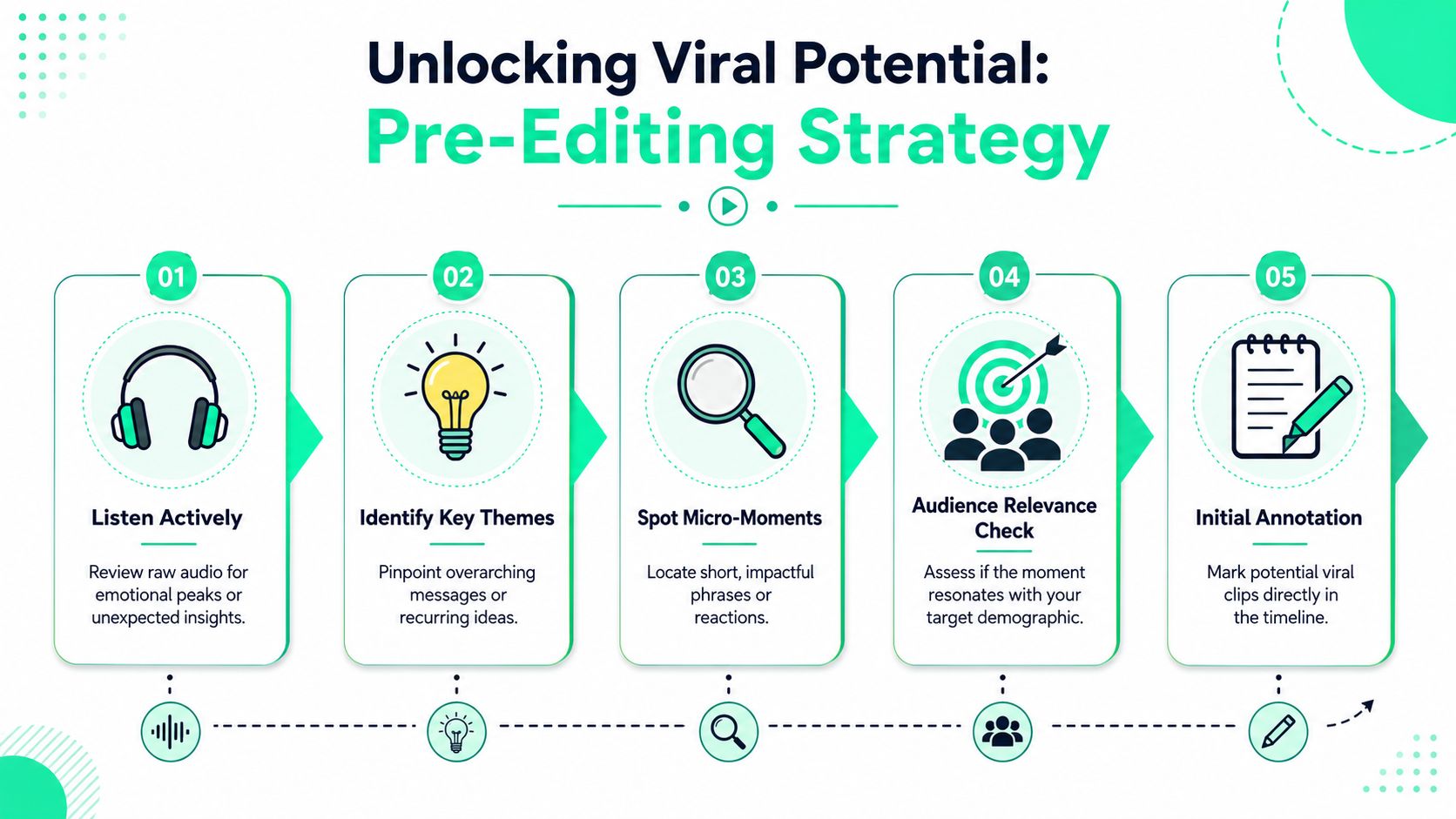
Most weak podcast clips fail long before the timeline opens. The problem isn't trimming. It's selection.
**80% of creators fail to convert long-form content into viral short-form clips because they miss strategic hook identification, not because they lack editing skill**, as noted in this [video on hook identification and clipping strategy](https://www.youtube.com/watch?v=zLPLDIZOdMo). That lines up with what many editors run into: the conversation was decent, but the chosen moment had no built-in tension.
### Listen for moments, not topics
A strong clips podcast workflow starts during recording. The editor, producer, or creator should already be marking moments that trigger one of a few proven reactions:
- **Surprise:** a statement that breaks expectation.
- **Clarity:** a compact explanation people can repeat.
- **Tension:** disagreement, risk, failure, or trade-off.
- **Identity:** something a target viewer instantly relates to.
- **Action:** a line that tells the viewer what to do next.
A full topic rarely goes viral on its own. A precise sentence can.
That's why broad segments such as “marketing trends” or “founder lessons” usually underperform when clipped without a sharper angle. Specificity wins. “The mistake that made sales calls worse” is more usable than “sales advice.”
### Use transcripts to hunt faster
Manual scrubbing is still useful, but transcription turns clip discovery into search instead of guesswork. A clean transcript lets an editor scan for emotional spikes, repeated phrases, objections, story turns, and quotable lines without replaying the full conversation over and over.
For teams that need a practical reference on preparing transcripts first, this [guide for video-to-text conversion](https://voicecontrol.pro/blog/how-to-transcribe-a-video-to-text/) is a helpful companion resource. There's also a focused walkthrough on [how to transcribe video to text](https://www.blitzreels.com/blog/how-to-transcribe-video-to-text) for short-form clipping workflows.
> The fastest editors don't review every second equally. They search for moments where emotion, usefulness, and phrasing all peak together.
### A pre-edit filter that saves time
Before any clip gets cut, run it through a short decision filter:
| Check | What to ask |
|---|---|
| Hook strength | Would a stranger care inside the first seconds? |
| Standalone value | Does the clip make sense without full episode context? |
| Audience fit | Is the point relevant to one clear viewer type? |
| Replay potential | Does the line invite a second watch or a share? |
| Packaging room | Can captions, title cards, or reframing improve it further? |
A moment can be smart and still be unclippable. That's a normal trade-off. Some great insights need too much setup. Others are accurate but flat. The job is to pick moments that survive compression.
### Build a clip bank before editing starts
A repeatable clips podcast engine keeps a shortlist before anyone starts polishing:
1. **Mark the obvious standout line first.** Don't overthink the top clip.
2. **Pull a few different emotional tones.** Not every post should sound the same.
3. **Save alternates with different openings.** Sometimes the second sentence is the main hook.
4. **Label clips by use case.** Education, authority, relatability, debate, story.
That simple habit does two things. It raises output quality, and it stops the team from wasting time beautifying moments that were never strong enough to begin with.
## From Raw Footage to Polished Clip in Minutes
The old clipping workflow is slow in a very specific way. The editor imports the episode, builds proxies, scrubs for a usable moment, trims filler words by hand, writes captions in another tool, exports one draft, notices the framing is off, goes back, and repeats that cycle until the clip is passable.
That process still works. It just burns time on tasks that software can handle faster.
**AI-powered clipping tools can cut video editing time from over 3 hours to just minutes by automatically transcribing audio, detecting optimal cuts, and generating on-beat captions**, according to this [AI clipping workflow demonstration](https://www.youtube.com/watch?v=cJbvyCL7Hq4). That doesn't mean every output is publish-ready. It means the human editor can spend energy on decisions instead of mechanics.
### Manual editing versus AI-assisted editing
The cleanest way to look at a clips podcast workflow is side by side:
| Stage | Manual workflow | AI-assisted workflow |
|---|---|---|
| Finding moments | Timeline scrubbing | Transcript search and clip suggestions |
| Cleanup | Hand-cutting pauses and filler words | Automatic pause trimming and filler removal |
| Captions | Separate captioning step | Built-in caption generation |
| Framing | Manual crops and keyframes | Auto reframing around faces |
| Variations | Slow to produce multiple versions | Easier to test several hooks and formats |
The trade-off is straightforward. Manual control gives maximum precision. AI gives speed and volume. Both are generally essential. Let the system do the repetitive first pass, then adjust the final details that affect performance.
### A faster three-step workflow
A practical clipping engine usually runs like this:
1. **Upload the raw episode**
Start with the full MP4 or MOV. A single source file is enough if the conversation was recorded cleanly. If the clip is for a talking-head podcast, the platform should detect speakers and preserve the strongest face crop.
2. **Generate rough clips automatically**
AI provides significant support. Transcription creates searchable text. Suggested cuts reduce review time. Automatic captioning creates a draft that can be corrected instead of typed from scratch.
3. **Refine only what changes performance**
Adjust the opening hook, tighten the start point, swap a title card, restyle captions, and check the crop. Don't waste time on frame-perfect edits nobody will notice in a fast-moving feed.
One option in this category is [BlitzReels' AI video clipping workflow](https://www.blitzreels.com/blog/ai-video-clipping-tool), which focuses on turning uploaded videos into short vertical clips with captioning, resizing, and hook-focused edits. Tools like Opus Clip also sit in the same decision set, and teams evaluating that ecosystem may find this [overview of who sponsors with Opus Clip](https://sponsorradar.com/brands/opus-clip) useful as a market context signal.
### What deserves human attention
Automation handles the boring middle. It doesn't replace editorial judgment.
> **Editing rule:** If a change won't improve the hook, clarity, pacing, or retention, it probably doesn't need to be done.
The pieces that still deserve a human pass are the first line, the visual emphasis, the pacing of subtitles, and whether the clip says something worth sharing. AI can speed up extraction. It can't supply taste.
That's why the strongest workflow isn't “one-click viral clips.” It's “one-click rough cut, then sharp editorial packaging.” That model scales better than either extreme. Pure manual editing is too slow. Pure automation often leaves weak openings and awkward emphasis untouched.
## Crafting Hooks and Captions That Stop the Scroll
A clipped segment isn't a finished social video. It still needs packaging. The opening frame, the caption style, and the crop determine whether anyone watches long enough to hear the point.
Watch time is the most important metric for short-form performance according to [Sprinklr's video metrics overview](https://www.sprinklr.com/blog/video-metrics/). That's why the first visual decision matters so much in a clips podcast workflow. The viewer doesn't reward effort. The viewer rewards immediate relevance.

### Start with a hook, not a logo
Many podcast clips still open with branded intros, long title cards, or a generic “welcome back” line. On social feeds, that usually costs attention. The opening should create a question, a promise, or a jolt.
Good hooks often use one of these patterns:
- **A sharp claim:** “Most guests answer this wrong.”
- **A useful warning:** “This mistake kills retention fast.”
- **A tension line:** “The team almost cut this segment.”
- **A curiosity gap:** “This part changed the entire argument.”
Title cards still matter, but they should support the hook, not delay it. A short headline over immediate speech is usually stronger than a separate intro screen.
### Captions should carry the clip
Captions aren't decoration. They're delivery.
A lot of viewers encounter podcast clips with sound off, low volume, or divided attention. Captions fix that, but only if they're paced well and easy to scan. Dense subtitle blocks often feel like homework. Shorter, bolder, on-beat captions feel native to short-form platforms.
**Benchmark data shows that clips with auto-reframed face-centering and bold, on-beat captions with emoji callouts achieve 48% higher engagement rates on TikTok and 37% higher engagement on Reels compared with static clips**, based on this [vertical clip editing benchmark video](https://www.youtube.com/watch?v=lo2T9eMFKNA).
A deeper look at that behavior appears in this guide on [how captions drive engagement on TikTok and Instagram](https://www.blitzreels.com/blog/how-captions-drive-engagement-on-tiktok-and-instagram).
> Keep captions readable enough to follow silently, but energetic enough to feel designed for the platform.
### Reframing is not optional on vertical platforms
A clips podcast usually starts as a wide-format recording. That's fine for YouTube. It's a problem on TikTok, Reels, and Shorts if the frame leaves faces tiny or off-center.
Auto reframing fixes the structural issue by keeping the speaker centered inside a vertical crop. That's the technical side. The creative side is deciding when to punch in, when to switch speaker emphasis, and when to leave space for title cards or lower thirds.
A useful visual reference sits below.
### Small visual changes often beat heavy editing
Not every clip needs aggressive motion graphics. A few lighter additions usually do more:
- **Add a concise opening text layer** so the viewer knows why the clip matters.
- **Use caption templates consistently** so posts look related without feeling repetitive.
- **Insert simple B-roll or overlays** when the spoken point becomes abstract.
- **Highlight key words selectively** instead of styling every line the same way.
The practical goal isn't to make the clip look busy. It's to remove reasons to swipe away.
## Resizing and Publishing Across All Platforms
Editing a strong clip and publishing the same file everywhere usually creates avoidable friction. Crops break, captions get cut off, title cards sit too high, and the pacing that felt right on one platform can feel off on another.
A clips podcast workflow needs a publishing checklist just as much as an editing checklist.
### Format first, then metadata
The visual format comes before the post copy. If the frame is wrong, no caption in the post description will save the clip.
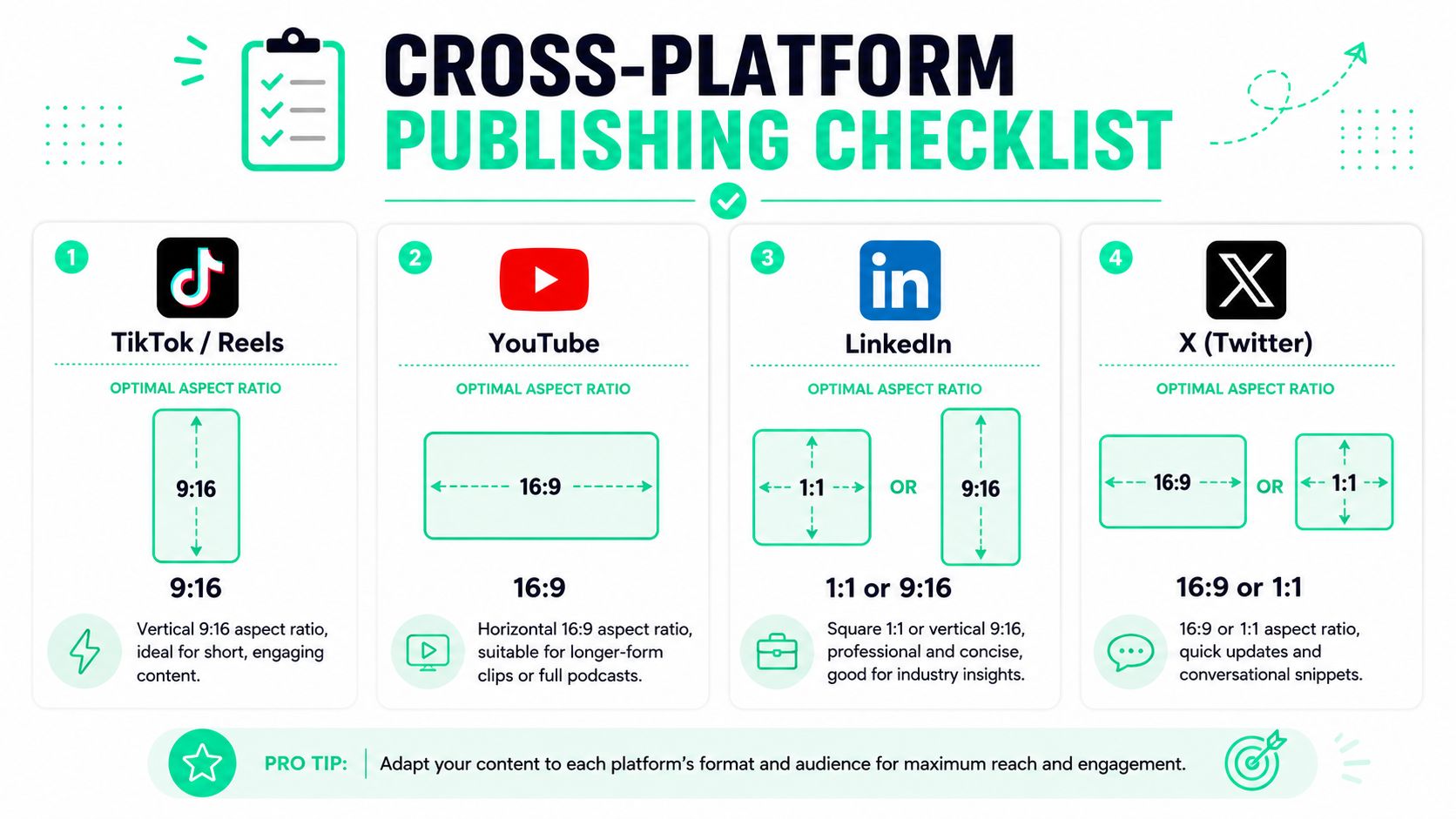
A practical resizing pass should check:
- **Safe framing:** faces, captions, and title cards need to stay clear of UI overlays.
- **Platform fit:** TikTok, Reels, and Shorts usually want vertical delivery, while LinkedIn can work with square or vertical depending on the post style.
- **Export consistency:** avoid mixing visual quality and caption sizing across channels.
For creators handling multiple outputs from the same source clip, a [video aspect ratio converter guide](https://www.blitzreels.com/blog/video-aspect-ratio-converter) is a useful reference point.
### Publish with platform behavior in mind
The same clip can stay visually identical while the packaging changes.
On TikTok and Reels, the post text should support the hook and invite a reaction. On LinkedIn, the framing often works better when the clip feels like a concise insight or lesson rather than raw entertainment. On YouTube Shorts, headline clarity matters because the clip often lives next to a larger library of related content.
> **Publishing note:** Don't write the description as a summary of the clip. Write it as a reason to comment.
A simple pre-flight list helps:
| Before publishing | What to verify |
|---|---|
| Crop | Speaker remains centered after resizing |
| Captions | No words hidden behind interface elements |
| Hook text | First frame makes sense without context |
| Description | Encourages response instead of repeating the clip |
| Thumbnail or title card | Readable on mobile |
Teams often lose performance in the last five minutes, not the first fifty. The clip was good. The export or resize wasn't.
## Common Podcast Clipping Questions Answered
### Can an audio-only show still run a clips podcast strategy
Turn audio-only episodes into clips by treating the spoken line as the asset and the visuals as support. Use audiograms, clean waveform layouts, bold subtitles, still-image scenes with motion, or simple background animation. The clip still needs a reason to stop. The visual layer just helps hold attention long enough for the line to land.
I would avoid posting a flat cover image with tiny captions and expecting short-form performance. Audio-first clips still need readable text, visible pacing, and an opening line that makes sense without any setup.
### How many clips should come from one episode
Set a minimum, then let the source material decide the ceiling.
For most shows, I would aim to pull three to five publishable clips per episode on the first pass. Some interviews only have two clean short-form moments. Others have eight or more. Stop pulling once the remaining sections need too much context, repeat the same point, or weaken the batch.
A stronger clipping engine sorts clips by purpose, not just quantity. Pull one sharp opinion, one practical takeaway, one emotional beat, and one insight with broad share potential. That mix gives the episode more distribution range than five clips that all sound the same.
### Should a clip open with a title card or jump straight into the moment
Open with the moment.
A title card can work if it appears at the same time as the first strong line and clarifies the promise of the clip. A branded intro at the start usually costs retention because it asks for patience before delivering anything useful. On short-form feeds, that trade-off rarely makes sense.
Keep any title treatment brief and functional. It should sharpen the opening, not delay it.
### What's the most common clipping mistake
The most common clipping mistake I see is spending edit time on a segment that was never strong enough to clip in the first place. Better captions, tighter cuts, and cleaner framing can improve a good moment. They cannot create tension, clarity, or surprise if the source line lacks all three.
Selection drives performance. Editing improves presentation.
### Do templates make clips feel repetitive
Templates help when they remove repetitive production work. They hurt when they force every clip into the same pacing, framing, and hook structure.
Keep the system consistent, then vary the parts the viewer feels. Change the opening line, title treatment, zoom intensity, caption emphasis, and where the cut starts. That gives you a repeatable workflow without making every clip look manufactured from the same timeline.
BlitzReels is one practical option for teams building a repeatable clips podcast workflow. It handles clipping, captions, reframing, resizing, and fast edits for vertical social video, which helps turn one recorded episode into multiple publishable assets without relying on a heavy manual timeline. Explore [BlitzReels](https://blitzreels.com) if the goal is to make podcast-to-short-form production easier to repeat.