---
title: "Closed Captions vs Subtitles: A Creator's Guide"
canonical: "https://blitzreels.com/blog/closed-captions-vs-subtitles"
---
# Closed Captions vs Subtitles: A Creator's Guide
URL: https://blitzreels.com/blog/closed-captions-vs-subtitles
Markdown URL: https://blitzreels.com/blog/closed-captions-vs-subtitles.md
Published: 2026-05-11
Author: BlitzReels
Closed captions vs subtitles: what's the difference? Learn which to use for accessibility, engagement, and algorithmic reach on TikTok, Reels, and Shorts.
Tags: closed captions vs subtitles, video captions, short form video, content creation, video accessibility

**92% of mobile videos are watched muted** according to the [Kapwing roundup of subtitle statistics](https://www.kapwing.com/resources/subtitle-statistics/). That single habit changes how creators should think about on-screen text.
For years, people treated captions as an accessibility box to check and subtitles as something for foreign films. That framing is too narrow for short-form video. On TikTok, Reels, and Shorts, the text on screen often does three jobs at once: it carries meaning when audio is off, helps viewers stay with the clip, and gives platforms more context about what the video contains.
That's why the closed captions vs subtitles question matters more than it sounds. It isn't just a terminology debate. It affects retention, clarity, localization, editing workflow, and how usable your content is in the feed.
If you create social video, the right answer usually depends on one thing: are you helping viewers who can't hear the audio, or viewers who can hear it but don't understand the language?
## Table of Contents
- [Why Your Sound-Off Viewers Need the Right Text](#why-your-sound-off-viewers-need-the-right-text)
- [The Fundamental Difference in Purpose and Audience](#the-fundamental-difference-in-purpose-and-audience)
- [Closed captions are for full audio access](#closed-captions-are-for-full-audio-access)
- [Subtitles are for language access](#subtitles-are-for-language-access)
- [A Detailed Comparison for Digital Creators](#a-detailed-comparison-for-digital-creators)
- [Quick comparison table](#quick-comparison-table)
- [What this means for discovery and workflow](#what-this-means-for-discovery-and-workflow)
- [Understanding Open Captions SDH and Other Types](#understanding-open-captions-sdh-and-other-types)
- [Open captions and closed captions are delivery choices](#open-captions-and-closed-captions-are-delivery-choices)
- [Where SDH fits](#where-sdh-fits)
- [Your Strategic Choice for Short-Form Video Growth](#your-strategic-choice-for-short-form-video-growth)
- [Why styled open captions usually win in the feed](#why-styled-open-captions-usually-win-in-the-feed)
- [What hurts performance](#what-hurts-performance)
- [How to Generate Perfect Captions in Minutes](#how-to-generate-perfect-captions-in-minutes)
- [A practical workflow](#a-practical-workflow)
- [The review step creators skip](#the-review-step-creators-skip)
- [Frequently Asked Questions](#frequently-asked-questions)
- [Do captions and subtitles mean the same thing](#do-captions-and-subtitles-mean-the-same-thing)
- [Should I use captions or subtitles on TikTok and Reels](#should-i-use-captions-or-subtitles-on-tiktok-and-reels)
- [Are platform auto-captions enough](#are-platform-auto-captions-enough)
- [What's the best format for YouTube uploads](#whats-the-best-format-for-youtube-uploads)
- [When should I use SDH](#when-should-i-use-sdh)
- [Do caption styles affect performance](#do-caption-styles-affect-performance)
## Why Your Sound-Off Viewers Need the Right Text
A lot of creators still ask whether captions are worth the effort. The audience already answered that. A [2023 YouGov survey of 1,000 US adults found that 63% of 18 to 29-year-olds watch native-language TV with subtitles](https://www.captioningstar.com/blog/closed-captions-are-gaining-popularity-among-gen-z-millennials/). In practice, many viewers use the word “subtitles” loosely when they mean any on-screen text.
That matters because modern viewing is messy. People watch in public, while multitasking, while scrolling at work, and while keeping their phone muted. In those moments, text isn't a nice extra. It's the version of the video they consume.
For short-form creators, this changes the priority list. The first question isn't “Should I add text?” It's “What kind of text does this video need?”
Sometimes you need **closed captions** because the viewer needs a full text equivalent of the soundtrack, including speaker labels and sound cues. Sometimes you need **subtitles** because the viewer can hear the clip fine but needs the spoken language translated or transcribed plainly. And sometimes, especially on social platforms, you'll use open on-screen text styled like captions even if the platform itself isn't handling traditional broadcast-style caption files.
> If your video depends on audio but your text only covers half the meaning, the viewer feels the gap immediately.
Creators who get this right usually produce clips that feel easier to follow. Creators who get it wrong often end up with text that looks polished but leaves out the very context that makes the video land. A punchline misses. A reaction video loses its setup. A tutorial step becomes confusing because the viewer can't tell who is speaking or what sound triggered the action.
The practical takeaway is simple. Treat on-screen text as part of the edit, not as the last export setting.
## The Fundamental Difference in Purpose and Audience
Text on video does two very different jobs, and short-form platforms reward creators who know which job they need.
### Closed captions are for full audio access
**Closed captions** are built for viewers who cannot fully access the soundtrack. They cover dialogue, speaker labels, and the non-speech audio that affects meaning. Music shifts, laughter, a long pause, a notification ping, a door slam. If the audio carries context, captions need to carry it too.
That distinction matters on social platforms because many creators treat all on-screen text like a transcript. In practice, that shortcut often strips out the cues that make a clip understandable without sound. A reaction video loses the setup. A tutorial loses the trigger for the next step. A joke falls flat because the text captured the words but missed the sound cue that made the timing work.
For creators, the result is not just an accessibility problem. It can become a retention problem. If a viewer has to guess who is talking or why a beat matters, they are more likely to drop before the payoff.
For a deeper terminology breakdown, this guide on how to [choose right captions or subtitles](https://whisperai.com/blog/closed-caption-vs-subtitles) is useful if you want another practical lens on the distinction. If you want a shorter definition reference, BlitzReels also has a plain-language glossary entry for [what closed captions include](https://www.blitzreels.com/glossary/closed-captions).
### Subtitles are for language access
**Subtitles** solve a different problem. The viewer can hear the audio, but needs help understanding the spoken language. In most cases, subtitles focus on dialogue and translation, not the full sound environment.
That makes subtitles the better fit for localization, multilingual publishing, and cross-border distribution. If you post an English interview for a Spanish-speaking audience, subtitles preserve the speaker's voice while making the message understandable. If your Reel includes short clips in two or three languages, subtitles can clarify the foreign-language segments without turning the whole edit into a full caption track.
On TikTok, Reels, and Shorts, that choice also affects performance more than many creators expect. Closed-caption style text usually gives a stronger result when the clip depends on pacing, reactions, or audio context because the viewer can follow the story even with the phone muted. Subtitles are stronger when the main growth goal is reaching viewers in another language market. They widen distribution, but they do not replace captions when sound itself carries meaning.
A practical rule works well:
- **Use closed captions** when the viewer needs a full text version of the audio experience.
- **Use subtitles** when the viewer needs translation or plain dialogue support.
- **Use caption-style burned-in text** on short-form social when visibility, readability, and watch time matter more than a toggle.
> The wrong text choice usually looks fine in the edit and underperforms in the feed.
That is why polished videos still lose viewers. The text is present, but it is not doing the job the audience needs.
## A Detailed Comparison for Digital Creators
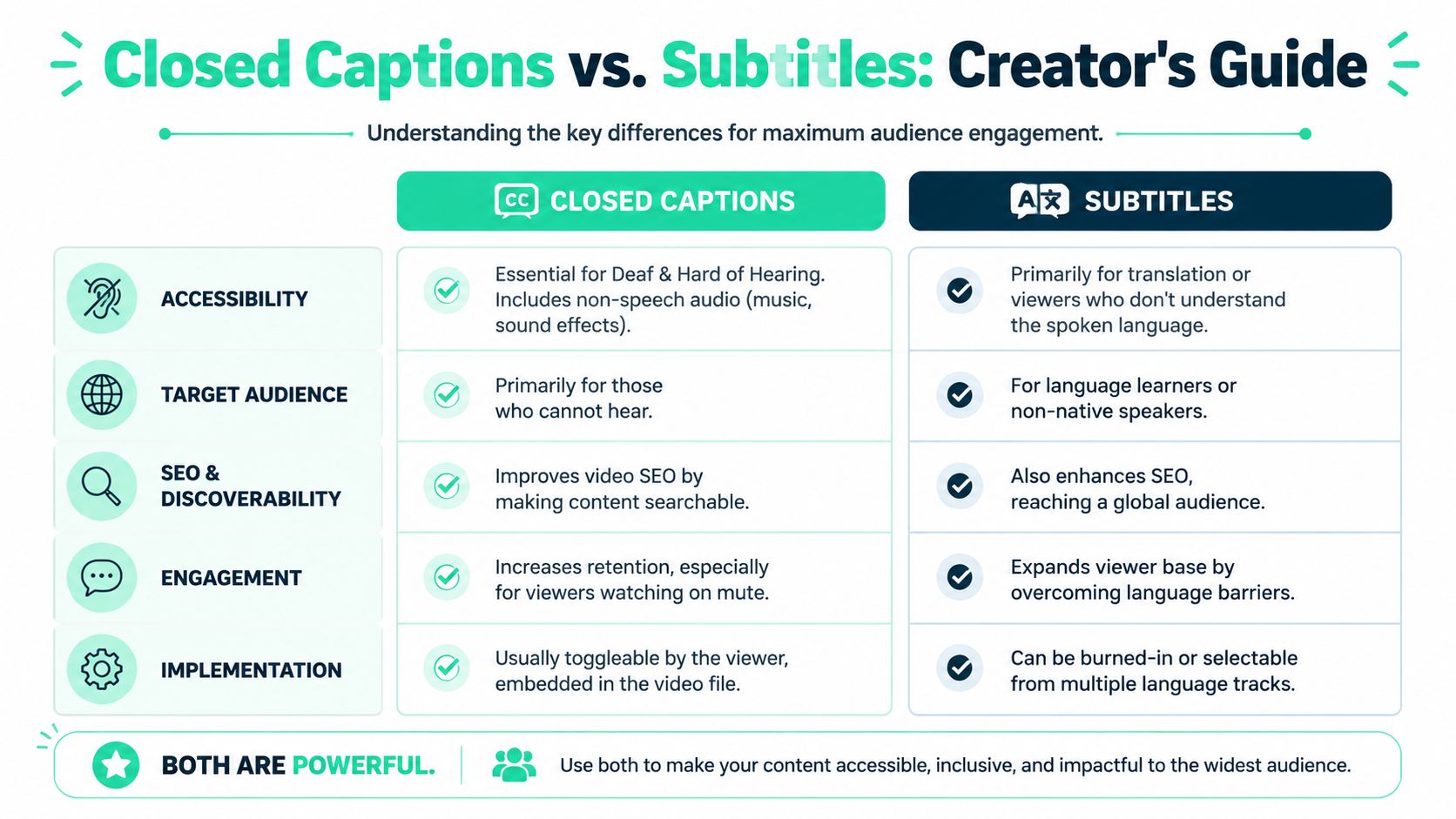
The easiest way to compare closed captions vs subtitles is to line them up against creator priorities instead of dictionary definitions.
### Quick comparison table
| Criteria | Closed captions | Subtitles |
|---|---|---|
| **Primary purpose** | Accessibility for viewers who can't fully access audio | Language support or translation for viewers who can hear audio |
| **What's included** | Dialogue, speaker labels, sound effects, music cues, relevant background sounds | Spoken dialogue only, usually without non-speech audio cues |
| **Best use case** | Tutorials, interviews, podcasts, story-driven clips, compliance-focused publishing | Multilingual content, translated interviews, foreign-language distribution |
| **Common file formats** | SRT, WebVTT, SCC | SRT, WebVTT and other subtitle-friendly formats |
| **Viewer control** | Often toggleable when uploaded as a caption file | Can be toggleable if provided as language tracks |
| **Short-form social use** | Often adapted into open, burned-in caption styling for guaranteed visibility | Best when publishing translated versions for different audiences |
| **Context depth** | High, because it captures the sound environment | Lower, because it centers spoken language |
### What this means for discovery and workflow
The biggest underused advantage of closed captions is metadata. The [Ditto comparison notes that searchable transcripts can produce 30 to 50% higher indexing precision](https://www.dittotranscripts.com/blog/subtitles-vs-closed-captions-whats-the-difference/). For creators, that matters because transcript-rich assets give platforms and internal search systems more usable context.
That doesn't mean every platform fully exposes that benefit in the same way, especially in short-form feeds. But it does mean closed-caption-style text gives you a stronger data layer than dialogue-only subtitles when the goal is accessibility plus discoverability.
Here's where creators usually make better decisions:
- **Educational clips:** Closed captions usually outperform plain subtitles because instructions often depend on pauses, emphasis, and audio cues.
- **Podcasts repurposed into shorts:** Closed captions help identify speakers and preserve reactions, which keeps clips coherent.
- **Global brand content:** Subtitles are often the better fit when the same asset needs to travel across languages.
- **Entertainment edits:** If the sound design matters to the joke or emotional beat, subtitles alone can feel thin.
File format also affects workflow. If you need compatibility and simplicity, **SRT** is often the easiest place to start. If you want more web-friendly styling and positioning flexibility, **WebVTT** can be useful. If you're in broadcast or compliance-heavy environments, **SCC** enters the conversation because it supports more traditional caption workflows.
> **Practical rule:** If removing non-speech audio cues would make the clip less understandable, you're not choosing between style options. You need captions.
For creators publishing across platforms, the smartest setup is often two outputs from the same edit: one burned-in social version for TikTok or Reels, and one separate caption file for YouTube or hosted video players that support toggles and multiple language tracks.
## Understanding Open Captions SDH and Other Types
Most creator confusion doesn't come from the difference between captions and subtitles. It comes from the extra labels attached to them.
### Open captions and closed captions are delivery choices
**Open captions** are burned into the video. The viewer can't turn them off. This is why they dominate short-form social. They guarantee that the text appears exactly where you want it, in the style you chose, from the first frame.
**Closed captions** sit as a separate text layer or file. The viewer can usually toggle them on or off. That works well on YouTube, streaming platforms, course platforms, and other environments where users expect playback controls.
For creators, this means “open” and “closed” describe **delivery**, not the underlying purpose. You can create caption content designed for accessibility, then choose whether to burn it in or upload it as a selectable track.
A fast decision framework looks like this:
- **Use open captions** when feed visibility matters most and you want total control over typography, placement, and branding.
- **Use closed captions** when the platform supports toggles well and the audience benefits from choosing whether to display them.
- **Use both** when you're repurposing one piece of content across social, YouTube, courses, and web embeds.
### Where SDH fits
**SDH** means **subtitles for the deaf and hard of hearing**. It sits in the middle. SDH behaves like subtitles in that it often appears as a subtitle option, but it includes accessibility details associated with captions, such as speaker labels and meaningful sound cues.
That makes SDH useful when the content needs translation or subtitle-style delivery but can't lose important audio context. If you're distributing content internationally and want to preserve more of the listening experience, SDH can be the right compromise.
A few real-world examples make the distinctions easier:
| Scenario | Best fit | Why |
|---|---|---|
| A talking-head business tip on Instagram Reels | Open captions | You need guaranteed visibility and clean styling in the feed |
| A YouTube tutorial with optional text | Closed captions | Viewers can toggle on text without permanently covering visuals |
| A foreign-language documentary for English viewers | Subtitles | The audience needs translation of dialogue |
| A multilingual film where sound cues matter to the story | SDH | You need translated dialogue plus key audio context |
What often fails is mixing the goals. A creator uploads subtitle-style dialogue only, assumes they've “done captions,” and then wonders why a reaction clip feels flat with sound off. Another creator burns oversized text over every important visual and hurts readability by solving one problem with a new one.
Good text treatment is always situational. The format should match the platform, the viewer's need, and the role audio plays in the clip.
## Your Strategic Choice for Short-Form Video Growth
On short-form platforms, the best text choice is usually the one that performs in a moving feed, not the one that sounds most technically correct in a post-production meeting.

### Why styled open captions usually win in the feed
The strongest argument for open caption styling on TikTok, Instagram Reels, and YouTube Shorts is simple: it gets seen immediately. A separate caption track depends on platform behavior and viewer settings. Burned-in text is there from frame one.
That matters because short-form video is judged fast. The opening seconds have to communicate topic, tone, and payoff. Styled captions help do that by turning speech into visual pacing. They can emphasize keywords, control reading rhythm, and keep a muted viewer locked into the narrative.
The platform side is still murky. The [Blend analysis notes that the SEO and discoverability advantage of captions in short-form video remains a significant knowledge gap, while also suggesting platforms may favor captioned content because of stronger watch-time and engagement signals](https://www.getblend.com/blog/closed-captioning-vs-subtitles/). That matches what many creators observe in practice: easier-to-follow videos tend to hold attention better.
If you want a plain-language refresher on the accessibility side, this explainer on [what is closed captioning](https://www.meowtxt.com/blog/what-is-closed-captioning) is a useful complement. For creators building shorts regularly, an [AI caption generator](https://www.blitzreels.com/ai-caption-generator) also matters because speed is part of strategy. If adding captions is slow, consistency suffers.
### What hurts performance
Not every caption style helps. Some choices look impressive in a template preview and fail in an actual feed.
Common mistakes include:
- **Oversized text blocks:** They cover faces, product demos, or screen recordings.
- **Weak contrast:** Thin white text over bright footage disappears on mobile.
- **Too much motion:** Animated words that jump constantly can make clips harder to follow.
- **Dialogue-only treatment when context matters:** A reaction, sound cue, or speaker change gets lost.
- **Bottom-edge placement:** Platform UI can cover the text.
> Short-form captions should support the edit. They shouldn't fight the frame.
For social video, the best-performing approach is often a hybrid mindset. Use the completeness of captions when the audio context matters, but present that information with the visual discipline of a social edit. Keep the wording tight. Highlight only what needs emphasis. Leave enough breathing room for the subject and the interface around it.
## How to Generate Perfect Captions in Minutes
85% of Facebook video is watched with the sound off, according to Meta for Business. On short-form platforms, that changes the job of captions. They do not just improve accessibility. They often decide whether the viewer understands the hook fast enough to keep watching.
### A practical workflow
The fastest caption workflow is simple. Generate with AI first, then review with intent.
For creators publishing shorts consistently, that is the only approach that scales without dragging down output. The mistake is stopping at the draft. Auto-generated captions are good at speed. They are not reliably good at nuance, timing, product names, slang, punchlines, or platform-safe presentation.
Work in this order:
1. **Correct the transcript** Fix names, jargon, brand terms, and any phrase the model guessed wrong. Niche creators lose trust fast during this stage. One wrong supplement ingredient, game title, investing term, or software feature can change the whole meaning.
2. **Clean up the timing**
Captions should hit with the spoken beat. Late text makes the edit feel slower, which matters on TikTok and Reels because the first few seconds carry the retention load.
3. **Trim for readability**
Spoken language is messy. On-screen language has to be cleaner. Remove filler words where meaning stays intact, shorten repeated phrasing, and keep the emotional or instructional beat that makes the clip work.
4. **Add context selectively**
Include speaker changes or meaningful sound cues only when they help comprehension. If a joke depends on a pause, a reaction, or a sound effect, the caption should carry that meaning.
5. **Format for the feed**
Use line breaks people can scan in a glance. Keep text clear of buttons, captions trays, and progress bars. A strong-looking caption style in an editor often performs poorly once platform UI covers the lower third.
6. **Export for the platform**
Burned-in captions usually make the most sense for TikTok, Reels, and Shorts because they guarantee visibility. Separate caption files are better where viewers expect language options or on/off controls.
If you want a repeatable setup, the [caption editing and export documentation](https://www.blitzreels.com/docs/captions) is a useful reference for workflow and file handling.
### The review step creators skip
Review is where captions start helping performance instead of just checking a box.
Consider the accuracy benchmarks: [professionally reviewed captions aim for a word error rate under 8% and sync within 200 to 500ms, while AI alone can land in the 15 to 20% range](https://www.interprefy.com/resources/blog/ai-closed-captions-accuracy). For a short-form creator, that gap shows up in practical ways. The joke misses. The CTA reads late. The key phrase people were supposed to remember appears after they have already scrolled.
I see this most often in repurposed podcast clips. Creators pull a strong soundbite, auto-caption it, post fast, and wonder why the short underperforms. The problem is rarely the idea alone. It is usually friction. If viewers have to decode the text, they leave before the point lands.
Use this review checklist before publishing:
- **Check proper nouns:** Brands, guests, locations, apps, and product terms.
- **Check timing on the hook:** The first caption has to appear fast and read clean.
- **Check line breaks:** Split by meaning, not by character count alone.
- **Check visual overlap:** Keep text off faces, hands, demos, and UI zones.
- **Check punchlines and CTAs:** These moments need exact wording and exact timing.
A quick demonstration helps if you're more visual than procedural:
One final rule improves a lot of shorts. Do not give every spoken word equal visual weight. Viewers scan captions in bursts. The phrases that carry the hook, payoff, or takeaway should read instantly.
> Clean captions reduce friction. Friction kills retention.
That is the standard.
## Frequently Asked Questions
### Do captions and subtitles mean the same thing
Not really. Creators often use the terms loosely, but the functional difference matters. Closed captions cover dialogue plus meaningful audio context. Subtitles usually focus on spoken dialogue and language translation.
### Should I use captions or subtitles on TikTok and Reels
In most cases, use **open, burned-in caption styling** for native social posts. It guarantees visibility in sound-off viewing and gives you control over placement and design. Use subtitles when you're publishing translated versions for different language audiences.
### Are platform auto-captions enough
They're useful as a starting point. They're not the final step if accuracy matters, your niche uses specific terminology, or timing affects the joke, lesson, or call to action. Review is what turns auto-generated text into creator-grade output.
### What's the best format for YouTube uploads
A separate caption file is usually the most flexible because viewers can toggle it on or off. It also makes updates easier than re-exporting the full video.
### When should I use SDH
Use SDH when you need subtitle-style delivery but can't lose important audio context. It works well for content that crosses languages while still needing speaker labels or meaningful sound cues.
### Do caption styles affect performance
Yes, but mainly through usability. If text is easy to read, well timed, and placed safely on screen, viewers can follow the video faster. If it blocks visuals or reads awkwardly, it hurts the experience.
---
If you want to turn raw clips into social-ready videos without spending hours formatting text by hand, [BlitzReels](https://blitzreels.com) is built for that workflow. You can upload footage, generate captions, refine the styling, and export vertical videos that are ready for TikTok, Reels, and YouTube Shorts.
*Built with [Outrank app](https://outrank.so)*