---
title: "Cloud Based Video Editor Guide for Short-Form Creators"
canonical: "https://blitzreels.com/blog/cloud-based-video-editor"
---
# Cloud Based Video Editor Guide for Short-Form Creators
URL: https://blitzreels.com/blog/cloud-based-video-editor
Markdown URL: https://blitzreels.com/blog/cloud-based-video-editor.md
Published: 2026-08-08
Author: BlitzReels
Learn how a cloud based video editor speeds up short-form creation. Compare features, workflows, and tools to pick the right one for your team.
Tags: cloud based video editor, short form video, video editing software, AI captions, content repurposing

You've got a full camera roll of raw footage, a deadline tomorrow, and a simple promise to keep. The podcast is recorded, the webinar's done, or the screen tutorial is sitting on a drive, and now the work starts, finding the clips, adding captions, cropping for vertical, and getting posts out before the moment goes cold. A **cloud based video editor** is built for that exact gap, the stretch between “we have the footage” and “the short is live.”
Short-form teams care about speed, not ceremony. A browser tab that can transcribe, clip, reframe, resize, and export is often the difference between posting once a week and shipping a steady stream of TikToks, Reels, Shorts, and LinkedIn clips. For a basic definition of the format itself, the [short-form video glossary](https://www.blitzreels.com/glossary/short-form-video) is a helpful companion while this guide stays focused on production. If a screen recording refuses to capture sound, a practical [screen recording audio fix](https://www.clearaudio.app/blog/how-to-get-sound-on-a-screen-recording) can save a session before the edit even starts.
## Table of Contents
- [Why Short-Form Creators Are Moving to the Browser](#why-short-form-creators-are-moving-to-the-browser)
- [The browser solves the part that slows creators down](#the-browser-solves-the-part-that-slows-creators-down)
- [What that means for the first short](#what-that-means-for-the-first-short)
- [What a Cloud Based Video Editor Actually Does](#what-a-cloud-based-video-editor-actually-does)
- [The simple workflow behind the interface](#the-simple-workflow-behind-the-interface)
- [Why the architecture matters for short clips](#why-the-architecture-matters-for-short-clips)
- [Cloud Editing Compared to Traditional Desktop Editors](#cloud-editing-compared-to-traditional-desktop-editors)
- [Side by side for short-form work](#side-by-side-for-short-form-work)
- [Where desktop still wins](#where-desktop-still-wins)
- [Why latency worries don't always hold up](#why-latency-worries-dont-always-hold-up)
- [Core Features That Actually Matter for Short-Form](#core-features-that-actually-matter-for-short-form)
- [The features that save time, not just look good](#the-features-that-save-time-not-just-look-good)
- [Practical features for the post, not the demo](#practical-features-for-the-post-not-the-demo)
- [A Fast Workflow for Repurposing One Video Into Many Shorts](#a-fast-workflow-for-repurposing-one-video-into-many-shorts)
- [A repeatable sequence that keeps moving](#a-repeatable-sequence-that-keeps-moving)
- [How to Choose the Right Cloud Based Video Editor](#how-to-choose-the-right-cloud-based-video-editor)
- [The buying checklist that matters most](#the-buying-checklist-that-matters-most)
- [When desktop is still the better answer](#when-desktop-is-still-the-better-answer)
- [Real Workflows and Your First Trial With a Cloud Editor](#real-workflows-and-your-first-trial-with-a-cloud-editor)
- [A simple seven-day trial](#a-simple-seven-day-trial)
## Why Short-Form Creators Are Moving to the Browser
A creator finishes a podcast recording, exports a webinar, or saves a screen tutorial, then stares at a single long file that needs to become three Reels, two TikToks, and a YouTube Short by tomorrow. That's the moment the browser starts to matter. The old workflow asks a laptop to handle every task locally, while a **cloud based video editor** shifts the heavy lifting online and turns the browser into the place where short-form decisions happen.
### The browser solves the part that slows creators down
For short-form, the bottleneck usually isn't filming. It's the time between raw footage and the first publishable clip. Cloud-based editing fits this job because media lives online, edits can be made from anywhere, and the output still becomes normal video files that can be posted to any platform.
That's why the category has become a serious infrastructure shift, not a novelty. Independent market reporting shows cloud-based video editing moving from about **38% of revenues in 2025 to more than 54% by 2034** in one analysis, while another industry article reported browser-based deployments at **72.8%** of the editing software market, which supports the idea that browser workflows are no longer fringe for many creators and teams. On the broader market side, Mordor Intelligence valued the global video editing market at **USD 3.54 billion in 2025** and projected **USD 4.99 billion by 2031**, with cloud workflows growing faster than the market average at **8.23% CAGR from 2026 to 2031** ([Mordor Intelligence](https://www.mordorintelligence.com/industry-reports/video-editing-market), [Dataintelo](https://dataintelo.com/report/global-video-editing-software-market)).
> **Practical rule:** if the workflow is built for clipping, captioning, and resizing, the browser should feel like the control room, not a compromise.
### What that means for the first short
The useful promise is simple. A long recording can be trimmed, captioned, reframed, and exported without bouncing between a heavy desktop app, a file transfer step, and a separate subtitle tool. For a new creator, that can cut the record-edit-publish loop from a half-day project into a fast repeatable routine.
That matters most in short-form, where every extra step invites delay. Once the footage is online, the editor can find a hook, build a title card, style captions, and prepare versions for TikTok, Instagram Reels, YouTube Shorts, and LinkedIn without rebuilding the project each time. The browser doesn't replace creativity, it removes the friction around it.
## What a Cloud Based Video Editor Actually Does
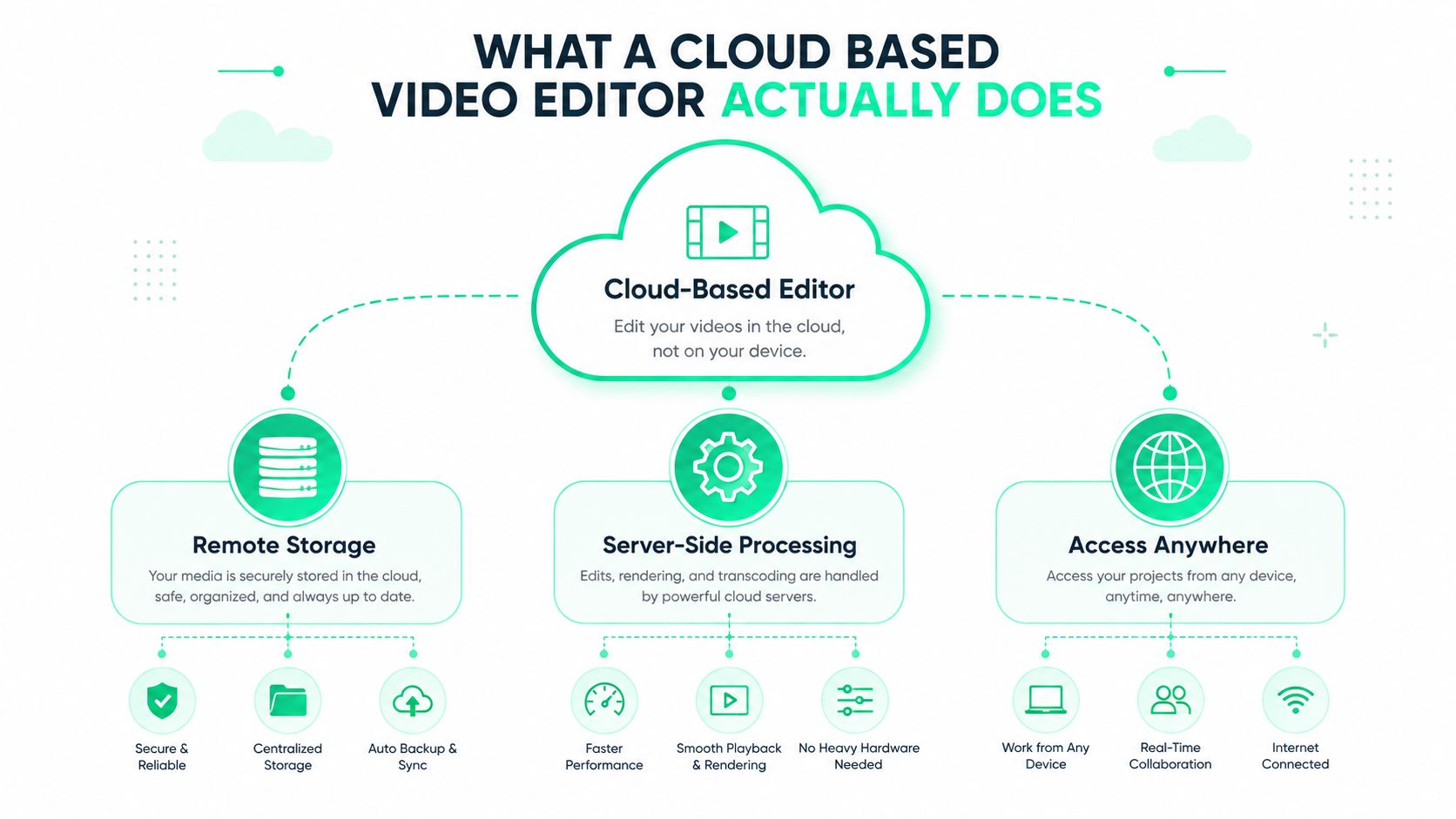
A **cloud based video editor** keeps footage on remote servers, runs editing tasks there, and uses a browser tab as the workspace. It works a bit like Google Docs for video, except the timeline, media, and rendering happen online instead of on one hard drive. For a new creator, that means the browser feels familiar, while the processing model runs very differently underneath.
### The simple workflow behind the interface
The process usually starts with an upload. A creator sends the source video to the platform, then opens the project in a browser where the timeline, captions, and visual controls appear.
From there, the platform handles the heavier work on its own machines. [Streaming Media](https://www.streamingmedia.com/Articles/ReadArticle.aspx?ArticleID=150047) describes cloud-based editing as uploading source files to the cloud service and then editing and encoding them in the browser, with the edits performed on machines provisioned by the provider. [LucidLink](https://www.lucidlink.com/blog/cloud-video-editing) explains the same basic setup from the storage side, where media lives in the cloud and editors can access, share, and work on files from anywhere without downloading large files or shipping hard drives.
That's the part beginners usually miss. The browser serves as the interface while the platform handles real editing work behind the scenes. The output is still a normal video file at the end, ready to download and post wherever the creator wants.
### Why the architecture matters for short clips
Short-form projects depend on quick turnarounds, so cloud rendering helps keep that pace manageable. A cloud-native editor described in NewscastStudio's coverage notes that rendering happens concurrently and stays consistent as load changes, which reduces export bottlenecks for teams working on multiple shorts at once. That matters more than flashy interface features because a stalled export can break momentum fast.
> The advantage goes beyond the editor simply being online. The browser can stay useful even when the creator's laptop is not a workstation.
For teams that worry about privacy or transcription workflow trade-offs, the editing choice usually sits next to transcription storage questions. A close look at [cloud vs offline transcription privacy](https://hyperwhisper.com/en/blog/video-transcription-software) helps clarify why some creators want local control while others prefer browser convenience. BlitzReels lays out its editing workflow and features on its [short-form editing features page](https://www.blitzreels.com/features), which shows how a browser-based tool can bring captioning, trimming, and export into one place.
## Cloud Editing Compared to Traditional Desktop Editors
The cloud vs desktop choice gets clearer once the work is short-form, not cinema. Desktop apps like Premiere Pro, Final Cut, and DaVinci Resolve still dominate heavy grading, multicam work, and effects-heavy sequences. Cloud editors win when the job is fast access, team feedback, transcription, and getting social clips out without depending on a powerful local machine.
### Side by side for short-form work
| Criterion | Cloud Based Video Editor | Traditional Desktop Editor |
|---|---|---|
| Hardware demands | Runs in a browser and shifts heavy processing to server-side infrastructure | Depends heavily on the local machine |
| Collaboration | Shared media, comments, and versioning work naturally across distributed teams | Collaboration often requires more handoff steps |
| Speed to first short | Fast when the goal is captions, clips, and vertical exports | Strong, but often slower for repurposing workflows |
| Cost structure | Usually centered on service access, storage, and usage limits | Usually centered on installed software and the machine that runs it |
| Learning curve | Easier for template-driven short-form work | Deeper control, but more complexity |
### Where desktop still wins
Desktop software still makes sense when the work calls for precision. Color grading, layered composites, and advanced timeline control are still easier in a mature installed app because those tools were built for deep manual control. A creator doing high-end brand work, complex multicam edits, or detailed finishing will still feel that difference quickly.
Cloud editing wins on another axis. It removes the need to wait for a better laptop, a larger local drive, or a studio machine to get started. That's especially useful for creators repurposing long recordings into short clips, because the goal isn't an elaborate timeline, it's a clean, publishable cut with captions and a strong hook.
### Why latency worries don't always hold up
A common concern is whether browser editing feels sluggish. That concern is valid, but it depends on the platform's infrastructure more than on the creator's laptop. A cloud-editing benchmark from an AWS EC2 setup showed one implementation using an **AWS g4dn.2xlarge** instance with **8 vCPUs**, **32 GB RAM**, a **NVIDIA Tesla T4 GPU**, about **400 MB/s** disk read and write, and **2 Gbit symmetrical internet**, which shows how much infrastructure responsive cloud editing can require ([AWS benchmark discussion](https://www.reddit.com/r/editors/comments/pxs18r/guide-affordable-video-editing-in-the-cloud/)).
That kind of setup is why cloud editors can feel surprisingly usable for compressed preview, timeline scrubbing, and export. Cloud-based systems push rendering and format conversion server-side, so the laptop becomes the window, not the engine.
## Core Features That Actually Matter for Short-Form
Short-form editing doesn't need every possible feature. It needs the handful that directly change how fast a creator can turn one long recording into multiple usable posts. That usually means transcription, clipping, vertical framing, caption styling, templates, and a way to move fast without manual cleanup on every export.
### The features that save time, not just look good
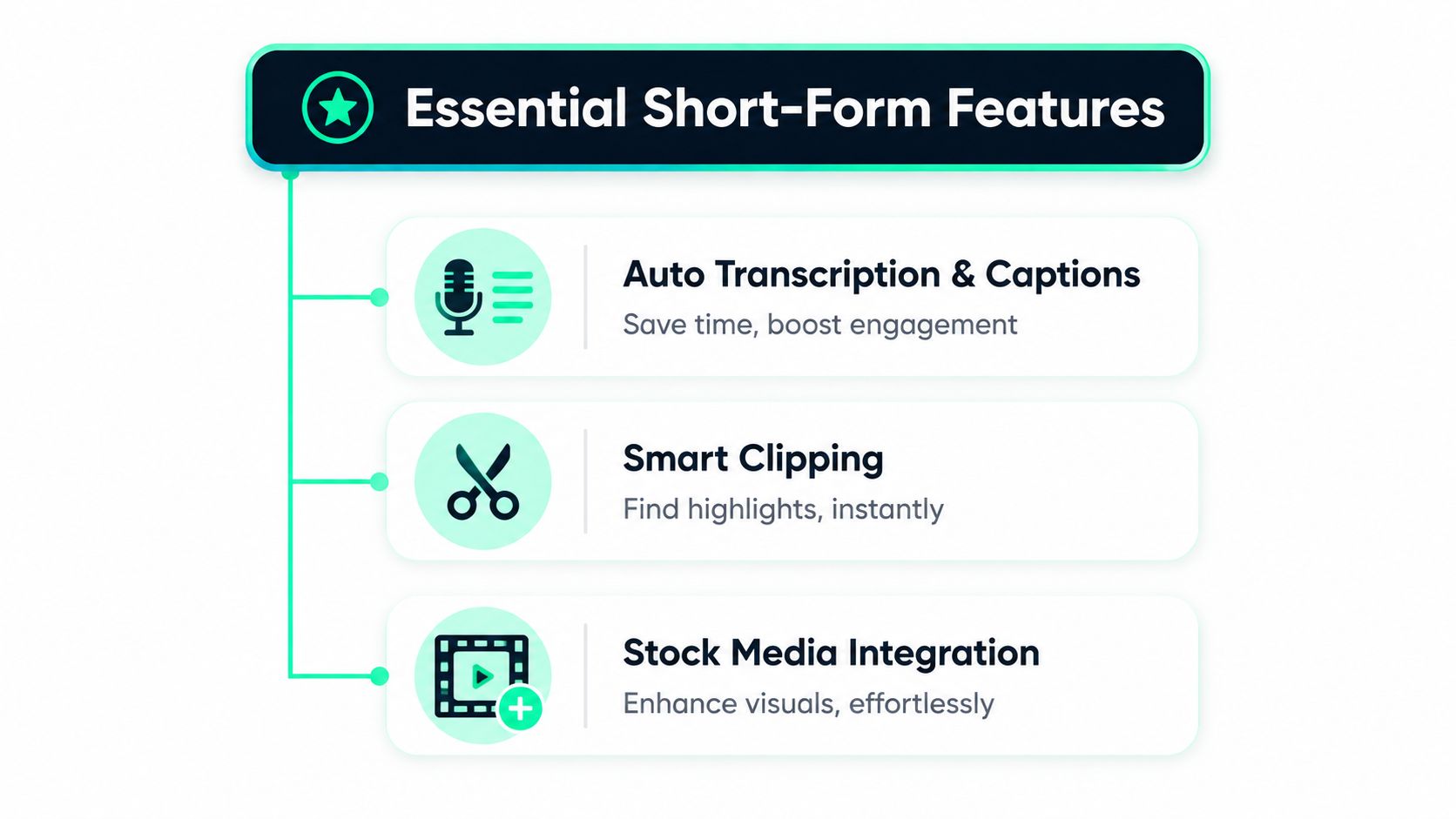
**Automatic transcription and captions** are the first filter. A good cloud editor turns spoken audio into text, then lets the creator style the captions so the clip reads cleanly on mute. That matters on TikTok, Instagram Reels, and YouTube Shorts, where silent viewing is common and bold text often carries the narrative.
**Smart clipping** is the next time saver. Instead of scrubbing a 45-minute file line by line, the platform can detect segments worth keeping, which helps a creator turn a webinar or podcast into several short posts. That is the point where browser tools become more than convenience, because they start doing the first pass of editorial work.
**Auto reframe** keeps faces centered when the aspect ratio changes. A horizontal interview can become a vertical clip without manually keyframing every shot, which is useful when the source footage was never recorded with short-form in mind. That's also where **one-click resizing** matters, because the same clip often needs different shapes for different platforms.
### Practical features for the post, not the demo
Templates and hooks help the opening do its job faster. A creator can drop a title card into the first second, choose a layout that already fits the brand, and keep moving instead of designing each variation from scratch. B-roll insertion adds another layer of usefulness, especially when a talking-head segment needs visual variety between sentences.
> **Useful test:** if a feature doesn't help a clip get to vertical export faster, it's probably optional for a short-form workflow.
For a deeper look at caption styling and how it affects readability, the [caption styles feature page](https://www.blitzreels.com/features/caption-styles) is a useful reference point. Cloud tools also differ on whether they can support light editing only or broader repurposing workflows, and that difference matters when the goal is shipping several platform-ready versions from one source file. Coverage of cloud video editing platforms still splits the market between lightweight editors for short social clips and more advanced tools for broader workflows, which shows why feature evaluation has to stay practical rather than theoretical ([Epiphan](https://www.epiphan.com/blog/cloud-video-editing-platforms/)).
## A Fast Workflow for Repurposing One Video Into Many Shorts
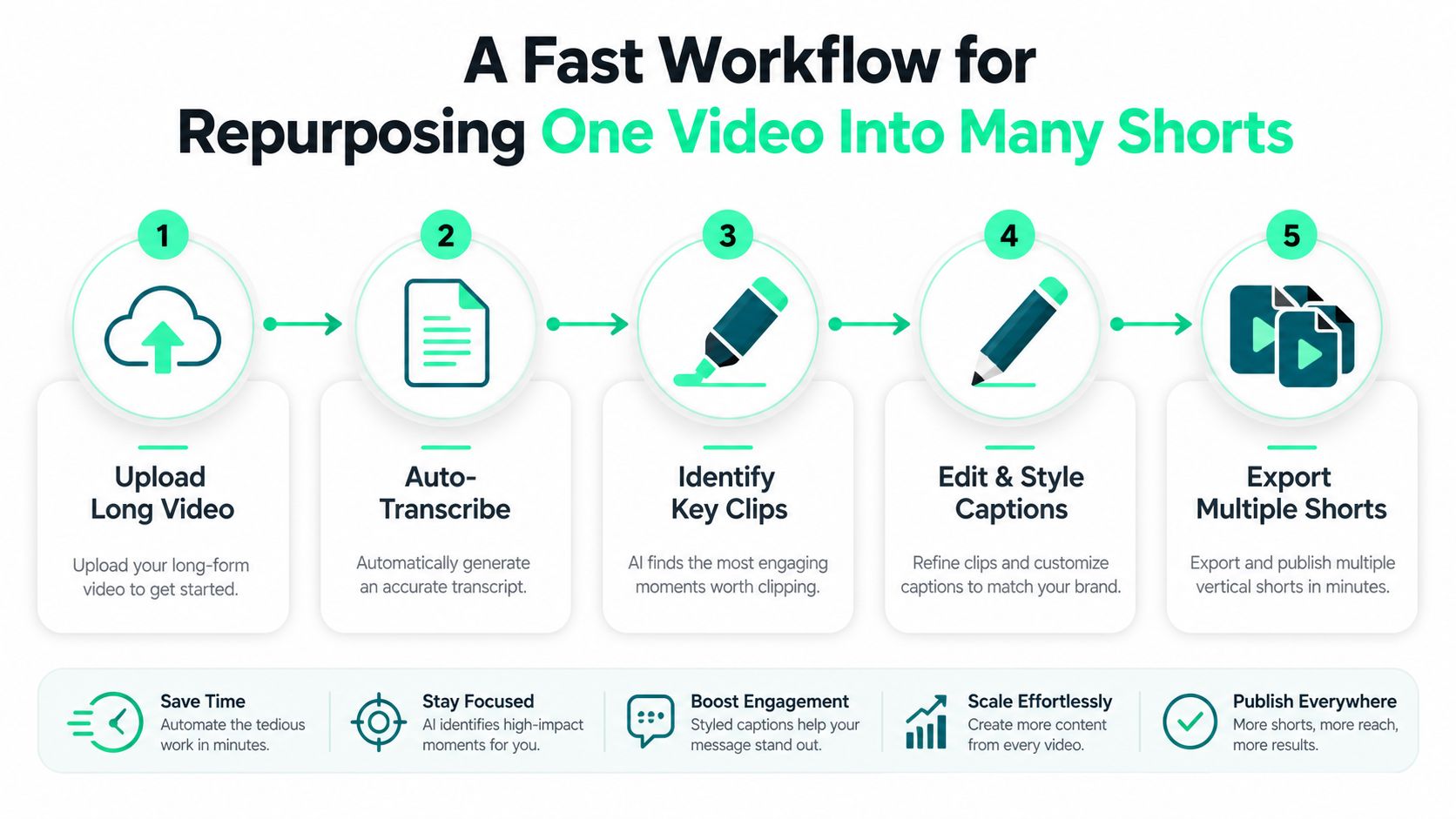
A single long recording can become a week's worth of posts if the process stays tight. A cloud editor is useful here because it handles the repetitive pieces first, transcription, highlight detection, vertical cropping, and exports, while the creator makes the judgment calls that still need human taste.
### A repeatable sequence that keeps moving
1. **Upload the long video.** A podcast episode, webinar recording, or screen tutorial goes into the browser-based workspace. The creator doesn't need to wait for local processing before editing starts.
2. **Auto-transcribe the audio.** The editor turns speech into text, which makes clipping, captioning, and searching easier.
3. **Identify key clips.** The platform flags usable moments, such as a sharp insight, a strong opinion, or a direct answer to a common question.
4. **Edit and style captions.** The creator chooses a hook, adds title cards if needed, and adjusts text so it fits the brand and the platform.
5. **Export multiple shorts.** The same source can be resized for TikTok, Reels, Shorts, and LinkedIn without rebuilding the project each time.
The useful part is what automation does in the background. Some tools detect faces, keep them centered in vertical crops, and place captions where they stay readable. Others support beat-aware text pacing or insert relevant visuals between talking points. That doesn't replace editing judgment, but it does reduce the number of manual moves that slow a session down.
The best repurposing workflow also includes a quick review pass. Captions need a human check, brand styling should stay consistent, and the final export should match the intended platform. For a practical walkthrough of turning longer YouTube footage into short clips, the [30-minute workflow for turning YouTube videos into TikTok gold](https://www.blitzreels.com/blog/the-30-minute-workflow-for-turning-youtube-videos-into-tiktok-gold) fits neatly alongside this approach, and [automated content repurposing](https://transclipper.ai/content-repurposing-tool) is a useful comparison point for creators exploring how much of the clipping process can be delegated to software.
## How to Choose the Right Cloud Based Video Editor
The right choice for short-form usually comes down to a few hard questions. Can the tool caption accurately, clip cleanly, reframe reliably, and export fast enough to keep a publishing schedule moving? If the answer is unclear, the editor is probably optimized for a different use case.
### The buying checklist that matters most
- **Caption quality first.** If the transcription is weak or the styling controls are clumsy, every other feature becomes harder to trust.
- **Clipping accuracy second.** A tool that finds the wrong highlight wastes more time than it saves.
- **Reframe reliability third.** Vertical output should keep the speaker centered without constant manual repair.
- **Template and hook support.** Short-form lives or dies on the opening, so reusable structures matter.
- **Platform-specific exports.** TikTok, Reels, Shorts, and LinkedIn should feel like deliberate output paths, not afterthoughts.
- **Team collaboration.** Shared libraries, comments, and version control matter once more than one person touches the footage.
- **Storage and pricing clarity.** A tool can look cheap until exports, bandwidth, or storage limits start stacking up.
- **Integration with the rest of the publishing stack.** Social schedulers and asset workflows matter when posting is part of the job, not a one-off task.
> **Buyer warning:** a low sticker price means little if the platform charges extra for every export or makes the team manually crop each clip.
### When desktop is still the better answer
A creator should still lean desktop when the project depends on detailed color work, complex compositing, or highly manual timeline craft. Cloud editors are strongest when speed, collaboration, and repetition matter more than deep finishing. They're built for getting from raw footage to publishable short in fewer steps.
BlitzReels sits in that browser-first category and focuses on turning uploaded videos into short-form clips with transcription, captioning, clipping, reframing, and export. That kind of workflow belongs on the shortlist when the editing problem is really a publishing problem. A good shortlist doesn't start with brand hype, it starts with whether the tool helps the creator ship faster without breaking the workflow.
## Real Workflows and Your First Trial With a Cloud Editor
A solo creator who records a weekly podcast can use one long episode as the source for a month of content. The edit starts with transcript scanning, moves into short clip selection, and ends with vertical exports for TikTok and Reels. The value isn't just the clip count, it's the ability to keep turning one recording into several posts without rebuilding the project each time.
A small marketing team gets a different kind of win. Raw footage can live in a shared cloud library, a teammate can leave timestamped comments, and the group can ship LinkedIn, Shorts, and Reels versions from the same source without sending files back and forth. That workflow reduces the usual confusion around versions, missing files, and who's responsible for the next cut.
### A simple seven-day trial
Pick one long video that already exists. Run it through a cloud based video editor, create three short clips, and export them in the aspect ratios needed for the target platforms. Track how long the full loop takes from upload to final export, because that number says more than any feature list.
The quickest way to test a tool is to make it solve a real publishing task. If the editor can handle captions, clipping, resizing, and basic styling in one sitting, it's probably useful for a short-form workflow. The [BlitzReels quickstart guide](https://www.blitzreels.com/docs/quickstart) is a practical starting point for anyone who wants to see how a browser-based workflow behaves before committing to a new system.
---
If short-form output is the goal, BlitzReels gives creators a browser-based way to turn one video into captioned, resized, and repurposed clips for TikTok, Reels, Shorts, and LinkedIn. It's worth opening the platform with a real recording, because the fastest way to judge a cloud editor is to see how quickly it gets from raw footage to something post-ready. Visit [BlitzReels](https://blitzreels.com) and test it against the next video sitting in the queue.