---
title: "Collaborative Video Editing: A Creator's Guide for 2026"
canonical: "https://blitzreels.com/blog/collaborative-video-editing"
---
# Collaborative Video Editing: A Creator's Guide for 2026
URL: https://blitzreels.com/blog/collaborative-video-editing
Markdown URL: https://blitzreels.com/blog/collaborative-video-editing.md
Published: 2026-05-12
Author: BlitzReels
Unlock faster workflows with collaborative video editing. Our guide explains the process, tools, and best practices for marketing teams and short-form creators.
Tags: collaborative video editing, video workflow, team video editing, short-form content, ai video editor

You're probably dealing with some version of this right now.
An editor sends `final_v4_REAL.mp4`. The marketing manager replies in Slack with “make the opening punchier.” A client emails “at 0:17 can we swap that shot?” Someone else drops revised captions into a Google Doc. Meanwhile, the social team is waiting because TikTok, Reels, and Shorts each need slightly different crops, captions, and hook text.
That isn't a creative problem. It's a workflow problem.
For years, video editing was built around one person sitting in one timeline on one machine. That model still works for certain projects. It breaks fast when you're producing short-form content at volume, working with freelancers, or running approvals across marketing, brand, and clients. Collaborative video editing fixes that by putting the project, the feedback, and the assets in one shared system instead of scattering them across drives, inboxes, and chat threads.
## Table of Contents
- [The End of Video Editing Chaos](#the-end-of-video-editing-chaos)
- [What the mess usually looks like](#what-the-mess-usually-looks-like)
- [What Is Collaborative Video Editing](#what-is-collaborative-video-editing)
- [Real-time and async are different](#real-time-and-async-are-different)
- [It changes who participates](#it-changes-who-participates)
- [Key Features and Their Real-World Benefits](#key-features-and-their-real-world-benefits)
- [Shared media libraries stop asset hunts](#shared-media-libraries-stop-asset-hunts)
- [Frame-accurate comments remove vague feedback](#frame-accurate-comments-remove-vague-feedback)
- [Version control prevents approval mistakes](#version-control-prevents-approval-mistakes)
- [Real-time visibility cuts duplicate work](#real-time-visibility-cuts-duplicate-work)
- [Permissions keep collaboration useful](#permissions-keep-collaboration-useful)
- [Clip-level notes are built for short-form teams](#clip-level-notes-are-built-for-short-form-teams)
- [Mapping Your Collaborative Editing Workflow](#mapping-your-collaborative-editing-workflow)
- [Who owns what](#who-owns-what)
- [A simple workflow from raw footage to publish](#a-simple-workflow-from-raw-footage-to-publish)
- [Technical Best Practices for Smooth Collaboration](#technical-best-practices-for-smooth-collaboration)
- [Structure beats talent when teams get busy](#structure-beats-talent-when-teams-get-busy)
- [Proxy workflows are the remote editing safety net](#proxy-workflows-are-the-remote-editing-safety-net)
- [Choosing Your Tools Traditional vs AI-Powered](#choosing-your-tools-traditional-vs-ai-powered)
- [Where traditional stacks still win](#where-traditional-stacks-still-win)
- [Where AI-powered workflows fit better](#where-ai-powered-workflows-fit-better)
- [Your Implementation Plan Creators and Teams](#your-implementation-plan-creators-and-teams)
- [Solo creator hiring an editor](#solo-creator-hiring-an-editor)
- [In-house marketing team](#in-house-marketing-team)
- [Frequently Asked Questions About Collaborative Editing](#frequently-asked-questions-about-collaborative-editing)
- [Do I need real-time editing, or is async review enough?](#do-i-need-real-time-editing-or-is-async-review-enough)
- [Is collaborative video editing only for large teams?](#is-collaborative-video-editing-only-for-large-teams)
- [Will this work if my internet isn't great?](#will-this-work-if-my-internet-isnt-great)
- [What's the biggest mistake teams make?](#whats-the-biggest-mistake-teams-make)
- [Are traditional tools obsolete now?](#are-traditional-tools-obsolete-now)
- [How do I know if my team is ready?](#how-do-i-know-if-my-team-is-ready)
## The End of Video Editing Chaos
The old workflow fails in predictable ways.
A podcaster records a long interview. The editor cuts a few clips in Premiere Pro. Then the founder wants stronger hooks, the social manager wants burned-in captions, and the client wants logo placement changed. Nobody is working from the same review screen, so feedback becomes translation. “Tighten the middle” means one thing to the editor and another thing to the person approving the post.
By the third revision, the team isn't really editing anymore. They're managing confusion.
### What the mess usually looks like
- **File-name roulette:** `final_final_2`, `final_use_this_one`, and `approved_latest` all exist at the same time.
- **Feedback in the wrong place:** notes live in email, Slack, comments on a cloud drive, and voice notes.
- **Heavy file shuffling:** people keep uploading and downloading exports instead of touching one shared project.
- **Lost context:** a reviewer says “replace this shot,” but doesn't identify the exact frame.
- **Bottlenecked approvals:** one missing stakeholder stalls everything.
> Collaborative editing works best when the team treats the project as one living workspace, not a chain of exported files.
That shift matters most for short-form teams. Long-form projects can survive a slower handoff model because timelines are measured in days or weeks. Short-form content lives on volume and speed. If your team clips podcasts, webinars, interviews, or product demos into social posts, every extra round of clarification burns momentum.
The fix isn't magical. It's operational. Put footage, comments, versions, and approvals into one shared workflow. Once that happens, feedback becomes precise, editors stop guessing, and the team spends more time shaping the video instead of chasing the latest file.
## What Is Collaborative Video Editing
**Collaborative video editing is like Google Docs, but for video.** Multiple people can work on the same project, comment on exact frames, review versions, and move a video from rough cut to final without passing giant files around all day.
At its best, collaborative video editing isn't just “two editors in one timeline.” It's a complete production system. The editor cuts. The producer organizes footage and approvals. The client or marketing manager reviews in context. The social lead checks captions, crops, and brand fit. Everyone works from the same source of truth.

The category is growing quickly because the need is real. The market for collaborative video editing is projected to grow from **$2.3 billion in 2025 to $5.15 billion by 2030**, with a **17.4% CAGR**, according to [Research and Markets' forecast for real-time collaboration in video editing](https://www.researchandmarkets.com/reports/6215327/real-time-collaboration-video-editing-market).
### Real-time and async are different
Some teams hear “collaborative” and think only about live, simultaneous editing. That's part of it, but not the whole story.
| Collaboration mode | What it looks like | Best use |
|---|---|---|
| **Real-time editing** | Multiple teammates work or observe changes as they happen | Fast internal teams, live reviews, quick social turnarounds |
| **Async collaboration** | Reviewers leave notes when they're available, editor responds later | Clients, cross-time-zone teams, approvals that don't need everyone online |
Collaborative projects often require both. Real-time helps when the social manager and editor are trying to fix a hook, opening frame, or caption style before publishing. Async works better when legal, brand, or clients need to review without joining a live session.
### It changes who participates
In a solo workflow, the editor carries too much interpretation work. In a collaborative workflow, each person contributes directly to their part of the process.
- **Editors** handle cuts, pacing, sound, and polish.
- **Producers or managers** keep assets, deadlines, and review rounds clean.
- **Reviewers** comment on the actual video, not in separate documents.
- **Social teams** check platform fit, hook quality, and caption readability.
> If feedback can't be tied to a frame, it usually creates another round of edits.
That's why collaborative video editing matters. It reduces interpretation, not just effort.
## Key Features and Their Real-World Benefits
A collaborative editing tool earns its keep when it removes specific bottlenecks. For short-form creators and marketing teams, those bottlenecks usually show up as missing assets, muddy feedback, duplicate cuts, and approval rounds that drag longer than the edit itself.
### Shared media libraries stop asset hunts
Short-form teams work fast, and speed falls apart when assets live across Slack threads, personal drives, and old project folders. A shared library keeps footage, music, logos, templates, lower thirds, and caption presets in one place, so the editor is not stopping mid-cut to ask for the current intro or sponsor tag.
It also protects brand consistency. The TikTok editor, paid social manager, and freelancer all pull from the same approved set instead of three slightly different versions.
Teams that want a clearer structure usually end up using a [shared workspace for projects, assets, and review activity](https://www.blitzreels.com/docs/workspace), because the library only works if everyone knows where the official files live.
### Frame-accurate comments remove vague feedback
Vague feedback burns hours.
“Can we make this part pop more?” forces the editor to interpret intent, guess the moment, then export another version just to check if the guess was right. Frame-specific comments fix that by attaching the note to the exact second, shot, or caption.
The difference is easy to see:
- **Vague note:** “The middle feels slow.”
- **Useful note:** “At 00:18, cut the pause before the answer.”
- **Production-ready note:** “At 00:18, replace this beat with product B-roll and keep the on-screen caption up for two more seconds.”
That level of precision matters even more on Reels and TikTok, where a half-second delay can weaken the hook.
### Version control prevents approval mistakes
Version control sounds administrative until someone publishes the wrong cut or a reviewer approves an outdated export.
In a clean collaborative setup, every review copy has a clear name, a timestamp, and an owner. People know which version is current, what changed since the last round, and whether a note has already been addressed. That keeps “final_v7,” “final_v7b,” and “final_USE_THIS” from turning into a real production system.
> **Practical rule:** If a file is up for review, it needs a named version and one person responsible for it.
### Real-time visibility cuts duplicate work
Real-time visibility is useful when two people are actively shaping the same deliverable under deadline. A social lead can review the opening hook while the editor trims dead air. A producer can check whether the CTA is on-brand without waiting for another export. Everyone sees the current state of the project instead of passing updates around in messages.
That matters less in traditional long-form workflows, where edits may happen in bigger, slower rounds. In short-form marketing, the loop is tighter. Teams test hooks, revise captions, swap graphics, and prep variants for multiple platforms in the same day. Visibility into current activity helps people avoid working on the same problem twice.
### Permissions keep collaboration useful
Open access sounds efficient until the wrong person deletes footage, shifts the timeline, or shares an unapproved cut.
Permissions solve that by matching access to responsibility:
- **Editors** adjust timelines, audio, and assets
- **Reviewers** comment, request changes, and approve
- **Clients or stakeholders** view selected versions
- **Managers** control status, delivery, and publishing decisions
The difference is usually first felt by agencies and in-house marketing teams. Broad visibility helps. Broad editing access creates cleanup work.
### Clip-level notes are built for short-form teams
Short-form production often starts with long raw footage. A 45-minute interview, webinar, podcast, or product demo might turn into ten clips across TikTok, Reels, Shorts, and paid social. The hard part is rarely the final trim alone. The hard part is finding the moments worth trimming.
Clip-level notes make that easier. A strategist can tag a strong hook. A founder can flag the cleanest product explanation. A social manager can mark the line that will work as a caption. Later, the editor can build fast from marked moments instead of scrubbing the same source footage again.
That is the primary benefit of collaborative features. They reduce interpretation, shorten review loops, and help teams go from raw footage to approved short-form content without losing a day to version confusion.
## Mapping Your Collaborative Editing Workflow
Monday morning. The social lead drops notes in Slack, the founder texts a new hook idea, the paid team comments on last week's export, and the editor is already cutting the wrong version. That is what a broken collaborative workflow looks like for short-form teams. The problem is rarely editing skill. It is handoff chaos.
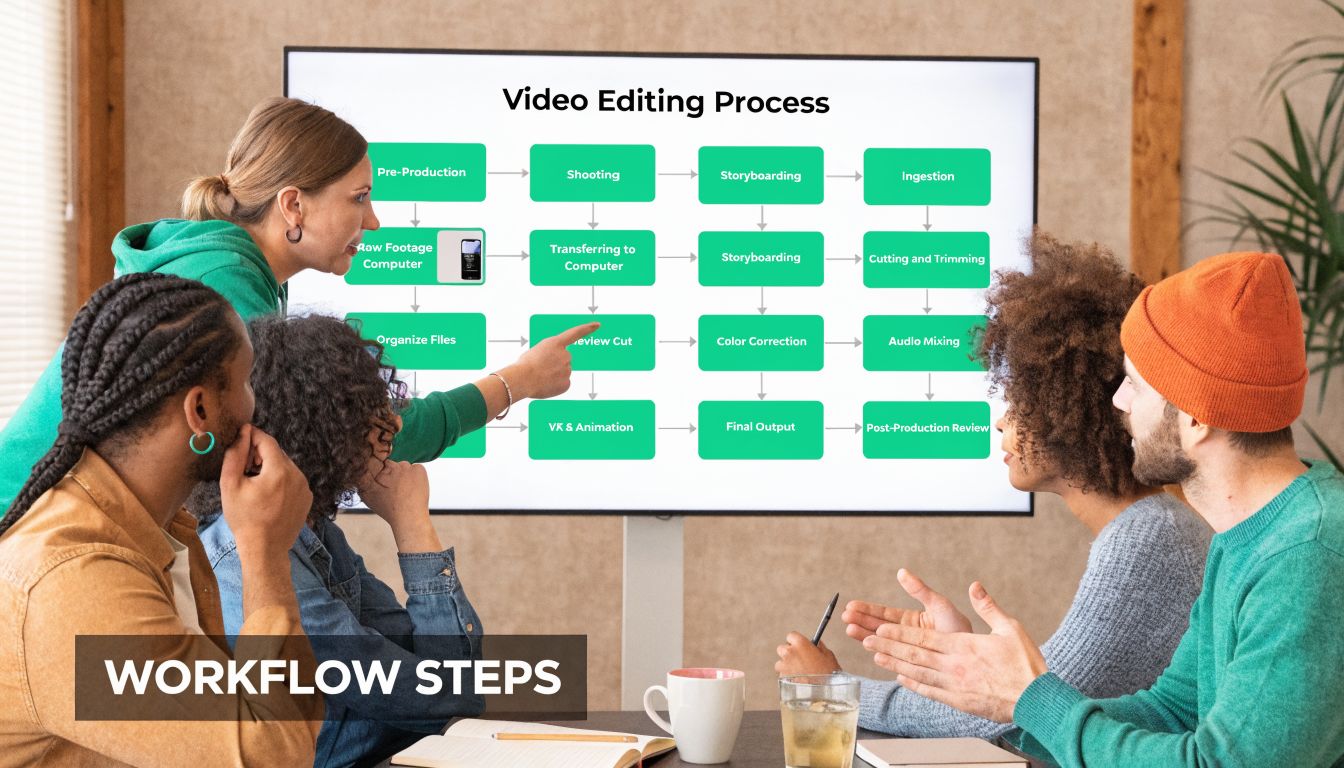
A workable system gives every project one home, one current cut, and one review path. Teams using shared editing environments often move faster because they are not splitting clip analysis, rough cuts, and feedback across separate tools, then trying to reconcile everything later. As noted earlier, vendors describing multi-user editing commonly report meaningful gains in analysis and editing speed, often in the 30% to 50% range compared with isolated workflows. The exact number matters less than the operational change. Fewer duplicate passes through footage. Fewer “which version is final?” messages. Fewer revisions caused by stale feedback.
For teams setting this up for the first time, a shared workspace works like a production office for short-form content. Briefs, source footage, versions, comments, approvals, and exports stay attached to the same job instead of getting scattered across email threads and cloud folders. The [BlitzReels workspace documentation](https://www.blitzreels.com/docs/workspace) shows the model clearly.
### Who owns what
Collaborative editing breaks down when responsibility is fuzzy, especially on fast-turn TikTok, Reels, and Shorts work where a team may produce ten variations from one source recording.
| Role | Main responsibility | Common mistake |
|---|---|---|
| **Producer or manager** | Intake, brief quality, deadlines, approval routing | Passing every stakeholder comment straight to the editor without sorting conflicts |
| **Editor** | Selects, structure, pacing, retention edits, polish | Cutting before the hook, CTA, and platform goal are clear |
| **Reviewer or client** | Frame-specific notes and final sign-off | Leaving broad feedback like “make it pop” with no timestamp or context |
| **Designer or motion specialist** | Graphics, branding, captions, animation polish | Building overlays from an outdated cut |
The producer or marketing lead usually protects the timeline more than anyone else. Someone has to decide whether a comment is a brand requirement, a performance hypothesis, or just personal taste.
### A simple workflow from raw footage to publish
Traditional long-form workflows often treat review as a late-stage event. Short-form teams cannot afford that. They need a tighter loop because one raw interview might feed organic posts, paid tests, and creator whitelisting assets in the same week.
1. **Ingest and tag the source material**
Upload footage, audio, graphics, and brand references to one shared location. Tag by speaker, product, campaign, hook angle, and platform if those categories matter to your team. A 40-minute interview is not one asset for a short-form team. It is a library of hooks, proof points, objections, and CTAs.
2. **Define the edit target before cutting**
Write down the goal for the version being built. Organic awareness, paid acquisition, founder-led thought leadership, product education, or testimonial proof all produce different edits from the same source clip. Editors work faster when the brief names the audience and the first three seconds that need to carry the cut.
3. **Build the rough cut around retention**
Start with the hook, then sequence the proof. That is a major difference from long-form editing, where the introduction can take its time. In short-form, the structure has to earn the next second immediately.
4. **Run review inside the project, not around it**
Keep comments attached to the live version with timestamps and frame context. Consolidate duplicate notes before revisions begin. If feedback lives in Slack, email, and a deck, the editor ends up spending half the revision round decoding comments instead of fixing the cut.
Before the next stage, a live demo often helps teams understand what a shared review loop feels like in practice:
5. **Polish only after the story is approved**
Add captions, punch-ins, reframing, B-roll, motion graphics, music, and platform formatting after the structure works. Many teams waste hours animating a version that still has the wrong opening line.
6. **Export by channel and archive cleanly**
Deliver platform-specific versions with naming that reflects aspect ratio, date, audience, and status. Then archive source media, captions, graphics, and finals so the next editor does not have to reverse-engineer the project three weeks later.
One rule keeps this whole process usable. One project gets one active review lane.
If your team is still building the production side around the edit, [Isolate Audio's guide for filmmakers](https://isolate.audio/articles/video-production-best-practices) is a useful reference because it covers the upstream habits that prevent downstream editing mess.
## Technical Best Practices for Smooth Collaboration
Creative teams often resist process because they think it will make the work feel rigid. The opposite is true. Good process gives editors room to focus because they're not constantly fixing preventable mistakes.
### Structure beats talent when teams get busy
The most useful collaboration habit is boring: a universal folder structure.
Use something every freelancer, editor, and manager can understand on sight:
- **01_Footage** for camera originals and screen recordings
- **02_Audio** for music, VO, and cleaned dialogue
- **03_Graphics** for logos, brand elements, and overlays
- **04_Project_Files** for edit files and linked assets
- **05_Exports** for review cuts and finals
Pair that with simple naming conventions. Name files by project, date, speaker, and version. Don't rely on memory. Don't trust “latest.” Don't let each editor invent their own system.
A second rule is permissions. Reviewers should review. Editors should edit. Admins should control archive and deletion rights. Teams lose surprising amounts of time recovering from accidental moves or overwritten media.
For teams that want a solid broader checklist beyond editing alone, [Isolate Audio's guide for filmmakers](https://isolate.audio/articles/video-production-best-practices) is worth keeping handy because it covers the production habits that reduce downstream mess.
### Proxy workflows are the remote editing safety net
Proxy workflows are one of the most effective technical decisions in collaborative video editing.
Instead of forcing every collaborator to handle full-resolution media all the time, proxy systems create lightweight working copies. In proxy-based collaborative workflows, those copies can be **2% of the original file size**, which makes remote access smoother and avoids crushing network connections. Those workflows can also cut production time by **up to 40%**, according to [IPV's write-up on collaborative editing and proxy conforming](https://blog.ipv.com/how-collaborative-video-editing-changes-video-production-workflows).
That matters because high-res footage creates friction fast. The editor sees lag. Reviewers wait for playback. Remote collaborators start downloading local copies “just to make it easier,” and suddenly the team is back in version-control hell.
Use proxies when:
- **Footage is heavy:** 4K and multicam projects get unwieldy fast
- **The team is remote:** not everyone has the same internet or hardware
- **You're producing volume:** repeating downloads and relinks don't scale
- **Short-form variants multiply:** one source clip may become many outputs
> Technical discipline isn't red tape. It's what lets creative teams move quickly without breaking the project.
The final piece is standards. Agree on frame rate, aspect ratio targets, caption style rules, and export naming before anyone starts polishing. If the team decides those late, every revision becomes more expensive.
## Choosing Your Tools Traditional vs AI-Powered
The tool question gets muddled because people compare platforms built for different jobs.
A documentary editor, a post house, a podcast clipping team, and a social media manager do not need the same workflow. That's why many short-form creators feel underserved. Short-form video now accounts for **60% of all social media views globally**, yet only about **15% of collaborative tools are optimized** for the rapid, caption-heavy, multi-aspect-ratio work common on TikTok and Reels, according to the source referenced in [this short-form collaboration market discussion](https://www.youtube.com/watch?v=MirFi1IqyJM).
### Where traditional stacks still win
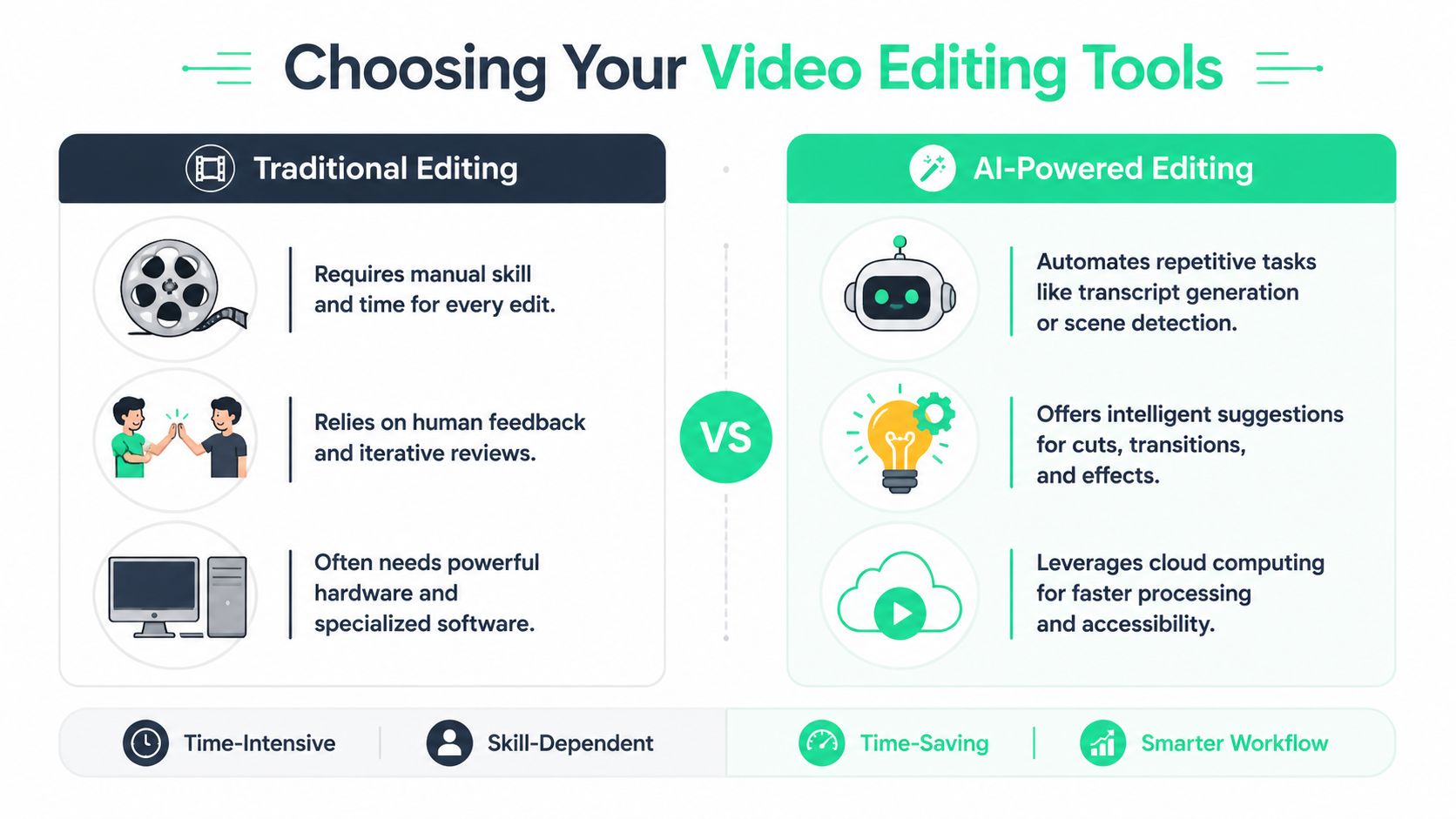
Traditional stacks usually mean something like Premiere Pro plus a review layer such as Frame.io, with extra tools for captions, graphics, audio cleanup, and exports.
That setup is strong when you need deep manual control.
- **Complex timelines:** documentaries, commercials, and narrative work benefit from granular editing tools
- **Specialist handoffs:** color, VFX, and sound teams often already work inside established pro software
- **Custom finishing:** unusual aspect ratios, advanced compositing, and detailed motion graphics are easier to manage
The trade-off is friction. There are more handoffs, more subscriptions, more training demands, and more room for inconsistent feedback. For short-form teams publishing frequently, the stack can become heavier than the work requires.
### Where AI-powered workflows fit better
AI-powered platforms are strongest when the team's goal is fast iteration on repeatable short-form content. You upload source footage, generate candidate clips, review transcripts, adjust hooks, refine captions, crop for vertical formats, and publish.
That's not a replacement for every editing craft skill. It is a better fit for a lot of social production.
| Decision area | Traditional stack | AI-powered platform |
|---|---|---|
| **Setup time** | Higher | Lower |
| **Learning curve** | Steeper | Friendlier for non-editors |
| **Best for** | Deep custom post-production | High-volume short-form content |
| **Review flow** | Often split across tools | Usually more centralized |
| **Caption and reframing work** | More manual | More automated |
If you're evaluating options broadly, this roundup that helps [compare AI video editing tools](https://www.repurposemywebinar.com/blog/ai-video-editing-tools-for-marketers) is useful because it frames the differences around marketer needs rather than film-school assumptions.
A platform with an [AI agent editor for short-form workflows](https://www.blitzreels.com/features/ai-agent-editor) fits teams that care more about speed to publish than about building every cut by hand from a blank timeline.
> The right tool isn't the most powerful one. It's the one that removes the most friction from the type of video you make every week.
## Your Implementation Plan Creators and Teams
Teams often don't need a total overhaul. They need a cleaner next step.
Cost matters here. For freelancers and small teams, collaborative tools can feel expensive, especially when cloud egress fees rise and per-user pricing stacks up. According to the source cited in [Evercast's collaborative editing overview](https://www.evercast.us/blog/collaborative-video-editing), **20% year-over-year increases in cloud storage egress fees** and broader pricing pressure make affordability a top concern, with **65% of small businesses** prioritizing scalable, budget-friendly options.
### Solo creator hiring an editor
If you're a solo creator bringing in your first editor, don't overbuild.
Start with a lightweight system:
- **One source of truth:** keep footage, brand assets, and approved exports in one shared location
- **One review channel:** all notes go in the video review tool, not in text messages and DMs
- **One naming convention:** project name, date, platform, version
- **One decision-maker:** if you have a manager or partner, choose who gives final notes
Your first operating rhythm can be simple:
1. Record long-form content.
2. Upload raw media and any brand assets.
3. Let the editor create a first pass of clips.
4. Review with timestamped feedback only.
5. Approve final versions by platform.
The mistake most solo creators make is trying to act like a mini agency. Keep it lean. Fewer tools, fewer review layers, fewer opportunities for confusion.
### In-house marketing team
Marketing teams need more structure because more people can stall the work.
A clean setup usually includes:
- **Brand guardrails:** caption style, fonts, lower-third rules, hook tone, safe areas for mobile
- **Role boundaries:** marketing reviews messaging, legal checks compliance, sales contributes objections or soundbites, but one owner consolidates notes
- **Campaign tagging:** group assets by campaign, product line, or audience segment
- **Approval rules:** define which posts need full approval and which can move on manager sign-off
For internal teams, the biggest benefit is reducing review sprawl. Don't let stakeholders comment wherever they happen to be. Centralize the review path and summarize decisions in the project itself.
If your team is redesigning its process, this article on [letting AI handle parts of your editing workflow](https://www.blitzreels.com/blog/let-ai-handle-the-edits-your-new-video-workflow) is a useful reference point for thinking about where automation can remove repetitive work without giving up control.
A practical rollout looks like this:
| Team type | Start this week | Add next |
|---|---|---|
| **Solo creator** | Shared storage, timestamped review, naming system | Template captions, clip tagging |
| **Marketing team** | Central review owner, permissions, campaign folders | Approval stages, platform-specific templates |
The goal isn't perfection. It's fewer avoidable delays on the next batch of videos.
## Frequently Asked Questions About Collaborative Editing
### Do I need real-time editing, or is async review enough?
Async review is enough for many teams. If your stakeholders are mostly approving cuts and leaving notes, frame-accurate comments can carry a lot of the load. Real-time collaboration helps when your team needs fast decisions, live revisions, or same-day publishing.
### Is collaborative video editing only for large teams?
No. A solo creator and one freelance editor can benefit immediately. Even a two-person setup gets cleaner when notes, assets, and versions live in one place.
### Will this work if my internet isn't great?
Yes, if you build the workflow correctly. Proxy media, controlled permissions, and centralized review matter more than having elite hardware. Poor internet becomes a bigger problem when teams try to move full-resolution files around unnecessarily.
### What's the biggest mistake teams make?
They split communication across too many channels. Once feedback lives partly in Slack, partly in email, and partly in exported files, the editor becomes a detective instead of an editor.
### Are traditional tools obsolete now?
Not at all. They're still the right choice for many complex productions. The central question is whether your current stack matches the kind of work you produce most often.
### How do I know if my team is ready?
If you regularly deal with duplicate exports, slow approvals, unclear notes, or repeated caption and crop revisions, you're ready. Those aren't random annoyances. They're signs your workflow needs collaboration built in.
---
BlitzReels is built for teams that need to turn recordings into short-form content quickly without dragging every clip through a heavy traditional process. If you want a faster way to generate clips, refine captions, adjust crops, and publish vertical videos, take a look at [BlitzReels](https://blitzreels.com).
*Powered by [Outrank](https://outrank.so)*