---
title: "Content Repurposing for B2B: One Recording, Dozens of Shorts"
canonical: "https://blitzreels.com/blog/content-repurposing"
---
# Content Repurposing for B2B: One Recording, Dozens of Shorts
URL: https://blitzreels.com/blog/content-repurposing
Markdown URL: https://blitzreels.com/blog/content-repurposing.md
Published: 2026-07-28
Author: BlitzReels
Learn how B2B marketers use content repurposing to turn webinars, demos, and interviews into high-performing short-form clips.
Tags: content repurposing, short-form video, video marketing, B2B content, AI video editing

Your webinar ended three weeks ago. The recording is still in the drive, the podcast edit is half-finished, and the founder Q&A that took a full afternoon to capture has already slipped behind the next launch. That's the normal state of modern B2B content, a lot of expensive material sits there waiting to be turned into **LinkedIn clips, YouTube Shorts, sales-enablement snippets, and ad cuts** instead of being published once and forgotten.
**Content repurposing** solves that by turning one strong asset into a distribution system. Industry guidance has moved in that direction for years, taking existing content and adapting it into different formats rather than copying and pasting, with modern workflows built around **evergreen assets**, **platform-native edits**, and reusable clip libraries [as described in Semrush's repurposing guide](https://www.semrush.com/blog/repurposing-content/) and [Digital Applied's workflow breakdown](https://www.digitalapplied.com/blog/content-repurposing-one-piece-ten-formats-guide). For teams publishing podcasts, webinars, demos, and founder videos, the question is no longer whether to repurpose. It's how to make it repeatable without turning production into a mess.
## Table of Contents
- [The Hidden Distribution System in Your Video Archives](#the-hidden-distribution-system-in-your-video-archives)
- [What changes when content becomes a distribution system](#what-changes-when-content-becomes-a-distribution-system)
- [Why Repurposing Deserves a Dedicated Workflow](#why-repurposing-deserves-a-dedicated-workflow)
- [Start with the right assets](#start-with-the-right-assets)
- [A Repeatable Framework for Auditing and Atomizing Content](#a-repeatable-framework-for-auditing-and-atomizing-content)
- [Audit first, then atomize](#audit-first-then-atomize)
- [Manual Editing Versus AI-Assisted Repurposing](#manual-editing-versus-ai-assisted-repurposing)
- [Manual vs AI-Assisted Repurposing](#manual-vs-ai-assisted-repurposing)
- [Platform-Specific Tactics for Short-Form Success](#platform-specific-tactics-for-short-form-success)
- [What each platform needs](#what-each-platform-needs)
- [Channel checklists that keep clips native](#channel-checklists-that-keep-clips-native)
- [Common Repurposing Mistakes and How to Avoid Them](#common-repurposing-mistakes-and-how-to-avoid-them)
- [When not to repurpose](#when-not-to-repurpose)
- [Measuring ROI and Scaling Your Repurposing Engine](#measuring-roi-and-scaling-your-repurposing-engine)
- [What to measure first](#what-to-measure-first)
## The Hidden Distribution System in Your Video Archives
A B2B team often thinks it has a content problem when it really has a distribution problem. The webinar deck got built, the podcast guest booked, the customer interview recorded, and the founder update captured, then everyone moved on because the next deadline showed up. Those recordings are already the raw material for a much larger engine, if someone treats them like assets instead of one-off events.
A better model is simple. One high-value recording becomes a source for **short clips**, **title-card hooks**, **captions**, **resize-ready cuts**, and **sales snippets** that can move across TikTok, Instagram Reels, YouTube Shorts, and LinkedIn. That's why content repurposing is now commonly treated as a workflow, not a side task, and why teams export their best content into a media library before editing [as shown in BlitzReels' media library documentation](https://www.blitzreels.com/docs/media-library).
### What changes when content becomes a distribution system
The value comes from reuse without sameness. A webinar replay can become a thought-leadership clip for LinkedIn, a product proof clip for a sales rep, and a tighter version for Shorts, each with a different opening and pacing. The original recording still matters as the source of truth, but the derivatives carry the message farther and in forms people are willing to watch.
> **Practical rule:** If the source recording doesn't have a clear audience, a useful takeaway, and enough visual or verbal texture to survive clipping, it probably shouldn't be repurposed yet.
Many teams waste time. They try to squeeze every asset into every platform, then wonder why the results feel thin. Strong repurposing starts with a finite archive of useful recordings, then turns those recordings into formats that fit the channel instead of forcing the channel to fit the recording.
The upside is real for agencies and SaaS teams. One strong founder interview can feed demand gen, sales, social, and nurture at the same time. The output isn't just more content, it's more useful distribution from work that already happened.
## Why Repurposing Deserves a Dedicated Workflow
A repurposing workflow pays for itself when the source material already has signal. A founder interview, webinar, or podcast episode can carry a B2B campaign for weeks, but only if someone plans how it will become clips, captions, summaries, and platform-specific edits. The work is closer to distribution ops than one-off editing, which is why a practical workflow matters more than a pile of saved recordings.
One common operating model is to keep a **60/40 split** between new pillar content and repurposing, then budget follow-on editing time against the source asset itself per this repurposing strategy guide. In that model, a guide that takes **10 hours** to produce is followed by about **4 hours** of repurposing work. That is a production standard, not an opportunistic “clip something if there is time” habit.
### Start with the right assets
Good workflows begin with selection, because the wrong source material creates more cleanup than output. The same guidance recommends exporting the top **50** pieces, scoring them on traffic, engagement, and conversion potential, then narrowing the pool to the top **5** for initial repurposing. That forces teams to treat the archive like a working library, not a dumping ground for every recording that happens to exist.
That matters in agency and SaaS environments, where founder videos, product webinars, and customer podcasts all compete for the same editing queue. A repurposing system should prioritize recordings with a clear point of view, usable proof, and enough texture to survive clipping. A flat interview can still be useful, but only if the team knows which segment will carry the message and which segment will just waste captioning time.
The format logic also changes the work. Repurposing is the process of taking existing content and turning it into different formats or platforms, rather than copying the same asset into every channel [as summarized by Semrush](https://www.semrush.com/blog/repurposing-content/). That is why one webinar can become a LinkedIn thought-leadership clip, a short product proof for a sales rep, and a tighter version for Shorts, each with a different hook and pacing. A practical internal reference point is the [BlitzReels content repurposing strategy guide](https://www.blitzreels.com/blog/content-repurposing-strategy), which fits that same distribution-first mindset.
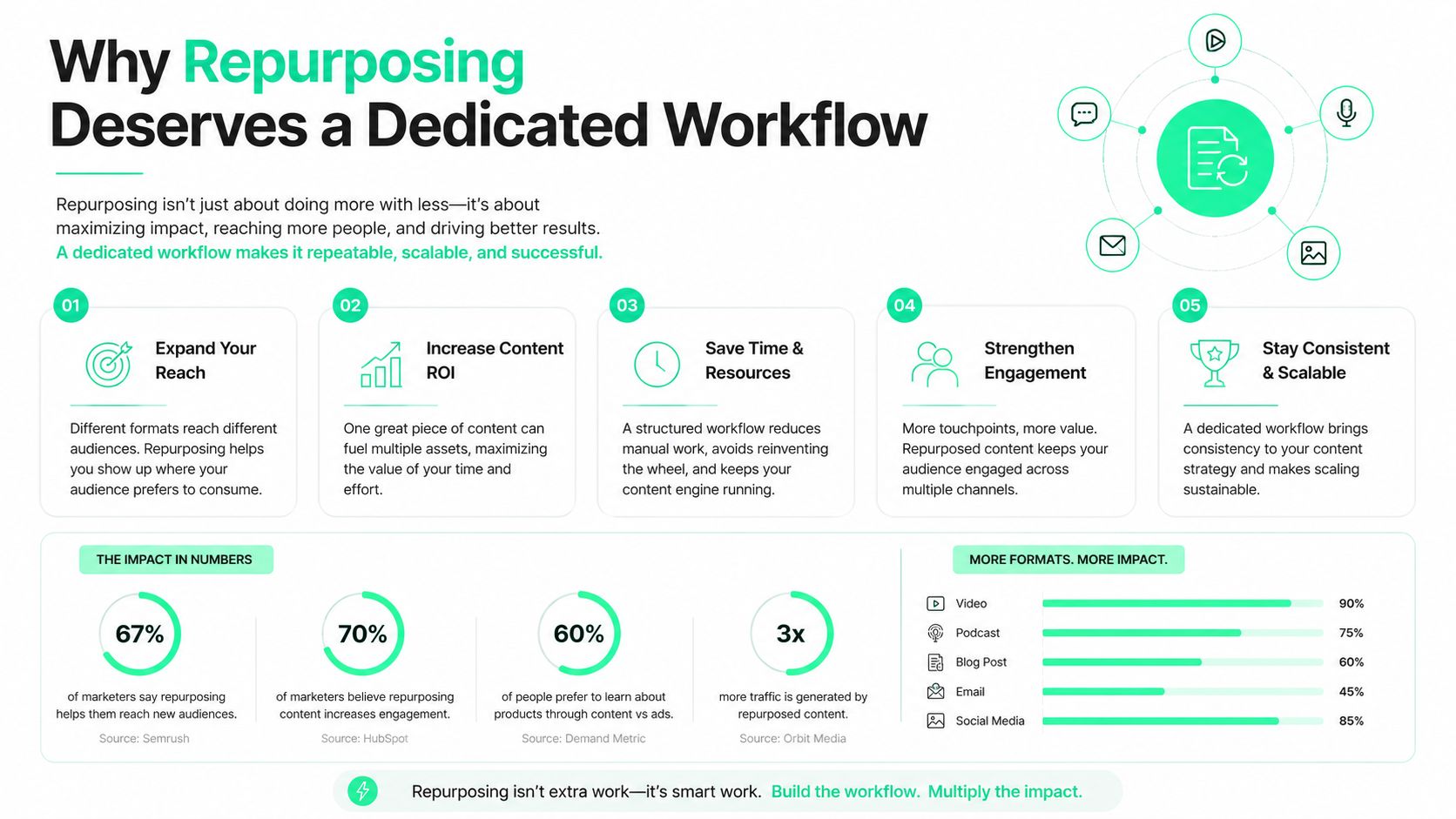
For teams comparing manual and AI-assisted editing, the trade-off is usually time versus control. Manual clipping takes longer, but it gives tighter judgment on what should be cut, where the caption should break, and whether the opening line holds attention on short-form platforms. AI can accelerate the first pass and reduce tedious trimming, but it still needs a human to check context, tone, and whether the clip lands for the target audience. In practice, that difference shows up in output quality, especially when a podcast or webinar needs to feel native on TikTok, Reels, Shorts, or LinkedIn.
Contently makes the same point from a planning angle. The strongest decision rule is to repurpose material that is evergreen, already performing well, or can be updated with fresh data [in its repurposing guide](https://contently.com/2024/04/09/ultimate-guide-repurposing-content/). That is the difference between a real operating model and a folder full of random excerpts.
A dedicated workflow also creates shared standards across editors, strategists, and demand gen managers. The team stops asking whether something can be clipped and starts asking whether the asset deserves the production time, whether the audience fit is strong, and whether the finished pieces will extend reach across podcast, webinar, and founder-video distribution.
## A Repeatable Framework for Auditing and Atomizing Content
A repurposing queue gets messy fast if every webinar, podcast, and founder video is treated as clip-worthy. The cleaner path starts with an audit, where the team ranks source assets by performance, audience fit, and whether the recording has material worth breaking apart. Once the right source is selected, the work shifts to atomizing it into reusable units such as **key statistics**, **quotable frameworks**, and **step-by-step instructions**.
### Audit first, then atomize
A useful sequence looks like this.
1. **Rank source assets by performance.** Traffic, conversions, engaged time, and longevity matter more than recency alone.
2. **Check audience fit.** A strong asset still needs a topic that makes sense on the target channel.
3. **Extract reusable units.** Pull out claims, examples, frameworks, transitions, and concise answers.
4. **Decide the derivative format.** Some points belong in clips, others in slides, captions, or a short written summary.
5. **Add platform-native framing.** Rewrite the opening, tighten the takeaway, and adjust pacing.
6. **Verify claims and metadata.** Fresh stats, internal links, and source references need a check before export.
7. **Publish, measure, and keep the single source of truth updated.**
That structure fits the repeatable production model described in [Viral.new repurposing workflow](https://viral.new/blog/what-is-content-repurposing), where repurposing is treated as a workflow with stages, not as a one-off editing task.
> Good repurposing pulls the same idea into different shapes. Bad repurposing just trims the same file into smaller files.
For B2B teams, the strongest source material is usually the recording that already proves something. A customer interview with a clear objection-handling moment, a webinar with a usable framework, or a podcast with a concise founder answer gives editors something concrete to shape. Parse.ly recommends prioritizing the highest-intent, best-performing content in the library, then using ROT analysis to surface material that has gone stale in the archive [in its repurposing resource](https://www.parse.ly/resource/content-repurposing/).
The operational gain is straightforward. Once a team agrees on what counts as a clip-worthy moment, it stops spending time on weak sections, awkward tangents, and long intros that do not serve the cut. That makes the first batch easier to ship and easier to repeat without quality slipping.
For teams turning this into a wider distribution system, [BlitzReels' content repurposing strategy guide](https://www.blitzreels.com/blog/content-repurposing-strategy) lays out the planning layer that sits behind the edits.
## Manual Editing Versus AI-Assisted Repurposing
A founder webinar can look like gold in the archive and still take half a day to turn into usable short-form clips. A customer interview has the same problem. The source is strong, but the repurposing method decides whether the team ships a handful of clips or a steady stream for LinkedIn, YouTube Shorts, Instagram Reels, and TikTok.
Manual repurposing still matters when the clip needs narrative control or brand-specific polish. A human editor can hear where the argument turns, decide which pause should stay, and cut for nuance instead of speed. That matters for founder stories, customer proof, and technical explanations, where a clumsy cut can flatten the message or make the speaker sound less confident than they are.
AI-assisted workflows win on throughput. Typeface notes that enterprise teams may manage **200+ assets per quarter across six or more channels**, and that manually reformatting one whitepaper into social, email, and sales variants can take **two to three days** of writer and designer time [in its AI repurposing guide](https://www.typeface.ai/blog/content-repurposing-with-ai-5-ways-to-repurpose-content). The practical trade-off is clear. If the team needs more output for short-form distribution, AI handles transcription, first-pass clipping, and resizing faster than a person should.
### Manual vs AI-Assisted Repurposing
| Workflow Stage | Manual Approach | AI-Assisted Approach |
|---|---|---|
| Source review | Watch the full recording, mark timestamps by hand | Transcribe the recording and surface likely clip moments |
| Clip selection | Editor judges every moment manually | AI suggests hook-worthy segments for review |
| Reframing | Crop and resize each cut one by one | Auto-reframe faces and subjects for vertical output |
| Captions | Type and time captions manually | Generate captions, then refine style and emphasis |
| Publishing prep | Re-export each version separately | Produce channel-ready variants faster, then QA them |
A tool like [grow your audience with less effort](https://www.narrareach.com/features/ai-content-repurposing) fits into that workflow because it reduces the amount of manual sorting before an editor ever opens a timeline. The useful comparison is not whether AI replaces editors. It does not. The core question is whether the team wants every clip to start with transcription, auto-detection, and resizing already handled.
> **What still needs a human:** hook judgment, final brand checks, claim verification, and the call on whether a clip is actually worth publishing.
For short-form video, the strongest setup is usually a hybrid process. Let AI handle clipping, reframing, captions, and resizing. Let a human decide which segment gets the strongest opening, which subtitle style fits the brand, and whether the closing needs a softer or harder call to action.
Teams that want a broader production model can map that approach against [BlitzReels' guide to repurposing long videos with AI](https://www.blitzreels.com/blog/how-to-repurpose-long-videos-with-ai). In practice, the gain is not only speed. It is speed with fewer dropped details, less editorial fatigue, and a cleaner path from one recording to multiple channel-ready cuts.
## Platform-Specific Tactics for Short-Form Success
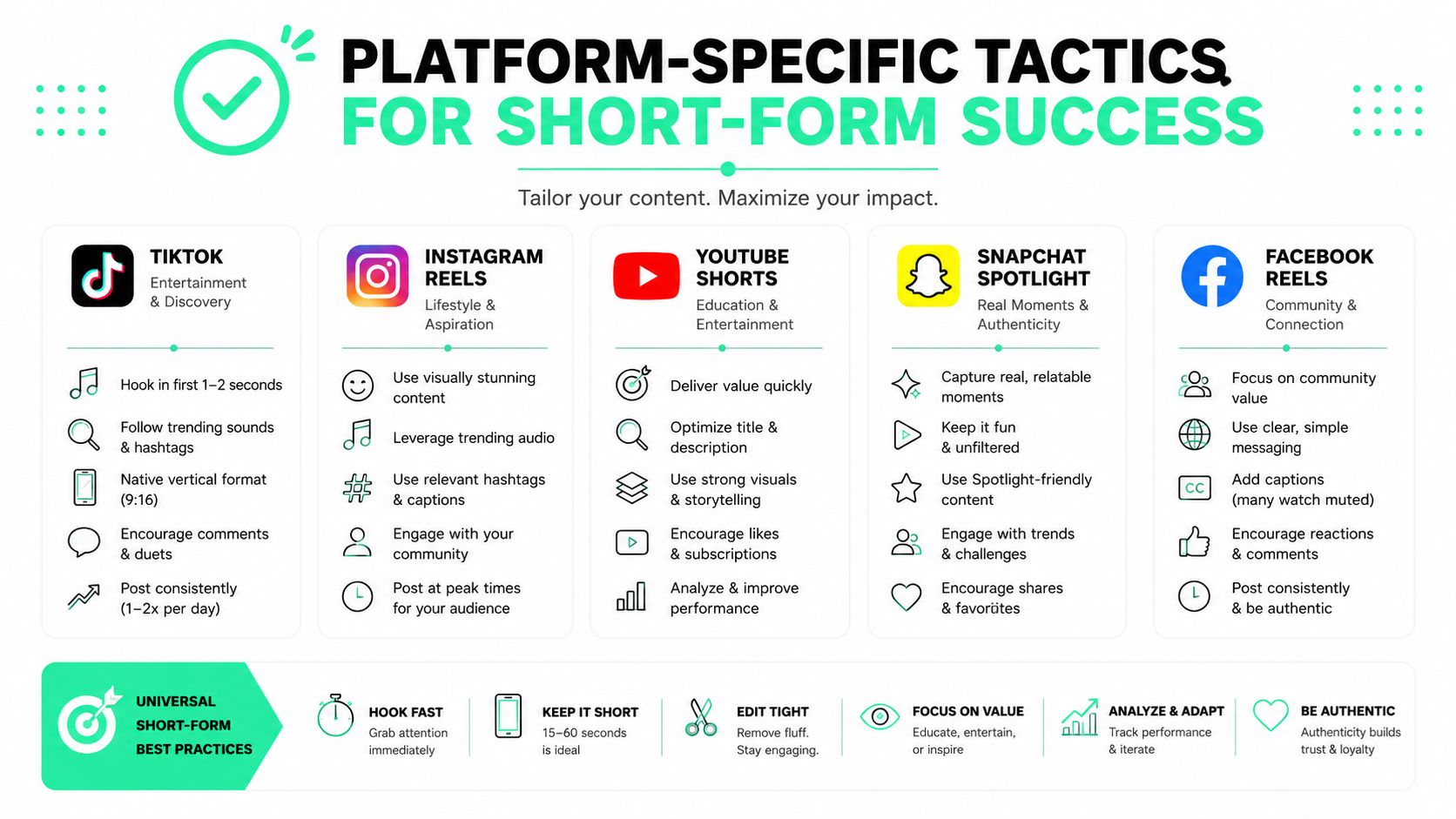
A podcast clip that lands on LinkedIn can feel too polished for TikTok, while a TikTok-style cut can feel undercooked for a sales-facing LinkedIn feed. Repurposing works only when the hook, caption density, pacing, and framing match the platform's norms, as Bit Social advises [as Bit Social advises](https://bit-social.com/blog/content-repurposing-cant-ignore-it/).
### What each platform needs
TikTok rewards a fast setup and a clear pattern break. The opening has to earn attention immediately, so the clip usually needs a sharper hook than a webinar excerpt would naturally provide. Instagram Reels benefits from bold captions, tighter visual rhythm, and a strong opening card, especially when the original recording begins slowly.
YouTube Shorts is less forgiving of dead space than a long-form upload. The clip needs a concise message, strong vertical framing, and enough visual energy to stay readable on mobile. LinkedIn works better when the clip feels useful, specific, and professionally framed, especially for demos, customer interviews, and founder commentary, as supported by the broader short-form guidance in [BlitzReels' short-form video overview](https://www.blitzreels.com/blog/short-form-video).
### Channel checklists that keep clips native
- **TikTok:** Lead with the most surprising line, keep the pacing brisk, and avoid over-explaining the setup.
- **Instagram Reels:** Add captions that are easy to scan, use title cards when the clip needs context, and keep visual clutter low.
- **YouTube Shorts:** Reframe the subject centrally, crop for vertical viewing, and trim every pause that does not add meaning.
- **LinkedIn:** Use a takeaway-driven hook, reinforce the point with captions, and make the clip useful for a buyer, manager, or team lead.
A narrow edit can still fail if it looks like the same file everywhere. Adaptation matters more than trimming. Strong short-form repurposing workflows add hooks, title cards, captions, reframing, and resizing before export, so the clip feels native instead of recycled.
For teams that want a practical editing reference, [BlitzReels' short-form video guide](https://www.blitzreels.com/blog/short-form-video) covers the habits that help clips feel platform-ready. The same rule holds across every channel. Respect the format, or the clip will look like an import.
For B2B teams turning webinars, podcasts, and founder videos into short-form output, the trade-off is usually time versus finish quality. A manual workflow can take closer to an hour per clip when an editor has to find the cut, tighten the pacing, write captions, and test the framing by hand. An AI-assisted workflow can cut that down to a much smaller fraction of the time because the first pass already handles transcription, scene detection, captions, and resizing, but the team still has to check hooks, brand fit, and whether the segment is worth publishing.
That is where the workflow design matters. If the team only needs a quick proof of concept for TikTok or Instagram Reels, AI gets the clip into review fast, then a human polishes the opening line and subtitle emphasis. If the audience is a LinkedIn buyer group, the edit usually needs more restraint, more context in the first few seconds, and a stronger check on claim accuracy before it goes live.
The best output usually comes from a hybrid path. AI handles the repetitive lift, the first crop, the captions, the resize, and the transcript cleanup. A human makes the editorial calls that separate a decent clip from one that fits the channel.
That same logic shows up in [SEO and UX content strategies](https://llmrefs.com/blog/content-optimization-strategies) for repurposed video, where the job is not only to publish more cuts, but to shape each one for discovery, clarity, and retention. Short-form distribution works the same way. The format changes, the message stays useful, and the edit has to do the work the platform expects.
## Common Repurposing Mistakes and How to Avoid Them
The most common mistake is assuming every asset deserves a second life. Some content is too time-bound, too narrow, or too weak to justify the editing cycle. Contently's guidance is useful here, because it argues for repurposing evergreen or materially updateable material instead of treating the archive as equally valuable [in its repurposing guide](https://contently.com/2024/04/09/ultimate-guide-repurposing-content/).
### When not to repurpose
Time-bound launch commentary usually ages poorly. So do clips that depend on stale stats, outdated positioning, or references that no longer make sense. If the material can't survive without heavy explanation, it's often better to refresh the source or retire it.
Another mistake is ignoring platform norms. The platform-native performance gap is real, and a straight repost rarely fixes it. Foundation Inc. makes the point clearly, noting that most guidance says to tailor to the platform, but often fails to specify which creative elements move performance when source content is adapted for TikTok, Instagram Reels, YouTube Shorts, or LinkedIn [in its short-form repurposing discussion](https://foundationinc.co/lab/most-undervalued-marketing-tool/).
> **Decision rule:** If a clip needs so much explanation that the platform-native version becomes hard to make, the asset probably needs a refresh before it needs a repurpose.
There's also an SEO and UX angle. LLMrefs' content optimization guidance is a good reminder that structure, clarity, and freshness matter when content is reused across channels [in its optimization strategies article](https://llmrefs.com/blog/content-optimization-strategies). That doesn't mean every clip should be written like a blog post. It means the copy, captions, and metadata should be deliberate, not copied from the source file.
The safest path is to audit content decay before editing. If the asset is still relevant, still useful, and still strong enough to hold attention, it earns a place in the workflow. If not, repurposing can become an expensive way to extend the life of weak content.
## Measuring ROI and Scaling Your Repurposing Engine
A repurposing engine only scales when the team measures more than output count. Start with one strong recording, one target channel, and one clear output, then compare the manual baseline with the AI-assisted process. That matters most for podcasts, webinars, demos, and founder videos, where a single session can become multiple shorts if the workflow holds up.
The practical question is simple. How much time does manual clipping, captioning, resizing, and formatting consume, and how much of that work can an AI-assisted workflow remove without hurting quality? In many B2B teams, manual editing still eats most of the production cycle because someone has to find the hook, trim the dead air, clean up captions, and adapt the frame for each platform. AI tools can cut that burden sharply, but they do not remove the need for a human to judge whether the clip is worth publishing.
### What to measure first
The first signals should be operational, not vanity metrics. Time saved per asset tells you whether the workflow gives the team back capacity. Output quality tells you whether speed is producing clips people will watch past the first few seconds. Channel-specific engagement and sales-enablement use matter because the goal is distribution, not just exporting more files.
The manual-versus-AI comparison should stay honest about trade-offs. Manual editing usually gives you tighter judgment on where the clip starts and stops, cleaner context, and fewer captions that misread a speaker's intent. AI-assisted workflows usually win on speed and consistency, especially when you need to turn one recording into several variants for short-form platforms without rebuilding every cut by hand. For teams standardizing that process, [BlitzReels' AI video editing workflow for short-form repurposing](https://www.blitzreels.com/blog/ai-video-editing-features-to-scale-your-content-output) shows how clip selection, captioning, and resizing can be handled in a single production path instead of scattered across separate tools.
Once the first run proves the workflow, scaling becomes a template problem. Editors need reusable caption styles, reliable title-card patterns, consistent hooks, and a clear approval path. Scheduling matters too, because audiences do not need the same idea repeated across every channel on the same day.
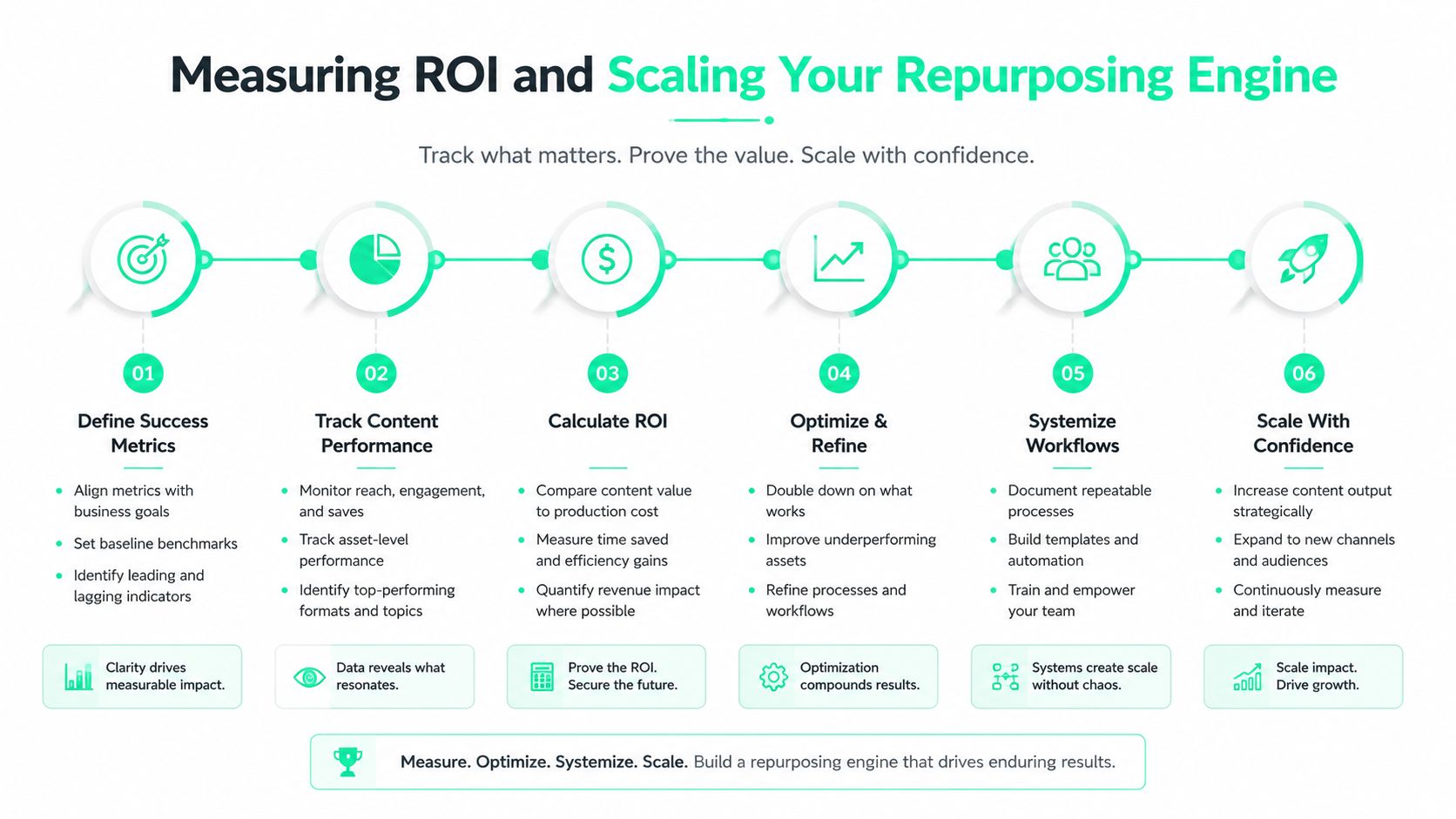
When the workflow is healthy, repurposing stops being a hunt for more minutes from the same asset. It becomes a distribution system for good ideas, one that keeps moving podcasts, webinars, and founder videos into short-form channels with less manual drag and more consistent output. That is the standard worth building toward.