---
title: "Content Repurposing Strategy for Short-Form Video Teams"
canonical: "https://blitzreels.com/blog/content-repurposing-strategy"
---
# Content Repurposing Strategy for Short-Form Video Teams
URL: https://blitzreels.com/blog/content-repurposing-strategy
Markdown URL: https://blitzreels.com/blog/content-repurposing-strategy.md
Published: 2026-07-25
Author: BlitzReels
Build a repeatable content repurposing strategy that turns webinars, podcasts, and demos into short-form clips for TikTok, Reels, Shorts, and LinkedIn.
Tags: content repurposing strategy, short-form video, video repurposing, clipping workflow, BlitzReels

The weekly clip sprint starts the same way for a lot of teams. A strong podcast, webinar, founder interview, or customer demo lands in a shared drive, the social queue is thin again, and someone asks for “a few clips” without a clear plan for which moments matter, which formats they're going to, or who's approving them before publish. That's where most **content repurposing strategy** work gets bogged down, not in editing skill, but in the handoffs, the lack of clip criteria, and the habit of treating repurposing like a leftover task instead of a production system.
The better model is a loop. One recording becomes a source asset, the source asset gets mined for moments, those moments get reframed and captioned for each platform, and the outputs get distributed on a staggered cadence that keeps reporting clean. A practical benchmark for that kind of workflow is the **60/40 split**, with **60%** of effort on new pillar content and **40%** on repurposing, plus an example of **4 hours of repurposing for every 10 hours** spent making a detailed guide, and a shelf life that can stretch from **30 to 180+ days**, a **6x increase** in usable lifespan, when the repurposing is done well (content repurposing strategy guide). That logic is why the loop matters more than a calendar entry.
## Table of Contents
- [The One Recording to Ten Shorts Production Loop](#the-one-recording-to-ten-shorts-production-loop)
- [The loop starts before the edit starts](#the-loop-starts-before-the-edit-starts)
- [Auditing Existing Content and Picking Pillar Assets](#auditing-existing-content-and-picking-pillar-assets)
- [Score the source before you score the clip](#score-the-source-before-you-score-the-clip)
- [A quick way to stop bad inputs early](#a-quick-way-to-stop-bad-inputs-early)
- [Planning Clips Before Recording and Picking Moments After](#planning-clips-before-recording-and-picking-moments-after)
- [Brief for clips, not just for the recording](#brief-for-clips-not-just-for-the-recording)
- [Mine the transcript, not the timeline](#mine-the-transcript-not-the-timeline)
- [Batch Workflow for Captions, Reframing, and Resizing](#batch-workflow-for-captions-reframing-and-resizing)
- [Build the edit path once, then reuse it](#build-the-edit-path-once-then-reuse-it)
- [Use platform presets to reduce guesswork](#use-platform-presets-to-reduce-guesswork)
- [Distribution Cadence and Platform-Specific Repurposing](#distribution-cadence-and-platform-specific-repurposing)
- [Match the format to the feed](#match-the-format-to-the-feed)
- [Keep one source asset alive without flooding the calendar](#keep-one-source-asset-alive-without-flooding-the-calendar)
- [Measuring Output and Benchmarking Across Platforms](#measuring-output-and-benchmarking-across-platforms)
- [Benchmark each platform against itself](#benchmark-each-platform-against-itself)
- [Make measurement reliable, not heroic](#make-measurement-reliable-not-heroic)
- [A Repeatable Playbook for B2B Short-Form Teams](#a-repeatable-playbook-for-b2b-short-form-teams)
- [The playbook in one pass](#the-playbook-in-one-pass)
## The One Recording to Ten Shorts Production Loop
Every B2B video team knows the pattern. A webinar finishes, the speaker deck is buried in a folder, and the team still needs clips for LinkedIn, YouTube Shorts, Instagram Reels, and TikTok by Friday. If the process depends on someone “finding time” to repurpose the asset later, the loop breaks immediately. The social team needs a repeatable way to move from **pillar recording** to published shorts without rebuilding the whole plan every week.
### The loop starts before the edit starts
The simplest way to think about a **content repurposing strategy** is as a production loop with four jobs, not one editing task. First, capture the source recording with repurposing in mind. Second, pull out moments that can stand alone. Third, adapt those moments to the destination platform. Fourth, distribute on a cadence that preserves clarity in reporting.
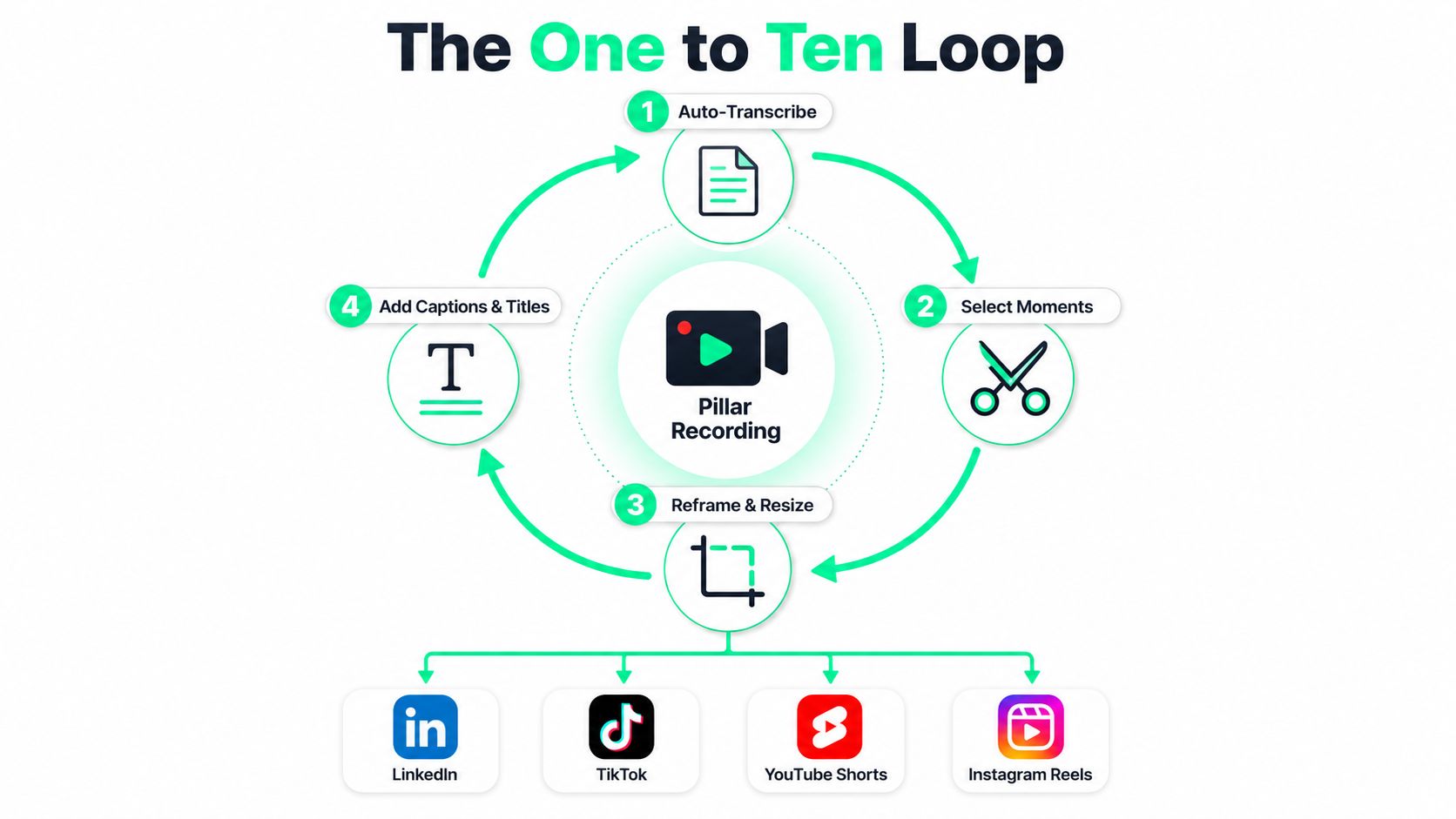
The trap is treating repurposing like squeezing extra life out of a finished asset. That usually leads to random clip selection, inconsistent pacing, and assets that still look like a long video cut down instead of a short-form post built for a feed. The better habit is to treat every recording as a source pool for a portfolio of outputs, where the recording, transcript, hook, captions, and title cards are all part of the same production pass.
A useful starting point is a resource like the [audience-driven YouTube script tool](https://beyondcomments.io/blog/you-tube-shorts-script-generator) from BeyondComments, especially when a team wants the original recording to contain cleaner hooks and more self-contained beats. That kind of planning reduces the amount of rescue editing later.
The throughline is simple. If a teammate can't hand the loop to someone else on Monday and get similar results, the process still depends too much on memory and heroics. A real system doesn't.
[Turn long video into shorts](https://www.blitzreels.com/blog/turn-long-video-into-shorts) fits naturally into that handoff because the job isn't “make clips,” it's “turn one strong recording into a steady stream of usable short-form assets.”
## Auditing Existing Content and Picking Pillar Assets
The highest-impact repurposing decision happens before the first clip is cut. Teams lose time when they try to atomize every webinar, every podcast, and every founder video just because it exists. A content audit protects the rest of the workflow by forcing a ranking decision: which source assets deserve editing time, and which ones should stay archived until they're refreshed or dropped.
### Score the source before you score the clip
A shared sheet works best when it keeps the criteria blunt. **Traffic history**, **evergreen shelf life**, **modular structure**, and **conversion value** are usually enough to sort a pile of recordings into tiers. If a webinar has a clear narrative, useful standalone sections, and a direct role in demand generation, it belongs near the top. If a customer interview is too narrow, timebound, or repetitive, it doesn't deserve the same repurposing effort just because the recording is long.
> **Practical rule:** if a source asset can't produce several self-contained moments without extra explanation, it probably isn't a pillar.
That logic matches the stronger guidance on repurposing, which says to start with evergreen, high-performing content and avoid assets that are too specific or timebound ([Optimizely's repurposing glossary](https://www.optimizely.com/optimization-glossary/content-repurposing)). A similar filter shows up in the 2026 workflow guidance that recommends prioritizing assets with traffic history, clear conversion value, high intent alignment, or modular structure, and using retention or average view duration as an early screen before repurposing ([Cognism's content repurposing guide](https://www.cognism.com/blog/content-repurposing)).
A SaaS team auditing a quarter of webinars might land on three pillar episodes, then map each one into five or more atoms. One webinar could yield a product takeaway, a customer pain point, a founder quote, a process clip, and a comparison segment. Another might only deserve two clips and a note to revisit after the messaging gets tighter.
The point isn't to maximize output from every recording. It's to protect the edit queue from weak source material so the loop stays fast. That's also where practical examples like [founder driven sales tactics](https://www.goextrovert.com/blog/founder-led-marketing) from Extrovert help teams identify which founder clips will hold attention once they leave the original context.
### A quick way to stop bad inputs early
A healthy audit usually has one cutoff question. Can this asset support a short-form audience without leaning on the rest of the recording for meaning? If the answer is no, the team should either refresh the material or skip it.
That's a better use of time than forcing every long-form asset into the same clipping process. The loop works best when the input is already worth the effort.
## Planning Clips Before Recording and Picking Moments After
The fastest clip workflow starts before the camera rolls. When podcast guests, webinar speakers, founders, and demo presenters know what kinds of moments the team wants, the recording arrives shaped for short-form instead of flattened into a single long answer. That preparation matters because it gives the editor stronger hooks, cleaner transitions, and fewer dead zones to scrub through later.
### Brief for clips, not just for the recording
The most useful pre-recording prompts are specific. Ask for **quotable opinions**, **clear step-by-step walkthroughs**, **sharp contrasts**, and **standalone explanations** that make sense without surrounding context. For a founder video, that might mean planning one strong opinion on the market, one tactical process, and one customer lesson. For a webinar, it might mean putting the most clip-worthy point early enough that it doesn't get buried under setup.
The structure recommendation from short-form repurposing guidance is brutally practical, use the opening **0–3 seconds** for the hook, **3–10 seconds** for context, and **10–45 seconds** for the body ([Postiv.ai on content repurposing strategies](https://postiv.ai/blog/content-repurposing-strategies)). That shape only works if the original recording contains a clean opening beat worth extracting.
A transcript makes the next decision easier, but only if the source was planned well. Speaker emphasis, question density, and standalone sentences are usually better signals than hunting randomly across the timeline. The strongest moments often show up where the speaker shifts tone, answers a direct question, or states something that doesn't need a long setup to land.
### Mine the transcript, not the timeline
A transcript review should look for one idea per clip. Long clips fail when they try to prove too much at once, especially on short-form platforms where the viewer expects an immediate point. Instead of cutting first and explaining later, the editor should mark the sentence that carries the clip, then trim everything else around it.
The same source planning also creates better transcript matches for repurposing. A speaker who knows a webinar is being clipped is more likely to state the answer in one clean sentence instead of circling the topic twice. That saves real editing time because the clipping pass becomes selection, not reconstruction.
[Scripts and hooks](https://www.blitzreels.com/guide/scripts-and-hooks) become much easier to manage when the original recording already contains the kind of concise beats that short-form needs.
## Batch Workflow for Captions, Reframing, and Resizing
A batch workflow matters because one recording rarely needs one export. It usually needs a vertical cut for Shorts, a variation for Reels, a different size for LinkedIn, and caption styling that still reads well when the sound is off. The production team slows down when each of those tasks becomes a separate edit.
### Build the edit path once, then reuse it
The cleanest flow is consistent. Upload the master file, generate the transcript, select the strongest moments, apply branded captions, reframe the speaker into **9:16**, and then resize the same cut for each destination. That sequence reduces rework because the clip is handled as a master asset with platform-specific exports, not as one-off edits made from scratch.
Here's the practical review checklist that catches most mistakes before publishing.
- **Caption accuracy:** verify names, product terms, and jargon before export.
- **Framing:** make sure the face stays centered after reframing, especially on sentence breaks.
- **Hook clarity:** confirm the first line makes sense without the full recording.
- **Aspect ratio:** check the destination size before approval.
- **Brand consistency:** confirm title cards, fonts, and color treatments match the template.
- **Accessibility:** use captions that stay readable on muted playback, a need that also matters for viewers using [captioning apps for deaf users](https://livetranscribe.pro/ai-audio-transcription-apps/) from iScribe Live Transcribe.
That last point isn't a nice-to-have. Captions are part of the product, not decoration.
A batched clipping session can produce ten or more branded clips in one pass when the team stops switching between transcript review, framing adjustments, and export settings. The time savings come from sequence discipline, not speed for its own sake. The editor stays in one mode long enough to make consistent calls.
### Use platform presets to reduce guesswork
A simple comparison table keeps export choices from becoming arguments.
| Platform | Aspect Ratio | Caption Priority | Hook Window |
| --- | --- | --- | --- |
| LinkedIn | Square or vertical | High, because silent autoplay is common | First line must be immediate |
| YouTube Shorts | Vertical | High, with readable on-screen text | First seconds need a clean hook |
| Instagram Reels | Vertical | High, with branded styling | Opening pace should be fast |
| TikTok | Vertical | High, with text overlays that feel native | Hook has to land fast |
The operational point is simple. The editor should be able to batch the same clip into platform-ready variations without reopening the whole project each time. That's where a production layer earns its keep, because the team can stay focused on the clip set instead of babysitting the timeline.
[The creator's guide to AI-powered batch editing for Reels](https://www.blitzreels.com/blog/the-creator-s-guide-to-ai-powered-batch-editing-for-reels) is useful reading for teams that want the workflow side to feel less manual.
The same batch logic also makes review cleaner. One approver can inspect a set of clips in a known order, rather than chasing random exports across folders and chat threads.
## Distribution Cadence and Platform-Specific Repurposing
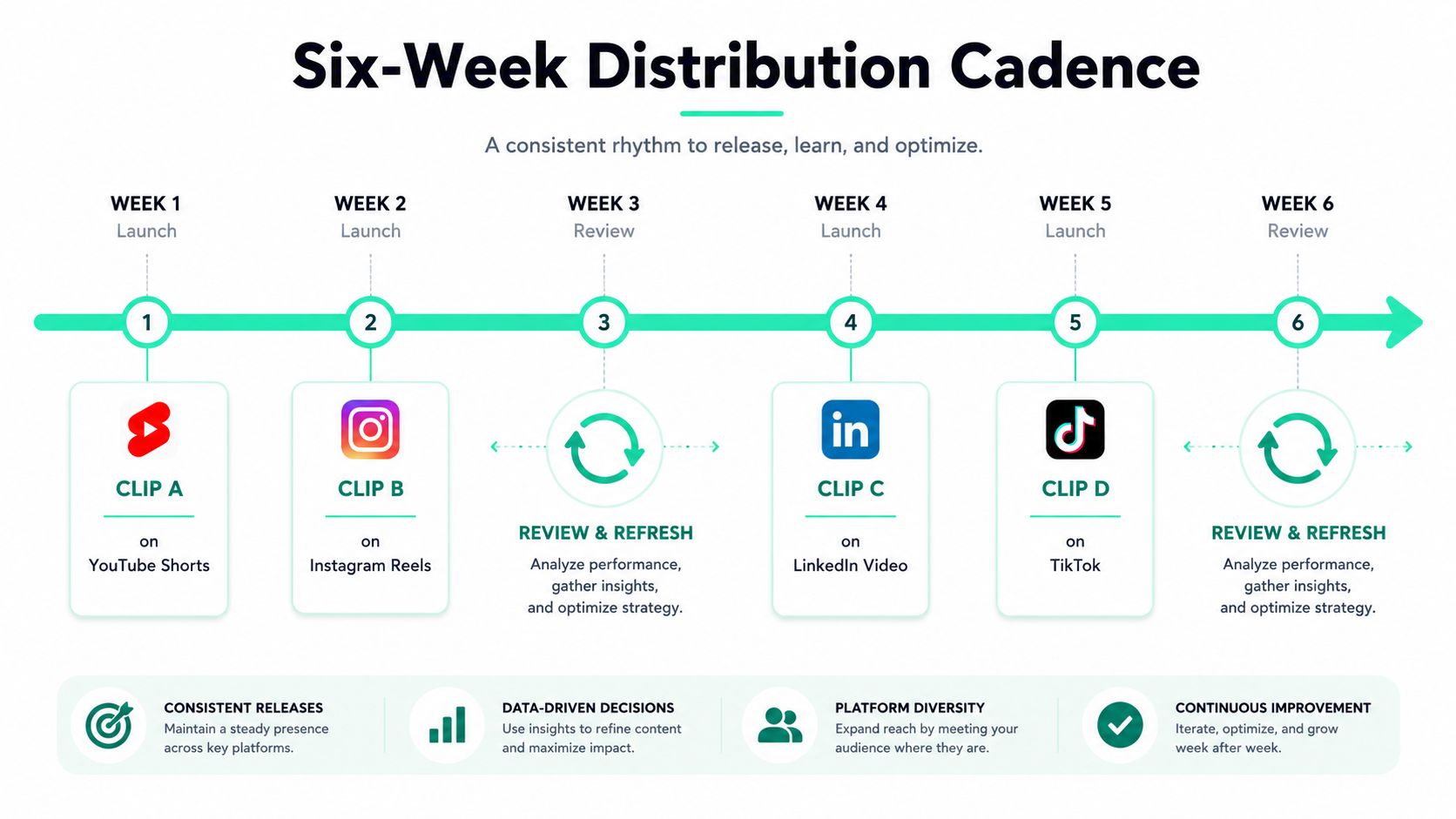
A single pillar recording shouldn't vanish after one post. The stronger move is to stretch it across **4 to 6 weeks** so the team gets multiple touches without creating audience fatigue. That only works when each platform gets a version that fits its norms instead of a straight resize of the same file.
### Match the format to the feed
LinkedIn usually needs stronger caption readability and a tighter angle on business value. Shorts and Reels tend to reward faster hooks and cleaner pacing. TikTok often responds better when the text overlay feels native to the platform rather than borrowed from a corporate template. That's not a resizing problem, it's a format problem.
The reason pacing matters is reporting clarity. If the same clip goes out in a staggered rollout, each post can be tied back to the source pillar instead of getting lost in a noisy publishing week. That makes it easier to see whether the asset worked, or whether the platform adaptation needs another pass.
A simple four-week rollout for one webinar could look like this.
- **Week 1:** publish the sharpest proof point as a YouTube Shorts cut.
- **Week 2:** post the most visual or quotable moment as an Instagram Reel.
- **Week 3:** hold for review, then refresh the hook if engagement is weak.
- **Week 4:** release the most business-forward clip on LinkedIn.
- **Week 5:** publish a more trend-aware version on TikTok if the topic still has momentum.
That cadence leaves room for a next pillar recording without stacking everything on top of each other. The team can keep one source asset active while the next one enters the batch queue.
[Reels, TikTok, or Shorts](https://www.blitzreels.com/blog/reels-tiktok-or-shorts-which-platform-is-best-for-creators-in-2026) is a useful comparison when the same source needs to be shaped differently for each feed.
### Keep one source asset alive without flooding the calendar
The smartest teams don't try to saturate every platform at once. They place the same pillar content into a staggered rotation, then revisit the hook or caption treatment based on what the first release taught them. That keeps the calendar breathable and the source asset measurable.
The deeper win is editorial rhythm. When the team knows a webinar can feed several weeks of output, it stops asking for new recordings just to fill the feed. The production system starts to carry the load.
## Measuring Output and Benchmarking Across Platforms
The measurement layer has to separate **output metrics** from **outcome metrics**. Clips per pillar, time-to-publish, and review turnaround tell the team whether the workflow is moving. Views, watch-through rate, leads, and attributed pipeline tell the team whether the clips are doing anything useful. If those get blended together, the loop becomes hard to diagnose.
### Benchmark each platform against itself
The common mistake is comparing a TikTok clip to a LinkedIn clip with the same standard. That comparison usually hides the core problem, because the feed, audience behavior, and viewing context are different. A better test is to score each repurposed asset against that platform's median rather than against the team's last post, because one weak week can be noise while several weak posts can point to a hook or source-content issue.
That nuance matters for short-form teams because distribution is increasingly platform-specific, and repurposing has to match format to platform rather than resize one asset everywhere. One workflow note from recent guidance makes the same point clearly, weak posts should be read against the platform baseline, not just the creator's own recent history ([Quso.ai on content repurposing strategy](https://quso.ai/blog/content-repurposing-strategy)).
The rest of the diagnosis is straightforward:
- **If output is low,** the bottleneck is usually the audit, the clip selection, or the handoff queue.
- **If output is high but performance is weak,** the hook or platform fit is probably off.
- **If early posts work and later ones fade,** the cadence may be too tight or the topic may be exhausted.
- **If leads stay flat,** the clip may be entertaining but disconnected from the funnel.
A month of repurposing data should answer one question. Is the source content strong enough to keep atomizing? If not, the team should move on instead of polishing a weak pillar for another round.
### Make measurement reliable, not heroic
Naming conventions, UTM standards, and a fixed source-of-truth sheet keep the reporting useful. The earlier workflow guidance recommends setting UTM standards and naming conventions before launch so each repurposed unit can be measured back to the pillar asset and compared across channels ([Cognism's repurposing workflow](https://www.cognism.com/blog/content-repurposing)). That's the difference between a dashboard and a guessing game.
| Metric | What It Measures | Healthy Signal |
| --- | --- | --- |
| Clips per pillar | How much usable output each source asset generates | The team can consistently turn strong recordings into multiple short assets |
| Time-to-publish | How fast a clip moves from recording to posting | The workflow doesn't stall in review or export |
| Review turnaround | How long approvals take | Brand checks happen quickly and predictably |
| Watch-through rate | Whether viewers stay with the clip | The hook and pacing are working |
| Leads | Whether clips drive contact or intent | Short-form supports demand, not just reach |
| Attributed pipeline | Whether repurposed clips contribute to revenue | The loop is tied to business outcomes |
The best measurement setups are boring. They use consistent filenames, one master sheet per pillar, and a clear owner for each stage. That's what keeps the loop honest.
## A Repeatable Playbook for B2B Short-Form Teams
A durable **content repurposing strategy** doesn't depend on more headcount. It depends on a shared pillar backlog, a fixed review template, and a weekly clip sprint that keeps the loop moving. Teams that get this right stop treating short-form as an emergency task and start treating it as a manufacturing line for branded assets.
### The playbook in one pass
- **Audit the library:** rank webinars, podcasts, demos, founder videos, and customer interviews before anyone edits.
- **Plan the recording:** brief speakers on clip-friendly beats, strong opinions, and standalone moments.
- **Mine the transcript:** select moments that work without extra explanation.
- **Batch the production:** caption, reframe, resize, and export in one session.
- **Stagger the rollout:** distribute the same pillar over several weeks instead of flooding one day.
- **Read the data:** compare results to platform baselines and adjust the hook, source, or cadence.
The teams that compound fastest usually keep the same operating habits every week. The backlog stays visible, the review template stays fixed, and the producer doesn't have to re-explain the process each sprint. That discipline is what turns one recording into a repeatable output system.
[YouTube to LinkedIn clips](https://www.blitzreels.com/use-cases/youtube-to-linkedin-clips) is a natural use case for teams that already have long-form video and want a tighter path into business-friendly distribution.
The next scaling move usually isn't another tool. It's adding more source formats into the same loop, customer interviews, event recordings, founder updates, and live demos, all run through the same audit, clip, review, and publish rhythm. That's how the strategy grows without turning into a staffing problem.
---
BlitzReels helps teams turn long recordings into branded short-form clips faster, with clipping, captions, resizing, and review built for the actual production loop. If the goal is to move from raw video to TikTok, Reels, Shorts, and LinkedIn assets without babysitting every edit, visit [BlitzReels](https://blitzreels.com) and see how the workflow fits your clip sprint.