---
title: "Create Reels with AI That Actually Get Watched"
canonical: "https://blitzreels.com/blog/create-reels-with-ai"
---
# Create Reels with AI That Actually Get Watched
URL: https://blitzreels.com/blog/create-reels-with-ai
Markdown URL: https://blitzreels.com/blog/create-reels-with-ai.md
Published: 2026-09-12
Author: BlitzReels
Learn to create reels with AI end-to-end — from hooks and AI editing to captions, exports and publishing for Reels, TikTok and Shorts.
Tags: create reels with ai, ai video editing, instagram reels tips, short form video, blitzreels

A podcast episode can be packed with useful ideas, yet still sit untouched in a content folder because nobody has time to find the strongest moments, cut them cleanly, reframe them, add captions, and publish them everywhere. That archive-to-Reels gap is where AI helps, but only when it acts as an editing accelerator rather than an autopilot.
Creating Reels with AI works best as a controlled workflow. AI can search transcripts, suggest hooks, remove dead air, generate captions, resize footage, and prepare platform variations. A human still needs to decide whether the opening is compelling, the cut lands naturally, the wording is accurate, and the finished clip sounds like the brand.
## Table of Contents
- [Why Creating Reels With AI Matters Right Now](#why-creating-reels-with-ai-matters-right-now)
- [Generation is different from assisted editing](#generation-is-different-from-assisted-editing)
- [Plan Hooks and Source Footage AI Can Cut](#plan-hooks-and-source-footage-ai-can-cut)
- [Find the hook before asking for the cut](#find-the-hook-before-asking-for-the-cut)
- [Capture footage that survives reframing](#capture-footage-that-survives-reframing)
- [Build Your AI Editing Workflow From Rough Cut to Branded Clip](#build-your-ai-editing-workflow-from-rough-cut-to-branded-clip)
- [Start with transcript-based clipping](#start-with-transcript-based-clipping)
- [Reframe before styling](#reframe-before-styling)
- [Validate timing instead of trusting auto-cuts](#validate-timing-instead-of-trusting-auto-cuts)
- [Export and Publish Settings for Reels TikTok and Shorts](#export-and-publish-settings-for-reels-tiktok-and-shorts)
- [Compare the publishing targets](#compare-the-publishing-targets)
- [Adapt one master without duplicating work](#adapt-one-master-without-duplicating-work)
- [Automate the Workflow With BlitzReels for Teams and Agents](#automate-the-workflow-with-blitzreels-for-teams-and-agents)
- [Match the automation layer to the job](#match-the-automation-layer-to-the-job)
- [Understand the editor categories](#understand-the-editor-categories)
- [Optimize Performance and Keep AI Reels On Brand](#optimize-performance-and-keep-ai-reels-on-brand)
- [Build a review loop around signals](#build-a-review-loop-around-signals)
## Why Creating Reels With AI Matters Right Now
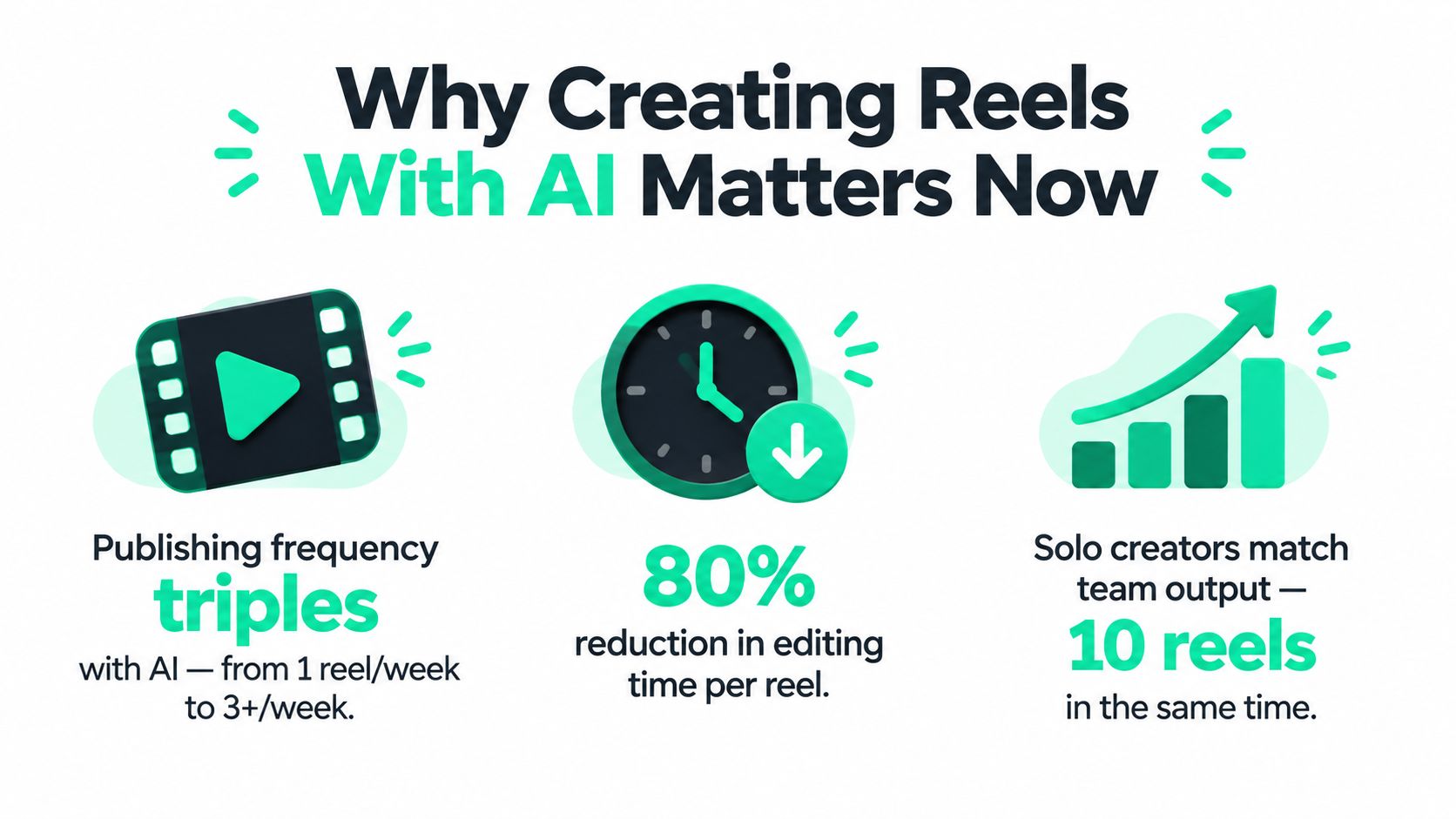
Short-form video has moved from occasional campaign material to a repeatable publishing format. A 2025 industry report found that the number of short-form videos published grew **71% year over year**, while the number of accounts using the format rose **51%**. The same report recorded nearly **6 million videos** published by its users in 2025, showing how quickly short-form production has become a high-volume workflow ([Metricool's 2025 short-form video report](https://metricool.com/social-media-short-video-report-2025/)).
That changes the editor's job. A solo creator may have a long interview, webinar, sales call, or YouTube episode that contains several useful clips, but manually reviewing every minute creates a bottleneck. A small marketing team faces the same problem at a larger scale. The pressure isn't only to make one polished Reel. It's to identify repeatable moments and adapt them for multiple feeds without flattening every post into the same template.
### Generation is different from assisted editing
Prompt-to-video generation can create a scene from a description, but most practical social workflows start with existing footage. The valuable work often involves finding a strong sentence in a long recording, trimming the setup, preserving the speaker's meaning, adding readable captions, and keeping the face correctly framed.
The AI video generator category is becoming a formal software market. Grand View Research estimates its value at **$788.5 million in 2025** and projects **$3,441.6 million by 2033**, with a projected **20.3% CAGR from 2026 to 2033** ([Grand View Research's AI video generator market analysis](https://www.grandviewresearch.com/industry-analysis/ai-video-generator-market-report)). That growth supports a practical conclusion, AI video creation is no longer an isolated experiment, but speed alone doesn't make a clip watchable.
> **Practical rule:** Automate discovery and assembly first. Keep judgment, voice, and final approval with a human editor.
A useful starting point is the explanation of [what AI video means for modern editing workflows](https://blitzreels.com/blog/what-is-ai-video). The strongest process treats AI as a draft engine. It creates a rough version quickly, then a person refines the hook, pacing, captions, title card, B-roll, and brand details before publishing.
## Plan Hooks and Source Footage AI Can Cut
AI produces usable clips when the source contains a clear idea, complete context, and enough visual information for reframing. A long conversation without concise statements, visible energy, or useful tension gives the editor fewer workable options, regardless of the software.
Build a source library from podcasts, webinars, interviews, recorded calls, YouTube videos, product demonstrations, customer questions, and vertical-first footage captured for social. Store the original files with transcripts, speaker names, topics, and brand restrictions. That context helps the clipping process begin with searchable material instead of a blank timeline.
### Find the hook before asking for the cut
The opening needs an immediate reason to continue watching. It may be a surprising answer, a mistake, a specific objection, a strong contrast, or the sentence that resolves a question the audience already has. A dramatic claim is only one option, and often a weaker one if the footage cannot support it.
Give the editor criteria instead of asking for “the best moments.” For example:
> Find statements that answer a practical question for first-time buyers. Return the exact transcript wording, speaker, start and end time, topic, and a suggested opening line. Exclude greetings, repeated points, unsupported claims, and sections that require missing context.
For a founder interview, use a narrower instruction:
> Identify clips where the speaker describes a mistake, explains what changed, or challenges a common assumption. Rank the moments by clarity and standalone value. Keep enough setup for the answer to make sense, but remove introductions and unrelated discussion.
The first seconds need a defined editorial job. Build a hook library with categories such as:
- **Contrarian opening:** Challenge a familiar assumption without overstating the evidence.
- **Problem-first opening:** Name the frustration the viewer recognizes.
- **Outcome opening:** Lead with the useful result, then explain the reasoning.
- **Question opening:** Raise the exact question the clip will answer.
- **Story opening:** Start when something changed, rather than at the beginning of the meeting.
### Capture footage that survives reframing
Record speakers with space around the face and relevant objects. AI reframing works more reliably when the subject stays visible and the source is not tightly cropped. Separate microphone audio, clear lighting, and deliberate pauses also create cleaner material for captions and cut detection.
Write prompts that account for each destination. Ask the editor to preserve the core sentence for Reels, Shorts, and TikTok, then propose platform-specific openings or trims. Review those versions against each platform's pacing rather than exporting one generic cut everywhere.
The hook should remain understandable without a long preamble. The [science of scroll-stopping video hooks](https://blitzreels.com/blog/the-science-of-scroll-stopping-video-hooks) offers a useful vocabulary for building repeatable openings instead of selecting random highlights.
A practical source checklist:
- **Context:** The clip stands alone without an unseen question.
- **Specificity:** The speaker gives an explanation, example, or point of view.
- **Visual clarity:** The subject can be reframed for vertical viewing.
- **Audio quality:** Speech is clear enough for accurate transcription.
- **Permission and accuracy:** The footage is approved for the intended channel and claims can be checked.
A good AI prompt converts editorial planning into searchable instructions the editor can execute. Keep the first cut automated, then verify meaning, pacing, brand voice, and channel fit before publication.
## Build Your AI Editing Workflow From Rough Cut to Branded Clip
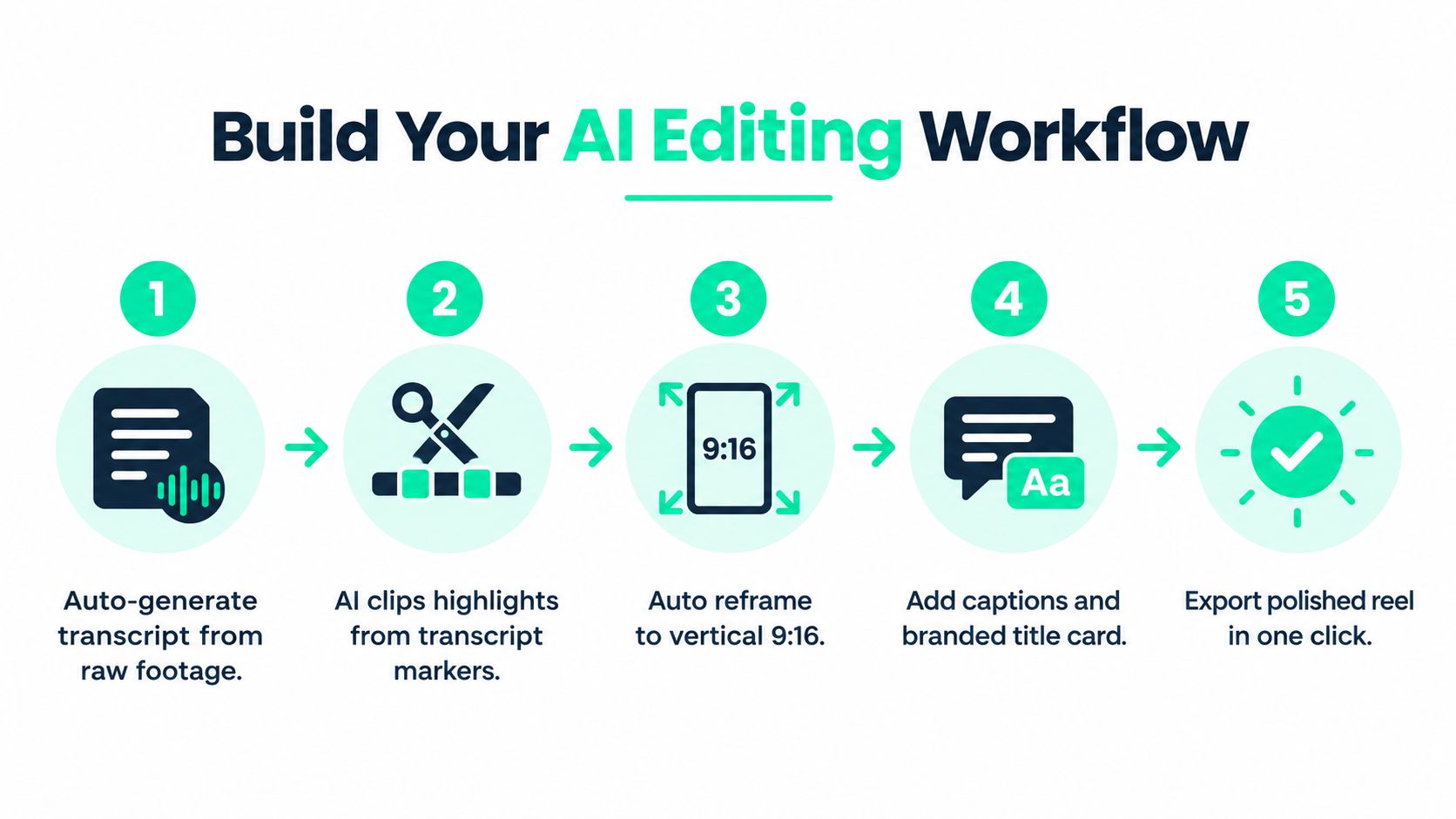
A reliable workflow begins with a transcript, not a blank canvas. Once speech is searchable, the editor can identify ideas, remove filler, and assemble a rough cut before spending time on detailed styling.
### Start with transcript-based clipping
Generate a transcript from the source recording and scan for the hook, the core explanation, and the closing beat. Ask the AI editor to create several candidate clips from those markers, but don't accept the first selection without reading the surrounding lines. A sentence can sound powerful in isolation while changing meaning when the preceding qualification is removed.
The rough cut should answer four questions:
1. Does the opening introduce a clear reason to watch?
2. Does the middle develop one idea rather than several?
3. Does the ending feel complete or create useful curiosity?
4. Can a viewer understand the clip without the original recording?
Cut greetings, repeated phrases, long pauses, and irrelevant setup. Keep natural breathing and conversational rhythm where they make the speaker sound credible. Over-cleaning can make a real person sound synthetic.
### Reframe before styling
Convert the working clip to a vertical composition and inspect every shot. The editor should follow the active speaker, preserve important product details, and avoid placing faces beneath interface elements. A two-person interview may need a dynamic crop, while a demonstration may require a wider frame with the product kept visible.
Add captions after the composition is stable. Caption styling should use a saved brand preset for font, contrast, position, emphasis, and safe margins. The words must match the spoken audio, including names, technical terms, and numbers. AI transcription is fast, but it can mishear proper nouns and change the meaning of a sentence.
Title cards should clarify the promise without repeating a full paragraph of captions. A short phrase can establish the topic, while the first spoken line carries the hook. B-roll can cover a jump cut or add context, but it shouldn't distract from the speaker's point.
For property marketers, visual storytelling often needs a different balance between footage and text. A practical reference on [listing video or slideshow for agents](https://dwellshot.com/blog/ai-listing-video-vs-slideshow) helps clarify when a moving walkthrough and a slideshow serve different viewer needs.
### Validate timing instead of trusting auto-cuts
Cut timing has a direct relationship with perceived rhythm. One independent study of **500 real videos** across TikTok, Instagram Reels, YouTube Shorts, and Pinterest Idea Pins found that human editors aligned cuts within **±0.15 seconds** of vocal transients **76% of the time**. The same study reported that CapCut templates had the closest platform alignment, with **0.07 to 0.09 seconds** average cut alignment error, and produced a **19% to 24% retention lift** on **22-second videos** compared with manual edits. Runway ML, Pictory, and Descript trailed the human baseline, with some results showing retention reductions of **4% to 13%** ([the independent short-form editing comparison](https://www.alibaba.com/product-insights/ai-video-editors-for-short-form-content-vs-capcut-templates-do-auto-cut-suggestions-match-platform-native-pacing-instincts.html)).
Those findings shouldn't turn timing into a rigid formula. They support a quality-control habit: zoom into each cut, listen for the vocal transition, and watch the clip without captions. If an edit interrupts a word, removes the setup, or changes the speaker's intent, move the cut manually.
Before export, review the transcript, captions, timeline items, B-roll, title card, and final frame. AI-generated scene inserts also need visual and policy checks. A **2026 peer-reviewed safeguards study** submitted **100 video prompts** to public generative video tools and classified **52% of Sora outputs** and **30% of Flow outputs** as potentially harmful, while an AI video evaluation survey describes alignment errors such as unintended objects or omitted actions ([the peer-reviewed safeguards study](https://pmc.ncbi.nlm.nih.gov/articles/PMC12945730/)). Generated assets should be treated as drafts until a person confirms correctness, compliance, and brand fit.
## Export and Publish Settings for Reels TikTok and Shorts
A polished edit can still fail at publication if the frame, runtime, or caption workflow doesn't match the destination. The safest process is to create one clean vertical master, then adapt the opening text, caption, and crop for each platform rather than uploading the exact same package everywhere.
YouTube officially supports a **9:16 vertical frame** for Shorts and also allows square **1:1** uploads to count as Shorts. A **16:9** upload is treated as a regular long-form video, and YouTube guidance supports **1080×1920 pixels** as a full-screen mobile export target ([YouTube's official video formatting guidance](https://support.google.com/youtube/answer/6375112?hl=en&co=GENIE.Platform=Desktop)).
### Compare the publishing targets
| Platform | Aspect and Resolution | Max Length and Caption Limit |
|---|---|---|
| Instagram Reels | 9:16 vertical, export the master at 1080×1920 | Reels can be up to 20 minutes. Captions are commonly documented at 2,200 characters, including spaces, punctuation, emojis, hashtags, and mentions ([Instagram Reels caption specifications](https://kompozy.io/specs/instagram-reels-caption-character-limit)) |
| YouTube Shorts | 9:16 vertical at 1080×1920. Square 1:1 uploads can also qualify | Shorts can be up to 3 minutes under current guidance. Captions and descriptions should be adapted to the publishing interface |
| TikTok | 9:16 vertical at 1080×1920 for full-screen viewing | TikTok supports videos up to 10 minutes. The native app supports captions up to 4,000 characters, while the Content Posting API caps direct-post captions at 2,200 UTF-16 runes (TikTok caption limit details) |
Allowed runtime isn't the same as recommended runtime. A longer upload window gives an editor more room for a complete explanation, but the opening still needs to earn attention quickly. Use the longer allowance when the story needs it, not as permission to keep every sentence.
### Adapt one master without duplicating work
Keep the central edit intact, then make controlled variations:
- **Reels:** Put the strongest context early because the caption preview is limited before expansion. Use a clean title card and avoid placing key text near interface edges.
- **Shorts:** Preserve vertical framing or use square when the source requires it. A wide master should be reframed rather than uploaded as 16:9 if Shorts distribution is the goal.
- **TikTok:** Keep native and API publishing paths separate in the workflow. A scheduler or integration must respect the lower API caption limit, even when the app accepts more text.
A TikTok-focused marketing reference such as the [Saleswise TikTok marketing guide](https://www.saleswise.ai/blog/tiktok-for-real-estate-agents) can help teams think through platform-native messaging instead of treating TikTok as a simple repost destination. The practical principle is consistent: export once at a strong vertical resolution, then customize captions, title cards, and opening context for the viewer and publishing system.
For a fuller technical checklist, use the [vertical video specifications guide](https://blitzreels.com/blog/vertical-video-specs) before starting a batch export.
## Automate the Workflow With BlitzReels for Teams and Agents
Manual editing is appropriate when a clip needs close creative judgment. Automation becomes useful when a team repeatedly performs the same operations across many recordings, accounts, and formats. The boundary should be clear: agents can prepare and validate work, while a human editor retains browser-based review and final control.
### Match the automation layer to the job
BlitzReels is an **agentic AI video editor** with a native hosted OAuth MCP server using Streamable HTTP. Claude, Codex, Cursor, and other compatible agents can use it to inspect projects, find clips, edit transcripts and captions, add B-roll or media, modify timeline items, validate output, start exports, and check render status. The same workflows are available through a REST API, TypeScript SDK, CLI with structured JSON, OpenAPI, `llms.txt`, and agent skills. The [AI agent editor documentation](https://blitzreels.com/features/ai-agent-editor) provides the relevant product workflow.
A useful agent instruction is concrete:
> Inspect the project, identify transcript segments about the selected topic, create candidate vertical clips, add the approved caption preset, insert the specified B-roll, validate captions and timeline continuity, start the export, then report render status.
That instruction defines operations rather than asking an agent to “make it viral.” The latter leaves too much room for inconsistent decisions.
### Understand the editor categories
Hosted cloud editors are useful when teams need shared projects, browser review, and managed rendering. Local MCP editors provide more local control but may require more setup and maintenance. Professional-NLE integrations suit editors who need established timeline tools and advanced finishing. FFmpeg servers are powerful for deterministic media processing, but they don't automatically provide editorial judgment, caption design, or brand review.
Automation should stop at a review checkpoint. A team can let an agent locate a hook, create a rough clip, apply a template, and begin validation. A person should then verify the transcript, inspect the crop, check B-roll, watch the opening and ending, and approve the export.
A scalable approval loop can include:
- **Project inspection:** Confirm the correct source, brand preset, and destination.
- **Draft assembly:** Create clips, captions, title cards, and media inserts.
- **Validation:** Check transcript accuracy, aspect ratio, timeline continuity, and visual safety.
- **Human review:** Approve voice, pacing, context, and brand fit.
- **Render verification:** Confirm that the final file completed successfully before publishing.
This structure gives agents repetitive work without allowing automation to decide what the brand sounds like.
## Optimize Performance and Keep AI Reels On Brand
Publishing more clips doesn't solve the differentiation problem. Short-form feeds already contain large volumes of polished, captioned videos, so a clip needs a recognizable point of view, not just clean cuts and synthetic B-roll.
Recent short-form guidance points toward format remixes, original angles, and consistent voice rather than identical mass-produced clips ([2026 short-form video trend coverage](https://fluxnote.io/blog/state-of-short-form-video-2026)). That means an AI workflow should preserve the speaker's phrasing, add a distinct editorial angle, and use templates as guardrails rather than replacing creative decisions.
### Build a review loop around signals
After publishing, compare clips by practical signals such as early drop-off, rewatches, comments, saves, shares, and the questions viewers ask. The point isn't to chase one universal runtime. Platform limits have diverged, with YouTube Shorts supporting up to 3 minutes, Instagram Reels up to 20 minutes, and TikTok up to 10 minutes, so the editor should test the structure that suits the idea rather than force every topic into one duration ([current platform runtime guidance](https://www.hedra.com/blog/ai-video-trends-social-media-trends)).
A lightweight QA checklist keeps quality from slipping:
- **Hook review:** Does the first line create a specific reason to continue?
- **Voice review:** Does the clip sound like the speaker, not a generic script?
- **Caption review:** Are names, technical terms, and emphasis accurate?
- **Visual review:** Does reframing keep the subject and supporting details visible?
- **Asset review:** Do AI-generated visuals match the brief and brand rules?
- **Variation review:** Does each platform version have a reason to exist?
Use templates for repeatable elements such as caption styling, title-card placement, and end frames. Change the editorial angle, not the basic production system. A product team might turn one interview into a myth-busting clip for TikTok, a concise explanation for Reels, and a more context-rich lesson for LinkedIn.
For teams that need consistent styling across repeated publishing, [automating brand style on TikTok and Reels](https://blitzreels.com/blog/automate-your-brand-style-on-tiktok-and-reels) offers a useful framework for turning visual rules into repeatable editing decisions. The human checkpoint remains essential because brand consistency includes judgment, tone, and what the clip chooses to leave out.
> **Editorial standard:** AI can propose the cut. The final Reel must still make a clear promise, deliver a complete idea, and sound like someone worth following.
---
BlitzReels gives creators and teams one workflow for AI clipping, transcript editing, captions, reframing, B-roll, title cards, branded templates, and cloud exports across Reels, TikTok, Shorts, LinkedIn, and other platforms. Visit [BlitzReels](https://blitzreels.com) to turn long-form recordings into reviewable short-form drafts while keeping human control over the final cut.