---
title: "How to Add Captions to Instagram Stories: A 2026 Guide"
canonical: "https://blitzreels.com/blog/how-to-add-captions-to-instagram-stories"
---
# How to Add Captions to Instagram Stories: A 2026 Guide
URL: https://blitzreels.com/blog/how-to-add-captions-to-instagram-stories
Markdown URL: https://blitzreels.com/blog/how-to-add-captions-to-instagram-stories.md
Published: 2026-06-24
Author: BlitzReels
Learn how to add captions to Instagram Stories using the native sticker, manual text, or an AI tool. Our 2026 guide covers styling, accessibility, and fixes.
Tags: how to add captions to instagram stories, instagram story captions, video captions, instagram accessibility, blitzreels

**Videos with captions achieve a 16% higher view completion rate and a 22% increase in engagement than uncaptioned videos**, according to [Pew Research](https://www.pewresearch.org). That changes the usual framing around Instagram Stories. Captions aren't a nice extra. They're part of the message itself.
The basic answer to **how to add captions to Instagram Stories** is easy. Tap the sticker tray and use Instagram's built-in Captions sticker. The harder part is what happens next: fixing transcription mistakes, keeping captions on-brand, and making sure people can read them. That's where most tutorials stop too early.
## Table of Contents
- [Why Captions Are Essential for Story Engagement](#why-captions-are-essential-for-story-engagement)
- [Using Instagram's Built-In Captions Sticker](#using-instagrams-built-in-captions-sticker)
- [The fastest native workflow](#the-fastest-native-workflow)
- [What the sticker does well](#what-the-sticker-does-well)
- [Editing and Styling Captions for Brand Identity](#editing-and-styling-captions-for-brand-identity)
- [What to edit before posting](#what-to-edit-before-posting)
- [How to keep captions on-brand](#how-to-keep-captions-on-brand)
- [Fixing Common Auto-Caption Errors and Troubleshooting](#fixing-common-auto-caption-errors-and-troubleshooting)
- [Why auto-captions still need review](#why-auto-captions-still-need-review)
- [How to fix a missing Captions sticker](#how-to-fix-a-missing-captions-sticker)
- [Designing for Accessibility Beyond Basic Captions](#designing-for-accessibility-beyond-basic-captions)
- [Readable captions matter more than decorative captions](#readable-captions-matter-more-than-decorative-captions)
- [A simple accessibility checklist](#a-simple-accessibility-checklist)
- [A Faster Workflow for Professional Captions with BlitzReels](#a-faster-workflow-for-professional-captions-with-blitzreels)
## Why Captions Are Essential for Story Engagement
Stories are often watched with the sound off, and that changes how retention works. If the spoken line carries the point but the viewer never hears it, the Story loses clarity in the first few seconds. Captions keep the message readable long enough for the hook to do its job.
That matters for more than accessibility. In practice, captioned Stories usually hold attention better because viewers can process the message in two ways at once: audio and text. Teams that care about replies, taps forward, exits, and completion rate should treat captions as part of Story packaging, not as an afterthought. The gain is not just reach. It is cleaner message delivery.
Captions also reduce a common performance problem. Instagram viewers move quickly, and auto-advance leaves little room for ambiguity. A captioned opener can clarify the premise before the next tap. That is one reason experienced social teams pair subtitle review with stronger hooks, cleaner framing, and tighter pacing. This [breakdown of how captions drive engagement on TikTok and Instagram](https://www.blitzreels.com/blog/how-captions-drive-engagement-on-tiktok-and-instagram) explains that relationship well.
Professional execution is the difference between "has captions" and "works." Auto-captions save time, but they still miss product names, accents, industry terms, and proper nouns. I treat caption review as a quality-control step, not a cosmetic one, because one bad transcription can distort the message or make the brand look careless. Good teams catch those errors before publishing and make sure the text is readable on top of the video, with enough contrast, size, and placement to serve viewers who rely on it.
> **Practical rule:** If the spoken words carry the meaning, the Story needs accurate, readable captions.
That standard applies across niches. A ministry team posting sermon clips, a founder sharing product updates, and a creator publishing daily commentary all face the same constraint: viewers will not all hear the audio. For teams building audience relationships in community-driven spaces, this [guide to boosting church social engagement](https://www.churchsocial.ai/blog/how-to-write-engaging-instagram-captions) is useful because it shows how clear wording and stronger caption writing support interaction, not just reach.
## Using Instagram's Built-In Captions Sticker
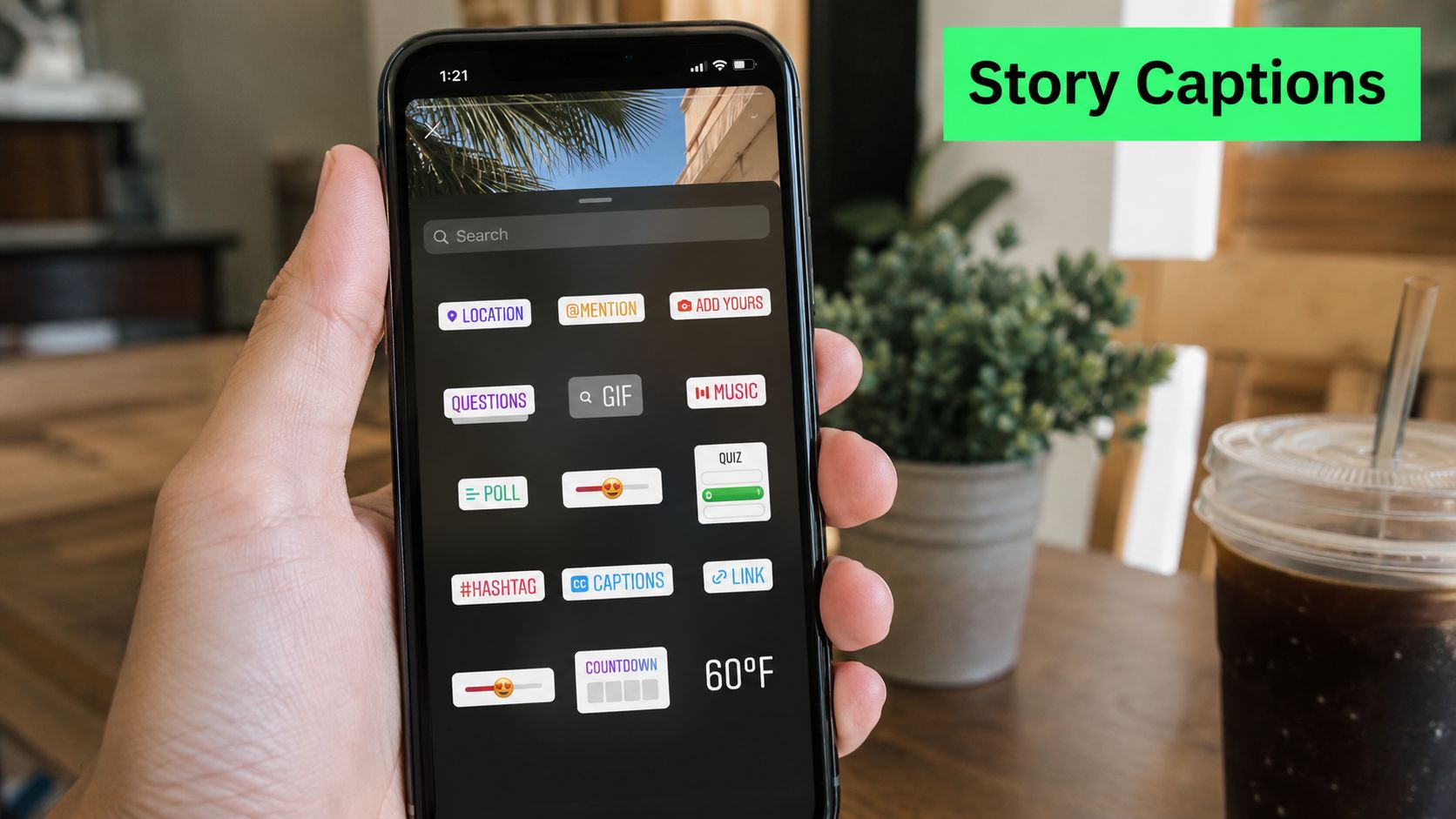
Instagram's native sticker is the fastest answer to **how to add captions to Instagram Stories** for most creators.
### The fastest native workflow
Instagram officially launched its native Captions sticker in 2023, and **by mid-2024 about 68% of active Story creators in major markets were using it over manual text entry, cutting average time-to-publish from 4.5 minutes to under 1.2 minutes**. That shift explains why manual typing now feels like the slow path for most short-form publishing.
The steps are straightforward:
1. **Record or upload the Story video** inside Instagram.
2. **Tap the sticker icon** at the top of the Story editor.
3. **Choose Captions** to generate text from spoken audio.
4. **Wait for transcription** to finish before moving the text box.
5. **Review every line** before publishing.
If Story length planning is part of the workflow, this [Instagram Story length guide](https://www.blitzreels.com/blog/how-long-is-instagram-story) helps clarify how much spoken content fits cleanly on screen without turning captions into a wall of text.
### What the sticker does well
The native sticker is good at speed. It removes the old routine of typing line by line with the Aa tool, and it keeps the process inside the app. For creators posting frequent updates, that matters. A faster workflow usually means more consistency.
It also works best when the source video is simple:
- **Clean speech:** Clear audio gives the tool its best chance.
- **One speaker:** Overlapping voices create messy caption timing.
- **Short phrasing:** Dense monologues become harder to read in Story format.
- **Stable framing:** If faces and products stay visible, it's easier to place captions without blocking key visuals.
A quick walkthrough helps if the sticker menu feels unfamiliar:
The built-in option is the right default for quick posting. It isn't the final answer for every professional workflow, though. Native captions are fast, but they still need editing, styling, and accessibility checks before a brand should treat them as publish-ready.
## Editing and Styling Captions for Brand Identity
Adding captions is only the first layer. Professional Stories need captions that look intentional, not auto-generated and abandoned.
### What to edit before posting
Instagram lets users tap into the caption block and make basic visual changes. That's enough for quick cleanup, but it helps to treat styling as part of the edit, not decoration after the fact. Font choice, text color, line spacing, and placement all affect whether people keep watching.
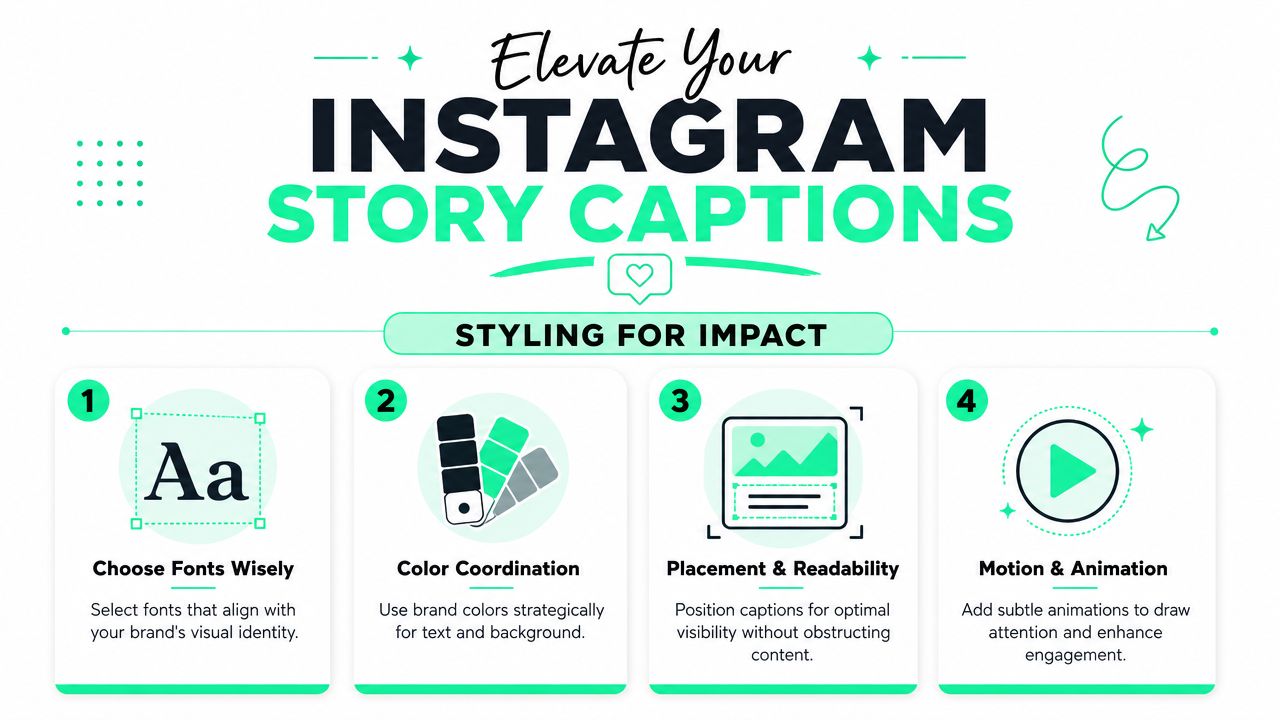
The best native edits are usually small:
- **Trim awkward line breaks:** Captions should break where people naturally pause.
- **Reposition the text block:** Keep it away from faces, products, and interface elements.
- **Use stronger contrast:** Thin text over busy footage disappears quickly.
- **Match the tone:** A polished brand update and a casual behind-the-scenes clip shouldn't use the exact same visual treatment.
> Captions should feel like part of the edit, not an afterthought pasted on top.
### How to keep captions on-brand
Native Instagram styling is useful, but limited. It can handle basic readability. It won't give teams much control over repeatable brand presentation across Stories, Reels, Shorts, and LinkedIn clips. That's where many creators hit friction. One Story looks polished, the next looks improvised, and the feed starts to lose consistency.
A cleaner standard is to define a few simple rules:
| Brand element | Good practice in Stories |
|---|---|
| Caption color | Use one primary text treatment most of the time |
| Placement | Keep captions in a repeatable lower or mid-screen zone |
| Hook text | Separate opening title cards from spoken captions |
| Emphasis | Highlight only key words, not every phrase |
For teams refining caption presentation, this [data-driven guide to styling video captions](https://www.blitzreels.com/blog/a-data-driven-guide-to-styling-video-captions) is useful because it connects readability choices with actual short-form editing decisions.
There's also a trade-off worth naming clearly. Instagram's native tool is fast, but the more a brand cares about consistent templates, title cards, reframing, and polished short-form packaging, the more the native editor starts to feel cramped. That doesn't make it bad. It just makes it basic.
## Fixing Common Auto-Caption Errors and Troubleshooting
Auto-captions save time. They don't remove review.
### Why auto-captions still need review
Instagram's native Captions sticker **typically mis-transcribes 10 to 15% of words, especially with complex vocabulary or overlapping speech**, and Instagram's own guidance advises users to tap incorrect words and edit them directly, as explained in this [Instagram caption editing guide](https://www.accessibilityeasy.com/blog/how-to-add-captions-to-instagram-stories). For creators posting casually, a small miss might feel harmless. For brands, founders, educators, and anyone quoting names or product terms, it can create avoidable credibility problems.
The best approach is a short caption audit before posting:
1. **Watch once with sound on.** Check names, jargon, prices, and place names first.
2. **Watch again muted.** Read only the captions and see whether the story still makes sense.
3. **Fix line rhythm.** Even accurate words can become hard to follow if the breaks are clumsy.
4. **Check visual overlap.** Text often drifts over stickers, polls, or faces after edits.
That workflow is faster than dealing with a Story that misquotes the speaker or garbles a CTA.
> A caption that is technically present but factually wrong is worse than a caption that was never added.
For teams working across a lot of clips, a dedicated [caption editing workflow](https://www.blitzreels.com/docs/captions) helps standardize corrections, especially when multiple people review content before publishing.
### How to fix a missing Captions sticker
Sometimes the issue isn't transcription quality. It's finding the sticker at all. The Captions sticker may not appear as a permanent option in the Story sticker tray by default. It can show up under Recently Used after prior use.
If it's missing, this workaround usually solves it:
- **Open Reels first:** Create a Reel draft and access the sticker menu.
- **Search for Captions:** Use the sticker search rather than scanning manually.
- **Exit without posting:** Return to Stories after the sticker has been surfaced.
- **Check Recently Used:** The sticker often appears there afterward.
This is one of those platform quirks that confuses people because it feels random. It isn't random. Instagram surfaces some tools based on recent behavior, and the Captions sticker can fall into that pattern.
## Designing for Accessibility Beyond Basic Captions
Captions help, but **readable** captions help more. Accessibility starts where decorative styling stops.
### Readable captions matter more than decorative captions
The World Health Organization indicates that **over 43 million people live with disabling hearing loss and over 2 billion have vision impairments**, which makes accessibility-focused caption design a practical reach decision, not a niche concern, as noted in this [accessibility overview](https://www.youtube.com/watch?v=Fo1stas2Hfs). On Instagram Stories, that means text has to be easy to read in less-than-perfect conditions. Bright sunlight, low screen brightness, busy backgrounds, and motion all reduce legibility.
Creators often over-prioritize aesthetics and under-prioritize clarity. Fancy font choices, low-contrast text, and caption blocks placed over active visuals can make a Story feel stylish while making it harder to understand.
### A simple accessibility checklist
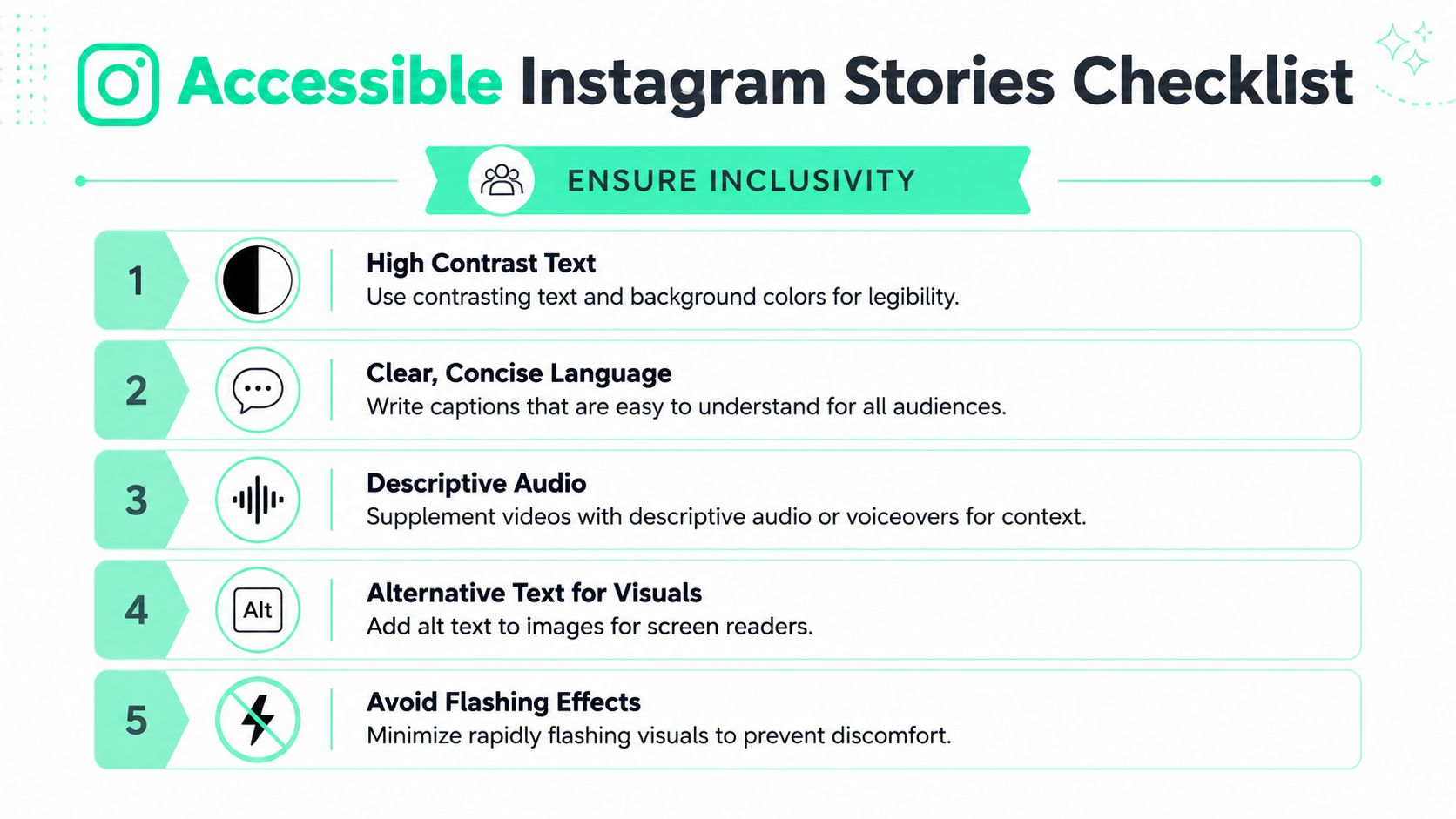
Instagram creators don't need a compliance department to improve accessibility. They need a repeatable checklist.
- **Use strong contrast:** WCAG 2.2 guidance calls for a **4.5:1** contrast ratio for normal text. If the background is busy, add a solid backing or choose a more readable color.
- **Choose legible sizing:** If the viewer has to squint, the text is too small.
- **Avoid cluttered placement:** Captions shouldn't sit on top of interface buttons, faces, or product details.
- **Write for scanning:** Tight phrasing reads better than long, dense sentences.
- **Check caption controls:** If closed-caption options are relevant in the post setup, make sure they're enabled appropriately.
For anyone comparing terminology and use cases, this guide to [closed captions vs subtitles](https://www.blitzreels.com/blog/closed-captions-vs-subtitles) is helpful because Story creators often use the terms interchangeably even when the viewing experience differs.
Accessibility work improves content for everyone, not only for people who explicitly identify accessibility needs. Better contrast, cleaner phrasing, and smarter placement also help the viewer watching in a noisy café, on a cracked screen, or while quickly tapping through Stories between meetings.
## A Faster Workflow for Professional Captions with BlitzReels
Instagram's built-in sticker solves one problem well. It gets captions onto a Story quickly. It doesn't solve the whole short-form workflow once teams need cleaner branding, easier correction, reusable templates, and faster output across multiple platforms.
That's where a dedicated editor makes more sense. Short-form teams often need to do several jobs at once: clip the strongest moment, tighten the hook, add title cards, clean up captions, resize for vertical formats, and reframe the shot so faces stay centered. Doing that natively inside each platform usually means extra friction and inconsistent results.
A stronger workflow usually looks like this:
- **Start with the clip:** Pull the best short segment first instead of captioning a weak take.
- **Set the frame:** Reframe and resize for Stories, Reels, TikTok, and Shorts before styling text.
- **Add the hook:** Use a title card or opening line that earns attention immediately.
- **Then finish captions:** Clean the transcript, apply a template, and export.
That's why creators working at volume tend to move toward purpose-built tools. BlitzReels fits that workflow well because it combines caption generation with clipping, reframing, resizing, templates, and fast editing in one place. Instead of treating captions as a separate chore, it treats them as part of the short-form packaging.
For creators who want to test that workflow directly, the [BlitzReels AI caption generator](https://www.blitzreels.com/ai-caption-generator) is the most relevant place to start. It's especially useful for teams repurposing one source video into multiple short edits where caption consistency matters just as much as speed.
The practical trade-off is simple. Native Instagram captions are fine for quick daily Stories. A dedicated short-form workflow is better when quality, repeatability, and editing speed all need to improve together.
---
BlitzReels helps creators turn raw clips into polished short-form videos with captions, hooks, title cards, resizing, reframing, templates, and fast edits built for Instagram, TikTok, YouTube Shorts, LinkedIn, and more. For a quicker way to create captioned Stories and repurpose videos without juggling multiple tools, explore [BlitzReels](https://blitzreels.com).