---
title: "How to Add Captions to Reels: A 2026 Guide for Growth"
canonical: "https://blitzreels.com/blog/how-to-add-captions-to-reels"
---
# How to Add Captions to Reels: A 2026 Guide for Growth
URL: https://blitzreels.com/blog/how-to-add-captions-to-reels
Markdown URL: https://blitzreels.com/blog/how-to-add-captions-to-reels.md
Published: 2026-06-30
Author: BlitzReels
Learn how to add captions to Reels using Instagram's sticker, third-party apps, and manual methods. Get tips for styling, engagement, and troubleshooting.
Tags: how to add captions to reels, instagram reels captions, video captions, subtitle reels, blitzreels

More than **70% of users watch videos with the sound off**, and adding captions can lift engagement by **up to 40%**. Reels with captions are also **2.5 times more likely to be shared** and see a **30% higher retention rate** than Reels without text overlays. That changes the way creators should think about editing. Captions aren't a finishing touch. They carry the message when audio never gets heard.
That matters whether the Reel is a talking-head clip, a product demo, a founder update, or a repurposed podcast cut. Anyone learning [creating successful Instagram Reels](https://adcrafty.ai/blog/how-to-create-reel-on-instagram) eventually runs into the same reality: strong hooks and clean visuals help, but captions often decide whether a viewer keeps watching or scrolls.
Instagram gives creators a built-in option. Traditional editors offer full control, but they're slow for high-volume publishing. A dedicated short-form workflow sits somewhere in the middle, especially for teams that also need clipping, reframing, resizing, title cards, and templates. For a deeper look at why captioning affects performance across short-form platforms, this breakdown of [how captions drive engagement on TikTok and Instagram](https://www.blitzreels.com/blog/how-captions-drive-engagement-on-tiktok-and-instagram) is useful context before picking a workflow.
## Table of Contents
- [Why Captions Are Non-Negotiable for Reels Growth](#why-captions-are-non-negotiable-for-reels-growth)
- [Captions do more than transcribe words](#captions-do-more-than-transcribe-words)
- [Using Instagram's Native Caption Sticker](#using-instagrams-native-caption-sticker)
- [How the native sticker works](#how-the-native-sticker-works)
- [Where the workflow starts to break down](#where-the-workflow-starts-to-break-down)
- [The Two Instagram Caption Systems Explained](#the-two-instagram-caption-systems-explained)
- [Editable captions and grey box captions are not the same](#editable-captions-and-grey-box-captions-are-not-the-same)
- [Which one creators should use](#which-one-creators-should-use)
- [A Faster Workflow with a Professional Caption Editor](#a-faster-workflow-with-a-professional-caption-editor)
- [What a professional workflow fixes](#what-a-professional-workflow-fixes)
- [Captioning Method Comparison](#captioning-method-comparison)
- [Best Practices for Captions That Stop the Scroll](#best-practices-for-captions-that-stop-the-scroll)
- [Style for readability first](#style-for-readability-first)
- [Use timing and emphasis deliberately](#use-timing-and-emphasis-deliberately)
- [Frequently Asked Questions About Reels Captions](#frequently-asked-questions-about-reels-captions)
- [Can creators upload an SRT file to Instagram Reels](#can-creators-upload-an-srt-file-to-instagram-reels)
- [Why do captions cover the speaker's face](#why-do-captions-cover-the-speakers-face)
- [What should creators do when Instagram mishears names or jargon](#what-should-creators-do-when-instagram-mishears-names-or-jargon)
- [Should every Reel use the same caption style](#should-every-reel-use-the-same-caption-style)
## Why Captions Are Non-Negotiable for Reels Growth
The biggest mistake in short-form editing is treating captions like accessibility admin. On Reels, they're part of the content itself. When **over 70% of users watch videos with the sound off**, the text on screen becomes the primary way the message lands.
The performance gap is hard to ignore. Captions can increase engagement by **up to 40%**, and captioned Reels are **2.5 times more likely to be shared** while delivering **30% higher retention** than versions without text overlays. Those numbers explain why creators who care about growth now build captioning into the workflow from the start instead of adding it at the end.
### Captions do more than transcribe words
Captions help viewers follow fast cuts, understand accents, catch product names, and stay oriented during silent autoplay. They also make short clips easier to repurpose across Instagram Reels, TikTok, YouTube Shorts, and LinkedIn where audience behavior changes but silent viewing remains common.
> **Practical rule:** If the Reel still makes sense with the phone muted, the edit is in good shape. If it falls apart without audio, the captions and visual structure need work.
Three common paths exist:
- **Instagram's native sticker** works for fast publishing and basic auto-transcription.
- **Manual editing tools** like Premiere give total control, but they can drag down turnaround time.
- **Dedicated short-form editors** speed up captioning, clipping, reframing, resizing, and template-based publishing when volume matters.
That choice affects more than convenience. It affects how fast a creator can ship, how clean the captions look, and whether edits stay consistent across a posting calendar.
## Using Instagram's Native Caption Sticker
Instagram's built-in Captions sticker is where most creators start, and for occasional posting it's still the simplest path.
### How the native sticker works
The basic process is straightforward:
1. **Upload the Reel video** into the Reels editor.
2. **Tap the sticker icon**.
3. **Select “Captions”** to trigger Instagram's auto-transcription.
4. **Review the generated text** and place it where it fits the frame.
5. **Adjust styling** so it's readable against the background.
That workflow is convenient because it happens inside the same app where the Reel gets published. There's no export, no re-upload, and no need to jump between tools just to get words on screen.
The native tool is best when the source audio is clean, the script is simple, and the creator needs to post quickly. For basic face-to-camera clips, that's often enough.
### Where the workflow starts to break down
The problem appears during correction. Instagram's native sticker lets users edit captions, but **users can only modify one word at a time**, which makes cleanup slow when the transcript includes names, jargon, or phrases the app misheard, as shown in Typito's guide to [adding captions and subtitles to Instagram Reels](https://typito.com/blog/add-captions-and-subtitles-to-instagram-reels/).
That one-word editing limit sounds minor until a Reel includes product names, technical terms, or fast delivery. Then the cleanup becomes tedious. What should be a quick polish turns into repetitive tapping.
A short walkthrough helps if the interface feels unfamiliar:
For creators already handling Instagram Stories too, the workflow differences between Stories and Reels matter because placement and editing options aren't identical. This guide on [how to add captions to Instagram Stories](https://www.blitzreels.com/blog/how-to-add-captions-to-instagram-stories) is useful when trying to keep text treatment consistent across both formats.
> Native captions are convenient. They aren't efficient once regular posting, brand consistency, and transcript cleanup become part of the job.
That's the trade-off. Instagram's sticker is good for speed at the point of upload. It's weak when accuracy and repeatable styling matter.
## The Two Instagram Caption Systems Explained
A lot of confusion around how to add captions to Reels comes from one issue: Instagram has **two different caption systems**, and they don't behave the same way.
### Editable captions and grey box captions are not the same
The first system is the **editable burned-in style** most creators mean when they talk about Reel captions. This is the route that gives control over how the text appears in the video composition.
The second is the **auto-generated grey box caption system** tied to **Advanced Settings > Show Captions**. That version is markedly different. It creates uneditable text, and creators can't fix mistakes before publishing. That distinction matters because **34% of viewers skip videos with inaccurate captions**, according to the source discussion in this [YouTube breakdown of Instagram caption types](https://www.youtube.com/watch?v=qI31LlojiEs).
Many tutorials blur these two options together, which is why creators often ask why their captions can't be edited. They picked the wrong system.
### Which one creators should use
For branded content, educational content, product explainers, or anything with names and niche vocabulary, the safer choice is the editable route. It allows correction, styling, and placement decisions that fit the actual shot.
The grey box route is useful when accessibility coverage is the main goal and speed matters more than polish. But it's a weak option for creators who want strong visual identity or tighter control over the viewer experience.
A simple way to frame the difference:
- **Editable burned-in captions** are for presentation, accuracy, and design control.
- **Grey box captions** are for basic auto-display, with limited control and no real cleanup path.
For anyone still mixing up **closed captions vs subtitles**, the distinction becomes clearer when looking at how platforms handle display and editing behavior. This guide to [closed captions vs subtitles](https://www.blitzreels.com/blog/closed-captions-vs-subtitles) helps separate the terminology from the publishing workflow.
> If a Reel needs to look polished, the creator needs editable captions. Anything else introduces avoidable risk.
## A Faster Workflow with a Professional Caption Editor
Instagram's native tools solve one problem. They put text on screen quickly. They don't solve the rest of the short-form workload.
A professional caption workflow is less about transcription alone and more about reducing friction across the full edit. That includes clipping the source video, selecting a hook, adding a title card, keeping the speaker framed correctly, resizing for vertical output, and maintaining a consistent caption style across multiple platforms.
### What a professional workflow fixes
The biggest gain is control without timeline bloat. Manual workflows in Premiere or similar editors can absolutely produce polished captions, but they ask creators to do a lot of repetitive work: trimming clips, building text layers, timing phrases, repositioning for safe zones, exporting, then resizing again for other platforms.
That's manageable for one Reel. It gets expensive in time when publishing several clips per week.
Short-form teams usually need the workflow to handle all of this together:
- **Clipping:** pulling the strongest segment from a longer recording.
- **Caption styling:** applying readable text treatments without rebuilding them every time.
- **Reframing:** keeping faces centered when converting widescreen footage into vertical video.
- **Resizing:** exporting versions for Reels, TikTok, Shorts, and LinkedIn.
- **Hooks and title cards:** making the first frame do more work.
- **Templates:** preserving consistency across a content series.
SleekPost has a useful overview in its [guide for creators exploring AI caption generators for Instagram](https://sleekpost.com/blog/ai-caption-generator-for-instagram), especially for comparing where automation helps and where human review still matters.
For creators trying to publish more without getting buried in edit time, a focused workflow around AI captioning and short-form repurposing makes more sense than trying to force every Reel through a traditional timeline. This is the practical advantage behind tools built for [spending less time editing reels with AI captions](https://www.blitzreels.com/blog/spend-less-time-editing-reels-with-ai-captions).
### Captioning Method Comparison
| Feature | Instagram Native Sticker | Manual Workflow (e.g., Premiere) | BlitzReels |
|---|---|---|---|
| Speed to first draft | Fast inside Instagram | Slowest | Fast |
| Bulk caption correction | Weak | Strong | Strong |
| Caption styling control | Basic | High | High |
| Dynamic text workflow | Limited | Manual | Built for short-form speed |
| Clipping long videos into shorts | No | Manual | Yes |
| Auto reframing for vertical video | No | Manual | Yes |
| Resizing for multiple platforms | Limited | Manual | Yes |
| Templates for repeatable branding | Limited | Possible but setup-heavy | Yes |
| Best fit | Quick single-post publishing | Editors who want full manual control | High-volume short-form creation |
Traditional editors still win on absolute granular control. Native Instagram wins on convenience. A dedicated short-form editor wins when the creator needs both speed and enough control to keep captions, framing, and packaging professional.
## Best Practices for Captions That Stop the Scroll
Viewers decide fast. If captions are hard to read in the first second, the Reel loses them before the hook has a chance to work.
### Style for readability first
Readable captions beat fancy captions.
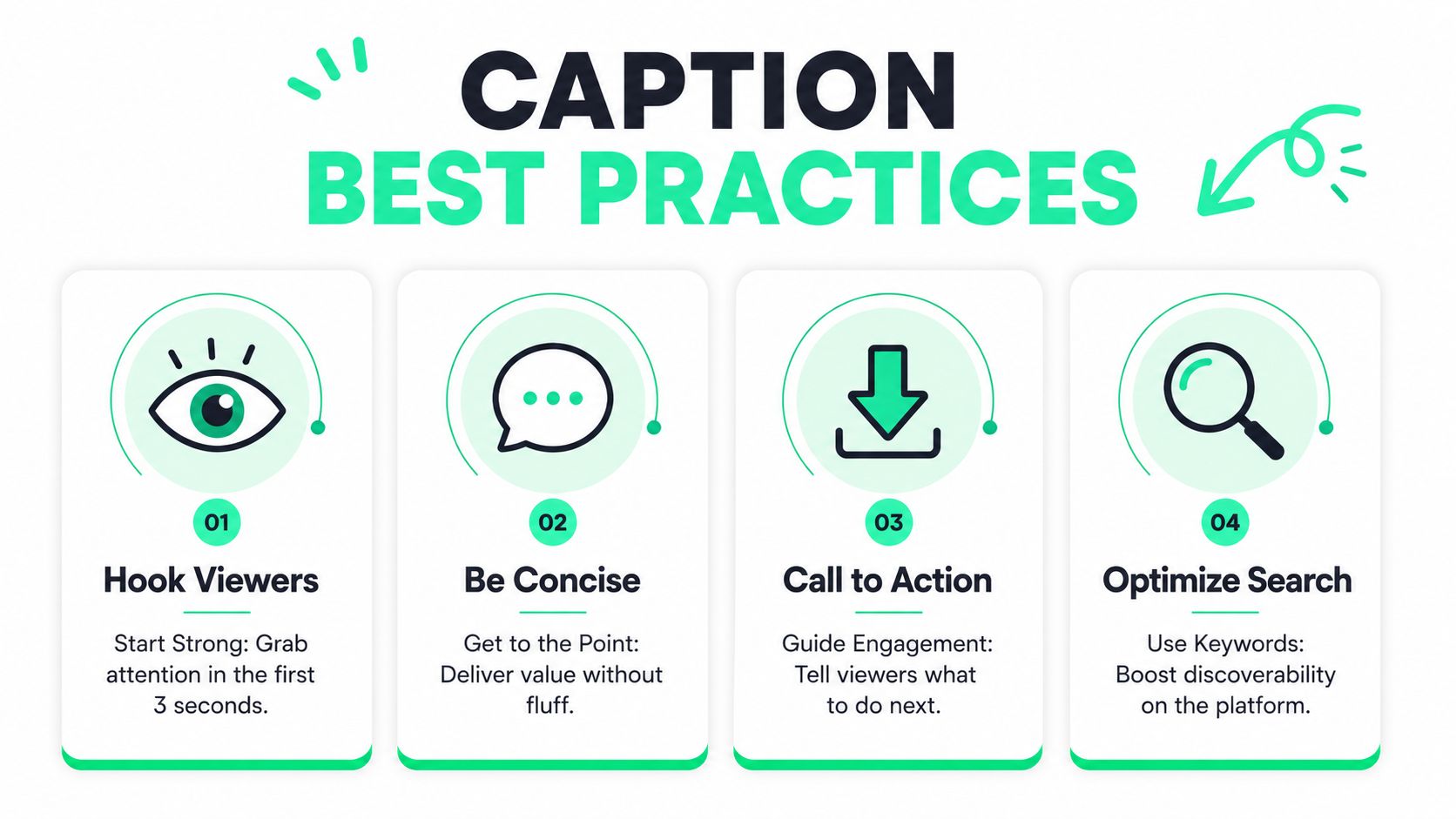
The most common failure is simple. Text is too small, sits inside Instagram's UI zone, blends into the background, or appears in subtitle blocks that feel dense on a phone screen. I see this constantly with native Instagram captions. They are fast to generate, but the styling ceiling is low, and small placement mistakes make the whole Reel feel amateur.
A better standard looks like this:
- **Keep lines short:** short-form captions read better in quick bursts than full sentence blocks. Tight line lengths help viewers process the message without falling behind.
- **Use strong contrast:** white text with a dark stroke, shadow, or background plate usually holds up best across different shots.
- **Limit on-screen clutter:** one or two lines at a time is easier to scan than stacked subtitle blocks.
- **Place text around the subject:** keep captions clear of the speaker's face, product demo, and Instagram interface elements.
This is also where the difference between Instagram's two caption systems matters in practice. The app's editable text captions can be adjusted inside Instagram, but they are still limited for polish and consistency. Burned-in captions give the creator full control over placement, style, and visibility because they are part of the video itself. For client work, branded series, or any Reel that needs to look consistent across platforms, burned-in usually wins.
### Use timing and emphasis deliberately
Timing is what separates readable captions from captions that add momentum.
A lot of creators stop after transcription. That gets words on screen, but it does not shape how the Reel feels. Good caption timing follows speech cadence, cuts dead air, and gives key phrases room to hit. Bad timing makes strong delivery feel flat.
Analysts at Opus note in their article on [how to add captions to Instagram Reels](https://www.opus.pro/blog/how-to-add-captions-to-instagram-reels) that synced, dynamic captions can improve viewer engagement compared with static text blocks. That lines up with what short-form editors see every day. When captions change in step with the voice, the video feels faster and clearer.
Keyword highlighting matters for the same reason. If the line contains the payoff, objection, result, or punchline, that phrase should stand out immediately. Educational Reels, founder clips, and UGC all benefit from this, but only if the emphasis is selective. Highlight too much and nothing feels important.
> Short-form captions should support pacing, not just document speech.
Useful habits include:
- **Highlight one idea at a time:** emphasize the phrase carrying the value, not half the sentence.
- **Match the spoken rhythm:** captions should appear when the speaker lands the point, not half a beat late.
- **Open with a clear payoff:** the first caption frame should help the hook, not repeat filler words.
- **Use a repeatable system:** consistent fonts, colors, and emphasis rules build recognition across a series.
Instagram's native tools can handle basic captioning. They get frustrating fast once the edit needs dynamic timing, brand consistency, or precise keyword emphasis. A dedicated workflow in BlitzReels is better for that kind of output because it speeds up transcript cleanup, styling, and timing adjustments without forcing the creator through a full manual edit. For teams refining those visual decisions, this [data-driven guide to styling video captions](https://www.blitzreels.com/blog/a-data-driven-guide-to-styling-video-captions) is a useful reference.
## Frequently Asked Questions About Reels Captions
### Can creators upload an SRT file to Instagram Reels
No. Instagram Reels don't support external SRT subtitle uploads. Captions need to be **burned into the video file as permanent visual layers** if the creator wants reliable visibility across devices and settings, as covered in Captiono's tutorial on [adding captions to Instagram Reels step by step](https://captiono.ai/adding-captions-to-instagram-reels-step-by-step-tutorial/).
### Why do captions cover the speaker's face
This usually happens because the editor treated captions as an afterthought instead of composing the frame around them. The fix is to place the subject slightly higher in the frame, keep caption blocks compact, and leave room for Instagram's interface elements. Dynamic placement beats a fixed bottom position when the speaker moves.
### What should creators do when Instagram mishears names or jargon
If the Reel includes brand names, technical terms, or industry-specific language, creators should review every line before publishing. Native Instagram editing slows this down because correction is awkward, so a more controlled workflow becomes more practical for recurring content. Clean source audio also reduces correction work.
> The fastest edit is the one that doesn't need a full round of transcript cleanup.
### Should every Reel use the same caption style
No, but every series should have a recognizable system. Educational clips, founder videos, testimonials, and comedic cuts often need different pacing and emphasis. The smart move is to keep a few templates, then adjust font weight, timing, and keyword highlighting based on the content type rather than forcing one look onto every Reel.
---
Creators who want a faster way to create, edit, caption, resize, and repurpose short-form videos can use [BlitzReels](https://blitzreels.com) to handle the heavy lifting in one workflow. It's built for TikTok, Instagram Reels, YouTube Shorts, LinkedIn, and other social formats, with tools for clipping source videos, generating captions, reframing for vertical, adding hooks and title cards, applying templates, and exporting polished shorts without getting stuck in a slow manual timeline.