---
title: "How to Add Captions to Video for Social Media"
canonical: "https://blitzreels.com/blog/how-to-add-captions-to-video"
---
# How to Add Captions to Video for Social Media
URL: https://blitzreels.com/blog/how-to-add-captions-to-video
Markdown URL: https://blitzreels.com/blog/how-to-add-captions-to-video.md
Published: 2026-08-14
Author: BlitzReels
Learn how to add captions to video for TikTok, Reels, and Shorts. Step-by-step methods, AI tools, SRT workflows, and accessibility tips inside.
Tags: video captions, add captions, short-form video, auto captions, BlitzReels

Closed captions became a formal accessibility milestone in U.S. broadcasting in **1993**, when federal regulations required **all new, nonexempt English-language television programming** to be captioned, and that shift still shapes how short-form creators publish video today [Google Docs help on captioning history](https://support.google.com/docs/answer/14953386?hl=en). On TikTok, Instagram Reels, and YouTube Shorts, captions aren't a decorative layer at the end of the edit. They're part of the record-to-publish loop, the same way hooks, title cards, reframing, and resizing are.
That matters because creators don't usually need one “perfect” caption method. They need the right one for the job, whether that's **AI auto-captions** for volume, a **manual SRT workflow** for accuracy, or a platform-native editor for fast cleanup. The smartest teams treat captioning like an asset that travels with the cut, not like text pasted into a timeline at the last minute. For a deeper look at why captions change engagement behavior on short-form feeds, the most useful companion read is [how captions drive engagement on TikTok and Instagram](https://blitzreels.com/blog/how-captions-drive-engagement-on-tiktok-and-instagram).
## Table of Contents
- [Why Captions Decide Whether Your Short-Form Video Performs](#why-captions-decide-whether-your-short-form-video-performs)
- [Captions are part of the first impression](#captions-are-part-of-the-first-impression)
- [Three workflows cover most creator needs](#three-workflows-cover-most-creator-needs)
- [Adding Auto Captions with an AI Workflow](#adding-auto-captions-with-an-ai-workflow)
- [Start with the source clip, not the final export](#start-with-the-source-clip-not-the-final-export)
- [What “good enough” looks like](#what-good-enough-looks-like)
- [Creating Captions Manually in YouTube Studio and Premiere](#creating-captions-manually-in-youtube-studio-and-premiere)
- [The cleanest workflow starts with a timed file](#the-cleanest-workflow-starts-with-a-timed-file)
- [Manual editing still beats a rebuild](#manual-editing-still-beats-a-rebuild)
- [Open Captions Versus Closed Captions and When to Use Each](#open-captions-versus-closed-captions-and-when-to-use-each)
- [Burned in when portability matters](#burned-in-when-portability-matters)
- [Accessibility still needs readable structure](#accessibility-still-needs-readable-structure)
- [Styling Captions for TikTok, Reels, and YouTube Shorts](#styling-captions-for-tiktok-reels-and-youtube-shorts)
- [Make the text easy to read on a phone](#make-the-text-easy-to-read-on-a-phone)
- [Style should support the cut, not fight it](#style-should-support-the-cut-not-fight-it)
- [Timing, Length, and the Human Review Checkpoint](#timing-length-and-the-human-review-checkpoint)
- [Readability rules are the baseline, not the ceiling](#readability-rules-are-the-baseline-not-the-ceiling)
- [Human review catches the stuff machines miss](#human-review-catches-the-stuff-machines-miss)
- [Picking the Right Caption Workflow for Your Posting Cadence](#picking-the-right-caption-workflow-for-your-posting-cadence)
- [Match the workflow to the publishing pattern](#match-the-workflow-to-the-publishing-pattern)
- [Spend time where it changes the clip](#spend-time-where-it-changes-the-clip)
## Why Captions Decide Whether Your Short-Form Video Performs
Short-form video gets judged in the first few seconds, often with the sound off and the thumb already moving. If the first line of text is slow to read, the clip loses one of its easiest retention tools. Captions belong in the same decision set as the opening hook, the crop, and the title card.
### Captions are part of the first impression
A clean caption track gives viewers a second way in when the audio is muted, the room is loud, or the speaker's accent, pace, or jargon would otherwise slow the scroll. The text also helps the eye stay anchored on the speaker's phrasing, which is especially useful when a cut jumps quickly between shots. In practice, captions can make a clip feel more deliberate and easier to follow, even before the viewer decides whether to keep watching.
The old broadcasting standard explains why this isn't optional fluff. **Closed captions became a formal accessibility milestone in 1993** when federal rules required captioning for new, nonexempt English-language TV programming [Google Docs help on captioning history](https://support.google.com/docs/answer/14953386?hl=en). That history matters because modern platforms still assume video should work with or without audio, and the same expectation now applies to TikTok, Reels, and Shorts.
### Three workflows cover most creator needs
Short-form teams usually land in one of three lanes. **AI auto-captions** fit high-volume posting, because they let a creator move from upload to styled export quickly. **Manual SRT authoring** fits accuracy-sensitive or brand-sensitive work, especially when a script already exists or the edit needs tight control. **Platform-native editors** sit in the middle, useful when a clip needs cleanup after transcription but does not justify rebuilding from scratch.
> **Practical rule:** if the same cut will be posted in multiple places, create the caption file as a durable asset first. That gives the edit more portability than copy-pasting a transcript into one editor and starting over elsewhere.
The file names matter too. An **SRT** file stores a sequence index, timestamp ranges, and the text payload for each caption segment. **VTT** is the web-player-friendly cousin, often used when the same caption track needs to live alongside online video players. The difference between **captions for accessibility** and **subtitles for translation** also matters. Captions include important sounds and stay synchronized with speech, while subtitles are mainly for translating what is said [Section 508 caption and transcript guidance](https://www.section508.gov/create/captions-transcripts/).
A sidecar file wins when the same cut has to live across platforms. Burned-in text can look consistent, but it is permanent. A timed file, especially an **SRT** or **VTT**, can be reused, edited, re-uploaded, and adapted without retyping everything.
For creators who want to understand how captioning affects watch behavior, the clearest next read is [how captions drive engagement on TikTok and Instagram](https://blitzreels.com/blog/how-captions-drive-engagement-on-tiktok-and-instagram).
## Adding Auto Captions with an AI Workflow
For volume posting, an AI workflow is the fastest route because it can transcribe, style, and export in one pass. Short-form teams use that path when they need captions that feel native to the platform, not pasted in later as an afterthought. The aim is speed plus structure, let the machine handle the rough transcription, then edit the parts viewers notice.
### Start with the source clip, not the final export
A practical AI caption workflow starts by uploading the source video and letting the tool transcribe the audio. For that step, [BlitzReels' AI caption generator](https://blitzreels.com/ai-caption-generator) fits the same record-to-publish loop that short-form producers use every day. After the transcript lands, check whether the caption breaks sit on real phrase pauses instead of awkward mid-thought splits. Segment boundaries matter more than perfect punctuation in short-form, because a caption line that hangs too long will outlive the cut and feel slow in a fast feed.
BlitzReels works well as a compact example because it pairs **transcription**, **auto-reframing**, **caption styling**, and **9:16 export** in one pass. It helps when a widescreen source has to move quickly into a vertical short without bouncing between separate tools. A standalone transcriber can still work, but the extra import and export steps usually add friction when the posting queue is heavy.
> A good AI caption draft is usually readable, correctly timed, and only lightly styled. It does not need to be perfect before the first review pass.
### What “good enough” looks like
Good enough means the transcriber got the language right, the segments sit on natural speech breaks, and the style does not bury the speaker under too much decoration. Bolded keywords can work when they support emphasis, but over-styling gets noisy fast. Emoji callouts can also help if they reinforce the meaning, though they are easy to overuse and turn the caption into a distraction.
The best use of AI here is speed plus structure. Let the machine do the rough transcription, then edit the obvious timing problems, fix the brand terms, and apply a preset that matches the content's tone. That is much faster than rebuilding captions line by line.
## Creating Captions Manually in YouTube Studio and Premiere
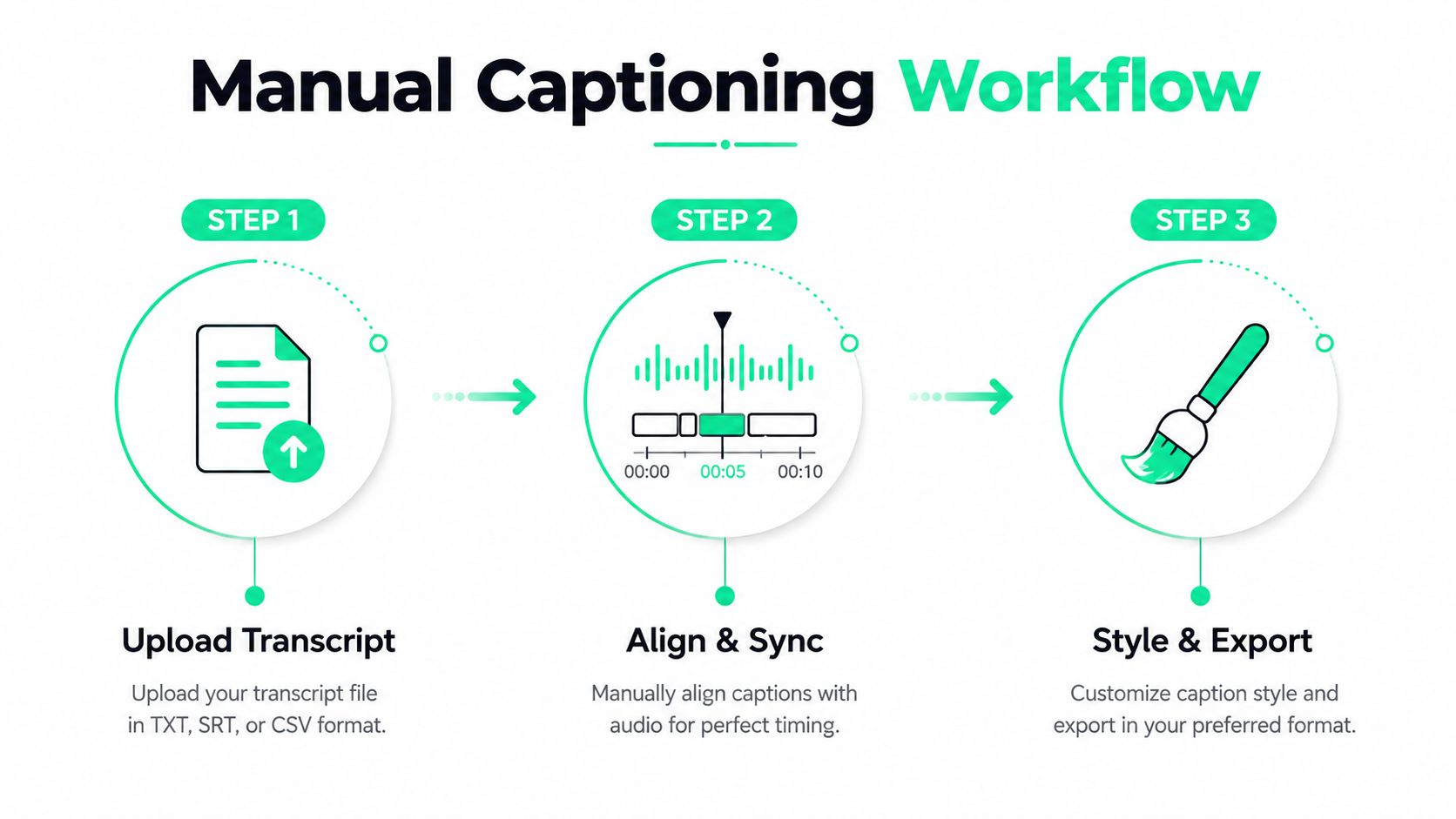
Manual captioning still matters when accuracy is the priority, or when brand terms, product names, and speaker cues need a human pass before publish. YouTube Studio gives creators three paths, **upload file**, **auto-sync**, or **type manually**, so the starting point can be a finished SRT, a transcript, or a blank slate [YouTube Studio subtitle help](https://support.google.com/youtube/answer/2734796?hl=en). Adobe Premiere Pro uses a dedicated **Captions workspace**, which gives editors a more timeline-centric way to create a caption track and adjust timing before export.
### The cleanest workflow starts with a timed file
The most reliable sequence is simple. Create a timed caption file first, check it against the final edit, then upload or burn it in. That order matters because even a small trim can throw the whole track off, and **sync drift** is the failure mode that makes otherwise correct captions look broken.
In YouTube Studio, the **upload file** path works well when the SRT is already cleaned. **Auto-sync** fits a transcript that still needs timing help. **Type manually** is the fallback for short clips or emergency fixes, but it is the slowest route when the deliverable has already been edited somewhere else. Premiere Pro's approach fits teams that want caption timing to live inside the edit rather than beside it.
### Manual editing still beats a rebuild
Manual cleanup is usually faster than starting over, especially when the platform editor exposes small, usable actions. YouTube's subtitle tools include **Duplicate and Edit** and **Add caption line**, which makes it easier to repair machine-generated captions than to retype the whole file from scratch [UArk accessible video captioning guidance](https://accessibility.uark.edu/accessible-technology/creating-accessible-videos/captioning-your-own-video.php). That is the main advantage of a manual workflow. It keeps the creator in control of phrasing, punctuation, and timing.
For editors who want a tighter tooling stack, an internal [SRT editor](https://blitzreels.com/tools/srt-editor) can sit between transcription and publish. The useful part is not fancy automation, it is getting the text and timestamps into a format that can move cleanly across platforms. If you want the same review tools used for timing checks, see the timing section.
## Open Captions Versus Closed Captions and When to Use Each
HandBrake makes the trade-off easy to see. On its Subtitles tab, checking **Burn In** creates **open captions**, which stay visible in the video itself. Leaving it unchecked keeps the text as **closed captions**, so viewers can toggle them on or off [HandBrake caption guide](https://learn.umw.edu/guides/adding-captions-to-video/). That single choice affects portability, editing flexibility, and where the file can be reused.
### Burned in when portability matters
Open captions are the safer pick when the clip has to look the same everywhere, especially on social platforms that do not give viewers a real caption menu. TikTok, Instagram Reels, and YouTube Shorts usually behave more like rendered video than a web player with selectable subtitle tracks, so the captions people see are generally the ones baked into the file. For short-form distribution, that makes burned-in text the practical default.
Closed captions still matter when the delivery target supports toggleable tracks and the same master file may be reused in different places. They are easier to switch off, and they keep the video cleaner when a platform or player does support a separate subtitle layer. The trade-off is straightforward. If the platform hides the track, the viewer never sees it.
### Accessibility still needs readable structure
Accessibility guidance still applies even when the final output is burned in. Captions should include important sounds, stay synchronized with speech, and keep each caption to **no more than two lines** and roughly **45 characters per line**. The [Section 508 caption and transcript guidance](https://www.section508.gov/create/captions-transcripts/) is useful here because those readability rules keep short-form text from feeling cramped and hard to scan.
For short clips, that usually means tying each caption to one spoken phrase and avoiding text that hangs around after the shot changes. That matters in a record-to-publish workflow, because a caption file that reads well in the editor still has to survive the pace of the final cut. If timing changes late, the safest move is to review the text again before export rather than assume the old sync still fits.
Manual fallback still makes sense for accuracy-critical clips. In YouTube Studio, **upload file** is the cleanest choice for a finished SRT, **auto-sync** helps when a transcript exists but the timing needs help, and **type manually** is the backup for small corrections. For longer edits, burning in after the final review avoids redoing sync work after the picture changes.
## Styling Captions for TikTok, Reels, and YouTube Shorts
Styled captions on short-form feeds serve a different purpose than accessibility captions. They're part legibility, part visual hook, and part pacing cue. In a crowded scroll, a strong caption style helps the eye lock onto the sentence the creator wants the viewer to catch first.
### Make the text easy to read on a phone
Font weight and size matter more than taste. Thin text disappears on a small screen, and oversized text can crowd the speaker or cover the frame. The safest approach is a bold, highly legible face with enough contrast to survive bright backgrounds, motion, and compression. The goal is not decorative flair, it's instant readability.
Position matters too. On Reels, captions should stay clear of the username area. On Shorts, they need to avoid the lower button stack. A caption that looks fine in the editor can become unusable once the platform UI overlays it.
> **Practical rule:** keep each segment to one spoken phrase whenever possible. If the caption outlasts the cut, the viewer spends energy catching up instead of following the clip.
### Style should support the cut, not fight it
Keyword highlighting and selective bolding can guide attention when a phrase carries the point of the clip. Emoji callouts can work in moderation, especially for tone or emphasis, but they should never replace actual readability. If the text is too dense, the caption becomes another wall between the viewer and the speaker.
For creators comparing tools, a guide like [a data-driven guide to styling video captions](https://blitzreels.com/blog/a-data-driven-guide-to-styling-video-captions) is useful because it frames styling as a production choice rather than a branding whim. HandBrake's **Burn In** toggle is still the simplest example of the trade-off. Burned-in captions guarantee the look, while closed captions preserve flexibility.
## Timing, Length, and the Human Review Checkpoint
Auto-captions fail in the same places again and again. Brand names get flattened, homophones slip through, punctuation disappears, and a caption can run longer than the phrase it is tracking. Those errors are manageable, but only if the review pass happens before export. In a short-form record-to-publish loop, that review sits between the rough transcript and the version you ship.
### Readability rules are the baseline, not the ceiling
Accessibility guidance points to **two lines**, roughly **45 characters per line**, and timing that follows the spoken phrase. That gives the caption a shape the viewer can process quickly, and it keeps the file usable when you need to move it between platforms. Short-form usually needs tighter segmentation than web video, because people are scanning at thumb speed and the frame changes more often.
Punctuation and segmentation become production choices, not grammar choices. A clean pause is usually better than a caption that tries to pack too much into one line. Captions should help the eye move with the speaker, not force a careful read. If you want the baseline rules in one place, the guidance linked earlier in the article covers the core accessibility requirements.
### Human review catches the stuff machines miss
A fast human pass after auto-generation, before export in **SRT** or another target format, saves more time than redoing a broken file later. YouTube's line-level editing tools, including **Duplicate and Edit** and **Add caption line**, make it faster to clean machine output than to start over [UArk accessible video captioning guidance](https://accessibility.uark.edu/accessible-technology/creating-accessible-videos/captioning-your-own-video.php). That is the point where proper nouns, brand spellings, and jargon need a real check, because the model often guesses from context.
The same pass is where timing gets judged against the edit itself. A caption file can be technically correct and still feel off if the spoken line and the on-screen cut do not match. If the cut is still changing, use a tool that can reflow timings instead of treating the first pass as final. Once picture lock is in place, the timing holds better and the review gets faster.
For teams that want a final QA step, a publishable-clip checklist like [this caption and edit QA guide](https://blitzreels.com/guide/publishable-clip-qa-checklist) keeps the review focused on what breaks viewer trust. The useful habit is simple. Check the captions after the edit settles, then scan once more for sync drift, line breaks, and any transcript errors that would make the clip feel sloppy on publish.
## Picking the Right Caption Workflow for Your Posting Cadence
The right caption workflow depends less on ideology and more on cadence. A creator who posts every day needs a different process from a brand that publishes a few polished shorts a week. The best system is the one that preserves review time for the lines that matter while keeping the rest of the edit moving.
### Match the workflow to the publishing pattern
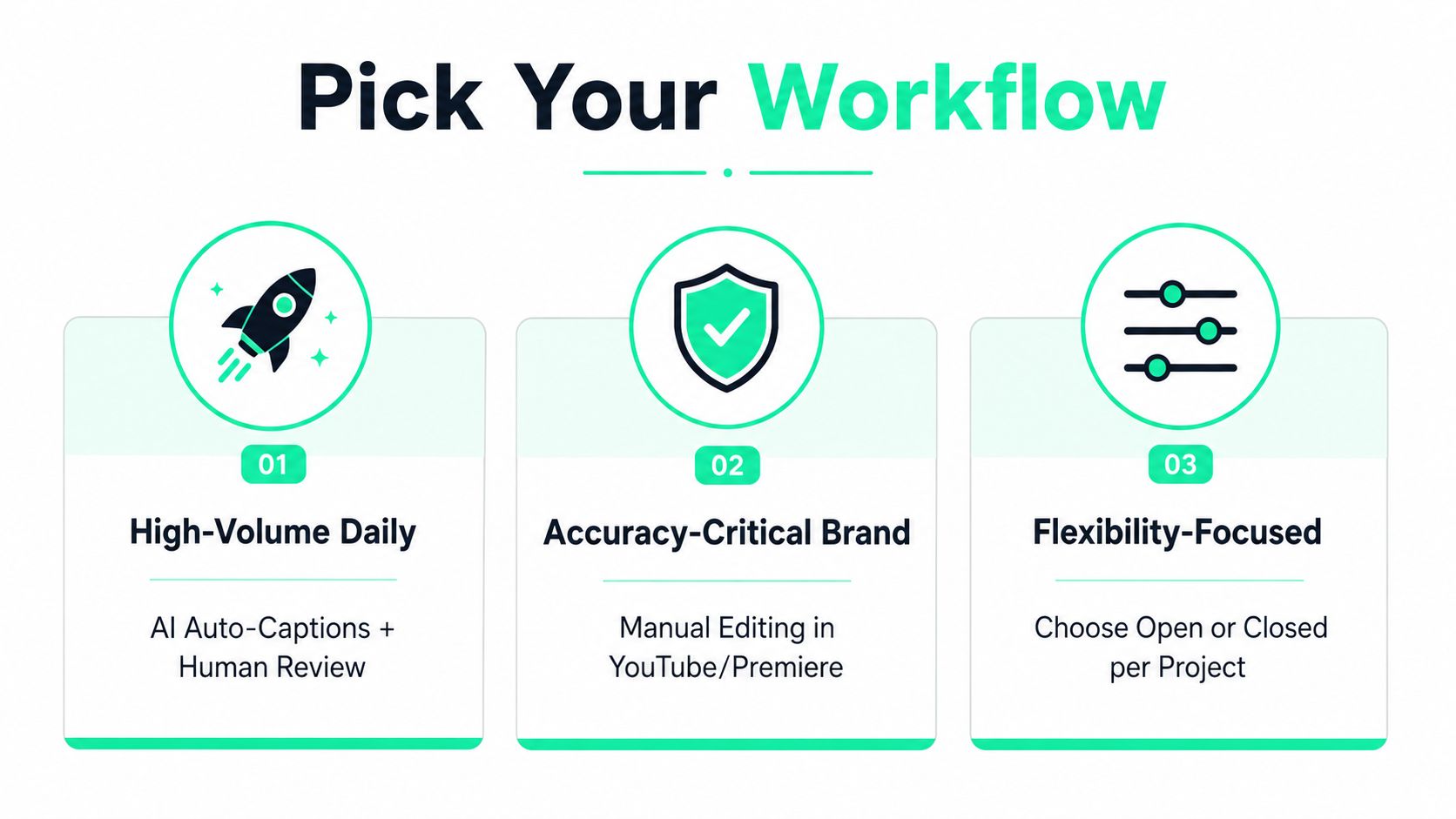
High-volume daily posters usually want **AI auto-captions plus human review**. That gives them speed, style, and enough control to catch obvious transcription mistakes without slowing the queue. Accuracy-critical brand accounts do better with **manual editing in YouTube Studio or Premiere**, because the extra control helps with names, compliance language, and polished delivery.
Mixed-format publishers often get the most value from a hybrid path. They author one timed caption file, then burn in or adapt the delivery based on where the clip is going live. That's especially helpful when the same cut will show up on TikTok, Reels, Shorts, and a website player.
### Spend time where it changes the clip
Creators who also compare editing stacks can use a resource like [find video and image software](https://myimageupscaler.com/blog/content-creator-software) to benchmark what sits beside captioning in the workflow. The production priority stays the same. Hooks, title cards, clips, clipping, reframing, and resizing usually deserve more attention than polishing a caption that already reads cleanly.
A practical benchmark is simple. A polished short should move from upload to final vertical export in about ten minutes when the caption loop is automated. If the process takes longer, the time usually belongs in the hook, title card, or cut selection, not in endless caption tweaking.
---
BlitzReels gives short-form creators a way to handle captions, reframing, clipping, resizing, and export in one workflow, so the record-to-publish loop stays tight. If the current process still bounces between transcript tools, editors, and platform uploads, it's worth trying [BlitzReels](https://blitzreels.com) for a faster path from raw video to a post-ready short.