---
title: "How to Create a YouTube Short: The Complete 2026 Workflow"
canonical: "https://blitzreels.com/blog/how-to-create-a-youtube-short"
---
# How to Create a YouTube Short: The Complete 2026 Workflow
URL: https://blitzreels.com/blog/how-to-create-a-youtube-short
Markdown URL: https://blitzreels.com/blog/how-to-create-a-youtube-short.md
Published: 2026-08-24
Author: BlitzReels
Learn how to create a YouTube Short that actually gets views. This step-by-step guide covers hooks, editing, captions, formatting, and publishing
Tags: youtube shorts, short form video, video editing, content creation, blitzreels

Most Shorts lose the viewer before the content has had a chance to prove itself. A 2026 benchmark recommends keeping retention above **80% in the first three seconds**, above **60% through the midpoint**, and above **70% average percentage viewed** by the end, although those figures are benchmarks rather than universal YouTube rules. [Retensis' audience-retention benchmarks](https://retensis.com/blog/audience-retention-benchmarks-2026) make the practical lesson clear: creating a YouTube Short starts with engineering the opening, not with choosing a filter or writing hashtags.
The workflow below treats every Short as a compact retention system. The creator identifies the payoff, builds the first frame around it, records for vertical viewing, edits out hesitation, formats captions for silent viewing, and uses analytics to improve the next upload. YouTube Shorts began as a staged rollout, launching in India in September 2020, expanding beta access in the United States in March 2021, and becoming available globally in July 2021, which reflects a product designed for mobile-first creation and distribution from the start. [A timeline of YouTube Shorts' rollout and format development](https://adamconnell.me/youtube-shorts-statistics/) provides further context.
## Table of Contents
- [Why Most YouTube Shorts Fail Before They Start](#why-most-youtube-shorts-fail-before-they-start)
- [The opening decides whether the edit matters](#the-opening-decides-whether-the-edit-matters)
- [Volume can't replace a retention-first structure](#volume-cant-replace-a-retention-first-structure)
- [Planning Your Short Around a Strong Hook and Payoff](#planning-your-short-around-a-strong-hook-and-payoff)
- [Three hook structures that survive the swipe](#three-hook-structures-that-survive-the-swipe)
- [Write the first line before recording](#write-the-first-line-before-recording)
- [Recording and Editing for Maximum Retention](#recording-and-editing-for-maximum-retention)
- [Cut for movement, not just silence](#cut-for-movement-not-just-silence)
- [Use automation for repetition, not judgment](#use-automation-for-repetition-not-judgment)
- [Formatting Captions and Visuals That Hold Attention](#formatting-captions-and-visuals-that-hold-attention)
- [Make every word easy to scan](#make-every-word-easy-to-scan)
- [Add visual changes that clarify the idea](#add-visual-changes-that-clarify-the-idea)
- [Publishing and Optimizing for the YouTube Algorithm](#publishing-and-optimizing-for-the-youtube-algorithm)
- [Read the curve before changing the strategy](#read-the-curve-before-changing-the-strategy)
- [Building a Repeatable Shorts Production System](#building-a-repeatable-shorts-production-system)
## Why Most YouTube Shorts Fail Before They Start
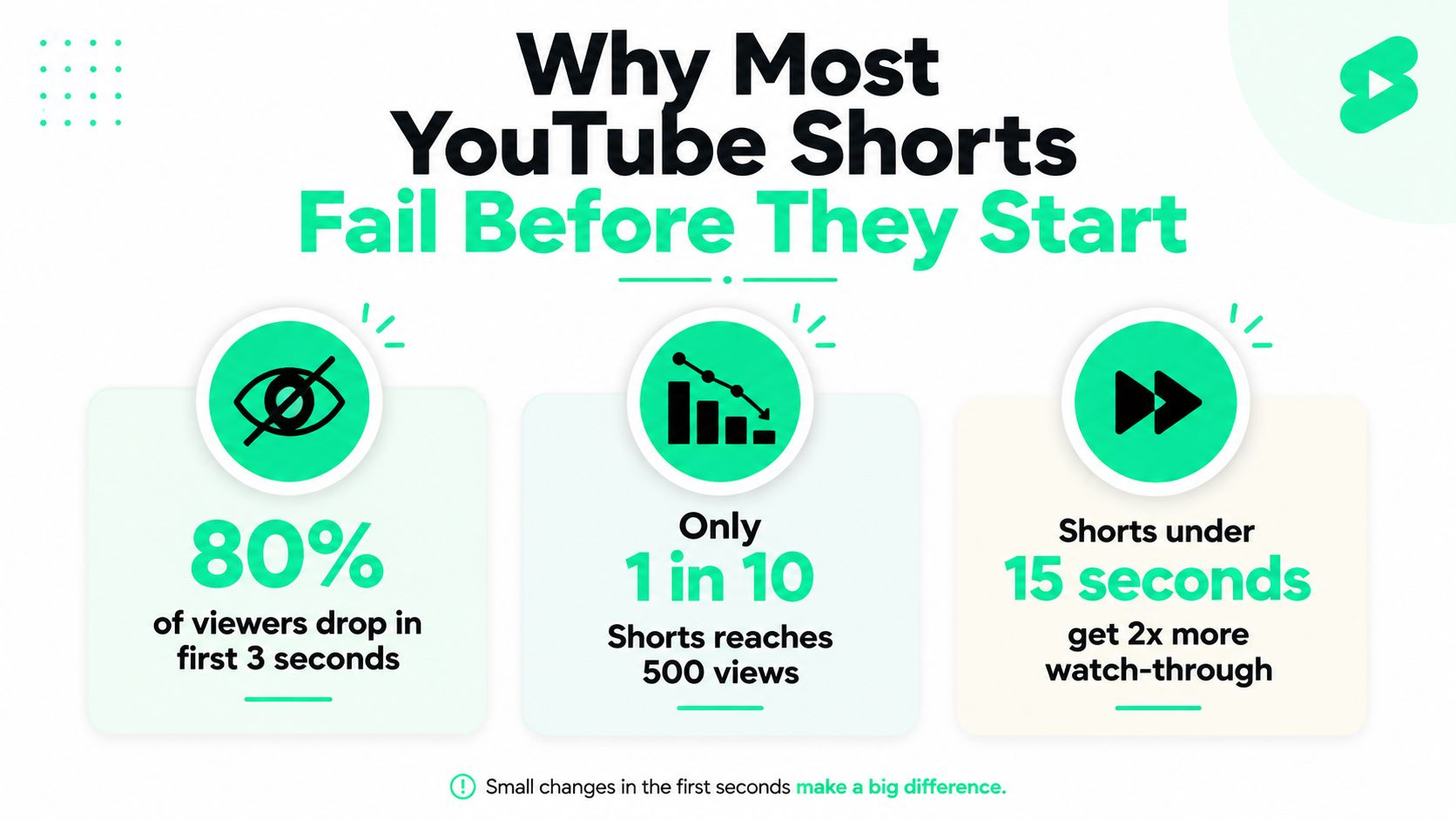
A Short can lose more than half its viewers before the useful information appears. The usual cause is a delayed premise: a greeting, broad setup, or background explanation occupies the opening, while the viewer is still deciding whether to swipe. The first **one to three seconds** therefore need to show the subject, tension, or expected result immediately.
Google's YouTube guidance recommends vertical video, a runtime under 60 seconds for the classic Shorts approach, and an opening that introduces the brand early. Eligible square or vertical uploads can also run up to **three minutes** when uploaded on or after October 15, 2024, according to [YouTube Shorts' current video specifications](https://www.vidulk.com/video-specs/youtube-shorts). Extra runtime gives you room for proof or context. It does not excuse a slow premise.
### The opening decides whether the edit matters
For Shorts between 30 and 60 seconds, benchmark data commonly places average retention around **40% to 55%**. Stronger performers can reach **65% to 79% or higher**, depending on format and length, according to [Shorts retention-rate benchmarks](https://www.gofaceless.ai/en/blog/youtube-shorts-retention-rate-benchmarks). The practical implication is straightforward: polished cuts, music, and captions cannot rescue an opening that makes viewers work to understand the video.
Start with a visible result, a clear conflict, or a question tied to a benefit. “Three camera settings that make phone footage look cleaner” gives the viewer a reason to stay. “Welcome back to another video” spends the most valuable moment on ceremony.
> **Practical rule:** If the viewer understands the topic only after the first sentence ends, the hook arrives late.
### Volume can't replace a retention-first structure
Frequent uploads create more opportunities to learn, but they do not repair slow intros, static framing, or a missing payoff. Edit for the first decision point: show the subject in the opening frame, place the key caption where it can be read instantly, and remove every pause before the premise becomes clear. Then keep visual movement purposeful, so each change supports the explanation rather than adding noise.
The final moment should resolve the promise established at the start. That loop gives the viewer a reason to continue, while the edit supplies clear viewing signals for distribution. A Short is therefore a compact promise-delivery system, not merely a vertical upload.
Creators managing terminology across platforms can consult the [short-form video glossary](https://blitzreels.com/glossary/short-form-video) when standardizing their production workflow. The time saved by a repeatable vocabulary is better spent reviewing where viewers leave and tightening the next opening.
## Planning Your Short Around a Strong Hook and Payoff
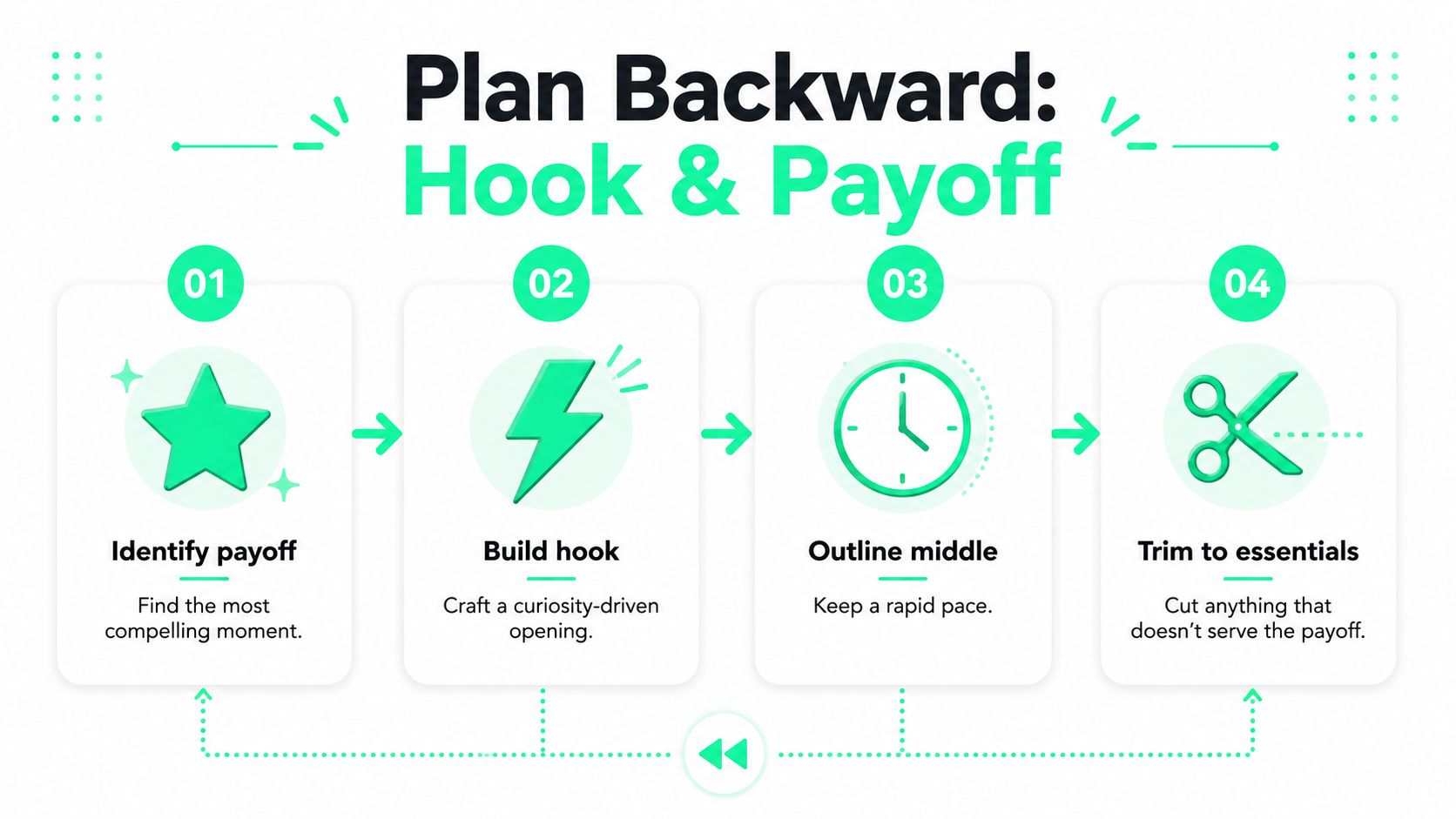
A reliable Short starts at the end. Before writing an introduction, identify the single moment viewers should remember, whether that's a result, a transformation, a mistake, a demonstration, or a concise answer. Everything before that moment must create enough curiosity to earn attention without burying the value.
A practical planning sequence looks like this:
1. **Name the payoff:** Write the result in one sentence. For example, “The final crop keeps the speaker's face centered while the original footage remains usable.”
2. **Build the hook:** Turn the payoff into a question, warning, contrast, or promise. “Your clip isn't unusable for Shorts. The crop is the problem.”
3. **Outline the middle:** Add only the explanation, demonstration, or proof needed to make the payoff credible.
4. **Trim to essentials:** Remove greetings, repeated context, pauses, throat-clearing, and any sentence that doesn't move toward the result.
### Three hook structures that survive the swipe
**Conflict hooks** work when the audience has a common problem: “Your captions are covering the button viewers need to tap.” The conflict creates immediate tension and gives the video a practical direction.
**Result-first hooks** show the outcome before explaining the process: “This is the edit after removing every dead pause.” The viewer sees the promised destination and stays to learn how it was reached.
**Direct-question hooks** qualify the right audience quickly: “How can a podcast clip become a readable vertical Short?” The question feels relevant to someone already facing that task, without wasting time on broad context.
The script should generally follow a simple arc: hook, proof or setup, useful development, payoff, and a closing frame that can connect naturally to the opening. For a 30-to-60-second concept, the middle should feel compressed rather than padded. [Actionable Shorts optimization tips from ViewsMax](https://blog.viewsmax.com/how-to-get-more-views-on-youtube-shorts/) can help creators refine the opening and packaging decisions around that structure.
### Write the first line before recording
The first spoken line and the first visual should reinforce each other. If the voice says “This crop fixes a video,” the frame should show the original and reframed versions, not a talking head waiting for the explanation. A title card can support the hook, but it shouldn't become a separate introduction.
Creators who need repeatable opening patterns can build a small script bank using [scripts and hooks for short-form content](https://blitzreels.com/guide/scripts-and-hooks). The bank should contain adaptable structures rather than rigid phrases, because a hook that fits a tutorial may feel artificial in a reaction, product demonstration, or story.
## Recording and Editing for Maximum Retention
The first three seconds decide whether a Short earns attention. Start with the result, the problem, or the strongest visual before the viewer has time to scroll. Recording for that moment begins with the frame, not the microphone. Use a **9:16 vertical frame at 1080 × 1920 pixels**, then position the subject where captions and interface elements will not cover the face or key object. Keep the opening visual specific enough to confirm the promise immediately.

A phone on a stable tripod is enough for many creator-led Shorts. Record one clean opening take, then capture alternate versions of the hook with different energy, pacing, and emphasis. During editing, compare them by how quickly they communicate the payoff, not by which delivery sounds most polished. A slightly imperfect take with a clear first sentence usually beats a smooth introduction that delays the point.
### Cut for movement, not just silence
Removing pauses is only the first pass. Strong editing changes the visual information as the idea develops. Move from a face to a screen recording, close-up, product detail, result card, or relevant B-roll when that change clarifies the spoken point. The goal is controlled visual progression, not frantic cutting. If the viewer receives the same visual signal for too long, retention can fall even when the narration remains useful.
Review the cut with four questions:
- **Does the opening show the promise immediately?**
- **Does each cut add information, emphasis, or contrast?**
- **Does the caption appear with the spoken idea rather than after it?**
- **Does the ending resolve the opening or create a natural loop?**
The final frame deserves deliberate editing. If the Short opens with a phone screen sliding into frame, return to that motion or visual position at the end. A loop does not guarantee replays, but a disconnected ending can make the viewing experience feel abruptly complete.
### Use automation for repetition, not judgment
AI-assisted editing can handle transcription, clip selection, caption generation, auto-reframing, B-roll placement, and resizing. BlitzReels can import an uploaded video or YouTube URL, identify possible clip-worthy moments, create bold captions, keep faces centered, resize widescreen footage for vertical output, and export Shorts-ready files. Review every result manually. Reject weak hooks, correct inaccurate captions, and decide whether the selected moment has a clear payoff.
Use [these quick professional techniques for polished short-form videos](https://blitzreels.com/blog/10-quick-pro-techniques-for-polished-short-form-videos) when usable footage still feels flat after the first edit. Automation saves time only when review stays strict. A fast bad cut remains a bad cut.
## Formatting Captions and Visuals That Hold Attention
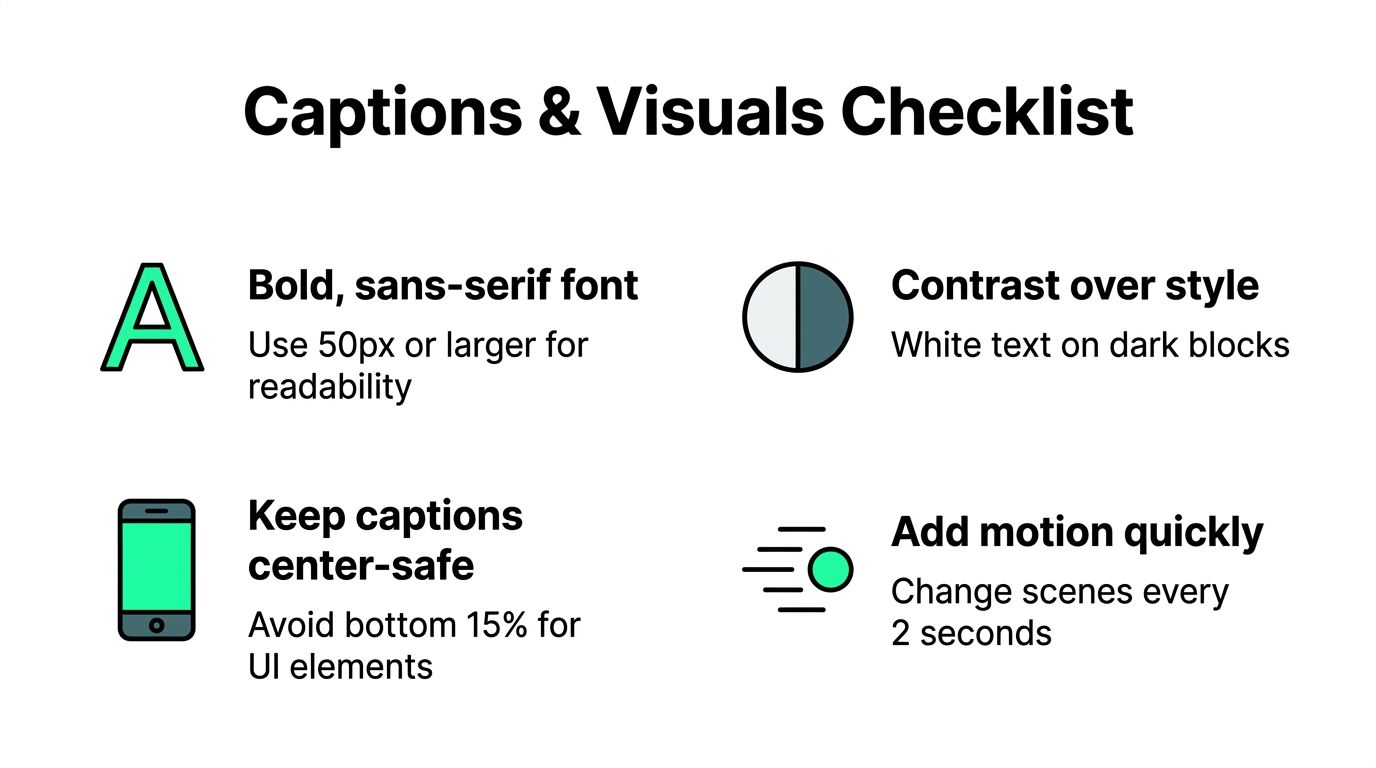
Captions serve three jobs: they keep speech understandable without sound, reinforce the words carrying the idea, and create visual rhythm. Treat them as part of the retention edit, not a finishing layer. Tiny text, weak contrast, or captions that arrive after the spoken phrase all add friction during the first three seconds, when viewers decide whether to continue.
Build on a **9:16 vertical canvas at 1080 × 1920 pixels**. The correct frame size will not rescue weak content, but the wrong export can cause cropping, blurred text, or empty space that makes the Short feel unfinished.
### Make every word easy to scan
A bold sans-serif font generally holds up better on small screens than a delicate display face. White text on a dark block, or another high-contrast treatment, stays readable over changing footage. Keep captions inside the center-safe area, away from the lower interface and controls that can cover the final words.
Caption hierarchy should be obvious:
- **Primary words:** Emphasize the term carrying the point, such as “crop,” “hook,” or “payoff.”
- **Supporting words:** Keep the remaining text quieter so the frame does not become a paragraph.
- **Emoji callouts:** Use them sparingly for emotion, direction, or a visible result.
- **Timing:** Bring each phrase on as the speaker delivers it, then remove it when the thought ends.
During the first three seconds, show the caption that states the problem, result, or tension immediately. Do not make viewers wait through an animated title before revealing why the clip matters. After that opening beat, vary scale, highlighted words, zooms, or title cards only when they mark a meaningful change. A preset keeps a series consistent, while deliberate variation prevents monotony. The [data-driven guide to styling video captions](https://blitzreels.com/blog/a-data-driven-guide-to-styling-video-captions) provides a useful reference for choosing readable treatments.
### Add visual changes that clarify the idea
Zooms should direct attention to a face, object, or detail. Random zooms create movement without improving comprehension. Title cards should establish the topic quickly, then leave the footage to carry the explanation.
Relevant B-roll can hide a cut, demonstrate a claim, or show the result while the voice continues. Generic stock footage often weakens clarity because it adds motion without meaning. Before inserting another visual, ask whether it helps viewers understand the sentence faster. If it does not, keep the current shot and protect the pacing.
## Publishing and Optimizing for the YouTube Algorithm
Publishing starts with a promise the video can keep. Write a title around the actual result and the problem it solves, especially on surfaces where the title appears before playback. A title such as “Fix Vertical Video for YouTube Shorts” sets a clear expectation. Exaggeration creates a mismatch, and viewers expose it through the retention curve.
Hashtags help classify a Short, but they cannot rescue an unclear topic or slow opening. Choose terms that match the subject, audience, and format. Then spend the editing time on the first three seconds and the payoff, where retention is usually won or lost. Viewers may find a Short in the Shorts feed, search, channel pages, or recommendations, so the title and spoken context should make sense without depending on tags.
A custom thumbnail can help in browse contexts. It does not repair a weak first frame or a delayed hook. Packaging earns the initial opportunity. The opening edit has to keep it.
### Read the curve before changing the strategy
YouTube does not offer one retention threshold for every Short. Compare videos with similar lengths, topics, and formats through **engaged views, average view duration, average percentage viewed, and the retention curve**. This keeps a long explanation from being judged against a quick visual gag using the same standard.
Read the analytics in a fixed order:
1. **Inspect the first-three-second drop-off.** A sharp decline usually points to a weak hook, an unclear first frame, or context that arrives too late.
2. **Find the first flat or falling section.** Check for an overlong explanation, a repeated point, or a shot that stopped adding information.
3. **Look for spikes.** Replays or skips can identify a moment to move earlier or develop into another Short.
4. **Compare like with like.** Match topics and runtimes instead of applying long-form benchmarks.
Retention benchmarks vary by format, and long-form standards do not transfer directly to Shorts. Use your own comparable uploads as the primary reference, then inspect outside analysis for context. A creator analytics source reports an average percentage viewed around **73.6% for Shorts** in [this Shorts retention analysis](https://www.gofaceless.ai/en/blog/youtube-shorts-retention-rate-benchmarks), but that figure should not dictate every edit. For packaging and discoverability principles, the [Surnex video SEO guide](https://surnex.io/blog/video-marketing-seo) offers broader context. Change the next cut in response to the curve, not a single view count.
## Building a Repeatable Shorts Production System
A sustainable Shorts system separates creative decisions from repetitive production. Batch the thinking first: collect several audience problems, write the payoff for each, and draft the opening line before recording. This reduces the temptation to publish whatever footage happens to exist.
Long videos, webinars, interviews, podcasts, and screen recordings can supply multiple candidate clips. Each clip still needs an independent hook, a clean beginning, and a payoff that makes sense without the original episode. Repurposing is not just cutting a long video into equal pieces. It's rebuilding each piece for a viewer who may have no context.
Templates and presets make quality easier to repeat. Keep a small set of caption styles, title-card treatments, reframing rules, and export settings, then adjust them when the topic demands a different visual language. Resources on [AI tools for video publishing](https://promptbuilder.cc/blog/ai-content-generator-for-youtube) can help teams evaluate where automation belongs in ideation, editing, and scheduling.
The useful production target is a short record, edit, publish loop that can approach **about ten minutes per Short** when the footage, templates, and workflow are already prepared. That figure comes from BlitzReels' publisher information, not a universal promise, so creators should measure their own process. [AI-powered batch editing for Reels](https://blitzreels.com/blog/the-creator-s-guide-to-ai-powered-batch-editing-for-reels) also shows how batching can reduce repeated setup work across a series.
Speed should never replace the hook. If automation produces several clips with indistinct openings, fewer stronger Shorts will usually create better learning than a larger queue of forgettable uploads. The system works when every draft passes the same test: clear first frame, immediate promise, purposeful middle, readable captions, and a payoff that earns the final second.
---
BlitzReels helps creators turn uploaded videos, screen recordings, and long-form footage into vertical Shorts with AI-assisted clipping, auto-reframing, captions, title cards, B-roll, resizing, and reusable templates. Visit [BlitzReels](https://blitzreels.com) to speed up the record, edit, and publish workflow while keeping final control over the hook and retention-focused cut.