---
title: "How to Create Podcast Shorts That Get Views"
canonical: "https://blitzreels.com/blog/how-to-create-podcast-shorts"
---
# How to Create Podcast Shorts That Get Views
URL: https://blitzreels.com/blog/how-to-create-podcast-shorts
Markdown URL: https://blitzreels.com/blog/how-to-create-podcast-shorts.md
Published: 2026-07-10
Author: BlitzReels
Learn how to create podcast shorts from your long-form episodes. Our step-by-step guide covers clipping, captioning, editing, and publishing for maximum reach.
Tags: how to create podcast shorts, podcast repurposing, video podcast clips, short-form video, podcast marketing

A lot of podcasters are sitting on a backlog of strong episodes that barely travel beyond existing listeners. The interview was sharp. The story landed. The guest gave three quotable lines that should've spread. Then the episode goes live, gets a loyal but limited response, and starts collecting digital dust in the archive.
That gap usually isn't a content problem. It's a packaging problem. Learning **how to create podcast shorts** turns one long recording into multiple discovery assets built for the feeds where new listeners spend time. Done well, a single episode doesn't produce one publishable asset. It produces a week of clips, titles, captions, reframed cuts, and platform-native posts.
## Table of Contents
- [Why Podcast Shorts Are Your Biggest Growth Lever](#why-podcast-shorts-are-your-biggest-growth-lever)
- [Long episodes don't fail because they're long](#long-episodes-dont-fail-because-theyre-long)
- [The real shift is workflow](#the-real-shift-is-workflow)
- [How to Identify and Select Viral-Worthy Clips](#how-to-identify-and-select-viral-worthy-clips)
- [Look for clip types, not random good moments](#look-for-clip-types-not-random-good-moments)
- [Use the transcript like a search engine](#use-the-transcript-like-a-search-engine)
- [Five clips from one long episode](#five-clips-from-one-long-episode)
- [Editing Your Podcast Short in Under 10 Minutes](#editing-your-podcast-short-in-under-10-minutes)
- [Build around hook, engage, reward](#build-around-hook-engage-reward)
- [Keep the edit fast and mechanical](#keep-the-edit-fast-and-mechanical)
- [Beyond Captions Adding Visual Polish That Stops the Scroll](#beyond-captions-adding-visual-polish-that-stops-the-scroll)
- [A plain clip versus a polished one](#a-plain-clip-versus-a-polished-one)
- [Use B-roll and side angles to reset attention](#use-b-roll-and-side-angles-to-reset-attention)
- [Finalizing and Formatting for TikTok Reels and Shorts](#finalizing-and-formatting-for-tiktok-reels-and-shorts)
- [The export checklist](#the-export-checklist)
- [Write the post around the clip](#write-the-post-around-the-clip)
- [The Smart Way to Publish and Distribute Your Shorts](#the-smart-way-to-publish-and-distribute-your-shorts)
- [Treat distribution as part of editing](#treat-distribution-as-part-of-editing)
- [Make each upload native](#make-each-upload-native)
## Why Podcast Shorts Are Your Biggest Growth Lever
A podcast can be excellent and still stay invisible. That's common when all the effort goes into the full episode and almost none goes into discovery assets. The archive grows, the production quality improves, but new listeners never get a low-friction entry point.
That's why shorts matter so much. **Short-form clips are the single most effective driver of audience growth, with clipped highlights driving up to 60% of new listener acquisition on platforms like TikTok and YouTube Shorts**, according to [podcast audience growth statistics](https://marketingltb.com/blog/statistics/podcast-statistics/). That changes the role of repurposing. It's not a side task after publishing. It's the main distribution layer.
### Long episodes don't fail because they're long
Most podcasts don't need more recording time. They need better extraction.
A strong episode usually contains multiple high-conviction moments:
- **A sharp opinion** that creates instant curiosity
- **A practical tip** that solves one specific problem
- **A personal story** that makes the speaker feel credible
- **A surprising line** that earns a replay
Those moments rarely spread on their own inside a full-length upload. They need clipping, captions, reframing, and titles built for vertical feeds.
> **Practical rule:** If a podcast only publishes full episodes, it forces new listeners to make a big commitment before they've seen any proof the show is worth their time.
Shorts solve that. A viewer can sample one insight, one laugh, one tension point, or one memorable exchange without opening a podcast app first. That's why creators who want reach are prioritizing clips before they obsess over another camera upgrade or another intro music refresh.
For a broader look at how short video works across platforms, this breakdown of [short-form video strategy](https://www.blitzreels.com/blog/short-form-video) is useful because it frames clips as a repeatable workflow rather than a one-off promo asset.
### The real shift is workflow
The old workflow was record, edit, publish, done. The current workflow is record, identify moments, cut multiple shorts, caption them, resize them, title them, and publish them in sequence.
That sounds like more work, but it usually creates more return from the same recording session. A single hour-long episode can become five shorts if the clipping process is disciplined. The key is to stop asking, “What part of this episode was good?” and start asking, “Which moments were built for a feed?”
## How to Identify and Select Viral-Worthy Clips
Most bad podcast shorts fail before editing starts. The captions may look fine. The crop may be clean. But the source moment was weak, too slow, or too context-heavy to stand on its own.
The easiest way to fix that is to stop hunting for “interesting” moments and start sorting clips into categories.
### Look for clip types, not random good moments
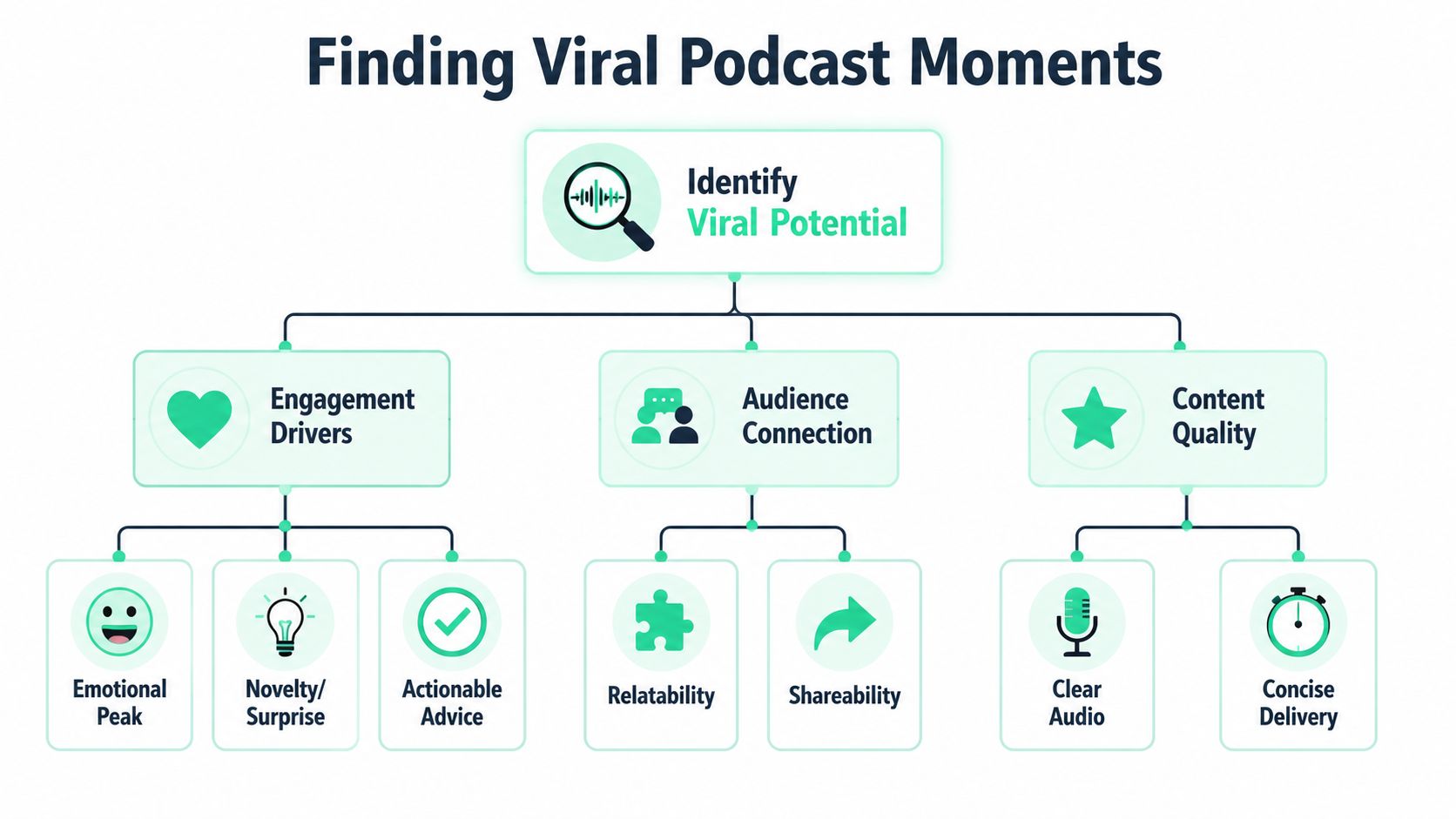
The strongest clip banks usually include a mix of these formats:
- **The hot take:** A firm opinion stated early. These work when the speaker says something clear enough to spark agreement or pushback without needing a long setup.
- **The actionable tip:** One tactic, one fix, one lesson. If a viewer can apply it immediately, the clip has a reason to be saved.
- **The compelling story:** A mistake, turning point, lesson, or tense moment with a beginning and payoff.
- **The controversial question:** A prompt that makes the viewer pick a side, rethink a belief, or keep watching for the answer.
This is also why the original episode matters. The [current state of podcasting](https://rss.com/blog/the-current-state-of-podcasting/) notes that the **sweet spot for original episodes that provide dense, extractable content is between 20 to 40 minutes**, and that **30% of listeners find podcasts through internet search**. That makes concise, searchable clip topics more valuable than vague highlight reels.
### Use the transcript like a search engine
A transcript turns clip selection from guesswork into filtering. Instead of rewatching the entire episode manually, scan for markers that usually signal a usable short:
| Signal in transcript | What it often means |
| --- | --- |
| “The mistake people make is...” | Tip or contrarian clip |
| “What surprised me was...” | Curiosity hook |
| “Most people think...” | Hot take setup |
| “Then everything changed when...” | Story pivot |
| “The real reason is...” | Reveal or payoff |
A tool built for [podcast clip generation](https://www.blitzreels.com/blog/podcast-clips-generator) can speed this up because it reduces the time spent searching through dead space, filler transitions, and context that won't survive in a short.
> Good clips usually announce themselves in the transcript before they impress in the timeline.
### Five clips from one long episode
Turning an hour-long episode into five shorts works better when each clip serves a different role.
A practical mix looks like this:
1. **Clip one** opens with the strongest broad hook.
2. **Clip two** delivers a tactical lesson.
3. **Clip three** captures a personal or guest story.
4. **Clip four** isolates a sharp opinion or debate point.
5. **Clip five** uses a curiosity gap that points back to the full episode.
That mix avoids a common mistake. Many podcasters cut five clips that all sound the same. Same pacing, same camera, same tone, same kind of insight. Feeds reward variation. A clip bank should feel like a set, not duplicates.
## Editing Your Podcast Short in Under 10 Minutes
Once the right moment is selected, editing should be fast, not precious. The goal isn't to build a miniature documentary. The goal is to remove friction between the raw conversation and a clean short that holds attention in a vertical feed.
An AI-assisted workflow helps most in this situation.
A practical stack might include Adobe Premiere for manual timeline control, Descript for transcript-led editing, CapCut for quick social-native styling, and one [efficient short-form content tool](https://theaicmo.com/tools/shorts-generator) directory if the team is comparing clipping workflows before committing to a setup. Where the process needs speed, BlitzReels can handle transcription, cut detection, caption generation, and vertical resizing from a single upload.
### Build around hook, engage, reward
The clip needs structure before it needs polish. A successful short must follow the **hook, engage, reward** framework, and [this editing guidance for shorts](https://www.youtube.com/watch?v=4QH2k64sYUM) also notes that captions generated by AI still need manual verification for frame fit and accuracy.
That structure is simple:
- **Hook:** The first line earns attention immediately. This can be a contrarian statement, an unfinished idea, a surprising claim, or a direct problem.
- **Engage:** The middle develops tension or usefulness, providing the viewer with context without drift.
- **Reward:** The ending resolves the promise. It answers the question, lands the joke, or delivers the takeaway.
If the hook takes too long, the short usually dies. If the reward never arrives, the short gets watched but not trusted. Both matter.
> A short doesn't need full context. It needs enough context to make the payoff feel earned.
After the first trim, check whether the opening line can stand alone on mute with captions on. If not, rewrite the opening through editing. Sometimes that means starting later in the sentence. Sometimes it means adding a title card that frames the point before the speaker does.
### Keep the edit fast and mechanical
The fastest editors don't make more decisions. They make fewer.
A repeatable under-10-minute process looks like this:
1. **Upload the source file** and let the tool transcribe it.
2. **Accept or reject AI clip suggestions** instead of scrubbing the whole timeline from scratch.
3. **Trim the in-point hard** so the first useful phrase appears instantly.
4. **Cut filler words and reset breaths** only when they slow the line.
5. **Resize to vertical 9:16** and make sure the speaker stays centered.
6. **Apply caption presets** with readable contrast and consistent placement.
7. **Add a title card** if the opening line needs support.
8. **Preview on mobile framing** before export.
The resizing step matters more than many podcasters expect. A widescreen talking-head clip often looks dead when cropped vertically. Auto reframing helps, but it still needs a human check, especially when two speakers share the frame or when gestures happen near the edge.
For teams building a faster mobile-first workflow, this guide to an [AI video editor for TikTok](https://www.blitzreels.com/blog/ai-video-editor-for-tiktok) is relevant because the same speed constraints apply to podcast shorts.
A quick visual walkthrough helps when the process feels abstract:
The important trade-off is this. Fast editing works when the source clip was selected well. It doesn't rescue a weak moment. That's why clipping discipline saves more time than any editing shortcut.
## Beyond Captions Adding Visual Polish That Stops the Scroll
A technically correct short isn't always a watchable short. Many podcast clips have clean subtitles and still feel static because nothing changes on screen. The speaker talks. The crop stays fixed. The pace drifts. The viewer leaves.
The difference between a clip that gets ignored and one that holds attention is often visual rhythm.
### A plain clip versus a polished one
Take the same podcast moment and package it two ways.
Version one is the common beginner edit. A vertical crop of the main speaker, auto-captions, no title card, no visual change, no pacing support. It isn't broken. It just doesn't create reasons to keep watching.
Version two adds:
- **A title card** that frames the point before the first spoken line
- **Caption styling** with emphasis on the key phrase
- **Punch-in zooms or reframes** on emphasis points
- **A clean template** that keeps branding consistent
- **A subtle progress cue** so the viewer feels momentum
That second version feels intentional. It gives the audience visual confirmation that the clip is going somewhere.
> **Editing cue:** If nothing changes visually for too long, attention usually drops before the point lands.
### Use B-roll and side angles to reset attention
One of the most useful upgrades for podcast shorts is the side-angle or B-roll hybrid approach. According to [this short-form visual strategy example](https://www.instagram.com/reel/DQ12CiYjeLs/), it's an underserved tactic that can **drive 20-30k views per clip**, and inserting relevant B-roll between voice lines can hold attention better than a static vertical crop.
That matters because many podcast setups aren't visually rich by default. They're conversation-first. A static crop can work for a powerful quote, but it often underperforms on story-based clips or tactical explanations.
Good inserts include:
- **A second camera angle** from the original recording
- **Screen captures** of something being discussed
- **Relevant photos or product visuals** that clarify the line
- **Simple graphic callouts** that reinforce one phrase
- **Reaction shots** when the guest or host makes the moment land
Templates help. A repeatable visual system cuts editing time because the title card, lower-third spacing, font treatment, and logo placement are already decided. That leaves attention for the actual clip.
For more examples of this kind of polish, these [quick pro techniques for polished short-form videos](https://www.blitzreels.com/blog/10-quick-pro-techniques-for-polished-short-form-videos) show the kinds of small production choices that make a short feel less disposable.
The trade-off is real. More visual polish can improve retention, but too many layers can make the clip feel over-edited. If the spoken moment is strong, the visuals should support it, not compete with it.
## Finalizing and Formatting for TikTok Reels and Shorts
The edit can be strong and still lose performance at export. Cropping mistakes, weak caption placement, and bloated descriptions can undermine a clip that was otherwise ready to post.
A final check should be short and strict.
### The export checklist
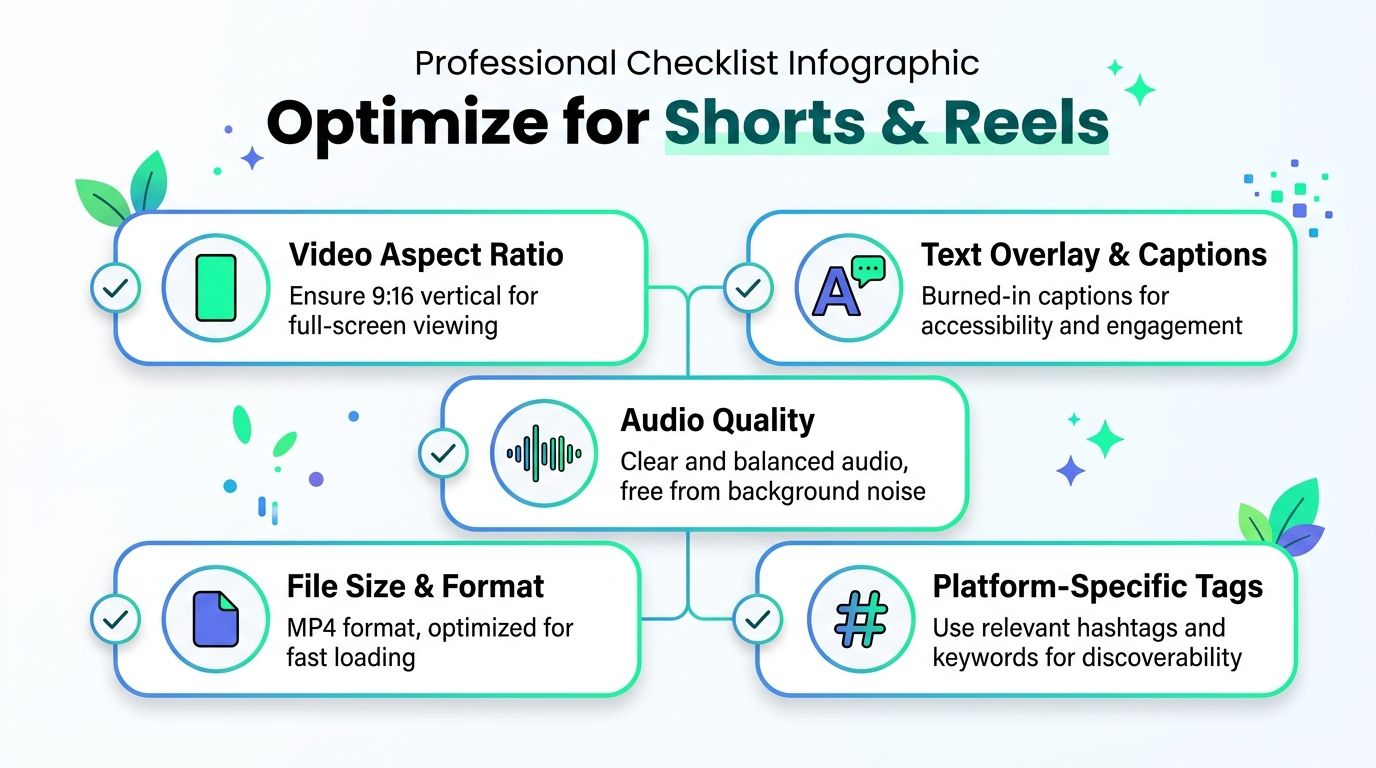
For TikTok, Instagram Reels, and YouTube Shorts, the file should be prepared for mobile-first viewing. [This short-form video formatting guide](https://www.shopmoment.com/articles/how-to-shoot-and-edit-short-form-video-for-instagram-reels-tiktok) notes that **captions must be added permanently and manually reviewed for inaccuracies**, and that **15–30 seconds is the sweet spot for high-retention content** across these platforms.
Use this checklist before upload:
- **Aspect ratio:** Export in vertical 9:16 so the clip fills the screen naturally.
- **Caption placement:** Keep burned-in captions clear of UI areas near the bottom.
- **Length discipline:** If the clip drifts, cut harder. Most shorts improve when the opening and ending get tighter.
- **Audio cleanup:** Make sure speech is clear and balanced.
- **End behavior:** Decide whether the clip should loop cleanly or end with a CTA.
If the recording setup still needs work, a practical [guide to budget video equipment](https://digidevice.shop/blogs/updates/best-budget-vlogging-kits-for-tik-tok-and-reels) can help tighten lighting, framing, and audio before the editing stage even starts.
### Write the post around the clip
A strong short needs matching packaging outside the frame.
A simple description formula works well:
- **Line one:** Restate the hook in plain language
- **Line two:** Add one sentence of context
- **Line three:** Invite the viewer to watch or hear the full episode
Titles should be compact and searchable. If the clip is about pricing mistakes, say that. If it's about hiring too early, say that. Generic copy wastes discoverability.
A tool for [converting video aspect ratios](https://www.blitzreels.com/blog/video-aspect-ratio-converter) is useful when the same source needs clean exports for multiple placements, but the bigger point is consistency. The clip, title, on-screen text, and caption should all express the same core idea.
## The Smart Way to Publish and Distribute Your Shorts
Publishing is where most repurposing systems get sloppy. The clip is exported, then cross-posted everywhere at once with the same caption, same hashtags, and same title. That saves a few minutes, but it often wastes the clip.
The better approach is staggered and platform-aware.
### Treat distribution as part of editing
To maximize reach, [this short-form distribution strategy](https://www.digitalapplied.com/blog/short-form-video-strategy-shorts-tiktok-reels-2026) recommends staggering uploads across platforms by **2–4 hours**, starting with **TikTok**, then **YouTube Shorts**, then **Instagram Reels**.
That order makes practical sense:
- **TikTok first** when the goal is broad discovery
- **YouTube Shorts second** when the topic has search intent
- **Instagram Reels last** when the account already has an audience relationship to use
A lot of teams handle this with one of the [best social media scheduling tools](https://xholic.ai/blog/best-social-media-scheduling-tools/) so the posting rhythm stays consistent even when editing batches happen on a different day.
### Make each upload native
The clip can stay the same. The packaging shouldn't.
TikTok usually rewards a more direct hook. YouTube Shorts benefits from a title that matches what someone might search. Instagram often performs better when the caption feels more conversational and tied to the creator's existing audience.
A clean system for how to create podcast shorts looks like this: record one strong episode, extract five different clip types, edit them quickly with captions and reframing, finalize the mobile formatting, then publish each one with native packaging and staggered timing. That system is what turns one podcast recording into ongoing audience discovery instead of a single upload that disappears.
---
BlitzReels fits this workflow for creators who want to upload a podcast recording, generate candidate clips, add captions, reframe to vertical, resize for platforms, and export shorts without spending hours on a traditional timeline. For teams trying to post more consistently, it offers a practical way to shorten the record-to-publish loop while keeping the clips usable for TikTok, Reels, YouTube Shorts, LinkedIn, and other social feeds.