---
title: "How to Edit an MP4 Video: A Fast Guide for Social Media"
canonical: "https://blitzreels.com/blog/how-to-edit-an-mp-4-video"
---
# How to Edit an MP4 Video: A Fast Guide for Social Media
URL: https://blitzreels.com/blog/how-to-edit-an-mp-4-video
Markdown URL: https://blitzreels.com/blog/how-to-edit-an-mp-4-video.md
Published: 2026-06-23
Author: BlitzReels
Learn how to edit an MP4 video for TikTok, Reels, and Shorts. Our guide covers fast clipping, captioning, and resizing to create engaging social content.
Tags: how to edit an mp4 video, video editing, short form video, mp4 editor, social media video

A raw MP4 usually lands in the same place. It sits in Downloads, on a phone camera roll, or inside a screen recording folder while the creator stares at it wondering how much work it will take to turn it into something worth posting.
That hesitation comes from an old idea of editing. Traditional editing treated video like a slow craft built around dense timelines, complex software, and long polishing cycles. Social video changed that. For TikTok, Instagram Reels, YouTube Shorts, and LinkedIn clips, the primary job isn't to make a perfect film. It's to make a clear, fast, platform-native clip that earns attention immediately.
## Table of Contents
- [From Raw File to Viral Clip The Modern MP4 Editing Mindset](#from-raw-file-to-viral-clip-the-modern-mp4-editing-mindset)
- [Attention is the real timeline](#attention-is-the-real-timeline)
- [Social editing is a packaging job](#social-editing-is-a-packaging-job)
- [The Core Editing Workflow From Import to Sequence](#the-core-editing-workflow-from-import-to-sequence)
- [Start with order, not effects](#start-with-order-not-effects)
- [Trim harder than feels comfortable](#trim-harder-than-feels-comfortable)
- [Optimizing Your MP4 for Vertical Social Feeds](#optimizing-your-mp4-for-vertical-social-feeds)
- [Vertical framing changes the edit](#vertical-framing-changes-the-edit)
- [Hooks and title cards do the heavy lifting](#hooks-and-title-cards-do-the-heavy-lifting)
- [Boosting Retention with Dynamic Captions and Visuals](#boosting-retention-with-dynamic-captions-and-visuals)
- [Captions are now part of the edit](#captions-are-now-part-of-the-edit)
- [Static talking heads need visual resets](#static-talking-heads-need-visual-resets)
- [Finding the Right MP4 Editor for Your Workflow](#finding-the-right-mp4-editor-for-your-workflow)
- [Traditional editors versus social-first tools](#traditional-editors-versus-social-first-tools)
- [A practical tool choice guide](#a-practical-tool-choice-guide)
- [Embracing the 10-Minute Edit Philosophy](#embracing-the-10-minute-edit-philosophy)
## From Raw File to Viral Clip The Modern MP4 Editing Mindset
Learning **how to edit an MP4 video** used to mean learning software first. That's backwards for short-form. The stronger mindset is audience-first: decide what earns the next second of attention, then shape the MP4 around that.
MP4 became the default canvas for this because the format became standard across devices, editors, and platforms. The MP4 container format was first published in **2001** and later updated in **2003** and **2004**, helping establish a unified container that fit mainstream creation and delivery workflows. By **2016**, Cisco's Visual Networking Index projected that video would represent **82% of all consumer internet traffic**, and much of that was delivered in MP4 or MP4-derived formats [as summarized in the verified data above].
Short-form publishing then changed what “editing” means in practice. Industry surveys cited by HubSpot have repeatedly shown that **more than half of marketing teams publish short-form videos weekly or more often**, which means editing has to support a fast posting cadence, not a slow masterpiece workflow ([HubSpot](https://www.hubspot.com)).
### Attention is the real timeline
A social edit is built on a different question than a documentary or brand film. Not “what looks cinematic?” but “what makes someone keep watching?”
That shift changes priorities:
- **Speed over complexity:** fast clipping beats elaborate timeline work for most daily posting.
- **Clarity over ornament:** viewers need the point quickly.
- **Reframing over polishing:** a clean vertical crop usually matters more than subtle transitions.
- **Repeatability over perfection:** templates and reusable title cards matter because creators publish often.
> Most creators don't need more editing features. They need fewer decisions between upload and publish.
### Social editing is a packaging job
The raw MP4 is only the source material. The publishable asset is the packaged version: clipped to the strongest moment, resized for the feed, captioned for silent viewing, and opened with a visible hook.
That's why the modern workflow leans on clipping, reframing, resizing, title cards, and caption templates. Those aren't shortcuts. They're the practical mechanics of making a phone-shot or screen-recorded MP4 feel native inside a crowded feed.
## The Core Editing Workflow From Import to Sequence
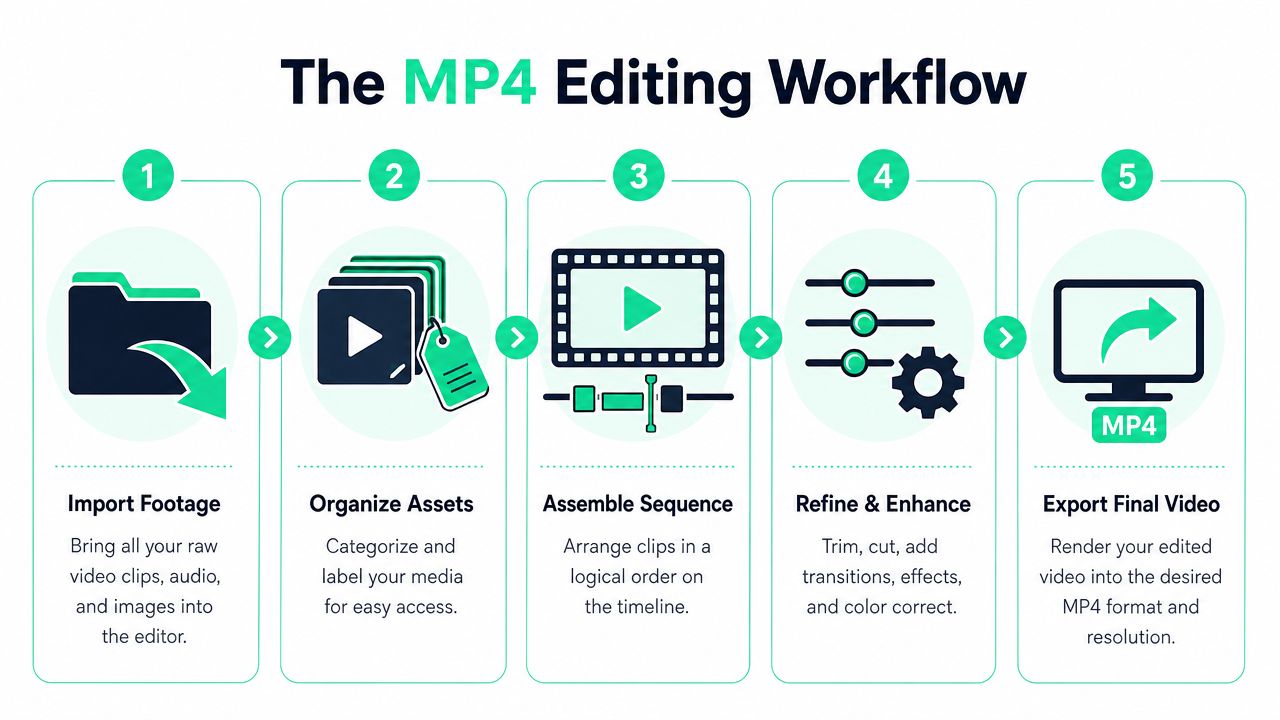
Editing gets easier when the workflow stays simple. The biggest quality gains usually happen before transitions, effects, or color tweaks. A practical MP4 workflow emphasizes **importing footage, reviewing clips, trimming mistakes, and assembling the sequence**, with the biggest gains coming from **aggressive trimming** and keeping the story in a clear order rather than piling on effects ([Entheos beginner guide to editing MP4 videos for social media marketing](https://www.entheosweb.com/beginners-guide-to-editing-mp4-videos-for-social-media-marketing/)).
### Start with order, not effects
Before touching the timeline, put every source file in one project folder. That includes footage, alternate takes, music, screenshots, logos, and any B-roll. The point isn't neatness for its own sake. The point is speed once the cuts begin.
For creators who often revisit older assets, it also helps to study how teams [rewire and rerun video projects](https://martini.art/en/how-to/edit-existing-video) without rebuilding everything from scratch. Existing MP4s often become better source material for new clips than the original posting ever did.
A simple review pass usually works best:
1. **Watch everything once:** mark usable moments before editing anything.
2. **Ignore polish:** only ask whether each clip is relevant.
3. **Label fast:** “strong hook,” “usable answer,” “good reaction shot,” and “dead space” are enough.
For phone-first creators, a lighter setup often wins. A practical reference is this guide on [editing videos on a phone](https://www.blitzreels.com/blog/how-to-edit-videos-on-phone), especially when the goal is clipping and publishing quickly instead of building complex sequences.
### Trim harder than feels comfortable
Most weak MP4 edits have the same problem. They leave in setup, hesitation, repeated phrasing, and the breath before the point.
Short-form editing rewards decisive cuts. Remove pauses. Remove false starts. Remove any sentence that repeats what the previous sentence already said. Then watch the cut once with sound off. If the point still lands visually, the trim is strong.
> **Practical rule:** If a line doesn't add meaning, movement, or context, cut it.
A clean first assembly often follows this logic:
- **Open on the strongest moment:** not the greeting, not the context.
- **Stack support after the claim:** proof, example, reaction, or demonstration.
- **End as soon as the value is delivered:** don't linger after the point is made.
Creators who want a straightforward answer to **how to edit an MP4 video** often overestimate what comes later in the process. Sequencing is what gives a clip momentum. Effects only decorate momentum that already exists.
A rough sequence should feel plain but tight. If it already flows, the rest of the edit gets easier.
## Optimizing Your MP4 for Vertical Social Feeds
A horizontal MP4 can be technically correct and still fail in a vertical feed. Social platforms reward edits that feel native to the screen people are holding, not the monitor the video was edited on.
### Vertical framing changes the edit
Reframing is not a finishing touch. It changes what the viewer sees, what gets cut, and what deserves text support. A talking-head clip with two people, slides, or product shots often needs a different crop for each beat.
That's why resizing and reframing matter more than many creators expect. The edit has to protect faces, hand gestures, and text while keeping enough negative space for captions and title cards. A useful starting point for that conversion process is this breakdown of a [video aspect ratio converter](https://www.blitzreels.com/blog/video-aspect-ratio-converter).
Common vertical mistakes show up fast:
- **Centering the wrong subject:** the speaker's face drifts while empty background stays in frame.
- **Forgetting UI safe zones:** captions or key visuals sit where platform buttons cover them.
- **Using a single crop for every shot:** what works for one clip won't always work for the next.
### Hooks and title cards do the heavy lifting
For social clips, the opening seconds decide whether the rest of the edit matters. Industry guidance cited in the verified data notes that **short-form videos often perform best when they are under 15 seconds** on platforms like TikTok, Reels, and YouTube Shorts, which is why creators frequently trim imported MP4 footage to fit that attention window ([video reference on short-form pacing](https://www.youtube.com/watch?v=W1Yj8SnOgvM)).
That changes how hooks should be edited. The opener should do one of three things immediately:
| Opening type | What it does | When it works |
|---|---|---|
| **Bold claim** | Creates tension fast | Advice, commentary, business clips |
| **Title card** | Frames the promise | Tutorials, explainers, list content |
| **Instant action** | Shows payoff early | Demos, transformations, reactions |
A strong title card doesn't need to be complicated. It needs to answer, “Why stop here?” in a glance.
Later in the edit, this kind of pacing becomes easier to see in motion:
The practical trade-off is simple. Traditional polish might make a clip look nicer. Strong hooks, reframing, and resizing make it more watchable in the environment where it lives.
## Boosting Retention with Dynamic Captions and Visuals
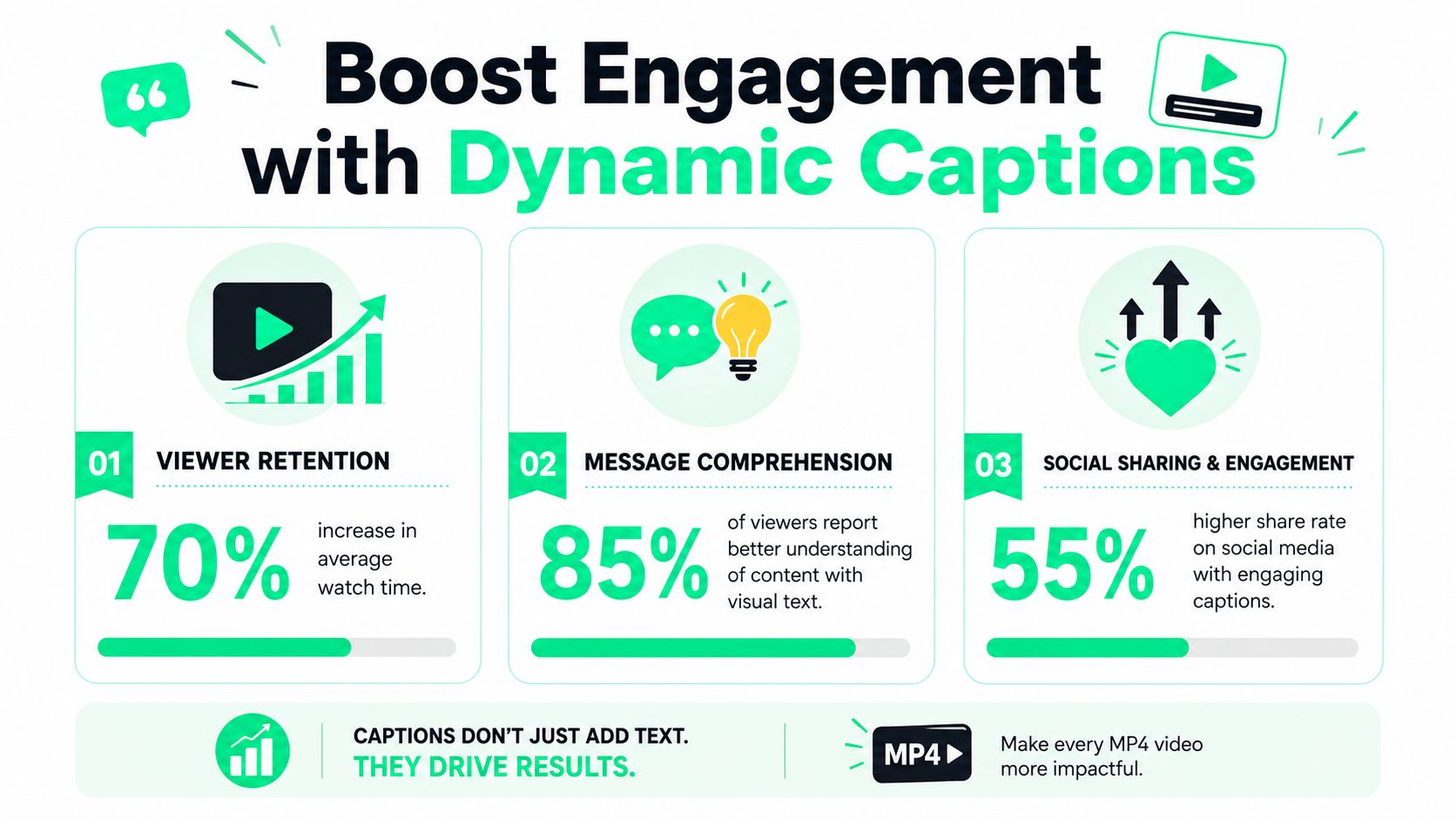
A surprising number of MP4 edits still treat captions like an accessibility checkbox added at the end. On short-form platforms, captions are part of the core storytelling layer.
Research cited by Adobe notes that videos with accurate, synchronized captions had **roughly 12% higher median viewing completion** than uncaptioned originals in a **2022** study, which is why captions have become a baseline expectation for feeds where many users watch without sound ([Adobe Express on MP4 editing and captions](https://www.adobe.com/express/feature/video/editor/mp4)).
### Captions are now part of the edit
Good captions don't just transcribe words. They control emphasis, rhythm, and readability.
The strongest caption styles usually do four things well:
- **Break lines naturally:** one thought per beat is easier to track.
- **Highlight key words:** color or weight helps the viewer follow the argument.
- **Sync tightly to speech:** laggy captions make the edit feel cheap.
- **Match the brand lightly:** templates help, but readability matters more than decoration.
For creators refining subtitle quality or working from spoken recordings, [Typist's MP4 transcription tips](https://iamtypist.dev/blog/mp-4-to-text-converter) offer useful practical guidance on turning speech into editable text before the styling pass.
Anyone trying to improve retention through text pacing should also review how [captions drive engagement on TikTok and Instagram](https://www.blitzreels.com/blog/how-captions-drive-engagement-on-tiktok-and-instagram), especially when deciding between simple subtitles and more animated caption templates.
> Accurate captions help viewers follow. Dynamic captions help viewers stay.
### Static talking heads need visual resets
Even a well-delivered monologue starts to feel visually flat. That's why experienced short-form editors add controlled interruptions to the frame.
Useful visual resets include:
- **Zoom changes:** a punch-in can add emphasis to a key line.
- **B-roll inserts:** screenshots, product footage, charts, or reaction clips keep the eye moving.
- **Emoji callouts or text stickers:** best used sparingly to support, not distract.
- **Cutaway title cards:** helpful when shifting to a new point or example.
The mistake is overloading every second with motion. Dynamic visuals work when they reinforce the spoken point. If every line gets a flashy effect, nothing feels important.
## Finding the Right MP4 Editor for Your Workflow
The tool matters less than most software companies claim, but it still shapes how fast an MP4 moves from raw footage to published short. Choosing well means matching the editor to the posting style, not chasing the longest feature list.
A common pain point with large MP4 files is **performance lag**. Professional editors often solve that with **proxies**, which are low-quality copies used during editing. Cloud-based editors avoid much of that local slowdown because the heavy processing happens on a server rather than on the creator's machine ([multicam and proxy workflow reference](https://www.youtube.com/watch?v=tClgsxclbUQ)).
### Traditional editors versus social-first tools
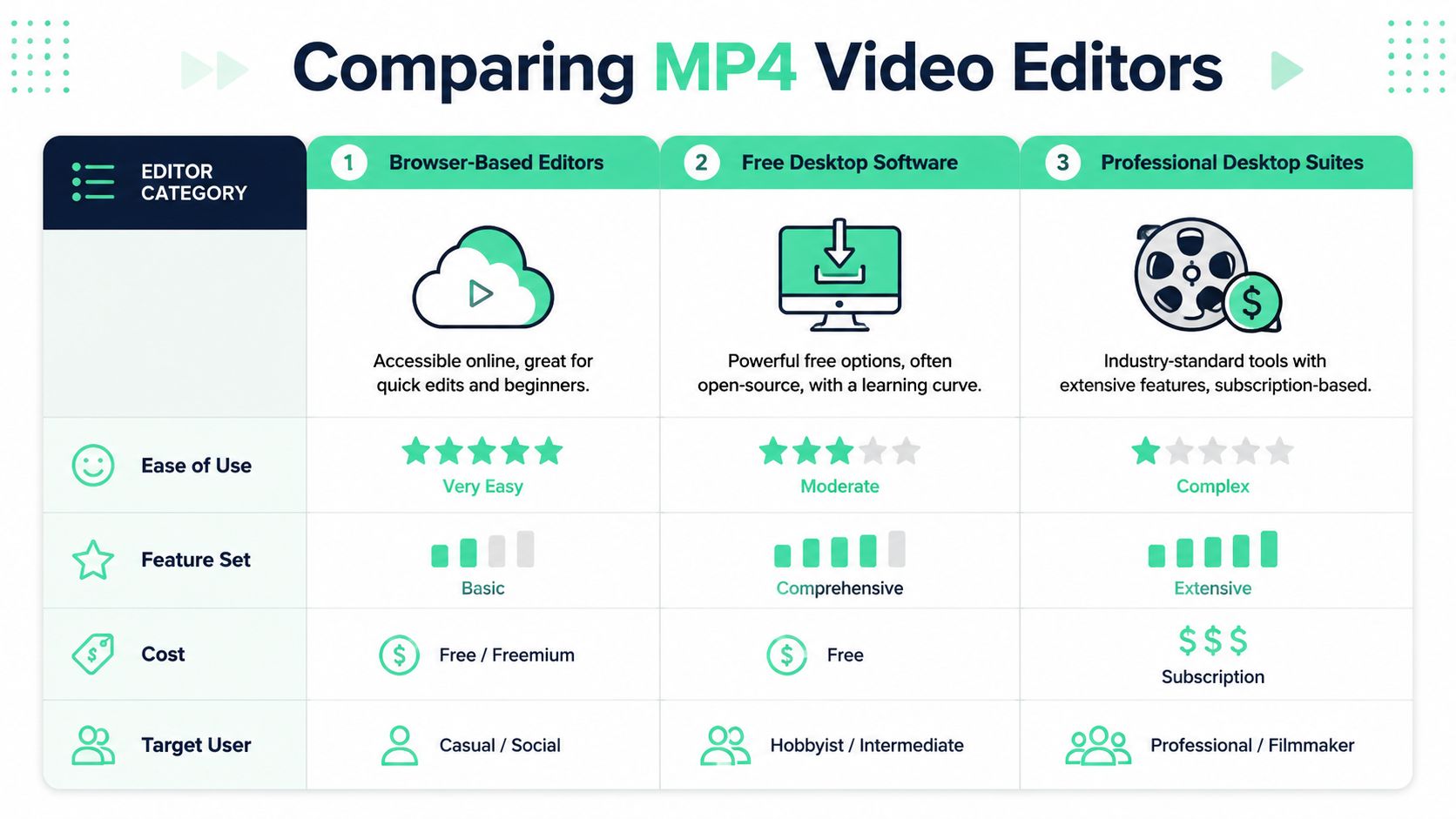
The easiest way to compare options is by workflow category, not brand loyalty.
| Category | Strengths | Limits | Good fit |
|---|---|---|---|
| **Professional desktop suites** | Deep control over audio, color, multicam, and effects | Slower setup, heavier learning curve, more local performance issues | Editors producing complex campaigns or long-form work |
| **Simple desktop or mobile apps** | Fast start, beginner-friendly, easy trimming | Branding and workflow flexibility can feel limited | Solo creators making straightforward clips |
| **Browser-based AI editors** | Quick clipping, captions, reframing, resizing, templates | Less useful for highly custom post-production | Teams and creators publishing social video often |
Adobe Premiere Pro is still the obvious choice for editors who need dense control. CapCut and iMovie are easier for straightforward trimming. Social-first web tools sit in a different lane: they're built around clipping, title cards, captions, and quick exports for vertical feeds.
One example is **BlitzReels**, which supports uploading MP4s, generating clips, adding captions, reframing for vertical formats, and exporting social-ready videos from a browser. That type of setup is closer to the daily needs of short-form teams than a traditional NLE built for full post-production.
### A practical tool choice guide
A creator doesn't need the “most powerful” editor. A creator needs the editor that removes the bottleneck.
A simple decision rule works well:
- **Choose a professional suite** if multicam edits, advanced audio cleanup, layered compositing, or detailed color work are part of the regular workflow.
- **Choose a lightweight app** if the job is basic trimming, quick resizing, and casual posting.
- **Choose a browser-first social editor** if the repeated tasks are clipping, captioning, resizing, and repurposing.
For a broader view of what matters in that last category, this guide to a [video editor for social media](https://www.blitzreels.com/blog/video-editor-for-social-media) maps the decision to real publishing needs better than a generic feature checklist.
> The right editor is the one that gets a publishable clip out before the idea goes stale.
## Embracing the 10-Minute Edit Philosophy
The fastest creators usually don't win because every video is better edited. They win because the workflow is repeatable. Raw MP4 in. Hook selected. dead space clipped. Captions added. Vertical resize done. Publish.
That's the shift behind modern short-form editing. The goal isn't endless refinement. It's a system that makes consistent posting realistic without burning hours on every clip.
Templates help. So do title cards, caption presets, and auto reframing. AI tools now handle a growing share of the mechanical work, which lets creators spend more energy on the opening hook, the point of view, and the publishing cadence. This look at [AI tools that halve your video editing time](https://www.blitzreels.com/blog/ai-tools-that-halve-your-video-editing-time) is useful for anyone trying to build that kind of workflow.
A creator who understands **how to edit an MP4 video** for social media doesn't aim for complexity. That creator aims for speed, clarity, and enough consistency to keep learning from every post.
---
BlitzReels helps turn raw MP4s into short-form clips with captions, reframing, resizing, and repurposing workflows built for TikTok, Instagram Reels, YouTube Shorts, LinkedIn, and other social channels. For creators who want a faster route from upload to publish, [BlitzReels](https://blitzreels.com) is worth exploring.