---
title: "How to Make Captions for Short-Form Video That Convert"
canonical: "https://blitzreels.com/blog/how-to-make-captions"
---
# How to Make Captions for Short-Form Video That Convert
URL: https://blitzreels.com/blog/how-to-make-captions
Markdown URL: https://blitzreels.com/blog/how-to-make-captions.md
Published: 2026-09-09
Author: BlitzReels
Learn how to make captions for TikTok, Reels, and Shorts that boost watch time. Step-by-step workflow for auto-transcription, styling, and export.
Tags: captions, short-form video, TikTok captions, video editing, caption styling

Roughly **80% of short-form video is watched on mute**, according to the supplied research brief. [That changes how creators should think about captions](https://www.trymypost.com/blog/accessibility-social-media-alt-text-captions-guide-2026): captions carry the hook, explanation, payoff, and call to action when sound is unavailable.
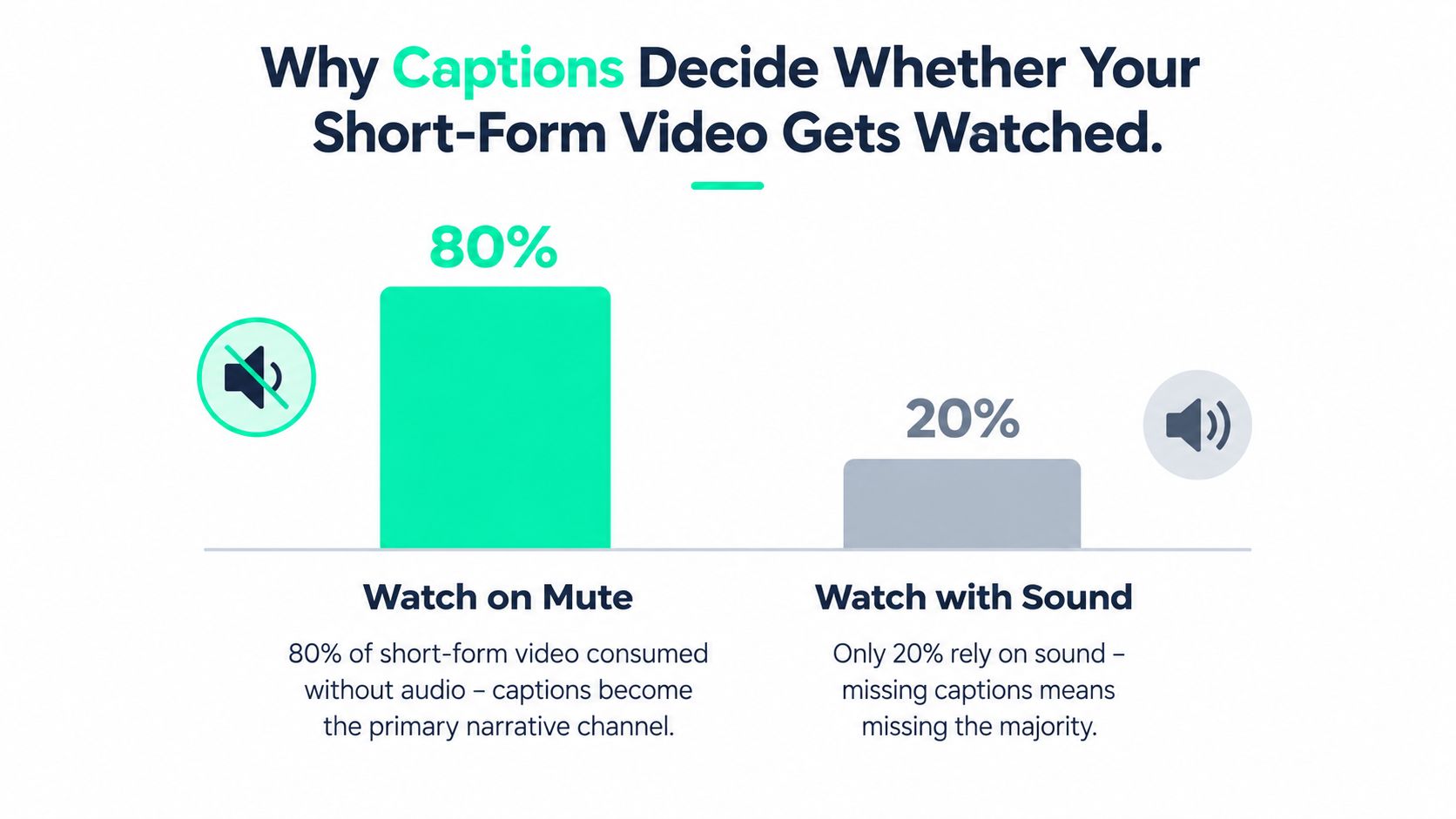
A swipe test makes the production trade-off clear. Two clips can use identical footage, pacing, and soundtrack, yet the version without readable text leaves silent viewers guessing during the opening seconds. The captioned version communicates the premise immediately, before viewers decide whether to enable audio.
Captions also support accessibility. [WCAG guidance from the W3C](https://www.w3.org/WAI/media/av/captions/) requires captions for prerecorded synchronized media at Level A and live synchronized media at Level AA. The [University of Michigan's video accessibility guidance](https://accessibility.umich.edu/basics/concepts-principles/video-captions) identifies WCAG success criteria 1.2.2 for prerecorded video and 1.2.4 for live video.
A reliable workflow covers **import, transcription, SRT cleanup, vertical styling, caption-type selection, human review, and platform-specific export**. Chunking, pacing, contrast, and safe placement affect whether captions are readable, while human review catches names, jargon, and timing errors that auto-captions miss. The practical guide to [captioning videos for social media](https://prodshort.com/blog/how-to-caption-videos) can support the process, but every finished clip still needs a quality gate before publishing.
## Table of Contents
- [Why Captions Decide Whether Your Short-Form Video Gets Watched](#why-captions-decide-whether-your-short-form-video-gets-watched)
- [The Caption Production Rules That Actually Move Watch Time](#the-caption-production-rules-that-actually-move-watch-time)
- [Turning Auto-Transcription Into Accurate, Timed Captions](#turning-auto-transcription-into-accurate-timed-captions)
- [Styling Captions for Vertical Video Without Losing the Frame](#styling-captions-for-vertical-video-without-losing-the-frame)
- [Auto Captions, Closed Captions, and Burned-In Captions Explained](#auto-captions-closed-captions-and-burned-in-captions-explained)
- [The Human Review Gate Every Caption Needs Before Publishing](#the-human-review-gate-every-caption-needs-before-publishing)
- [Pre-Publish Checklist, Export Settings, and Scaling the Workflow](#pre-publish-checklist-export-settings-and-scaling-the-workflow)
## Why Captions Decide Whether Your Short-Form Video Gets Watched
The first caption frame must answer the viewer's silent question: “What is this about?” A spoken hook works only for viewers who can hear it. In a quiet office, on public transport, or with device audio disabled, readable text delivers the premise before the viewer decides whether to keep watching.
Captions also preserve narrative continuity. If a speaker says, “The mistake is in the first five seconds,” those words should appear as the claim lands. A delay of several beats makes the edit feel broken, even when the footage and voiceover are strong.
> **Practical rule:** Edit captions as part of the story, not as a graphic layer placed over a finished story.
Font selection comes later. Start by importing the clip, generating a transcript, cleaning the SRT or VTT, and segmenting dialogue into readable cues. Then style those cues for a vertical frame, choose open or closed delivery, review high-risk words, and export a version suited to each platform. A caption that is present but mistimed, hidden behind interface controls, or difficult to read has not completed the job.
Short-form editors must separate **accessibility captions** from decorative kinetic text. Animated emphasis can highlight a product name or key phrase, but it cannot replace complete spoken dialogue, speaker identification, or meaningful sound descriptions. [The W3C explains the distinction between captions and subtitles](https://www.w3.org/WAI/media/av/captions/), with captions including spoken content and relevant audio information needed to understand synchronized media.
A practical workflow uses automation for speed and human review for accuracy. Automatic transcription can create the first pass, while a person checks names, jargon, numbers, overlapping speakers, cue timing, and mobile readability. The [captioning videos for social media](https://prodshort.com/blog/how-to-caption-videos) guide can support that process, but each finished clip still needs a quality gate before publishing.
The goal is simple: let viewers follow the story without turning every sentence into oversized text that blocks the visual action.
## The Caption Production Rules That Actually Move Watch Time
Caption design works better when the constraints are fixed before the timeline becomes crowded. Research synthesis recommends keeping captions to **two lines**, placing them consistently near the bottom, and keeping reading speed below about **145 words per minute**, because comprehension drops above that threshold and viewers generally prefer consistent segmentation. See the [data-driven guide to styling video captions](https://blitzreels.com/blog/a-data-driven-guide-to-styling-video-captions) for a complementary treatment of readability and emphasis.
A second control is line length. A styling guide recommends keeping subtitle lines under **42 characters** for mobile readability, using sentence case instead of ALL CAPS, holding each caption frame on screen for at least **1.5 seconds**, and breaking text at natural phrase boundaries. Those rules reduce the chance that a viewer must decode a dense block while also following a face, product demonstration, or screen recording.
Contrast is an accessibility control rather than a branding preference. Short-form guidance recommends a **4.5:1 contrast ratio**, so the text needs to remain readable against the worst background frame, not only against the average shot. A pale caption over a bright wall may look acceptable in a thumbnail and fail as soon as the speaker moves in front of it.
| Rule | Target | Why It Matters |
|---|---:|---|
| Visible text | Two lines maximum | Keeps eye movement controlled and protects the visual subject |
| Reading speed | Below about 145 words per minute | Reduces comprehension loss and cue lag |
| Line length | Under 42 characters | Prevents awkward wrapping on mobile screens |
| Frame duration | At least 1.5 seconds | Gives viewers enough time to read the cue |
| Contrast | 4.5:1 | Supports accessible reading across changing backgrounds |
These are defaults, not prison bars. A rapid dialogue exchange may require tighter segmentation, while a number, URL, or multilingual phrase may need extra time. The editor should preserve meaning first, then adjust timing and line breaks until the words remain readable without slowing the visual rhythm.
## Turning Auto-Transcription Into Accurate, Timed Captions
Automatic transcription is a useful first draft. It isn't a publish-ready caption file. One analysis of AI-generated captions recorded an average accuracy rate of **89.8%**, which the researchers judged insufficient for current legal accessibility expectations, while a YouTube auto-caption study identified **525 phrase-level errors across 68 minutes of video**, or about **7.7 phrase errors per minute**. Those findings are documented in the [caption accuracy research](https://scholarworks.calstate.edu/downloads/hh63t317h).
The working sequence should stay continuous. The editor drops the raw clip into an auto-transcriber, generates the first pass, downloads the SRT or VTT, and opens it in a text editor or directly inside the video timeline. A line-by-line scrub then catches proper nouns, brand names, technical terms, punctuation, and words that sound alike but carry different meanings.
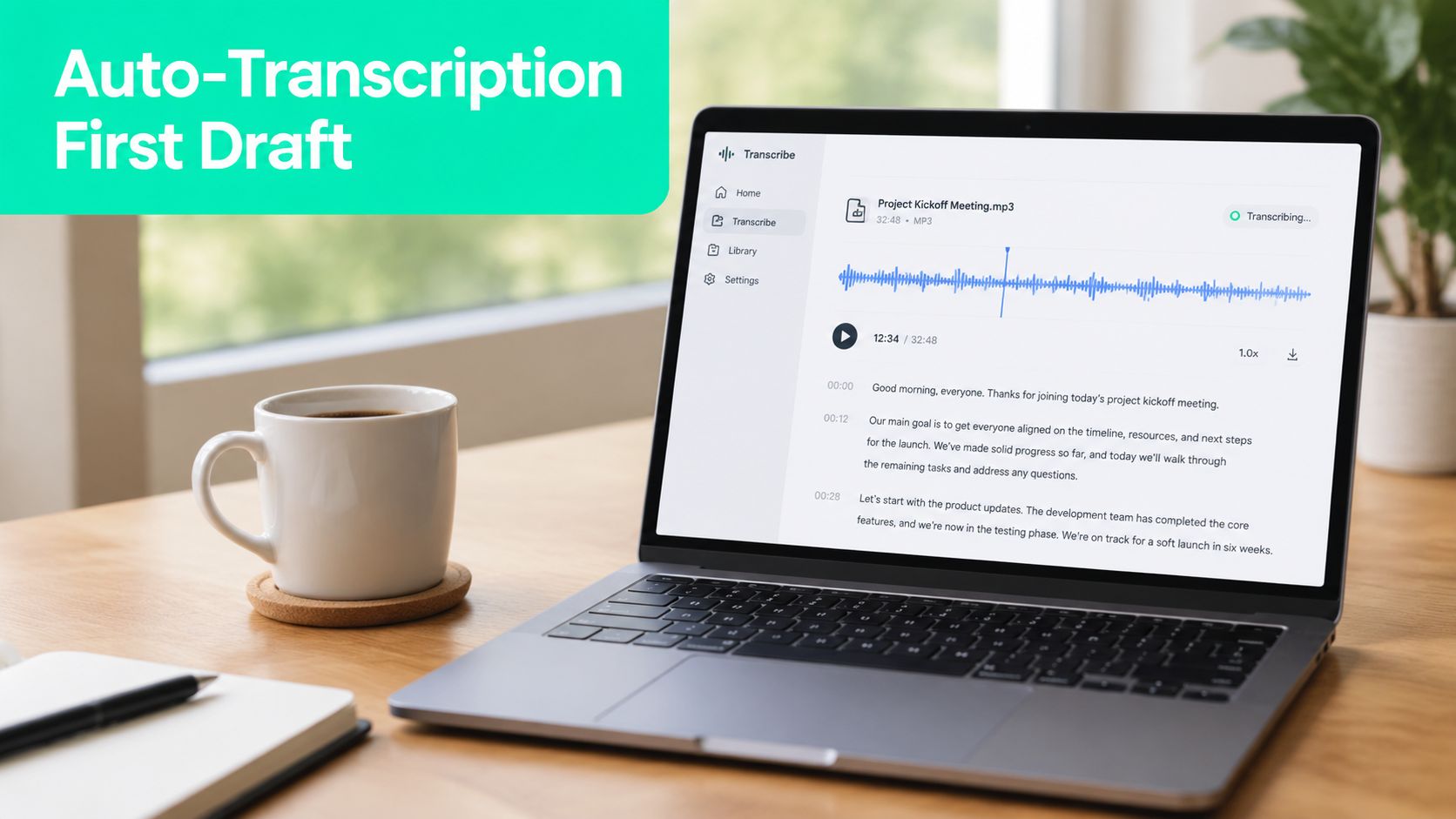
Timing needs the same attention as spelling. Each cue should begin when the speaker's sound starts and end after the spoken phrase finishes, without lingering into the next idea. When two short cues are separated by a pause of less than **300 milliseconds**, merging them can create a smoother reading unit, provided the combined caption still respects the two-line and reading-speed limits.
The most damaging errors usually appear in difficult audio rather than ordinary sentences. Homophones need contextual correction, cross-talk requires speaker separation or selective trimming, and music bleed can cause false words that should be removed. [A practical guide to transcribing video to text](https://blitzreels.com/blog/how-to-transcribe-video-to-text) can help structure the initial conversion, but the final SRT should be treated as an edited asset.
A short playback at normal speed catches timing drift that static review misses.
The clean file should contain complete dialogue, useful punctuation, sensible cue boundaries, and synchronization that matches the actual speech. Only then is it ready for visual styling.
## Styling Captions for Vertical Video Without Losing the Frame
A **1080x1920 vertical canvas** creates a narrow reading environment. Captions need to sit low enough to feel connected to the speaker, but not so low that a platform username, audio label, progress bar, or other interface element hides them. A workable starting point is the lower third, with roughly the bottom **200 pixels** reserved as an anchor area, followed by a visual check on every platform preview.
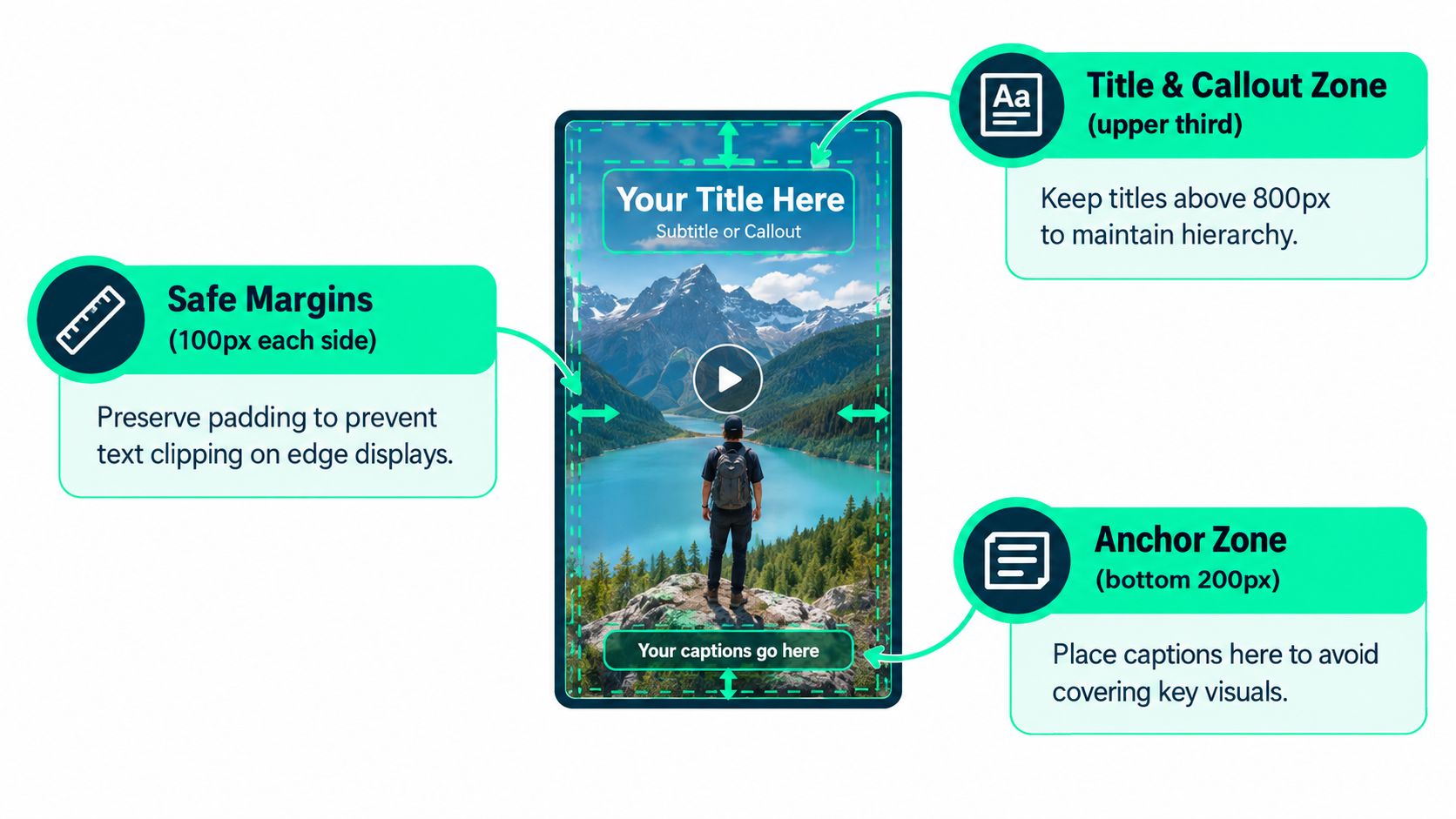
Consider a talking-head clip where the face stays in the middle and the opening title occupies the upper third. Captions can remain near the bottom while the hook stays visible above the speaker's eyes. If the speaker bends toward the lower edge or a product demonstration fills the bottom of the frame, the caption block should move temporarily rather than covering the hand movement that explains the point.
Font weight between **600 and 700** gives small mobile text enough presence without requiring an oversized typeface. A **2 to 3 pixel stroke** can separate letters from a complex background, but an opaque or semi-opaque backing often performs better when footage changes rapidly. Sentence case is generally easier to read, while ALL CAPS can create urgency for a short sales hook. It shouldn't become the default for full spoken sentences.
Each platform has its own visual interference. TikTok's caption-safe area, Instagram Reels' username and audio overlays, and YouTube Shorts' progress controls can all compete with a caption placed too close to the edge. The editor should inspect the exported file inside each native player rather than trusting a clean editing canvas.
The final check uses the worst-case frame, not the prettiest one. Test contrast at the moment when the caption crosses a bright face, white shirt, sky, or product highlight. Guidance on [AI tools for vertical video framing](https://blitzreels.com/blog/ai-tools-for-perfect-vertical-video-framing) is useful for reframing decisions, but captions still need manual placement when the subject moves unpredictably.
## Auto Captions, Closed Captions, and Burned-In Captions Explained
Creators usually choose among three delivery types, and each solves a different problem. **Auto captions** are generated by the platform and can be useful for a draft, especially when speech is clear. They remain vulnerable to names, accents, jargon, and punctuation errors, and editing is limited to the platform's own interface.
**Closed captions** travel separately from the image, commonly as an SRT sidecar or an editable subtitle track. They preserve flexibility and can be revised later, but support varies by destination and upload workflow. **Burned-in captions**, also called open captions, become part of the video pixels. They can't be stripped away by a feed that ignores sidecar files, which makes them dependable for cross-posted vertical clips.
| Caption Type | Editability | Best Platform | Best Use Case |
|---|---|---|---|
| Auto captions | Platform-dependent | Native social upload | Draft generation and quick review |
| Closed captions | High when the track is retained | Platforms accepting subtitle files | Long-form cuts and flexible accessibility delivery |
| Burned-in captions | Requires a new video export | Cross-posted short-form feeds | Hook-heavy clips and branded vertical edits |
The practical recommendation is simple: use auto captions as a starting layer, closed captions when the destination preserves them, and burned-in captions when consistent presentation matters across feeds. A [brand-voice guide for AI caption generation](https://wavegen.ai/blog/ai-caption-generator) can help keep wording aligned with a company's tone, but voice consistency doesn't remove the need for timing and accuracy review.
For social clips, a vertical-safe preset can speed up recurring work. BlitzReels offers timed subtitle generation, SRT export, word-level caption editing, styled subtitle burn-in, and vertical reframing, allowing an editor to adjust captions and frame composition within the same production workflow. [Closed captions and subtitles](https://blitzreels.com/blog/closed-captions-vs-subtitles) aren't interchangeable in every accessibility context, so the delivery choice should follow the audience, platform, and required level of editability.
## The Human Review Gate Every Caption Needs Before Publishing
Human review is the accessibility floor, not optional polish. Automatic captions can help creators move quickly, but the supplied research found accuracy problems significant enough to make unedited output unsuitable for legal accessibility expectations. A separate analysis found repeated phrase-level errors, which means even a caption track that looks mostly correct can misstate a product name, instruction, or claim.
The reviewer should scan the transcript against the source audio and visual context. Proper nouns need checking against an approved name or pronunciation guide, numbers and currencies require direct verification, borrowed words need their accent marks preserved where relevant, and speaker changes must be clear when more than one person talks.
> **Human review protects meaning, not just spelling.**
Overlapping speech needs an editorial decision. The reviewer can isolate the louder or narratively important voice, split the cues to preserve both speakers, or add speaker identification when context would otherwise become ambiguous. Important non-dialogue sounds also belong in accessibility-grade captions when they affect understanding, such as a warning tone, a door slam that changes the scene, or music that signals a shift.
The final timing pass should flag any cue shorter than **1.5 seconds**, following the subtitle-styling guidance cited earlier. Short flashes can force viewers to choose between reading and watching, especially on a small screen. The reviewer should also check line breaks, punctuation, capitalization, safe-zone placement, and whether emphasis animation distracts from complete dialogue.
Skipping this gate may save editing time, but it transfers the cost to viewers who rely on captions and to brands whose message becomes unclear. A short, focused review is a better trade than publishing a polished-looking clip with incorrect words or unusable synchronization.
## Pre-Publish Checklist, Export Settings, and Scaling the Workflow
The last review should happen on the rendered video, not only in the editor. Every cue needs a valid start and end time, each line should remain within the intended length, and the text must hold the required **4.5:1 contrast ratio** against difficult background frames. The caption block also needs to sit inside the 1080x1920 safe area, away from usernames, audio labels, progress controls, and other interface elements.
A compact quality checklist helps prevent predictable misses:
- **Read every cue aloud:** Confirm the caption matches the recorded words, including names, jargon, numbers, and punctuation.
- **Check the frame:** Verify that captions don't cover faces, hands, product details, title cards, or the visual hook.
- **Review timing:** Watch at normal speed and confirm each cue appears with the speech and stays readable.
- **Inspect platform versions:** Preview the exported file in TikTok, Instagram Reels, YouTube Shorts, or LinkedIn as appropriate.
- **Validate the file:** Confirm the SRT or VTT is complete when a sidecar track is required, and confirm the burned-in version contains the approved styling.
Export settings should follow the destination's current technical requirements rather than a copied preset. The supplied workflow notes specify H.264 at 1080x1920, with a **6 Mbps** target for TikTok, burned-in captions in the MP4, and Instagram Reels accepting the same codec with bitrate tolerance up to **10 Mbps**. YouTube Shorts can ingest the same file and also accepts an optional SRT sidecar. These settings should still be checked against each platform's current upload documentation before a large batch.
Teams can scale by locking one caption preset, one SRT cleanup convention, and one review checklist. New footage can move through the same workflow, while a junior editor handles the first QA pass and a senior editor reviews high-risk clips. [Creating an SRT file](https://blitzreels.com/blog/create-a-srt-file) gives the team a repeatable subtitle-file foundation before automation is added.
Agent-driven workflows can then inspect projects, edit transcripts and caption words, add B-roll, resize or reframe clips, validate output, start exports, and verify render status before a human opens the final file. Automation should flag jargon and timing drift, not approve them.
---
BlitzReels helps creators and teams clip source videos, edit transcripts, generate timed captions, resize and reframe vertical footage, apply caption styles, add title cards, and export branded social versions. Visit [BlitzReels](https://blitzreels.com) to turn a reviewed caption workflow into a faster repeatable process for TikTok, Instagram Reels, YouTube Shorts, LinkedIn, and other platforms.