---
title: "How to Make Podcast Clips for TikTok That Go Viral"
canonical: "https://blitzreels.com/blog/how-to-make-podcast-clips-for-tiktok"
---
# How to Make Podcast Clips for TikTok That Go Viral
URL: https://blitzreels.com/blog/how-to-make-podcast-clips-for-tiktok
Markdown URL: https://blitzreels.com/blog/how-to-make-podcast-clips-for-tiktok.md
Published: 2026-07-11
Author: BlitzReels
Learn how to make podcast clips for TikTok with our step-by-step guide. Turn long episodes into viral shorts with tips on hooks, captions, and editing.
Tags: how to make podcast clips for tiktok, podcast to tiktok, video repurposing, short form video, tiktok for podcasters

A familiar pattern shows up on almost every podcast team. The full episode is strong, the guest is sharp, the conversation has real moments, and then nothing happens after publishing except a few loyal listeners hitting play.
Meanwhile, TikTok is full of short clips that pull a single idea, frame it fast, caption it clearly, and earn attention from people who would never sit down for a full episode first. That gap is where most podcast growth gets lost.
The good news is that learning **how to make podcast clips for TikTok** isn't about becoming a full-time video editor. It's about building a workflow that finds the right moment, shapes it for the platform, and turns each episode into a repeatable stream of short-form content.
## Table of Contents
- [From Long-Form Gold to TikTok Goldmine](#from-long-form-gold-to-tiktok-goldmine)
- [Finding Your Viral Moments Before You Edit](#finding-your-viral-moments-before-you-edit)
- [What actually works as a clip](#what-actually-works-as-a-clip)
- [Use transcript and audience signals together](#use-transcript-and-audience-signals-together)
- [The Modern Clipping and Editing Workflow](#the-modern-clipping-and-editing-workflow)
- [Manual clipping breaks at volume](#manual-clipping-breaks-at-volume)
- [A faster AI-assisted workflow](#a-faster-ai-assisted-workflow)
- [Designing Captions and Visuals for a Silent Scroll](#designing-captions-and-visuals-for-a-silent-scroll)
- [Captions are part of the edit](#captions-are-part-of-the-edit)
- [Visual hierarchy keeps the clip moving](#visual-hierarchy-keeps-the-clip-moving)
- [Optimizing Audio and Adding Final Polish](#optimizing-audio-and-adding-final-polish)
- [Clean audio beats fancy effects](#clean-audio-beats-fancy-effects)
- [Frame the same moment differently for TikTok](#frame-the-same-moment-differently-for-tiktok)
- [Your Pre-Publishing Checklist and Export Settings](#your-pre-publishing-checklist-and-export-settings)
- [Run this check before every upload](#run-this-check-before-every-upload)
- [Export for consistency](#export-for-consistency)
## From Long-Form Gold to TikTok Goldmine
A strong podcast already contains the raw material for strong short-form video. The problem usually isn't content quality. It's packaging.
An hour-long conversation asks a lot from a new viewer. A short clip asks for one good hook, one clear idea, and one reason to keep watching. That's why clipping isn't just trimming. It's selecting, reframing, captioning, resizing, and publishing with enough consistency that each episode produces multiple chances to get discovered.
Teams that handle this well don't treat TikTok clips as leftovers. They treat them as a separate content format with its own pacing, title cards, visual rules, and opening hooks. That mindset changes everything.
For creators who need a broader primer on [repurposing podcast content](https://www.fame.so/post/ultimate-podcast-clip-guide), Fame has a useful overview of the mechanical constraints and publishing considerations that shape this workflow.
## Finding Your Viral Moments Before You Edit
The fastest way to waste time is to open an editor before deciding what deserves to become a clip. Most weak podcast shorts fail before the first cut because the source moment never stood on its own.
The strongest clips usually contain one complete payoff. A surprising opinion. A clean explanation. A sharp disagreement. A useful tactic. An emotional reaction. TikTok doesn't reward “pretty interesting if you watched the full episode.” It rewards moments that feel instantly self-contained.
### What actually works as a clip
A podcast clip has to survive outside the original conversation. That means context can't do all the work. If the audience needs the previous five minutes to understand why the line matters, it probably isn't a TikTok clip yet.
A practical screening method:
- **Contrarian takes:** A guest disagrees with common advice and explains why.
- **Tight how-to moments:** A process or tactic gets explained in plain language.
- **Emotional peaks:** The speaker gets animated, blunt, funny, or unusually honest.
- **Unexpected turns:** The conversation starts one way and quickly reveals something else.
- **Standalone insight:** The point has a clear beginning, middle, and payoff.
> **Practical rule:** If the first sentence creates curiosity and the next few lines deliver the answer, the moment is clip-ready.
Length discipline matters here. Industry guidance cited by Podshop identifies **30 to 60 seconds** as the sweet spot for TikTok podcast clips, and recommends aiming for **3 to 5 clips from one episode** while maintaining a schedule of **3 to 4 clips per week** for audience growth ([Podshop guidance on viral podcast clips](https://www.podshoponline.co.uk/the-ultimate-guide-to-podcast-clips-that-go-viral)).
That range forces better choices. It strips out meandering setup, throat-clearing, and side comments that feel natural in long-form conversation but drag in short-form.
### Use transcript and audience signals together
Creators often rely on instinct alone. That works sometimes, but it doesn't scale well across a backlog of episodes.
A better method starts with the transcript. Search for bold claims, laughter, direct advice, surprising phrases, and sections where the guest becomes more concise. Then compare those candidates against audience behavior. Guidance shared in podcasting circles points creators toward **engagement spikes**, where comments, shares, and replays rise together, as the best sign that a moment carries unusual weight.
A simple workflow looks like this:
1. **Scan the transcript first:** Highlight any passage that reads like a quote card.
2. **Check audience response:** Prioritize sections that generated stronger reactions.
3. **Test for independence:** Remove surrounding context and see if the idea still lands.
4. **Trim aggressively:** Cut every pause, detour, and soft setup line.
5. **Queue multiple options:** Don't stop at one clip if the episode clearly has more.
For teams refining opening lines, this guide on [scroll-stopping video hooks](https://www.blitzreels.com/blog/the-science-of-scroll-stopping-video-hooks) is useful because hook quality often decides whether a solid insight ever gets heard.
## The Modern Clipping and Editing Workflow
Speed changes what gets published. If clipping one episode takes half a day, most creators won't keep up. If the process is fast enough to run after every recording, short-form becomes part of the normal production loop instead of a separate project that keeps getting postponed.
That shift is why AI tools matter. Not because they replace editorial judgment, but because they remove the slowest parts of clipping.
### Manual clipping breaks at volume
The manual workflow is familiar. Upload the episode. Scrub the timeline. Listen in real time. Cut a segment. Resize it vertically. Reframe the speaker. Add captions. Fix line breaks. Export. Repeat.
That process works for one clip. It falls apart when the goal is consistent output across TikTok, Instagram Reels, YouTube Shorts, LinkedIn, and other channels. The bottleneck isn't talent. It's repetition.
A few trade-offs show up quickly:
| Workflow choice | What works | What doesn't |
|---|---|---|
| **Timeline-only editing** | Fine for one polished clip | Slow for batch production |
| **Manual hook selection** | Helpful when the editor knows the show deeply | Hard to repeat across many episodes |
| **One-size-fits-all crop** | Fastest path to export | Often cuts off faces or weakens framing |
| **Raw transcript captions** | Better than no text | Usually too flat for TikTok pacing |
The strongest workflow uses automation for detection and formatting, then human review for taste and narrative.
### A faster AI-assisted workflow
Creators often struggle to manually identify the best **30 to 45 second** segments. Video guidance on AI clipping tools notes that newer systems can suggest a **“shocking hook”** or **“value promise”** in the first **3 seconds**, but the primary advantage comes from using a platform that lets creators validate and refine those AI-selected openings against current TikTok behavior ([AI clip selection and hook refinement guidance](https://www.youtube.com/watch?v=Q7RafCnJv_0)).
That matters because AI can surface options fast, but it can't be trusted blindly. It may choose the loudest line instead of the clearest one. It may over-prioritize drama when the better clip is the practical takeaway.
A modern workflow usually looks like this:
- **Upload the full episode:** Let the platform transcribe the conversation automatically.
- **Review AI clip suggestions:** Scan proposed highlights rather than scrubbing the whole timeline.
- **Validate the first line:** Make sure the hook creates curiosity without sounding forced.
- **Reframe for vertical:** Use auto-centering so faces stay visible in a 9:16 crop.
- **Trim filler words and pauses:** Remove “umms,” “aahs,” and dead air that slow the opening.
- **Apply a reusable style:** Add templates for captions, title cards, and brand-safe colors.
- **Batch export versions:** Prepare TikTok, Reels, Shorts, and LinkedIn variants from the same source.
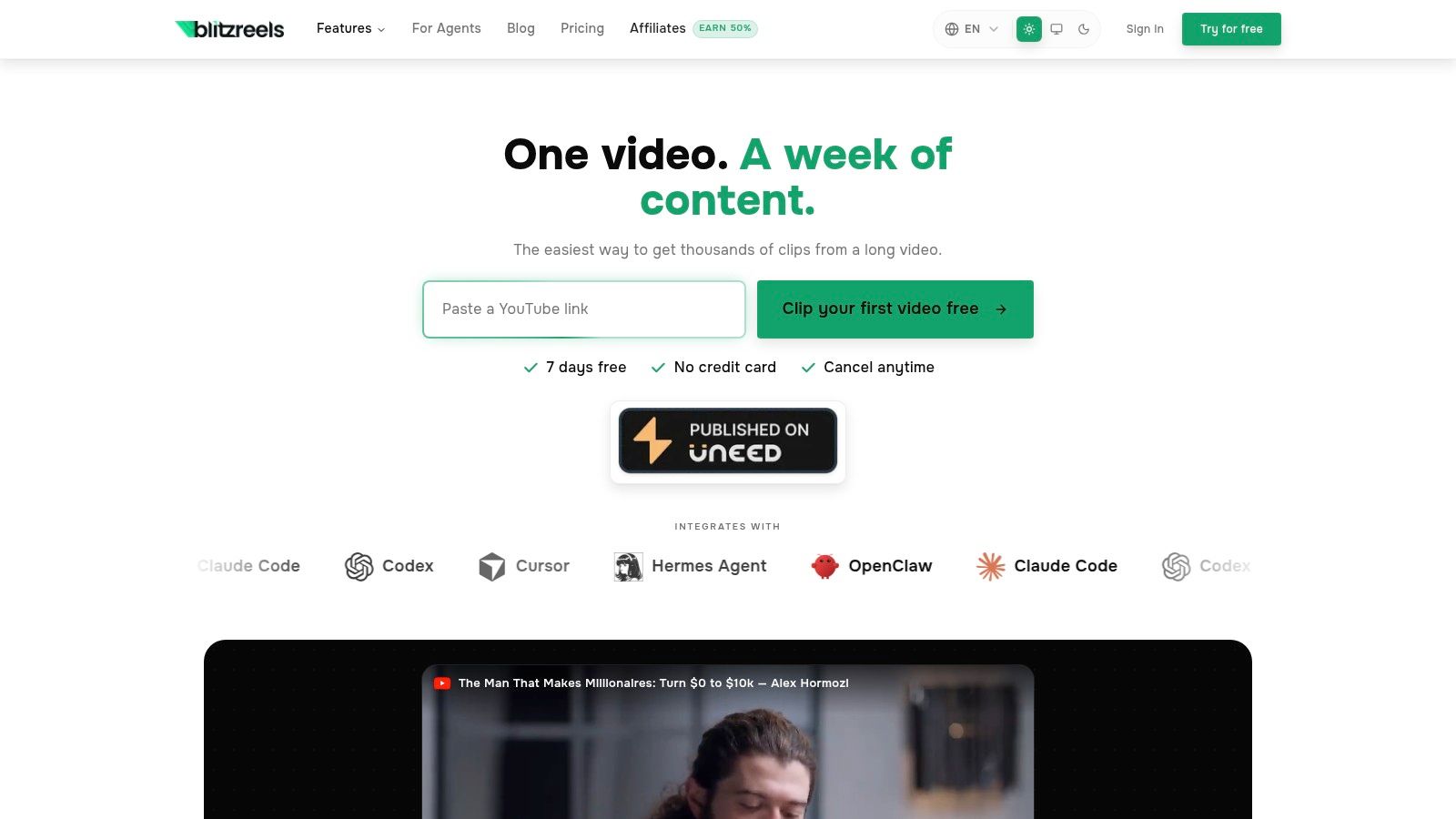
A hands-on look at an [AI video clipping tool](https://www.blitzreels.com/blog/ai-video-clipping-tool) can help teams compare this approach against slower manual editors.
The middle of the process is where many teams lose momentum, so seeing the workflow in motion helps.
> The best clipping setup doesn't try to automate taste. It automates searching, transcribing, reframing, and repetitive formatting so the editor can spend time on the actual decision.
## Designing Captions and Visuals for a Silent Scroll
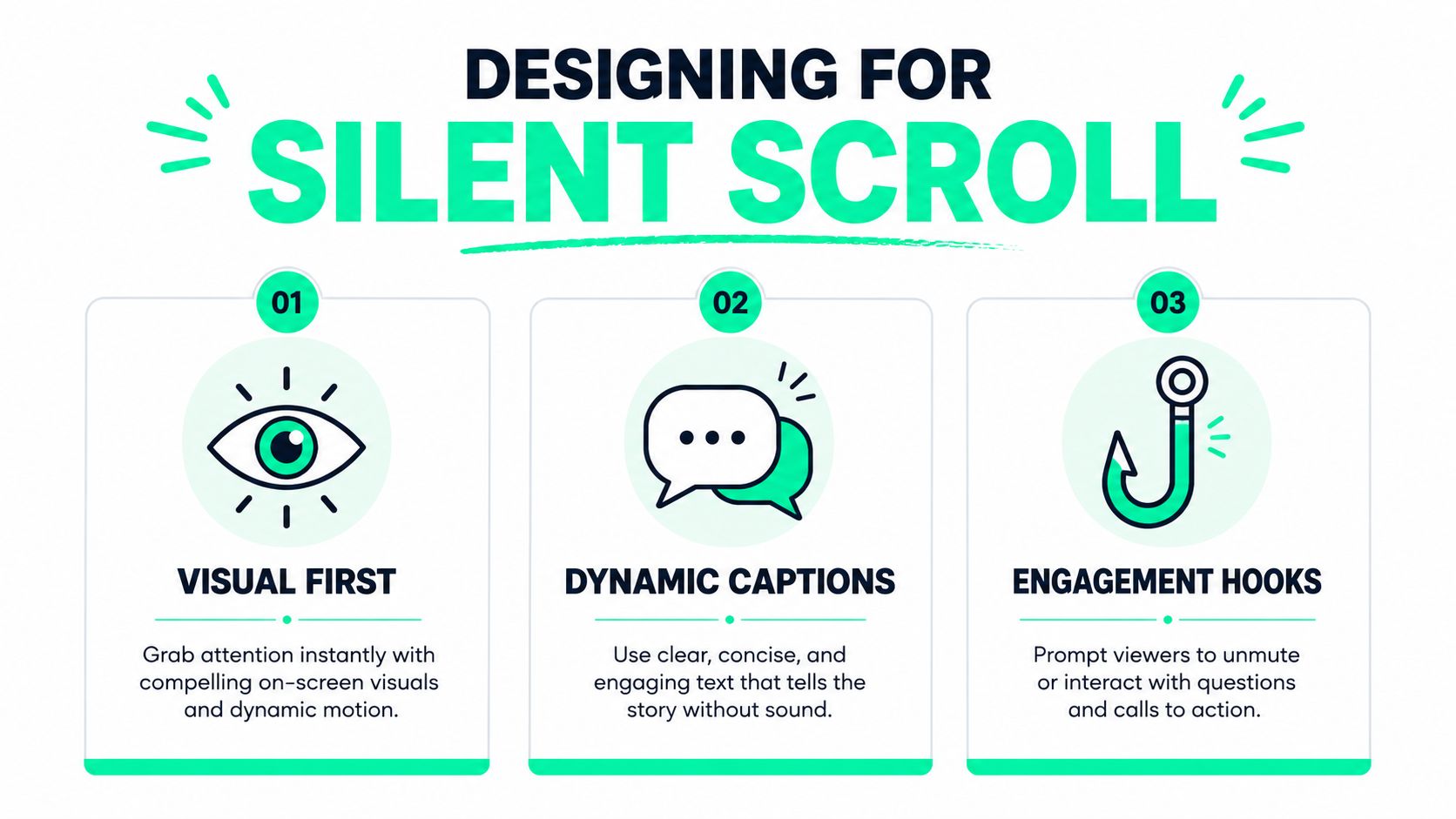
A podcast clip without strong captions is usually asking too much from TikTok viewers. Many people watch with sound low, off, or half-ignored. In that environment, captions aren't a nice addition. They're part of the main storytelling layer.
Basic subtitles aren't enough either. Flat text at the bottom of the frame may make the clip understandable, but it rarely makes it compelling.
### Captions are part of the edit
Captions need to do more than transcribe speech. They need to guide attention, reinforce key words, and match the rhythm of the line. Strong short-form editors treat text as motion design.
Guidance shared by podcasters points to a minimum video resolution of **1080x1920 pixels** and the use of **clear typography for text overlays**, while also noting that clips tied to **engagement spikes** tend to perform best when paired with strong visual captions ([podcast clip caption and resolution guidance](https://www.reddit.com/r/podcasting/comments/veb3xu/how_to_make_viral_tiktoks_from_your_podcast/)).
A better caption system usually includes:
- **Word emphasis:** Highlight the most important phrase in a different color or weight.
- **Chunked phrasing:** Break long sentences into short readable bursts.
- **On-beat timing:** Let the text land with the speaker instead of trailing behind.
- **Selective motion:** Use subtle animation where it helps, not on every single word.
- **Intentional placement:** Keep text clear of TikTok UI and the speaker's face.
For creators experimenting with topical visuals, meme references, or cultural framing around a quote, tools that help [make trending content](https://magicmeme.com/create) can be useful when the clip needs an extra visual layer rather than just subtitles.
### Visual hierarchy keeps the clip moving
Talking-head podcast clips often fail because nothing changes on screen. Even when the insight is strong, the visual energy stays flat.
Several design choices fix that:
#### Title cards and hook frames
Open with a title card only if it sharpens the promise. A weak title card delays the clip. A sharp one creates context immediately. “Why most podcasts clip the wrong moments” works. “Podcast advice” doesn't.
#### Reframing and resizing
Horizontal source video rarely fits vertical screens cleanly. Reframing isn't just technical resizing. It's a composition decision. The speaker's eyes, gestures, and mouth need to stay visually central or the clip feels awkward.
#### Pattern interrupts
Small visual changes help retain attention. A zoom on the key sentence. A quick cut to a second camera. A highlighted phrase. A graphic callout. A related image. Used lightly, these keep the clip feeling active without turning it into noise.
> Good captions don't sit under the video. They carry the video when the audio isn't doing all the work.
For a deeper breakdown of how text styling affects retention, this article on [how captions drive engagement on TikTok and Instagram](https://www.blitzreels.com/blog/how-captions-drive-engagement-on-tiktok-and-instagram) is worth reviewing.
## Optimizing Audio and Adding Final Polish
A polished clip usually wins through subtraction. Better audio cleanup. Cleaner pacing. A more natural opening. A sharper ending. None of those changes feel dramatic on their own, but together they decide whether the video feels native to TikTok or recycled from somewhere else.
Many podcast clips already have decent source audio. The job here isn't to overproduce it. The job is to remove friction.
### Clean audio beats fancy effects
The first pass should strip out anything that interrupts momentum. Filler words, long inhales, dead air, background hum, and uneven levels all make short clips feel slower than they are.
The audio pass should focus on:
- **Dialogue clarity:** The voice should be easy to understand on phone speakers.
- **Noise reduction:** Remove distractions without making the voice sound artificial.
- **Volume leveling:** Avoid jarring changes between host and guest.
- **Breath and pause control:** Keep natural rhythm, but cut hesitation that weakens the hook.
- **Music restraint:** If a bed or trending sound is added, it should support the line rather than compete with it.
Teams that also want tighter lip-sync and caption timing often benefit from reviewing methods for [syncing audio with video](https://www.blitzreels.com/blog/syncing-audio-with-video), especially when multiple edits or overlays are involved.
### Frame the same moment differently for TikTok
One of the most overlooked finishing steps is narrative framing by platform. Zencastr points out a real gap here: **TikTok rewards “authenticity and unexpected turns” while YouTube Shorts prioritizes “clarity and framing,”** so the same clip often underperforms if it's published everywhere with the exact same intro ([platform-specific framing for podcast clips](https://zencastr.com/blog/how-to-use-ai-to-make-podcast-clips)).
That doesn't mean rebuilding the clip from scratch. It means adjusting the opening and packaging.
A practical comparison:
| Platform | Stronger opening style | Common mistake |
|---|---|---|
| **TikTok** | Fast, conversational, slightly raw | Over-explaining before the payoff |
| **YouTube Shorts** | Clear setup with stronger framing | Assuming context is obvious |
| **Instagram Reels** | Punchy and polished | Making it feel too corporate |
| **LinkedIn video** | Context-rich and insight-led | Leaving the takeaway too implicit |
The final polish also includes the CTA. A clip needs a job. Some should drive profile follows. Some should point viewers to the full episode. Some should invite a comment. Some should build familiarity with the host.
A few CTA options work better than others:
- **For discoverability:** “Follow for more podcast clips like this.”
- **For episode traffic:** “Full conversation is in the latest episode.”
- **For engagement:** “Agree or disagree?”
- **For topic continuation:** “Part two covers the harder question.”
The strongest CTA feels like a natural extension of the clip, not an ad pasted on top of it.
## Your Pre-Publishing Checklist and Export Settings
A strong clip can still underperform in the last five minutes before posting.
I see this happen when the edit is good, but the exported file tells a different story on mobile. Captions sit too low. The crop shifts on the final render. The CTA appears after the swipe. If you want a repeatable clipping system, this final check has to be part of the workflow, not an afterthought.
### Run this check before every upload
TikTok accepts short clips and longer uploads, but for podcast promotion, the key question is whether the moment still works once it hits the feed. A clip that feels sharp in the timeline can feel slow, cramped, or visually messy on a phone.
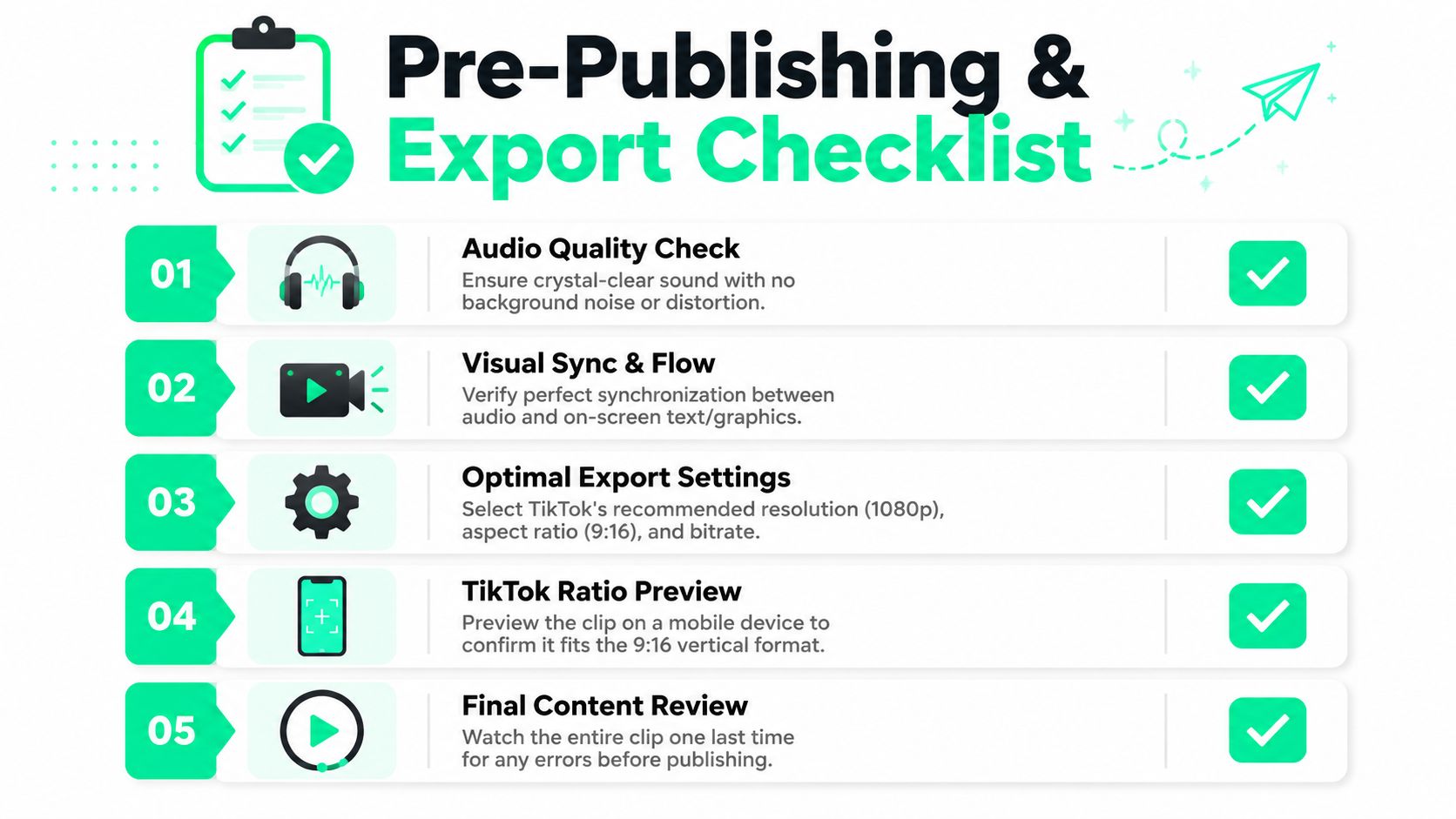
Before uploading, check:
1. **The first second earns attention.** The opening line, reaction, or visual change needs to hit immediately.
2. **Captions stay readable at phone size.** Review font size, contrast, and timing on an actual device, not only in the editor preview.
3. **Safe zones are clean.** Keep key words, faces, and lower-third graphics clear of TikTok interface areas.
4. **The speaker crop still looks intentional.** Auto-reframing saves time, but it can miss hand gestures, reaction shots, or a second speaker entering frame.
5. **The CTA appears before the drop-off point.** If the prompt matters, place it while viewers are still watching.
6. **Template elements match the clip.** AI clipping tools are fast, but title cards, speaker labels, and progress bars still need a quick human pass.
If the clip uses a custom cover or supporting graphics, tools that help [prepare images for TikTok](https://myimageupscaler.com/tools/resize/resize-image-for-tiktok) can keep static assets aligned with the same vertical format as the video.
### Export for consistency
Export settings should stay standardized across the whole clip pipeline. That matters even more if you're producing clips in batches with AI-assisted captions, reframing, and templated layouts. One bad preset can soften ten clips at once.
A practical export standard:
- **Resolution:** Export at **1080x1920** for vertical mobile viewing.
- **Aspect ratio:** Keep it at **9:16** for TikTok-first distribution.
- **Frame review:** Scrub the exported file to catch caption drift, crop jumps, or title card misalignment.
- **Phone test:** Watch the final render on a phone with sound off first, then with sound on.
- **Version control:** Save separate exports if you changed the hook, cover frame, or CTA for different platforms.
If you're adapting the same clip for multiple feeds, a tool for [checking and converting video aspect ratios](https://www.blitzreels.com/blog/video-aspect-ratio-converter) helps catch crop issues before the post goes live.
The teams that publish strong clips consistently usually do one thing well here. They treat export QA as part of production. AI speeds up clipping and packaging, but the final review is what keeps volume from turning into sloppy output.