---
title: "How to Make Reels That Actually Convert in 2026"
canonical: "https://blitzreels.com/blog/how-to-make-reels"
---
# How to Make Reels That Actually Convert in 2026
URL: https://blitzreels.com/blog/how-to-make-reels
Markdown URL: https://blitzreels.com/blog/how-to-make-reels.md
Published: 2026-07-31
Author: BlitzReels
Learn how to make Reels that hook viewers, drive retention, and ship fast — from clipping webinars to publishing vertical clips with captions and hooks.
Tags: reels, instagram reels, short-form video, video editing, content repurposing

A founder opens a 45-minute webinar export, scrolls through a customer interview, and realizes the same thing every time. The footage is there, the ideas are there, but there's no clean path from a long recording to a Reel people will stop for. That's the core job of **how to make Reels** for a business, not performing for a camera, but extracting something sharp from the archive and turning it into a clip that earns attention.
That matters more now because Reels are no side feature. After Meta launched Reels in August 2020, industry summaries based on Meta and Datareportal data reported that Reels reached about **2 billion monthly users** and drove roughly **50% of the time spent on Instagram** by 2024 to 2026, with consumption volume cited at **140 billion to 200 billion daily plays/views** across Instagram and Facebook and about **55% of Reel views coming from non-followers** ([LoopEx Digital's Reels statistics roundup](https://www.loopexdigital.com/blog/instagram-reels-statistics)). For business owners, that means the format is built for discovery, not just follower maintenance.
The working model is simple. Find the moment, cut to the hook, reframe it vertically, add captions that survive sound-off viewing, brand it lightly, export it cleanly, then repurpose it again. That's the difference between posting a one-off clip and running a repeatable short-form pipeline.
## Table of Contents
- [The Webinar Hard Drive Problem](#the-webinar-hard-drive-problem)
- [Start with the footage that already exists](#start-with-the-footage-that-already-exists)
- [What belongs in a business Reel](#what-belongs-in-a-business-reel)
- [Why Reels Reward Retention-First Editing](#why-reels-reward-retention-first-editing)
- [The first seconds do the heavy lifting](#the-first-seconds-do-the-heavy-lifting)
- [Sound-off viewing changes the script](#sound-off-viewing-changes-the-script)
- [Choosing the Moment and Cutting to a Hook](#choosing-the-moment-and-cutting-to-a-hook)
- [Use three tests to pick the moment](#use-three-tests-to-pick-the-moment)
- [Cut to the payoff, then explain it](#cut-to-the-payoff-then-explain-it)
- [Reframing Vertical and Adding Animated Captions](#reframing-vertical-and-adding-animated-captions)
- [Keep the visual target in the middle](#keep-the-visual-target-in-the-middle)
- [Captions should carry the clip](#captions-should-carry-the-clip)
- [A fast editing layer changes the math](#a-fast-editing-layer-changes-the-math)
- [Resizing and Exporting for Every Platform](#resizing-and-exporting-for-every-platform)
- [Build the export around the platform, not the source file](#build-the-export-around-the-platform-not-the-source-file)
- [One master clip should become several exports](#one-master-clip-should-become-several-exports)
- [Repurposing One Source Into Multiple Reels](#repurposing-one-source-into-multiple-reels)
- [Slice by angle, not by time](#slice-by-angle-not-by-time)
- [Change the opening and the close](#change-the-opening-and-the-close)
- [BlitzReels Compared to Traditional Editing Workflows](#blitzreels-compared-to-traditional-editing-workflows)
- [The trade-off is speed versus control](#the-trade-off-is-speed-versus-control)
- [A weekly clipping system beats a content calendar](#a-weekly-clipping-system-beats-a-content-calendar)
## The Webinar Hard Drive Problem
A lot of teams think they have a Reels problem when they really have an archive problem. A webinar gets recorded, a product demo gets exported, a customer interview gets saved to a drive, and then nobody wants to touch it because turning one long file into a finished clip feels like a second job.
### Start with the footage that already exists
The smartest Reels workflow starts from existing material, not from a blank camera roll. A strong podcast segment, a clear demo moment, or a sharp answer in a webinar already contains the raw ingredients, the only question is where the value starts and stops. That's why clipping has become the practical way to make short-form at speed, especially for founders and small teams who can't afford to film something new every day.
A useful mindset shift is to treat the source video as inventory. One recording can hold multiple hooks, multiple talking points, and multiple angles, and each of those can become a different Reel if it stands alone. For contrast, the [royalty data for artists](https://www.usemogul.com/hrdrv) resource from Mogul is a reminder that useful media workflows often depend on getting the value out of existing assets, not creating everything from scratch.
> **Practical rule:** if a clip needs the surrounding webinar to make sense, it's not ready yet.
### What belongs in a business Reel
Business Reels work best when they lift one clean idea. A customer interview might contain a line about why a buyer switched vendors. A Loom-style walkthrough might show the exact moment a workflow breaks. A product demo might reveal the one feature that solves the obvious objection.
That's the shift. The question is not, "What can be filmed today?" The question is, "What moment in the archive already deserves distribution?" Once that's answered, the rest of the edit becomes a sequence, choose, cut, frame, caption, brand, export. The manual work gets smaller because the selection work gets sharper.
## Why Reels Reward Retention-First Editing
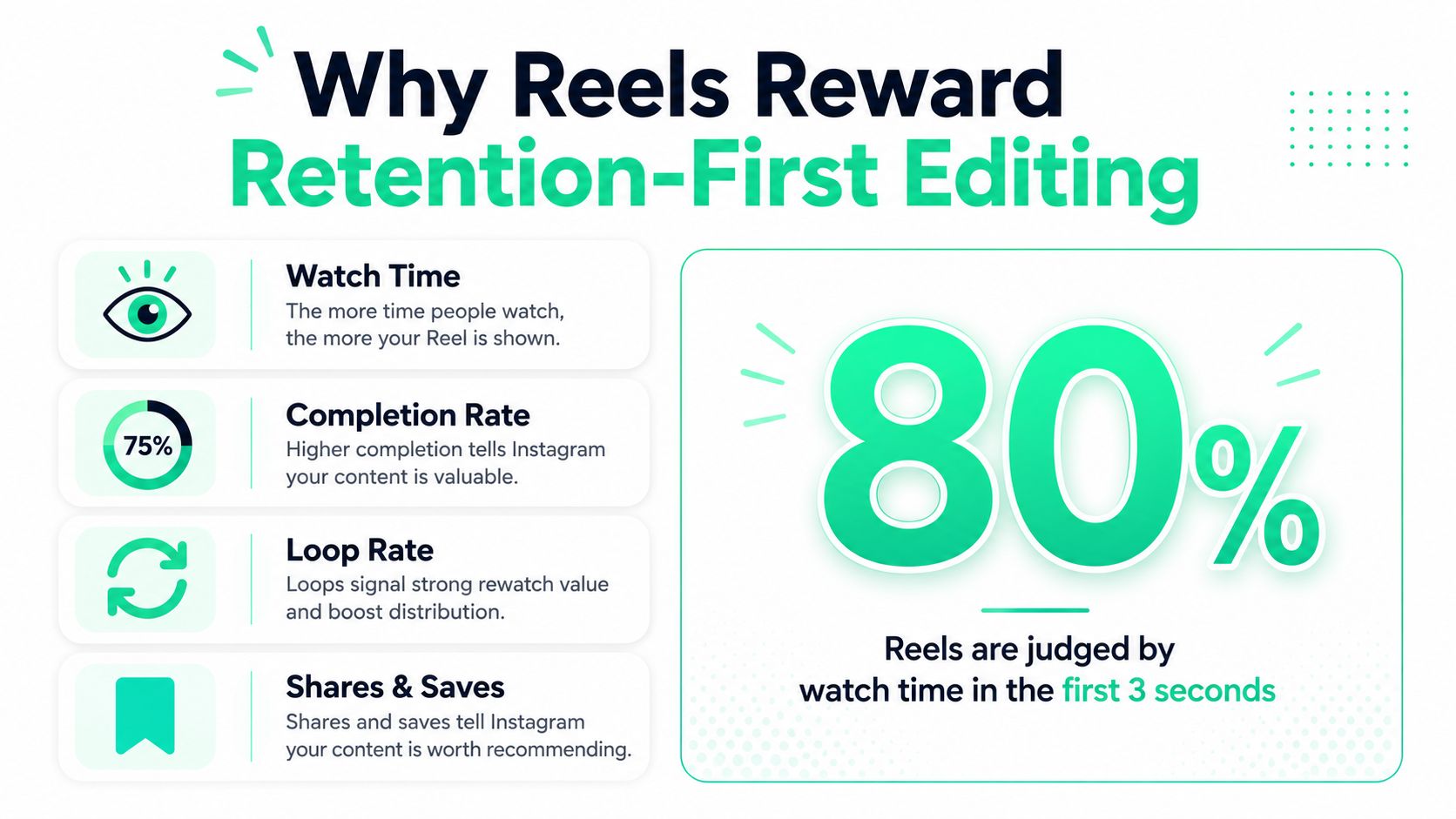
A Reel has to earn attention inside a swipe feed, so the edit has to prove value fast. That is why retention-first editing matters more than polish. If the opening beats do not hold the viewer, the rest of the clip never gets a chance to work. For business owners cutting from podcasts, webinars, or demos, the job is usually not to shoot more. It is to find the section that can survive on its own, then shape it for quick comprehension.
### The first seconds do the heavy lifting
The opening frame has one job, make the payoff obvious. Guides on short-form editing, including [best practices for Instagram Reels](https://clickyapps.com/creator/video/guides/instagram-reels-best-practices), consistently push the same point. Give the viewer a clear hook, visible motion, or a problem statement before any branding or intro. If the point is still fuzzy after a glance, the clip gets skipped before the message lands.
That changes how you edit. Reels need **hook → value → CTA**, not a slow warm-up. A logo sting, a long greeting, or a soft “hey everyone” opening usually burns the exact attention window that matters most. If the source clip does not open with a line worth stopping for, cut straight to the sentence that does.
### Sound-off viewing changes the script
Many viewers start with the sound off, so the visual layer has to carry the meaning. The first frame, the headline, and the captions all need to communicate the point without waiting for audio. Strong subtitles and a clear on-screen prompt help the clip make sense before the viewer hears the speaker.
That is why pacing matters so much in short-form. Reels hold attention better when the body is broken into fast, visually distinct beats, and when the viewer gets a fresh cue every few seconds instead of one long block of talking. The same logic shows up in [short-form video editing guidance](https://www.blitzreels.com/blog/short-form-video), where retention depends on giving the eye something new before the scroll reflex kicks in. It is not decoration, it is the part of the edit that keeps a repurposed clip from feeling flat in a feed built for movement.
## Choosing the Moment and Cutting to a Hook
The best clips usually don't start as clips at all. They start as a moment inside a larger recording that says something specific enough to survive on its own. In a podcast, that might be a guest pushing back on a common pricing assumption. In a webinar, it might be the question that exposes a mistake everyone keeps making. In a Loom demo, it might be the exact second a feature proves why it exists.
### Use three tests to pick the moment
A moment is worth clipping when it passes three simple checks.
1. **It teaches something.** The viewer leaves with a concrete idea, not just a vibe.
2. **It makes a sharp claim.** The line should be specific enough to create curiosity.
3. **It stands alone.** The surrounding context can't be required for basic understanding.
That filter keeps the edit honest. If a sentence only works after three minutes of setup, it probably belongs in the long-form recording, not in a Reel.
### Cut to the payoff, then explain it
Once the moment is chosen, the hook should carry the first beat. The most effective structure is often result first, explanation second. Show the conclusion, then walk through how it happened. That reduces drop-off because viewers can judge the relevance of the clip instantly.
> A Reel should feel like the middle of a good conversation, not the opening of a presentation.
Keep the body short and deliberate. A strong short-form structure often works best as **2 to 5 beats**, one idea per beat, rather than a single long stretch of explanation. That's also where a clean cut matters. Trim out every pause that doesn't add meaning, then give the opener enough urgency that the rest of the clip feels earned.
For teams building this way, the [science of scroll-stopping video hooks](https://www.blitzreels.com/blog/the-science-of-scroll-stopping-video-hooks) is a useful reference point because it matches what short-form viewers already do, they judge fast, and they reward clarity fast.
## Reframing Vertical and Adding Animated Captions
A strong moment can still miss if the frame feels awkward. Most business footage starts in 16:9, so the edit has to be reframed into a vertical **9:16** canvas if it is going to work as a Reel. The practical target is **1080 × 1920 pixels**, with faces, products, and text kept in the center so Instagram's UI does not cover the important parts of the shot.
### Keep the visual target in the middle
Vertical reframing is mostly about control. A speaker's face should stay centered, the product should stay visible, and any text should sit away from the top and bottom UI areas that get crowded by the app interface. Keep faces and text out of the bottom **20%** of the frame, especially when repurposing webinars or screen recordings.
That matters even more with repurposed footage. A widescreen podcast shot can look polished in the original file and still fail vertically if the crop leaves too much empty space or cuts a gesture out of frame. Auto-reframe helps when there is one clear subject, but the crop still needs a human check.
### Captions should carry the clip
Animated captions do more than translate speech into text. They set pace, create emphasis, and keep the message readable when sound is off. High-contrast subtitles work best when they are easy to scan, timed to the beat of the edit, and backed by occasional emoji callouts on the phrases that deserve attention.
Branding belongs here too, but lightly. Fonts, colors, and title cards should make the next clip faster to produce, not heavier to watch. A reusable caption style or intro card can save time across a batch of Reels, especially when the source footage already has a consistent voice and visual identity.
The other practical move is to insert a zoom, a B-roll shot, or a quick text change whenever the clip risks becoming visually static. If the talking head never changes and the subtitle style never varies, the viewer starts to drift.
The [captions workflow guide](https://www.blitzreels.com/blog/how-to-add-captions-to-reels) is useful if the goal is to keep the transcript readable without turning the edit into a design project.
### A fast editing layer changes the math
A tool like **BlitzReels** can compress this stage into one workflow, upload, auto-captions, reframing, and brand presets, instead of making a team jump between separate apps. That matters because the slow part is usually not the trimming, it is the back-and-forth between crop, text, and review.
Here is a useful checkpoint before export.
- **Crop first:** make sure the subject is centered before any styling.
- **Caption second:** the text should be readable without competing with the frame.
- **Brand last:** keep the logo and title card restrained enough that the clip still feels native.
The [video repurposing tutorial](https://www.youtube.com/embed/FDOi29blAFI) shows the kind of edit flow many teams want when the raw file is a webinar or interview, not a fresh vertical shoot.
## Resizing and Exporting for Every Platform
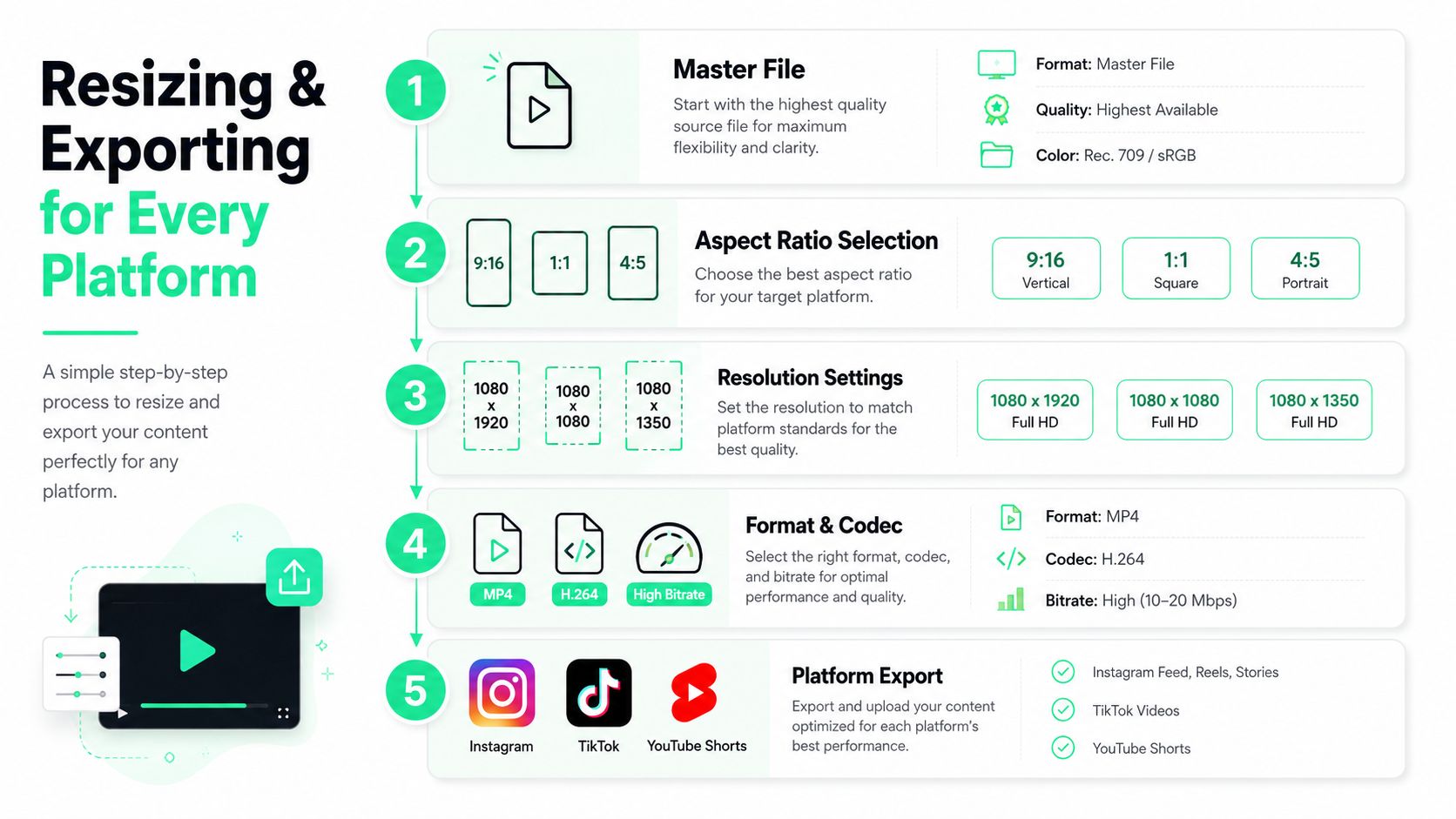
A Reel that only works on Instagram leaves reach on the table. A source clip should move across TikTok, YouTube Shorts, and LinkedIn without being rebuilt from scratch, so the export layer has to be part of the edit, not an afterthought. That means choosing the right canvas, the right safe zones, and the right cover frame before the file ever gets posted.
### Build the export around the platform, not the source file
The starting point for these formats is still the vertical canvas. Instagram Reels are built around **9:16** with **1080 × 1920** pixels, and the important elements need to stay centered so the app interface does not cover them. That same discipline helps when the clip is republished elsewhere, because a centered subject and clean safe zone make platform adaptation much easier.
Different platforms tolerate different styling. LinkedIn can handle denser title text than a casual Reels feed, while TikTok often works better with stronger on-screen prompts. The move is to keep the edit stable, then swap the title frame, shift the crop slightly, and adjust the closing CTA to fit the audience.
For layout checks, [this aspect ratio converter](https://www.blitzreels.com/blog/video-aspect-ratio-converter) is useful before export, especially when one source needs to fit more than one feed.
### One master clip should become several exports
A workflow-oriented resize tool like **BlitzReels** turns one mastered edit into multiple platform-safe files. Teams save time that way. Instead of exporting one version, revisiting the crop, and redoing the subtitles for each network, they can keep the core cut stable and only adjust the framing and delivery layer.
That same logic applies to file type and quality. A clean MP4 export with a high bitrate is usually the safest base for social posting because it preserves text sharpness and lowers the chance that captions look mushy after upload. Cover selection matters too, because the thumbnail often decides whether the clip gets a second look in the feed.
The same export discipline shows up in [ai video production for fashion brands](https://www.wearview.co/uses/ai-video-production-for-fashion-brands), where one source often needs to be shaped into multiple social outputs without losing clarity on smaller screens.
## Repurposing One Source Into Multiple Reels
One long recording can feed a week of short-form if the team stops treating each clip as a one-off. A 30-minute podcast, a webinar, or a customer interview usually contains several distinct assets hiding in the transcript, a contrarian take, a how-to point, a mistake story, a sharp quote, and one clean stat or outcome.
### Slice by angle, not by time
The fastest repurposing teams don't ask, “Where do we cut this?” They ask, “What kind of clip does this source contain?” That approach turns a single recording into multiple posts with different hooks and different CTAs. A mistake story can become an educational Reel. A quote can become a punchy opinion clip. A feature demo can become a problem-solving clip.
That's the same asset-first thinking used in [ai video production for fashion brands](https://www.wearview.co/uses/ai-video-production-for-fashion-brands), where the value often comes from reshaping one source into several outputs instead of chasing a brand-new shoot every time.
> The archive gets more valuable when each source can produce more than one angle.
### Change the opening and the close
Two clips can use the same source file and still feel different if the first line and the last line change. A title card can set a different expectation, the crop can favor a different speaker, and the closing CTA can ask for a different next step. One version might ask viewers to watch another clip. Another might push them to comment on the idea.
That also means captions and cover frames should not be treated as generic. The title, the subtitle emphasis, and the thumbnail all help the platform understand what the clip is about. A clip that is designed once and reused twice usually performs better than a clip that tries to say everything in one version.
The [content repurposing strategy guide](https://www.blitzreels.com/blog/content-repurposing-strategy) is a useful companion here because the logic is simple, one source, many outputs, no extra filming day required.
## BlitzReels Compared to Traditional Editing Workflows
A founder with a folder full of webinar recordings or podcast files usually needs the same thing, a short clip that gets to the point fast. The problem is that the usual editing paths are built for different jobs. The Instagram in-app editor is quick, but it gives limited room for repurposing. Premiere Pro offers full control, but it asks for more time and more skill than many business owners want to spend on a 20-second clip. A clipping layer like BlitzReels sits between those two extremes by focusing on the work that matters most for short-form, trimming, captions, reframing, and multi-platform exports.
### The trade-off is speed versus control
Timeline editors still make sense when a clip needs frame-by-frame precision, complex audio work, or layered motion graphics. They are also the slowest option for routine social repurposing, because every file has to be built by hand. The in-app editor sits on the other side. It is fast for simple posts, but it gets awkward when the source is widescreen podcast footage, a webinar, or a screen recording that needs careful cropping.
That leaves a middle path for teams that need volume. BlitzReels is built to take a long source video, detect usable moments, generate captions, center the frame, and get the clip ready for vertical publishing. That makes it practical for podcast clips and webinar pull-quotes, especially when the goal is to produce a steady stream of short-form assets, not to build a cinema-grade timeline.
The trade-off shows up in the finishing work too. A dedicated editor gives more control over every cut and graphic, while a clipping workflow gives speed and consistency across a library of existing footage. For business owners, the question is simple, do they want to spend time shaping each file manually, or use that time on choosing the right moment and posting it cleanly? A broader comparison like the [best AI video editors guide](https://www.blitzreels.com/blog/best-ai-video-editors) helps frame that decision. Some editors are better for full creative control. Others are better for speed. For business owners, the right question is whether the tool reduces the time between “good moment found” and “clip posted.”
### A weekly clipping system beats a content calendar
The sustainable version of Reels production is straightforward. Pull a few moments from existing footage, cut each to a hook, reframe vertical, add captions and brand styling, export for multiple platforms, then stagger the posts and review performance after a short window. The metrics that matter most are **average watch time**, **save rate**, and **share rate**, because those show whether the clip kept attention and earned distribution.
A small team does not need a different idea every day. It needs one reliable system that turns archived footage into publishable assets at a predictable pace. That is why the best Reels workflow is a clipping workflow, not a content calendar.
BlitzReels fits that kind of production, but it is not the only useful piece in the stack. Some teams pair it with a [LinkedIn content creation tool](https://www.viralbrain.ai/) when the same source video needs to become both short-form video and written social posts, which keeps the repurposing plan tied to the original recording instead of starting over each time.
BlitzReels is built for that exact process, turning existing videos into short branded clips with hooks, captions, reframing, and platform-ready exports in one place. If a team is trying to move from scattered recordings to a repeatable short-form system, it can visit [BlitzReels](https://blitzreels.com) and start building the next batch from footage that already exists.