---
title: "How to Repurpose Podcast Content Into Clips That Convert"
canonical: "https://blitzreels.com/blog/how-to-repurpose-podcast-content"
---
# How to Repurpose Podcast Content Into Clips That Convert
URL: https://blitzreels.com/blog/how-to-repurpose-podcast-content
Markdown URL: https://blitzreels.com/blog/how-to-repurpose-podcast-content.md
Published: 2026-08-02
Author: BlitzReels
Learn how to repurpose podcast content into clips, reels, and posts with a proven workflow that turns one episode into a full week of social content.
Tags: podcast repurposing, podcast to shorts, ai video editor, short-form content, blitzreels

You finish the episode, export the file, paste a few rough notes into a doc, and then the recording disappears into a folder named something like “final-final.” The conversation was good, the guest gave you usable lines, and the show should be doing more than earning a single publish day. That gap between “episode shipped” and “content extracted” is where most podcasts leave distribution on the table.
The fix isn't to stare harder at the audio file. The fix is to treat the **transcript as the production asset**, then turn one conversation into a week's worth of clips, quote posts, audiograms, and platform-native shorts. Teams that build around that workflow pull far more out of each recording, and they avoid the usual scramble of re-listening, retyping, and guessing what might work. Practical breakdowns of this kind of asset-to-format thinking are also covered in [strategies for turning assets into formats](https://heytrendy.app/blog/content-repurposing-strategies).
## Table of Contents
- [The Moment Every Podcast Host Recognizes](#the-moment-every-podcast-host-recognizes)
- [Auditing the Episode Before You Cut Anything](#auditing-the-episode-before-you-cut-anything)
- [Clean the transcript, then mark the signal](#clean-the-transcript-then-mark-the-signal)
- [Separate clip-worthy moments from dead air](#separate-clip-worthy-moments-from-dead-air)
- [Extracting High-Performing Clips](#extracting-high-performing-clips)
- [Score each moment against the same rubric](#score-each-moment-against-the-same-rubric)
- [A simple inventory example](#a-simple-inventory-example)
- [Editing Each Clip for a Mobile-Native Feed](#editing-each-clip-for-a-mobile-native-feed)
- [Trim from the hook, not from the beginning](#trim-from-the-hook-not-from-the-beginning)
- [Reframe, caption, review](#reframe-caption-review)
- [Formatting Clips for the Platform That Will Host Them](#formatting-clips-for-the-platform-that-will-host-them)
- [Match the cut to the feed](#match-the-cut-to-the-feed)
- [Use native cadence, not identical reposts](#use-native-cadence-not-identical-reposts)
- [Shipping a Week of Content in One Production Session](#shipping-a-week-of-content-in-one-production-session)
- [A workable batch cadence](#a-workable-batch-cadence)
- [Keep the workflow inside one approved system](#keep-the-workflow-inside-one-approved-system)
- [Measuring Which Clips Actually Moved the Needle](#measuring-which-clips-actually-moved-the-needle)
- [Track the signals that indicate real interest](#track-the-signals-that-indicate-real-interest)
- [FAQ for the first batch](#faq-for-the-first-batch)
## The Moment Every Podcast Host Recognizes
The episode is uploaded. The guest has already thanked everyone on LinkedIn. The show notes are half-written, and the original file is sitting in a drive folder like it's waiting for permission to matter again. That's the point where a lot of teams stop treating the episode as a content source and start treating it like a completed object.
That instinct is expensive. A single recording usually contains multiple usable ideas, but they don't reveal themselves when someone thinks only in terms of “the episode.” They show up when the team looks at the transcript, pulls out the strongest lines, and asks which moments can stand alone on TikTok, Instagram Reels, YouTube Shorts, LinkedIn, or inside an email. [Why repurposed clips drive more engagement than originals](https://www.blitzreels.com/blog/why-repurposed-clips-drive-more-engagement-than-originals) makes the same case from a distribution angle.
> **Practical rule:** If a clip needs the full episode to make sense, it usually isn't a clip yet.
That shift changes the job. The audio file becomes source material, not the starting point. The workflow becomes audit, extract, edit, format, schedule, measure. Once that chain is in place, one episode can feed a content calendar instead of disappearing after launch day.
Advantage is consistency. When a team repurposes from the transcript first, each downstream asset keeps the same core message while adapting the packaging to the channel. Guidance on turning one recording into multiple formats is useful here, especially when the goal is to stop treating podcast publishing as the end of the process.
## Auditing the Episode Before You Cut Anything
The transcript needs a clean first pass before anyone opens an editor. That pass is less about summarizing the whole conversation and more about marking the moments that can survive outside the episode. A strong audit usually starts with a read for ideas, then a second read for hooks, then a third pass for lines that can function as quotes or transitions.
### Clean the transcript, then mark the signal
A messy transcript slows everything down. Clean up speaker labels, obvious transcription errors, and any sections where two people are talking over each other. Then tag timestamps for **strong claims**, **surprising details**, **guest reactions**, and **process explanations**. Those are the moments that usually become clip anchors, pull quotes, or title-card openings.
The best teams do not try to rescue every minute of a conversation. They build a short list of **3 to 5 standalone “aha” moments** for each downstream asset, then ignore the rest unless it supports the hook. That keeps the repurposed piece focused and cuts down on re-listening, because the editor is not hunting through the full file every time a new format is needed.
A transcript-first workflow also keeps the messaging tight. One practical guide recommends using the transcript as the source of truth, then deriving show notes, a blog post, a newsletter angle, and social posts from the same text, which reduces repeated explanation work and keeps every format aligned with the same episode message. For a clean conversion from speech to text, the [audio to text workflow](https://www.blitzreels.com/blog/convert-audio-mp-3-to-text) is the useful foundation, not a nice-to-have extra.
### Separate clip-worthy moments from dead air
Some sections are there to build rhythm in the episode, not to carry social distribution. Long setup, housekeeping, and extended context often feel necessary in the full conversation, but they rarely survive the jump to short-form unless they lead directly into the payoff. The audit should flag those sections as support material, not content inventory.
> Do not summarize the whole episode. Find the one line that would still make sense to someone who has never heard of the show.
That filter matters. A cold viewer does not need the preamble, and a platform feed will not reward it. The transcript audit should leave the team with a ranked list of moments that already have a beginning, middle, and end, even if the final edit trims them into a tighter shape.
## Extracting High-Performing Clips
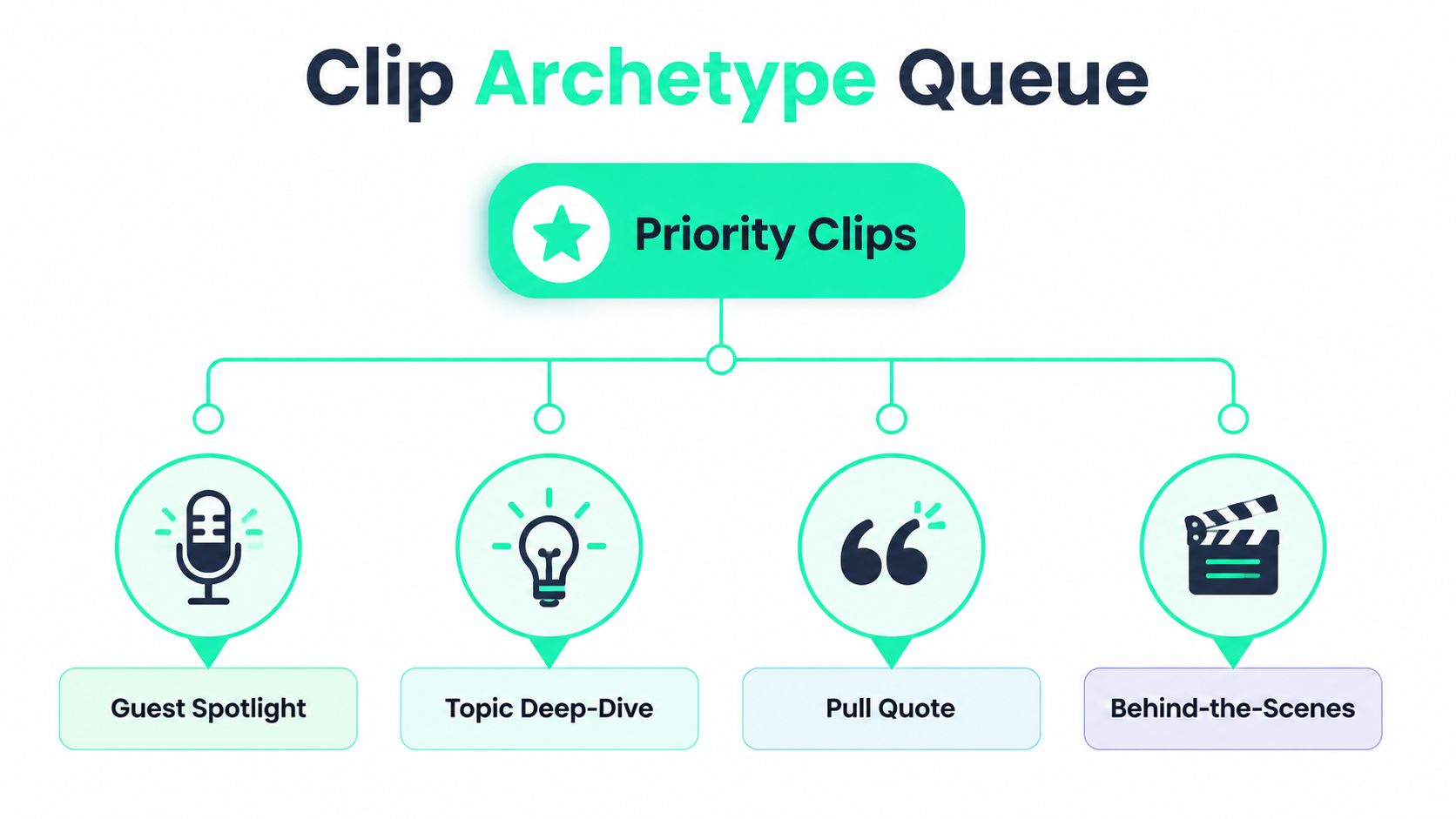
High-performing clips usually fall into four archetypes, and each one does a different job. A **guest spotlight** gives the audience a person to care about. A **topic deep-dive** gives them a useful idea. A **pull quote** gives them a sharp line to share. A **captioned audiogram** gives them a lightweight asset for feeds where the visual does not need to carry much.
### Score each moment against the same rubric
A raw timestamp only becomes a usable clip if it passes a simple test:
- **Standalone hook,** does the first line create curiosity without extra setup.
- **Self-contained idea,** does the segment make sense on its own.
- **Emotional punch,** is there surprise, tension, humor, or conviction.
- **Clear next step,** does the clip naturally point to the full episode, a follow-up post, or a related asset.
A strong guest clip usually starts in the middle of a sentence or with the punchline, not with a warm-up. A topic clip works when the guest explains a process, a mistake, or a framework in plain language. A pull quote is often the shortest option, but it still needs to be memorable enough to stand on its own as text. An audiogram works best when the audio is the point and the visual keeps it legible.
The useful timing window is usually **30 to 60 seconds** for mobile-native distribution, because it keeps the hook tight and the payoff close. One 2026 guide says **one 45-minute episode can yield 50+ social media posts** when it is broken into clips, quotes, and derivative assets, which is exactly why the audit has to be selective instead of exhaustive. A separate summary also reports that repromoting episodes through blog posts and social content can drive **300% more episode downloads** ([source](https://influenceflow.io/resources/repurposing-podcast-content-for-social-media-the-complete-2026-guide/)).
### A simple inventory example
A single 45-minute episode can produce a usable stack when the guest is strong and the transcript is clean:
| Clip type | What it usually becomes |
|---|---|
| Guest spotlight | One vertical short, one LinkedIn-friendly cut |
| Topic deep-dive | One educational Reel or Short |
| Pull quote | One static quote post, sometimes paired with a captioned cut |
| Captioned audiogram | One low-friction teaser for social or email |
The goal is not volume for its own sake. The goal is to create enough distinct angles that the same episode can reach different audiences without feeling repeated.
The mistake to avoid is blasting the same file everywhere at once. One B2B repurposing guide warns against flooding every platform with the same asset on the same schedule, because each channel works better with its own native cadence and format. Before a clip goes out, use the hook principles in [The science of scroll-stopping video hooks](https://www.blitzreels.com/blog/the-science-of-scroll-stopping-video-hooks) to check whether the opening line can hold attention on its own. For teams that hand off the edit work, [video editing services](https://moonb.io/blog/video-editing-companies) can be the practical route when the internal team needs faster turnaround or more consistent output.
## Editing Each Clip for a Mobile-Native Feed
A raw timestamp is only a starting point. It still needs a hook that lands fast, framing that holds on a phone screen, captions that can be read without sound, and a review pass that catches anything a first-time viewer might misunderstand. Editors earn their keep here, because the clip either feels made for the feed or it reads like leftover podcast footage.
### Trim from the hook, not from the beginning
Hook-first trimming comes first. The strongest line should appear immediately, or at least within the first few seconds, so the clip has a chance to hold attention before the viewer scrolls on. If the episode opens with setup that delays the point, cut it. If the payoff lands too late, move the cut until the payoff arrives sooner.
That is where **clipping** and title-card hooks matter. A clip can open on a short question, a hard claim, or a direct reaction line, then let the speaker explain the idea once the viewer is already listening. BlitzReels handles that style of fast editing with its clipping workflow, title-card options, and auto reframing, which keeps the speaker centered when a widescreen interview is cut down for a vertical feed.
Captions are part of the edit, not decoration. A muted feed needs text that is readable, timed well, and clear enough that the clip still works without audio. For a closer look at that part of the workflow, [how captions shape engagement on TikTok and Instagram](https://www.blitzreels.com/blog/how-captions-drive-engagement-on-tiktok-and-instagram) is worth reading alongside the edit.
> A clip with the right line and the wrong framing still loses attention. The viewer notices the roughness before the point lands.
### Reframe, caption, review
The visual pass comes next. **Speaker reframing** keeps faces from drifting off-center during crop changes, and **resize** settings make it possible to move from the original interview layout to phone-friendly output without rebuilding the whole asset. Captions should stay consistent in style, but they should not be so heavy that they bury the speaker.
The brand review pass catches the problems that do not show up in the transcript. That includes profanity that works in the room but not on the channel, an off-message tangent, or a line that needs a little more context so a cold viewer does not misread it. A template system helps here, because the same visual rules can be reused without editing every clip from scratch.
If a team needs outside support, [video editing services](https://moonb.io/blog/video-editing-companies) are an option, but the better internal workflow is still one where the edit is repeatable enough that the next episode does not feel like a custom project.
## Formatting Clips for the Platform That Will Host Them
A clip can be strong and still underperform if it looks foreign in the feed. A vertical TikTok edit with bold captions may fit TikTok cleanly, while the same treatment can feel too loud on LinkedIn, where a calmer opener and a cleaner visual hierarchy usually read better. The point is not to make every export identical. It is to match the wrapper to the place where the clip will be watched.
### Match the cut to the feed
TikTok, Instagram Reels, and YouTube Shorts usually work best with a **9:16 vertical** cut, a sharp opening, strong captions, and tight pacing. Those feeds reward motion and immediate clarity, so the first seconds need to make the topic obvious without extra setup. LinkedIn asks for a different treatment. A square or **4:5** version, with less aggressive motion and a more restrained opener, often fits the work-focused feed better.
X can work with a shorter clip, a still image, or a quote card, depending on the angle. Email is a different use case again, because the clip often acts as a preview rather than the full piece. In that setting, the CTA does more of the work than the visual treatment, since the goal is to bring the reader back to the episode page or the full conversation.
The practical move is to make one source cut, then reformat it for each destination instead of posting the same file everywhere. That is where a batch workflow saves real time. For teams that want the mechanics, [batch editing for reels](https://www.blitzreels.com/blog/the-creator-s-guide-to-ai-powered-batch-editing-for-reels) fits naturally into the same production chain as the [subtitles generator](https://www.blitzreels.com/tools/subtitles-generator). If you also want a broader comparison of tools, [compare AI tools for social posts](https://www.aiphotogenerator.net/blog/2026/06/best-ai-for-social-media-content-creation) before you lock your stack.
### Use native cadence, not identical reposts
The same clip can live in multiple places, but it should not feel pasted in from one channel to another. A LinkedIn post may need a gentler lead-in and a cleaner title card. A Reel may call for a faster cut and stronger on-screen emphasis. A Shorts version can usually carry a little more punch in the opening line, as long as the clip still stands on its own.
For teams building the full podcast-to-clips pipeline, the [podcast clips use case](https://www.blitzreels.com/use-cases/podcast-clips) and the [clipping workflow](https://www.blitzreels.com/clipping) are the most direct starting points, because they keep the focus on turning the episode into native short-form assets instead of exporting one universal file and hoping it fits.
## Shipping a Week of Content in One Production Session
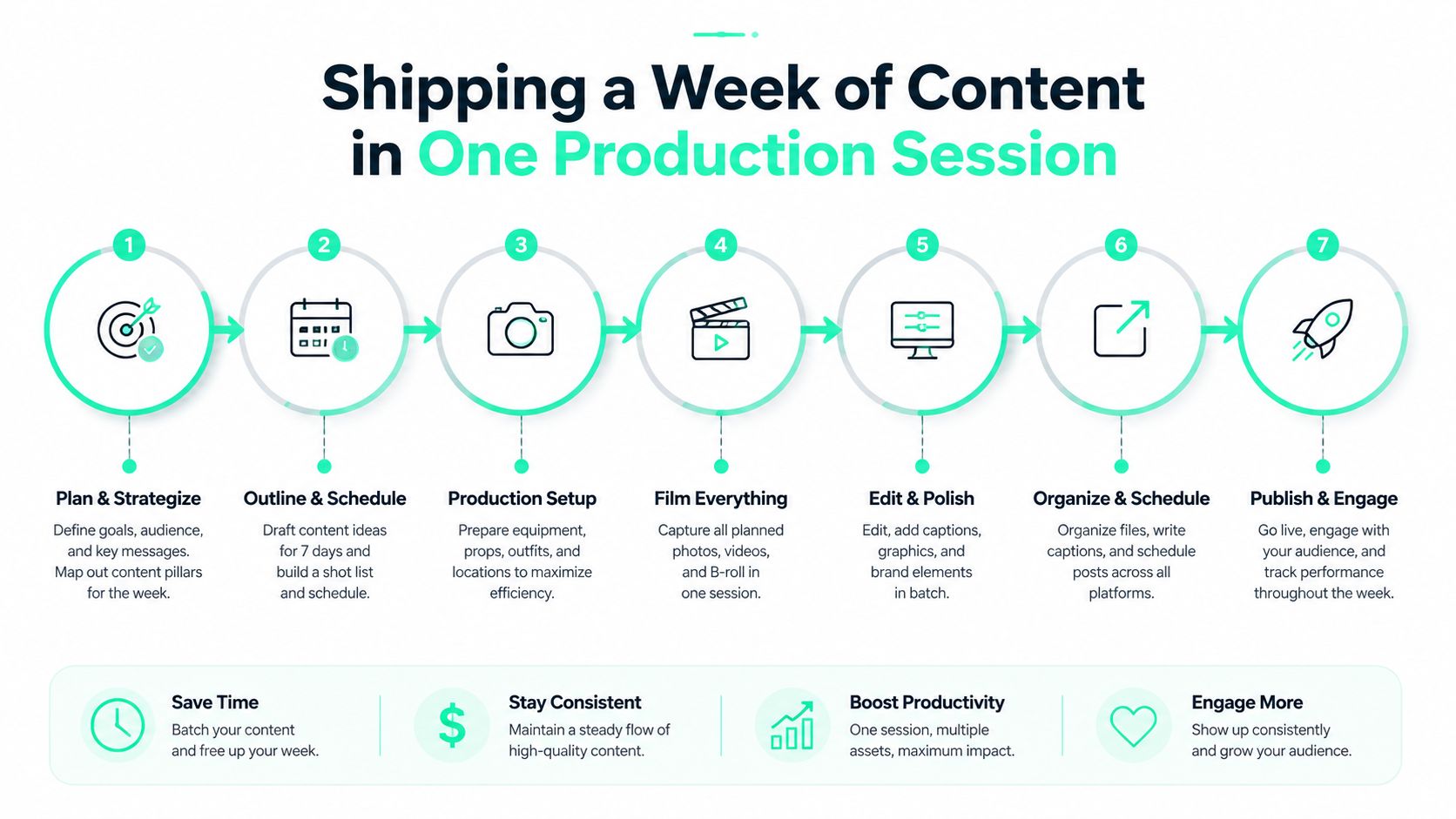
A week of output usually comes from one strong production block, not from chasing fresh ideas every day. Record the episode, transcribe it, mark the clips, then move into edit and scheduling while the transcript is still fresh. That keeps a small team from turning into a last-minute clip shop, and it makes the episode the source file for the whole calendar instead of a one-off asset.
### A workable batch cadence
A practical cadence looks like this:
1. **Record and transcribe on Monday.** The transcript becomes the working file, not a backup.
2. **Audit the transcript right away.** Mark the strongest hooks, the guest reactions, and the lines that can stand alone.
3. **Edit the top clips on Tuesday.** Apply hook-first trimming, captions, and reframing in one pass.
4. **Reformat for platforms.** Create the vertical, square, or 4:5 versions needed for each channel.
5. **Review and export in batches.** Catch brand issues before anything goes live.
6. **Schedule across the week.** Space the assets out so the audience sees variety instead of a content dump.
That rhythm works because it keeps decisions close together. Once you have the title card, caption style, and lower-third treatment approved, those elements can carry across the next round of clips without rebuilding the package every time. For teams that want the editing workflow spelled out in more detail, [batch editing for reels](https://www.blitzreels.com/blog/the-creator-s-guide-to-ai-powered-batch-editing-for-reels) fits naturally into the same production chain.
The other time saver is deciding clip types before export starts. Some cuts need a title card, some need B-roll, some can ship as a straight quote with subtitles, and some work better with a CTA that sends viewers to the full episode. A batch process keeps those choices from getting made under pressure, when small mistakes tend to slip through.
### Keep the workflow inside one approved system
Teams lose time when every clip starts from scratch. A cleaner system uses approved templates for clipping, captions, reframing, and final export, so the same episode can be pushed through the pipeline without bouncing between separate tools. That setup also makes it easier to keep review steps consistent, because the team is looking at the same structure each time instead of a new layout for every asset. For a practical reference on that kind of production setup, [batch editing for reels](https://www.blitzreels.com/blog/the-creator-s-guide-to-ai-powered-batch-editing-for-reels) and the [subtitles generator](https://www.blitzreels.com/tools/subtitles-generator) fit into the same workflow, while [compare AI tools for social posts](https://www.aiphotogenerator.net/blog/2026/06/best-ai-for-social-media-content-creation) helps teams choose which parts of the stack they want to automate.
A tool like BlitzReels fits that model when the team needs podcast episodes turned into captioned shorts without jumping between separate editors for clipping, subtitles, resize, and final formatting.
## Measuring Which Clips Actually Moved the Needle
Views alone don't tell the story. A clip can rack up attention and still fail to move anyone toward the podcast, the site, or the brand. The numbers that matter are the ones that show whether the clip created deeper interest, not just a fleeting impression.
### Track the signals that indicate real interest
The cleanest set of metrics is small:
- **Completion rate,** because it shows whether the opening held attention long enough to matter.
- **Profile visits,** because it indicates curiosity beyond the clip itself.
- **Link clicks back to the full episode,** because it shows whether the asset drove action.
- **Follower conversion by clip archetype,** because it tells the team which format attracts the right audience.
Raw view count is the wrong primary metric. A clip with fewer views can outperform a bigger one if it drives more meaningful actions. The useful question is not “What was watched?” It's “What caused someone to care enough to click, follow, or come back?”
> A clip that drives profile visits usually did a better job than a louder clip that never moved the viewer further.
That logic matters when the team is deciding what to cut next time. If guest spotlight clips consistently trigger more profile visits, they deserve more priority in the transcript audit. If topic deep-dives drive more clicks back to the episode, they should get stronger hooks and cleaner CTAs. If pull quotes get shared but don't convert, they may still belong in the stack, but not as the main growth lever.
### FAQ for the first batch
How often should clips go live? Consistency matters more than volume, as long as the schedule feels native to the channel.
When should a clip retire? When the hook stops earning attention or the topic no longer feels timely to the audience.
How should evergreen guests be repurposed without sounding repetitive? Change the angle, not just the crop. A different hook, title card, or CTA keeps the asset from feeling copied.
The loop is simple. Audit the transcript, cut the strongest moments, ship the clips, then use the numbers to decide which archetypes deserve more space in the next episode. That's how podcast repurposing stops being a chore and becomes a production system.
---
BlitzReels turns podcast episodes into captioned shorts, clipped highlights, and resized platform-ready exports without forcing a team to rebuild the same asset for every channel. If the workflow needs transcript-first clipping, reframing, subtitles, and fast batch editing in one place, visit [BlitzReels](https://blitzreels.com) and see how the production loop can move from episode to scheduled clips faster.