---
title: "How to Repurpose Video Content for Short-Form Reach"
canonical: "https://blitzreels.com/blog/how-to-repurpose-video-content"
---
# How to Repurpose Video Content for Short-Form Reach
URL: https://blitzreels.com/blog/how-to-repurpose-video-content
Markdown URL: https://blitzreels.com/blog/how-to-repurpose-video-content.md
Published: 2026-08-01
Author: BlitzReels
Learn how to repurpose video content into TikToks, Reels, Shorts, and LinkedIn clips with a proven workflow for hooks, captions, and fast publishing.
Tags: repurpose video, short-form content, video repurposing, AI video editor, social clips

You've got the raw material already. A webinar sits in the drive, a podcast recording got published once and forgotten, a product demo has good answers buried inside it, and nobody has turned any of it into the short clips your audience scrolls through.
That's the waste many teams live with. The fix is not “make more video,” it's to **repurpose one recording into a pipeline of platform-ready shorts** with a transcript, a clip map, captions, reframing, and a publishing cadence that keeps the team from starting over every week. A 2024 survey by Wyzowl found that **91% of businesses** use video as a marketing tool, and **95%** of video marketers say video is an important part of their strategy, which is exactly why the editing workflow has to get more efficient, not more chaotic. [LocaliQ's repurposing breakdown](https://localiq.co.uk/blog/how-to-repurpose-video-content-across-all-your-channels) makes the case clearly, once video becomes a core asset, the smartest move is to re-edit a single recording into multiple outputs instead of producing each asset from scratch.
## Table of Contents
- [The One Recording Sitting in Your Drive Right Now](#the-one-recording-sitting-in-your-drive-right-now)
- [Stop treating every platform like a separate shoot](#stop-treating-every-platform-like-a-separate-shoot)
- [What changes when repurposing becomes the default](#what-changes-when-repurposing-becomes-the-default)
- [Auditing Your Video Library for Repurposing Gold](#auditing-your-video-library-for-repurposing-gold)
- [Score the archive before touching the timeline](#score-the-archive-before-touching-the-timeline)
- [Tag for reuse, not for sentiment](#tag-for-reuse-not-for-sentiment)
- [Mining the Transcript for Clip Candidates](#mining-the-transcript-for-clip-candidates)
- [Read for quotable lines and natural breakpoints](#read-for-quotable-lines-and-natural-breakpoints)
- [Narrow the candidate list before editing](#narrow-the-candidate-list-before-editing)
- [Editing Shorts That Actually Get Watched](#editing-shorts-that-actually-get-watched)
- [Write the hook first, then cut the rest](#write-the-hook-first-then-cut-the-rest)
- [Reframe for vertical before you polish anything else](#reframe-for-vertical-before-you-polish-anything-else)
- [Build captions and visual rhythm for silent viewing](#build-captions-and-visual-rhythm-for-silent-viewing)
- [Batching, Approvals, and Publishing Cadence](#batching-approvals-and-publishing-cadence)
- [Batch source material, captions, and approvals together](#batch-source-material-captions-and-approvals-together)
- [Use a cadence that keeps the feed active](#use-a-cadence-that-keeps-the-feed-active)
- [Keep one edit queue, not five separate ones](#keep-one-edit-queue-not-five-separate-ones)
- [Measuring What Works and Feeding It Back In](#measuring-what-works-and-feeding-it-back-in)
- [Track the metrics that map to attention](#track-the-metrics-that-map-to-attention)
- [Tag every clip so the winners are traceable](#tag-every-clip-so-the-winners-are-traceable)
- [Your Repurposing System on One Page](#your-repurposing-system-on-one-page)
## The One Recording Sitting in Your Drive Right Now
The moment is familiar. A **60-minute webinar** gets recorded cleanly, the speaker gives three strong answers, and then the file lands in a folder where it will sit until next quarter. The same thing happens with a podcast episode, a founder Q&A, or a customer interview that had real signal but no downstream system.
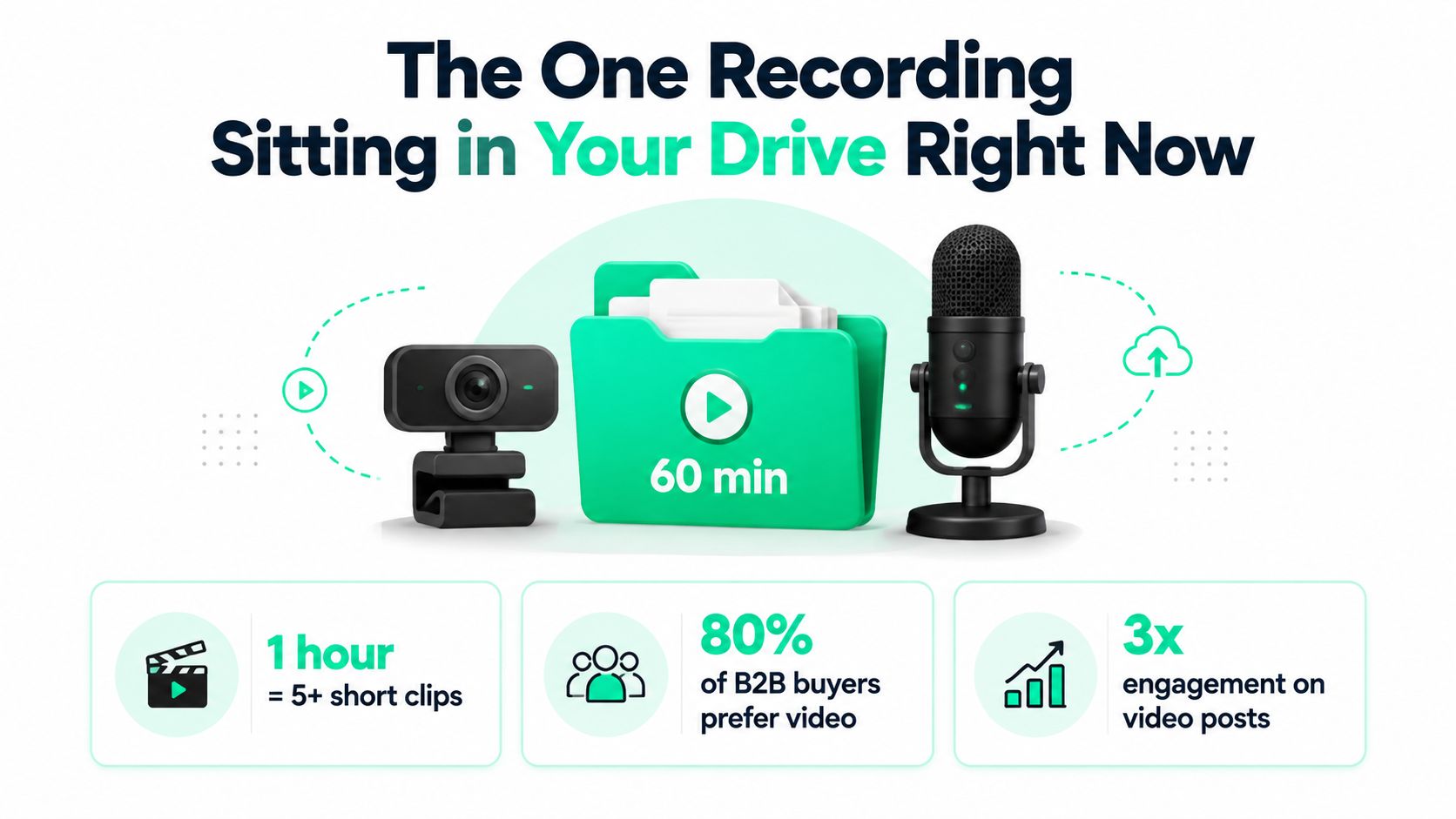
That file isn't a finished asset, it's a **source asset**. The right way to think about **how to repurpose video content** is simple, one recording should become a cluster of clips, title cards, captions, and platform-specific edits that each do one job well. BlitzReels' repurposing overview explains the broader content reuse mindset at [its content repurposing guide](https://www.blitzreels.com/blog/content-repurposing), and the logic is sound, a single recording has more usable material than most teams extract from it the first time.
### Stop treating every platform like a separate shoot
Teams waste time when they try to create a new video for TikTok, another for LinkedIn, and a third for YouTube Shorts. The better move is to record once, then carve the strongest moments into native short-form outputs.
That approach fits the reality of modern video marketing. People already expect video in their feeds, and short-form platforms reward speed, clarity, and a fast hook. A long recording should not be “shared again,” it should be **mined**.
### What changes when repurposing becomes the default
The brief shifts from “make a video” to “extract value from a video.” That changes how teams prep interviews, how they moderate webinars, and how they capture founder recordings.
> **Practical rule:** if a recording contains three solid answers, it probably contains three clips worth editing. If it contains one clear takeaway plus a strong quote, it still belongs in the repurposing queue.
That's why weekly repurposing matters. It turns the archive into a working inventory instead of a storage problem.
## Auditing Your Video Library for Repurposing Gold
A repurposing system starts with a clean inventory, not with editing software. The team needs to know what's in the library, which recordings are evergreen, and which ones are dead ends because the topic is too time-sensitive or the delivery is too weak.
### Score the archive before touching the timeline
The fastest audit is a spreadsheet with five columns, **asset name**, **format**, **date**, **topic**, and **repurposing potential**. Then each recording gets a simple yes, maybe, or no based on whether it has one sharp quote, a useful explanation, or a story that still matters next month.
That matters because not every source format produces the same kind of short-form. **Webinars** usually give clean teaching moments, **podcasts** yield conversational quotes, **product demos** produce feature-focused clips, **customer interviews** give proof and emotion, and **founder recordings** often carry the sharpest positioning lines. Those differences should guide editing decisions instead of forcing every source into the same clip pattern.
### Tag for reuse, not for sentiment
A video can be good and still be the wrong repurposing candidate. A company announcement, for example, might be polished but too tied to one date. A tutorial or customer story often has longer shelf life.
Use tags that help an editor move fast later.
- **Evergreen topic:** Useful beyond the original publish week.
- **Strong quote:** A line that can stand alone as a clip opener or pull quote.
- **Clear audience fit:** A specific role or segment can recognize itself in the message.
- **Multi-clip potential:** Enough distinct ideas exist to create more than one short.
If the archive is messy, that's not a creative problem, it's an operations problem. Clean labels make the next stage faster, and the team should do that work before any cut is made.
## Mining the Transcript for Clip Candidates
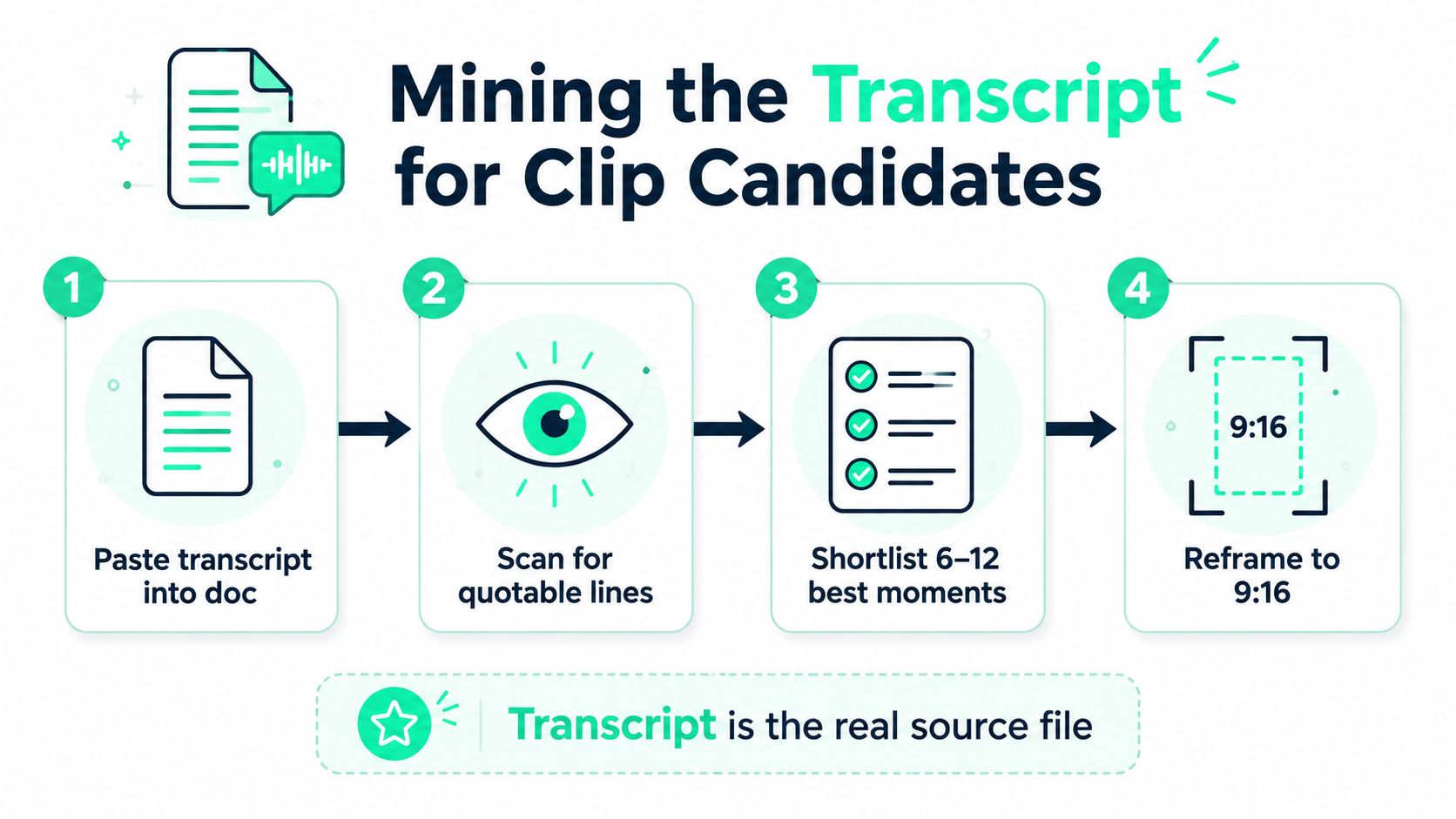
The transcript is the source file. Not the timeline, not the folder, not the original export. Once the transcript is in front of the editor, the job becomes easier because the strongest material is easier to scan, compare, and shortlist.
A practical transcription workflow helps here. If the team still needs a transcription source, [find video transcription tools](https://aidictation.com/blog/video-transcription-software) before opening the editor, because the value comes from reading the conversation as text, not from scrubbing blindly through hours of footage.
### Read for quotable lines and natural breakpoints
Paste the transcript into a document and scan for four things, **quotable lines**, **surprising facts**, **questions from the audience**, and moments where the speaker changes pace or tone. Those are the places where a clip can start or stop without feeling cut up.
Kaltura recommends watching the full video and identifying moments that can stand alone as shorter clips, including powerful quotes, interesting facts, and tips, then separating those clips before optimizing them for different platforms. That sequence is smart because it forces selection before formatting, which is the opposite of the usual mistake.
### Narrow the candidate list before editing
Wistia's transcript-first workflow is even more useful for teams that want to move quickly. It says you can paste the transcript into ChatGPT, add clear instructions such as word count, voice, tone, and topic coverage, then revise the draft with headers or brand voice edits before publication. [Wistia's repurposing guide](https://wistia.com/blog/repurpose-video-content) supports that approach directly, and it's the right order, because the team should know what the clip says before it decides how the clip looks.
A good source recording usually yields **6-12 short clips** worth serious attention, and some workflows generate more candidate moments before trimming to the best ones. For transcription workflow support, the team can also use [BlitzReels' transcription guide](https://www.blitzreels.com/blog/how-to-transcribe-video-to-text) as a practical reference point.
> Don't edit the whole file first. Mark the transcript, shortlist the strongest moments, then open the editor with decisions already made.
That single discipline keeps the repurposing pipeline from turning into a replay of the full recording.
## Editing Shorts That Actually Get Watched
A selected clip still needs three things to survive in a feed, a strong hook, readable captions, and the right frame. If any one of those is weak, the clip feels like a trimmed webinar instead of a short-form asset.
### Write the hook first, then cut the rest
The opening line should name the payoff fast. If the clip is about a pricing mistake, the first spoken line should make that clear. If the point is a founder lesson, the first sentence should point to the lesson, not wander through setup.
That's why title cards and opening text matter only when the speaker's first line needs help. A weak delivery can be rescued with a concise title card, but the stronger move is still to begin with the best line of the clip. When the content is worth watching, the hook should do the work.
### Reframe for vertical before you polish anything else
A repurposed clip should be built around **9:16 framing** for TikTok, Reels, and Shorts. Keep the speaker's face centered, trim dead space, and crop with intention instead of forcing the original widescreen shape to fit everywhere.
BlitzReels handles that kind of workflow directly in its [short-form editing guide](https://www.blitzreels.com/blog/short-form-video-editing), and its toolset is aligned with the actual job, clip, caption, resize, export. For YouTube Shorts specifically, the [resize video for YouTube Shorts tool](https://www.blitzreels.com/tools/resize-video-for-youtube-shorts) is the right slot when the source file needs a quick vertical conversion.
### Build captions and visual rhythm for silent viewing
Short-form viewers often skim with the sound off, so captions need to be bold, readable, and timed to the beat of the speaker's delivery. Use line breaks that match phrases, not sentence dumps that cover the screen.
If the footage feels flat, add one of three fixes, **zoom punches**, **B-roll**, or a **title card**. Zoom punches work when emphasis is already present in the voice. B-roll works when the speaker needs visual support. Title cards work when the clip needs a cleaner setup than the raw audio provides.
A useful reference for idea shaping is [LesFM's Shorts idea guide](https://lesfm.net/blog/youtube-shorts-ideas/), because the clip should still feel like a discrete idea, not a chopped-out segment with no start and no finish.
> **Editing rule:** keep one visual decision per problem. Don't stack every effect on top of a weak clip and hope it feels finished.
For subtitle work, the [BlitzReels subtitles generator](https://www.blitzreels.com/tools/subtitles-generator) is the obvious slot when the team wants fast, on-brand captioning without rebuilding the entire edit from scratch.
## Batching, Approvals, and Publishing Cadence
A single great clip is a nice asset. A weekly cadence is a system. The difference is process, not talent.
### Batch source material, captions, and approvals together
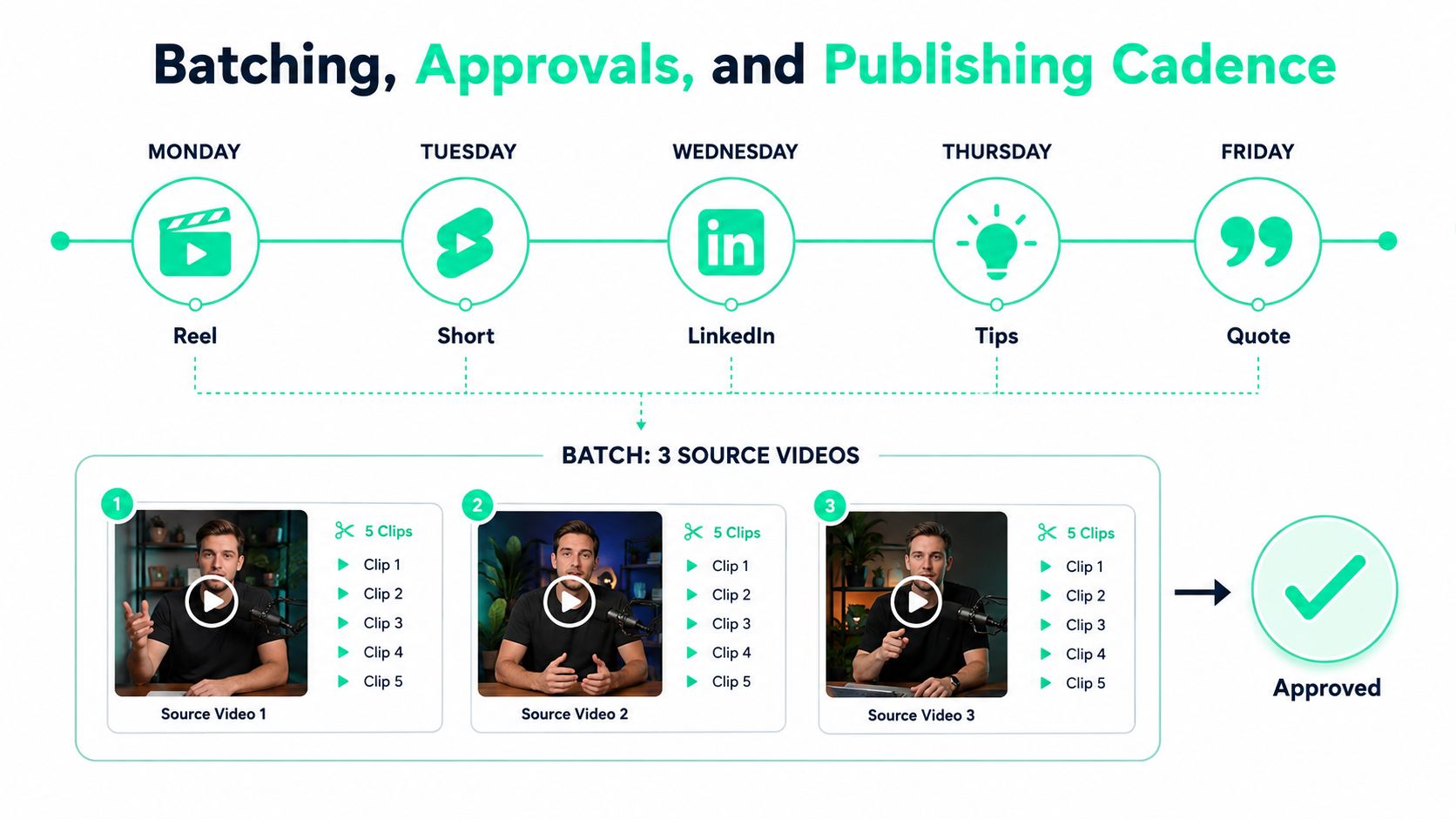
The cleanest repurposing day starts with all source assets open at once. One session can pull clips from a webinar, a podcast, and a customer interview, then draft the platform-specific captions and CTAs in the same document.
That keeps legal, brand, and compliance checks light. Approvals should happen on the finished clip, not on a rough idea buried inside an untouched file. Once the team signs off, the post can be scheduled for the right platform without sending the editor back into revision loops.
### Use a cadence that keeps the feed active
A seven-day workflow may generate **15-30 clip candidates** from day-one source material before the team narrows them to the strongest edits. That is a useful burst, but it only matters if the output gets distributed over time. One source guide recommends posting **3-4 clips per week** from a batch of webinar clips, which is the right rhythm for keeping the content line active without repeating the same opening line too quickly.
A practical sequence looks like this:
- **Monday:** Publish a thought-leadership clip on LinkedIn.
- **Wednesday:** Publish a tighter version as a Reel or Short.
- **Friday:** Publish another angle from the same source with a new hook.
- **Next week:** Rotate in the next source video instead of recycling the same clip.
For teams that want to batch more aggressively, [the creator's guide to AI-powered batch editing for Reels](https://www.blitzreels.com/blog/the-creator-s-guide-to-ai-powered-batch-editing-for-reels) fits the workflow slot where throughput matters more than micromanaging each export.
### Keep one edit queue, not five separate ones
The mistake is splitting the workflow by platform too early. A smarter queue groups by source video first, then formats for the platform second. That way, the editor only has to review the source once, and the publishing calendar can spread the clips out across the month without scrambling for new ideas every day.
That cadence is what turns repurposing into a channel, not a chore.
## Measuring What Works and Feeding It Back In
Repurposing only compounds when the team learns from the clips it ships. The useful signals are simple, and they don't require a bloated dashboard.
### Track the metrics that map to attention
The first number that matters is whether the opening line holds attention. Then comes completion, followed by shares, profile visits, and comments or DMs that mention a specific clip. Those signals tell the team whether the content was merely watched or remembered.
| Funnel Stage | Primary Metric | Why It Matters |
|---|---|---|
| Attention | Hook retention at 3 seconds | Shows whether the opening line earned the scroll stop |
| Consumption | Completion rate | Shows whether the clip held attention after the hook |
| Distribution | Shares | Shows whether viewers thought it was worth passing on |
| Intent | Profile visits | Shows whether the clip moved viewers closer to the brand |
| Engagement | DMs or comments naming the clip | Shows which idea or angle stayed memorable |
### Tag every clip so the winners are traceable
Every published clip should be tagged by **source video**, **hook style**, and **platform**. That makes the monthly review useful instead of anecdotal. The team can see which speaker keeps winning, which topic keeps getting saved, and which opening line keeps getting ignored.
The feedback loop matters for future recordings too. If a certain question format works on LinkedIn, the next webinar should include more of those prompts. If a founder quote lands better than a feature walkthrough, the next podcast should leave room for more opinion and less product narration.
> Good repurposing doesn't just extract content from a video. It trains the next recording to produce better clips.
That's the point of the pipeline. The output becomes research for the next source asset.
## Your Repurposing System on One Page
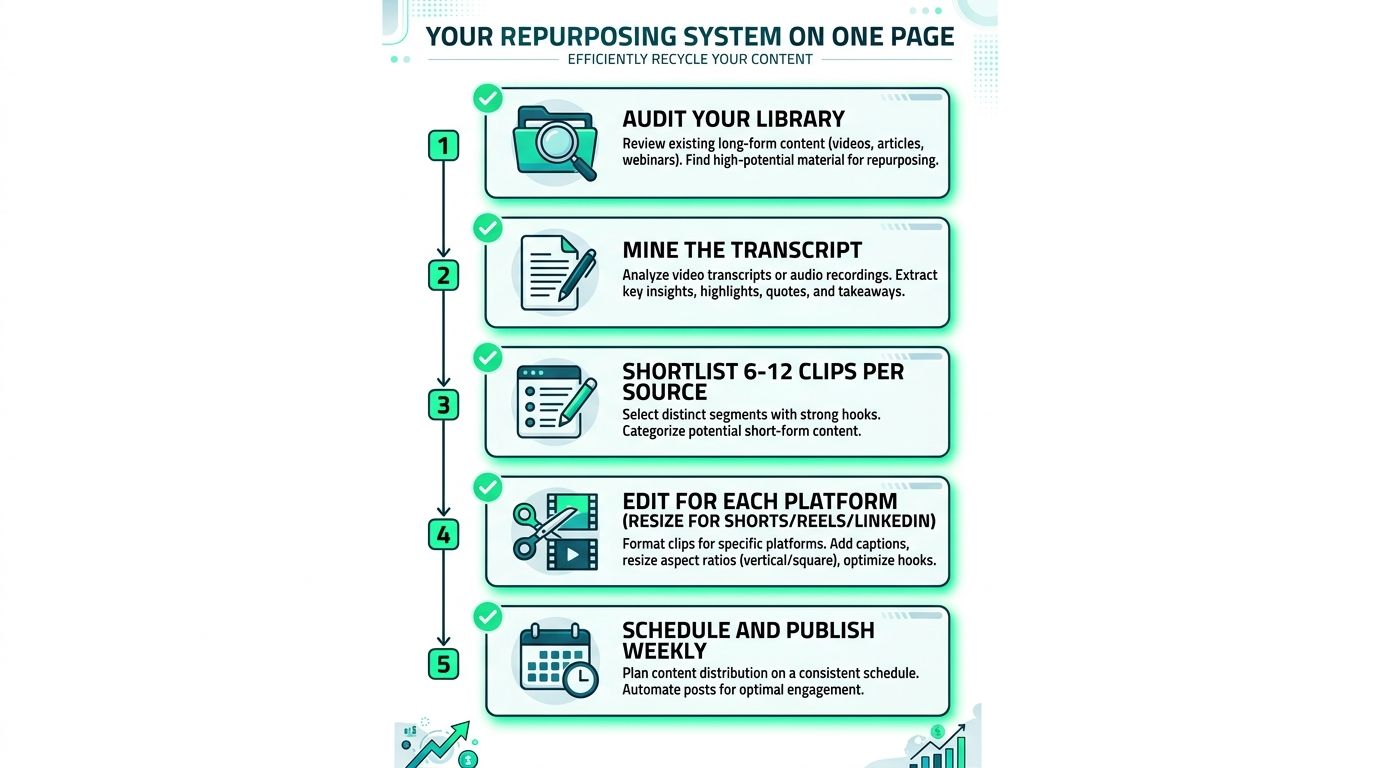
A repurposing system should fit on one page and still be good enough to hand to a freelancer or new hire. The checklist is straightforward, and it should live next to the editing calendar.
1. **Audit the library.** Sort webinars, podcasts, demos, interviews, and founder recordings by topic and evergreen value.
2. **Mine the transcript.** Mark quotable lines, breakpoints, and ideas that can stand alone.
3. **Shortlist 6-12 clips per source.** Keep only the strongest candidate moments, not everything decent.
4. **Edit for each platform.** Reframe for Shorts, Reels, and LinkedIn, then add captions, hooks, and clean pacing.
5. **Schedule and publish weekly.** Spread the clips across the month so the feed stays active without repeating the same angle back-to-back.
The failures are predictable. Teams try to repurpose every video instead of the top 20 percent, they edit before they select, and they skip approval until the post is already live. Those habits slow the whole operation down.
A better process is the one above, repeated every week. It works because it treats repurposing as production, not improvisation.
---
BlitzReels turns that workflow into a practical editing stack for short-form content, from clipping and captions to resizing and export. If the team needs to move one webinar, podcast, or demo into a week of platform-ready shorts, [visit BlitzReels](https://blitzreels.com) and use it as the editor for the record, cut, caption, and publish loop.