---
title: "How to Voice Over a Video: A Step-by-Step Guide for 2026"
canonical: "https://blitzreels.com/blog/how-to-voice-over-a-video"
---
# How to Voice Over a Video: A Step-by-Step Guide for 2026
URL: https://blitzreels.com/blog/how-to-voice-over-a-video
Markdown URL: https://blitzreels.com/blog/how-to-voice-over-a-video.md
Published: 2026-06-22
Author: BlitzReels
Learn how to voice over a video with our complete guide. We cover scripting, recording, editing, and using AI tools like BlitzReels for pro social video audio.
Tags: how to voice over a video, video voice over, audio for video, short form video, blitzreels

A lot of short-form creators hit the same wall. The footage looks good, the captions are sharp, the hook is solid, and then the voice-over makes the whole thing feel cheap. Usually it's not because the speaker has a bad voice. It's because the script runs long, the room echoes, the mic level clips, or the edit leaves in every breath and stumble.
Learning how to voice over a video is less about sounding like a radio announcer and more about building a repeatable workflow. For TikTok, Reels, YouTube Shorts, and LinkedIn clips, “good enough” audio often beats perfect audio that takes too long to make. The best workflow is the one that gets a clear, punchy read into the edit fast, with captions, reframing, resizing, title cards, and clipping still moving on schedule.
Traditional voice-over workflows still work. A script, a mic, an editor, and some patience can produce clean results. But social content changes the standard. The audio has to survive phone speakers, compete with platform noise, and land in sync with cuts, hooks, and on-screen text. That changes what matters.
## Table of Contents
- [The Foundation Scripting and Acoustic Prep](#the-foundation-scripting-and-acoustic-prep)
- [Write for the ear, not the page](#write-for-the-ear-not-the-page)
- [Build a room that behaves](#build-a-room-that-behaves)
- [Recording Techniques for Clear Voice Overs](#recording-techniques-for-clear-voice-overs)
- [Mic handling matters more than fancy gear](#mic-handling-matters-more-than-fancy-gear)
- [Performance fixes weak audio faster than plugins](#performance-fixes-weak-audio-faster-than-plugins)
- [Editing and Polishing Your Audio Track](#editing-and-polishing-your-audio-track)
- [Cut first, then shape](#cut-first-then-shape)
- [What to polish and what to leave alone](#what-to-polish-and-what-to-leave-alone)
- [Syncing Mixing and Mastering for Social Media](#syncing-mixing-and-mastering-for-social-media)
- [Sync to moments, not just the timeline](#sync-to-moments-not-just-the-timeline)
- [Mix for captions, music, and phone speakers](#mix-for-captions-music-and-phone-speakers)
- [The Fast Track AI Voice Overs with BlitzReels](#the-fast-track-ai-voice-overs-with-blitzreels)
- [Where manual workflows slow creators down](#where-manual-workflows-slow-creators-down)
- [What the faster AI workflow changes](#what-the-faster-ai-workflow-changes)
- [Troubleshooting Common Voice Over Problems](#troubleshooting-common-voice-over-problems)
- [Noisy room](#noisy-room)
- [Thin or harsh voice](#thin-or-harsh-voice)
- [Clicks mouth noise and stiff delivery](#clicks-mouth-noise-and-stiff-delivery)
## The Foundation Scripting and Acoustic Prep
A weak voice-over usually starts before recording. Most problems come from a script that reads like an article and a room that sounds like a kitchen.
### Write for the ear, not the page
Short-form narration needs short sentences, clear verbs, and a fast start. If the first line doesn't support the hook on screen, the whole clip feels late. A script for social should sound like speech, not like copy pasted from a blog post or slide deck.
A reliable timing benchmark comes from the [Gravy for the Brain voice-over rates guide](https://www.gravyforthebrain.com/voice-over-rates-guide-industry-guide). Narration is often calculated at **160 words per minute**, using **total word count ÷ 160 = finished minutes of audio**. That means a **320-word** script typically lands at about **2 minutes**. For short-form creators, that benchmark is useful because it exposes bloated scripts before the record button gets pressed.
For social clips, tighter is usually better. The strongest scripts often follow this pattern:
- **Hook first:** Start with the point people care about, not the setup.
- **One idea per sentence:** If a line has two commas, it probably needs a rewrite.
- **Caption-friendly phrasing:** Clean sentence chunks make on-screen captions easier to read.
- **Edit points built in:** Short clauses give clean places to cut, zoom, or insert B-roll.
> **Practical rule:** If a sentence feels awkward to say out loud once, it will feel worse on take three.
A teleprompter helps, but only if the text is written for natural speech. A simple tool like the [BlitzReels online teleprompter](https://www.blitzreels.com/tools/online-teleprompter) keeps the read steady without forcing the speaker to glance down at notes between every line.
### Build a room that behaves
Expensive treatment is nice. It isn't the first fix. The first fix is choosing a room with soft surfaces and less reflective junk.
Closets full of clothes work because fabric absorbs reflections. Bedrooms often beat offices because bedding, curtains, and rugs tame slapback. Kitchens and bare living rooms usually sound bright and hollow, even with a decent mic.
A workable zero-budget prep checklist looks like this:
| Problem | Likely cause | Better move |
|---|---|---|
| Echo | Hard walls and empty surfaces | Record near clothes, curtains, or blankets |
| Traffic or HVAC | Bad timing, not bad gear | Record at quieter hours and turn off nearby noise |
| Computer fan | Mic too close to laptop | Move the computer farther away or use a phone as recorder |
| Rustling | Paper script or handheld notes | Use a tablet or screen instead |
> The cleanest short-form voice-overs often come from boring rooms, not expensive rooms.
Acoustic prep matters because every problem left in the room becomes an editing problem later. And editing around room echo is a lot harder than hanging a blanket and moving two feet to the left.
## Recording Techniques for Clear Voice Overs
A lot of short-form creators hit record in a bedroom, spare office, or kitchen corner and hope cleanup will save the take. That usually slows the whole process down. Clean voice-over starts with repeatable mic technique, then smart shortcuts where they help.
### Mic handling matters more than fancy gear
For video, Production Expert's sample rate guidance supports recording at **48kHz** so the audio plays nicely with video timelines. Keeping peaks around **-18dBFS** also gives enough headroom for the louder words that show up once you get more animated on take two or three.
That setup is simple, but it has to stay consistent. Social voice-over does not need a broadcast booth. It does need fewer variables.
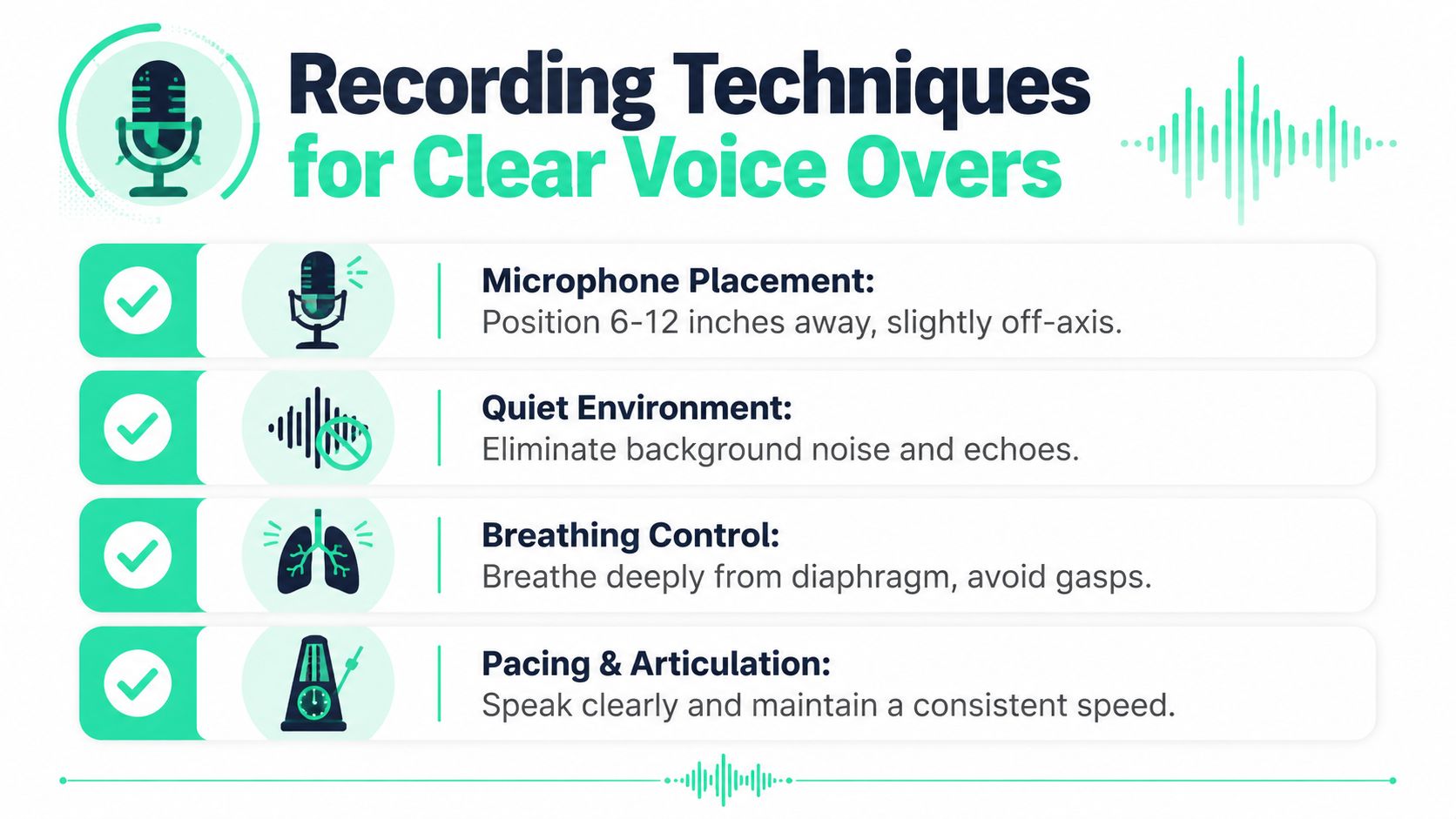
- **Keep the same mouth-to-mic distance** for the whole read so the tone does not jump between lines.
- **Speak slightly past the mic**, not straight into it, to reduce plosives on words with P and B sounds.
- **Watch input meters during your loudest line**, because clipping usually happens on emphasis words, not the calm first sentence.
- **Record a few seconds of room tone** so noise reduction and patch edits have something natural to pull from.
Creators still sorting out their setup can skim this guide to [essential voice over gear](https://lesfm.net/blog/voice-over-equipment/) and make better buying decisions. In practice, a decent USB mic used well usually beats an expensive mic used badly for TikTok, Reels, and Shorts.
The bigger trade-off is workflow. Traditional recording usually means one app for capture, another for cleanup, then the edit timeline after that. That method works, but it is slow if you publish often. An AI-assisted workflow can get a rough but usable result faster, especially if the room is a little noisy and the final destination is a phone speaker.
A study in the *Journal of the Audio Engineering Society* on deep learning noise suppression found that these systems improved speech quality and intelligibility in noisy conditions compared with unprocessed recordings, which is why software cleanup often beats chasing small hardware upgrades in untreated rooms (AES abstract). For short-form creators, that usually means this: get the cleanest take you can, then let AI handle the leftover fan noise or low HVAC rumble instead of obsessing over studio-perfect capture.
### Performance fixes weak audio faster than plugins
Mic technique keeps the recording usable. Delivery makes it worth listening to.
Three habits improve takes fast:
1. **Mark emphasis words before recording.** Those words often line up with punch-ins, captions, or product callouts.
2. **Change your expression to match the line.** A slight smile brightens a read. A more grounded posture adds weight.
3. **Record two or three versions on purpose.** One steady, one sharper, one more conversational gives you options in the edit without forcing heavy processing later.
Short-form creators can stop copying long-form voice-over advice. You do not need ten takes and microscopic performance tweaks for a 20-second Reel. You need one clean take with energy, one safety take, and levels that will survive compression once music and captions are on top.
A fast recorder helps keep that pace. The [BlitzRecorder voice over recording tool](https://www.blitzreels.com/blitzrecorder) is handy for quick capture when you want a clean take without opening a full DAW before you have even built the video.
A slightly rough take with personality usually wins on social. A perfectly clean read with no momentum usually sounds like someone reading off a screen.
## Editing and Polishing Your Audio Track
A decent recording still sounds unfinished until the edit does its job. Social viewers will forgive a room that is not perfect. They will not forgive rambling pauses, uneven volume, or mouth noise that distracts from the first line.
### Cut first, then shape
Start with timing. Before touching compression or EQ, clean the structure of the read so it moves at the speed of the video.
Sound On Sound's voice-over editing guidance recommends removing pauses longer than 0.5 seconds and using moderate compression in the 2:1 to 3:1 range for spoken word. The same guidance also warns that long pauses hurt momentum early, especially in short pieces where viewers decide fast whether to keep watching.
My usual pass looks like this:
- **First pass:** Remove mistakes, pickups, and repeated words.
- **Second pass:** Tighten gaps between phrases so captions and visuals do not feel late.
- **Third pass:** Cut lip smacks and the breaths that stand out, but keep a few natural inhales if deleting them makes the read feel chopped up.
That order matters. Creators often reach for plugins too early, then waste time polishing lines that should have been cut.
### What to polish and what to leave alone
Once the timing feels right, level the performance by hand. Clip gain or volume envelopes solve more problems than heavy processing, especially on short-form voice-over where one sentence can jump out louder than the next.
Then apply light control:
| Task | Good enough for social | Overkill for most shorts |
|---|---|---|
| Breath cleanup | Remove obvious distractions | Manually strip every human sound |
| Compression | Gentle control for consistency | Heavy squash that kills expression |
| EQ | Small presence lift if speech feels dull | Aggressive boosts that make consonants painful |
| Noise cleanup | Reduce hiss, hum, room tone | Overprocessed artifacts from extreme settings |
This is the split between the old workflow and the faster one. In a DAW, you can spend 20 minutes drawing fades around breaths, stacking plugins, and hunting room tone between words. That still makes sense for ads, client work, or anything that has to survive scrutiny on headphones.
For TikTok, Reels, and most Shorts, good enough usually means this: tight pacing, even loudness, and cleanup that does not sound processed. If the noise floor is mild, a restrained pass of noise reduction for voice-over cleanup is plenty. If the cleanup starts adding watery, metallic artifacts, back it off. A little fan noise is less distracting than a voice that sounds chewed up by software.
AI tools help here if speed matters more than surgical control. Manual editing still gives the cleanest result, but BlitzReels-style cleanup is often the better trade-off for daily social output because it gets you to a usable track fast without opening three different apps.
Leave some humanity in the read. Clean audio wins. Over-edited audio rarely does.
## Syncing Mixing and Mastering for Social Media
You finish a clean read, drop it onto the timeline, and the video still feels off. The words hit a beat late. The captions race ahead. The music bed sounds fine on headphones, then swallows the voice on a phone speaker. That last stretch is where short-form voice-over work usually wins or loses.
### Sync to moments, not just the timeline
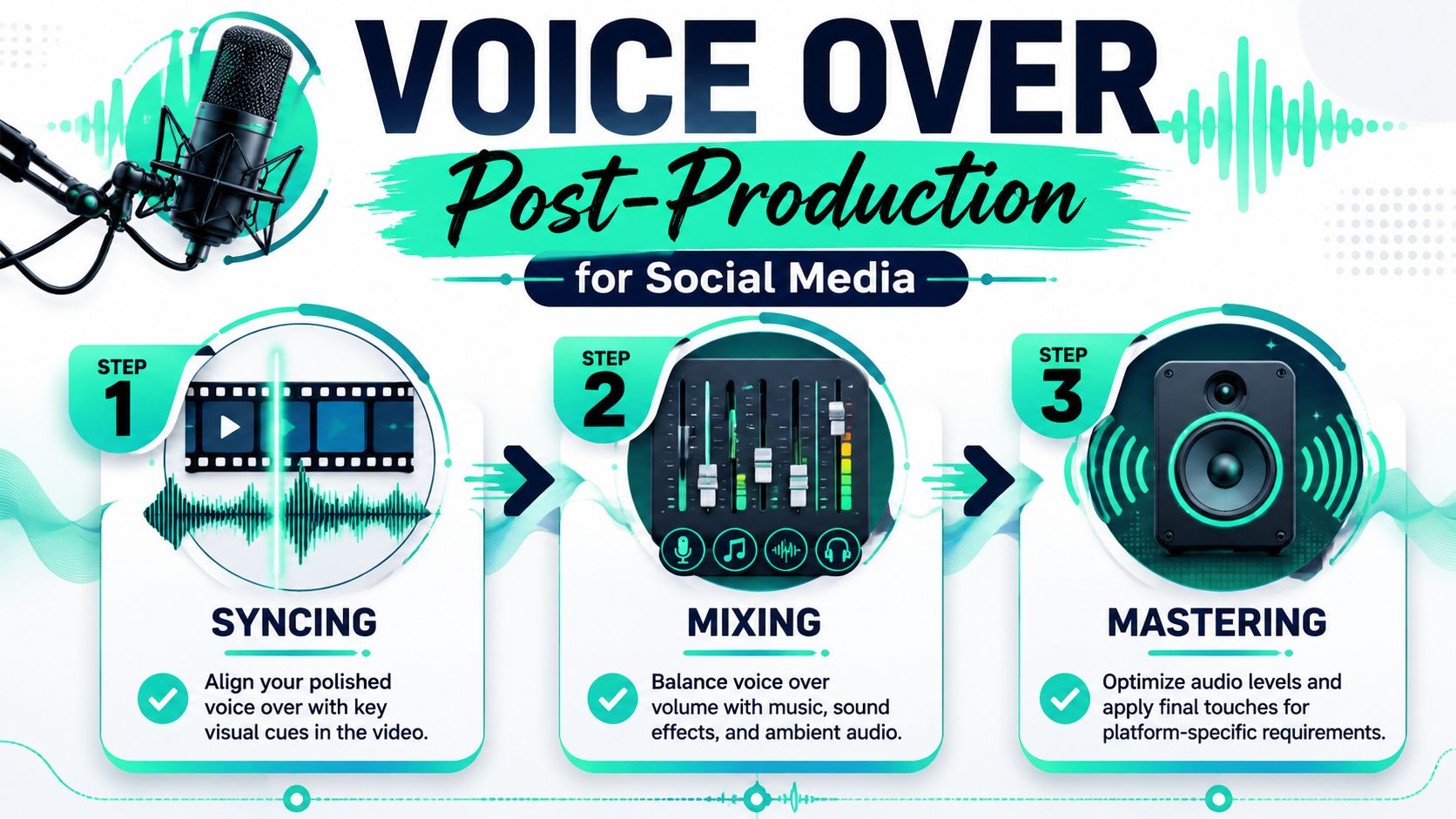
Good sync is about impact, not just placement. If the line says “here's the mistake,” that phrase should land with the cut, zoom, screen change, or reaction shot that gives it weight. If it lands half a second later, the clip feels sloppy even when the audio is technically in sync.
That matters even more with repurposed footage. A fresh narration has to match the pacing of the original edit, the subtitle timing, and the visual rhythm already baked into the clip. A practical walkthrough on [syncing audio with video](https://www.blitzreels.com/blog/syncing-audio-with-video) helps when you need to line narration up with cuts, transitions, and on-screen text without dragging every clip by hand.
My rule is simple. Sync the sentence to the viewer's attention shift.
A fast review pass usually catches the misses:
- **Hit visual changes with key words:** Hook lines, reveals, and punchlines should land on the cut.
- **Check the read against the final edit:** A sentence that sounds natural solo can feel slow once motion graphics and captions are added.
- **Watch captions with sound on:** If the voice outruns the text, retention drops because viewers split attention.
### Mix for captions, music, and phone speakers
For social video, the voice carries the message. Everything else supports it. That changes the mix decisions.
A traditional workflow might send the track through a DAW for automation, EQ moves, compression, limiting, and a separate loudness check before export. That level of control is useful for ad spots, branded content, or client work with approval rounds. For TikTok, Reels, and Shorts, the target is usually simpler: clear speech, stable loudness, and music that never competes with the line.
A practical social mix usually looks like this:
1. Set the voice first.
2. Pull the music lower than feels necessary.
3. Duck the bed under spoken phrases if the arrangement is busy.
4. Test the export on a phone speaker at normal volume.
> If the line is hard to understand on a phone in a noisy room, the mix still needs work.
Mastering for social is mostly compatibility. Keep peaks controlled, keep loudness consistent, and avoid chasing a glossy finish that buys you nothing in a vertical feed. The manual route gives more precision. BlitzReels-style AI workflows save time by handling the repetitive alignment and leveling work that short-form creators burn hours on.
That trade-off shows up across creator tools, not just editing software. Teams comparing automation stacks for outreach and partnerships often look at broader categories like AI solutions for influencer discovery, while creators dealing with daily publishing usually care more about one question: does this tool get a voice-over synced, mixed, and ready to post without opening four programs? For social content, that is often the better benchmark.
## The Fast Track AI Voice Overs with BlitzReels
You clip a strong 30-second moment from a podcast, drop it into a vertical timeline, and realize the original audio will not hold up on TikTok. The pacing is off, the hook lands late, and fixing it by hand means bouncing between recording software, an editor, a caption tool, and a resize workflow. That is the point where the manual process stops feeling precise and starts feeling wasteful.
For polished commercial work, that extra control can be worth it. For Shorts, Reels, and TikTok, it usually is not.
### Where manual workflows slow creators down
Recording the voice is rarely the main time sink. Cleanup is. Recutting pauses, swapping line reads, matching captions to a new script, reframing for vertical, and exporting platform-specific versions can turn one simple voice-over into half a day of production.
Repurposed content makes that worse. A creator pulls a clip from a webinar, screen recording, talking-head video, or podcast, then finds out the source audio is muddy or the wording does not fit the new hook. Re-recording is easy enough. Syncing that new read to the old visuals, then rebuilding captions and timing, is where the hours go.
Analysts in the Global Video Marketing Report 2025 trends overview found that **74% of short-form creators struggle with timing mismatches** when adding new voice-overs to existing clips. That lines up with what I see in practice. The pain is not the read itself. It is the repetitive alignment work after the read.
### What the faster AI workflow changes
BlitzReels cuts out a lot of hand work that short-form creators do over and over. Instead of recording takes in one app, cleaning them in another, syncing in a timeline, then captioning and resizing later, you can generate a workable voice track from a script and build around it in one place.
That matters most when the goal is good enough social audio, not studio narration. Clear speech, solid pacing, readable captions, and exports that fit the platform beat a perfect vocal chain that took three extra hours.
| Task | Manual workflow | Integrated AI workflow |
|---|---|---|
| Voice creation | Record multiple takes and comp them | Generate a usable read from the script |
| Sync | Slide words and pauses into place by hand | Match narration timing to clip rhythm automatically |
| Captions | Transcribe, style, and retime manually | Auto-generate captions that follow the voice track |
| Reframing | Rebuild crops for vertical formats | Auto-center subjects for social layouts |
| Packaging | Add hooks and title cards in separate steps | Build hooks, title cards, and versions in one pass |
The trade-off is simple. Manual editing gives finer performance control. An AI workflow gives speed, consistency, and fewer chances to lose momentum while repurposing content at volume.
That is especially useful if you are turning long recordings into a week of short clips. You may also need a transcript before you rewrite the narration, which is where tools that [convert MP3 audio to text for clip planning](https://www.blitzreels.com/blog/convert-audio-mp-3-to-text) fit naturally into the process.
Creator teams make the same call in adjacent workflows. They use specialized tools for repetitive research and outreach, including [AI solutions for influencer discovery](https://reach-influencers.com/ai-driven-influencer-tools-for-startups/), because copying manual steps across dozens of deliverables does not scale.
My rule is practical. If the piece is a paid campaign, a brand film, or anything performance-sensitive, record and edit manually. If the job is publishing punchy social clips fast, BlitzReels handles the boring parts well enough to save serious time without hurting the final result.
## Troubleshooting Common Voice Over Problems
Even a careful workflow produces bad takes sometimes. The fix gets easier when the problem is diagnosed by symptom instead of by guesswork.
### Noisy room
**Symptom:** The read sounds fine, but there's hiss, hum, fan noise, or light room echo underneath.
**Likely cause:** The room is doing too much, or the mic is hearing more of the space than the voice.
**Fix:** Move closer to the mic without crowding it, soften the room with clothes or blankets, and re-record if the noise is obvious during speech. If the take is otherwise strong, use gentle cleanup instead of trying to erase the room completely. Extreme suppression often makes speech sound brittle or artificial.
### Thin or harsh voice
**Symptom:** The narration feels small, sharp, or tiring on phone speakers.
**Likely cause:** The speaker is too far off the mic, the room is reflective, or the EQ and compression are doing too much.
**Fix:** Re-record with a steadier mic position and a calmer room. In editing, back off aggressive high-end boosts and keep compression light. For social, presence is useful. Harshness is not.
> Most “bad mic” complaints are actually placement problems or room problems.
### Clicks mouth noise and stiff delivery
**Symptom:** Mouth sounds, sticky consonants, awkward starts, or a robotic read.
**Likely cause:** Dry mouth, rushing, or reading text that was written to be read instead of spoken.
**Fix:** Rewrite clunky lines into shorter spoken phrases, pause before the take, and record several versions with different energy. Small mouth noises can be cut manually. If the whole read feels lifeless, editing won't save it. A better take is faster.
When the source audio is messy and the spoken words need to be repurposed into captions or a fresh script, a transcript helps identify what should stay, what should be cut, and what should be re-recorded. A practical starting point is converting the audio into text with a tool like this [MP3 to text guide](https://www.blitzreels.com/blog/convert-audio-mp-3-to-text).
The final test is simple. Play the finished clip on a phone, at low volume, without headphones. If the message still lands, the voice-over is ready.
---
Clean voice-overs matter because they make every other part of a short-form video work better. Hooks hit harder, captions feel more natural, title cards make sense faster, and clips are easier to repurpose across platforms. [BlitzReels](https://blitzreels.com) helps creators turn that whole process into a faster workflow with AI-powered clipping, captioning, reframing, resizing, and short-form editing built for TikTok, Reels, YouTube Shorts, LinkedIn, and more.