---
title: "Instagram Reels Length Explained for Better Reach"
canonical: "https://blitzreels.com/blog/instagram-reels-length"
---
# Instagram Reels Length Explained for Better Reach
URL: https://blitzreels.com/blog/instagram-reels-length
Markdown URL: https://blitzreels.com/blog/instagram-reels-length.md
Published: 2026-09-06
Author: BlitzReels
Learn instagram reels length limits, best durations for reach, and how to edit and repurpose clips for Instagram, TikTok and Shorts.
Tags: instagram reels length, instagram reels, reels editing tips, short form video, video repurposing

A Reel can be as short as **3 seconds**, while **3 minutes is the practical limit for broad discovery**. Longer uploads can technically reach **15 to 20 minutes**, but Reels beyond 3 minutes aren't recommended to non-followers, so their organic discovery is more limited.
A creator has just finished a strong four-minute story. The opening is sharp, the lesson is useful, and the ending ties everything together. Then comes the familiar question: what should be cut to fit Instagram Reels length without removing the part that makes the story worth watching?
The answer depends on more than the upload screen. **Duration is a distribution decision.** A short cut can create a quick entry point for new viewers, while a longer cut can give an existing audience more room for explanation. The wrong length can bury the hook, crowd the captions, or ask unfamiliar viewers for more attention than they're ready to give.
This guide turns the current limits into an editing plan. It covers how the format evolved, why the **3-minute discovery cutoff** matters, how to choose a duration for hooks and tutorials, and how to repurpose one source video for other platforms. It also shows how clipping, captions, reframing, resizing, title cards, templates, and human review can help creators make each version feel intentional. For broader context on how short-form formats work across channels, the [short-form video guide](https://blitzreels.com/blog/short-form-video) provides a useful foundation.
## Table of Contents
- [Introduction to Instagram Reels Length and Why It Matters](#introduction-to-instagram-reels-length-and-why-it-matters)
- [How Instagram Reels Length Limits Have Evolved](#how-instagram-reels-length-limits-have-evolved)
- [What the timeline means for editors](#what-the-timeline-means-for-editors)
- [Official Instagram Reels Length Limits You Need to Know](#official-instagram-reels-length-limits-you-need-to-know)
- [Recording in the app versus uploading from the camera roll](#recording-in-the-app-versus-uploading-from-the-camera-roll)
- [Best Instagram Reels Length for Reach Retention and Storytelling](#best-instagram-reels-length-for-reach-retention-and-storytelling)
- [Match pacing to viewer commitment](#match-pacing-to-viewer-commitment)
- [How to Edit and Export Reels to Fit the Right Duration](#how-to-edit-and-export-reels-to-fit-the-right-duration)
- [A practical trimming sequence](#a-practical-trimming-sequence)
- [Where an editor can accelerate the workflow](#where-an-editor-can-accelerate-the-workflow)
- [Repurposing Reels for TikTok YouTube Shorts and LinkedIn](#repurposing-reels-for-tiktok-youtube-shorts-and-linkedin)
- [One source, several deliberate versions](#one-source-several-deliberate-versions)
- [Your Next Steps for Choosing the Perfect Reels Length](#your-next-steps-for-choosing-the-perfect-reels-length)
## Introduction to Instagram Reels Length and Why It Matters
Instagram Reels started as a compact format, but creators now face several different limits at once. A video may be technically uploadable yet poorly suited to discovery, or it may fit the platform while losing the pacing that made the original compelling.
The key distinction is simple: **the maximum upload length isn't automatically the best publishing length**. A creator making a product demonstration may need more time than someone showing a visual transition. A podcast clip may require enough context to make the speaker's point understandable, but not every sentence from the original conversation belongs in the Reel.
> **Practical rule:** Choose the audience's job before choosing the duration. Decide whether viewers need a punchline, a quick answer, a demonstration, or a complete story.
The current range has three useful reference points. Reels generally need to be at least **3 seconds**, and videos up to **3 minutes** can remain eligible for broad discovery. Camera-roll uploads can extend to **15 minutes on many accounts and up to 20 minutes in newer rollouts**, but videos longer than 3 minutes aren't recommended to non-followers, as documented by [Socialinsider's explanation of Reels length and discovery](https://www.socialinsider.io/blog/instagram-reels-length/).
That creates a practical editing choice. A creator with a four-minute interview can publish a longer version for an existing audience, or extract a focused section that works for discovery. The second option often preserves the central insight more effectively than compressing every detail into an overcrowded edit.
BlitzReels fits this workflow as one editing option for creators who need to clip longer recordings, edit transcripts, style captions, reframe footage vertically, resize exports, and review the final cut quickly. The important principle remains editorial judgment. Software can identify and assemble material, but a human still needs to confirm that the hook, context, captions, and ending make sense together.
## How Instagram Reels Length Limits Have Evolved
Reels didn't begin with today's flexible range. Instagram launched the format in **August 2020 with a maximum length of 15 seconds**, then expanded it in stages to **30 seconds, 60 seconds, and 90 seconds by 2022**, according to this [history of Instagram Reel length changes](https://www.moonb.io/blog/instagram-reel-length).
The progression resembles widening a canvas. Early creators had to express one visual idea quickly. Later limits allowed a short explanation, a compact tutorial, or a small narrative arc. Each expansion gave creators more room without turning Reels into a conventional long-form video destination.
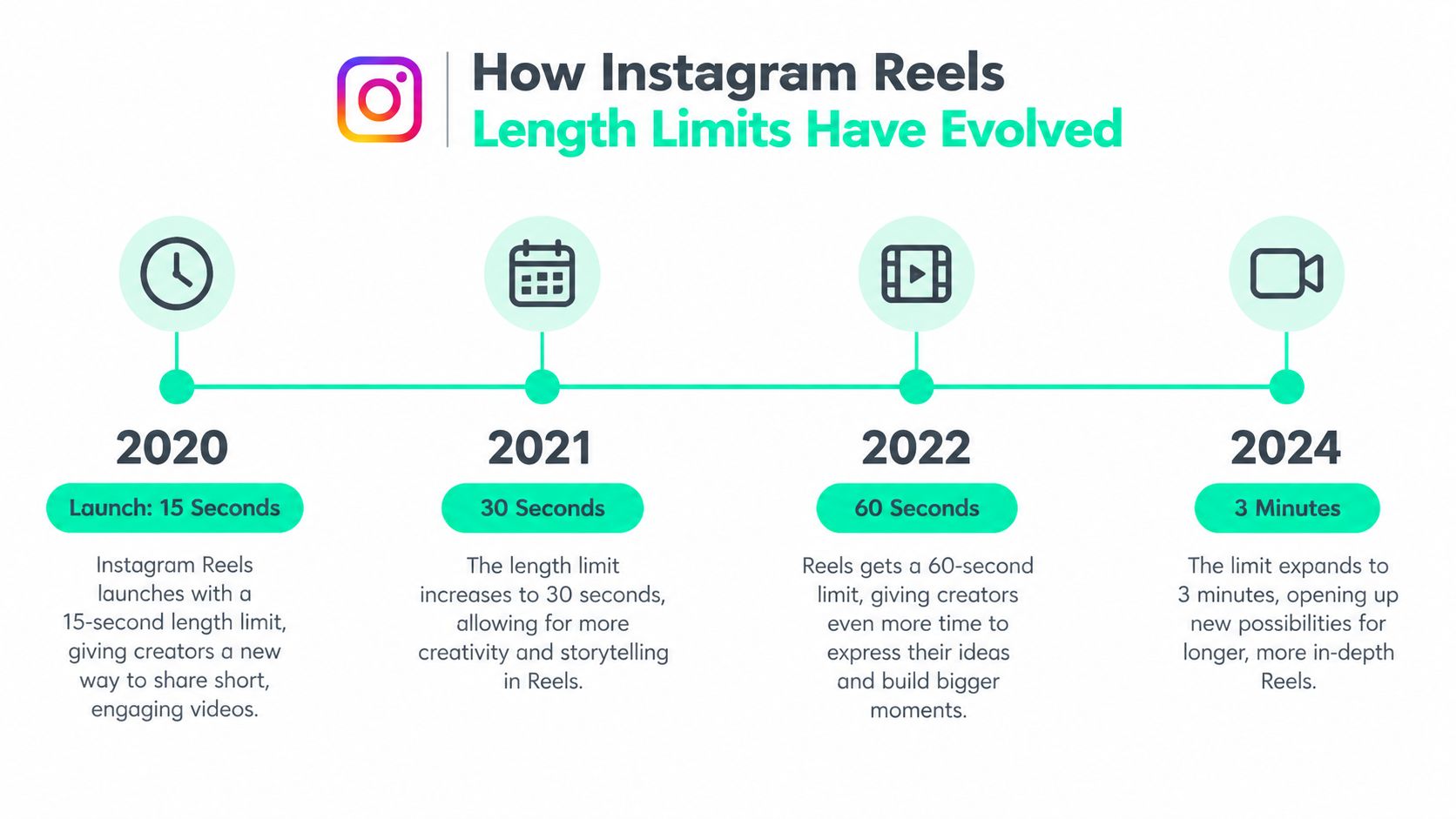
In **January 2025**, Instagram head Adam Mosseri announced support for Reels up to **3 minutes**, describing the change as a response to creators needing more room for storytelling while keeping the platform focused on short-form video. The announcement changed the editorial question from “Can the story fit?” to “Which version deserves discovery?”
That's why older advice centered only on a **60-second or 90-second cap** can mislead current planning. Those limits describe earlier stages of the format, not the full picture available to creators now. The more useful question is whether a video belongs inside the length range that supports broader recommendation.
### What the timeline means for editors
The expansion also changed how source material should be prepared. A creator can record a longer conversation once, then shape it into several versions. One cut might lead with the strongest claim, another might isolate a practical demonstration, and a longer version might serve followers who want the complete explanation.
The [platform video specs for Donivo users](https://donivo.app/blog/social-media-video-length-limits) can help teams compare video constraints across social channels before they build a repurposing workflow. That comparison matters because a master recording shouldn't be edited around Instagram alone if the same material will also appear on TikTok, YouTube Shorts, or LinkedIn.
Longer limits don't remove the need for compression. They make deliberate compression more valuable. The best editor still removes pauses, repeated setup, weak transitions, and context that the visual can communicate faster. A larger canvas gives the story more breathing room, but it doesn't require creators to use every available second.
## Official Instagram Reels Length Limits You Need to Know
Instagram Reels length becomes easier to understand when the limits are separated into **technical floor**, **technical ceiling**, and **discovery boundary**.
The practical floor is about **3 seconds**. Reels shorter than that are generally not publishable as Reels, so a blink-and-miss-it clip needs enough visual duration to register as a format rather than a failed upload. The technical ceiling can reach **20 minutes**, but that ceiling describes what may be supported by the platform, not what receives equal distribution.
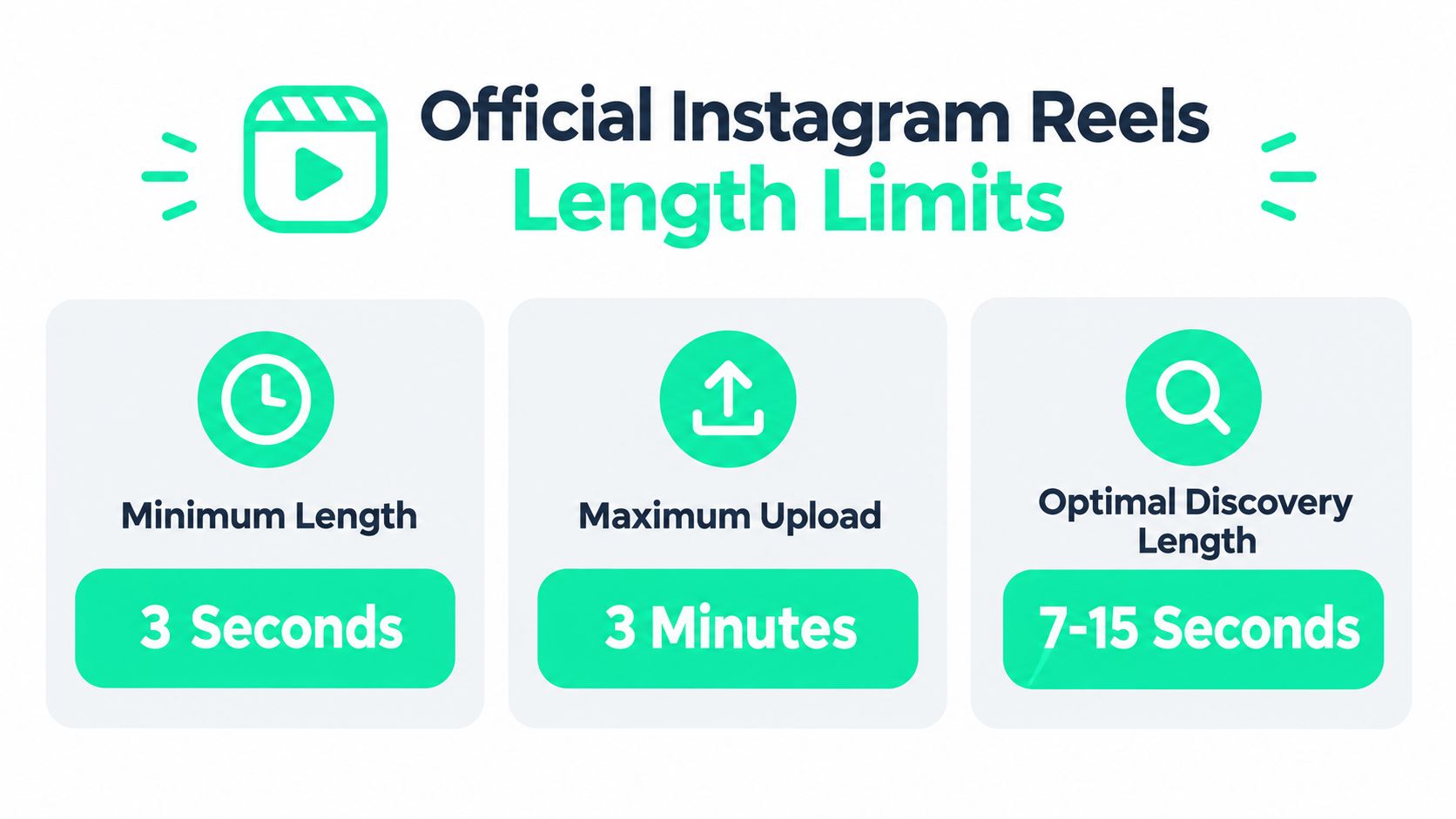
The most important boundary sits at **3 minutes**. According to [Socialinsider's current breakdown](https://www.socialinsider.io/blog/instagram-reels-length/), Reels longer than 3 minutes aren't recommended to non-followers and therefore don't enter the Reels tab for broader discovery in the same way shorter cuts do.
> **The practical limit for discovery is 3 minutes, even though the technical upload ceiling can be higher.**
That distinction affects the decision before editing begins. A long upload may still make sense for a community that already knows the creator, a detailed demonstration, or an archive-style post. It's a weaker choice when the primary goal is reaching people who don't follow the account.
### Recording in the app versus uploading from the camera roll
Creation method adds another layer of confusion. Some **2026 guidance** distinguishes between in-app recording, which is commonly capped at **3 minutes**, and camera-roll uploads, which can extend to **15 minutes on many accounts and up to 20 minutes on newer rollouts**, as explained by [Affroom's guide to Reel creation methods](https://affroom.com/blog/how-long-can-you-make-instagram-reels/).
The exact option shown can vary by account and rollout. A creator who sees a shorter in-app control hasn't necessarily reached the platform's broader upload ceiling. Recording with a phone camera or editing externally can provide a different path, but the discovery trade-off still applies to videos longer than 3 minutes.
For export and framing considerations, creators can also consult [vertical video specs for social publishing](https://blitzreels.com/blog/vertical-video-specs). The duration decision should happen alongside the framing decision, because a technically acceptable long video can still feel difficult to watch if the subject, captions, or key action is poorly positioned.
## Best Instagram Reels Length for Reach Retention and Storytelling
The best duration depends on what the viewer needs to accomplish. A visual joke may work in a few seconds, while a tutorial needs enough time to show the problem, process, and result. A story can run longer when every beat earns its place.
The following matrix gives creators a starting point without treating any duration as a universal rule:
| Content Goal | Recommended Length | Why It Works |
|---|---:|---|
| Stop the scroll with one visual idea | Under 15 seconds | A compact edit can deliver a hook, action, and payoff without extra setup. |
| Explain one idea or quick tip | 15 to 30 seconds | This range leaves room for context while keeping the message focused. |
| Teach a process or show a product | 30 to 90 seconds | The edit can demonstrate several steps without forcing every detail into a short cut. |
| Tell a complete story or share a substantial clip | 90 seconds to 3 minutes | A longer arc can work when the opening establishes a clear reason to keep watching. |
A short Reel should begin with the point, not an introduction to the point. A product demo might open on the finished result, then reveal how it works. A podcast clip might begin with the most surprising statement and use a title card to identify the question being answered.
### Match pacing to viewer commitment
Longer videos need stronger structure, not just more footage. Captions should remove ambiguity for silent viewers, while visual changes, B-roll, reframing, and occasional title cards can help maintain momentum. The creator should still remove any sentence that repeats information already visible on screen.
A useful way to judge a draft is to ask whether the first moment makes the promise clear, whether each section advances that promise, and whether the ending gives viewers a reason to save, share, or follow. The [guide to view-through rate](https://blitzreels.com/blog/view-through-rate) offers additional context for evaluating how much of a video viewers watch, without reducing the editing decision to duration alone.
Creators looking for topic ideas can pair this framework with [ideas to attract followers with Reels](https://supgrowth.com/2026/04/17/ig-reels-ideas/). The strongest idea still needs the right cut. A strong concept stretched too far feels slow, while a useful concept cut too aggressively becomes confusing.
## How to Edit and Export Reels to Fit the Right Duration
A source video rarely arrives at the exact length needed for publishing. The cleanest approach is to edit for meaning first, then adjust duration without damaging the viewer's understanding.
Start by identifying the smallest complete unit in the recording. For a webinar, that might be one answer rather than the entire discussion. For a podcast, it could be a claim, supporting example, and conclusion. For a product video, it may be the problem, the demonstration, and the visible result.
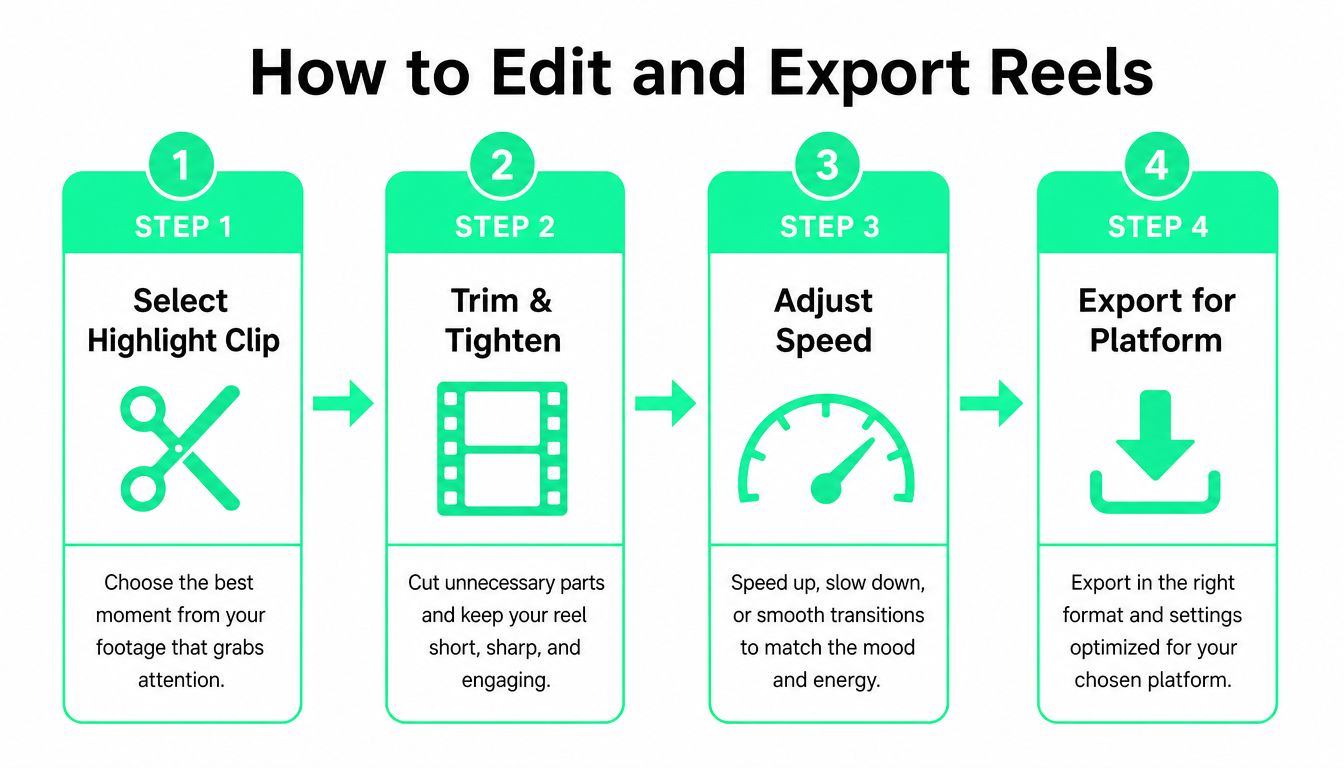
### A practical trimming sequence
1. **Select the highlight clip.** Find the sentence or visual moment that gives the audience a reason to stay. Remove greetings, repeated setup, and internal discussion that only made sense in the original recording.
2. **Tighten the transcript and timeline.** Cut pauses, false starts, duplicate phrases, and transitions that don't carry meaning. Captions should follow the revised speech, not the untouched transcript.
3. **Adjust speed carefully.** Slight changes can help a spoken clip fit its target without making the speaker sound unnatural. If speeding up harms comprehension, cut more words instead.
4. **Add visual support.** B-roll, media inserts, a title card, or a close reframing can keep a necessary explanation visually active. These additions should clarify the message, not distract from it.
A vertical crop needs its own review. Reframe the speaker or product for a **9:16 layout**, keep captions away from interface areas, and check the opening frame as both a full-screen video and a small preview. Resizing a horizontal recording without repositioning the subject often produces a technically vertical video that still feels visually wrong.
### Where an editor can accelerate the workflow
BlitzReels can support this process by letting creators inspect projects, create clips, edit transcripts, captions, and timeline items, add B-roll or other media, validate output, start exports, and verify render status. Its agentic workflow is available through a native hosted OAuth MCP server, REST API, TypeScript SDK, CLI with structured JSON, OpenAPI, `llms.txt`, and agent skills, while browser-based review keeps final control with human editors.
That model differs from a local MCP editor, a professional NLE integration, or an FFmpeg server. A hosted cloud editor handles project operations and rendering in its own environment, while local and server-based workflows place different responsibilities on the creator or development team.
For a focused tutorial on extracting several usable segments from one recording, the [guide to cutting videos into parts](https://blitzreels.com/blog/how-to-cut-videos-into-parts) provides a complementary editing approach. Before publishing, the creator should validate duration, caption timing, audio, framing, and the final render rather than trusting the timeline preview alone.
## Repurposing Reels for TikTok YouTube Shorts and LinkedIn
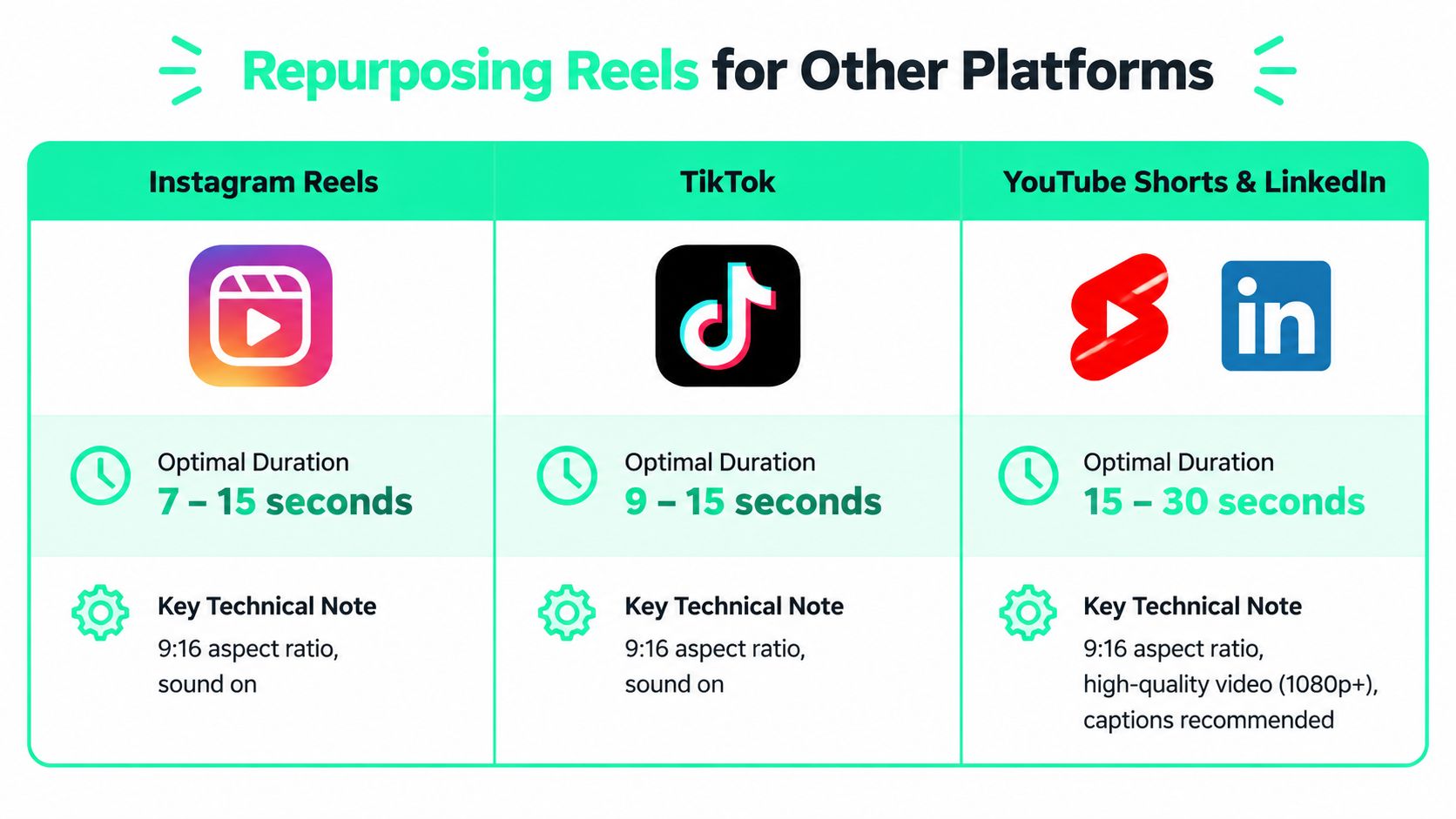
Repurposing works best when the source video is treated as a collection of modular ideas. A creator can record one interview or presentation, then build a core clip that carries the main point across platforms and add platform-specific openings, captions, framing, and calls to action.
A **60 to 90 second core** can be a useful editorial starting point for material that needs explanation. It leaves room for a complete thought while allowing shorter versions to be created later. That doesn't mean every platform should receive the same file. Instagram may need a sharper discovery cut, TikTok may benefit from a different opening, YouTube Shorts may use a search-oriented title card, and LinkedIn may need more professional context.
### One source, several deliberate versions
A practical repurposing flow looks like this:
- **Find the core idea:** Clip the strongest passage from a podcast, webinar, interview, call, or YouTube video.
- **Build the Instagram version:** Put the hook early, use readable captions, and keep the cut inside the discovery-friendly range when non-follower reach matters.
- **Adapt the frame:** Reposition faces, products, screens, and B-roll for vertical viewing instead of applying one automatic crop everywhere.
- **Create platform variants:** Change the title card, caption style, ending, or opening line when the audience context differs.
- **Review before release:** Check every render for caption errors, awkward cuts, missing media, and platform-specific interface overlap.
Creators comparing production approaches can [find AI tools for Reels](https://www.aimusicvideogenerators.com/guides/ai-music-video-for-instagram-reels), especially when evaluating clipping, captioning, and creative support. Tools vary significantly, though. A hosted cloud editor manages projects and renders remotely, a local MCP editor operates closer to the user's own environment, professional-NLE integrations preserve established editing workflows, and FFmpeg servers focus on programmable media processing.
BlitzReels can handle AI clipping, caption styling, templates, vertical reframing, resizing, and cloud rendering for TikTok, Instagram Reels, YouTube Shorts, and LinkedIn. Its agent-enabled operations can inspect projects, create clips, modify captions and timeline items, add media, and check render status through hosted MCP or API workflows. The [video repurposing guide](https://blitzreels.com/blog/how-to-repurpose-video-content) provides a broader process for turning one recording into a coordinated set of social edits.
## Your Next Steps for Choosing the Perfect Reels Length
The right Instagram Reels length starts with distribution intent. For broad discovery, keep the finished cut at or below **3 minutes**, because longer Reels aren't recommended to non-followers according to the [current distribution guidance](https://www.socialinsider.io/blog/instagram-reels-length/). Use a longer upload only when the additional context has a clear purpose and the audience already has a reason to stay.
Before publishing, a creator can run this checklist:
- **Choose the viewer's job:** Decide whether the Reel delivers a visual punchline, quick tip, demonstration, tutorial, or complete story.
- **Protect the opening:** Make the first visual and caption communicate the subject immediately.
- **Remove repetition:** Tighten the transcript, pauses, filler, and duplicated explanations.
- **Check the frame:** Reframe and resize the subject for vertical viewing, then inspect captions around interface areas.
- **Review the ending:** Make the final takeaway or next action clear without adding unnecessary explanation.
- **Validate the export:** Confirm the duration, audio, captions, media, and render before posting.
Short cuts suit fast ideas and direct hooks. Mid-length edits give explainers and demonstrations enough room to breathe. Longer stories deserve the extra duration only when every section advances the narrative. After publishing, creators should compare completion and drop-off behavior across their own content, then revise the next hook, structure, or cut based on what viewers finish.
---
BlitzReels helps creators clip long recordings, edit transcripts and captions, reframe and resize footage, add B-roll and title cards, and export versions for Instagram Reels and other platforms. Visit [BlitzReels](https://blitzreels.com) to turn one source video into reviewed, platform-ready cuts with faster editing and repurposing.