---
title: "LinkedIn Video Specifications: The Complete 2026 Guide"
canonical: "https://blitzreels.com/blog/linkedin-video-specifications"
---
# LinkedIn Video Specifications: The Complete 2026 Guide
URL: https://blitzreels.com/blog/linkedin-video-specifications
Markdown URL: https://blitzreels.com/blog/linkedin-video-specifications.md
Published: 2026-08-25
Author: BlitzReels
Master LinkedIn video specifications in 2026. File sizes, durations, aspect ratios, bitrates, captions, and export settings for feed, ads, and Pages.
Tags: linkedin video specifications, linkedin video size, linkedin video ads, linkedin aspect ratio, linkedin captions srt

You've just finished a polished LinkedIn clip. The image is sharp, the captions are timed, and the opening hook lands quickly. Then the upload finishes, LinkedIn processes the file, and the feed version looks softer than the master, or the post fails because the export was built for the wrong publishing lane.
That frustration usually comes from treating LinkedIn's limits as targets. The platform has one of the most forgiving upload envelopes in social video, but generous ceilings make creators overspec files, choose unsuitable containers, and spend time chasing settings viewers won't see. The practical answer is simpler: understand the difference between what LinkedIn accepts and what produces clean playback across organic posts, Pages, Career Pages, and ads.
## Table of Contents
- [Why LinkedIn Video Specifications Confuse Even Experienced Creators](#why-linkedin-video-specifications-confuse-even-experienced-creators)
- [The ceiling isn't the target](#the-ceiling-isnt-the-target)
- [LinkedIn Video Specs for Organic Feed and Personal Profile](#linkedin-video-specs-for-organic-feed-and-personal-profile)
- [A practical organic preset](#a-practical-organic-preset)
- [LinkedIn Video Ads vs Pages vs Career Pages Specs Compared](#linkedin-video-ads-vs-pages-vs-career-pages-specs-compared)
- [One source, several deliverables](#one-source-several-deliverables)
- [Supported File Formats and Codecs for LinkedIn Uploads](#supported-file-formats-and-codecs-for-linkedin-uploads)
- [The dependable production combination](#the-dependable-production-combination)
- [Aspect Ratios and Resolution by Placement](#aspect-ratios-and-resolution-by-placement)
- [Designing for the crop](#designing-for-the-crop)
- [Recommended Export Settings for Clean LinkedIn Playback](#recommended-export-settings-for-clean-linkedin-playback)
- [Thumbnails Captions and SRT Files the Often Overlooked Specs](#thumbnails-captions-and-srt-files-the-often-overlooked-specs)
- [Captions need editorial control](#captions-need-editorial-control)
- [Repurposing Long Videos into LinkedIn Ready Shorts](#repurposing-long-videos-into-linkedin-ready-shorts)
- [Reframe before adding polish](#reframe-before-adding-polish)
- [Common Upload Mistakes and How to Fix Them](#common-upload-mistakes-and-how-to-fix-them)
- [Quick Reference LinkedIn Video Specs Card](#quick-reference-linkedin-video-specs-card)
## Why LinkedIn Video Specifications Confuse Even Experienced Creators
A creator finishes a 4K, color-graded interview clip and uploads the master directly from an editing workstation. The file is enormous, the bitrate is high, and the codec is optimized for post-production rather than distribution. LinkedIn accepts the upload, runs it through its processing pipeline, and returns a feed version that can look flatter, softer, or less detailed than the original.
The problem isn't always the source footage. It's often the export decision. LinkedIn supports a broad technical range, including resolutions from **256×144 to 4096×2304**, frame rates from **10 FPS to 60 FPS**, and bitrates from **192 Kbps to 30 Mbps**, according to the [published LinkedIn video specification overview](https://www.moonb.io/blog/linkedin-video-specifications). Those are operating boundaries, not a promise that every file inside them will look equally good after processing.
### The ceiling isn't the target
LinkedIn's official Pages and Career Pages guidance allows files from **75 KB to 5 GB**, durations from **3 seconds to 10 minutes**, resolutions from **256×144 to 4096×2304**, frame rates from **10 to 60 FPS**, and bitrates from **192 Kbps to 30 Mbps**. It also accepts a broad collection of containers and codec families, while no longer supporting AVI, QuickTime, or MOV for those uploads, as documented in the [official Pages and Career Pages specifications](https://www.linkedin.com/help/linkedin/answer/a1311816).
That flexibility makes LinkedIn feel less predictable than mobile-first platforms with narrower delivery rules. TikTok, Instagram Reels, and YouTube Shorts push creators toward more standardized vertical workflows. LinkedIn, by contrast, accepts professional presentations, square clips, vertical explainers, desktop interviews, and ad creative in the same general ecosystem.
> **Practical rule:** A specification that LinkedIn accepts isn't automatically a specification worth rendering.
A reliable workflow separates the **technical envelope** from the **production target**. The envelope tells an editor whether a file can pass validation. The target determines whether the file uploads efficiently, survives server-side transcoding, displays clearly on phones and desktops, and leaves enough room for captions, title cards, and interface overlays.
The rest of the workflow should focus on that target. For short-form production, clean H.264 video, readable captions, an intentional aspect ratio, and a strong first frame matter more than chasing the highest supported resolution or frame rate.
## LinkedIn Video Specs for Organic Feed and Personal Profile
Organic uploads need a dependable default rather than a maximal export. LinkedIn's Pages and Career Pages specifications establish a **75 KB minimum file size**, a **5 GB maximum**, a **3-second minimum duration**, and a **10-minute maximum duration** for those native uploads. Broader LinkedIn guidance allows some desktop personal-profile uploads to reach **15 minutes**, so the publishing surface should be checked before rendering.
| Parameter | Minimum | Recommended | Hard Maximum |
|---|---:|---:|---:|
| File size | 75 KB | Practical H.264 MP4 export | 5 GB |
| Duration | 3 seconds | Based on the idea and edit | 10 minutes for Pages and Career Pages |
| Resolution | 256×144 | 1920×1080 or an intentional vertical equivalent | 4096×2304 |
| Frame rate | 10 FPS | 30 FPS | 60 FPS |
| Bitrate | 192 Kbps | Conservative delivery bitrate | 30 Mbps |
| Aspect ratio | 1:2.4 | 1:1, 4:5, 9:16, or 16:9 by placement | 2.4:1 |
The [official LinkedIn Pages and Career Pages specification](https://www.linkedin.com/help/linkedin/answer/a1311816) supports MP4, MPEG-4, MKV, WebM, FLV, ASF, and several codec families. In practice, **H.264 video in an MP4 container** remains the safest cross-device choice. LinkedIn processes uploads for delivery, so a ProRes master or an unusually high-bitrate H.265 file adds transfer and processing overhead without guaranteeing a visible improvement in the feed.
### A practical organic preset
For most short-form posts, target **1080p, 30 FPS, H.264, and a moderate delivery bitrate**. The exact bitrate should reflect motion, texture, and graphics, but there's rarely a production reason to push toward LinkedIn's upper ceiling for a talking-head clip. A stable encode with clean AAC audio is more useful than a technically extravagant file.
Personal profiles and Company Pages use different publishing contexts, but the same basic principle applies: export for the destination, not the camera original. Desktop uploads can offer a broader duration window in some cases, while the mobile app is more likely to be used for immediate, short-form publishing. Third-party schedulers may add their own file handling or size restrictions, so the scheduler's documentation should be checked independently.
Creators repurposing material from another platform can use [YouTube to LinkedIn clips](https://blitzreels.com/use-cases/youtube-to-linkedin-clips) to start with a suitable cut, then review the crop, captions, and opening frame before publishing. The upload method doesn't fix a poor aspect-ratio decision, and LinkedIn's transcoder can't rescue text that was already placed too close to the edge.
## LinkedIn Video Ads vs Pages vs Career Pages Specs Compared
LinkedIn is unusually forgiving about upload formats and file envelopes. That flexibility helps a clip reach different publishing surfaces, but it also encourages teams to export at theoretical limits they do not need. The practical decision is to identify the lane first, then create a file that plays cleanly in that environment.
Paid video has the clearest published boundaries. LinkedIn's advertising guidance sets a **75 KB minimum** and a **500 MB maximum** for video ads, with durations from **3 seconds to 30 minutes**. Its broader ad guidance recommends **15 to 30 seconds** for eligibility across possible Feed and Audience Network placements, as stated in the [official video ad specifications](https://business.linkedin.com/advertise/ads/sponsored-content/video-ads/specs) and [ad duration guidance](https://www.linkedin.com/help/linkedin/answer/a424737).
| Placement | Max Duration | Max File Size | Best Aspect Ratio | Notes |
|---|---:|---:|---|---|
| Organic personal-profile upload | 10 minutes for standard native guidance | 5 GB in the native upload envelope | 1:1 or 4:5 for feed work | Some desktop uploads can allow longer duration |
| Company Page video | 10 minutes under Pages guidance | 5 GB under the Pages and Career Pages specification | 16:9, 1:1, or 4:5 by creative | Page publishing may have different workflow expectations |
| Career Page video | 10 minutes under Pages guidance | 5 GB under the Pages and Career Pages specification | 1:1 or 4:5 for mobile viewing | Keep recruiting messages readable without sound |
| Video ad | 30 minutes | 500 MB | 4:5, 1:1, or 16:9 by placement | 15 to 30 seconds is the practical cross-placement range |
| Audience Network video ad | Placement dependent | Validate before export | Usually a flexible social ratio | Check the campaign setup before final delivery |
Organic posts, Company Pages, and Career Pages can share a master, yet their publishing workflows and review requirements differ. Check the current account interface before delivery, especially for Page uploads. Ads need a separate creative review because approval involves more than file validity. Text must remain readable, CTA overlays must survive cropping, and the opening frame must communicate without relying on audio.
### One source, several deliverables
A single master can feed several lanes, but upload-time improvisation creates avoidable compromises. Keep a high-quality mezzanine, then render an organic feed version, a shorter ad cut, and a Page variation with adjusted title cards where needed.
Choose the **tightest active lane first** when paid distribution is planned. That keeps a long organic edit from becoming an awkward ad cut and gives captions, hooks, and branding enough room in every version. LinkedIn accepts generous files, but a smaller, properly targeted export usually transfers and processes more predictably than an oversized deliverable chasing a ceiling viewers will not see.
## Supported File Formats and Codecs for LinkedIn Uploads
Container and codec choices cause more upload trouble than most creators expect. A file can look perfect in an editor and still fail because the wrapper, codec, or audio track doesn't match the publishing surface.
For Pages and Career Pages, LinkedIn explicitly lists **MP4, MPEG-4, MKV, WebM, FLV, and ASF**, alongside several supported codec families. The same specification states that **AVI, QuickTime, and MOV are no longer supported** for those uploads. Because LinkedIn's support can vary by placement, MP4 remains the safest production container rather than relying on a file that happens to work in one account.
| Format | Container | Video Codec | Audio Codec | LinkedIn Status |
|---|---|---|---|---|
| MP4 | MP4 | H.264/AVC | AAC | Safest default |
| MPEG-4 | MPEG-4 | Supported codec family | AAC preferred | Generally usable when encoded cleanly |
| MKV | MKV | Supported codec family | AAC preferred | Accepted in Pages and Career Pages guidance |
| WebM | WebM | Supported codec family | Compatible track required | Accepted in Pages and Career Pages guidance |
| FLV | FLV | Supported codec family | Compatible track required | Listed for Pages and Career Pages |
| ASF | ASF | Supported codec family | Compatible track required | Listed for Pages and Career Pages |
| MOV or QuickTime | MOV or QuickTime | Varies | Varies | Not supported for Pages and Career Pages |
| AVI | AVI | Varies | Varies | Not supported for Pages and Career Pages |
### The dependable production combination
A clean **H.264/AVC video track with AAC audio in an MP4 container** gives the uploader the least to interpret. H.264 Main or High profile is a sensible compatibility choice, while H.265, VP9, and ProRes can create unnecessary uncertainty across personal posts, ads, and Page uploads.
Audio needs equal attention. AAC-LC stereo is a practical delivery choice, and the audio should be checked for a valid track rather than assumed to exist because the editing timeline contains sound. PCM audio inside a MOV wrapper can create compatibility problems, especially when a team moves the file between editing, scheduling, and advertising systems.
Renaming a `.mov` file to `.mp4` doesn't convert the container. It only changes the label, which can cause rejection or processing errors. A proper transcode creates a genuine MP4 structure and gives the editor a chance to verify frame rate, codec, bitrate, duration, and audio.
Creators who want a clearer explanation of how the video stream and container work can use this [codec glossary](https://blitzreels.com/glossary/codec). For broader planning around content types, [LinkedIn content formats for B2B](https://grouglobal.com/blog/best-linkedin-content-formats) offers useful editorial context beyond the file itself.
## Aspect Ratios and Resolution by Placement
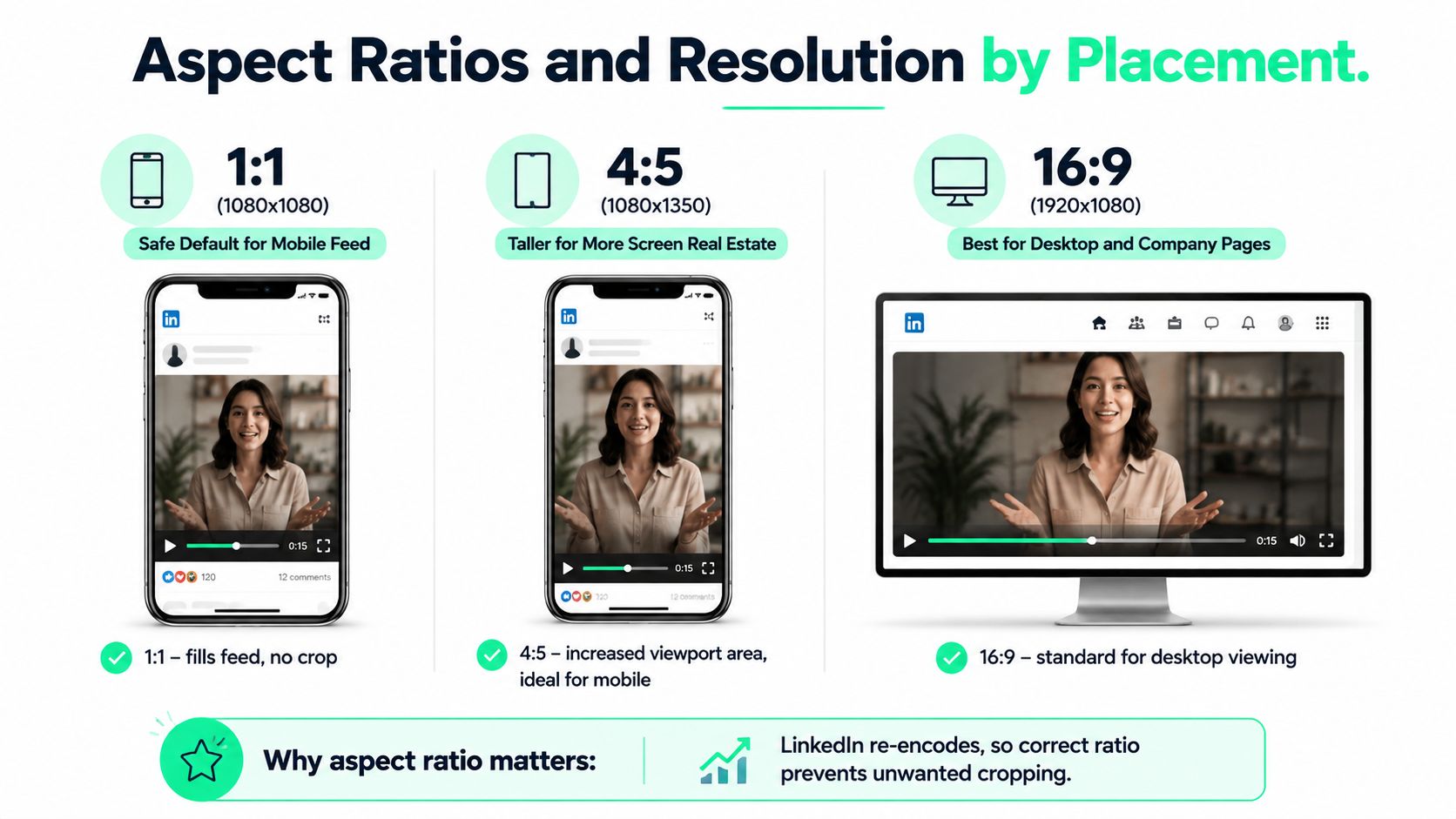
**Aspect ratio is the first export decision.** Resolution matters, but a correctly framed 1080×1350 clip usually serves a mobile feed better than an oversized file that still uses the wrong shape.
The most practical choices are:
- **1:1, 1080×1080:** A safe square default for feed posts that need consistent rendering across devices.
- **4:5, 1080×1350:** A taller mobile-feed format that gives the creative more vertical presence.
- **9:16, 1080×1920:** A full vertical canvas for mobile-first storytelling, when the destination supports the composition cleanly.
- **16:9, 1920×1080:** The conventional horizontal format for desktop viewing, presentations, webinar clips, and wide ad creative.
### Designing for the crop
LinkedIn adds interface elements around the video, and those overlays can compete with subtitles, speaker names, title cards, and calls to action. Critical text and faces should sit inside a generous central area rather than hugging the top or bottom edge.
A vertical clip also needs a different visual hierarchy from a webinar excerpt. A speaker-tracked crop can keep the face centered, while a static center crop may cut off the person entirely when the source speaker sits to one side. Editors should review every reframed shot, not just the opening frame.
The [BlitzReels LinkedIn video resizing tool](https://blitzreels.com/tools/resize-video-for-linkedin) can help adapt a source clip to a square or vertical canvas, but automated reframing still needs a human quality check. Resolution cannot repair a poor crop. A correctly composed 4:5 file is more useful than an upscaled version with extra pixels and missing context.
## Recommended Export Settings for Clean LinkedIn Playback
LinkedIn's technical limits are broad enough that editors can choose a conservative delivery preset and stop worrying about theoretical ceilings. The reliable short-form target is a clean H.264 encode, a stable frame rate, and audio that remains intelligible after processing.
For 1080p square or vertical masters, an H.264 High Profile encode at Level 4.2 with a moderate VBR bitrate is a practical starting point. For short ad-style clips, a delivery range around **6 to 8 Mbps** can be efficient, while more complex square or vertical masters may need a higher range to preserve fine detail. The exact setting should follow the footage, because animated graphics and noisy camera images compress differently.
| Parameter | Short Vertical under 30s | Standard Post 30 to 90s | Long-Form Clip 90s to 10min |
|---|---|---|---|
| Container | MP4 | MP4 | MP4 |
| Video codec | H.264 High Profile | H.264 High Profile | H.264 High Profile |
| Frame rate | 30 FPS | 30 FPS | 30 FPS |
| Bitrate approach | VBR, efficient delivery | Moderate VBR | Moderate VBR with detail preserved |
| Audio | AAC-LC stereo | AAC-LC stereo | AAC-LC stereo |
| Encoding | Single pass is usually sufficient | Two-pass for a final master | Two-pass when file efficiency matters |
| Framing | 9:16 or 4:5 | 1:1 or 4:5 | Match the source and placement |
A **30 FPS** export is the sensible default for talking-head footage. A 24 FPS cinematic clip can work when the source was intentionally shot that way, but exporting at 60 FPS rarely improves ordinary LinkedIn playback enough to justify the added data and processing.
Audio should be clean, consistent, and free of clipping. AAC-LC stereo at a sensible quality setting works well for speech, while peaks should leave headroom for platform processing. A two-pass encode can improve bitrate allocation for a final master, although a fast single-pass export is often appropriate for a short clip that needs to move quickly from edit to upload.
For teams moving compressed assets through a repeatable workflow, the [LinkedIn video compression tool](https://blitzreels.com/tools/compress-video-for-linkedin) can help create a smaller upload without turning compression into a blind quality trade-off.
## Thumbnails Captions and SRT Files the Often Overlooked Specs
A file can pass LinkedIn's uploader and still fail at the point that matters, the feed preview. The thumbnail, caption track, and audio mix determine whether a viewer understands the clip before deciding to continue.
A custom thumbnail for feed and Page use should be prepared at **1200×627 pixels**, approximately **1.91:1**, in JPG or PNG format and under **5 MB**. The composition should show the subject clearly, use restrained title-card text, and avoid making the thumbnail carry the entire argument. A clean face, a recognizable visual, and a concise promise usually work better than a crowded miniature poster.
### Captions need editorial control
Auto-captions save time, but they can mishandle product names, technical terms, names of speakers, and acronyms. An SRT sidecar lets an editor correct the words and timing before publication.
A professional caption workflow keeps cues short, uses no more than two lines per cue, and checks that the text stays readable against the image. Timecodes must match the final master, not an earlier cut. If the video changes after the SRT is prepared, the caption file needs to be retimed or regenerated.
Captions also protect the message when viewers encounter the video without sound. Burned-in captions provide visual consistency and brand styling, while a separate SRT keeps the text accessible as a selectable caption track when the publishing workflow supports it. The choice depends on the destination, but neither approach excuses an unchecked transcript.
The [BlitzReels SRT editor](https://blitzreels.com/tools/srt-editor) provides a focused way to review subtitle timing and wording before upload. Audio levels still need a final listen on headphones and a phone speaker. Dialogue should remain clear after mobile compression, music should sit behind the voice, and the opening line should make sense even when the viewer hasn't enabled sound.
## Repurposing Long Videos into LinkedIn Ready Shorts
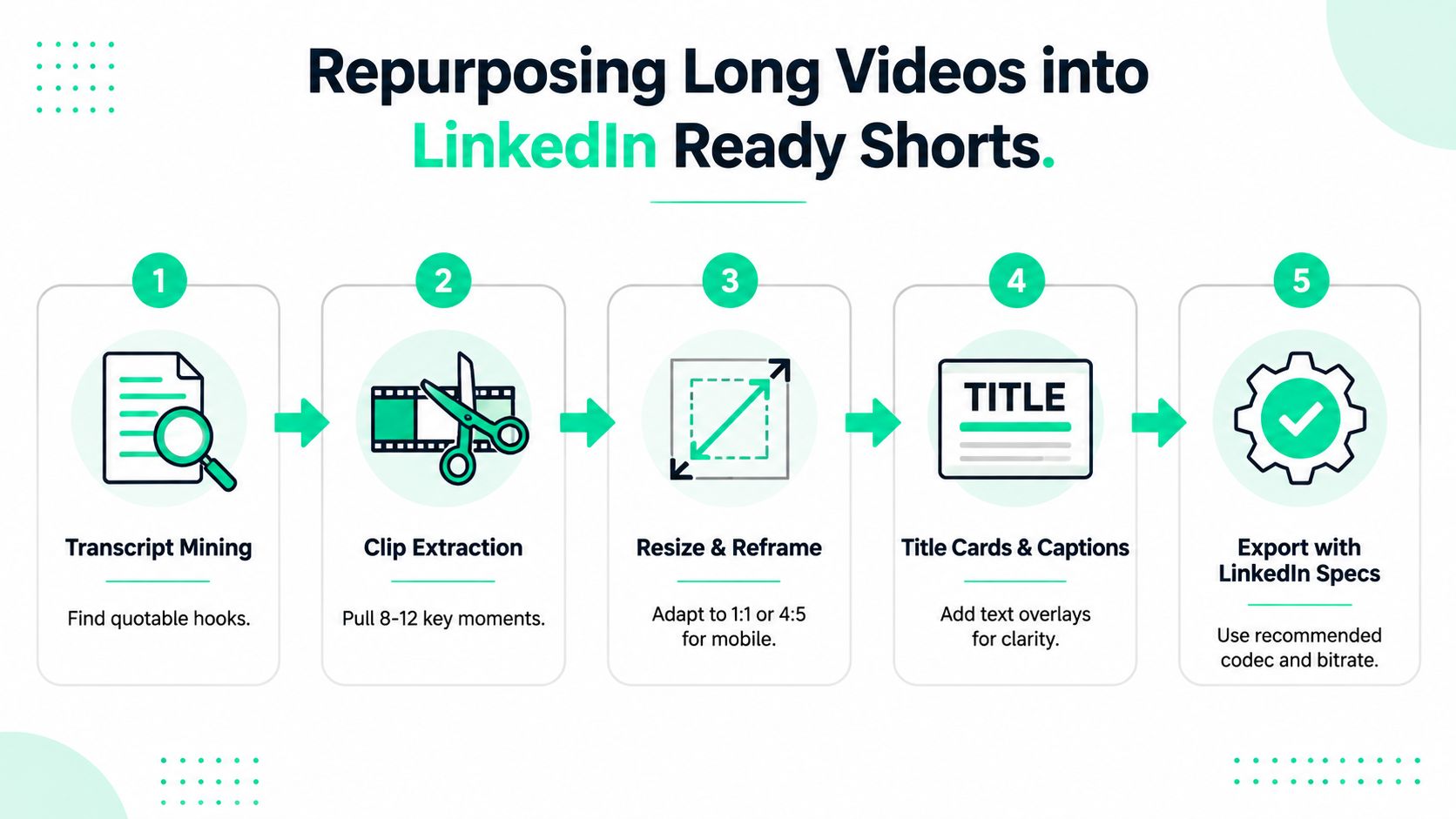
A sixty-minute webinar, podcast, or keynote contains more than one usable LinkedIn idea. The efficient workflow starts with the transcript, not with random timeline scrubbing. Search for decisive statements, surprising explanations, objections, and moments where the speaker's energy changes.
A strong repurposing pass can identify **8 to 12 key moments** from one long recording, then turn each moment into a separate editorial unit. The clip needs its own hook, context, and ending. Cutting a section out of a webinar often leaves a slow introduction that made sense live but loses a feed viewer.
### Reframe before adding polish
A 16:9 source can be center-cropped or speaker-tracked into 9:16 or 4:5. The editor should reserve space for captions, speaker labels, title cards, and LinkedIn interface elements before adding graphics. A face that sits comfortably in the original wide frame may need active tracking in a vertical version.
The most useful toolchain combines transcript mining, clipping, reframing, resizing, captions, templates, and fast review. BlitzReels can transcribe a source, identify cuts, apply dynamic captions, auto-reframe a speaker, and batch-export short-form versions for social platforms. A human editor still decides whether the hook is accurate, whether the crop feels natural, and whether the title card overpromises.
Each finished clip should use a distinct opening angle. One might lead with the problem, another with the contrarian answer, and a third with the speaker's strongest phrase. Scheduling the group across a planned publishing window avoids turning the feed into a duplicate sequence and gives each idea room to stand alone.
## Common Upload Mistakes and How to Fix Them
Most LinkedIn upload problems come from using a production master as a delivery file or from designing for another platform's safe zones. A short preflight catches the common failures.
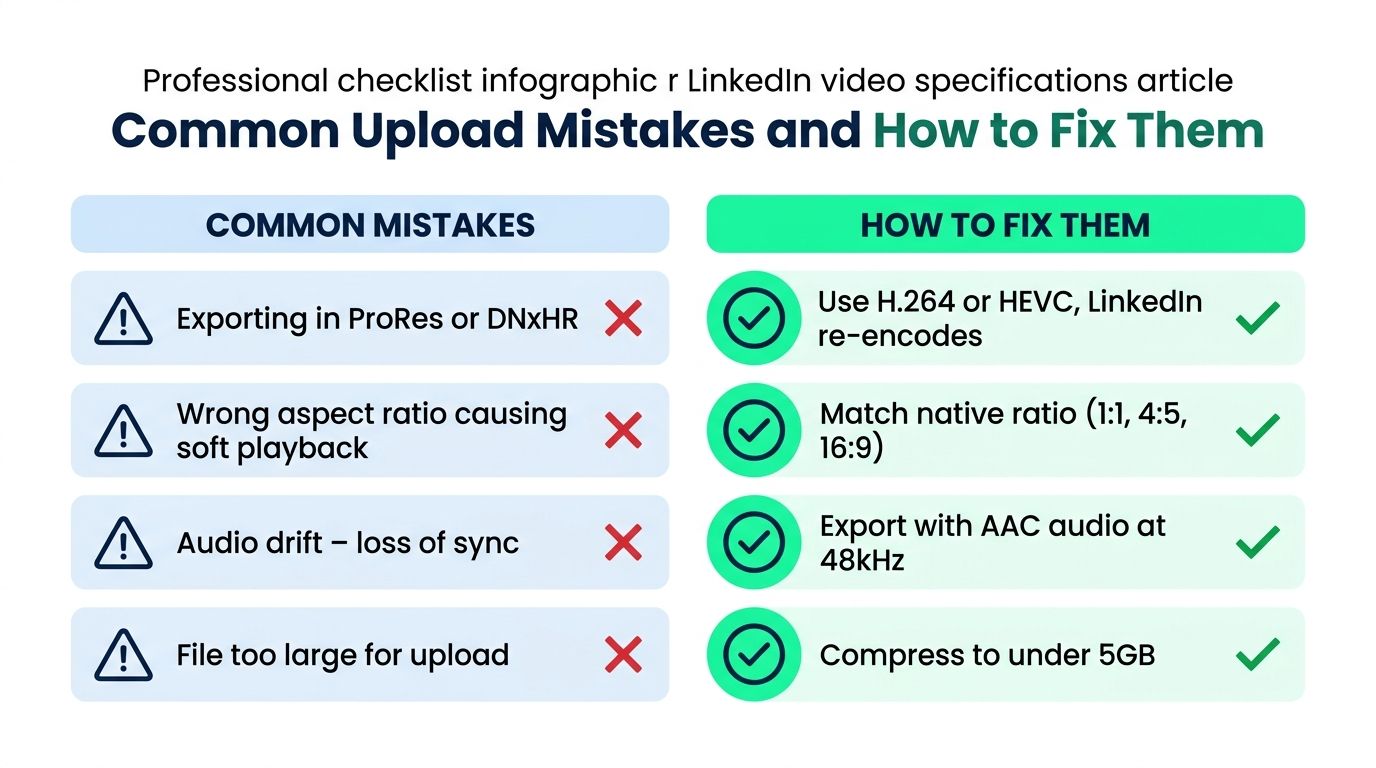
- **Oversized production codecs:** ProRes and DNxHR are designed for editing, not routine social delivery. Use a genuine H.264 MP4 export instead of sending a heavy mezzanine through the uploader.
- **Unnecessary high frame rates:** LinkedIn accepts up to 60 FPS, but 30 FPS is the practical default for most talking-head clips. Higher frame rates add data without solving a framing or storytelling problem.
- **Invalid containers:** Renaming a MOV file to MP4 doesn't convert it. Transcode the file and verify the actual container.
- **Edge-bound graphics:** Text placed for Instagram may sit beneath LinkedIn's interface elements. Keep titles, faces, and captions comfortably inside the central composition.
- **Unchecked captions:** Auto-generated subtitles can distort brand names and jargon. Review an SRT or correct the burned-in caption layer before publishing.
## Quick Reference LinkedIn Video Specs Card
The following card is designed for editors working in Premiere, DaVinci Resolve, a scheduler, or an AI repurposing workflow.
| Parameter | Organic Feed | Video Ads | Company Pages | Recommended Export |
|---|---|---|---|---|
| File size | 75 KB to 5 GB | 75 KB to 500 MB | 75 KB to 5 GB under Pages guidance | Genuine MP4 delivery file |
| Duration | 3 seconds to 10 minutes under standard native guidance | 3 seconds to 30 minutes | 3 seconds to 10 minutes | Short, focused edit |
| Resolution | 256×144 to 4096×2304 | Validate placement requirements | 256×144 to 4096×2304 | 1080p target |
| Aspect ratio | Flexible within the published range | 4:5, 1:1, 9:16, or 16:9 by placement | Match the Page creative | H.264 framing by destination |
| Frame rate | 10 to 60 FPS accepted | Validate campaign setup | 10 to 60 FPS accepted | 30 FPS |
| Bitrate | 192 Kbps to 30 Mbps | Placement dependent | 192 Kbps to 30 Mbps | Conservative VBR |
| Audio | Compatible audio track | Clean speech and music mix | Compatible audio track | AAC-LC stereo |
| Captions | SRT or burned-in captions | Captions strongly recommended | Review for accessibility | Corrected captions |
| Thumbnail | Custom preview when available | Creative-dependent | Page preview asset | Clear title card or subject frame |
---
BlitzReels helps creators turn long recordings into short LinkedIn clips by handling clipping, captions, reframing, resizing, title cards, templates, and export preparation in one workflow. Visit [BlitzReels](https://blitzreels.com) to create platform-ready versions from existing videos, review the crop and captions, and move from source footage to a clean LinkedIn upload faster.