---
title: "Podcast Clips: A Guide to Creating Viral Short-Form Video"
canonical: "https://blitzreels.com/blog/podcast-clips"
---
# Podcast Clips: A Guide to Creating Viral Short-Form Video
URL: https://blitzreels.com/blog/podcast-clips
Markdown URL: https://blitzreels.com/blog/podcast-clips.md
Published: 2026-07-12
Author: BlitzReels
Learn the complete workflow for turning long podcast episodes into high-performing podcast clips for TikTok, Reels, and Shorts. A step-by-step guide.
Tags: podcast clips, video repurposing, short form video, social media video, podcast marketing

A familiar pattern plays out after publishing. The full podcast episode is strong, the core audience listens, a few clips get posted in a rush, and then the episode fades into the archive while short-form platforms keep surfacing sharper, faster edits.
That is usually not a content supply problem. It is a selection and packaging problem.
A single episode can produce weeks of usable social assets, but only if the workflow is built around clips from the start. AI tools help by scanning transcripts, spotting topic shifts, and surfacing likely highlight moments fast. They save hours on the first pass. They do not reliably judge whether a clip has tension in the first two seconds, whether the quote makes sense without full episode context, or whether the speaker's delivery will hold attention on mute. That part still needs an editor, producer, or strategist making hard calls.
The teams getting consistent results treat the podcast as source footage for a distribution system, not a one-time upload. They record with clip potential in mind, mark promising timestamps during the session, let AI narrow the edit pool, and then apply human judgment to choose the moments that can stop a scroll and earn a click. That approach also explains why [repurposed podcast clips often drive more engagement than original social posts](https://www.blitzreels.com/blog/why-repurposed-clips-drive-more-engagement-than-originals). The raw conversation usually carries more specificity, personality, and credibility than a post written after the fact.
Done well, podcast clips are not leftovers. They are the main engine for extending the reach of the episode without multiplying production time.
## Table of Contents
- [The Untapped Gold in Your Podcast Archives](#the-untapped-gold-in-your-podcast-archives)
- [Why long-form alone rarely drives discovery](#why-long-form-alone-rarely-drives-discovery)
- [What sits inside a typical episode](#what-sits-inside-a-typical-episode)
- [Finding Your Golden Moments Before You Edit](#finding-your-golden-moments-before-you-edit)
- [Why AI alone misses the mark](#why-ai-alone-misses-the-mark)
- [How to record for clip potential](#how-to-record-for-clip-potential)
- [Editing and Captioning for Short Attention Spans](#editing-and-captioning-for-short-attention-spans)
- [Build the first seconds first](#build-the-first-seconds-first)
- [Edit for pace captions and framing](#edit-for-pace-captions-and-framing)
- [Optimizing Export Settings for Each Platform](#optimizing-export-settings-for-each-platform)
- [Use one master export then check platform details](#use-one-master-export-then-check-platform-details)
- [Protect captions from platform UI](#protect-captions-from-platform-ui)
- [Building a Smart Distribution Strategy](#building-a-smart-distribution-strategy)
- [Turn one episode into a release calendar](#turn-one-episode-into-a-release-calendar)
- [Distribution starts during recording](#distribution-starts-during-recording)
- [Measuring Performance to Refine Your Process](#measuring-performance-to-refine-your-process)
- [Read drop-off before reading likes](#read-drop-off-before-reading-likes)
- [Use results to shape the next recording](#use-results-to-shape-the-next-recording)
## The Untapped Gold in Your Podcast Archives
Open any back catalog and the pattern is usually obvious within ten minutes. One episode contains a strong opinion that could start a debate, a practical answer that teaches one thing fast, a personal story with a clean payoff, and at least one line that sounds better in short form than it did inside the full conversation.
That is the core value sitting in a podcast archive. The problem is packaging. Long-form episodes ask a new viewer for too much attention up front, while short clips let that same viewer sample the idea, the host, and the tone before deciding whether to commit to the full episode.
I treat every recorded episode as source material for distribution, not as a single asset with one publish date. That shift changes the workflow. It changes how interviews are planned, how questions are asked, and how the team reviews transcripts after recording. It also saves time, because one solid conversation can fill weeks of social inventory without booking extra shoots.
### Why long-form alone rarely drives discovery
Full episodes still matter. They build trust, session time, and subscriber loyalty. But clips do the first job. They earn attention from people who have never heard of the show.
That matters because platform behavior favors sampling. Viewers scroll, judge quickly, and stay only if the point is clear fast. A 45-minute episode can be excellent and still struggle to reach anyone beyond existing followers unless a shorter asset introduces it first. Teams that treat clips as a distribution layer usually get more value from the same recording session, especially when they build each episode around a few moments designed to stand on their own.
That is also why [repurposed podcast clips often drive stronger engagement than original social posts](https://www.blitzreels.com/blog/why-repurposed-clips-drive-more-engagement-than-originals). The raw material already has tension, specificity, and a real voice. It just needs tighter framing for feed-based viewing.
> **Practical rule:** If an episode produces no clean short-form moments, the problem usually started before editing. The host buried the point, the guest answered too broadly, or the conversation was never shaped for reuse.
### What sits inside a typical episode
A useful archive usually holds several clip categories, and each one serves a different job in distribution:
- **Contrarian moments** that spark comments because they push against standard advice.
- **Tactical answers** that solve one clear problem without extra setup.
- **Story beats** with tension and payoff that keep retention high.
- **Sharp one-liners** that work as a hook, title card, or caption-led opener.
AI makes this archive easier to mine because it can scan transcripts and surface likely candidates fast. Human review still decides what actually works. A transcript may flag a sentence as insightful, but the on-camera version can fall apart if the speaker rambles into it, references missing context, or delivers the line with weak energy. Strong clip workflows use AI for speed and human judgment for selection.
The best teams account for that before the record button is pressed. They ask cleaner questions, leave space for complete answers, and prompt guests to restate the key idea in a self-contained way. That small adjustment improves the archive more than any editing shortcut later.
A good podcast archive is not a storage problem. It is a content bank with delayed value. The teams that get the most out of it record with clip potential in mind, let AI narrow the search, and keep a human editor responsible for the final call.
## Finding Your Golden Moments Before You Edit
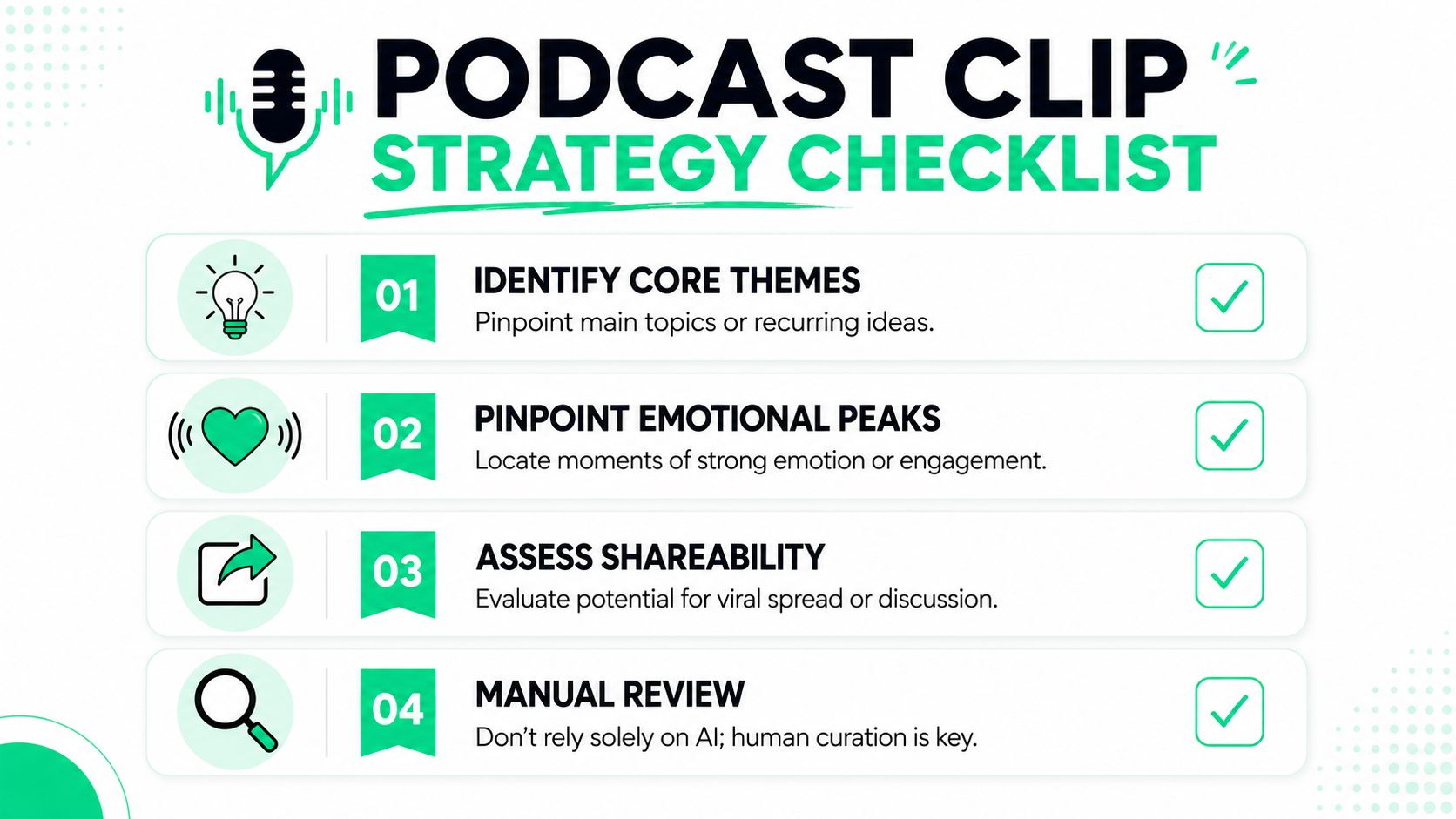
AI has changed clip discovery. It hasn't replaced editorial judgment.
That distinction matters because most weak podcast clips don't fail in the timeline. They fail one step earlier, when software identifies a segment that sounds useful in transcript form but falls flat on screen because the speaker hedges, gets interrupted, rambles into the point, or needs context that the viewer doesn't have.
### Why AI alone misses the mark
The strongest workflow uses AI for speed and humans for judgment. That isn't a philosophical preference. It's a production reality. **Data shows 60–70% of AI-selected clips still require manual editing** to remove crosstalk or vague language, and the best outcomes come from a hybrid approach where human review refines what the tool surfaces, according to [Podcast Studio Glasgow's analysis of podcast clip production](https://www.podcaststudioglasgow.com/podcast-studio-glasgow-blog/podcast-clips-are-your-real-growth-engine-why-professional-production-matters-from-day-one).
A fast workflow usually looks like this:
1. **Transcribe the episode first.** Clean transcripts make it easier to scan for claims, stories, and tight teaching moments. A guide to [transcribing video to text](https://www.blitzreels.com/blog/how-to-transcribe-video-to-text) is useful here because searchable text changes clip review from guesswork into sorting.
2. **Mark candidate moments in batches.** Don't make a keep-or-delete decision on the first pass.
3. **Review with sound and picture on.** A line that reads well can still fail because facial expression, overlap, or pacing ruins it.
4. **Cut ruthlessly.** If the point takes too long to arrive, it won't survive the feed.
> AI is good at finding where something happened. A human still has to decide whether anyone will care.
### How to record for clip potential
The easiest way to improve podcast clips is to shape the conversation before the cameras roll. Recording is commonly performed as if the full episode is the sole output, with editing tools subsequently employed to extract social content. That usually creates extra cleanup work.
A better recording plan includes a few deliberate habits:
- **Open answers with the claim.** Don't bury the point under throat-clearing.
- **Pause after strong lines.** Clean gaps help clipping tools and editors isolate a usable moment.
- **Ask for specifics.** Concrete examples outperform broad summaries because they give the clip a sharper payoff.
- **Restate context inside the answer.** A viewer who sees only the clip still needs enough setup to understand it.
- **Vary delivery.** Humor, tension, disagreement, and surprise all make better raw material than flat agreement.
A “golden moment” usually has one of four characteristics. It surprises the viewer, teaches something practical, compresses a story into a short arc, or states a clear opinion that people want to debate. If a segment does none of those, it may still be valuable in the full episode, but it probably won't become a strong short.
## Editing and Captioning for Short Attention Spans
Editing decides whether a promising segment becomes a scroll-stopper or just another trimmed excerpt. The target isn't only to make the clip shorter. The target is to make the idea land faster, look native on vertical platforms, and remain understandable with sound off.
### Build the first seconds first
The opening decides whether the rest of the edit matters. A high-performing clip needs a visible and audible hook immediately. **Seventy percent of viewers decide whether to continue watching within the first 3 seconds**, and the technical workflow for stronger podcast clips includes identifying that hook early, using jump cuts to maintain pace, auto-reframing for mobile, and normalizing audio to **-16 to -14 LUFS** to avoid a **30% drop in engagement**, based on the guidance in [Podcast Monkey's video podcast editing workflow](https://podcastmonkey.co/blogs/news/video-podcast-editing).
That changes the order of operations. Instead of editing from the beginning of the raw excerpt and hoping it gets compelling, start by isolating the most arresting sentence or visual beat. Then build around it.
A practical sequence looks like this:
- **Choose the first line last.** The strongest opener often comes from the middle of the raw exchange.
- **Add a title card only when it clarifies the promise.** If the spoken hook is already sharp, don't bury it.
- **Trim all lead-in friction.** Remove “so,” “I think,” “kind of,” and side comments that delay the point.
### Edit for pace captions and framing
Once the opening works, the rest of the edit should keep removing reasons to leave. That means tightening speech, keeping faces centered, and making captions readable without overwhelming the frame.
Tools such as Premiere Pro, CapCut, Descript, and [BlitzReels caption and clipping workflows](https://www.blitzreels.com/blog/how-ai-captions-save-time-and-grow-your-audience) can all handle parts of this process, including transcription, clipping, captions, reframing, resizing, templates, and fast social exports. The right choice depends on whether the team wants timeline-level control or a faster publish loop.
A reliable edit pass includes:
- **Jump cuts for filler removal.** Remove repetition, dead air, and detours, but preserve natural cadence.
- **L-cuts and J-cuts where hard cuts feel too abrupt.** Audio continuity helps clips feel smoother even when visuals move quickly.
- **On-beat captions.** Captions should highlight meaning, not mirror every syllable in the same style.
- **Reframing for 9:16.** Vertical crops need to keep eyes and mouth positioned comfortably for mobile viewing.
- **Visual resets.** A punch-in, angle change, title card, or brief B-roll insert can refresh attention before the frame goes stale.
> **Editing heuristic:** Every cut should either clarify the point, accelerate the pace, or improve the visual experience.
This walkthrough shows the difference between a raw excerpt and a finished social clip:
A few common mistakes keep showing up in weak podcast clips:
| Problem | What it does | Better move |
|---|---|---|
| Captions too low | Platform UI covers key words | Raise subtitle area and preview in mobile framing |
| No visual movement | The clip feels static | Add reframing, zoom changes, or angle swaps |
| Hook takes too long | Viewers leave before payoff | Open with the strongest claim |
| Audio levels vary | The clip feels unpolished | Normalize before export |
Fast editing isn't about rushing. It's about removing avoidable decisions. Strong templates, repeatable caption styles, and standard title card formats reduce production time without making every clip look identical.
## Optimizing Export Settings for Each Platform
A clean edit can still underperform if the export doesn't match where it's published. Platform-native sizing is the easy part. The harder part is preserving readability after UI overlays, caption placement, and mobile cropping.
### Use one master export then check platform details
Teams often work faster with one master vertical version, then create platform-specific variants only when the text layout or metadata needs adjustment. That keeps the workflow simple while still respecting how each app displays content.
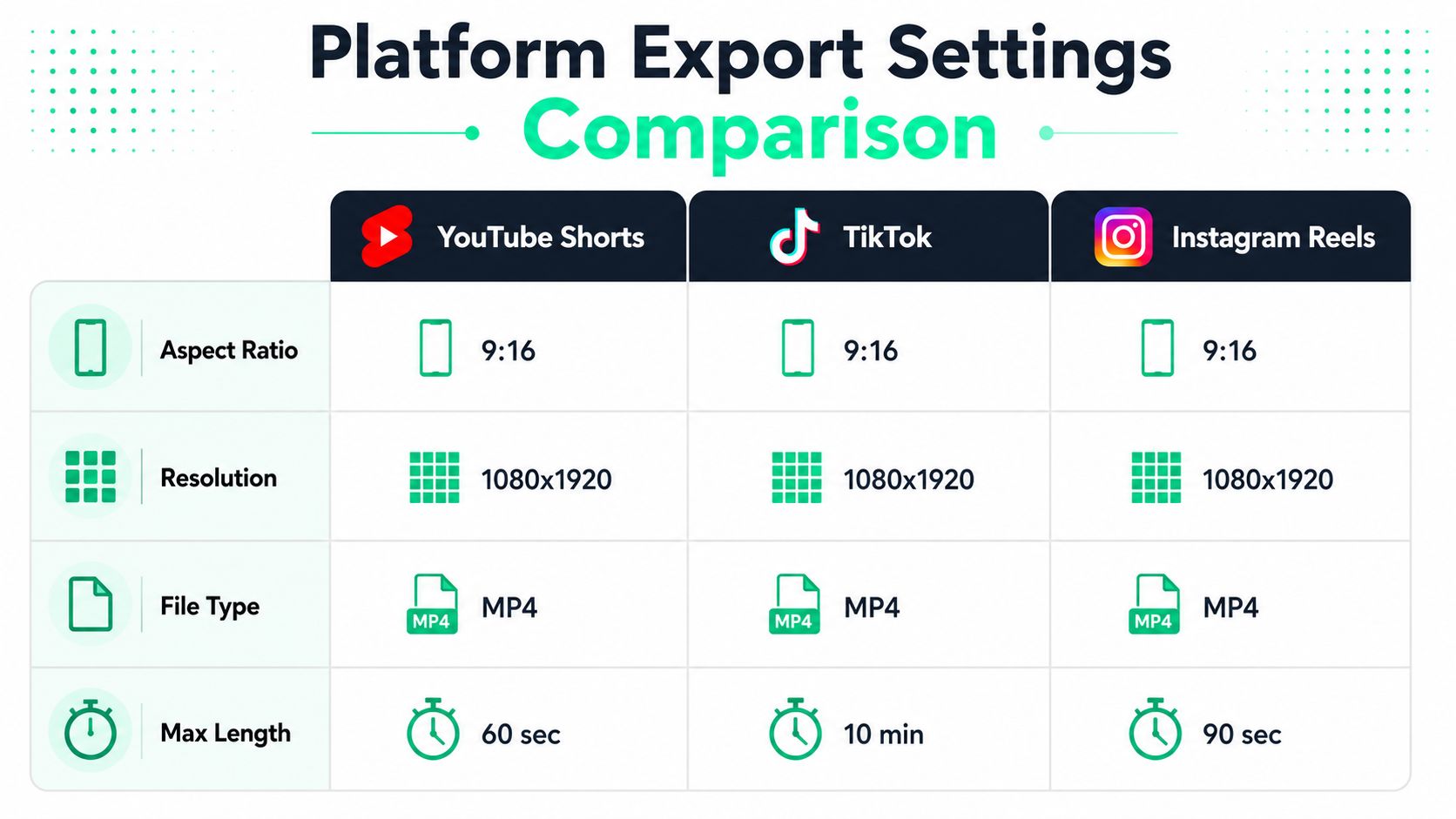
A practical baseline for podcast clips:
- **Aspect ratio** should stay vertical at 9:16.
- **Resolution** should stay at 1080x1920.
- **File type** should stay MP4.
- **Length** should respect the publishing context, even if the platform technically allows more.
That last point matters. Professional creators often keep reels and shorts brief because the clip should finish before attention drops. The safe creative choice is still to cut to the strongest complete idea, not to use all the available runtime just because the platform allows it.
### Protect captions from platform UI
The frame doesn't belong entirely to the editor. TikTok, Reels, and Shorts all place buttons, captions, usernames, and other interface elements over the video. That means text-safe zones matter just as much as export settings.
Use this quick delivery checklist:
- **Check bottom spacing.** Don't place key subtitles where platform buttons can cover them.
- **Leave room at the top.** Title cards and hook text need margin from profile and app labels.
- **Review on an actual phone.** Desktop previews miss overlap issues.
- **Compress only after checking visual quality.** If file size becomes an issue, use a dedicated workflow for [compressing MP4 video](https://www.blitzreels.com/blog/how-to-compress-mp-4-video) instead of exporting repeatedly with increasingly aggressive settings.
A final pass before upload should confirm three things. The captions are readable, the speaker remains properly framed after resizing, and the opening text still lands even with platform UI sitting on top of the composition.
## Building a Smart Distribution Strategy
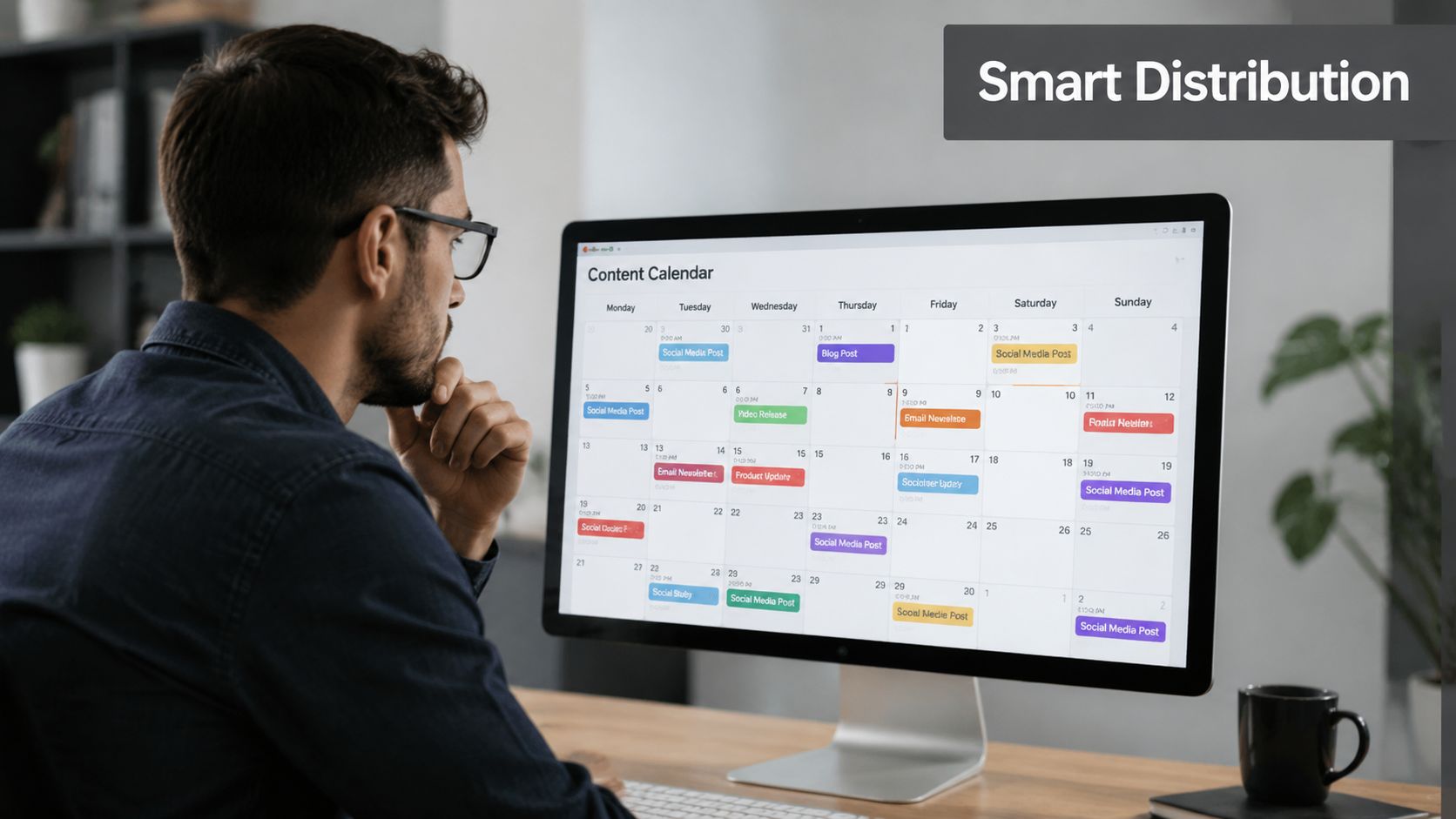
Posting a finished clip without a release plan wastes a lot of recording effort. Distribution is where a podcast episode turns into a month of social activity, and it works better when clips are assigned different jobs instead of all saying the same thing in slightly different edits.
### Turn one episode into a release calendar
A useful batch usually includes a mix of formats. One clip can introduce a bold claim. Another can answer a tactical question. A third can use a story beat. A fourth can tease the full episode.
That structure gives each post a reason to exist.
- **Awareness clips** should stop the scroll and make the creator recognizable.
- **Authority clips** should teach one thing clearly enough that viewers save or share it.
- **Conversation clips** should invite disagreement, examples, or follow-up questions.
- **Bridge clips** should point viewers toward the full interview, website, or embedded episode page.
For creators publishing from their own site, a guide to [professional podcast embedding for creators](https://taap.bio/blog/how-to-embed-podcast-on-website) is helpful because distribution works better when short clips and full episodes live in a cleaner on-site experience instead of being scattered across platforms.
> A clip calendar works when each post has a role. Repetition without purpose looks efficient in a spreadsheet and weak in a feed.
### Distribution starts during recording
A lot of social performance gets decided before editing begins. **Data reveals that multi-camera podcast clips average 20–30k views, while poorly framed single-camera clips often stall under 5k, and visual framing during recording can be 2–3x more impactful than post-processing edits**, according to [the referenced clip analysis on Instagram](https://www.instagram.com/reel/DQ12CiYjeLs/).
That trade-off changes production priorities. Fancy captions can't rescue dull framing. A single locked shot can work for some formats, but a feed built on repeated static clips starts to blend together. Angle changes, solo shots, reaction cuts, and occasional B-roll give the editor more ways to maintain attention without forcing artificial effects into every post.
A simple distribution system usually includes:
- **A release sequence** that spreads one episode's clips across several weeks.
- **Platform-aware captions** that adapt the same idea to different audiences.
- **Comment prompts** that invite responses without sounding scripted.
- **Cross-promotion** that routes interested viewers to the episode, newsletter, or site.
“Post and pray” fails because it treats every clip as disposable. A structured calendar treats each clip as part of a broader audience-building loop.
## Measuring Performance to Refine Your Process
Publishing clips without reviewing outcomes leads to the same mistakes repeating in the next recording batch. The useful metrics aren't the vanity numbers alone. The useful metrics explain where attention broke, what kept viewers watching, and which topics deserve more follow-up.
### Read drop-off before reading likes
Start with retention. If viewers leave immediately, the hook failed or the opening frame didn't match the promise. If they stay through the opening and leave midway, the pacing probably slowed or the clip took too long to deliver payoff.
This is where clip length matters. **For marketing purposes, 73% of consumers find videos between 30 to 120 seconds most effective**, which gives podcast editors a practical target range when choosing excerpts and testing variations, according to [Prodshort's short-form video trends summary](https://prodshort.com/blog/short-form-video-trends). The exact winner still depends on the idea, but this range is a useful benchmark when reviewing what to keep and what to trim.
### Use results to shape the next recording
A performance review should answer a few direct questions:
- **Which hooks held attention longest**
- **Which topics generated shares instead of passive views**
- **Which framing choices made the clip feel more dynamic**
- **Which captions improved comprehension without clutter**
A glossary of [video analytics terms and metrics](https://www.blitzreels.com/glossary/video-analytics) helps teams standardize how they read those signals across platforms.
The most efficient creators close the loop. They don't just edit better next time. They record better next time. A weak retention curve can point back to vague answers, soft openings, or clips that needed too much context. A strong share rate usually points toward clarity, specificity, or a point of view strong enough to repeat in future episodes.
---
BlitzReels fits this workflow when the goal is to turn a podcast recording into short-form social assets without spending hours in a traditional timeline. It can help with clipping, captions, reframing, resizing, title cards, templates, and quick exports for TikTok, Reels, Shorts, LinkedIn, and related platforms. For teams that want a faster record-to-publish loop, [BlitzReels](https://blitzreels.com) is worth evaluating alongside the rest of the editing stack.