---
title: "Podcast to Shorts: Your 2026 Guide to Viral Clips"
canonical: "https://blitzreels.com/blog/podcast-to-shorts"
---
# Podcast to Shorts: Your 2026 Guide to Viral Clips
URL: https://blitzreels.com/blog/podcast-to-shorts
Markdown URL: https://blitzreels.com/blog/podcast-to-shorts.md
Published: 2026-07-09
Author: BlitzReels
Learn the complete workflow for turning your podcast to shorts. This guide covers finding hooks, AI editing, captioning, and platform-specific tips for 2026.
Tags: podcast to shorts, repurpose content, short-form video, video editing, content strategy

A familiar pattern plays out every week. A team spends serious effort recording a podcast episode, publishes the full version, shares it once, then moves on to the next one while the archive sits untouched.
That archive usually isn't empty content. It's uncut social inventory. Strong opinions, sharp stories, practical tips, rebuttals, founder moments, customer language, and clean soundbites are already there. The problem isn't a lack of material. The problem is that most podcasts are still treated like single assets instead of raw material for a repeatable **podcast to shorts** system.
Short-form platforms changed the economics of distribution. A full episode asks for sustained attention. A clip only has to earn the next few seconds. That's a much easier entry point for new viewers, especially on TikTok, Instagram Reels, YouTube Shorts, and LinkedIn. Once that clicks, the strategy changes from “record more” to “extract better, edit faster, publish consistently, and learn from the response.”
## Table of Contents
- [The Untapped Goldmine in Your Podcast Archive](#the-untapped-goldmine-in-your-podcast-archive)
- [How to Systematically Find Clip-Worthy Moments](#how-to-systematically-find-clip-worthy-moments)
- [Listen for moments that already carry tension](#listen-for-moments-that-already-carry-tension)
- [Mark candidates before opening the editor](#mark-candidates-before-opening-the-editor)
- [Choose clips with different jobs](#choose-clips-with-different-jobs)
- [The Modern AI Clipping and Editing Workflow](#the-modern-ai-clipping-and-editing-workflow)
- [Start with one clean source file](#start-with-one-clean-source-file)
- [Use AI for detection, not final judgment](#use-ai-for-detection-not-final-judgment)
- [Build an editing bin, not a single export](#build-an-editing-bin-not-a-single-export)
- [Advanced Editing Techniques for High Retention](#advanced-editing-techniques-for-high-retention)
- [Hooks decide whether the clip gets a chance](#hooks-decide-whether-the-clip-gets-a-chance)
- [Captions and motion keep attention from leaking](#captions-and-motion-keep-attention-from-leaking)
- [Pacing fixes what raw podcast footage usually gets wrong](#pacing-fixes-what-raw-podcast-footage-usually-gets-wrong)
- [Optimizing and Publishing Across Platforms](#optimizing-and-publishing-across-platforms)
- [What changes from platform to platform](#what-changes-from-platform-to-platform)
- [Why face-first video beats static podcast visuals](#why-face-first-video-beats-static-podcast-visuals)
- [Measuring What Matters and Closing the Loop](#measuring-what-matters-and-closing-the-loop)
- [Track the opening before anything else](#track-the-opening-before-anything-else)
- [Feed short-form results back into the next episode](#feed-short-form-results-back-into-the-next-episode)
## The Untapped Goldmine in Your Podcast Archive
Most podcast libraries contain far more usable content than their owners realize. A single conversation often includes a dozen moments that would work better as standalone short videos than they do buried inside a full episode.
That gap matters because social platforms reward fast clarity. The best podcast moments usually have exactly that. A clean answer, a surprising opinion, a direct lesson, or a sharp reaction can become a clip with almost no new ideation required. The recording work is already done.
The shift is operational, not creative. Instead of treating every episode as an endpoint, smart teams treat it as a source file for clipping, captions, reframing, resizing, title cards, and distribution. That's the practical center of a strong **podcast to shorts** workflow.
> Your archive doesn't need more recording. It needs better extraction.
A lot of creators still overestimate the value of making something new and underestimate the value of repackaging something proven. That's why resources on [RedactAI content strategies](https://redactai.io/blog/content-repurposing-strategies) are useful. They frame repurposing as a deliberate distribution system, not a fallback task for old content.
The same logic applies to podcast clips. A strong long-form conversation usually contains multiple formats inside it: quote-style clips, educational snippets, opinion-led shorts, teaser cuts, and reaction moments. When those are edited for vertical viewing, they stop being leftovers and start acting like acquisition assets.
That's also why repurposed video often beats net-new posts on social. The core idea has already survived a real conversation, which tends to make it sharper and more specific. The mechanics behind that are covered well in this breakdown of [why repurposed clips drive more engagement than originals](https://www.blitzreels.com/blog/why-repurposed-clips-drive-more-engagement-than-originals).
## How to Systematically Find Clip-Worthy Moments
Finding strong shorts isn't an editing task first. It's a selection task. Most weak podcast clips fail long before captions or resizing enter the picture.

The practical workflow is hybrid. **Podcast clips drive 40% of new listeners, short clips account for 20–40% of new audience acquisition for video shows, and social discovery contributes 10–30% of new listeners**, which is why a useful system starts with AI detection and ends with manual review of the top **5–10 clips** rather than blind automation alone, as outlined by [Podcast Studio Glasgow on podcast clips and social discovery](https://www.podcaststudioglasgow.com/podcast-studio-glasgow-blog/podcast-clips-are-your-real-growth-engine-why-professional-production-matters-from-day-one).
### Listen for moments that already carry tension
A clip needs internal momentum. If a segment only makes sense because of what happened three minutes earlier, it usually won't travel well as a short.
The strongest moments often fall into a few recurring categories:
- **Contrarian lines** that challenge a common belief.
- **Tactical advice** that someone can apply immediately.
- **Specific claims** that sound concrete instead of vague.
- **Story beats** with conflict, surprise, or reversal.
- **Questions with emotional pull** that make a viewer wait for the answer.
A transcript helps, but reading alone can flatten tone. Audio and facial delivery still matter. A line that looks average on the page may hit hard when the speaker pauses, laughs, or leans into the camera.
### Mark candidates before opening the editor
The fastest teams don't scrub the full timeline from scratch every time. They review with a clipping lens and tag moments as they go.
A simple review pass works well:
1. **Mark the first sentence that creates curiosity.** If there's no hook, there's probably no clip.
2. **Check whether the segment can stand alone.** If context is missing, skip it or recut it.
3. **Look for clear payoff.** A strong opening without a satisfying answer often underperforms.
4. **Watch body language.** Visible reaction improves social performance more than clean audio alone.
5. **Trim aggressively.** If a sentence doesn't earn attention, it doesn't belong.
> **Practical rule:** A clip should survive without the rest of the episode. If it needs a long setup, it's a chapter, not a short.
Transcripts are still useful for speed. Keyword searching for objections, claims, questions, product terms, customer pain points, or emotional words can narrow the field quickly. This makes accurate text matter, especially when teams want to jump from spoken dialogue to rough-cut candidates. A clean starting point is a transcript workflow like this guide on [how to transcribe video to text](https://www.blitzreels.com/blog/how-to-transcribe-video-to-text).
### Choose clips with different jobs
Not every short should do the same thing. A balanced podcast to shorts system usually pulls from several editorial lanes.
| Clip type | What it's good for | What usually hurts it |
|---|---|---|
| Opinion clip | Reach and comments | Too much setup |
| Educational clip | Saves and repeat views | Generic advice |
| Story clip | Watch time | Slow opening |
| Proof clip | Trust and conversions | Empty claims |
| Question-led clip | Curiosity | Weak payoff |
That variety matters because the data later becomes more useful. If every clip has the same structure, the team can't tell whether a topic worked or whether the format did.
## The Modern AI Clipping and Editing Workflow
Modern clipping software changed podcast repurposing from a manual editing project into a production system. The gain isn't just speed. It's consistency.
**A single 60-minute podcast episode can yield 20 to 40 ready-to-post short clips using AI processing, typically in under 10 minutes. Shorter 20–30 minute episodes yield 8–15 clips, while 90-minute interviews can produce 40–60 clips**, according to [Choppity's podcast clip generator benchmarks](https://www.choppity.com/tools/podcast-clip-generator/). That scale is what makes batch publishing realistic instead of aspirational.
### Start with one clean source file
The workflow works better when the source footage is clean. Clear audio, visible faces, and stable framing make every downstream task easier. That includes transcription, speaker detection, clipping, caption timing, and vertical reframing.
Most modern tools follow a similar pipeline. Audio gets extracted, the episode is transcribed, speakers are identified, high-interest segments are suggested, faces are detected, and the frame is cropped around the active speaker for vertical output. The point isn't to admire the automation. The point is to remove repetitive timeline work.
Teams evaluating these workflows often compare the trade-offs between raw automation and editorial control. A useful overview of that wider shift appears in [Koast AI content insights](https://koast.ai/post/koast-ai-the-ultimate-guide-to-ai-powered-content-creation), especially for anyone building a more systematic content engine around one source recording.
### Use AI for detection, not final judgment
AI is strong at narrowing the search space. It's weaker at understanding nuance, context, and intent.
That's why the practical model is not “upload and publish whatever gets generated.” It's “upload, generate a wide candidate set, then choose deliberately.” A tool such as [BlitzReels' AI video clipping workflow](https://www.blitzreels.com/blog/ai-video-clipping-tool) can handle transcript generation, rough clip detection, captions, resizing, reframing, and title-card preparation. That removes the mechanical burden, but a human still needs to decide which clips deserve distribution.
Three editing choices usually separate a usable AI cut from a post-ready one:
- **Opening trim:** Move the first frame to the line with the strongest tension.
- **Context repair:** Add a short title card or on-screen text when the clip needs one sentence of setup.
- **Visual cleanup:** Reframe, resize, and simplify the screen so the speaker stays readable on mobile.
A raw auto-cut often includes throat-clearing, overlong pauses, or a sentence that made sense in the room but feels flat in-feed. That isn't an AI failure. It's just where editorial judgment still matters.
### Build an editing bin, not a single export
The smartest teams don't ask the software for one winner. They ask for a pool of options.
That pool becomes a content bin: short candidates sorted by angle, length, speaker, and platform fit. Some will become YouTube Shorts. Others will be trimmed differently for Reels or posted later when a topic becomes timely again.
A quick product walkthrough helps make that process concrete:
> The real gain from AI clipping isn't that it picks perfectly. It's that it gets a team from one long episode to an organized shortlist fast enough to publish consistently.
That's the difference between occasional repurposing and an actual system. One approach creates a clip when someone has spare time. The other creates a repeatable inventory every time a podcast episode is recorded.
## Advanced Editing Techniques for High Retention
A generated clip is a draft. Retention usually rises or falls in the next layer of editing.
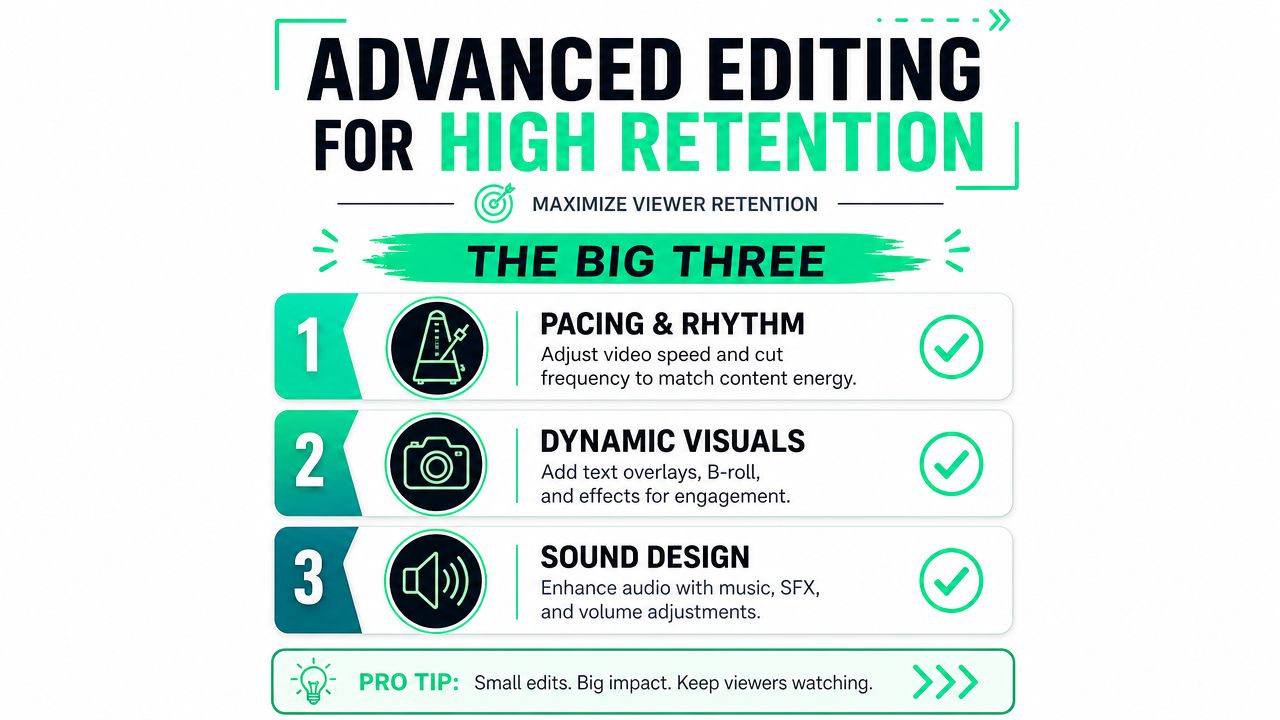
For YouTube Shorts, the standard is unforgiving. **Creators need a minimum audience retention rate of 80%, and every shot needs to beat a 70% viewed-versus-swiped-away threshold. The opening hook is the most important factor in whether the algorithm keeps recommending the video**, based on [YouTube Shorts guidance discussed in this YouTube source](https://www.youtube.com/watch?v=ZOIflHgGQVo).
### Hooks decide whether the clip gets a chance
Most podcast footage starts too early. The speaker warms up, adds context, then finally says the line that should've opened the video.
That's why the first editing pass should focus on hook placement, not caption styling. A strong short often begins with the conclusion, the sharpest claim, or the most emotionally charged question. If context is needed, a title card can provide it faster than spoken setup.
Useful hook options include:
- **Direct claim:** Start on the strongest statement.
- **Question-led open:** Lead with the line that creates tension.
- **Title card plus answer:** Use text to set context, then cut straight into payoff.
- **Mid-thought entry:** Drop the viewer into the most energetic sentence if the clip still makes sense.
A good hook doesn't just sound interesting. It reduces decision time for the viewer.
### Captions and motion keep attention from leaking
Podcast clips live in silent-scroll environments. Captions aren't decoration. They carry comprehension, pacing, and emphasis.
The captions that tend to hold attention do a few things well:
- **They're readable on a phone.** Large type, clear contrast, few words per frame.
- **They emphasize key words.** Color pops, bolding, or on-beat animation can make a line land harder.
- **They fit the speaker's rhythm.** Laggy captions create friction. Overactive captions create noise.
Title cards, subtitle templates, and word-level animation can all help, but only when they serve the line. Overdesigned captions often make a clip feel cheaper, not sharper.
> A clean subtitle style with one or two emphasis treatments usually beats a template packed with constant motion.
### Pacing fixes what raw podcast footage usually gets wrong
Even strong spoken content can look static. A podcast clip usually needs visual intervention to feel native on short-form platforms.
That intervention might include reframing, zoom cuts, cutaways, image inserts, light B-roll, or text overlays that reset the eye between sentences. The goal isn't to hide the fact that the source was a podcast. The goal is to make the short feel intentionally edited for vertical viewing.
A practical editing checklist helps:
1. **Trim dead air first.** Silence and filler words break momentum quickly.
2. **Check shot energy.** If the frame sits unchanged too long, add movement.
3. **Use selective zooms.** Important lines can carry more weight with tighter framing.
4. **Insert visual support carefully.** A screenshot, headline, or image should clarify the point, not distract from it.
5. **Polish audio last.** Volume consistency and light music can help, but poor pacing won't be fixed by sound alone.
One more trade-off matters here. Fast editing helps retention, but frantic editing can damage clarity. Good pacing feels deliberate. The viewer should notice momentum, not editing tricks.
## Optimizing and Publishing Across Platforms
A clip that's edited well can still underperform if it's published with the wrong packaging. Each platform has its own expectations, and those details affect reach.
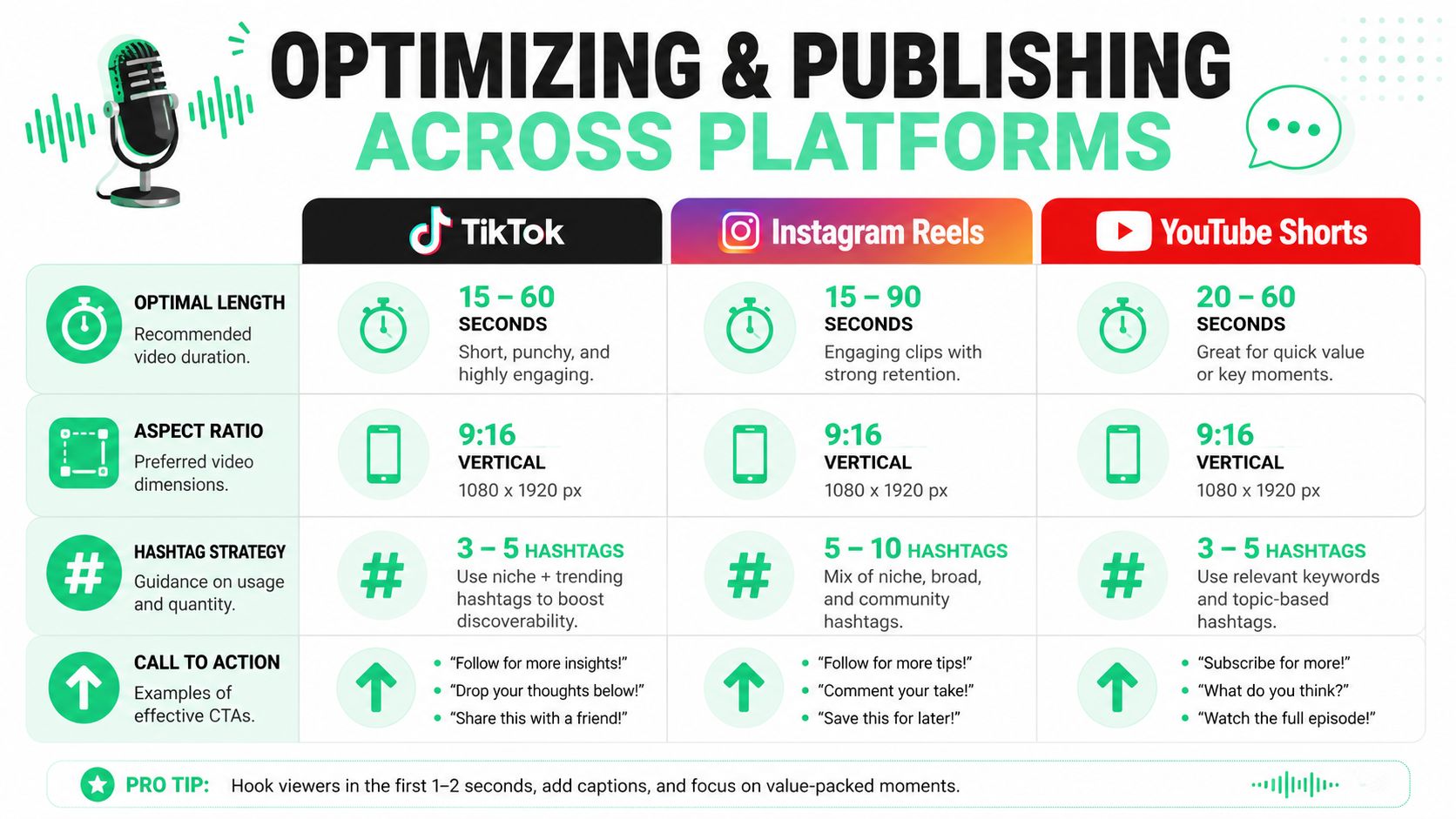
One publishing rule is straightforward. **Video clips showing human faces outperform audiograms by 3x on Facebook and LinkedIn, and 10x on YouTube, TikTok, and Instagram. For YouTube Shorts, clips must stay under 60 seconds, and using 2+ relevant hashtags discovered through autocomplete is recommended**, according to [Podcasters United on audiograms versus video shorts](https://podcastersunited.org/feed-your-brand/podcast-content-strategy-audiograms-vs-video-shorts/).
### What changes from platform to platform
The underlying clip can stay similar, but the wrapper should shift.
| Platform | What matters most | Publishing move |
|---|---|---|
| TikTok | Immediate clarity and native-looking text | Add strong on-screen text beyond captions |
| Instagram Reels | Save and share potential | Write a caption that adds context or a takeaway |
| YouTube Shorts | Searchable framing and clean intent | Use a title hook and keyword support in the description |
YouTube Shorts tends to reward cleaner categorization. A title card, clear topic framing, and a concise title help the clip find the right audience. TikTok is less forgiving of anything that feels exported from another platform without adaptation. Reels often benefits from slightly more polished presentation, especially when the clip teaches something useful.
A helpful baseline for teams new to the format is this glossary entry on [short-form video basics](https://www.blitzreels.com/glossary/short-form-video), particularly when standardizing publishing rules across channels.
### Why face-first video beats static podcast visuals
Many podcast workflows continue to stall at this stage. The team publishes audiograms because they're easy, but ease isn't the same as effectiveness.
Audiograms can still work for niche distribution or audio-first audiences, but they rarely compete with a properly reframed video clip that shows the speaker's face. Human expression adds meaning that waveform graphics can't carry. It also gives editors more to work with when they build hooks, captions, and punchy title cards.
A simple publishing standard keeps quality from slipping:
- **Use visible faces whenever possible.** Static waveform posts should be the fallback, not the default.
- **Resize for vertical viewing.** Don't rely on a tiny widescreen crop inside a tall canvas.
- **Keep exports platform-ready.** The fewer manual fixes needed at upload time, the more consistently the team publishes.
- **Match the CTA to the platform.** Comments may work on one platform, saves or shares on another.
> Short-form distribution works better when teams adapt one idea to several feeds instead of copying the same post blindly everywhere.
## Measuring What Matters and Closing the Loop
Most podcast repurposing systems break after publishing. Clips go live, someone checks likes, then the next episode gets cut the same way as the last one.
That misses the most valuable part of the process. The data from shorts should shape future source content, not just future edits.
### Track the opening before anything else
**Hooks should be treated as a KPI by tracking 2-second and 3-second view counts**, which helps identify and reuse opening structures that earn attention, as explained in [Visla's video marketing trends guidance](https://www.visla.us/blog/listicles/video-marketing-trends-for-2026/).
That matters because the opening determines whether the rest of the clip gets a chance. If viewers leave immediately, a strong middle section doesn't matter. Teams should review early drop-off first, then look at watch time, retention curves, saves, shares, and comments in context.
For teams trying to make that analysis more rigorous, [Bazzly's social media engagement guide](https://bazzly.ai/blog/how-to-measure-social-media-engagement) is a useful companion for separating surface engagement from the signals that inform future content decisions.
### Feed short-form results back into the next episode
A repeatable **podcast to shorts** system thus becomes a growth loop.
If short clips about pricing objections hold attention, future episodes should include more explicit pricing discussion. If story-led clips outperform tactical clips, the host should ask for more examples and fewer abstractions. If title-card framing consistently rescues context-heavy segments, that should become part of the standard edit package.
That same discipline improves the source show over time. Better clips come from better raw conversations. Better conversations come from learning what audiences stop for. A broader overview of that relationship appears in this guide to [what video marketing means in practice](https://www.blitzreels.com/blog/what-is-video-marketing).
---
BlitzReels fits this workflow as one option for teams that want to upload a podcast recording, generate clip candidates, add captions, reframe for vertical formats, resize exports, and move faster from long-form footage to publishable shorts across social platforms.