---
title: "A B2B Team’s Workflow for Repurposing Video Content in 2026"
canonical: "https://blitzreels.com/blog/repurposing-video-content"
---
# A B2B Team’s Workflow for Repurposing Video Content in 2026
URL: https://blitzreels.com/blog/repurposing-video-content
Markdown URL: https://blitzreels.com/blog/repurposing-video-content.md
Published: 2026-07-29
Author: BlitzReels
Learn how repurposing video content into short-form clips can boost engagement and drive conversions in 2026.
Tags: repurposing video content, short-form video, video clipping, video repurposing, content workflow

Repurposing video content is the fastest way for B2B teams to turn hours of recorded webinars, podcasts, demos, and customer interviews into days of social reach without scheduling another recording session. One solid source file—like a webinar or podcast episode—can fuel an entire week of vertical clips for TikTok, Reels, and LinkedIn when you stick to a repeatable workflow: choose moments, clip, reframe to 9:16, add captions, resize, review, and publish.
## Table of Contents
- [Why Repurposing Video Content Is a B2B Workflow Multiplier](#why-repurposing-video-content-is-a-b2b-workflow-multiplier)
- [Quick Comparison Table](#quick-comparison-table)
- [Operational Bottlenecks and Time Savings](#operational-bottlenecks-and-time-savings)
- [Finding the Moments Worth Clipping](#finding-the-moments-worth-clipping)
- [Quick Automation Wins](#quick-automation-wins)
- [Examples From B2B Workflows](#examples-from-b2b-workflows)
- [A Simple Checklist for Consistency](#a-simple-checklist-for-consistency)
- [Where Production Fits In](#where-production-fits-in)
- [Reframing and Resizing Clips for Vertical Platforms](#reframing-and-resizing-clips-for-vertical-platforms)
- [Practical Resizing Tips](#practical-resizing-tips)
- [Adding Captions, Hooks, and Title Cards That Stop the Scroll](#adding-captions-hooks-and-title-cards-that-stop-the-scroll)
- [Caption Styles and Brand Consistency](#caption-styles-and-brand-consistency)
- [Building a Repeatable Clipping and Publishing Workflow](#building-a-repeatable-clipping-and-publishing-workflow)
- [Planning Your Batch Day](#planning-your-batch-day)
- [Production With BlitzReels](#production-with-blitzreels)
- [Export, Review, Publish](#export-review-publish)
- [Distribution And Iteration](#distribution-and-iteration)
- [Reviewing, Publishing, and Measuring What Works](#reviewing-publishing-and-measuring-what-works)
- [Fast Review Checklist](#fast-review-checklist)
- [Metrics That Matter for B2B](#metrics-that-matter-for-b2b)
- [Practical A/B Framework](#practical-ab-framework)
- [Common Questions About Repurposing Video Content](#common-questions-about-repurposing-video-content)
## Why Repurposing Video Content Is a B2B Workflow Multiplier
Most B2B marketing teams already have a library of long-form recordings sitting on a hard drive. The bottleneck isn't a lack of content—it's the editing bandwidth and a system you can run over and over. Repurposing video content shifts the effort from constantly creating new footage to focused, efficient production. The goal is to pull out the most valuable moments, clip them, reframe to a vertical 9:16 aspect ratio, layer in dynamic captions and title cards, and export ready-to-post files for each social platform.
Here's what a repeatable process can help you knock out in a single afternoon from one source file:
- Clip five **15–30 second hooks** from a 45-minute webinar recording.
- Pull three **LinkedIn-friendly 45–60 second explainers** from a product demo.
- Batch eight **TikTok or Reels shorts** from a customer interview, complete with bold captions and a strong title card.

If you want to go deeper on stretching a single episode into multiple assets, our guide on how to [turn one episode into 10 posts](https://flexworkstudios.com/how-to-repurpose-a-single-podcast-episode-into-10-pieces-of-content/) walks through the full approach.
## Quick Comparison Table
Not every clip serves the same purpose. Matching length and format to the platform makes a noticeable difference in how your B2B audience engages.
| Clip Type | Ideal Length | Best Platforms | B2B Use Case Example |
|---|---:|---|---|
| Attention Hook | 10–20s | TikTok, Reels, Shorts | A surprising stat from a webinar |
| Explainer Clip | 30–60s | LinkedIn, YouTube Shorts | A quick "how-to" from a product demo |
| Demo Moment | 45–90s | LinkedIn, Reels, Shorts | A feature solving a specific customer pain point |
| Customer Quote | 15-45s | LinkedIn, Reels | A testimonial from a recorded interview |
> Focus on hooks that earn the first two seconds of attention and captions that work on mute. Those two things alone separate clips that get watched from clips that get scrolled past.
## Operational Bottlenecks and Time Savings
The usual choke points for B2B teams are manual timeline scrubbing, inconsistent caption styles, and resizing clips for each platform one by one. This is an operational bottleneck, not a creative one. Tools that auto-transcribe, auto-detect highlights, and let you batch-resize can save your team hours per webinar or podcast episode. The key is treating repurposing as its own dedicated production step rather than an afterthought tacked onto someone's week.
This is exactly where [BlitzReels](https://www.blitzreels.com) fits into the B2B workflow. It handles the production step—clipping, captioning, reframing, and exporting vertical-ready files—without the usual time-consuming back-and-forth between different apps. It turns a multi-hour manual task into a fast, repeatable process.
Ready to put this into practice? Here's where to start:
1. **Inventory your top long-form assets:** Pull your best webinars, podcasts, demos, and customer interviews.
2. **Define output formats:** Decide on clip lengths and styles for each platform you're targeting (e.g., Shorts, Reels, LinkedIn).
3. **Block off a single afternoon** to batch clip, caption, resize, and export using a tool like BlitzReels.
Read also: Learn more about why repurposed clips drive engagement in our article [Why Repurposed Clips Drive More Engagement Than Originals](https://www.blitzreels.com/blog/why-repurposed-clips-drive-more-engagement-than-originals).
## Finding the Moments Worth Clipping
Great short-form clips start before any trimming happens. They begin when you learn to spot a hook in a long recording. You're scanning a 45-minute webinar, a 30-minute podcast, or a customer interview, looking for clear signals: a guest's contrarian take, a customer stating a pain point in one sentence, or that "aha" moment when the interface clicks during a product demo. These are repeatable signals that predict attention on vertical social feeds.
Keep a simple checklist handy to surface candidates quickly. Mark timestamps with a sharp emotional turn, a surprising stat, a memorable phrase, or a clear problem-to-solution arc. Do this consistently and you'll pull five to ten high-probability clips from a single long-form file.
### Quick Automation Wins
AI-powered clipping and transcription tools have changed this game entirely. Auto-transcribe your webinar or podcast to get a searchable transcript with timestamps. Run highlight detection to surface the peaks, then export candidate clips for human review. The result is less manual scrubbing through timelines and more time spent on batching your best moments together.
- Run a transcript and search for trigger words like "exactly," "the biggest mistake," or "the result was."
- Flag timestamps where audience laughter or applause occurs in event recordings.
- Prioritize clips with a natural 2–4 second hook followed by a 10–25 second payoff.
> Pick clips that answer one question or make one point clearly so captions can map to the audio without heavy edits.
### Examples From B2B Workflows
From a **podcast episode**, pull the guest's one-line takeaways as 15–30 second Reels. From a **webinar**, extract the demo moment where a feature solves a named problem as a 45–60 second LinkedIn clip. From a **customer interview**, clip the exact moment the customer states the ROI number or specific benefit—those direct quotes convert.
### A Simple Checklist for Consistency
When you're working through multiple episodes or recordings, having a repeatable process keeps things moving. Here's a framework that works:
1. Scan the transcript for bold phrases, questions, and audience reactions.
2. Mark 8–12 candidate timestamps per episode.
3. Triage into Hook, Explainer, Demo, or Testimonial buckets.
4. Export selected ranges for the next production step.
### Where Production Fits In
This selection step turns guesswork into a repeatable phase of repurposing video content. Once you've chosen your moments, it’s time for production. This is where you pass them to a tool like BlitzReels to clip, reframe to 9:16, add captions and branded title cards, resize, and export. Learn more about automatic highlight detection in our glossary entry: [Highlight Detection](https://www.blitzreels.com/glossary/highlight-detection).
## Reframing and Resizing Clips for Vertical Platforms
Getting landscape footage from a webinar or event ready for mobile means picking a focal point that still makes sense once you've cropped it down to a **9:16** vertical format. When you're reframing, keep the speaker's eyes and upper torso in the frame. That way, crucial facial expressions and lip sync don't get lost in the crop.
Auto-reframing is a lifesaver when you're working through a batch of clips. Look for tools that track faces and pan smoothly—nobody wants jarring jump cuts every time a speaker shifts on stage. This is a huge time-saver, letting you avoid setting manual keyframes so you can get your exports out the door faster.
With multi-speaker podcasts or panels, dynamic crops work best. Switch focus between speakers or split the frame into a picture-in-picture layout so you don't end up with awkward headroom or chopped-off hand gestures. It keeps the conversational context intact.
When working with screen-share demos, prioritize the UI element being explained. Crop to the right side of the screen or zoom into the active window, and keep a small presenter inset visible so there's still a human face attached to the walkthrough.
### Practical Resizing Tips
- Create and export a single **9:16** master file, then use templates or presets to resize for TikTok, Reels, and Shorts.
- Keep primary captions inside the central **10% margin** so they survive platform compression and stay readable.
- Use templates with safe zones baked in for logos and title cards—your batches will look cohesive without extra tweaking.
> Keep faces centered and captions readable. Those are the two things viewers notice first on vertical feeds.
Go easy on smart zooms. Over-animated crops tend to look amateur. Smooth, subtle movements timed to dialogue beats work much better—they hold attention on the hook without distracting from it.
Batching is what makes this whole process repeatable. With BlitzReels, you can apply one template across ten clips, then adjust crops on a per-clip basis if needed. Compared to reframing every single clip from scratch, you'll save hours.
Here are some common pitfalls and how to fix them:
- **Awkward headroom** — Drop the crop box a little or add a branded title card above the speaker's head.
- **Cut-off slides** — Switch to a split-screen layout or pull a full-slide still and layer in zoomed cutaways of the speaker.
- **Tiny captions after resize** — Bump up the font size and stroke in your template, or export at a higher bitrate.
Here's a quick workflow for a fast 9:16 export:
1. Lock in your story beats and pick the hook frame.
2. Run auto-reframe and double-check face centering.
3. Add captions on the beats and drop in a title card using a template.
4. Export your 9:16 master, then generate platform-specific outputs from there.
For a deeper dive on converting wide footage, check out our guide on [Convert Horizontal Video To Vertical](https://www.blitzreels.com/blog/convert-horizontal-video-to-vertical).
## Adding Captions, Hooks, and Title Cards That Stop the Scroll
Here's something most teams learn the hard way: short-form clips autoplay muted. That means your captions and opening title card are doing all the heavy lifting in those first crucial moments. If they're not sharp and clear, people scroll past before the sound even matters.
Bold, on-beat captions that mirror how someone actually talks will hold attention far better than a static wall of text. Highlight one or two keywords to guide the eye—this is where precise SRT timing, a readable font, and a high-contrast stroke come into play. Without that contrast, captions can turn into muddy smudges after platform compression.
**Where to place your title card depends on the clip's purpose.**
For quick hooks, open with a hard-cut title card that runs just 0.5–1.5 seconds. State the promise in one short headline ("The #1 Mistake in SaaS Pricing"), then cut straight to the moment. For narrative explainers, flip that order—lead with the live audio to hook them first, then reveal a title card to lock in the context.
Match your caption style to the platform and audience. LinkedIn B2B clips work best with clean, static lower-thirds and full-sentence captions that prioritize clarity. TikTok and Reels, on the other hand, reward punchy animated captions with the occasional emoji to keep things human. This is repurposing video content with intent—align the visual language with wherever it's going live.
- Use SRT edits to align captions to key phrases, not just entire sentences.
- Bold or color the keyword that signals value—a metric, an outcome, a specific result.
- One short caption phrase every 1–2 seconds on a fast hook; 2–3 seconds for longer explainers.
### Caption Styles and Brand Consistency
Using templates in BlitzReels is the key to brand consistency. Pick a palette and commit to it across every clip in a batch. For instance, use your brand's accent color for keyword highlights and a dark, semi-transparent background for legibility. Consistent color, font, and animation presets shave hours off review time and make dozens of clips feel like a unified campaign, not a scattered archive.
> A crisp hook and readable captions can raise view-through rates by focusing attention in the first three seconds.
**Practical title card treatments to try:**
1. **Hard-cut headline:** A single-line promise in large type, lasting 0.5–1.5s. Your go-to for hook-driven clips from webinars or podcasts.
2. **Animated lower-third:** Slides in with the speaker's name and title during their first answer. Works especially well for demos and expert interviews where credibility matters.
3. **Static intro frame with logo:** Best for batch exports where brand recall is the main goal.
**What this looks like in practice for a B2B team:**
- **From a podcast:** Pull a guest's one-line takeaway, add an opening hard-cut title card, and use animated captions timed to the punchline.
- **From a webinar demo:** Start on the demo moment itself, add static lower-thirds to label the feature being shown, and highlight key numbers in the captions.
**Tips to speed up your workflow:**
- Batch-apply caption templates in BlitzReels, then go back and tweak SRT timing per clip.
- Build one 9:16 master with captions baked in, then resize for Shorts, Reels, and LinkedIn exports.
- For a professional tone on LinkedIn, swap playful emojis for simple callout icons or stick to one tasteful emoji at most.
Read also: Learn more about how captions drive engagement on TikTok and Instagram in our article [How Captions Drive Engagement On TikTok And Instagram](https://www.blitzreels.com/blog/how-captions-drive-engagement-on-tiktok-and-instagram).
## Building a Repeatable Clipping and Publishing Workflow
Stop treating every video edit like a one-off project. Instead, build a system that runs like clockwork. Think of each source file—a podcast episode, webinar recording, demo, or event session—as a content batch. That single file becomes the raw material for a dozen short-form posts. When you shift your mindset this way, repurposing video content stops being a quarterly panic and becomes a predictable, measurable engine for social media growth.
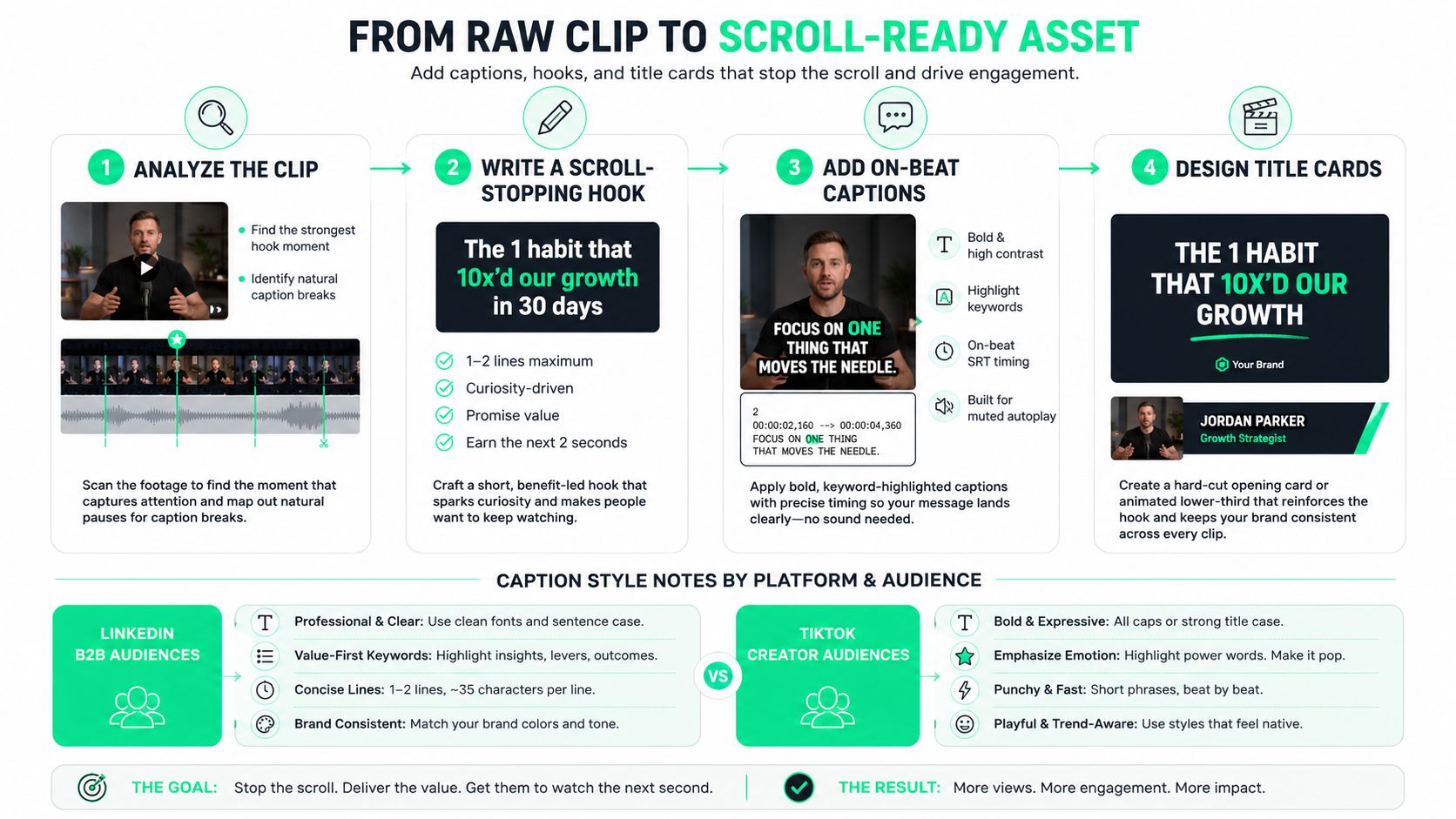
The diagram above breaks down the four-stage production process your team should run for every single clip: analyze the raw footage, write a scroll-stopping hook, add on-beat captions, and design branded title cards. Notice how it highlights the different captioning needs for a LinkedIn B2B audience versus a general TikTok crowd—packaging matters just as much as the clip itself.
### Planning Your Batch Day
Before you cut a single frame, set up clear naming conventions so your assets stay searchable. A format like `Project_EpXX_Timestamp_Type` (e.g., `Webinar_42_12m34s_Hook`) works wonders. Once your video files are in the editor, run an auto-transcription to surface candidate moments fast. This eliminates manual scrubbing and keeps your team focused on finding high-probability hooks.
* **Batch clipping tips:**
* Export **8–12 candidate timestamps** per asset for review.
* Classify each clip immediately as a Hook, Explainer, Demo, or Testimonial.
* Use highlight detection to prioritize clips featuring laughter, questions, or strong action verbs.
### Production With BlitzReels
Slide [BlitzReels](https://www.blitzreels.com) right into the gap between recording and scheduling. It's the production step in your workflow. If you're pulling clips from a podcast, use the podcast clip presets; if you need Shorts exports, the YouTube Shorts presets have you covered. BlitzReels handles the heavy lifting—clipping, auto-reframing to **9:16**, adding on-beat captions, and applying title card templates—so you spend minutes per clip instead of hours.
> "One clip is a project; twenty clips a week is a system." Optimize the process to scale your output without scaling your headcount.
### Export, Review, Publish
Export a single **9:16 master file**, then generate platform-specific variants using one-click presets. Run a quick QA pass to check caption timing, brand colors, and speaker framing. For approvals, send reviewers exactly three things: the clip, the SRT file, and a screenshot of the title card. This eliminates back-and-forth and speeds up sign-offs.
| Workflow Style | Time Investment | Output (from 1-hr webinar) |
| :--- | :--- | :--- |
| Manual workflow (Premiere/After Effects) | Full day per episode | 8–12 clips |
| BlitzReels-assisted workflow | ~1 hour per episode | 8–12 clips |
### Distribution And Iteration
Space your clips out across the week instead of posting them all at once. This lets you measure hook retention and watch-through rates properly. Track those early KPIs and iterate: swap out title cards, tweak caption highlights, or reframe your crops if retention drops. Need more strategic depth? Check out our full guide on [Content Repurposing Strategy](https://www.blitzreels.com/blog/content-repurposing-strategy).
## Reviewing, Publishing, and Measuring What Works
A quick quality check before publishing saves you from common errors: a misheard word in the captions, an audio glitch, or a reframe that crops out half the speaker's face. Read through the captions while scanning the transcript, listen for any weird audio spikes, and double-check that reframed shots keep faces and presentation slides fully visible. When you're working with consistent templates, this whole review process takes under five minutes per clip.
The exact things you're looking for depend on the source material. A webinar clip needs a check for misaligned slides, while a podcast clip lives or dies on caption accuracy. Build a short checklist for each content type — it speeds up approvals and dramatically cuts down on rework.
### Fast Review Checklist
- Confirm caption timing matches spoken syllables and key phrases.
- Verify the speaker is centered in the 9:16 crop.
- Check title card wording and brand colors are correct.
- Play the clip muted to ensure the captions tell the whole story.
> Small QA catches save hours of rework and protect your brand's professional voice.
When it comes to publishing, don't dump everything at once. Spreading clips across the week helps you spot performance patterns without fatiguing your audience. A solid starting point is three posts per week per channel — adjust from there based on engagement trends.
### Metrics That Matter for B2B
Keep your eye on metrics that tell a story. **Watch-through rate** reveals if people stick around. **First-three-second hook retention** shows if your opening grabs attention. And **clicks back to long-form assets** — the original webinar, a product page, or a related blog post — measure whether your clips are driving meaningful business impact.
1. Watch-through rate for each clip length
2. Hook retention in seconds 0–3
3. Clicks or sessions driven to the source asset or landing page
### Practical A/B Framework
A/B testing lets you iterate fast without guessing. Change one variable at a time: test two different title card hooks on the same clip, or try different caption styles. Record results in a basic spreadsheet, then scale what works into your next batch of clips.
- Pick 4 clips per source file (e.g., webinar).
- Test Hook A vs. Hook B across similar audiences.
- Run each test for 48–72 hours and compare the watch-through rate.
This is where having the right production tool makes a real difference. With BlitzReels, you can clip a long-form video, auto-reframe it to **9:16**, add on-beat captions, and export platform-specific variants in minutes. That speed removes the manual resizing and captioning bottlenecks, so your team can run more A/B cycles without adding headcount.
For distribution, pair your scheduled posts with a small paid boost on a few select clips to accelerate learning, then lean into what wins organically. Finish each cycle by documenting what worked and why. Save your winning caption styles, crop decisions, and hook lines so every new batch of repurposed video content gets smarter.
Explore the tools that support this workflow: see our clipping features overview, try our [podcast clip presets](/use-cases/podcast-clips), and read the resizing guide for YouTube Shorts.
## Common Questions About Repurposing Video Content
When you're working with multi-person recordings—panel discussions, podcasts with multiple guests, interviews—keeping the active speaker front and center can be tricky. Most modern clipping tools can auto-detect speaker tracks and label candidate clips accordingly. From there, dynamic crops or picture-in-picture layouts do the heavy lifting, keeping the person talking centered without you having to manually keyframe every switch. It cuts review time down dramatically.
Sometimes you'll sit through a webinar and think, "There's nothing clip-worthy here." That's where the transcript becomes your best friend. Search through it for problem statements, surprising metrics, or brief anecdotes. If the organic hook isn't obvious, build a synthetic one. Drop a title card at the start—something like "How We Cut Churn by 18%"—then cut to the moment that delivers on that promise. It's a simple framing trick, but it works.
As for cadence, three posts per week per channel is a solid starting point. Keep an eye on watch-through rates and first-three-second retention, and let those numbers tell you whether to scale up or pull back. Every audience is different, so don't be afraid to adjust once you have real data.
Brand consistency across batches comes down to templates. Caption presets, color kits, and title-card masters should be locked in before you start producing. Apply them across the board and only deviate when there's a clear reason to. When every export shares the same visual DNA, your audience starts recognizing your content before they even read your name.
For small B2B teams, the biggest operational win is consolidation. Instead of juggling three or four different tools for clipping, transcribing, captioning, and resizing, centralize the entire production workflow into one platform. [BlitzReels](https://blitzreels.com) handles clipping, on-beat captions, auto-reframing to **9:16**, and template-based resizing so a single source file can produce a week's worth of shorts in under an hour. That kind of efficiency is what makes a sustainable short-form video strategy possible.
> The repeatable workflow that keeps things moving: choose the moment, clip it, reframe it, caption it, resize it, review it, and publish it.