---
title: "Short Form Video Editing: The Definitive Guide for 2026"
canonical: "https://blitzreels.com/blog/short-form-video-editing"
---
# Short Form Video Editing: The Definitive Guide for 2026
URL: https://blitzreels.com/blog/short-form-video-editing
Markdown URL: https://blitzreels.com/blog/short-form-video-editing.md
Published: 2026-06-27
Author: BlitzReels
Master short form video editing in 2026. This guide covers the complete workflow, platform specs for TikTok & Reels, and attention-hacking techniques.
Tags: short form video editing, video marketing, content creation, tiktok editing, instagram reels

Short form video editing stopped being a lightweight social skill a while ago. **Short-form videos generate 2.5 times more engagement than long-form content across social platforms and outperform long-form in awareness, reach, and shareability** according to [these short-form video statistics](https://marketingltb.com/blog/statistics/short-form-video-statistics/). That changes the job of the editor. The goal isn't just to trim clips. The goal is to control attention, quickly, on feeds where viewers decide in seconds whether a video deserves the next swipe.
Teams that publish consistently usually discover the same thing. Strategy matters, but execution decides whether a good idea gets watched. A solid script can still fail if the hook lands late, the captions are hard to read, the framing wastes screen space, or the pacing never resets visually. For anyone building a repeatable publishing process, this broader [content system for writers and creators](https://www.narrareach.com/blog/long-form-short-form) is useful because it frames short-form output as part of an operating system, not a one-off tactic.
That's also why short form editing now sits inside the larger discipline of video marketing, not outside it. The mechanics of hooks, clipping, captioning, reframing, and resizing directly affect distribution, retention, and repurposing. For a broader look at how those pieces connect, this guide to [what video marketing is](https://www.blitzreels.com/blog/what-is-video-marketing) gives the surrounding context.
## Table of Contents
- [Why Short Form Video Editing Is a Critical Skill in 2026](#why-short-form-video-editing-is-a-critical-skill-in-2026)
- [The Core Concepts of High-Impact Short Form Editing](#the-core-concepts-of-high-impact-short-form-editing)
- [Pacing controls attention](#pacing-controls-attention)
- [Clarity has to survive mute viewing](#clarity-has-to-survive-mute-viewing)
- [Retention comes from pattern changes](#retention-comes-from-pattern-changes)
- [A Practical Short Form Video Editing Workflow](#a-practical-short-form-video-editing-workflow)
- [Start with the hook and the payoff](#start-with-the-hook-and-the-payoff)
- [Build the rough cut before polishing](#build-the-rough-cut-before-polishing)
- [Caption, format, and export for distribution](#caption-format-and-export-for-distribution)
- [Advanced Techniques to Maximize Viewer Retention](#advanced-techniques-to-maximize-viewer-retention)
- [Use visual resets before attention drops](#use-visual-resets-before-attention-drops)
- [Make cuts feel invisible](#make-cuts-feel-invisible)
- [Use B-roll with a job to do](#use-b-roll-with-a-job-to-do)
- [Platform-Specific Specs and Optimization Tips](#platform-specific-specs-and-optimization-tips)
- [The technical baseline](#the-technical-baseline)
- [How TikTok Reels and Shorts differ in practice](#how-tiktok-reels-and-shorts-differ-in-practice)
- [Tools and Templates to Accelerate Your Editing Workflow](#tools-and-templates-to-accelerate-your-editing-workflow)
- [Desktop editors mobile apps and AI tools](#desktop-editors-mobile-apps-and-ai-tools)
- [Templates reduce decision fatigue](#templates-reduce-decision-fatigue)
- [Your Actionable Short Form Video Editing Checklist](#your-actionable-short-form-video-editing-checklist)
- [Pre-edit checks](#pre-edit-checks)
- [In-edit checks](#in-edit-checks)
- [Post-edit checks](#post-edit-checks)
## Why Short Form Video Editing Is a Critical Skill in 2026
Short form video editing matters because distribution has shifted toward feeds built for speed, repeat viewing, and constant creative turnover. The publishing environments themselves are massive. The **short video platform market was valued at USD 53.7 billion in 2025 and is projected to reach USD 132.9 billion by 2035, with 2026 estimated at USD 59.3 billion** according to [Research Nester's short video platform market report](https://www.researchnester.com/reports/short-video-platform-market/4978). Editors aren't working on the edges of media anymore. They're shaping content for a large, expanding publishing ecosystem.
That scale changes what clients, founders, marketers, and creators expect from the edit. They don't just want a clean timeline. They want faster turnaround, reusable templates, title cards that fit multiple channels, captions that hold up on mute, and reframing that keeps the subject centered after resizing.
> **Practical rule:** In short form, editing quality often decides whether strategy gets a chance to work.
Editing has also become more operational. Teams don't need a slow, handcrafted workflow for every post. They need a system that can clip, caption, resize, and repurpose quickly without making every video look generic. That's why many social teams now combine planning discipline with faster production methods, including AI-assisted workflows and reusable visual templates.
A useful way to think about the skill is this:
- **It affects reach:** Strong edits create a sharper hook and cleaner opening frame.
- **It affects retention:** Tight pacing removes dead air and keeps the visual pattern changing.
- **It affects output volume:** Faster editing lets teams publish more often without expanding headcount.
- **It affects consistency:** Templates, caption presets, and title card systems keep a brand recognizable across platforms.
The editor who understands those trade-offs is no longer just a technician. That person is part strategist, part operator, and part publisher.
## The Core Concepts of High-Impact Short Form Editing
Short form video editing is best understood as **attention engineering**. The editor is arranging words, images, motion, and text so the viewer keeps moving forward instead of swiping away. That definition is more useful than “cutting clips,” because the strongest short-form videos rarely succeed on cuts alone.
For anyone working on product-led social content, this [guide to profitable video for sellers](https://www.hivehq.ai/blog/video-production-for-social-media) is a useful complement because it connects video decisions to actual selling contexts rather than treating editing as a purely aesthetic task.
### Pacing controls attention
Pacing is the rate at which a video gives the viewer something new to process. That can be a jump cut, a punch-in, a title card, a prop, a B-roll insert, or a shift in caption emphasis. Good pacing feels inevitable. Bad pacing feels slow, repetitive, or noisy.
A lot of creators confuse fast with effective. Fast editing only works when each cut has a reason. If every clip change feels random, the video becomes harder to follow. If nothing changes, attention drops.
That's why even a basic understanding of the [jump cut definition and when to use it](https://www.blitzreels.com/blog/jump-cut-definition) matters. Jump cuts aren't just a style. They're a control mechanism for pace and compression.
### Clarity has to survive mute viewing
Short-form viewers often encounter a video in distracted environments. They may not have sound on. They may be watching in a queue, at work, or in between tasks. So the message has to be understandable from the frame alone.
That means editors need to think beyond the spoken line. The visual layer has to carry meaning through:
- **Readable captions** that don't disappear into the background
- **Clean framing** that keeps the subject large enough on a phone screen
- **Title cards** that establish context immediately
- **On-screen examples** that show the point instead of only stating it
> A short video shouldn't depend on one channel of communication. Speech, text, framing, and visuals should all reinforce the same idea.
### Retention comes from pattern changes
Retention usually improves when the viewer gets regular signs that the video is still moving somewhere. Those signs can be subtle. A zoom change. A cutaway. A fresh graphic. A shift from talking head to screen recording. A caption treatment that emphasizes the next key phrase.
The mistake is assuming “simple” means static. Simple can still be dynamic. In practice, high-impact short form editing usually rests on three pillars:
| Pillar | What it does | What weak execution looks like |
|---|---|---|
| **Pacing** | Keeps momentum alive | Long pauses, repetitive framing |
| **Clarity** | Makes the point obvious | Dense speech, weak captions, clutter |
| **Retention** | Creates forward motion | No visual resets, no payoff structure |
When those pillars work together, the edit feels effortless. When one breaks, viewers feel it immediately.
## A Practical Short Form Video Editing Workflow
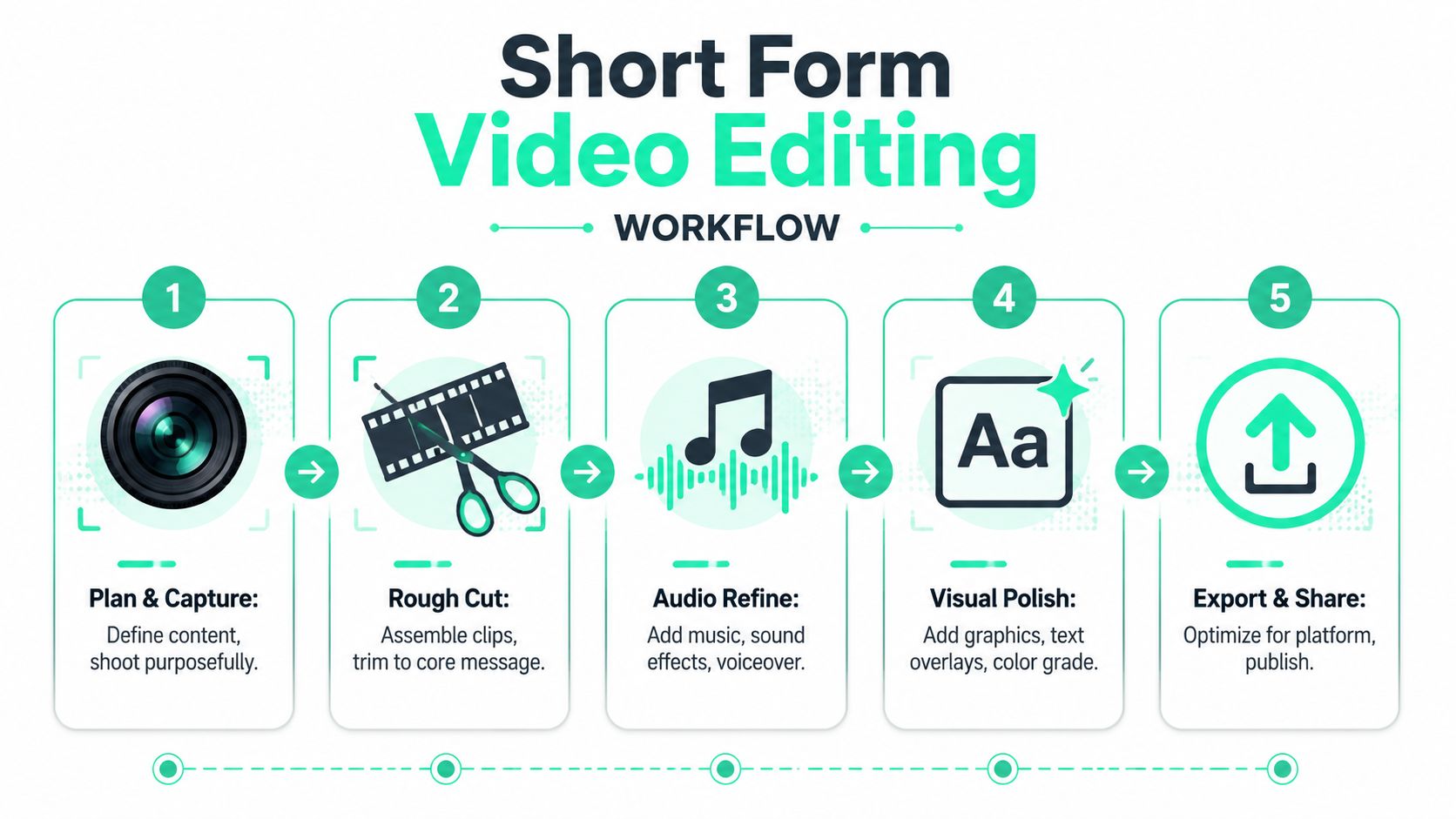
The most reliable workflow is linear, but not rigid. Plan the hook. Build a rough cut. add captions and visual hierarchy. Then resize and export for the platform. Editors who skip the order usually waste time polishing footage that should've been cut earlier.
This process flow shows the sequence clearly:
### Start with the hook and the payoff
Before opening the editor, define two things. What earns the first second, and what payoff justifies the rest of the watch. If those two points aren't clear, the edit turns into cosmetic work.
A good planning pass usually includes:
1. **The opening line:** Start with the strongest claim, question, or tension point.
2. **The proof element:** Show the demo, result, example, or mistake quickly.
3. **The loop close:** End in a way that resolves the setup or pushes to the next step.
For repurposing workflows, longer footage gets broken into extractable moments. Interviews, webinars, podcasts, demos, and talking-head recordings often contain usable short segments, but only after aggressive clipping. This walkthrough on how to [turn long video into shorts](https://www.blitzreels.com/blog/turn-long-video-into-shorts) is a practical reference for that process.
### Build the rough cut before polishing
Rough cutting is where most of the editing happens. Not the final polish. The decision phase. Remove throat-clearing. Cut repeated phrases. Drop any sentence that doesn't push the point forward. If a clip takes too long to “get going,” start later.
At this stage, editors usually make better videos by asking hard questions:
- **Does the first frame communicate anything on its own?**
- **Can the opening be understood before the audio fully registers?**
- **Is there dead space between thoughts that should be clipped out?**
- **Would a cutaway explain the point faster than more talking?**
A rough cut should feel slightly too tight. That's often a good sign. Short-form edits usually fail from excess, not from restraint.
The embedded walkthrough below is useful for seeing how short-form pacing decisions play out in a real visual process.
### Caption, format, and export for distribution
Captioning isn't a final garnish. It's part of the edit. The strongest captions do more than transcribe. They control emphasis, support mute viewing, and create rhythm. Editors should highlight key words, keep line lengths readable, and place text where it doesn't fight the subject's face.
After captions, move to formatting:
- **Reframe for vertical viewing:** Don't just crop. Track the subject so faces stay centered.
- **Resize thoughtfully:** A title card that works in one layout may crowd another.
- **Check safe areas:** Captions and lower-screen text can get covered by platform UI.
- **Export cleanly:** Use platform-friendly settings and test playback on mobile.
> **Workflow reminder:** Fast editing doesn't mean rushing. It means removing rework.
A practical social workflow also benefits from templates. Reusable hooks, caption styles, intro cards, and end cards reduce decision fatigue. That matters when a team is publishing multiple clips a week across TikTok, Instagram Reels, YouTube Shorts, LinkedIn, and other vertical feeds.
## Advanced Techniques to Maximize Viewer Retention
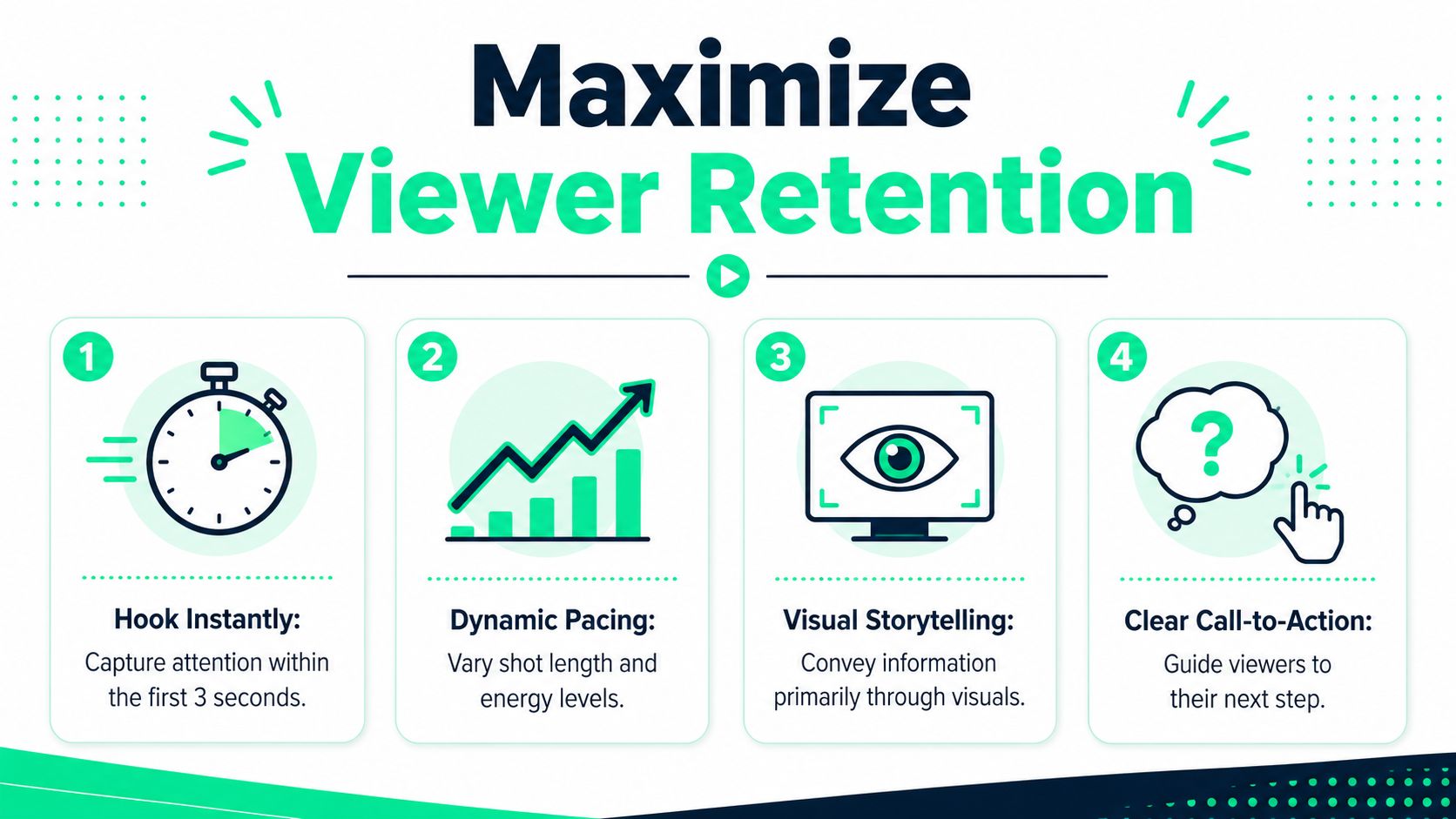
Most editing advice tells creators to “keep it simple.” That's incomplete. Strong shorts usually rely on specific, repeatable attention mechanics, not a vague minimalist philosophy. **High-performing shorts rely on changing zoom levels every 3 to 5 seconds to create a multi-camera illusion, and data shows that one to five transitions are optimal for 30 to 60 second videos, with the hook being a mandatory transition spot** according to [Jon Loomer's lessons from short-form video creation](https://www.jonloomer.com/11-lessons-learned-from-short-form-video-creation/).
That single idea changes how a timeline gets built. Instead of treating transitions and zooms as decoration, editors can use them as retention tools.
### Use visual resets before attention drops
A visual reset is any deliberate change that refreshes the screen without breaking the story. Common examples include a punch-in, a new crop, a title card, a cut to B-roll, or a quick prop demonstration.
The key is cadence. If the frame sits unchanged for too long, the video starts to feel flatter than it is. A simple talking-head clip can hold attention much longer when the editor varies shot scale and inserts proof moments at the right intervals.
For hooks specifically, this guide to [scroll-stopping video hooks](https://www.blitzreels.com/blog/the-science-of-scroll-stopping-video-hooks) is useful because the hook transition often carries more weight than any later visual flourish.
### Make cuts feel invisible
The best short-form cuts often aren't noticed. They're felt as momentum. One reliable technique is to cut on hard consonants or on a beat in the music. Another is to cut mid-action so the eye stays focused on movement rather than on the transition.
Editors also get cleaner results when they avoid ornamental transitions that don't support the message. A wipe or spin can draw attention to the edit itself. A simple cut, timed well, usually feels better.
A few practical retention patterns work repeatedly:
- **Cut on emphasis:** Trim around the strongest word in the sentence, not the weakest.
- **Shift framing with intent:** Use a crop change when a new sub-point starts.
- **Keep visuals readable:** Close-ups and medium shots usually survive mobile viewing better than wide shots.
- **Sync text to rhythm:** On-beat captions create momentum even when the footage is static.
> When viewers notice the transition more than the idea, the edit is usually overworking.
### Use B-roll with a job to do
Purposeful B-roll solves specific problems. It can clarify an abstract claim, cover a jump cut, add proof, or reset attention. Weak B-roll only decorates. Strong B-roll advances understanding.
That's why props, screen captures, product close-ups, hands-on demos, overlays, and short environmental shots often outperform generic stock clips. They answer the viewer's unspoken question: “What does this look like?”
Title cards also belong in this retention system. Used sparingly, they create chapter breaks inside a short video. Used too often, they interrupt flow. The rule is simple. If a title card creates immediate clarity or energy, keep it. If it repeats what the voice already says, cut it.
## Platform-Specific Specs and Optimization Tips
Editing for all platforms with one export usually creates avoidable problems. The base file may be fine, but packaging, pacing expectations, and audience behavior still differ enough to justify platform-specific adjustments.
### The technical baseline
A strong default export for short-form social content is already well established. **Optimal short-form video lengths are 21 to 34 seconds, and these clips require a vertical 9:16 aspect ratio, a minimum 1080x1920 resolution, and MP4/H.264 encoding** according to [Sureshot's short-form video definition guide](https://sureshot.video/blog/short-form-video-definition).
That baseline is a solid starting point for TikTok, Instagram Reels, and YouTube Shorts.
| Platform | Aspect Ratio | Resolution (Recommended) | Max Length | File Format |
|---|---|---|---|---|
| TikTok | 9:16 | 1080x1920 | Platform-dependent longer uploads are supported, but short, tightly edited clips are usually more effective | MP4 with H.264 |
| Instagram Reels | 9:16 | 1080x1920 | Platform-dependent longer uploads are supported, but concise vertical edits are safer for feed performance | MP4 with H.264 |
| YouTube Shorts | 9:16 | 1080x1920 | Shorts can run longer than older limits, but structure matters more than filling time | MP4 with H.264 |
### How TikTok Reels and Shorts differ in practice
Platform optimization is less about inventing three different videos and more about adjusting the same core asset intelligently.
- **TikTok:** Trend sensitivity matters more. Audio choices, visual speed, and native-looking edits usually help the post blend into the feed.
- **Instagram Reels:** Presentation polish tends to matter more. Better title cards, cleaner brand styling, and sharper visual packaging often make a difference.
- **YouTube Shorts:** Slightly more educational or explanatory structures can work, especially when the opening promise is clear and the answer arrives quickly.
There's also a distribution reason to care about video formatting beyond the platform app itself. For marketers thinking about discoverability, this overview of [video's SEO impact](https://www.keywordkick.com/stats/video-seo-statistics) helps frame why a properly packaged clip can support visibility beyond a single feed session.
The practical rule is simple. Build one master edit, then create light variants. Swap the hook line, adjust the title card, move the caption placement if needed, and confirm the crop works natively on each platform.
## Tools and Templates to Accelerate Your Editing Workflow
Tool choice affects output speed more significantly than often realized. The wrong stack creates friction in every stage. Cutting takes longer, captions become a chore, reframing becomes manual, and resizing for each platform turns into repetitive cleanup.
**73% of consumers prefer watching short-form videos to learn about a product or service, and TikTok holds about a 40% market share while Instagram Reels and YouTube Shorts each command around 20%** according to [Quintly's deep dive on TikTok and Instagram Reels](https://www.quintly.com/blog/deep-dive-tiktok-and-instagram-reels). When audience preference and platform concentration look like that, tool decisions stop being a minor production detail.
### Desktop editors mobile apps and AI tools
Traditional desktop editors like Premiere Pro offer deep control. They're strong for custom motion, layered timelines, audio cleanup, and detailed finishing. The trade-off is speed. For teams publishing a lot of shorts, desktop-first workflows can become expensive in time.
Mobile-first apps like CapCut are faster to open and easier to use for native-feeling edits. They're practical for solo creators, especially when trend turnaround matters. The downside is that larger content operations can outgrow them, particularly when managing repeatable templates, multi-platform exports, and library-based workflows.
AI-powered web tools aim at the boring middle. They help with clipping, auto-captions, resizing, reframing, title cards, and repurposing. [BlitzReels](https://blitzreels.com) fits that category. It turns uploaded video into short-form clips with automated transcription, best-cut detection, on-beat captions, auto-reframing, and export options sized for vertical platforms.
For creators comparing options specifically for social-first production, this list of [apps to make Reels](https://www.blitzreels.com/blog/best-apps-to-make-reels) is a useful reference point.
> **Decision test:** Choose the tool that removes the most repeated work, not the one with the longest feature list.
### Templates reduce decision fatigue
Templates matter because short-form editing contains a lot of small repeated choices. Caption style. Hook layout. Title card spacing. End screen format. Zoom behavior. Brand color placement. Making those choices from scratch every time slows the process down and creates inconsistency.
A good template system usually includes:
- **Hook templates** for opinion, tutorial, mistake, and demo openings
- **Caption presets** for talking-head clips, screen recordings, and interviews
- **Title cards** sized for vertical mobile viewing
- **End cards** that support the next action without overwhelming the frame
That structure doesn't make videos feel formulaic. It creates a repeatable base so editors can spend more energy on the parts that need judgment.
## Your Actionable Short Form Video Editing Checklist
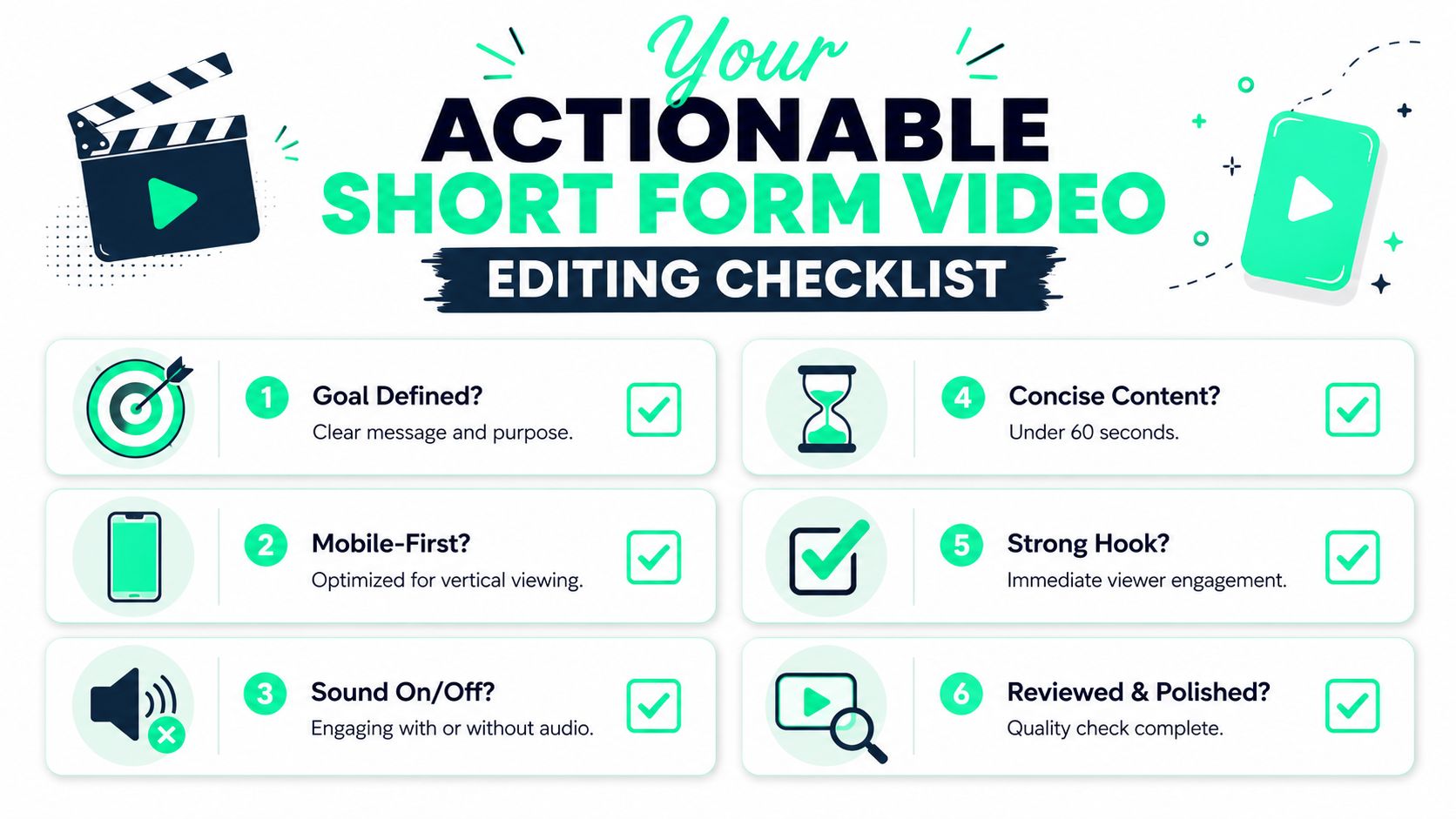
The strongest short-form videos usually come from disciplined basics, not editing tricks piled on top of weak ideas. A checklist helps because it catches the small misses that lower retention.
Before publishing, run through three stages.
### Pre-edit checks
- **Hook defined:** The opening frame and first line should earn attention immediately.
- **Footage selected:** Pull the clearest A-roll first, then gather B-roll that explains or proves the point.
- **Mobile framing considered:** If the shot won't read on a phone screen, the edit starts at a disadvantage.
### In-edit checks
- **Dead space removed:** Cut pauses, repeats, and slow starts aggressively.
- **Captions styled for clarity:** Keep them readable, timed well, and visually subordinate to the subject.
- **Visual resets added:** Use crop shifts, cutaways, title cards, or proof shots when momentum starts to flatten.
### Post-edit checks
- **Platform formatting confirmed:** Review the crop, safe areas, and vertical export.
- **Audio checked:** Speech should remain clear, and the video should still make sense with sound off.
- **Packaging finished:** Thumbnail frame, opening title card, and final CTA should all match the goal of the post.
This condensed checklist works well as a final review reference:
> A short video rarely fails because of one catastrophic mistake. It usually loses because several small editing decisions weaken the first impression, the pacing, and the payoff at the same time.
---
BlitzReels helps creators and teams turn raw footage into short-form videos faster with clipping, captions, reframing, resizing, templates, and repurposing workflows built for TikTok, Instagram Reels, YouTube Shorts, LinkedIn, and other social platforms. For anyone trying to publish more consistently without living in a timeline editor, [BlitzReels](https://blitzreels.com) is worth a look.