---
title: "How to Turn Long Form Video Into Shorts: A 2026 Workflow"
canonical: "https://blitzreels.com/blog/turn-long-form-video-into-shorts"
---
# How to Turn Long Form Video Into Shorts: A 2026 Workflow
URL: https://blitzreels.com/blog/turn-long-form-video-into-shorts
Markdown URL: https://blitzreels.com/blog/turn-long-form-video-into-shorts.md
Published: 2026-07-03
Author: BlitzReels
Learn how to turn long form video into shorts that perform. This guide covers a step-by-step workflow for AI clipping, vertical reframing, and captioning.
Tags: turn long form video into shorts, video repurposing, short form content, ai video editor, youtube shorts

Most consumers only watch an entire video if it's **under 60 seconds**, and videos under 90 seconds retain about **50% of viewers on average**, according to [HubSpot's short-form video psychology breakdown](https://blog.hubspot.com/marketing/short-form-video-psychology). That changes the repurposing conversation.
The job isn't to chop a podcast, webinar, interview, or tutorial into random highlights. The job is to turn long form video into shorts that make sense on their own, move fast on a phone screen, and still feel connected to the creator's brand. Most weak repurposing fails at the first part. The clip gets a click, but the viewer feels dropped into the middle of a conversation.
Creators who publish consistently already know the trade-off. Manual clipping gives more control but burns time. AI speeds up selection, captions, resizing, and title cards, but it still misses context, pacing, and visual framing often enough that human review matters. A good workflow uses both.
## Table of Contents
- [Plan Your Clips for Standalone Value](#plan-your-clips-for-standalone-value)
- [Pick moments with a full arc](#pick-moments-with-a-full-arc)
- [Reject teaser clips that need homework](#reject-teaser-clips-that-need-homework)
- [Use AI to Find Highlights Automatically](#use-ai-to-find-highlights-automatically)
- [Treat AI clipping as a first pass](#treat-ai-clipping-as-a-first-pass)
- [Compare tools by what they miss](#compare-tools-by-what-they-miss)
- [Edit for Vertical Viewing and Maximum Pacing](#edit-for-vertical-viewing-and-maximum-pacing)
- [Reframe before you decorate](#reframe-before-you-decorate)
- [Cut for speed in the opening seconds](#cut-for-speed-in-the-opening-seconds)
- [Add High-Impact Captions and Branding](#add-high-impact-captions-and-branding)
- [Make captions carry the idea, not just the dialogue](#make-captions-carry-the-idea-not-just-the-dialogue)
- [Brand the series, not every individual sentence](#brand-the-series-not-every-individual-sentence)
- [Scale Your Output with Batching and Templates](#scale-your-output-with-batching-and-templates)
- [Build a repeatable production lane](#build-a-repeatable-production-lane)
- [Use one review checklist before export](#use-one-review-checklist-before-export)
- [Common Questions About Repurposing Video](#common-questions-about-repurposing-video)
- [How short should a short be](#how-short-should-a-short-be)
- [Can this be done for free](#can-this-be-done-for-free)
- [What about music rights and copyright](#what-about-music-rights-and-copyright)
- [Which AI tool is easiest for beginners](#which-ai-tool-is-easiest-for-beginners)
## Plan Your Clips for Standalone Value
The strongest repurposing decision happens before the timeline opens. A creator can pull a dramatic line from a long video, add captions, resize it to vertical, and still end up with a weak short if the viewer can't understand why that moment matters.
YouTube's creator guidance says Shorts should be **“enjoyable on their own”**. It also notes that **78% of viewers who click from a Short to a long video abandon it within 15 seconds if the Short lacks a standalone narrative hook**, as discussed in [YouTube's guidance on transitioning long-form content to Shorts](https://blog.youtube/creator-and-artist-stories/transitioning-your-long-form-content-to-youtube-shorts/). That's the difference between a clip that creates interest and a clip that creates confusion.
### Pick moments with a full arc
A useful short usually contains three things:
- **A clear setup:** The viewer understands the topic immediately.
- **A point of tension:** There's a question, mistake, claim, contrast, or problem.
- **A payoff:** The clip lands on an answer, lesson, or memorable conclusion.
That arc can happen in a quick opinion clip, a product lesson, a podcast exchange, or a story beat. It doesn't need to feel cinematic. It just needs to feel complete.
> **Practical rule:** If a clip makes sense only after watching the previous two minutes, it isn't ready to stand alone.
Many repurposing workflows often fail here. Editors often search for “best moments” when they should be searching for “small complete moments.” Those aren't always the same thing. The loudest sound bite in an interview may perform worse than a quieter section that delivers one complete idea.
A creator working from a podcast, webinar, or talking-head tutorial should review footage with the same lens used to define [short-form video](https://www.blitzreels.com/glossary/short-form-video) strategy in the first place. The clip has to deliver value inside the clip itself. Promotion is secondary.
### Reject teaser clips that need homework
There's a place for curiosity. There isn't much room for vagueness.
A weak repurposed short often sounds like this: “And that's when everything changed.” That line can work inside a long video where the audience already knows the setup. As a short, it usually creates friction. The viewer doesn't know who changed, what changed, or why they should keep watching.
A better version compresses context into the first sentence and keeps the ending clean. Instead of clipping “this strategy failed,” the stronger short becomes “this ad failed because the hook came too late, and here's the fix.”
A quick screening method helps:
| Clip test | Keep it if | Cut it if |
|---|---|---|
| Context test | The viewer can understand the point without prior setup | The clip starts mid-thought |
| Value test | The clip teaches, entertains, or resolves something | The clip only teases the longer video |
| Ending test | The final line feels complete | The clip stops right before the useful part |
That filter saves editing time later. It also fixes the common problem where repurposed clips get views but don't build trust.
## Use AI to Find Highlights Automatically
Manual scrubbing is still useful, but it's slow. For creators sitting on hours of interviews, webinars, YouTube videos, or screen recordings, AI clipping is the fastest way to get a working draft of what might become publishable shorts.
Short-form viewing is now routine. **85% of social media users watch short-form content at least weekly**, and **93% of marketers report landing new customers from short video ads on social media**, according to [YouGov's reporting on short-form video consumption and impact](https://yougov.com/en-gb/articles/54298-how-short-form-video-on-social-media-is-impacting-tv-viewership-in-2026). That's why AI-assisted clipping has moved from convenience to normal workflow.
### Treat AI clipping as a first pass
A solid AI workflow is simple:
1. **Upload the long source file**
This can be an MP4, MOV, screen recording, interview, webinar, or downloaded long-form asset.
2. **Let the tool transcribe the audio**
The transcript gives the software something to search besides visuals. That matters because many strong clips are driven by language, not motion.
3. **Review suggested highlights**
AI tools usually surface moments with sharp statements, keyword density, emotional changes, or clean topic transitions.
4. **Shortlist only the clips with standalone value**
This is still a human decision. AI can detect a moment that sounds engaging. It can't always tell whether the moment feels complete.
5. **Send the winners into editing**
That's where clipping turns into packaging. Captions, reframing, title cards, and hook placement happen here.
For creators comparing tools, [AI video clipping workflows](https://www.blitzreels.com/blog/ai-video-clipping-tool) are useful when they remove the first layer of labor, not when they promise to replace editorial judgment. A tool should help find candidates quickly. It shouldn't be trusted blindly to publish them.
### Compare tools by what they miss
Opus is a common choice for automatic highlight detection. It's useful for speed, especially when a team wants rough cuts from long interviews or podcasts. Some creators also use timeline editors first and rely on transcript search to mark excerpts manually.
BlitzReels fits into the same category of AI-first repurposing tools, with clipping, captions, resizing, hook selection, and reframing in one workflow. That matters for teams that don't want to bounce between separate apps just to turn long form video into shorts.
The important comparison isn't feature count. It's failure points.
- **Transcript-heavy tools** can find strong spoken moments but may ignore visual context.
- **Virality scoring tools** can rank clips aggressively but often overvalue punchy lines.
- **All-in-one editors** reduce handoff friction, though they still need manual approval.
A quick product walkthrough helps show how that looks in practice:
> The fastest workflow isn't the one that creates the most clips. It's the one that produces the fewest unusable clips.
That's the right expectation for AI. It cuts the hunt time. It does not eliminate taste.
## Edit for Vertical Viewing and Maximum Pacing
A raw AI clip is rarely ready for posting. The biggest issues usually show up immediately. The speaker's face drifts off-center. Important visuals get cropped. The opening stalls. A decent idea gets buried under slow pacing.
### Reframe before you decorate
Every major short-form platform uses **9:16 vertical**, and a [Shop Moment guide to short-form shooting and editing](https://www.shopmoment.com/articles/how-to-shoot-and-edit-short-form-video-for-instagram-reels-tiktok) notes both the format requirement and the need to resize carefully so key visual elements aren't cut out. The same source notes a **2025 industry report** that found **64% of viewers abandon vertical clips where the subject is cut off or distorted**, and **90% of AI-generated clips can fail to auto-reframe subjects optimally**.
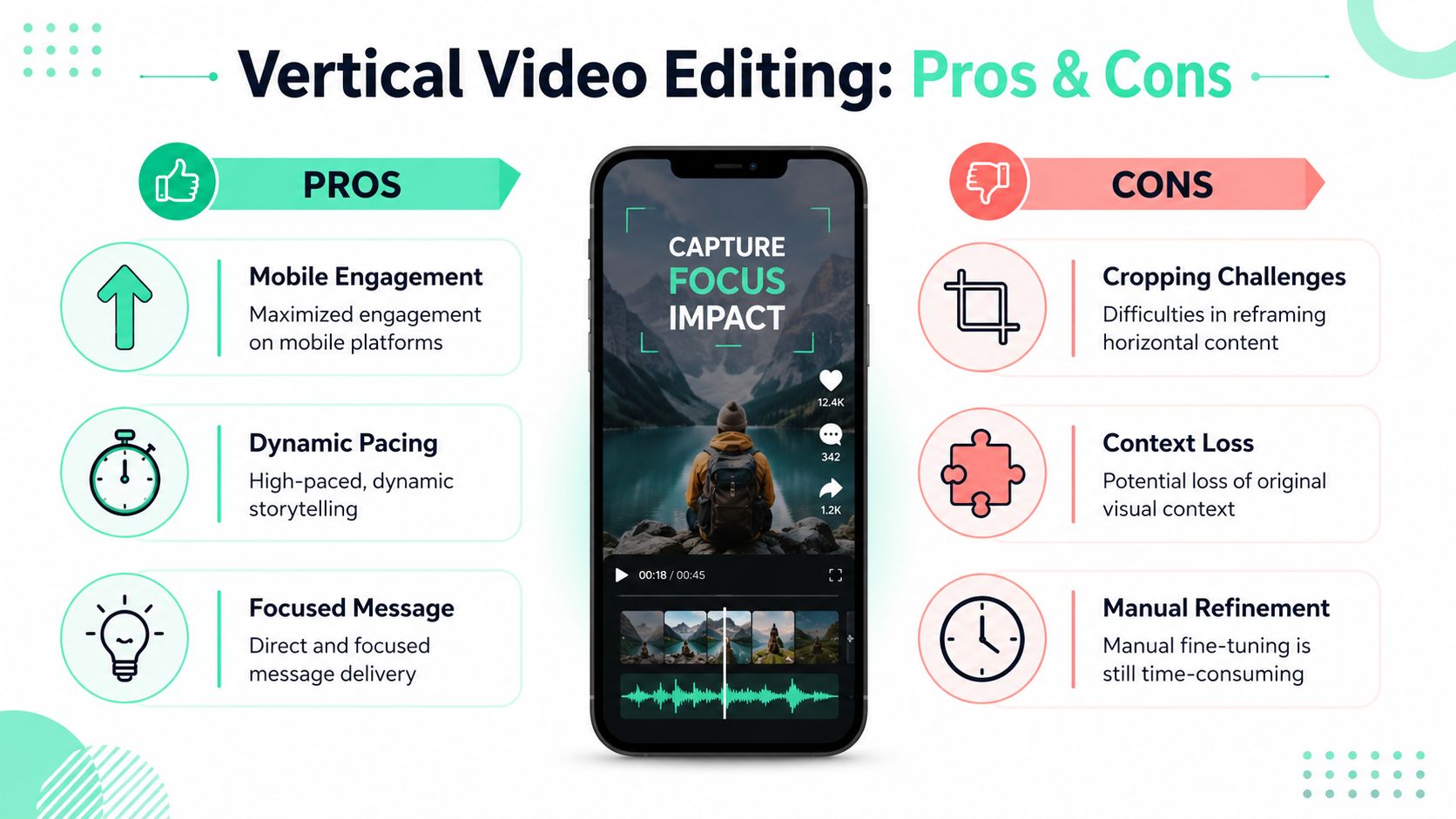
That's why reframing comes before styling. If the crop is wrong, better captions won't save the clip.
A practical sequence works better than random tweaking:
- **Start with face position:** Keep the primary subject centered or intentionally offset.
- **Check hand gestures and product demos:** Horizontal footage often loses these first.
- **Use keyframes when auto-reframe drifts:** Automated subject tracking helps, but it still misses movement and multi-person scenes.
- **Review top and bottom safe areas:** Platform UI can cover text, faces, and lower-third graphics.
Creators editing music-driven clips often run into this problem faster because rhythm masks bad framing until the subject gets chopped at the edge. For teams working on performance-heavy content, this guide to [AI music video for TikTok and Reels](https://www.aimusicvideogenerators.com/guides/ai-music-video-for-tiktok-reels) is useful for thinking through visual pacing and platform-native presentation.
### Cut for speed in the opening seconds
The first seconds decide whether the clip earns attention. [Reimagine Main Street's short-form video tips](https://reimaginemainstreet.com/2024/06/tips-for-short-form-video-content-tiktok-instagram-reels-and-youtube-shorts/) notes that the **first 2 to 3 seconds** are the most critical for retention, and that a hook has to be front-loaded or the viewer scrolls past.
That changes editing choices in a few specific ways:
| Edit choice | What works | What fails |
|---|---|---|
| Opening line | Lead with the claim, problem, or payoff | Long greetings and throat-clearing |
| Pauses | Remove dead space between sentences | Leaving natural conversation pacing untouched |
| Title cards | Use a short setup that clarifies the point | Writing a vague teaser that adds no context |
| Zooms and punch-ins | Use them to emphasize a beat | Overusing motion on every sentence |
For creators who want a faster editing lane, [vertical video editor workflows](https://www.blitzreels.com/blog/vertical-video-editor) are most useful when they combine auto-reframing with easy manual correction. That's the trade-off worth paying for. Speed on the first pass, control on the second.
> A short should feel edited for a phone, not merely cropped for one.
## Add High-Impact Captions and Branding
Captions decide whether a short works with the sound off, but their bigger job is sharper than accessibility. They help the clip feel complete on its own. If a viewer can read the main point, follow the logic, and get the payoff without extra context from the original long video, the short has a better chance of earning attention and trust.
As noted earlier, retention drops fast in short-form. Captions help recover some of that loss by making the idea easier to process at a glance. AI can generate a solid transcript quickly. It still misses names, jargon, and emphasis, so the last manual pass matters.
### Make captions carry the idea, not just the dialogue
Good short-form captions usually do four jobs at once:
- **Clarify the takeaway:** Rewrite clumsy spoken phrasing so the viewer gets the point faster.
- **Direct attention:** Emphasize a few words that carry the claim, result, or tension.
- **Support pacing:** Time each line change to the beat of the sentence, not to arbitrary subtitle chunks.
- **Add missing context:** Use short on-screen setup text when the clip starts in the middle of a larger conversation.
That last point is the one many creators miss. A highlight can be interesting and still fail as a short if the viewer needs the previous 20 seconds to understand it. In those cases, a compact opener like “3 editing mistakes killing retention” or “Why this webinar clip still converts” gives the clip enough framing to stand alone.
Title cards also matter here. If the strongest line lives in the middle of the source video, a brief setup card can supply the premise without forcing a reshoot or a voiceover patch.
> Strong captions reduce dependency on the original video. That is what makes a repurposed short feel intentional instead of clipped.
### Brand the series, not every individual sentence
Creators usually waste time in one of two ways. They either leave captions on the default style and lose clarity, or they over-design every clip and slow production down.
A better system keeps a few elements fixed:
- **One font family**
- **One base caption treatment**
- **One title card position**
- **One to two accent colors**
- **One logo treatment, used lightly**
Then adjust only the parts that affect comprehension. Tutorials can use cleaner, steadier captions. Opinion clips can handle stronger emphasis. Reaction-style content can move faster and use more visual punch. The brand stays recognizable, but each short still fits the content.
For teams tightening this workflow, [how captions drive engagement on TikTok and Instagram](https://www.blitzreels.com/blog/how-captions-drive-engagement-on-tiktok-and-instagram) explains why caption styling affects retention, not just readability. If shorts are part of a paid acquisition mix too, [AdStellar AI automates video ads](https://www.adstellar.ai/blog/how-to-create-video-ads-automatically) in a way that is useful for comparing organic repurposing workflows with ad-focused creative production.
## Scale Your Output with Batching and Templates
Repurposing falls apart when every short becomes a one-off project. The fix isn't editing faster on a single clip. The fix is building a batch process that removes repeated decisions.
### Build a repeatable production lane
Batching works because clipping, captioning, reframing, and export all benefit from repetition. A creator or small team can process one long video at a time, but it's usually more efficient to process one stage across multiple clips.
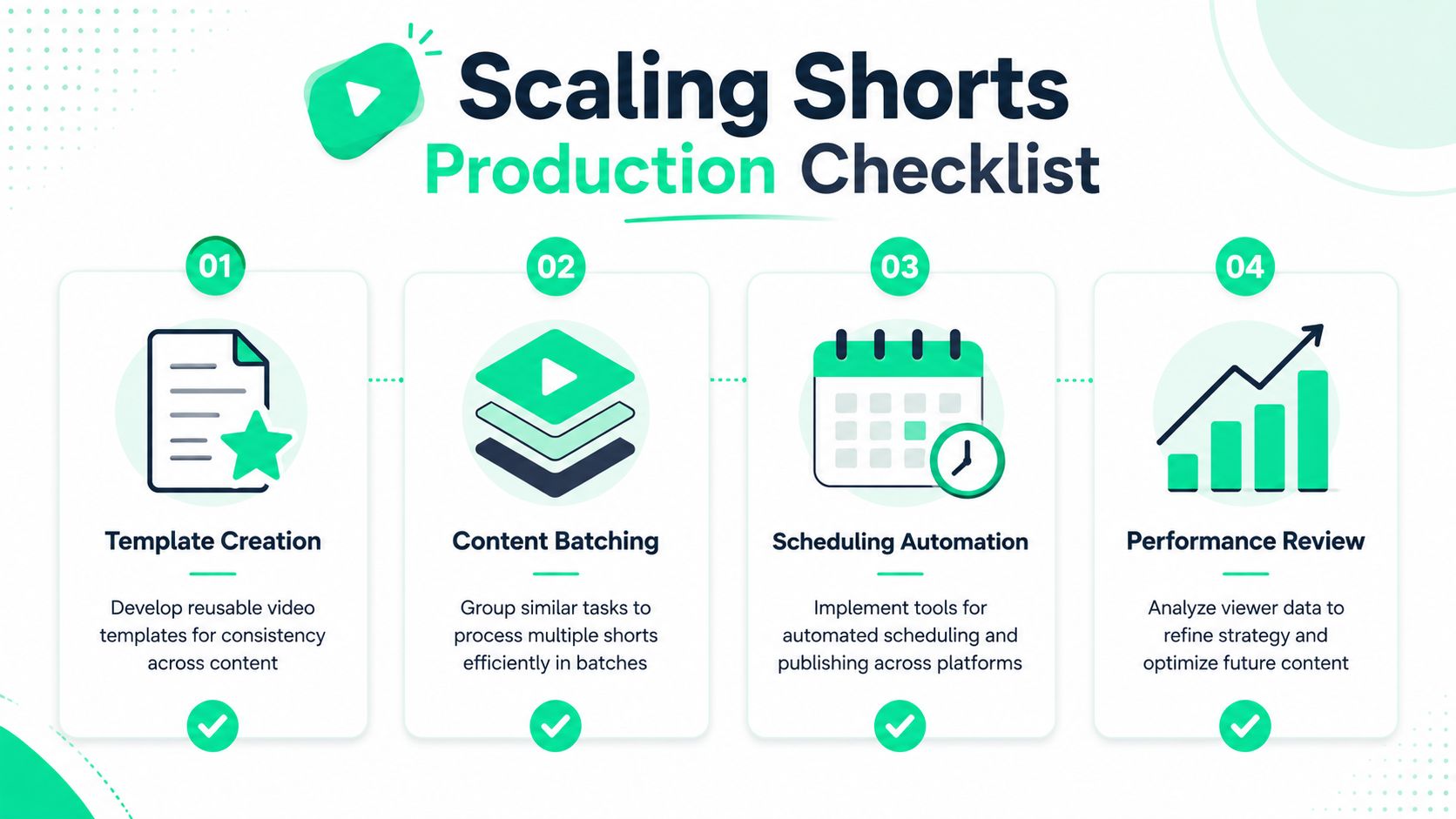
A practical weekly batch might look like this:
1. **Select source videos**
Pull long podcasts, webinars, demos, interviews, or tutorials into one queue.
2. **Generate rough clips in one session**
Review candidate highlights and shortlist only the clips worth polishing.
3. **Apply one caption template family**
This keeps branding steady without redesigning every asset.
4. **Handle reframing in a dedicated pass**
Cropping errors are easier to catch when reviewing several vertical edits back-to-back.
5. **Export and schedule together**
Publishing friction drops when files are named, approved, and queued in one block.
Creators handling both organic shorts and paid creative often use adjacent systems for versioning and output. For teams branching into ad production, this explanation of how [AdStellar AI automates video ads](https://www.adstellar.ai/blog/how-to-create-video-ads-automatically) is useful because it shows how automation fits once content needs to move across campaigns, not just social feeds.
### Use one review checklist before export
Templates are valuable because they reduce choices. They aren't valuable if they lock in the wrong choices.
A final quality-control pass should stay short:
| Checkpoint | What to confirm |
|---|---|
| Hook | The clip opens with a clear claim, question, or payoff |
| Crop | Faces, hands, and products stay visible in 9:16 |
| Captions | Line breaks are readable and emphasis feels intentional |
| Branding | Title cards, colors, and fonts match the content system |
| Ending | The clip resolves cleanly without trailing off |
For batch-heavy creators, [AI-powered batch editing for Reels](https://www.blitzreels.com/blog/the-creator-s-guide-to-ai-powered-batch-editing-for-reels) is worth reviewing because the key win in repurposing isn't one polished short. It's a workflow that can survive the next ten.
## Common Questions About Repurposing Video
Repurposing usually breaks down on small execution decisions, not on clipping itself. Creators lose time deciding how long a short should be, whether free tools are enough, how to avoid copyright problems, and which AI tool will save work instead of creating cleanup.
### How short should a short be
Regarding length, there isn't one perfect duration. A better rule is simple: end the clip as soon as the viewer gets a complete takeaway.
That matters because strong shorts need standalone value. If someone watches the clip without seeing the original video, they should still get a clear lesson, opinion, process, or answer. Clips that depend on missing context often get weak retention and weak conversion because they feel like fragments, not finished content.
In practice, many creators improve results by cutting the setup harder than they think they should. Keep the hook, keep the proof, keep the payoff. Remove the throat-clearing, repeated phrasing, and soft landing at the end.
### Can this be done for free
Yes, if output is still low.
Free editors, manual clipping, separate caption tools, and basic resizing can work for a creator posting a few times a month. That approach is useful early on because it teaches judgment. You quickly learn which moments stand on their own and which only worked inside the full video.
The trade-off is production drag. Once posting frequency goes up, free stacks usually create more handoffs, more formatting fixes, and more inconsistency across platforms. Paid AI tools start making sense when time spent assembling shorts costs more than the subscription.
### What about music rights and copyright
Repurposing a clip does not change the underlying rights. If the source video includes music, footage, or audio that was only cleared for one use, that problem carries into the short.
A safer workflow looks like this:
- **Use original spoken audio when possible**
- **Add music from the platform's approved library**
- **Avoid lifting background tracks from old uploads**
- **Check stock assets inside templates before publishing**
- **Review client work separately if usage rights are limited**
This matters even more for creators trying to post on a reliable schedule across several channels. Systems help maintain that cadence, and [AI for consistent social media presence](https://wavegen.ai/ai-content-repurposing) is a useful resource for planning repurposing output beyond one platform.
### Which AI tool is easiest for beginners
The easiest tool is the one that reduces correction work after the first pass.
Beginners often get trapped by tool stacks that look cheap at first and slow everything down later. They pull highlights in one app, export captions from another, resize somewhere else, then spend more time fixing line breaks, bad crops, and awkward clip starts than they would have spent editing manually.
A practical starter tool should handle:
- **Transcript generation**
- **Highlight suggestions**
- **Caption editing**
- **Vertical reframing**
- **Basic brand templates**
- **Exports sized for major social platforms**
Opus is a reasonable starting point for creators who want quick clip suggestions. For teams producing at volume, all-in-one tools are often easier to manage because fewer handoffs means fewer errors. The right choice depends on one question: after the AI finishes, how much work is left to make the short feel complete and publish-ready?
BlitzReels is a practical option for creators who want to turn long form video into shorts without stitching together separate tools for clipping, captions, reframing, resizing, and export. It's built for fast short-form workflows across TikTok, Instagram Reels, YouTube Shorts, LinkedIn, and other social channels, with support for title cards, templates, and quick editing passes that keep production moving.