---
title: "Vertical Video Specs for Every Platform in 2026"
canonical: "https://blitzreels.com/blog/vertical-video-specs"
---
# Vertical Video Specs for Every Platform in 2026
URL: https://blitzreels.com/blog/vertical-video-specs
Markdown URL: https://blitzreels.com/blog/vertical-video-specs.md
Published: 2026-09-03
Author: BlitzReels
Complete vertical video specs for TikTok, Reels, Shorts, and LinkedIn in 2026. Aspect ratios, resolutions, codecs, durations, and export presets.
Tags: vertical video specs, short-form video, video dimensions, social video specs, video export

A **9:16 frame rotated from 16:9**, delivered at **1080 × 1920 pixels**, contains **2,073,600 pixels** and has become the practical canvas for short-form video. That file-level standard is only half the job. A clip can pass upload checks and still render badly when captions sit beneath TikTok controls, a face lands under Instagram's interface, or a LinkedIn feed crops the composition.
The reliable approach is a two-layer system: create one technically interoperable master, then compose platform-aware variants with safe zones, captions, hooks, title cards, and thumbnails considered before export. This guide treats **vertical video specs** as a production problem, not just a resolution lookup.
## Table of Contents
- [Why Vertical Video Specs Matter in 2026](#why-vertical-video-specs-matter-in-2026)
- [The History Behind the 9:16 Standard](#the-history-behind-the-916-standard)
- [Universal Vertical Video Technical Baseline](#universal-vertical-video-technical-baseline)
- [TikTok Vertical Video Specs](#tiktok-vertical-video-specs)
- [Instagram Reels and Stories Specs](#instagram-reels-and-stories-specs)
- [YouTube Shorts Upload Specs](#youtube-shorts-upload-specs)
- [LinkedIn Vertical Video Specs](#linkedin-vertical-video-specs)
- [Cross-Platform Safe Zone Comparison](#cross-platform-safe-zone-comparison)
- [BlitzReels Export Presets for Each Platform](#blitzreels-export-presets-for-each-platform)
- [Agent Driven Spec Compliance with BlitzReels MCP](#agent-driven-spec-compliance-with-blitzreels-mcp)
- [Quick Reference Cheat Sheet](#quick-reference-cheat-sheet)
- [Vertical Video Specs Frequently Asked Questions](#vertical-video-specs-frequently-asked-questions)
- [What's the difference between file-level and composition-level specs?](#whats-the-difference-between-file-level-and-composition-level-specs)
- [Can AI agents validate vertical video specs before upload?](#can-ai-agents-validate-vertical-video-specs-before-upload)
- [When is 4:5 better than 9:16?](#when-is-45-better-than-916)
## Why Vertical Video Specs Matter in 2026
The shared baseline is straightforward: **9:16, 1080 × 1920, MP4, H.264 video, AAC audio, and 30 fps**. This format maps cleanly to portrait smartphone viewing and is the recommended or default upload shape across TikTok, Instagram Reels, YouTube Shorts, Snapchat, and Stories placements, as documented in this [vertical video dimensions guide](https://www.moonb.io/blog/vertical-video-dimensions).
That doesn't mean one export solves every publishing problem. The first layer is the **file specification**, which determines whether the platform can ingest and process the file cleanly. The second is the **composition specification**, which determines whether people can see the speaker, hook, product, captions, and call to action after interface elements cover parts of the frame.
> **Practical rule:** Build one clean 1080 × 1920 master, but never design one identical overlay layout for every platform.
A horizontal source often needs more than a simple resize. Reframing may need to follow a face, protect a product demonstration, reposition a hook, or move captions away from platform controls. Teams exploring [tagged vertical video topics](https://flexworkstudios.com/tag/vertical-video/) can use the wider production context, but the operational takeaway is simple: portrait delivery is now a default workflow rather than a niche variation.
The [short-form video glossary](https://blitzreels.com/glossary/short-form-video) provides useful terminology for teams standardizing clipping, captions, pacing, and repurposing. A dependable workflow finishes with a reusable master plus platform-specific exports, not a vague checklist copied into every project.
## The History Behind the 9:16 Standard
The shape of a screen has never been permanently “normal.” Film and television established horizontal and near-square conventions, while the **4:3 rectangle became a cultural standard in the 1950s** as broadcast television adapted to existing movie material, as described in this [academic history of aspect-ratio culture](https://www.scielo.br/j/ars/a/qt7tznfNZ7sVQtyTynmhCJq/?lang=en).
The smartphone changed the production logic. Snapchat helped normalize portrait-native playback from its **2011 launch**, and the modern short-form ecosystem eventually converged around 9:16 because users hold phones vertically and platforms fill the available screen. The result is less a stylistic preference than a cross-platform publishing convention.
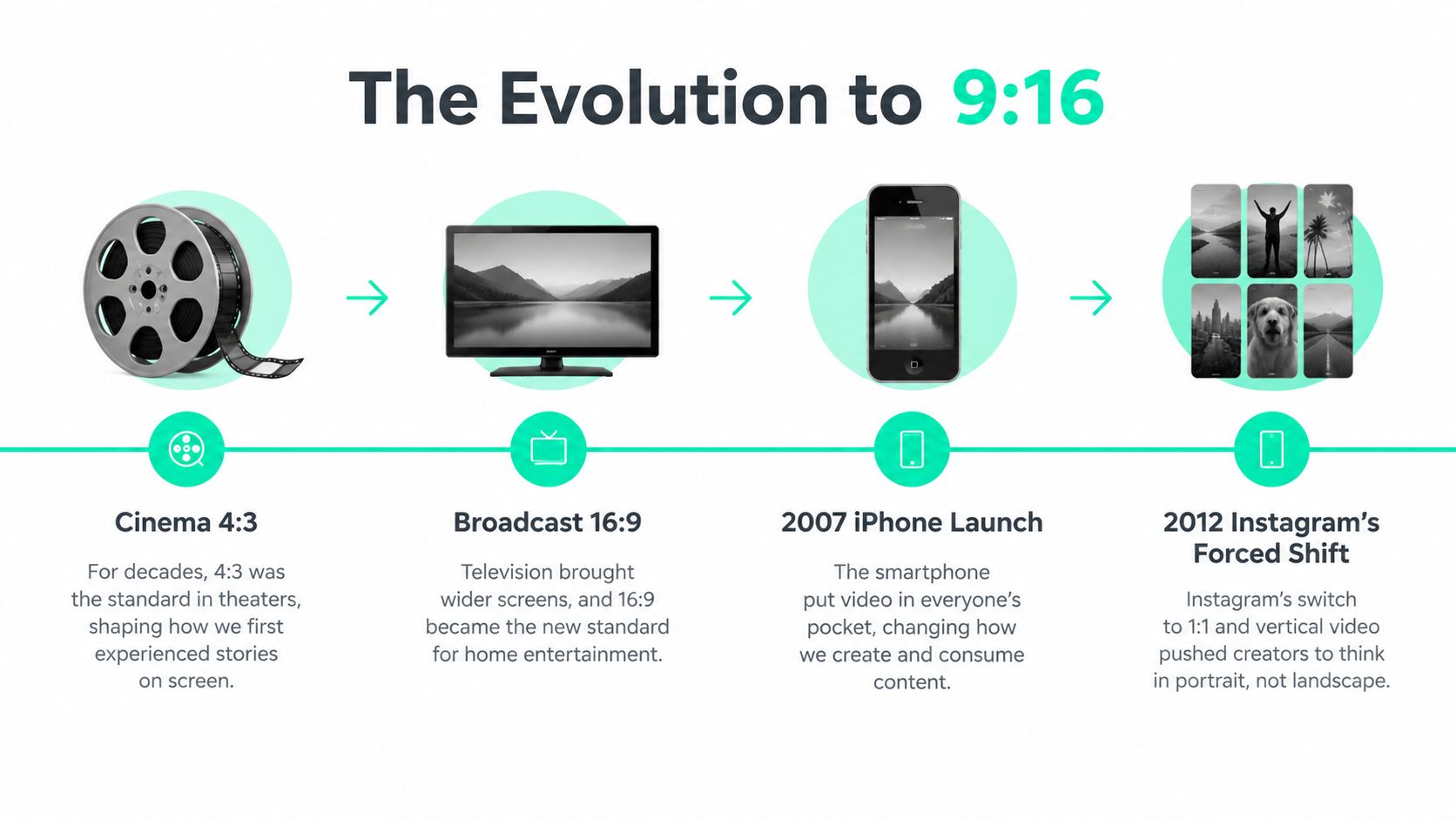
Legacy 16:9 production still works for cinematic scenes, websites, long-form YouTube, and footage that depends on broad spatial context. It becomes inefficient when teams force that source into a portrait feed without planning the crop. A native vertical composition gives the editor room to place a strong opening, readable captions, a title card, and a face without relying on black bars or accidental center crops.
The important historical lesson is practical: **9:16 moved from platform-specific novelty to shared production standard**. Producers who keep a horizontal master should treat vertical reframing as a deliberate edit, not an afterthought.
## Universal Vertical Video Technical Baseline
A strong delivery package uses **MP4 with H.264 video and AAC audio**. The 1080 × 1920 grid preserves Full HD portrait quality, while **30 fps** remains the safe default for ordinary talking-head, interview, podcast, and educational footage. **60 fps** makes sense for high-motion material, but it also creates larger files and gives the receiving platform more material to transcode.
For 1080 × 1920 exports, expert guidance identifies **8–15 Mbps** as a practical quality and compatibility range, with the exact target depending on motion, texture, and delivery context, as outlined in this [vertical video production guide](https://kokoconvert.com/blog/vertical-video-complete-guide-2026). Excessive bitrate doesn't guarantee a better result after platform re-encoding. A clean source with sensible compression generally behaves more predictably than a needlessly oversized upload.
| Parameter | Recommended Value | Acceptable Range |
|---|---:|---:|
| Aspect ratio | 9:16 | Portrait vertical |
| Resolution | 1080 × 1920 | Platform-dependent vertical delivery |
| Container | MP4 | MP4 preferred for interoperability |
| Video codec | H.264 | H.264 baseline |
| Frame rate | 30 fps | 60 fps for high-motion footage |
| Audio codec | AAC | AAC |
| Bitrate | 8–15 Mbps | Adjust for motion and delivery |
| Safe composition | Center critical content | Leave room for platform UI |
Audio deserves equal attention. AAC keeps the package broadly compatible, while spoken-word clips need clean dialogue, consistent loudness, and captions that remain legible when autoplay starts muted or viewers watch without sound.
Export the master once at this baseline. Derive shorter cuts, resized compositions, caption treatments, and platform-specific safe-zone versions from that master instead of repeatedly transcoding an already compressed upload.
## TikTok Vertical Video Specs
TikTok is a useful first target because its portrait feed reinforces the shared baseline. A practical export uses **1080 × 1920**, **30 fps**, **H.264 in MP4**, and AAC audio. **60 fps** is supported, but talking-head clips rarely need it.
TikTok upload guidance varies by route and device. Older documented summaries list a **5 to 60 second** range for in-feed content, while current account and ad capabilities can differ, so the publishing workflow should validate the intended destination rather than assume one universal duration rule. The same caution applies to file limits, which differ between mobile operating systems and web upload paths.
Keep the hook, face, product, and critical captions away from the interface. TikTok guidance commonly places interface pressure along the top, bottom, and right side, so a centered composition is safer than a full-frame text layout.
| Parameter | Recommended | Acceptable Range | Notes |
|---|---:|---:|---|
| Aspect ratio | 9:16 | Vertical portrait | Full-screen delivery |
| Resolution | 1080 × 1920 | Platform-supported vertical sizes | Preserve source quality |
| Container | MP4 | MP4 | Avoid unnecessary wrappers |
| Video codec | H.264 | H.264 | Broad compatibility |
| Frame rate | 30 fps | 60 fps | Use 60 fps for motion |
| Video bitrate | 8–12 Mbps | Adjust by motion | Avoid oversized masters |
| Composition | Center-weighted | Platform-aware | Protect captions and faces |
Caption styling matters as much as encoding. Large, high-contrast captions can survive small-screen viewing, but they still need enough vertical separation from TikTok's caption and action controls. For compression-heavy uploads, the [TikTok video compression tool](https://blitzreels.com/tools/compress-video-for-tiktok) can fit the file to the intended delivery path without turning a clean master into a low-quality intermediary.
## Instagram Reels and Stories Specs
Reels and Stories both use portrait framing, but they're different publishing environments. Reels support a broader editing and discovery context, while Stories are consumed as sequential, full-screen updates where interface controls and reply actions occupy predictable areas.
A Reel should begin with the strongest visual or spoken hook, because the first frame often becomes the viewer's decision point. Stories need a more self-contained design, especially when a sequence is split or watched without the surrounding context. Faces, captions, logos, and calls to action should stay in the central composition rather than being pushed toward the extreme top or bottom.
| Parameter | Reels | Stories | Notes |
|---|---:|---:|---|
| Aspect ratio | 9:16 | 9:16 | Shared portrait frame |
| Resolution | 1080 × 1920 | 1080 × 1920 | Full-screen baseline |
| Frame rate | 23–60 fps | 30 fps | Match the source where practical |
| Container | MP4 | MP4 | H.264 is the safe video codec |
| Audio | AAC | AAC | Check muted playback |
| Composition | Protect feed preview | Protect top and bottom UI areas | Keep key content central |
Instagram can also show a Reel through feed and profile surfaces where the preview crop differs from the full-screen playback. That makes a two-output workflow useful: one full-screen vertical version and one composition or thumbnail treatment that remains intelligible when the platform presents a narrower preview.
The [Instagram Reels resizing tool](https://blitzreels.com/tools/resize-video-for-instagram-reels) is suited to the mechanical part of the job, while the editor still needs to inspect crop behavior, caption position, title-card readability, and the selected cover frame. A technically valid Reel can still feel unfinished if its preview hides the subject or its lower-third collides with controls.
## YouTube Shorts Upload Specs
YouTube Shorts favors a vertical file that fills the mobile screen without letterboxing. The practical delivery target is **1080 × 1920 MP4 with H.264 at 30 fps**, while 60 fps can serve sports, gaming, and other footage where motion clarity matters.
The Shorts feed has its own presentation logic. Channel identity, progress indicators, titles, and action controls can reduce the visibly available area, so a title card placed at the extreme top or a product detail placed at the extreme bottom may become difficult to read. A centered subject and restrained lower-third usually survive better than edge-to-edge typography.
| Parameter | Recommended | Acceptable | Notes |
|---|---:|---:|---|
| Aspect ratio | 9:16 | Vertical portrait | Fill the frame |
| Resolution | 1080 × 1920 | Platform-supported vertical sizes | Preserve detail |
| Container | MP4 | MP4 | Use a standard delivery package |
| Video codec | H.264 | H.264 | Reliable compatibility |
| Frame rate | 30 fps | 60 fps | Use 60 fps for high motion |
| Audio | AAC stereo | AAC | Check dialogue clarity |
| Composition | Central subject and text | Platform-aware safe framing | Avoid edge placement |
YouTube's documented behavior and product surfaces can change, so the export should be checked against the current destination and intended duration. The important production rule remains stable: don't add pillarboxing to horizontal footage and call it a Short. Reframe the source, crop with intent, and validate the finished render before uploading.
## LinkedIn Vertical Video Specs
LinkedIn requires a more deliberate choice between feed visibility and full-screen portrait treatment. A **4:5 composition** can be safer for a professional feed because it occupies useful vertical space without asking every viewer to enter a full-screen experience. A 9:16 version can still make sense for mobile-first placements, Stories-style surfaces, or content designed around a portrait viewing session.
The difference affects editorial design. A founder quote, product explanation, or recruiting message often benefits from a stable speaker, a clear lower-third, and captions that remain readable when autoplay begins muted. A 4:5 crop can also preserve more predictable framing across desktop and mobile than a full-height portrait export.
| Placement | Aspect Ratio | Resolution | Duration | Bitrate | Caption Style |
|---|---:|---:|---:|---:|---|
| Native feed | 4:5 | 1080 × 1350 | Short, focused cut | Moderate delivery bitrate | Hard-coded lower-third |
| Portrait mobile | 9:16 | 1080 × 1920 | Platform-dependent | Match master where practical | Centered captions |
| Square fallback | 1:1 | 1080 × 1080 | Platform-dependent | Match delivery needs | Compact text treatment |
LinkedIn's feed can place profile, reaction, or sharing controls over the lower portion of the video. Critical claims, names, and subtitles shouldn't rely on that area. The safest workflow creates a 4:5 feed version with a deliberate lower-third and retains the 9:16 master for other destinations, rather than shrinking one layout until every platform becomes mediocre.
## Cross-Platform Safe Zone Comparison
The same 9:16 file can render differently across TikTok, Instagram Reels, YouTube Shorts, and LinkedIn. TikTok's right-side action cluster and caption area create lateral and lower pressure. Instagram adds username and action treatments, Stories introduce their own reply and sharing controls, and YouTube places channel and navigation elements around the Shorts experience.
LinkedIn is the outlier because feed composition matters more than filling a phone. A 4:5 cut can be safer for feed readability, while a 9:16 source remains valuable for mobile-oriented reuse. The universal center should hold the face, main product, key gesture, and primary caption, but it shouldn't be treated as an excuse to ignore platform-specific guides.
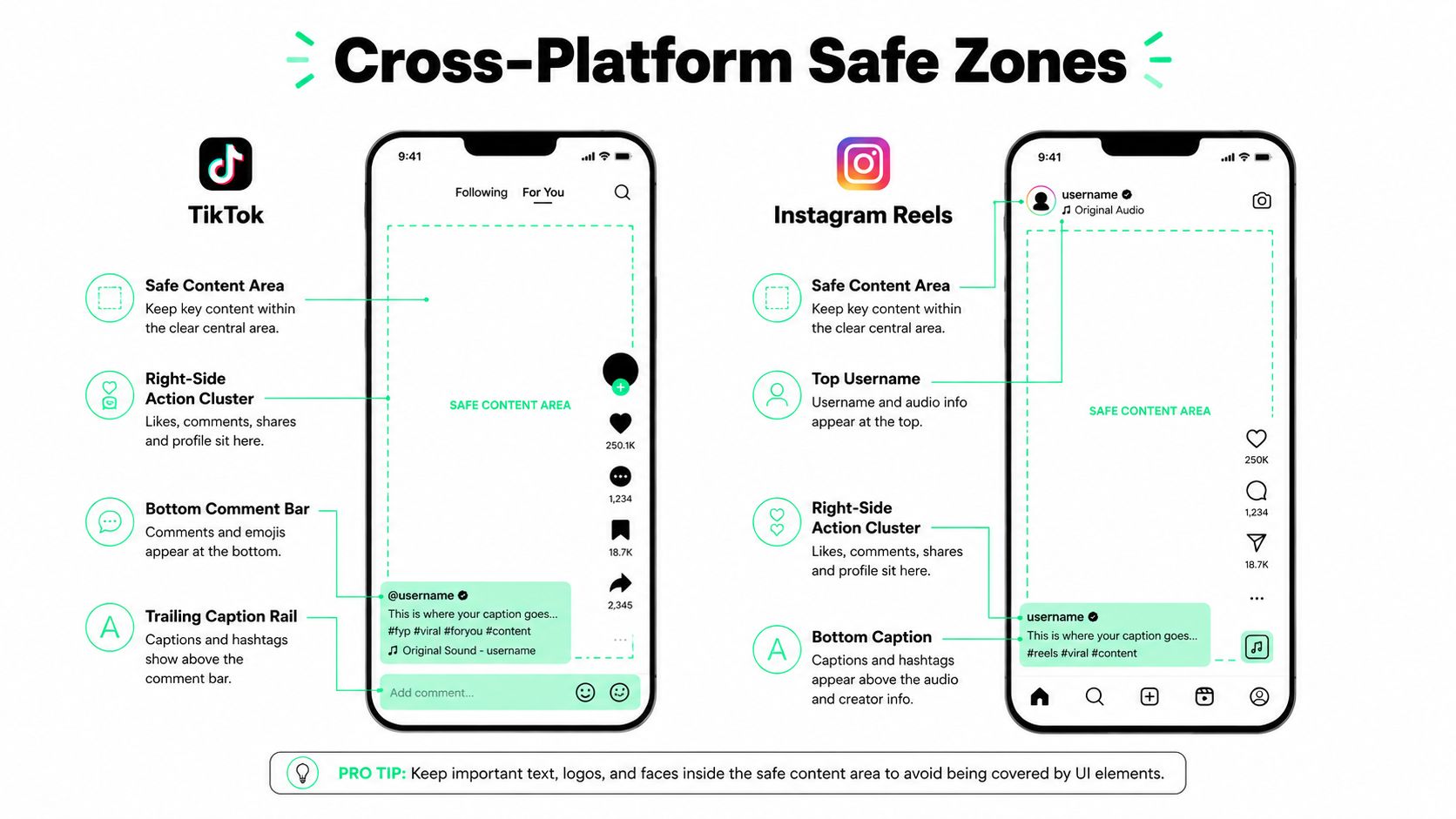
| Platform | Pressure Points | Composition Guidance |
|---|---|---|
| TikTok | Right action cluster, lower caption and comment controls | Keep text and product detail centered |
| Instagram Reels | Username area, lower actions, caption region | Protect the central subject and cover frame |
| Instagram Stories | Top account controls, lower reply and CTA area | Keep titles away from top and bottom edges |
| YouTube Shorts | Progress and channel controls | Avoid edge-dependent titles and logos |
| LinkedIn | Mobile share strip and desktop feed behavior | Consider 4:5 for feed-first publishing |
A practical guide layer can be painted over a 1080 × 1920 timeline, but exact pixel boundaries should be treated as production guides rather than permanent platform laws. Interface layouts change, and overlays can vary by device, account state, and placement. The [AI framing guide for vertical video](https://blitzreels.com/blog/ai-tools-for-perfect-vertical-video-framing) is useful for teams that want automated reframing while retaining a human review pass.
## BlitzReels Export Presets for Each Platform
BlitzReels can serve as one production option for teams that need to create, caption, resize, and repurpose short-form clips across several destinations. Named presets turn repeated export decisions into a controlled workflow, but presets should still be checked against the actual placement and campaign requirements.
A sensible preset map looks like this:
- **TikTok 9:16 1080p:** H.264 video, AAC stereo, 30 fps, and a **6 Mbps** target for the named preset. Manual review should confirm that captions and the opening hook remain clear around TikTok controls.
- **Instagram Reels:** 9:16 delivery with thumbnail treatment that supports the feed preview. The full-screen render and the selected cover frame need separate inspection.
- **Shorts Shelf:** 9:16 output with a **60-second cap** and SDR Rec.709 tagging for a consistent delivery profile.
- **LinkedIn 4:5:** A 1080 × 1920 timeline can be transformed into a **1080 × 1350** letterboxed master when feed-first placement is the priority.
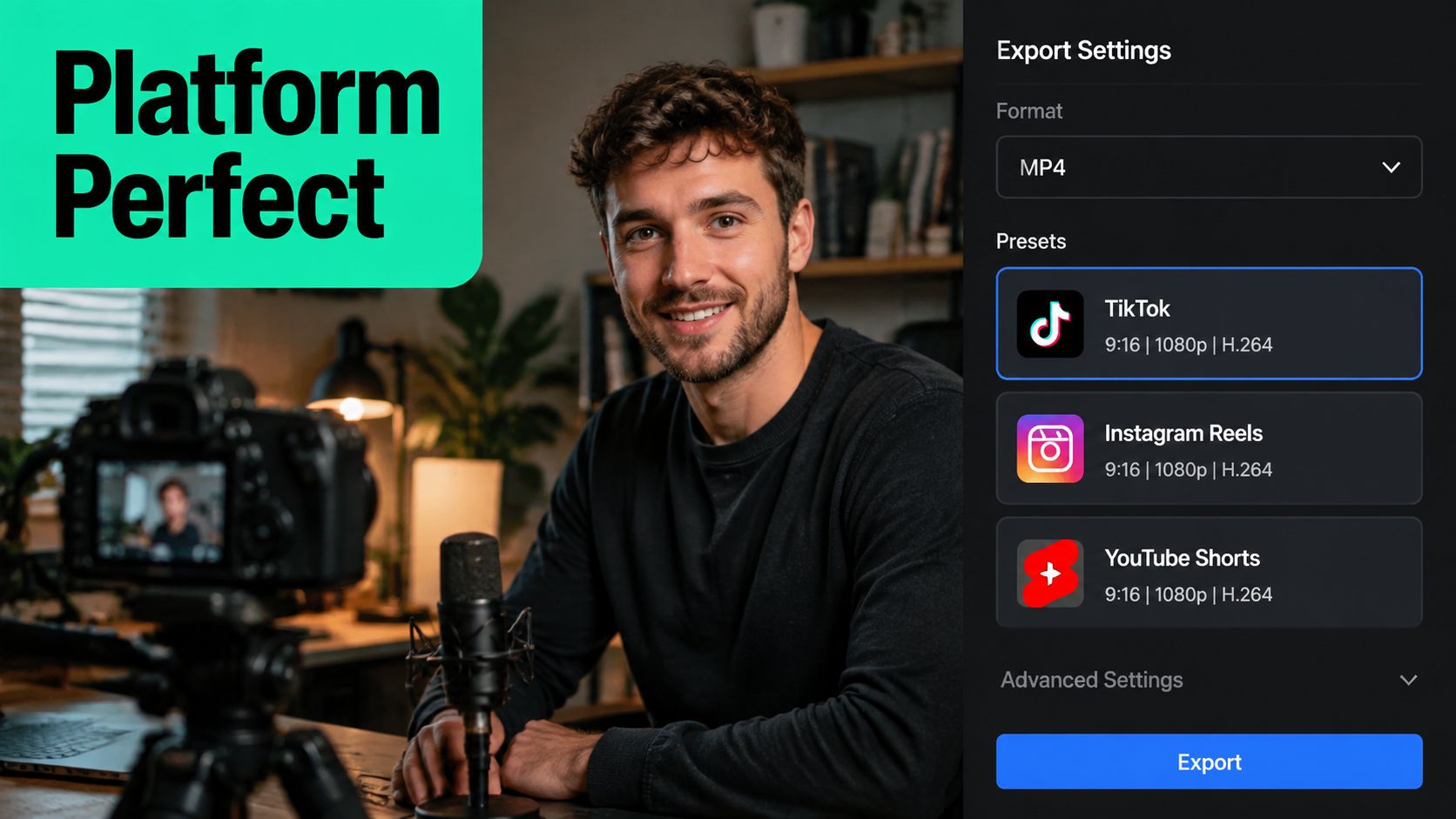
The AI clipping workflow can identify a strong excerpt from a podcast, webinar, interview, call, or YouTube video, then reframe a horizontal source around the speaker. A platform tag can route the cut to a matching preset, while a human editor reviews the hook, transcript edits, captions, B-roll, title cards, and final crop.
Manual override remains important. Paid placements may need a custom bitrate, alternate caption treatment, or a different crop, and an editor should be able to change those settings rather than accept automation blindly. The [export preset glossary](https://blitzreels.com/glossary/export-preset) explains the role of reusable export configurations in a repeatable pipeline.
## Agent Driven Spec Compliance with BlitzReels MCP
A cross-platform workflow becomes more reliable when the agent handles repeatable checks and the editor handles judgment. BlitzReels is an **agentic AI video editor** with a native hosted OAuth MCP server, REST API, TypeScript SDK, CLI with structured JSON, OpenAPI, llms.txt, and agent skills. These interfaces can support operations such as inspecting projects, finding clips, editing transcripts and captions, adding B-roll or media, modifying timeline items, validating output, starting exports, and checking render status.
A practical pipeline begins with a master project and platform targets:
1. Attach the approved vertical master or import a source that needs reframing.
2. Define TikTok, Reels, Shorts, and LinkedIn targets.
3. Ask the agent to identify clips, edit transcripts, generate captions, add media, and apply platform-aware framing.
4. Run deterministic checks for dimensions, aspect ratio, codec, frame rate, duration, and export status.
5. Send the renders to human review before scheduling publication.
The important distinction is between **deterministic validation** and visual judgment. A parser can confirm that a file is 1080 × 1920. It can't reliably decide whether a speaker's hand, product, or facial expression has been awkwardly cropped. Caption overlap detection can flag likely collisions, but a human should still inspect the rendered frame.
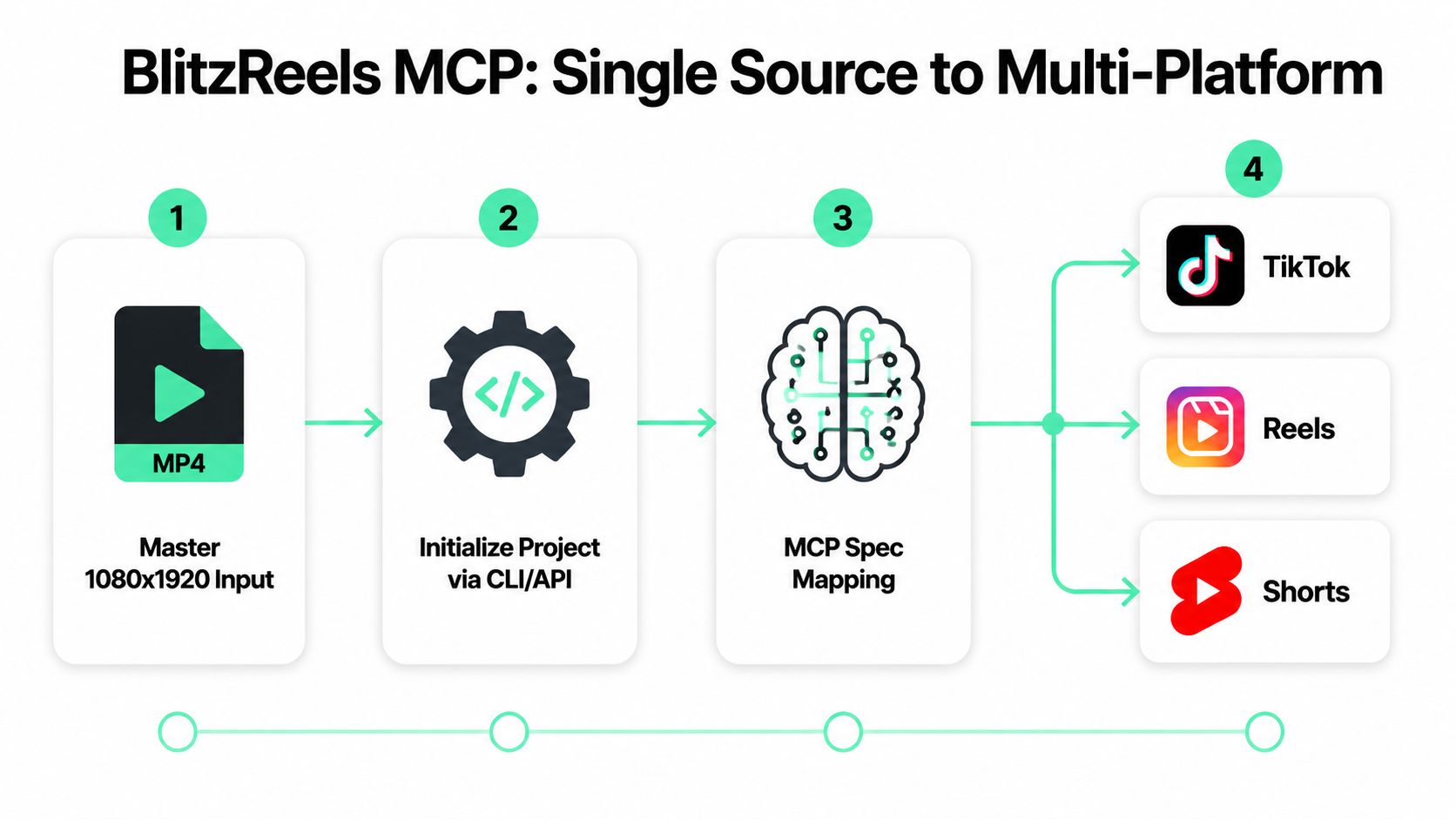
CLI quality checks can include flags such as `--validate-spec` and `--safe-zone-overlay`, with structured JSON returned for downstream audit systems. A scheduler can chain the workflow so a recurring podcast produces multiple compliant variants, but the final approval step should remain with a human editor who can reject a weak hook, wrong crop, or misleading caption.
## Quick Reference Cheat Sheet
The table below separates the universal file baseline from the exceptions that matter during composition and publishing. Values should be treated as operational defaults, then checked against the destination's current upload interface.
| Platform | Aspect Ratio | Resolution | Max Duration | Max File Size | Codec | Frame Rate | Key Rule |
|---|---:|---:|---:|---:|---|---:|---|
| Universal master | 9:16 | 1080 × 1920 | Platform-dependent | Platform-dependent | H.264, AAC audio | 30 fps | Preserve a central safe composition |
| TikTok | 9:16 | 1080 × 1920 | Platform-dependent | Route-dependent | H.264 | 30 fps | Protect lower and right-side UI areas |
| Instagram Reels | 9:16 | 1080 × 1920 | Platform-dependent | Platform-dependent | H.264 | Platform-supported range | Check the feed preview crop |
| Instagram Stories | 9:16 | 1080 × 1920 | Platform-dependent | Platform-dependent | H.264 | 30 fps | Keep key content away from interface edges |
| YouTube Shorts | 9:16 | 1080 × 1920 | Platform-dependent | Platform-dependent | H.264 | 30 fps | Avoid letterboxing and edge-dependent text |
| LinkedIn feed | 4:5 | 1080 × 1350 | Platform-dependent | Platform-dependent | H.264 | 30 fps | Use a lower-third that survives feed overlays |
The broadly interoperable video package remains **MP4, H.264, AAC, 30 fps**, with **8–15 Mbps** identified as a practical 1080 × 1920 export range in the [vertical video technical guide](https://edicionvideopro.com/en/editing-techniques/916-aspect-ratio-guide-vertical-video-for-tiktok-reels/). A compact desktop card can keep the codec and frame-rate decisions visible, while a mobile card should emphasize aspect ratio, resolution, safe framing, and destination.
The most overlooked rule isn't another codec setting. It's leaving enough room around captions, faces, logos, and product close-ups for each platform's interface. A master can be technically correct and compositionally wrong.
## Vertical Video Specs Frequently Asked Questions
### What's the difference between file-level and composition-level specs?
File-level specs describe the encoded asset, including container, codec, dimensions, frame rate, audio, and bitrate. Composition-level specs describe what sits inside the frame, including aspect ratio, safe zones, captions, faces, hooks, and title cards. Treating them as one problem can produce a file that uploads successfully but hides the message beneath interface controls.
**Takeaway:** Validate the file first, then inspect the rendered composition on every target surface.
### Can AI agents validate vertical video specs before upload?
Yes, agents can automate deterministic checks such as dimension parsing, codec inspection, frame rate, duration, and render status through media metadata tools and structured workflows. Safe-zone detection is more heuristic because computer vision must interpret faces, text, products, and possible UI collisions, so human review remains necessary.
**Takeaway:** Let automation reject invalid files, but let an editor approve framing and storytelling.
### When is 4:5 better than 9:16?
A 4:5 version can be the better choice when LinkedIn feed visibility and predictable cross-device composition matter more than full-screen portrait playback. TikTok still expects a 9:16-oriented experience, so one source may need both a 4:5 LinkedIn cut and a 9:16 short-form export.
**Takeaway:** Choose 4:5 for feed-first LinkedIn work, and retain 9:16 for portrait-native platforms.
---
BlitzReels helps teams turn one source into platform-aware short-form videos with clipping, transcript editing, captions, reframing, title cards, resizing, templates, cloud rendering, and agent-driven validation. Visit [BlitzReels](https://blitzreels.com) to build a reusable vertical export workflow, review each render, and move from a clean master to publish-ready TikTok, Reels, Shorts, and LinkedIn variants.