---
title: "Video Editing Software App for Short-Form Social Video"
canonical: "https://blitzreels.com/blog/video-editing-software-app"
---
# Video Editing Software App for Short-Form Social Video
URL: https://blitzreels.com/blog/video-editing-software-app
Markdown URL: https://blitzreels.com/blog/video-editing-software-app.md
Published: 2026-09-08
Author: BlitzReels
Find the right video editing software app for TikTok, Reels, and Shorts. Compare features, workflows, and AI tools that turn long-form content into branded
Tags: video editing software app, short-form video editor, AI video editing, social media video tools, repurpose video content

An hour-long podcast is already recorded. The webinar is full of useful answers. The interview has several moments that could stop a scroll. By the end of the day, a creator or marketing team still needs five to ten branded vertical clips for TikTok, Instagram Reels, YouTube Shorts, and LinkedIn, each with clean captions, a strong hook, and the right framing.
That workload exposes the difference between a general-purpose **video editing software app** and a short-form production system. A broad editor may offer excellent timeline control, effects, and export quality, yet still force an editor to scrub manually, find every quote, keyframe every reframing move, style captions repeatedly, and export each variation one at a time. The practical question isn't which app has the longest feature list. It's which workflow removes repetitive decisions without taking final editorial control away.
## Table of Contents
- [The Short-Form Production Bottleneck](#the-short-form-production-bottleneck)
- [What a Video Editing Software App Actually Does](#what-a-video-editing-software-app-actually-does)
- [Core and Advanced Features That Matter for Social Video](#core-and-advanced-features-that-matter-for-social-video)
- [Transcript-based clipping](#transcript-based-clipping)
- [Cut detection and boundary control](#cut-detection-and-boundary-control)
- [Captions that support sound-off viewing](#captions-that-support-sound-off-viewing)
- [Reframing and platform sizing](#reframing-and-platform-sizing)
- [Templates, title cards, and supporting media](#templates-title-cards-and-supporting-media)
- [How to Choose the Right App for Short-Form Workflows](#how-to-choose-the-right-app-for-short-form-workflows)
- [A practical scoring test](#a-practical-scoring-test)
- [Practical Workflow for Repurposing Long-Form Into Shorts](#practical-workflow-for-repurposing-long-form-into-shorts)
- [Step 1, ingest and transcribe](#step-1-ingest-and-transcribe)
- [Step 2, shortlist moments](#step-2-shortlist-moments)
- [Step 3, tighten the clip](#step-3-tighten-the-clip)
- [Step 4, apply the brand system](#step-4-apply-the-brand-system)
- [Step 5, reframe and check safe zones](#step-5-reframe-and-check-safe-zones)
- [Step 6, review as a team](#step-6-review-as-a-team)
- [Step 7, batch export and validate](#step-7-batch-export-and-validate)
- [How BlitzReels Fits Into Creator and Team Workflows](#how-blitzreels-fits-into-creator-and-team-workflows)
- [Where Video Editing Software Is Heading Next](#where-video-editing-software-is-heading-next)
## The Short-Form Production Bottleneck
A typical repurposing assignment starts with a long recording and an incomplete brief. The editor knows the subject, the audience, and the publishing channels, but not which moments will work as standalone clips. Searching visually through a long timeline is slow because the strongest ideas may be separated by pauses, unfinished sentences, or a question that only makes sense with the answer several minutes later.
Traditional non-linear editors such as Premiere Pro and DaVinci Resolve handle this material with precision, but they were designed around deliberate timeline construction. The editor imports footage, creates selects, trims clips, builds a sequence, adds graphics, adjusts audio, and prepares exports. That process is powerful for a polished production, but repetitive when the source is a podcast or webinar that needs to become a family of short clips.
The bottleneck grows when every clip needs the same finishing work. Captions must be generated and corrected. The speaker must remain visible after a horizontal-to-vertical crop. A title card or hook may need to change between versions. Brand colors, fonts, logo placement, and safe zones must remain consistent, while the editor still needs to judge whether the first few seconds create enough curiosity.
> **Practical rule:** A tool that saves time finding the moment but creates more work correcting the output hasn't solved the repurposing problem.
The [short-form video production workflow](https://blitzreels.com/blog/short-form-video) works best when discovery, editing, branding, and delivery are treated as connected operations. A transcript can help locate ideas, but transcript-based clipping alone won't guarantee a compelling opening. Automatic reframing can keep a face in view, but it still needs a human check when two people enter the frame. Captions can be generated quickly, but names, technical terms, and punctuation require review.
That gap explains why many “best video editing app” roundups feel less useful to social teams. They compare Premiere, CapCut, Resolve, Final Cut, and Filmora as broad editors, but often overlook the repeated production loop that turns one long-form asset into many platform-ready outputs. The cost isn't just editing time. It includes inconsistent branding, delayed publishing, missed conversations, and fewer opportunities to test different hooks from the same source.
## What a Video Editing Software App Actually Does
The phrase **video editing software app** covers several distinct tool categories. Treating them as interchangeable leads to poor buying decisions because a professional editor, a mobile timeline app, a cloud repurposing platform, and an agentic editor solve different problems.
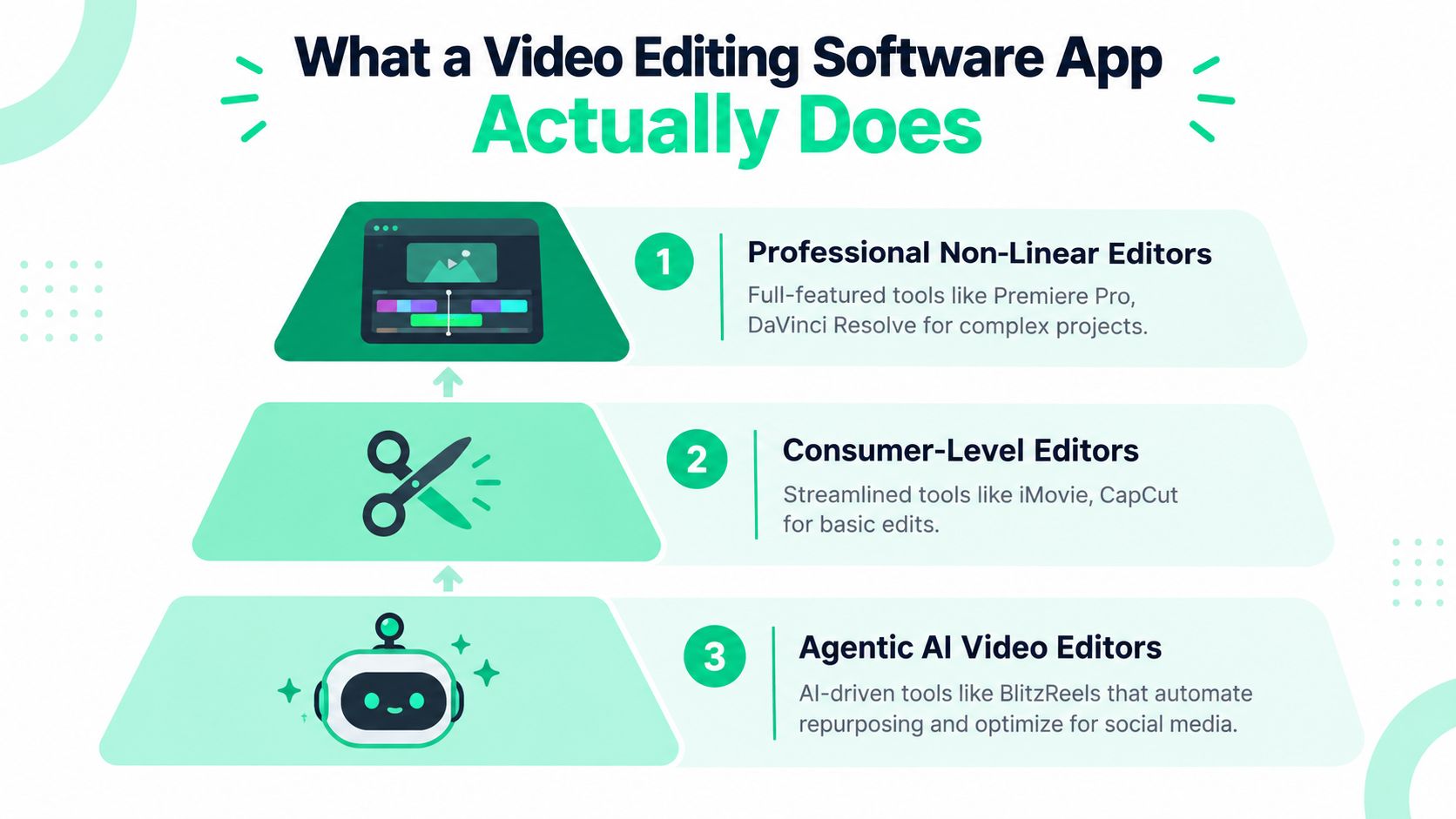
A professional NLE is like a full commercial kitchen. Premiere Pro and DaVinci Resolve give editors detailed control over timelines, audio, color, effects, codecs, and media management. They suit a feature, commercial, documentary, or carefully finished hero video, especially when a project needs frame-level decisions and a broad post-production toolset. Their trade-off is operational overhead. A skilled editor can move quickly, but the workflow still depends heavily on manual selection and timeline work.
A consumer timeline editor is closer to a compact home kitchen. CapCut, Filmora, and iMovie make basic cutting, text, music, transitions, and social exports easier to learn. They work well when the editor already knows the desired sequence or is producing a short video from a relatively small set of clips. They become less efficient when the assignment involves searching a long recording, generating many related clips, or coordinating review across a team.
A cloud repurposing platform changes the starting point. Instead of asking the editor to inspect every frame first, it can use a transcript, searchable dialogue, source markers, and reusable templates to help identify candidate moments. That approach is better suited to podcasts, interviews, webinars, calls, and recorded presentations where the spoken content carries the primary value.
An agentic AI video editor adds an automation layer around those editing operations. Through an agent interface or API, a system can inspect projects, find media, create clips, edit transcripts and captions, add B-roll, modify timeline items, validate output, start exports, and check render status. Human review still matters, especially for claims, tone, framing, caption accuracy, and brand safety.
The market context supports treating this category as established software infrastructure rather than a niche creator utility. The global video editing software market is forecast to grow from **USD 2.54 billion in 2026 to USD 3.80 billion by 2034**, representing about **49.6% cumulative growth** and a reported **5.2% CAGR**, according to [Straits Research's video editing software market coverage](https://straitsresearch.com/report/video-editing-software-market). Other estimates also point to sustained demand, although market boundaries differ. [Mordor Intelligence's market analysis](https://www.mordorintelligence.com/industry-reports/video-editing-market) places the market at **USD 3.54 billion in 2025** and **USD 3.75 billion in 2026**, with a projection of **USD 4.99 billion by 2031** at a reported **5.88% CAGR**.
The right choice depends on the dominant job. A single polished production may need the full kitchen. A repurposing team needs a faster preparation line, searchable source material, repeatable branding, and reliable delivery controls.
## Core and Advanced Features That Matter for Social Video
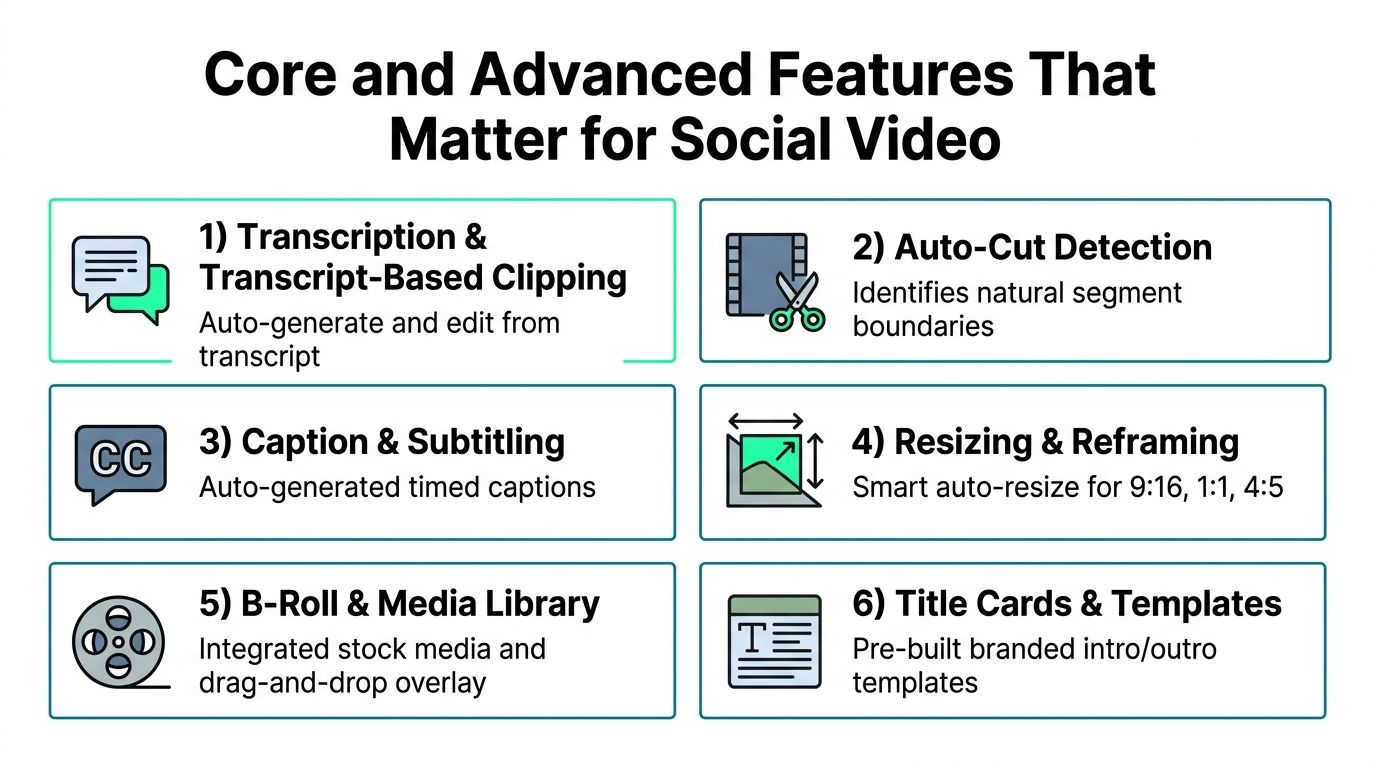
Short-form tools should be judged by how they reduce production decisions, not by how many buttons they expose. The most useful features address specific points where long-form content becomes difficult to publish in a vertical feed.
### Transcript-based clipping
Transcription turns spoken content into a searchable editing surface. An editor can search for a phrase, scan the surrounding context, and create a candidate clip without relying entirely on visual scrubbing. This works particularly well for interviews and webinars, where the most valuable moments are often answers, explanations, objections, or concise opinions.
AI suggestions can accelerate discovery, but they shouldn't decide the final editorial package. The editor still needs to remove setup language, tighten the opening, and check whether the clip makes sense without the original question.
### Cut detection and boundary control
Auto-cut detection can identify pauses, scene changes, or natural segment boundaries. It helps create a usable first pass, but automatic boundaries can feel abrupt when a speaker pauses for emphasis or begins a thought before the visually obvious cut. A browser-based [professional timeline editor](https://blitzreels.com/features/pro-timeline) remains useful for adjusting those decisions precisely.
### Captions that support sound-off viewing
Captions aren't merely a finishing layer. They establish rhythm, clarify speech, and make the central idea visible before a viewer commits to watching. Good caption tools allow corrections, line-length control, emphasis styling, speaker distinctions, and placement adjustments rather than forcing every clip into one rigid preset.
Editors should review names, product terms, acronyms, and punctuation manually. An incorrect caption can change meaning and undermine trust faster than a modest visual imperfection.
### Reframing and platform sizing
A horizontal interview doesn't automatically become a good vertical clip. Auto-reframe should track the active speaker, preserve important gestures, and respond sensibly when the shot includes two people or a screen share. Editors need a way to override the crop with keyframes or a timeline adjustment when the subject-tracking decision is wrong.
Export presets also prevent practical publishing errors. TikTok guidance centers on a **9:16 vertical canvas at 1080×1920 pixels**, with MP4 or MOV support and H.264 or H.265 encoding, as detailed in [TikTok's current video specifications](https://xroadstudio.com/platform-specs/tiktok). Instagram Reels uses the same **9:16, 1080×1920** format, while [Instagram safe-zone guidance](https://imgshifter.com/blogs/instagram-aspect-ratios-2026) advises keeping text, captions, and calls to action away from interface overlays.
### Templates, title cards, and supporting media
Templates turn brand rules into repeatable production components. A useful template can define caption styling, intro timing, title-card treatment, logo behavior, and end-screen structure without locking the editor into an unchangeable sequence.
B-roll and media libraries add context when the original footage is visually static. They should support drag-and-drop placement and clear timeline control. AI-generated images, voice, video, hooks, and title-card concepts can expand options, but generated material still requires review for factual fit, visual continuity, licensing terms, and brand suitability. Practical [editing tips to attract brands](https://sponsorradar.com/insights/youtube-video-editing-tips) are also useful when the goal is to make the final package feel deliberate rather than automatically assembled.
## How to Choose the Right App for Short-Form Workflows
A useful evaluation starts with the source material, not the marketing page. Take an actual podcast, webinar, or interview and test the complete path from upload to approved export. A tool that looks impressive in a feature matrix may struggle with transcript correction, multi-speaker framing, caption styling, or batch delivery.
| Criteria | Professional NLE | Consumer Timeline Editor | Cloud Repurposing Platform |
|---|---|---|---|
| Finding clips in long-form footage | Precise, but often manual | Usually manual | Transcript search and AI-assisted discovery |
| Caption workflow | Powerful with setup or extensions | Accessible, with varying control | Usually central to the workflow |
| Reframing | Detailed manual control and automation options | Often simplified | Designed around repeatable social crops |
| Templates and brand reuse | Flexible, but may need disciplined setup | Easy for basic packages | Strong fit for repeatable branded outputs |
| Batch production | Possible, often configuration-heavy | Limited to moderate | Typically aligned with multiple clip outputs |
| Collaboration | Strong in supported production environments | Often limited | Browser review, approvals, and shared projects |
| Best fit | Hero edits and complex finishing | Individual quick edits | Repurposing and recurring social production |
### A practical scoring test
Speed matters first. Measure how quickly the app moves from a long source to credible clip candidates, not merely how fast it imports media. Then inspect whether an editor can revise the transcript and have those changes update the timeline cleanly.
Caption quality deserves its own review. Check punctuation, speaker changes, emphasis controls, line breaks, and placement. A fast first pass loses value if every caption must be rebuilt manually.
Reframing should be tested with difficult footage, not only a centered talking head. Use a guest interview, a panel, a presentation with slides, or a shot where the speaker changes position. The software should offer an override when automatic tracking makes an editorially poor choice.
Export coverage must reflect the actual publishing plan. TikTok, Reels, Shorts, and LinkedIn may require different framing, duration decisions, metadata handling, and review conventions. YouTube Shorts documentation summarized in [current Shorts specifications](https://www.vidulk.com/video-specs/youtube-shorts) says Shorts can run for up to **3 minutes** and must use vertical **9:16** or square **1:1** uploads to qualify as Shorts rather than standard long-form videos.
AI reliability also needs governance. AI can propose clips, captions, crops, and media, but brand teams need visible review states, editable source decisions, render validation, and a record of what changed. For a cloud workflow, compare the tool with the practical requirements described in [cloud-based video editing guidance](https://blitzreels.com/blog/cloud-based-video-editor), including browser access, shared review, and production continuity.
## Practical Workflow for Repurposing Long-Form Into Shorts
The strongest workflow treats a long recording as a source library rather than one finished video. Each clip should earn its place through a clear idea, a strong opening, and a format that matches the destination.
### Step 1, ingest and transcribe
Import the podcast, webinar, interview, call, or YouTube source and generate a transcript. Confirm speaker labels where possible, then scan for phrases tied to the audience's questions, objections, desired outcomes, and strongest opinions.
### Step 2, shortlist moments
Search the transcript for meaningful terms instead of watching the entire recording linearly. AI suggestions can surface likely highlights, but the editor should judge whether each candidate has a complete thought, enough context, and a compelling reason to continue watching.
### Step 3, tighten the clip
Trim greetings, repeated setup, and delayed answers. Auto-cut detection can help identify natural boundaries, while the timeline lets the editor preserve a pause that adds emphasis or remove one that weakens the hook. The first spoken line should make sense quickly, even when the viewer has no knowledge of the original recording.
### Step 4, apply the brand system
Correct the transcript before styling captions. Add the approved font, colors, emphasis treatment, title card, logo behavior, and any recurring end screen. B-roll can clarify an abstract idea, while a simple hook card can make a useful answer legible in a fast-moving feed.
### Step 5, reframe and check safe zones
Convert the source to vertical and inspect the crop throughout the clip. Keep captions and calls to action away from interface areas. Instagram Reels safe-zone guidance is especially important because overlays can cover text near the top, bottom, and right edge.
### Step 6, review as a team
A reviewer should check factual accuracy, names, captions, visual continuity, brand tone, and platform fit. AI output is a draft, not approval. A browser review process gives producers, subject-matter experts, and clients a shared place to request changes without passing around disconnected exports.
### Step 7, batch export and validate
Prepare platform-specific versions, then inspect the rendered files rather than trusting the timeline preview. Check the opening frame, caption placement, audio, crop, title card, and final call to action. Shorts format detection matters on YouTube, while vertical sizing and safe zones matter across TikTok and Reels.
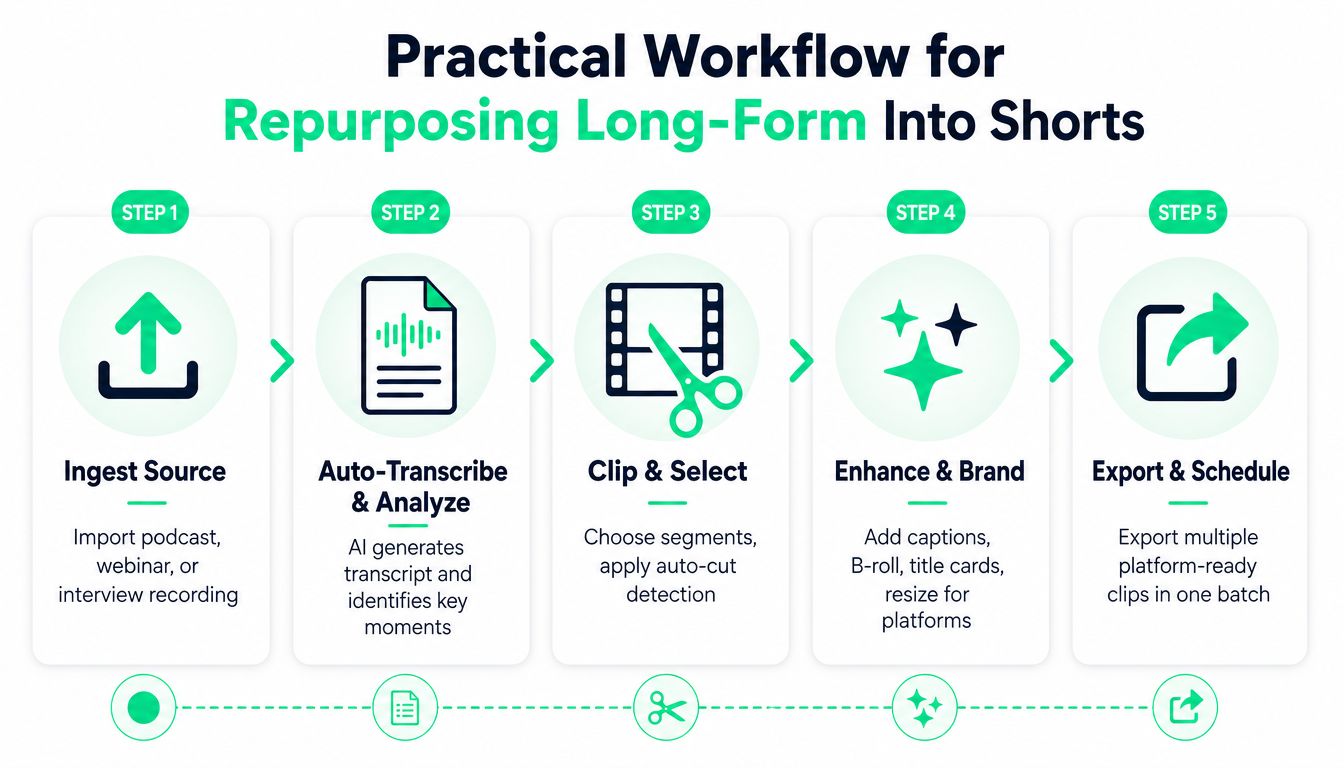
The workflow becomes easier to standardize when each stage has a defined handoff. Discovery produces candidate clips, editing produces approved timelines, branding applies reusable components, and delivery produces validated platform files.
A detailed guide to [turning long-form video into shorts](https://blitzreels.com/blog/turn-long-form-video-into-shorts) can help teams document these decisions before production volume increases.
## How BlitzReels Fits Into Creator and Team Workflows
BlitzReels fits the category of an **agentic AI video editor** for branded short-form production. It supports clipping from podcasts, webinars, interviews, calls, and YouTube videos, then combines transcript editing, captions, vertical reframing, title cards, media libraries, templates, and cloud rendering for TikTok, Instagram Reels, YouTube Shorts, and LinkedIn.
The important distinction is control. An agent can perform production operations, while human editors retain browser-based review and final approval. That makes the system different from a local MCP editor that depends on a desktop application, a professional-NLE integration that extends an existing timeline, or an FFmpeg server that executes media commands without offering a complete collaborative editing environment.
Its hosted MCP server uses Streamable HTTP and OAuth. Agents such as Claude, Codex, and Cursor can use it to inspect projects, find clips, edit transcripts and captions, add B-roll or other media, modify timeline items, validate output, start exports, and check render status. The same operations are available through a REST API, TypeScript SDK, CLI with structured JSON, OpenAPI, `llms.txt`, and agent skills.
That architecture matters when content production involves more than one editor. A developer can connect a content intake process to project creation. An agent can prepare candidate clips from a new recording. A producer can review the browser timeline, correct the hook, adjust a caption, approve the crop, and trigger the final export without handing the entire process to an opaque automation.
The product also supports AI image, voice, and video generation, which can help fill supporting visual gaps or develop title-card variations. Those capabilities don't remove editorial responsibility. Human reviewers still need to verify generated media, spoken claims, caption accuracy, brand fit, and platform presentation.
Teams evaluating the product can review [what BlitzReels is](https://blitzreels.com/about/what-is-blitzreels) alongside their existing NLE or cloud workflow. The practical positioning is complementary. Premiere Pro or Resolve may remain the right choice for complex finishing, while an agentic cloud editor can provide the repeatable infrastructure for turning long-form recordings into a steady stream of social assets.
## Where Video Editing Software Is Heading Next
Video editing software is moving from isolated desktop timelines toward connected production infrastructure. The shift isn't only about adding AI buttons. It changes how teams find source moments, assign review work, preserve brand rules, validate outputs, and connect editing with the rest of a content operation.
Transcript-driven editing will continue to matter because spoken content provides a searchable map of long recordings. Agent-driven workflows extend that map into actions, allowing systems to create projects, prepare clips, apply captions, update timelines, and monitor renders through structured interfaces. API-first editing makes the workflow easier to connect with content calendars, approval systems, asset libraries, and internal tools.
That direction also raises the standard for reliability. Teams need editable decisions rather than unexplained results, visible review states rather than silent automation, and render validation rather than confidence in a preview window. The most useful apps will combine fast automation with clear human control.
A practical evaluation can start immediately:
- Audit where the current process loses time, whether in discovery, caption correction, reframing, review, or export.
- Test one repurposing workflow using an actual podcast, webinar, or interview rather than a sample file.
- Compare the number of manual decisions required before and after automation.
- Check whether API, SDK, CLI, or MCP access could connect editing to the team's existing content systems.
A general editor may still be the right tool for a carefully crafted hero video. For recurring short-form production, the stronger choice is the app that makes discovery, branding, review, and delivery repeatable without hiding the decisions that matter.
---
BlitzReels provides an agentic AI video editor for creating and repurposing branded clips, with hosted MCP, REST API, TypeScript SDK, CLI, browser review, captions, reframing, templates, and cloud rendering for major social platforms. Visit [BlitzReels](https://blitzreels.com) to test a workflow built around turning long-form recordings into approved, platform-ready short-form video.