---
title: "Your Best Video Editor for Social Media: A 2026 Guide"
canonical: "https://blitzreels.com/blog/video-editor-for-social-media"
---
# Your Best Video Editor for Social Media: A 2026 Guide
URL: https://blitzreels.com/blog/video-editor-for-social-media
Markdown URL: https://blitzreels.com/blog/video-editor-for-social-media.md
Published: 2026-05-27
Author: BlitzReels
Find the best video editor for social media in 2026. This guide covers essential features, creator workflows, and AI tools for TikTok, Reels, & Shorts.
Tags: video editor for social media, social media video, reels editor, tiktok editor, short-form video

Most creators don't have a shooting problem. They have an editing bottleneck. The footage is fine, the idea is solid, but the clip still doesn't get posted because the workflow turns simple content into a pile of tiny decisions: where to cut, how to caption, how to crop for TikTok, what to do for Reels, whether the subtitle block covers the face, and whether it's worth making a Shorts version too.
That's why choosing a **video editor for social media** isn't really about finding the app with the longest feature list. It's about finding the tool that removes friction from the record-to-publish loop. In a space where social media use is projected to reach **5.42 billion** people worldwide in 2025, video is projected to make up **82%** of internet traffic, and short-form consumption has reportedly grown by **75%**, speed stops being a convenience and becomes part of the job, according to [Teleprompter's social media video statistics roundup](https://www.teleprompter.com/blog/social-media-video-statistics).
## Table of Contents
- [The Real Problem with Social Video Editing](#the-real-problem-with-social-video-editing)
- [Traditional editing fails social workflows](#traditional-editing-fails-social-workflows)
- [The Decision Is Workflow Design](#the-decision-is-workflow-design)
- [Anatomy of a High-Impact Social Video Editor](#anatomy-of-a-high-impact-social-video-editor)
- [Captions need design controls, not just transcription](#captions-need-design-controls-not-just-transcription)
- [Reframing and resizing do different jobs](#reframing-and-resizing-do-different-jobs)
- [Hooks, title cards, and templates should reduce decisions](#hooks-title-cards-and-templates-should-reduce-decisions)
- [The Modern Short-Form Creator Workflow](#the-modern-short-form-creator-workflow)
- [The old workflow breaks at every handoff](#the-old-workflow-breaks-at-every-handoff)
- [The new workflow is built around repurposing](#the-new-workflow-is-built-around-repurposing)
- [The editor should create momentum](#the-editor-should-create-momentum)
- [Editing for Algorithms Platform-Specific Strategies](#editing-for-algorithms-platform-specific-strategies)
- [The first seconds decide the edit](#the-first-seconds-decide-the-edit)
- [One vertical export is not a platform strategy](#one-vertical-export-is-not-a-platform-strategy)
- [Publishing matters after the edit too](#publishing-matters-after-the-edit-too)
- [Finding Your Fit Tool Recommendations by Use Case](#finding-your-fit-tool-recommendations-by-use-case)
- [For marketers repurposing long videos](#for-marketers-repurposing-long-videos)
- [For solo creators posting daily](#for-solo-creators-posting-daily)
- [For teams that need searchable video operations](#for-teams-that-need-searchable-video-operations)
- [Your Evaluation Checklist and Final Verdict](#your-evaluation-checklist-and-final-verdict)
- [A practical checklist for any trial](#a-practical-checklist-for-any-trial)
- [Final verdict](#final-verdict)
## The Real Problem with Social Video Editing
You record a sharp 45-second take for TikTok. The message is clear, the energy is right, and the hook works on the first line. Then the editing starts, and the speed disappears. Captions need cleanup, the frame needs a new crop, the safe areas change by platform, and one usable clip turns into three rounds of repetitive work.
That bottleneck is why social editing feels harder than filming. The footage usually exists. The slowdown happens between clip selection and publish.
The scale of that shift is easy to miss if you still treat social video like a smaller version of traditional editing. Social media usage keeps growing, video still dominates attention online, and short-form viewing continues to rise, as summarized in [Teleprompter's social media video statistics roundup](https://www.teleprompter.com/blog/social-media-video-statistics). For creators, that changes the buying criteria. A video editor for social media is not just a place to cut clips. It is a production system for repeatable output.
### Traditional editing fails social workflows
General-purpose editors were built to finish projects. Social creators need to ship versions.
That difference matters. A YouTube documentary workflow can justify a long edit session with detailed timeline work. TikTok, Reels, and Shorts usually reward fast iteration, strong first seconds, clear subtitles, and quick platform adjustments. If the software forces the same setup every time, posting frequency drops.
The friction usually shows up in the same places:
- **Manual caption cleanup every session:** Good enough transcription is not enough if every line still needs styling, repositioning, and timing fixes.
- **Repeated resizing and recropping:** One vertical export does not guarantee that faces, products, screenshots, or on-screen text stay visible everywhere.
- **Too many small publishing decisions:** Hook screen, cover frame, subtitle treatment, and clip length get rebuilt from scratch instead of reused.
I see the same pattern across creator workflows. The problem is rarely a lack of editing features. It is too many steps between idea and post.
> **Practical rule:** If a tool makes you rebuild the same short video for each platform, it is reducing output where consistency matters most.
### The Decision Is Workflow Design
The better question is not, "Which editor has the most features?" It is, "Which editor removes the most repeat work for the kind of content I publish?"
That shifts the evaluation fast. A creator posting daily talking-head clips needs speed in caption styling, hook trimming, and vertical framing. A brand team repurposing webinars needs faster clipping, transcript search, and versioning. The right tool depends on the workflow you repeat every week, not the feature page you skim during a trial.
That is also why short-form creators have moved away from long-form editing habits. Social editing works best as a fast packaging system. Clip the usable moment, shape the opening, keep the message readable on a phone screen, and export versions without rebuilding the project each time. The workflow in this guide to [how AI edits long videos for social media](https://www.blitzreels.com/blog/from-marathon-to-sprint-how-ai-edits-long-videos-for-social-media) explains that shift well. The constraint is not access to footage. It is the time cost of turning footage into platform-ready assets at scale.
## Anatomy of a High-Impact Social Video Editor
A strong social editor isn't defined by how many buttons it has. It's defined by how few decisions a creator has to make manually before the post is ready.
This workflow contrast shows the gap clearly:
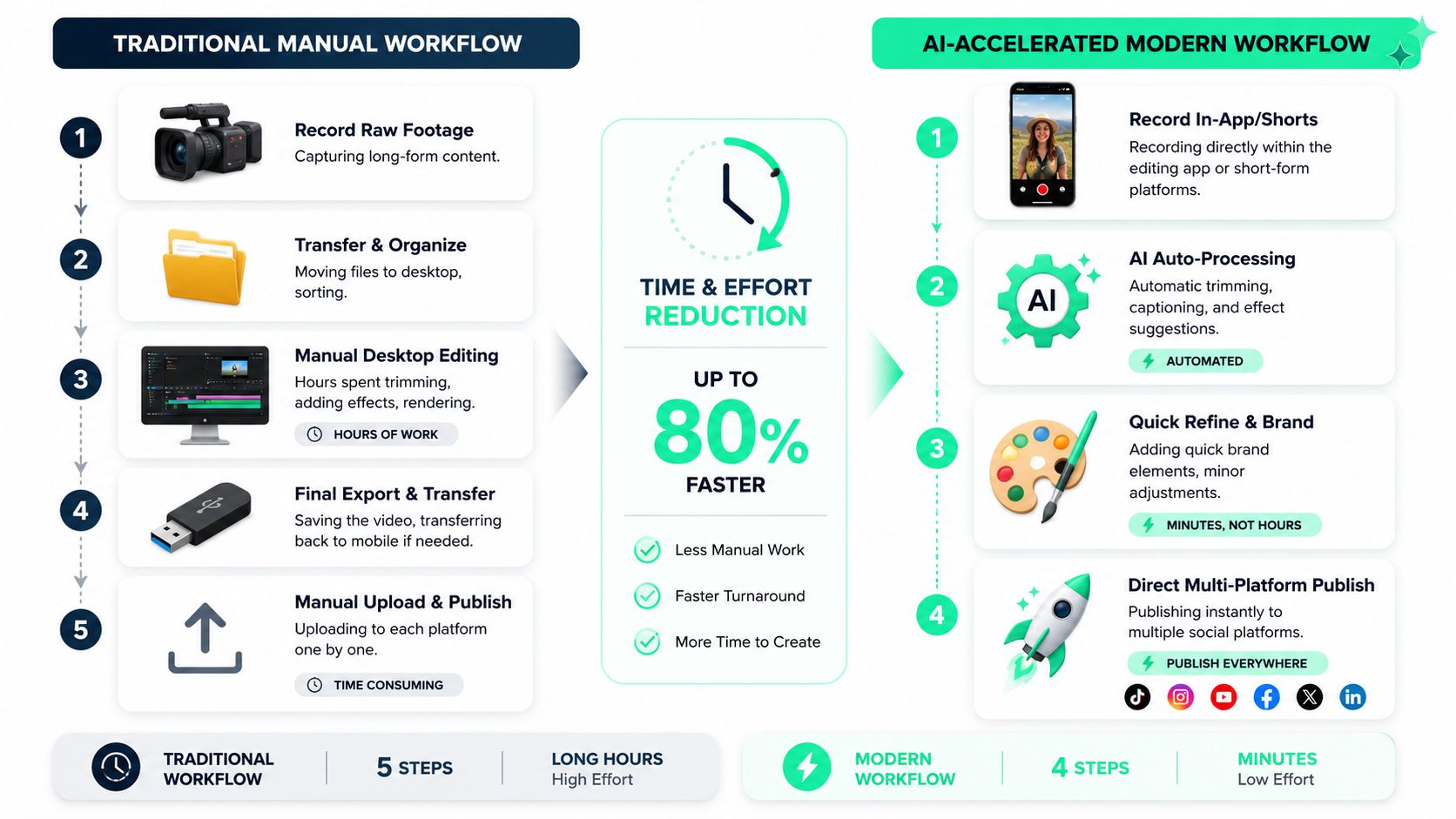
The best tools push the repetitive work into automation, then leave room for fast creative judgment. That means a creator should spend time improving the hook, pacing, and visual hierarchy. They shouldn't spend most of the session dragging subtitle boxes and rebuilding crops.
### Captions need design controls, not just transcription
Captions aren't a checkbox. They're part of the composition. The subtitle style, size, placement, and motion all affect whether the frame feels clean or crowded.
Common creator guidance also points out that captions can hurt retention when they block faces or key visuals, and that auto-reframing plus large, readable subtitle styles work better on small screens, as discussed in [Common Ground PR's practical social editing tips](https://commongroundpr.com/five-video-editing-tips-how-to-create-engaging-videos-for-social-media/).
A good editor should let creators control:
- **Placement:** Keep text out of the way of faces, product shots, or UI-heavy areas.
- **Style:** Match brand colors and emphasis without turning every line into visual noise.
- **Readability:** Use text that still works on mobile without dominating the frame.
> Captions help accessibility, but on social they also act like motion graphics. If they look bad, the whole edit looks bad.
For a useful benchmark, creators can compare those needs against the kinds of controls listed on the [BlitzReels features page](https://www.blitzreels.com/features), especially around captions, reframing, and short-form formatting.
A practical video walkthrough helps here because caption design is easier to judge visually than in theory.
### Reframing and resizing do different jobs
These are often treated like the same feature, but they solve different problems.
**Resizing** changes the canvas. **Reframing** decides what stays visible inside that canvas.
That difference matters most when one source clip needs to become several social outputs. A horizontal recording may technically fit a vertical export, but if the speaker drifts off-center or the product demo gets cropped awkwardly, the video still fails. The editor has to keep the actual subject readable, not just generate a new aspect ratio.
A useful social tool should handle both tasks cleanly:
| Need | What the editor should do |
|---|---|
| **Canvas adaptation** | Export for vertical, square, and feed-friendly formats without rebuilding the project |
| **Subject retention** | Keep faces, hands, and products centered as the frame changes |
| **Speed cleanup** | Remove dead space and tighten pauses quickly |
### Hooks, title cards, and templates should reduce decisions
The best editors help creators package the clip before anyone scrolls away. That usually means fast title cards, opening text, and reusable visual templates.
What tends to work:
- **Hook-first opening:** Lead with the payoff, conflict, result, or claim.
- **Simple title cards:** Use them to clarify context, not decorate the screen.
- **Reusable templates:** Keep fonts, colors, and motion consistent across posts.
What usually doesn't work:
- **Slow intros:** Logos, scene-setting, and polite lead-ins waste the most valuable seconds.
- **Overbuilt motion graphics:** They look “edited” but often distract from the point.
- **Template dependence:** If every post looks like borrowed trend packaging, the content loses identity.
A modern editor should make repeatable branding easier while still letting the creator keep the video feeling native to TikTok, Reels, Shorts, or LinkedIn.
## The Modern Short-Form Creator Workflow
The old short-form workflow was full of handoffs. Record somewhere, transfer files, cut in another tool, render, resize, upload, then repeat the entire process for the next channel. That system can still produce good videos, but it burns time in places the audience never sees.
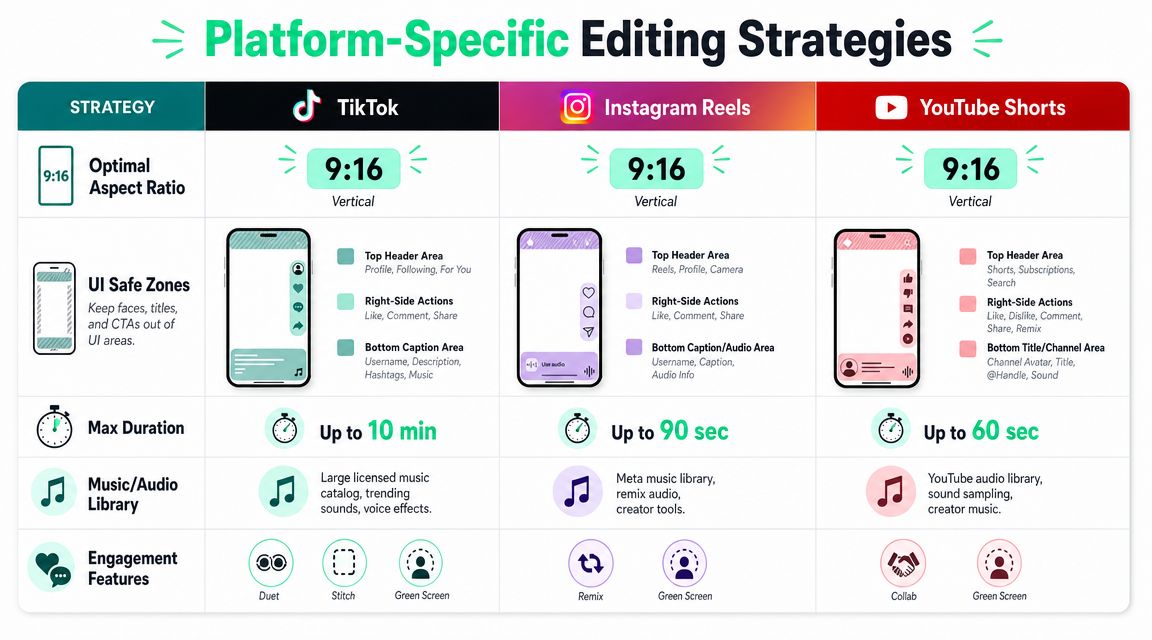
This comparison captures the platform layer creators have to think about while editing:
### The old workflow breaks at every handoff
Traditional editing habits came from desktop production. Social publishing needs something tighter. The minute a creator has to move files across apps, restyle every subtitle manually, or rebuild a crop from scratch, the workflow starts leaking energy.
That usually shows up in familiar patterns:
- **Footage sits unedited:** Good recordings pile up because finishing feels heavier than recording.
- **Cross-posting gets skipped:** A TikTok version exists, but no Reel or Short gets made.
- **Publishing becomes inconsistent:** The content plan depends on whether someone has enough time to edit.
### The new workflow is built around repurposing
The strongest social workflow starts with one source asset and assumes multiple outputs from day one. A talking-head clip might become a TikTok with bold captions, a Reels version with safer text placement, a Shorts version with a tighter opening, and a square or 4:5 version for a feed post.
That's why rapid repurposing is such a useful benchmark. Tools that support **16:9, 1:1, 4:5, and 9:16** exports and automate trimming reduce the manual cost of making several platform-ready versions, as described by [Quickchannel's video editor overview](https://quickchannel.com/en/product/video-editor/).
> A social workflow is healthy when the first finished clip makes the second and third version easier, not harder.
A practical way to think about the sequence is:
1. **Upload the source clip**
2. **Generate transcript and rough cuts**
3. **Select the strongest moments**
4. **Apply a caption style**
5. **Check framing for vertical**
6. **Export the needed formats**
7. **Publish with platform-specific packaging**
For creators repurposing longer source material, this guide on [turning YouTube videos into TikTok clips in a faster workflow](https://www.blitzreels.com/blog/the-30-minute-workflow-for-turning-youtube-videos-into-tiktok-gold) maps the process well. The important shift is mental, not just technical. The source video is no longer the final product. It's the raw material for a batch of social edits.
### The editor should create momentum
A creator usually knows within minutes whether a tool will help or slow things down. The right one creates momentum after upload. It surfaces clip candidates, gives usable caption output, and makes resizing feel like adaptation rather than re-editing.
The wrong one turns every post into a mini post-production session.
## Editing for Algorithms Platform-Specific Strategies
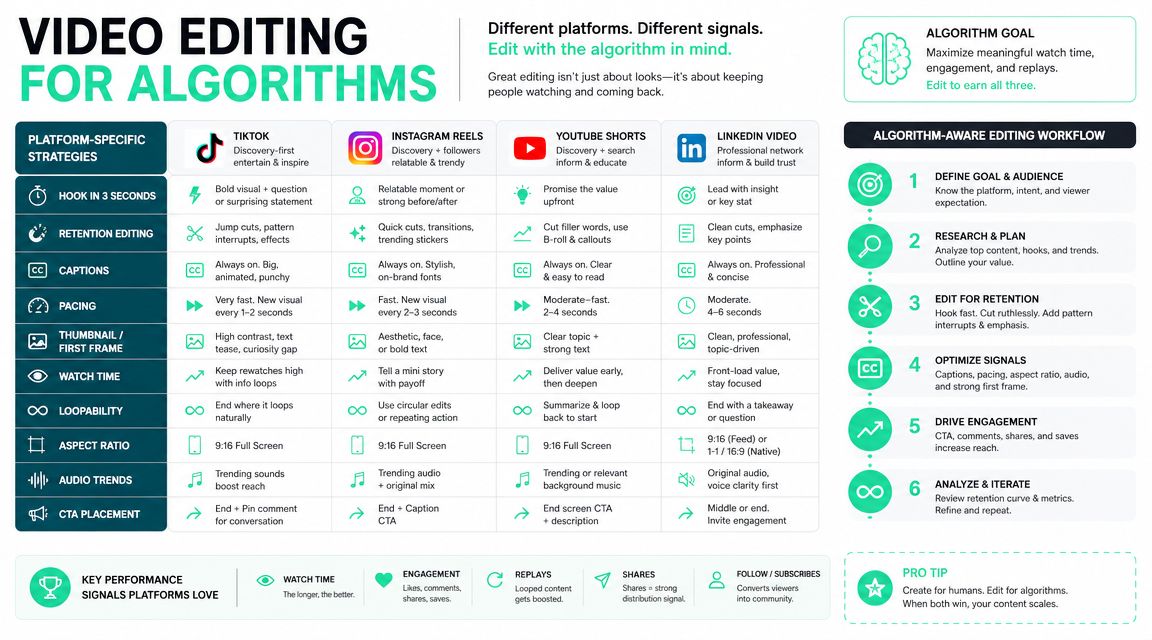
A lot of weak short-form strategy comes from one assumption: if the video is vertical, it's ready everywhere. It usually isn't. TikTok, Instagram Reels, and YouTube Shorts all present vertical video differently, and those interface differences affect where captions, faces, and product visuals should sit.
### The first seconds decide the edit
For social, the opening frame has to do real work. Adobe notes that viewers often decide whether to keep watching in about **three seconds**, and that **9:16 framing** with tight subject placement is important for phone-based viewing across TikTok, Reels, and Shorts, according to [Adobe's guidance on editing for social](https://www.adobe.com/creativecloud/video/discover/editing-for-social.html).
That changes editing priorities immediately. The best opening isn't the one with the nicest transition. It's the one that makes the point fastest.
Useful opening moves include:
- **Start on the payoff:** Show the result before the explanation.
- **Lead with a statement on screen:** Give the viewer a reason to decode the next lines.
- **Cut late setup:** Most spoken intros can lose the first sentence.
### One vertical export is not a platform strategy
Even when every platform prefers vertical, the same visual layout won't survive all three feeds equally well. Caption blocks, profile areas, interaction buttons, and descriptions all compete for space. A creator who centers subtitles too low may find them fighting the app interface. A creator who uses the exact same crop everywhere may hide the important action under platform UI.
There are also cases where **9:16** shouldn't be the only default. Instagram feed distribution can still benefit from **4:5** or square depending on the placement goal, while long horizontal source footage may need different crops depending on whether the priority is a face, a product, or text on screen. That's where an editor needs actual layout control, not just a one-click vertical export.
> The right crop depends on what the viewer needs to read first: the face, the product, or the caption.
Creators who are still deciding where a clip belongs can use a platform comparison like [this breakdown of Reels, TikTok, and Shorts for creators in 2026](https://www.blitzreels.com/blog/reels-tiktok-or-shorts-which-platform-is-best-for-creators-in-2026) to match the edit to the distribution goal.
### Publishing matters after the edit too
The workflow doesn't end at export. For teams building a more automated posting stack, publishing options matter because they affect whether edits move smoothly from production into distribution. For TikTok-specific automation, the [TikTok publishing API overview from LetMePost](https://letmepost.dev/platforms/tiktok/) is a useful resource for understanding how scheduled or programmatic publishing can fit into a broader content system.
That matters because editing for algorithms isn't just about visual style. It's also about operational consistency. Teams that can move cleanly from clip selection to platform-ready publishing usually get more value from each source video than teams that finish the edit and then stall on the final upload step.
## Finding Your Fit Tool Recommendations by Use Case
There isn't one best video editor for social media. There's a best fit for the type of content operation behind it. A solo creator posting trend-driven clips from a phone has different needs than a marketer repurposing webinars, and both are different from a team trying to search, summarize, and distribute large video libraries.
That choice matters because the upside is real. One industry summary reports that social videos are shared **1,200% more** than text-and-image posts combined, and that **69%** of consumers prefer short mobile videos for product learning, according to [HashMeta's video marketing statistics roundup](https://hashmeta.com/blog/video-marketing-statistics-essential-consumption-trends-shaping-digital-strategy/). If video is already carrying that much weight, the editor can't be the slowest part of the stack.
### For marketers repurposing long videos
This group usually works from webinars, podcasts, demos, interviews, and recorded presentations. The biggest need isn't cinematic control. It's turning longer assets into multiple short clips without a lot of manual searching.
**Descript** makes sense when transcription is central to the workflow and the team likes editing through text. It's useful for speech-heavy content and collaborative review.
**CapCut** works when the team wants quick templates, social-native effects, and flexible device support. It can move fast, but the template-heavy style can also push business content toward a more generic look if the team isn't careful.
A repurposing-focused workflow benefits most from tools built around clipping, captions, reframing, and short-form outputs rather than broad production features. Teams evaluating those kinds of workflows can compare examples across different [creator and marketing use cases](https://www.blitzreels.com/use-cases).
### For solo creators posting daily
Daily posters need low friction. They usually care less about advanced post-production and more about whether the app lets them move from raw thought to finished short quickly.
**CapCut** is a practical option for creators who rely on trend formats, quick subtitle generation, and mobile editing. It's strong when speed matters and the creator is already working in a TikTok-adjacent style.
**Splice** fits creators who want a cleaner timeline-first mobile workflow without so much template pressure. It's useful for people who want direct control over cuts and pacing on a phone.
A solo creator should ask one question before anything else: does the editor help the content get posted today, or does it make the creator postpone the post until later?
### For teams that need searchable video operations
Some teams don't just need editing. They need video as an operational system. That includes indexing recorded content, extracting useful moments, and connecting media workflows to documentation or analysis stacks.
In that kind of environment, it helps to understand what a broader AI video layer can process. Diffio AI's documentation on [video support capabilities](https://diffio.ai/docs/overview/capabilities/video-support/) is useful here because it frames video handling as part of a wider content-processing workflow rather than just an editor interface.
That's a different category from creator-first tools, but it matters for larger teams. If the team's real problem is finding, understanding, and reusing video assets, the editor is only one part of the solution.
| Use case | Better fit | Why |
|---|---|---|
| **Repurposing webinars and podcasts** | Descript or a repurposing-focused short-form tool | Fast transcript-led clipping and review |
| **Daily short-form creation** | CapCut or Splice | Lower friction, faster turnaround on mobile |
| **Multi-system video operations** | Editor plus searchable video tooling | Better for indexing and reuse across teams |
The right choice comes down to where the friction lives. If the pain is finding the best moments, choose around clipping. If the pain is daily output, choose around speed. If the pain is asset management, choose around retrieval and reuse.
## Your Evaluation Checklist and Final Verdict
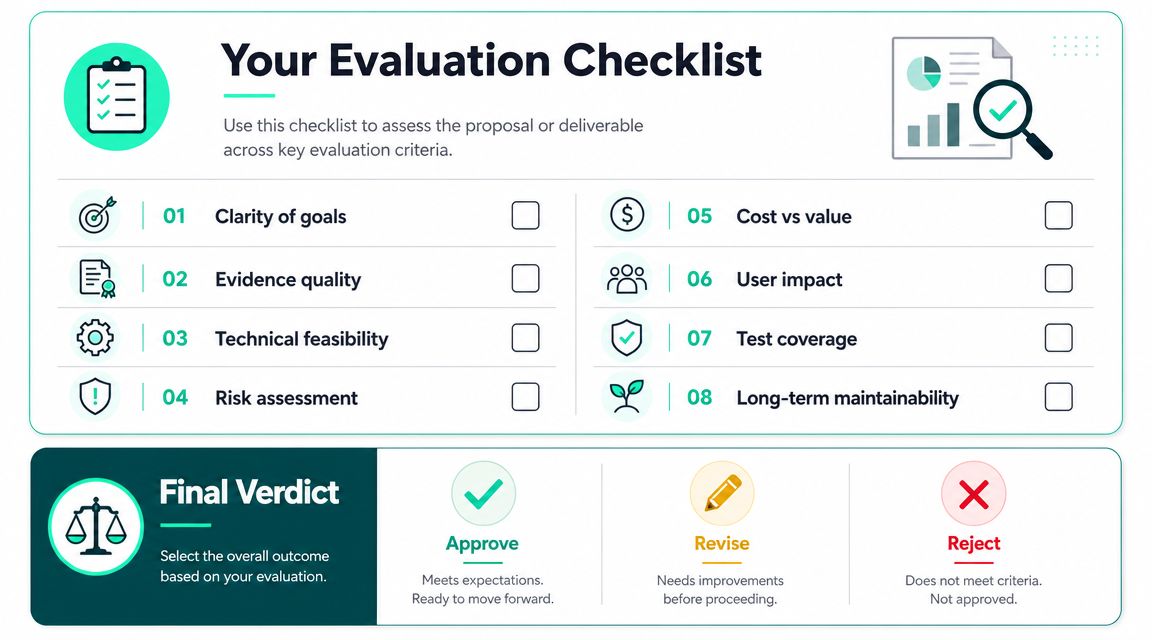
A free trial usually fails in the first ten minutes. The creator imports a clip, tests a transition, toggles a few templates, and still has no answer to the core question. Will this tool help publish faster across TikTok, Reels, and Shorts without turning one edit into three separate jobs?
### A practical checklist for any trial
Run one real piece of footage through the full workflow. A talking-head clip, product demo, podcast segment, or customer video works fine. The point is to test the editor against the content you publish, not a polished sample file.
- **Can it create usable captions fast?** Check readability first. On short-form, captions often carry retention when viewers watch with sound low or off. If styling, timing, or placement takes too much cleanup, the tool is adding work.
- **Does reframing keep the subject clear?** Auto-crop only helps if the face, hands, or product stays in frame. That matters more on TikTok and Reels, where cramped vertical composition kills clarity fast.
- **Can it produce multiple outputs from one edit?** A good trial should include one source clip turned into a TikTok cut, a Reel-safe version, and a Shorts export. If that process feels repetitive, repurposing friction is still there.
- **Can you tighten the first seconds without fighting the interface?** Hooks decide whether the rest of the edit gets seen. If trimming the open, swapping text, or testing a stronger first line feels slow, daily publishing will feel slow too.
- **Can you make version two quickly?** Weak editors often falter here. One decent export is not enough. A key indicator is how fast you can produce an alternate hook, caption style, or crop for a second post.
- **Does the tool reduce decision fatigue?** Good software removes low-value choices. It should help you move from clip to publish with fewer pauses, fewer manual fixes, and less second-guessing.
A simple test works well. Start with one source file and aim to publish-ready drafts for three platforms in one sitting.
### Final verdict
The best video editor for social media fits the way content gets made. It should shorten the path from raw footage to publish-ready post, especially when the job includes clipping one long recording into multiple platform-specific versions.
That means less time fixing captions, less time correcting vertical crops, and less time rebuilding the same video for different aspect ratios. It also means fewer tiny editing decisions that drain momentum before the post goes live.
Feature lists rarely answer that. Workflow does.
If your workflow is the bottleneck, you need a tool designed to clear it. BlitzReels is built for the workflow-first creator. It automates the repetitive decisions, clipping, captioning, reframing, and resizing, so you can focus on the creative ones, like the hook, pacing, and final packaging. If your current editor creates more work every time you repurpose a clip for TikTok, Instagram Reels, YouTube Shorts, or LinkedIn, explore [BlitzReels](https://blitzreels.com) and see how it removes friction between record and publish.