---
title: "Video Repurposing Tool Guide for Short Form Growth"
canonical: "https://blitzreels.com/blog/video-repurposing-tool"
---
# Video Repurposing Tool Guide for Short Form Growth
URL: https://blitzreels.com/blog/video-repurposing-tool
Markdown URL: https://blitzreels.com/blog/video-repurposing-tool.md
Published: 2026-08-15
Author: BlitzReels
Learn how a video repurposing tool turns long videos into short-form clips for TikTok, Reels & Shorts with captions, reframing and templates.
Tags: video repurposing tool, short form video, video repurposing, AI video editing, BlitzReels tips

A creator records one useful conversation on Monday and plans to publish it everywhere by Tuesday. The recording needs a strong opening for TikTok, a clean vertical crop for Instagram Reels, captions for silent viewing, a concise version for YouTube Shorts, and a more context-rich edit for LinkedIn. By the time the first clip is finished, the rest of the week has disappeared into trimming, resizing, caption correction, and repeated exports.
That workflow made sense when one video had one destination. It breaks down when a single recording needs several **platform-native versions**. A video repurposing tool turns the source into a working content system, helping creators identify usable moments, shape hooks, add title cards, reframe speakers, apply templates, and export short-form files without rebuilding every edit from scratch.
The important distinction is quality, not just speed. A copied clip with the same pacing and CTA everywhere can feel out of place, while a carefully adapted clip can serve entertainment, conversion, or shopping goals. The guide below builds a practical mental model, explains the features that matter, and shows how creators can govern the process when the content library grows.
## Table of Contents
- [Introduction Why One Video Is Never Enough Anymore](#introduction-why-one-video-is-never-enough-anymore)
- [What a Video Repurposing Tool Really Does](#what-a-video-repurposing-tool-really-does)
- [Repurposing is more than resizing](#repurposing-is-more-than-resizing)
- [When repurposing beats re-shooting](#when-repurposing-beats-re-shooting)
- [Core Features That Make Repurposing Fast and Watchable](#core-features-that-make-repurposing-fast-and-watchable)
- [Transcription and smart clipping](#transcription-and-smart-clipping)
- [Captions that support silent viewing](#captions-that-support-silent-viewing)
- [Reframing for vertical feeds](#reframing-for-vertical-feeds)
- [Templates and title cards](#templates-and-title-cards)
- [Export and delivery controls](#export-and-delivery-controls)
- [Practical Repurposing Workflows You Can Run in Minutes](#practical-repurposing-workflows-you-can-run-in-minutes)
- [Workflow one turns a long conversation into a clip set](#workflow-one-turns-a-long-conversation-into-a-clip-set)
- [Workflow two adapts one talking-head recording](#workflow-two-adapts-one-talking-head-recording)
- [How to Choose the Right Video Repurposing Tool for Your Team](#how-to-choose-the-right-video-repurposing-tool-for-your-team)
- [Check the source and volume limits](#check-the-source-and-volume-limits)
- [Test control, not just automation](#test-control-not-just-automation)
- [Common Pitfalls That Make Repurposed Clips Flop](#common-pitfalls-that-make-repurposed-clips-flop)
- [Measuring Success and Turning Clips Into Growth](#measuring-success-and-turning-clips-into-growth)
- [Use a simple review loop](#use-a-simple-review-loop)
## Introduction Why One Video Is Never Enough Anymore
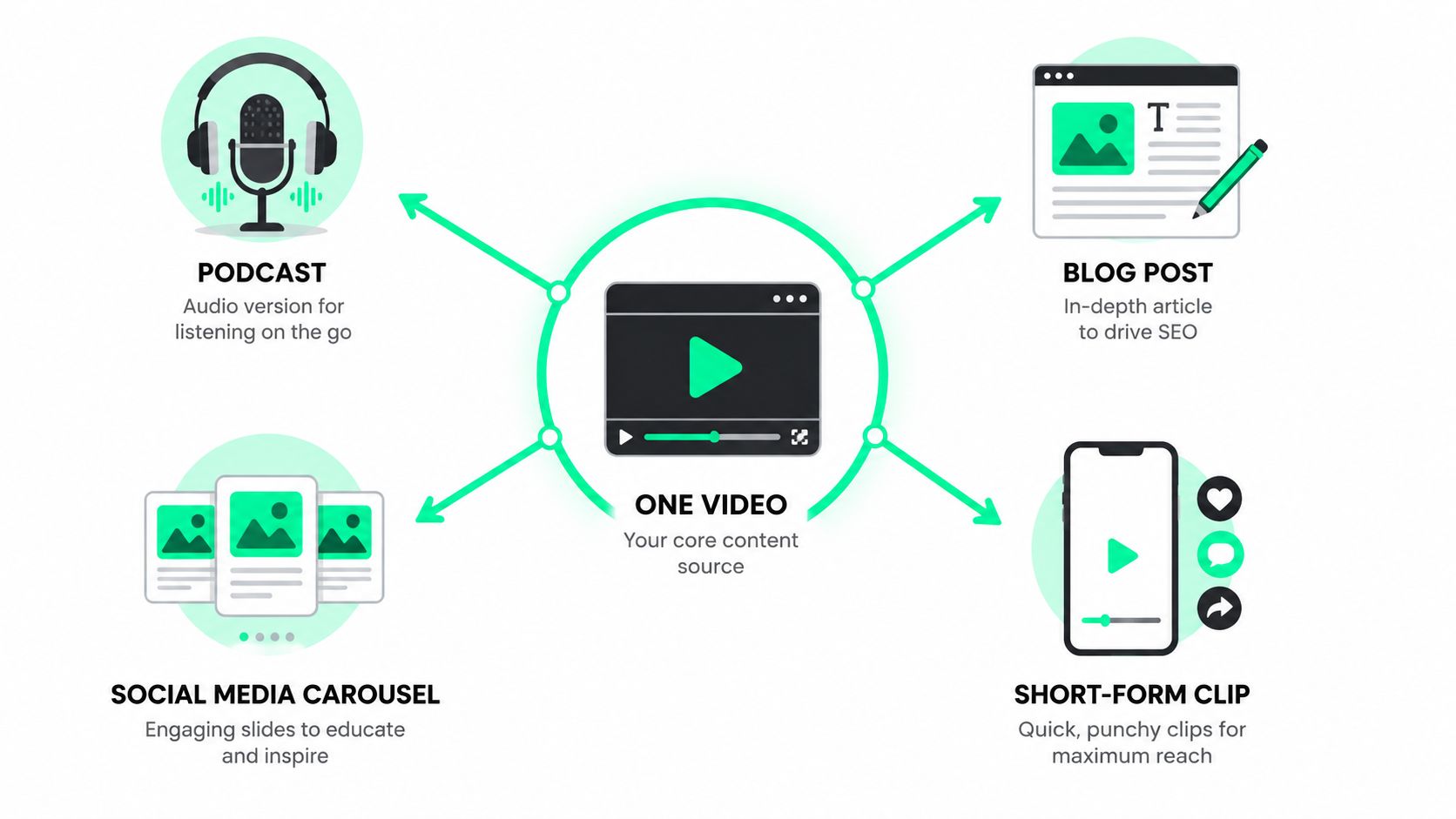
A podcast host finishes recording a valuable interview and sees five possible publishing jobs waiting on the desk. One clip needs an immediate question for TikTok, another needs a bold title card for Reels, a third needs a compact insight for Shorts, and a fourth needs enough context for LinkedIn. The original recording is strong, but manually turning it into each version feels like editing five different videos.
Short-form video became a mainstream distribution format through the rise of platforms built around fast, vertical viewing. Vine launched in **2013** with six-second looping videos, Instagram introduced Reels in **2020**, and YouTube Shorts later joined the market. By **2024**, YouTube Shorts was reported to surpass **70 billion daily views**, a scale that shows how quickly short-form moved into the center of online attention. The history is outlined in [Brandwatch's short-form video glossary](https://www.brandwatch.com/social-media-glossary/short-form-video/).
That shift created a practical problem. A long interview, webinar, screen recording, or product demonstration may contain dozens of useful moments, but each platform expects its own rhythm, framing, caption treatment, and call to action. Manual editing can still produce excellent work, yet it becomes difficult to maintain when every asset requires separate transcription, clipping, reframing, and export.
A **video repurposing tool** handles the repetitive parts while leaving editorial judgment with the creator. It can locate a complete thought, turn it into a clip, keep the speaker visible in a vertical frame, generate captions, and prepare versions for multiple feeds. The creator still decides whether a moment is accurate, useful, on-brand, and appropriate for the intended audience.
> **Practical rule:** One recording can supply the raw material, but each platform version still needs a reason to exist.
The most useful workflow treats the master recording as a source library, not a finished social post. The sections ahead show how that approach works, which features reduce editing friction, how to select a tool, and how to avoid publishing automation that produces technically correct but forgettable clips. For a broader explanation of why this model matters, creators can also review [why repurposed clips drive more engagement than originals](https://blitzreels.com/blog/why-repurposed-clips-drive-more-engagement-than-originals).
## What a Video Repurposing Tool Really Does
A helpful analogy is a song remixed for different radio stations. The melody stays recognizable, but the edit changes depending on the audience. A dance station may want the chorus immediately, a talk station may need a longer introduction, and a video channel may require a visual hook. **Repurposing works the same way**. The source remains consistent, while the presentation changes for the destination.
A basic editor trims footage. A video repurposing tool goes further by helping answer four connected questions:
1. **What is worth extracting?**
2. **Where should the clip begin and end?**
3. **How should the frame, captions, and pacing change?**
4. **Which version fits the platform and the publishing goal?**
The process usually starts with transcription. Once spoken words become searchable text, a creator can find a phrase, scan the conversation, and identify complete ideas without scrubbing through the entire timeline. The tool can then segment the source into potential clips, remove dead space, and provide a starting point for review.
### Repurposing is more than resizing
Resizing changes dimensions. Repurposing changes the communication job.
A horizontal product demonstration might become a short clip that opens with the result rather than the setup. A podcast answer might need a title card that states the tension before the speaker appears. A founder's explanation could work as entertainment when it highlights an unexpected opinion, as a conversion post when it explains a customer problem, or as a shoppable clip when the product and purchase action appear early.
That's why a tool needs more than a crop button. It should support **clipping, captions, reframing, resizing, hooks, title cards, templates, and fast editing** in one connected workflow. BlitzReels fits this category by taking video sources such as MP4, MOV, or screen recordings and helping turn them into short-form edits for social publishing. The [video repurposing glossary](https://blitzreels.com/glossary/video-repurposing) offers a concise reference for the terminology.
The category also includes tools with different strengths. Some focus on clipping long recordings, some focus on transcript-based editing, and others focus on distribution. A current overview such as [best content repurposing tools 2026](https://contesimal.ai/blog/content-repurposing-tools/) can help buyers compare those categories, but the central question remains practical: does the tool reduce the work between the original recording and a platform-ready post?
### When repurposing beats re-shooting
Repurposing makes sense when the source contains a complete idea, a useful demonstration, a strong reaction, or a clear answer. It's less suitable when the original video depends on context that disappears after cutting, or when the speaker's wording needs substantial correction.
A creator can think of the tool as an assistant editor. It proposes moments and handles repetitive formatting, while the human reviewer protects meaning, brand voice, and audience fit. That balance prevents two common errors, publishing every automated clip or spending so much time polishing one version that no other channel receives content.
## Core Features That Make Repurposing Fast and Watchable
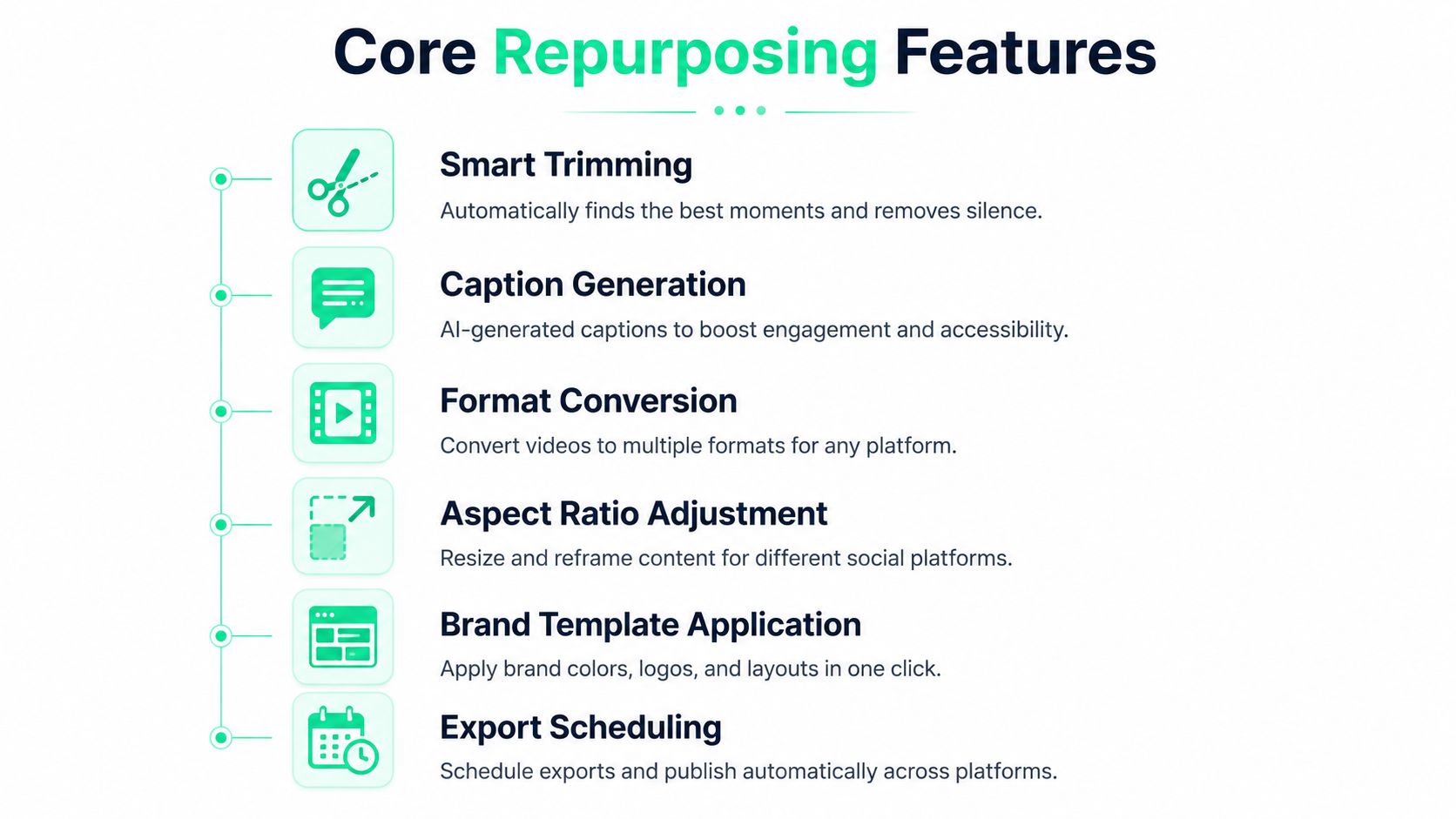
A tool earns its place in a short-form workflow when it reduces decisions without removing editorial control. Six capabilities matter most because they address different points of friction, from finding a usable moment to exporting a clean file.
### Transcription and smart clipping
**Auto-transcription** turns a recording into a searchable working document. It helps an editor locate a phrase, compare nearby context, and check whether a proposed clip begins and ends at a natural point. Modern caption evaluation has also become more detailed than a single word-error score. VCapsBench contains **5,677+ videos** and **109,796+ question-answer pairs**, and evaluates caption quality through Accuracy, Inconsistency Rate, and Coverage Rate in its [technical benchmark](https://aclanthology.org/2025.findings-acl.449.pdf).
Smart clipping uses the transcript and the audio-visual structure to suggest standalone moments. A useful clip answers a question, introduces tension, demonstrates an outcome, or delivers a complete insight. The feature saves search time, but it shouldn't decide final relevance without review.
### Captions that support silent viewing
Captions need to be accurate, readable, and visually aligned with the speaker. Word-by-word timing, emphasis, bold styling, and restrained emoji use can help the viewer follow the argument when sound is off. One analysis reports that captioned videos can achieve **12–15% higher completion rates** than versions without captions, and it discusses how subtitles may support YouTube discovery through indexing and recommendation systems. The details appear in [this analysis of subtitles and retention](https://zoupyu.com/blog/subtitles-retention-math-shorts).
Caption quality involves more than spelling. A repurposing tool should let the editor correct names, control line length, choose contrast, and apply a consistent visual treatment. Automatic output is a draft, not a guarantee.
### Reframing for vertical feeds
Most major short-form platforms use the **9:16 aspect ratio at 1080×1920 pixels**, including TikTok, Instagram Reels, YouTube Shorts, and Facebook Reels, as described in this guide to vertical video dimensions. Automatic reframing keeps a face, product, or screen area visible when a horizontal source becomes a vertical clip.
A good reframing system follows the subject as the speaker moves. A weak one leaves a face near the edge, cuts off a product, or centers empty background. The editor should inspect the opening frame, the main point, and the closing CTA rather than trusting the crop everywhere.
### Templates and title cards
Templates provide repeatable choices for caption placement, colors, fonts, transitions, and logo treatment. Title cards create immediate context, especially when the original conversation takes too long to reach its point. A creator might turn “a discussion about pricing” into “The pricing mistake that slows signups,” provided the title accurately reflects the clip.
### Export and delivery controls
Export settings protect the final result. A useful tool should produce platform-ready files without forcing the editor to repeat the same resize and download process for every destination. Scheduling and publishing can be valuable too, but distribution automation should come after the team has approved the clip, caption style, and CTA.
More information about the available editing capabilities appears on the [BlitzReels features page](https://blitzreels.com/features).
## Practical Repurposing Workflows You Can Run in Minutes
A repeatable workflow begins with a clear source and a clear publishing goal. Without those decisions, automation creates a larger review pile instead of a faster process.
### Workflow one turns a long conversation into a clip set
A podcast or webinar usually contains several editorial angles. The first pass should identify those angles before any styling begins.
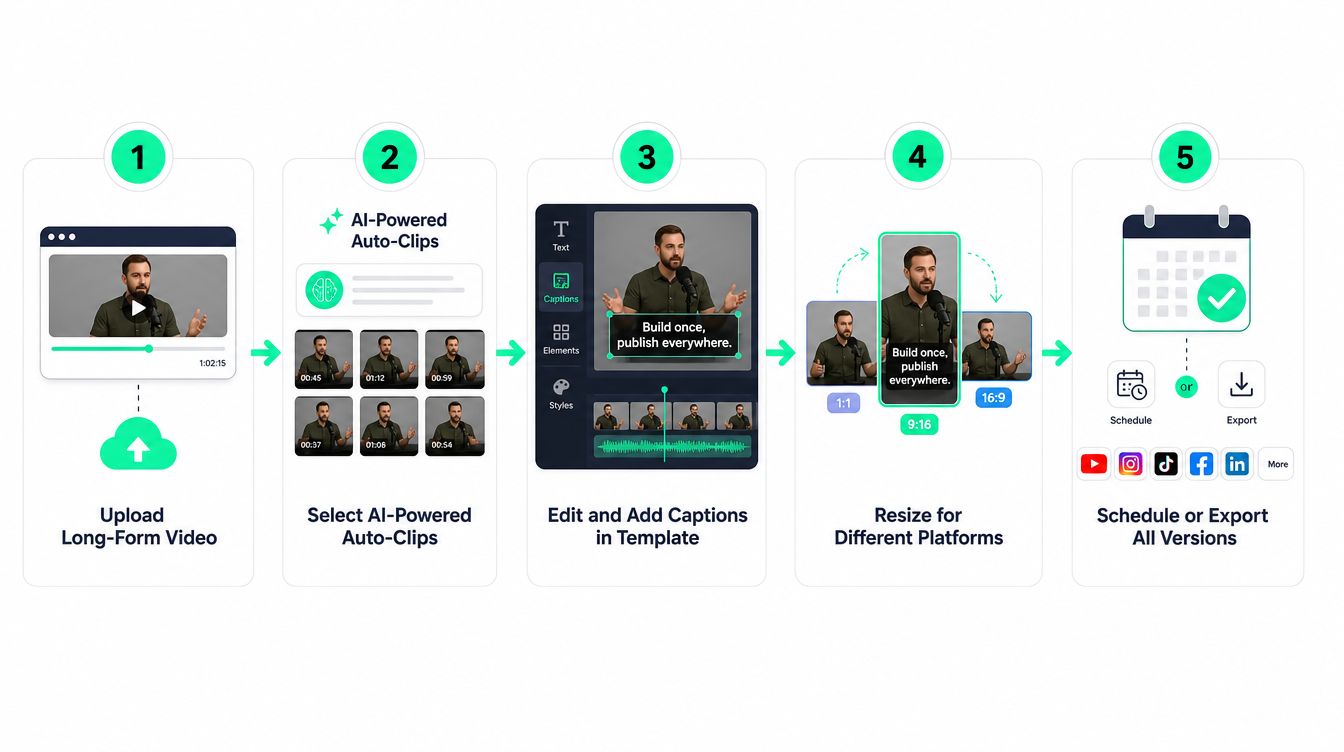
1. **Upload and transcribe.** Add the recording, confirm the speaker names and technical terms, then scan the transcript for complete thoughts.
2. **Choose moments by job.** Select one clip that entertains, one that teaches, one that challenges an assumption, and one that points toward a useful next step. This creates variety instead of several clips saying the same thing.
3. **Strengthen the opening.** Start with the most compelling sentence or add a truthful title card that gives the viewer a reason to continue. A clip about a failed launch might open with the lesson, then provide the background.
4. **Apply captions and visual structure.** Use a readable caption preset, emphasize important words sparingly, and insert B-roll only when it clarifies the point.
5. **Reframe and export.** Check the face, product, and text area in the vertical crop. Export the versions required for the selected platforms, then name the files by topic and goal.
A creator using BlitzReels can use automatic transcription, suggested clips, captions, reframing, and fast editing as the first pass, then make the final editorial decisions before export. The [webinar-to-short-clips use case](https://blitzreels.com/use-cases/webinar-to-short-clips) reflects this long-recording workflow.
The same discipline applies beyond video. Teams turning written social ideas into video prompts may also benefit from a practical resource on [how to repurpose tweets](https://xholic.ai/blog/repurpose-tweets/), especially when a strong text hook can become the opening line of a short.
Here's a visual example of the kind of short-form transformation this process supports:
### Workflow two adapts one talking-head recording
A single talking-head video can produce different versions without changing the central message. The key is to assign each version a distinct purpose.
- **TikTok version:** Lead with a surprising statement, move quickly to the example, and end with a question that invites discussion.
- **Instagram Reels version:** Use a clean title card, strong facial framing, and a visually consistent caption template.
- **YouTube Shorts version:** Make the idea self-contained, keep the title aligned with the actual answer, and avoid an ending that depends on unseen context.
- **LinkedIn version:** Preserve enough explanation for professional readers, then close with a practical implication rather than a generic engagement request.
The source recording can stay the same, but the **hook, pacing, title card, and CTA** should reflect the destination. An entertainment clip may delay the product mention until the payoff. A conversion clip should connect the problem to the solution sooner. A shoppable clip needs clear product visibility and an uncomplicated action.
A ten-minute record-edit-publish loop becomes realistic when the tool handles repetitive preparation, but only when the creator uses templates and makes decisions in batches. The efficient pattern is not “generate everything and post everything.” It's “generate, review, classify, adapt, and export.”
## How to Choose the Right Video Repurposing Tool for Your Team
The right tool depends on the bottleneck. A solo creator may value speed and simple templates, while a marketing team may need approval controls, consistent brand treatment, and reliable publishing across several accounts.
A trial should test the actual source material, not a polished demo file. Upload a recording with imperfect lighting, multiple speakers, movement, and industry-specific language. Then inspect the transcript, clip boundaries, caption corrections, reframing, export quality, and review process.
| Team Profile | Priority Features | What to Test First |
|---|---|---|
| Solo creator | Fast clipping, simple captions, reusable templates | Whether a complete clip can be edited and exported without a complex timeline |
| Small marketing team | Brand presets, shared review, batch exports | Whether several people can approve clips without losing version control |
| Podcast or webinar team | Searchable transcription, speaker handling, long-source clipping | Whether suggested clips preserve context and begin at natural points |
| Multilingual team | Language coverage, caption editing, consistent templates | Whether translations remain readable and on-brand across source videos |
| Distribution-focused team | Multi-destination publishing, file organization, export reliability | Whether approved files reach each channel without repeated manual setup |
### Check the source and volume limits
Some tools are designed for short uploads, others for long recordings, and others for already-finished clips. The team should confirm supported formats, storage rules, processing limits, and how the plan handles recurring batches.
Language support deserves early attention. One repurposing tool advertises support for **more than 20 transcription languages**, which signals that multilingual publishing has become a meaningful workflow requirement rather than a niche add-on. The relevant support documentation is available through [Repurpose.io's FAQ resources](https://support.repurpose.io/en/category/faqs-1kbwjkq/).
### Test control, not just automation
A good first result can hide a difficult approval process. Editors should check whether the tool allows caption corrections, custom hooks, face-centered reframing, title-card changes, template locking, and clear export naming.
The best choice may not be the tool that generates the most clips. It may be the one that helps a team reject weak clips quickly and preserve a recognizable brand voice across a large back catalog.
## Common Pitfalls That Make Repurposed Clips Flop
Repurposing fails when creators treat every platform as a file destination instead of a viewing environment. A clip that works on LinkedIn may need a faster opening on TikTok, a cleaner visual rhythm on Reels, or more explanation on Shorts.
The first mistake is **blind reposting**. The footage may be identical, but the hook, title card, caption density, and CTA should reflect the audience and goal. Entertainment clips need momentum, conversion clips need clarity, and shoppable clips need visible product context and a direct next action.
The second mistake is cutting before the idea becomes complete. A short clip can be brief without being abrupt. Editors should remove pauses and repetition while preserving the setup, the central point, and the payoff.
The third mistake is accepting auto-captions without a visual check. Misspelled names, crowded lines, weak contrast, and captions placed over important product details can make an otherwise useful video difficult to watch.
The fourth mistake is treating vertical framing as a final export setting. One source reports that **94% of smartphone users hold their phones vertically**, and it claims vertical videos can receive up to **4 times more engagement on Facebook** and **2.5 times better performance on X** than square videos. Those figures are presented in [this vertical video optimization guide](https://nextdayanimations.com/optimizing-vertical-video-for-social-media/), but the practical lesson is broader: the frame should be composed for the phone from the beginning.
> A vertical crop isn't a smaller horizontal video. It's a different stage.
Finally, scale can magnify weak editorial choices. If every automated clip uses the same opener, caption style, and CTA, the channel starts to sound mechanical. A review checklist, approved templates, and clear rules for entertainment, conversion, and shoppable content help teams increase output without lowering standards.
## Measuring Success and Turning Clips Into Growth
A repurposing system should make publishing easier, but output alone isn't the result. The team needs to learn which hooks hold attention, which topics earn saves and shares, and which CTAs lead viewers toward a meaningful next step.
Short-form video has become economically important because one source asset can feed many distribution paths. Independent industry coverage cited in **2026** reported that short-form video accounted for **over 80% of global mobile data consumption**, while global short-form video ad spend was projected to reach **$111 billion in 2025**, growing at **more than 9% annually**. Those figures and their context appear in [this short-form video testing playbook](https://www.testdevlab.com/blog/sfv-playbook-short-form-video-testing-history).
### Use a simple review loop
A weekly review can group clips by purpose rather than by platform:
- **Entertainment:** Compare opening tension, pacing, rewatch behavior, shares, and comments.
- **Conversion:** Examine whether the explanation is clear and whether viewers take the intended next action.
- **Shoppable:** Check product visibility, offer clarity, visual demonstrations, and the path from viewing to purchase.
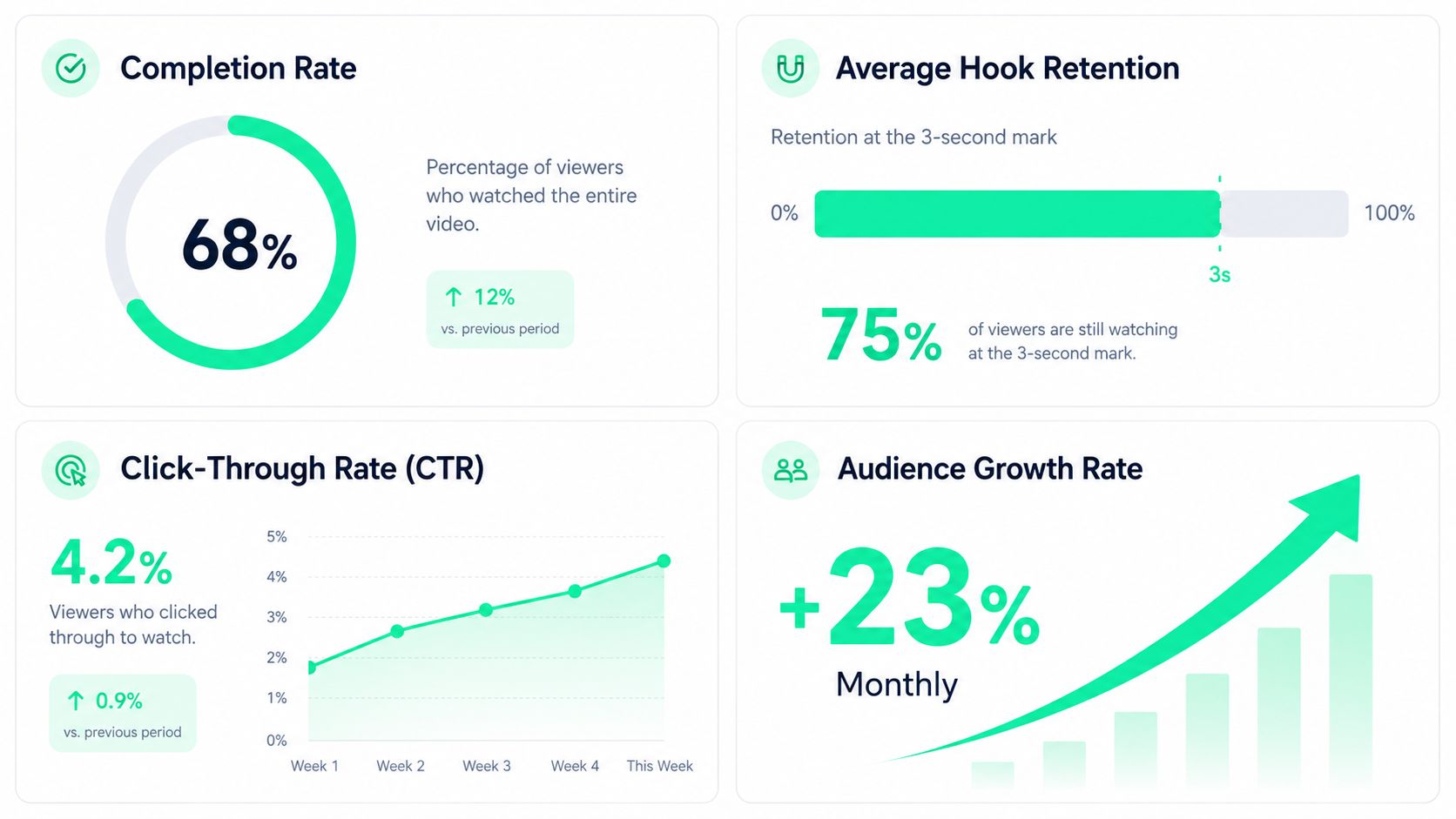
Completion and hook retention reveal whether the opening earns attention. Saves and shares suggest that the idea has continuing value. Click-through activity connects the clip to a business action, while follower growth shows whether repeated publishing is building an audience.
The next batch should change one variable at a time. A creator might test a question-led hook against a result-led hook, or compare a minimal caption style with a more emphatic one. The [short-form video tips collection](https://smarcomms.com/short-form-video) can provide additional ideas for testing creative treatments without abandoning the underlying message.
The broader category is covered in [the short-form video glossary](https://blitzreels.com/glossary/short-form-video), where teams can align on terms before documenting their process. Once a winning structure appears, templates and batch exports make it easier to reproduce the format while still adapting the content for each platform.
---
BlitzReels helps creators turn uploaded videos into short-form clips with transcription, captions, hooks, reframing, templates, and platform-ready exports for channels such as TikTok, Instagram Reels, YouTube Shorts, and LinkedIn. Visit [BlitzReels](https://blitzreels.com) to build a faster repurposing workflow and start turning existing recordings into reviewed, ready-to-publish content.