---
title: "What Is Video Transcription: Unlock Your Short-Form Video Potential"
canonical: "https://blitzreels.com/blog/what-is-video-transcription"
---
# What Is Video Transcription: Unlock Your Short-Form Video Potential
URL: https://blitzreels.com/blog/what-is-video-transcription
Markdown URL: https://blitzreels.com/blog/what-is-video-transcription.md
Published: 2026-06-02
Author: BlitzReels
Discover what is video transcription and how AI converts video to text for better SEO, accessibility & faster editing. Unlock your content's potential in 2026.
Tags: what is video transcription, ai transcription, video to text, short-form video, content creation

Think of all the spoken words in your video. Every hook, every key point, every surprising stat. Now imagine if all that valuable dialogue was trapped, inaccessible unless someone watched the entire thing with the sound on. **What is video transcription?** It's the process that sets your content free, turning every spoken word into searchable, editable text.
For creators on TikTok, Reels, and Shorts, this is the foundational step that makes fast-paced, modern video workflows possible. It's how you turn raw footage into viral content, faster.
## Table of Contents
- [What Is Video Transcription and Why It Matters for Creators](#what-is-video-transcription-and-why-it-matters-for-creators)
- [From Text to Viral Short](#from-text-to-viral-short)
- [How Video Transcription Works: Manual vs. AI](#how-video-transcription-works-manual-vs-ai)
- [Speed and Accuracy: The Creator’s Dilemma](#speed-and-accuracy-the-creators-dilemma)
- [Why AI Is the Only Choice for Short-Form Video](#why-ai-is-the-only-choice-for-short-form-video)
- [The Top 5 Benefits of Transcribing Your Videos](#the-top-5-benefits-of-transcribing-your-videos)
- [1. Boost Your Content’s Searchability and SEO](#1-boost-your-contents-searchability-and-seo)
- [2. Maximize Accessibility and Engagement](#2-maximize-accessibility-and-engagement)
- [3. Unlock Endless Repurposing Opportunities](#3-unlock-endless-repurposing-opportunities)
- [4. Create a Lightning-Fast Editing Workflow](#4-create-a-lightning-fast-editing-workflow)
- [5. Improve Content Quality and Structure](#5-improve-content-quality-and-structure)
- [Understanding Essential Transcription File Formats](#understanding-essential-transcription-file-formats)
- [The Big Three: SRT, VTT, and TXT](#the-big-three-srt-vtt-and-txt)
- [Comparing Transcription File Formats](#comparing-transcription-file-formats)
- [How to Get More Accurate AI Transcriptions](#how-to-get-more-accurate-ai-transcriptions)
- [Preparing Your Audio for the AI](#preparing-your-audio-for-the-ai)
- [Simple Steps for Better Transcripts](#simple-steps-for-better-transcripts)
- [Your New Transcription-Powered Video Workflow](#your-new-transcription-powered-video-workflow)
- [The Modern Short-Form Workflow](#the-modern-short-form-workflow)
- [Frequently Asked Questions About Video Transcription](#frequently-asked-questions-about-video-transcription)
- [What Is the Difference Between Transcription and Captions?](#what-is-the-difference-between-transcription-and-captions)
- [How Accurate Is AI Video Transcription in 2026?](#how-accurate-is-ai-video-transcription-in-2026)
- [Can Transcribing My Videos Really Help With SEO?](#can-transcribing-my-videos-really-help-with-seo)
- [How Long Does AI Take to Transcribe a Short Video?](#how-long-does-ai-take-to-transcribe-a-short-video)
## What Is Video Transcription and Why It Matters for Creators
At its simplest, video transcription is the process of converting your video's audio into written text. It’s like getting a full script of your video that you can easily skim through. But for today's creators cranking out short-form content, it's so much more than a simple text file—it's the engine that powers speed, creativity, and a smarter workflow.
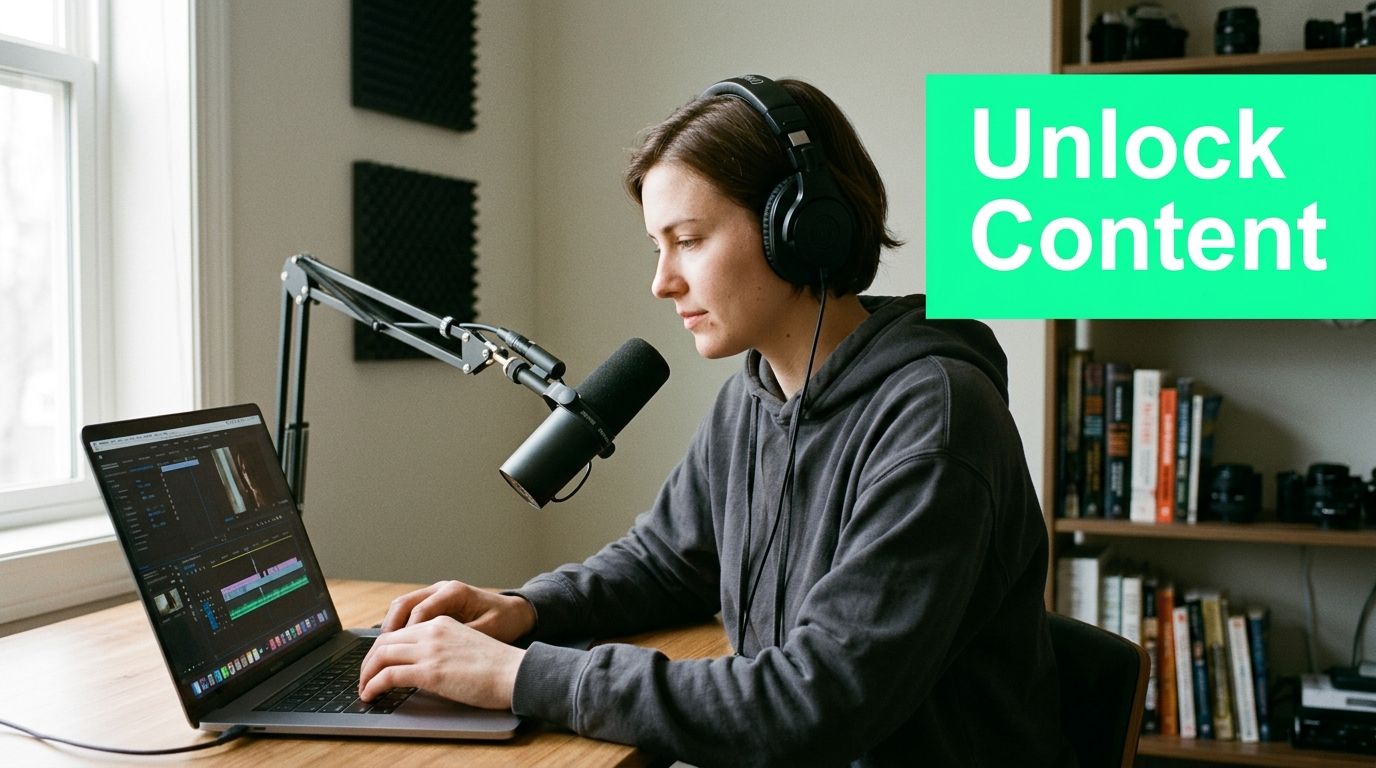
This text version of your video becomes the raw material for all kinds of powerful edits. It's the magic behind how tools like BlitzReels can supercharge your content creation. If you want to get into the nitty-gritty, you can explore the technical definition of [transcription](https://www.blitzreels.com/glossary/transcription) in our glossary.
> For short-form video creators, the transcript is a roadmap. It helps you instantly find the most powerful **hooks**, create engaging **captions**, and identify the best moments for **clipping**—all without re-watching your footage endlessly.
This process isn't just a niche trick; it's rapidly becoming central to how all content is made. The global market for AI transcription, valued at **USD 4.5 billion in 2024**, is expected to explode to **USD 19.2 billion by 2034**. This massive growth shows just how essential transcription has become for modern workflows like indexing, clipping, and repurposing content.
### From Text to Viral Short
So, what does this actually look like in your day-to-day workflow? It means you can take raw footage and transform it into a polished, engaging short video in minutes, not hours.
A good transcript allows you to:
* **Automatically generate captions** that stop the scroll.
* **Quickly identify viral hooks** to use for title cards or opening lines.
* **Edit your video by editing the text**, a much faster way to find and create clips.
* **Repurpose one long video** into dozens of shareable social media moments.
* **Resize and reframe** your best clips for any platform in seconds.
This text-first approach makes your content far more accessible, discoverable, and ultimately, effective. For a deeper look at professional video transcription, especially its role in reaching global audiences, check out [Translators USA's video transcription guide](https://translators-usa.com/professional-video-transcription-services-the-complete-2026-guide-to-accuracy-and-global-reach/). It connects spoken words to a world of possibilities.
## How Video Transcription Works: Manual vs. AI
When it comes to getting a text version of your video, you have two options: the scenic route (manual transcription) and the superhighway (AI). For creating short-form videos, picking the right one is crucial for building a fast and effective workflow.
Manual transcription is just what it sounds like. A real person sits down, listens to your video, and painstakingly types out every single word. This approach has long been the gold standard for accuracy in fields like law or academic research, but it's incredibly slow and expensive. For a creator on TikTok or Reels, waiting days for a transcript just isn’t an option.
Automated (AI) transcription, on the other hand, uses speech recognition software to turn your audio into text almost instantly. This is the engine that powers the fast-paced world of modern video creation. If you're curious about the underlying tech, understanding how speech-to-text works provides great insight into [hands-free typing for creators](https://sparkpod.ai/blog/speech-to-text-on-chromebook).
### Speed and Accuracy: The Creator’s Dilemma
Historically, the big trade-off between manual and AI has always been accuracy versus speed. A human transcriptionist can hit up to **99% accuracy**, which is why they’re still essential for high-stakes work. By contrast, one study found that an average AI platform only reached **61.92% accuracy** on audio with challenging background noise. You can dig into these [video transcription accuracy findings](https://www.rev.com/blog/facts-about-video-transcription) to see how different factors can throw off the results.
But for social media creators, near-instant speed is far more valuable than perfect, court-admissible accuracy. The goal isn’t to produce a flawless legal document; it’s to get a "good enough" draft that you can use to start creating.
> The real power of AI transcription isn't just speed; it's what that speed unlocks. It allows tools like BlitzReels to offer text-based editing, automatic captioning, and instant hook detection—features that are impossible with slow, manual methods.
### Why AI Is the Only Choice for Short-Form Video
When you're churning out content for TikTok, Instagram Reels, and YouTube Shorts, AI-powered transcription is really the only practical choice. It lays the groundwork for a nimble and efficient workflow.
Here’s a side-by-side look at what that means for you in real terms:
| Feature | Manual Transcription | AI Transcription (with BlitzReels) |
| :--- | :--- | :--- |
| **Turnaround Time** | 24-48 hours | Under 60 seconds |
| **Cost** | High (per-minute fee) | Low (included in subscription) |
| **Workflow Integration**| Disconnected; requires copy-pasting text | Fully integrated for clipping, captions, and editing |
| **Use Case**| Legal depositions, academic research | Viral short-form video, social media content |
Ultimately, AI transforms your transcript from a static, boring document into a dynamic editing tool. It’s the key that lets you generate stylish captions, pinpoint powerful **hooks** for your **title cards**, and start **clipping** your best moments in seconds, making your entire creation process faster from start to finish.
## The Top 5 Benefits of Transcribing Your Videos
Thinking of video transcription as just a technical chore is a huge mistake. It’s actually a strategic move that pays off in a big way, especially for creators on fast-paced platforms like TikTok, Instagram Reels, and YouTube Shorts. Understanding what transcription is is the first step, but seeing what it can *do* for your reach, engagement, and workflow is a total game-changer.
When you make transcription a core part of your creation process, you can expect some serious advantages. Here are the top five.
### 1. Boost Your Content’s Searchability and SEO
Let’s be clear: search engines like Google are incredible at reading text, but they can't "watch" your video to understand what it's about. A transcript is like handing them a cheat sheet—a keyword-rich document they can crawl, index, and rank. This means your video can start showing up in search results for the very topics you discussed, bringing a new wave of organic traffic straight to your content.
For YouTube Shorts and Reels, this also helps the platforms’ own recommendation algorithms understand your video's topic, increasing the chances it gets shown to the right audience.
### 2. Maximize Accessibility and Engagement
A huge slice of your audience watches videos with the sound off. They might be in a quiet office, on a noisy train, or just prefer to scroll in silence. For them, captions aren't just nice to have; they're essential.
> A transcript is the raw material for creating perfectly timed captions. By transcribing your video, you’re not just making it accessible; you’re ensuring **100% of your audience** can understand your message, which has a massive impact on watch time and engagement.
Captions don't just serve those who can't hear—they help everyone focus. You can learn more about how [AI captions make your content more engaging and accessible](https://www.blitzreels.com/blog/how-ai-captions-make-your-content-more-engaging-and-accessible) in our detailed guide.
### 3. Unlock Endless Repurposing Opportunities
A single video is secretly a treasure trove of content just waiting to be unpacked. Your transcript is the map that shows you where to find all the gold.
With a text version of your video, you can instantly:
* **Pull out powerful quotes** to create shareable graphics for social media.
* **Spot interesting stats** or hooks to share as text-based posts.
* **Turn the entire thing** into a blog post, article, or newsletter.
* **Identify the best clips** to resize and reframe for different platforms.
This approach lets you turn one recording session into an entire week's worth of content, saving you a staggering amount of time and effort.
### 4. Create a Lightning-Fast Editing Workflow
Imagine editing your video just by highlighting text on a document. That’s exactly what a transcript unlocks for your workflow. Forget about endlessly scrubbing through a timeline; now you can just scan the text to find the precise moments you want to use.
This is the very heart of how a tool like BlitzReels works. You use the transcript to find your best **hooks**, identify the perfect segments for **clipping**, and generate **captions** in seconds. It transforms video editing from a slow, painful task into a fast, intuitive process.
### 5. Improve Content Quality and Structure
Finally, one of the most underrated benefits of reviewing a transcript is that it makes you a better creator. It gives you a bird's-eye view of your own content, making it incredibly easy to see where you started rambling, where your points were weak, or where you repeated yourself.
By analyzing the transcripts of your most successful videos, you can pinpoint the exact language and hooks that resonated with your audience. You can then take those insights and apply them to your next recording, getting better every single time.
## Understanding Essential Transcription File Formats
Once your video’s dialogue is converted to text, that text has to live somewhere. It gets saved into a specific file, and the format of that file matters—a lot. This might sound overly technical, but it’s as simple as knowing when to use a JPEG versus a PNG for an image. Each file type has a specific job.
The alphabet soup of file extensions really just boils down to three you’ll see constantly: **SRT**, **VTT**, and **TXT**. Getting to know them will save you major headaches when you’re trying to add captions to your TikToks, Reels, or Shorts.
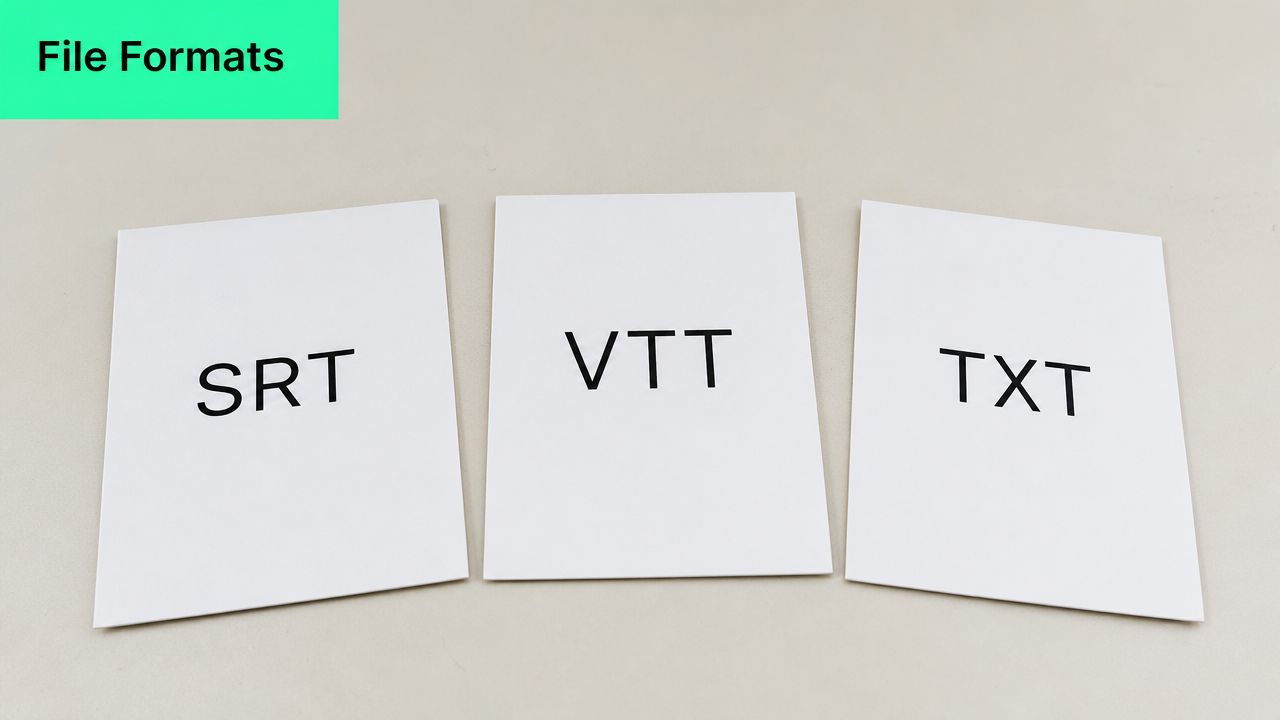
Choosing the right one ensures your captions show up perfectly synced and your workflow stays fast. Let’s break down what you actually need to know.
### The Big Three: SRT, VTT, and TXT
When you export your transcript, you’ll usually get a few options. Here’s a simple guide to what they do and when to use them.
* **SRT (SubRip Text):** This is the undisputed champion of caption files. Think of it as the universal language for subtitles. It’s a plain text file that contains your dialogue broken down into numbered sections with precise start and end timestamps. Every major platform—from YouTube and LinkedIn to TikTok and Instagram—accepts **SRT** files, making it your go-to for on-screen captions.
* **VTT (WebVTT):** Consider **VTT** the modern, web-focused successor to SRT. It does everything an SRT file does (text and timestamps) but adds the ability to include styling information like text color, font choices, and on-screen positioning directly within the file. While not quite as universally supported as SRT just yet, it's the new standard for web video.
* **TXT (Plain Text):** This one is exactly what it sounds like—a simple text file with just the raw, unformatted words from your video. It contains zero timestamps or formatting, which makes it useless for displaying captions. But for content repurposing? It’s pure gold. This clean script is the perfect starting point for a blog post, a series of X posts, or your podcast show notes.
To make the choice even clearer, here’s a quick comparison.
### Comparing Transcription File Formats
| Format | Key Feature | Best For |
| :--- | :--- | :--- |
| **SRT** | Universal compatibility with timestamps | Uploading captions to almost any social media platform or video player. |
| **VTT** | Timestamps plus advanced styling options | Web-based video players where you want custom caption appearances. |
| **TXT** | Raw, unformatted text only | Repurposing your video's content into articles, social posts, or scripts. |
For short-form creators, the takeaway is simple. Use **SRT** or **VTT** for captions that appear on your video, and use **TXT** when you want to turn your spoken words into other forms of content.
For editors working with desktop software, knowing how to handle these files is a core skill. If you're deep in a professional editing environment, you might find guides like [micDrop's Premiere Pro workflow guide](https://www.micdrop.cc/blog/premiere-pro-subtitles) helpful for seeing how these files plug into a larger production.
But what if you want to skip the manual import/export hassle? That's where tools like BlitzReels come in. You can make all your corrections right on the platform. When you're done, you just export a finalized SRT file that’s perfectly timed and ready for any platform. You can even use our [online SRT editor](https://www.blitzreels.com/tools/srt-editor) to make quick tweaks without needing complex software.
## How to Get More Accurate AI Transcriptions
As powerful as modern AI transcription is, it isn't magic. The quality of the transcript you get back is a direct reflection of the audio you feed it. It’s like cooking—you’ll always get a better meal when you start with fresh, high-quality ingredients.
You have far more control over AI accuracy than you might realize. By taking a few simple steps *before* you hit record, you can dramatically improve the final output and slash your editing time. A cleaner transcript from a tool like BlitzReels means faster captioning, easier clip generation, and a smoother path to publishing your content.
### Preparing Your Audio for the AI
The guiding principle is simple: make it as easy as possible for the machine to hear you. The old saying "garbage in, garbage out" has never been more true. Clear audio in, clean transcript out.
This infographic breaks down the essential pre-recording steps to set your AI up for success.
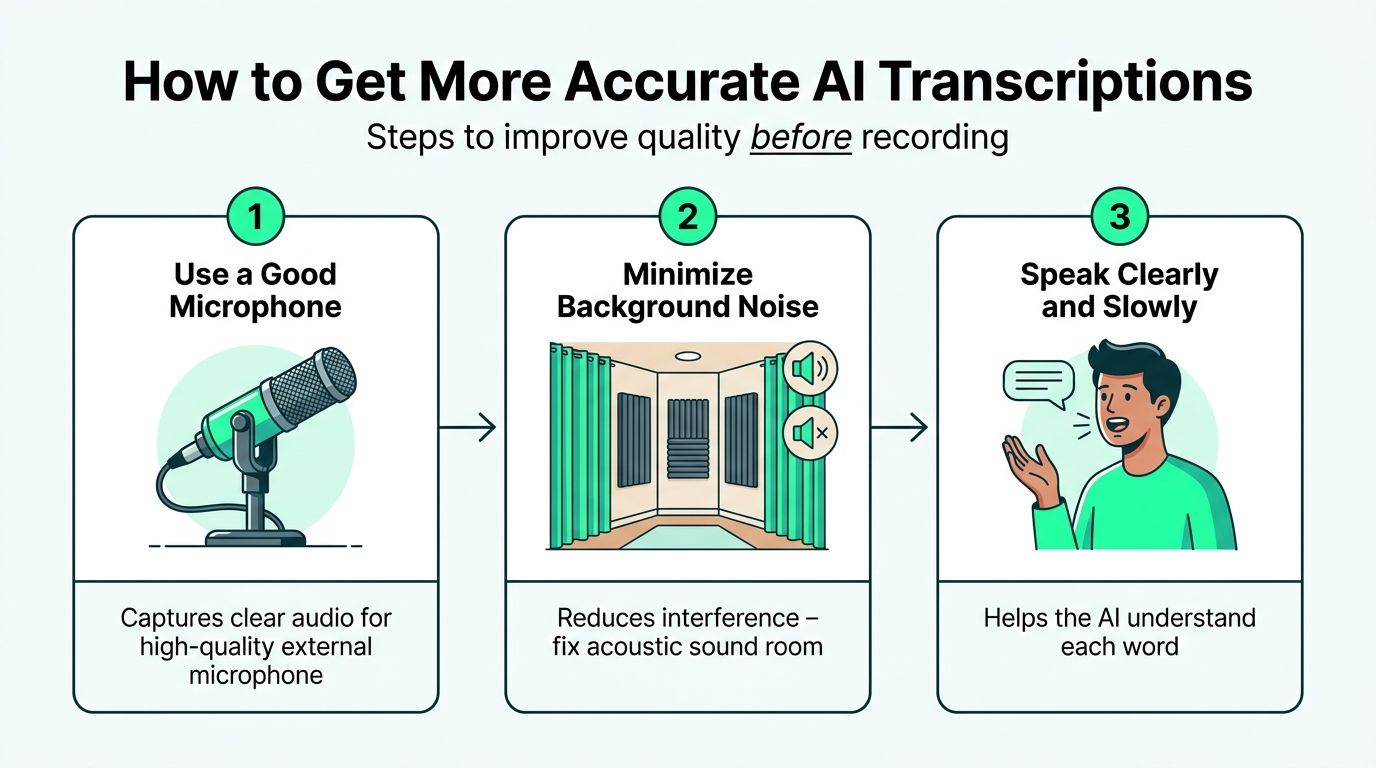
Following this process seriously cuts down on the "digital noise" that can confuse speech-to-text algorithms, leading to far fewer errors and a much more accurate starting point.
### Simple Steps for Better Transcripts
Let's break down these best practices. You don't need a professional studio to see a huge improvement, just a little planning.
1. **Invest in a Decent Microphone:** Your phone’s built-in mic is great for convenience, but it's designed to pick up everything—the echo in the room, the hum of the fridge, the dog barking next door. Even an affordable external lavalier or USB microphone will make a massive difference by focusing on your voice and capturing crisp audio.
2. **Minimize Background Noise:** Find the quietest space available. That means turning off fans, air conditioners, and TVs. Close the windows to block out street noise. Every sound that isn't your voice is a potential point of confusion for the AI.
3. **Speak Clearly and Pace Yourself:** You don't need to talk like a robot, but try to enunciate your words and avoid rushing. Mumbling or speaking too quickly causes words to blur together, which is a classic source of transcription mistakes.
> By focusing on clear audio capture, you shift your effort from tedious post-production correction to simple pre-production setup. This front-loading of work pays dividends, saving you time when editing and refining your captions.
Taking these steps ensures that when you upload your video to a platform like BlitzReels, the AI has the best possible source material to work with. For creators ready to level up, learning how to [automate your video captions without losing brand style](https://www.blitzreels.com/blog/automate-your-video-captions-without-losing-brand-style) is the perfect next step after mastering clean transcription.
## Your New Transcription-Powered Video Workflow
Alright, you get the theory behind transcription and why accuracy matters. But how does this actually change the way you make videos? This is where we move from concept to practice and see how a transcription-first approach completely overhauls the way you create short-form content.
Forget the old days of endlessly scrubbing through a video timeline, trying to find that one perfect soundbite. Your new workflow is smarter, faster, and built around text. Using a platform like BlitzReels as our guide, you’ll see how the transcript becomes the engine driving every creative choice, turning a tedious editing session into a quick and intuitive process.
### The Modern Short-Form Workflow
This is how you go from raw footage to a polished, ready-to-post short video in just a few minutes. It all starts with the text.
1. **Upload and Transcribe Instantly:** Start by uploading your video file. The AI kicks in immediately, generating a full transcript of your audio in under a minute. This text document is now your main editing tool.
2. **Find Hooks and Create Clips:** Instead of re-watching the entire video, just read the transcript. Scan the text to pinpoint the most powerful **hooks**, surprising stats, or valuable insights. Once you spot a golden nugget, all you have to do is highlight the text to instantly create a clip from that exact moment in the video.
3. **Generate and Style Captions:** With your best clips selected, it’s time to generate on-beat **captions** directly from the transcript. The AI syncs every word perfectly to the audio. From there, you can jump into the SRT editor to fix any minor errors and then apply your brand’s colors, fonts, and unique animated styles from a template. An [AI caption generator](https://www.blitzreels.com/ai-caption-generator) makes this whole step seamless.
4. **Frame, Finalize, and Export:** Add a dynamic **title card** based on the hook you found in step two. Let the AI’s auto-reframing feature keep the speaker perfectly centered in the shot. Finally, **resize** the video with a single click for TikTok, Instagram Reels, or YouTube Shorts, and export your finished masterpiece.
This is the BlitzReels editor, where your transcript becomes a powerful, interactive tool for fast-paced video creation.
This interface shows how clipping, captioning, and resizing all originate from that initial transcript, putting every tool you need in one place.
> This transcription-powered workflow isn't just about adding captions. It’s a fundamental shift in how you edit, allowing you to find your best content, create engaging clips, and publish high-quality shorts faster than ever before.
## Frequently Asked Questions About Video Transcription
Getting started with video transcription always brings up a few practical questions. Let's clear up some of the most common ones so you can see how it fits into a real-world workflow for creating short-form content.
### What Is the Difference Between Transcription and Captions?
Think of a **transcription** as the full, raw script of everything said in your video. It's the complete text from start to finish. **Captions**, on the other hand, are the small, timed pieces of that text that pop up on the screen while the words are being spoken.
Essentially, the transcript is the raw material, and captions are the polished, viewer-friendly final product. In a modern workflow, tools like BlitzReels use that full transcript to automatically create perfectly timed and editable captions for your videos.
### How Accurate Is AI Video Transcription in 2026?
In 2026, a high-quality AI transcription engine can easily hit over **95% accuracy** on videos with clear audio. That said, its performance can dip if you’re dealing with heavy background noise, strong accents, or people talking over each other.
This is exactly why having a good editing tool is non-negotiable. A built-in [SRT editor](https://www.blitzreels.com/tools/srt-editor), like the one inside BlitzReels, lets you quickly fix those few minor errors to make sure your final captions are 100% perfect before they go live.
### Can Transcribing My Videos Really Help With SEO?
Absolutely. Search engines like Google are masters at reading text, but they can't "watch" a video to figure out what it's about. When you include a full transcript on your website or in your YouTube description, you're giving them a keyword-rich text file they can easily crawl and index.
> This simple step makes your video content discoverable through normal text searches, which can dramatically increase your organic traffic and lead new viewers straight to your channel.
### How Long Does AI Take to Transcribe a Short Video?
It’s almost instant. With a modern platform like BlitzReels, a typical short-form video for TikTok, Reels, or Shorts can be fully transcribed in **less than 60 seconds**.
This incredible speed is what makes a text-based workflow so powerful. It allows creators to move from raw footage to a fully captioned and clipped video that’s ready to post in just a handful of minutes.
---
Ready to transform your content creation process? **BlitzReels** uses transcription to power a lightning-fast workflow, letting you clip, caption, and resize videos in minutes. [Try it for free](https://blitzreels.com) and see how easy it is to create professional shorts.