---
title: "YouTube Shorts Editing: A Practical End-to-End Workflow"
canonical: "https://blitzreels.com/blog/youtube-shorts-editing"
---
# YouTube Shorts Editing: A Practical End-to-End Workflow
URL: https://blitzreels.com/blog/youtube-shorts-editing
Markdown URL: https://blitzreels.com/blog/youtube-shorts-editing.md
Published: 2026-07-30
Author: BlitzReels
Learn YouTube Shorts editing with a practical workflow for founders, marketers, and creators. Covers hooks, captions, reframing, exports, and batch repurposing.
Tags: youtube shorts editing, shorts workflow, video captions, vertical video, clip repurposing

A founder opens a webinar recording, scrubs through the timeline, and finds the same problem every time. The strongest answer sits too deep in the file, the intro drifts, the captions lag, and the clip still needs reframing before it can live on a phone screen. That's the job of **YouTube Shorts editing**, turning long-form footage into something that earns attention fast, then gives people a reason to stay.
Shorts are no longer a side format. Reported daily views climbed from about **30 billion in 2021** to **more than 200 billion by 2025–2026** ([ZebraCat analysis](https://www.zebracat.ai/post/youtube-shorts-statistics)), and one independent analysis says Shorts accounted for roughly **77% of global YouTube views in 2025** when counting videos under one minute, up from **70% in 2024** and **66% in 2023** ([ZebraCat analysis](https://www.zebracat.ai/post/youtube-shorts-statistics)). For teams repurposing webinars, podcasts, demos, and interviews, editing is now the decision layer that shapes discovery, retention, and whether the next clip is worth making.
## Table of Contents
- [Why Shorts Editing Is Now an Optimization Job](#why-shorts-editing-is-now-an-optimization-job)
- [The choice is the product](#the-choice-is-the-product)
- [Choosing the Right Clips From Long-Form Recordings](#choosing-the-right-clips-from-long-form-recordings)
- [Scan for value, not just timestamps](#scan-for-value-not-just-timestamps)
- [Select for narrative coherence](#select-for-narrative-coherence)
- [Trimming Hooks and Pacing the First Three Seconds](#trimming-hooks-and-pacing-the-first-three-seconds)
- [Start where the value lands](#start-where-the-value-lands)
- [Tighten the opening line](#tighten-the-opening-line)
- [Captions, Emoji Callouts, and On-Beat Styling](#captions-emoji-callouts-and-on-beat-styling)
- [Make the words land on time](#make-the-words-land-on-time)
- [Use styling as a system](#use-styling-as-a-system)
- [Aspect Ratios, Safe Zones, and Export Settings](#aspect-ratios-safe-zones-and-export-settings)
- [Resize the source without losing the subject](#resize-the-source-without-losing-the-subject)
- [Export for clean delivery](#export-for-clean-delivery)
- [SRT Files, Audio Cleanup, and Title Overlays](#srt-files-audio-cleanup-and-title-overlays)
- [Treat the SRT file like quality control](#treat-the-srt-file-like-quality-control)
- [Make one source work across platforms](#make-one-source-work-across-platforms)
- [Common Shorts Editing Mistakes and How to Avoid Them](#common-shorts-editing-mistakes-and-how-to-avoid-them)
- [The daily fixes that matter](#the-daily-fixes-that-matter)
- [Build the learning loop](#build-the-learning-loop)
## Why Shorts Editing Is Now an Optimization Job
A marketing lead watches a 45-minute demo and pauses at the same question every week, which 20 seconds deserve to become a Short. The answer is rarely the cleanest sentence or the most polished clip. It's the moment that makes someone stop scrolling, rewatch, or share, and that's why editing is no longer a cleanup pass.
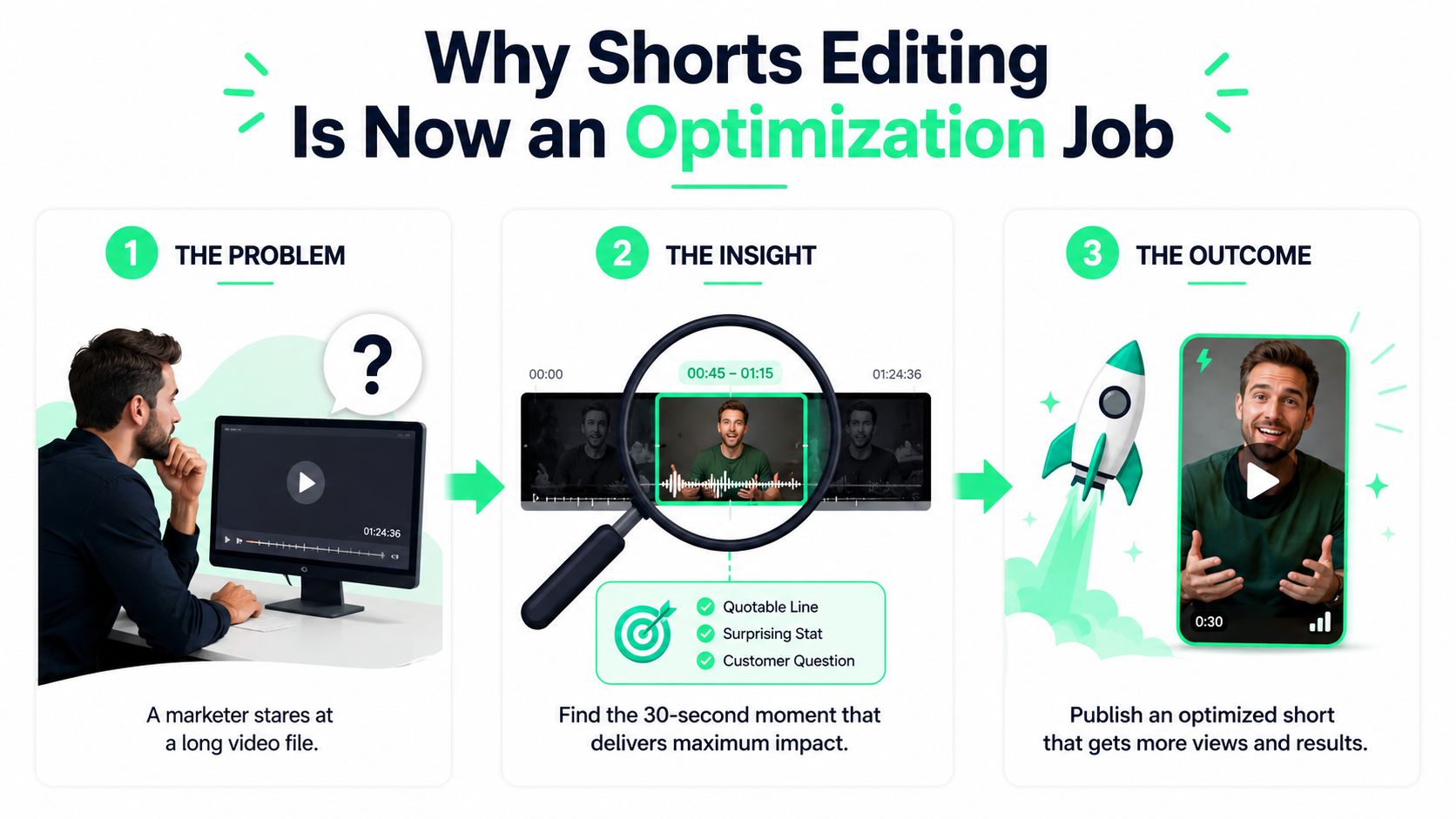
The practical shift is simple. Shorts now live inside a discovery system where the opening seconds and early response influence whether a clip keeps moving. Google's Shorts guidance also emphasizes creating Shorts from existing videos and using up to **60 seconds** of source footage ([YouTube support](https://support.google.com/youtube/answer/12836917?hl=en&co=GENIE.Platform=Android)), which makes the editing pass more important, not less.
### The choice is the product
For founders, educators, and B2B teams, the raw file is only the starting point. A podcast clip can fail because the hook starts too slowly, the framing hides the speaker's hands, or the on-screen text lands too low for mobile viewing. A good editor looks at those pieces as separate variables, not one vague “make it shorter” task.
> **Practical rule:** if the clip doesn't earn attention in the opening beat, the rest of the edit doesn't matter much.
That's why practical **youtube shorts editing** is closer to diagnosis than trimming. The clip has to be selected, tightened, reframed, captioned, and exported in a way that matches how people watch on mobile. A wider workflow, including repurposing and format-specific publishing, sits behind that decision, not beside it. For a broader short-form framework, see [BlitzReels short-form video workflows](https://www.blitzreels.com/blog/short-form-video).
## Choosing the Right Clips From Long-Form Recordings
The fastest way to waste time is watching every recording from the top and hoping a good clip appears. Better editors scan for signals first, then confirm the moment in context. A quotable line, a surprising statistic, a direct customer question, or a strong opinion usually tells the truth faster than the transcript does.
### Scan for value, not just timestamps
A repurposing pass should start with intent. A webinar for demand gen might produce a clip because a speaker answers a hard question clearly. A podcast might surface a sharper clip because the guest says something unexpected in one sentence. An interview often becomes useful when the answer includes a clean claim that stands alone without the surrounding discussion.
That's where AI-assisted clipping helps. It can surface candidates quickly, but the human editor still has to check whether the moment makes sense without the rest of the conversation. The core question is whether the clip gives the viewer immediate value, not whether it merely fills a vertical frame.
For a practical walkthrough on turning long recordings into short-form assets, [turning long-form video into Shorts](https://www.blitzreels.com/blog/turn-long-form-video-into-shorts) is useful background, especially for teams working from webinars and interviews. Another useful framing is [repurpose old content](https://www.gokrakensocials.com/blog/repurpose-old-content), which matches the same editorial logic. Once a candidate is chosen, trimming the hook and reframing it for vertical becomes the next judgment call.
### Select for narrative coherence
A strong clip still needs a complete thought. The opening needs enough context to make sense, but not so much that it turns into setup. If the segment depends on three earlier minutes of explanation, it probably isn't the right clip.
BlitzReels' clipping workflow fits that kind of repurposing because it surfaces candidate moments from longer files and lets teams review them before exporting. For podcasters and webinar hosts, that means the editor spends less time hunting timestamps and more time deciding whether the clip is worth publishing.
## Trimming Hooks and Pacing the First Three Seconds
The first 1 to 3 seconds decide whether a Short survives the swipe. A slow intro, a title slide that lingers too long, or a fade from black usually burns the one window that matters most. The best opening starts with the payoff, the strongest visual, or the most surprising line.
### Start where the value lands
A founder clip about pricing should not start with “Today I want to talk about pricing.” It should start with the hard statement, the customer objection, or the moment that changes the frame. A webinar clip should often skip the panel introduction entirely and land on the answer people would stop for.
The pacing rule is equally blunt. Expert editing guides recommend very frequent cuts, with guidance ranging from about every **2 seconds** to a new visual element every **5 to 7 seconds** to avoid scroll fatigue and keep retention moving ([YouTube Shorts editing guide](https://videoeditingtips.pro/youtube-video-editing-guide/youtube-shorts-editing-guide/)). That doesn't mean frantic editing, it means every beat has to earn the next one.
> Pacing is the highest-leverage edit choice because it decides whether the viewer reaches the point of the clip that matters.
### Tighten the opening line
A practical rewrite helps. “In today's webinar, we're excited to share a few thoughts about customer onboarding” becomes “Customers usually leave during onboarding because the first win takes too long.” The second line gives a reason to stay. It also gives the editor a cleaner visual anchor for the opening frame and the first caption line.
This is also where on-beat cuts matter. The caption can hit with the spoken phrase, the face can stay centered, and the visual can change before the viewer feels the clip stall. For a deeper breakdown of hook design, [the science of scroll-stopping video hooks](https://www.blitzreels.com/blog/the-science-of-scroll-stopping-video-hooks) is the right companion piece.
## Captions, Emoji Callouts, and On-Beat Styling
Captions carry the clip. On muted playback, they carry the whole argument, and they also help viewers keep up when a speaker moves fast or skips between points. For repurposed webinars and podcasts, that matters because the source usually includes pauses, overlap, and filler words that need to be cleaned out before the subtitle file is exported. The goal is not just readable text, it is retention that holds through the first pass of the clip.
### Make the words land on time
Caption timing shows up in viewer behavior fast. If the words lag behind the audio, the clip feels off and the viewer has to work harder than they should. If the captions hit on beat, reading and listening stay aligned, which is the standard I aim for on interview clips and webinar cuts where the spoken line has to land cleanly.
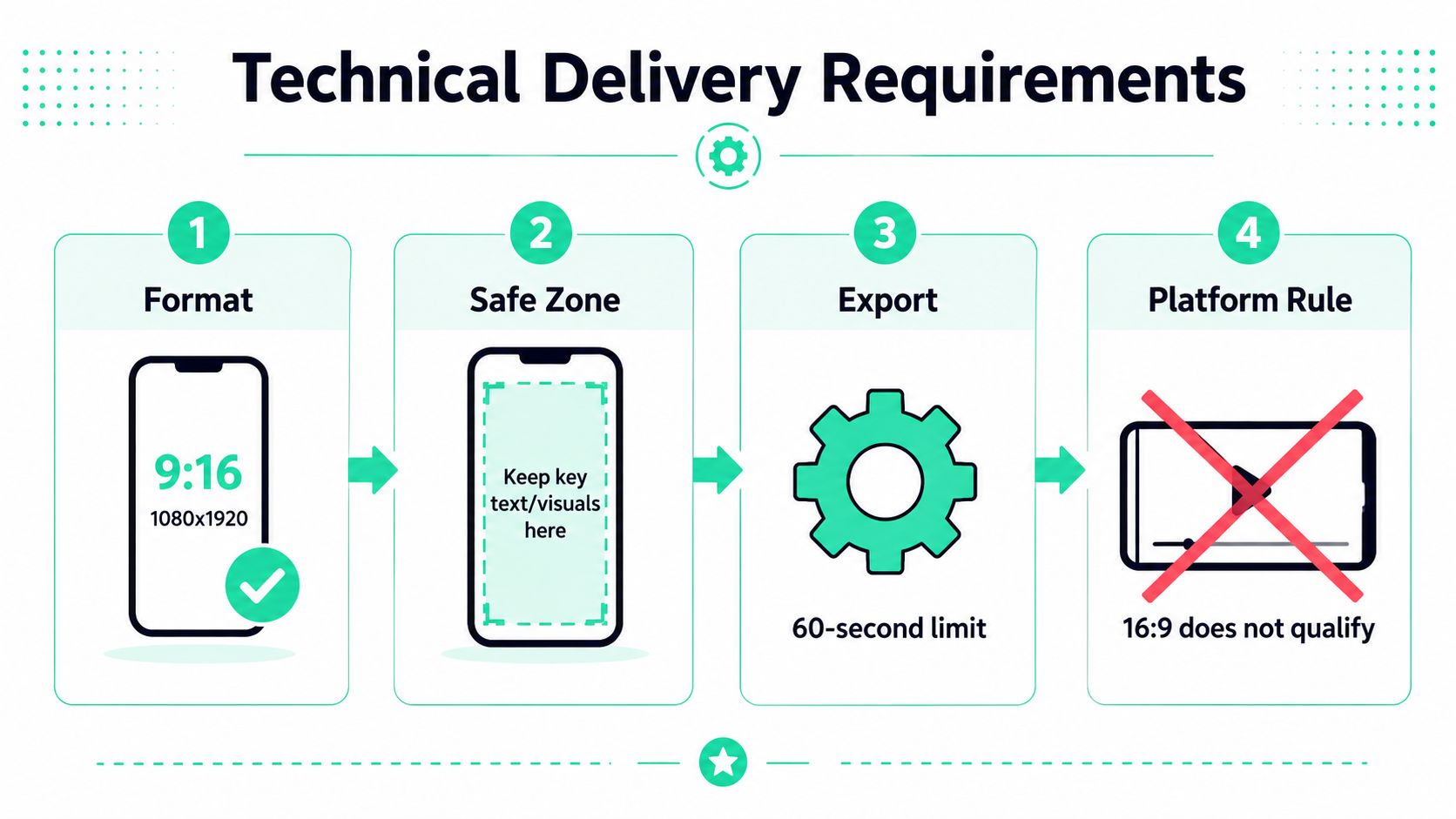
That timing also affects how the clip feels in the feed. A subtitle line that lands late can make even a strong point feel edited after the fact, while a clean on-beat line supports the pace of the cut. For teams that want a practical reference on styling choices, [MiraFlow's 2026 YouTube Shorts best practices guide](https://miraflow.ai/blog/youtube-shorts-best-practices-2026-complete-guide) is useful, and [a data-driven guide to styling video captions](https://www.blitzreels.com/blog/a-data-driven-guide-to-styling-video-captions) is a solid companion when you are tuning subtitle presentation. The technical setup still matters too, so Shorts should stay in vertical **9:16** with a **1080×1920** frame, and faces or key objects need room away from the lower UI area.
### Use styling as a system
Emoji callouts, bold word emphasis, and saved caption presets make the clip feel consistent across a team. That consistency matters when several editors touch the same channel or when a batch of episodes gets turned into Shorts. A style preset also removes the need to decide font, color, and highlight treatment from scratch on every export.
The use case is retention diagnosis. If viewers keep dropping at the same phrase, stronger caption emphasis can help isolate whether the issue is the line itself, the pacing around it, or a visual stall. I treat that as a production system, not decoration. Clean captions, intentional emoji markers, and predictable emphasis patterns give you a faster read on what the clip is doing.
BlitzReels' [subtitle generator](https://www.blitzreels.com/tools/subtitles-generator) fits that workflow when the source audio is clean enough to caption quickly, then refine visually for posting. For export decisions tied to aspect ratio and framing, the [Sup Growth TikTok aspect ratio guide](https://supgrowth.com/2026/05/30/tiktok-aspect-ratio/) is a useful reference point.
## Aspect Ratios, Safe Zones, and Export Settings
The technical setup is not a footnote. It decides whether a Short feels native or awkward in the feed. Hootsuite's guide says Shorts can be uploaded in **up to 3 minutes** total, must be vertical only with a **9:16** aspect ratio, and recommends **1920 × 1080 pixels** resolution, while also noting that captions are optional but recommended for engagement and accessibility ([Hootsuite guide](https://blog.hootsuite.com/youtube-shorts/)). Other publishing references still describe Shorts under the stricter **60 seconds or less** rule, so teams should verify the target upload path before exporting.
### Resize the source without losing the subject
A widescreen webinar cannot just be center-cropped and called finished. The editor has to reframe the speaker, keep the face out of the lower UI area, and make sure title text does not drift into the edges. Riverside notes that Shorts can also be square **1:1** at **1080 × 1080**, but **16:9 horizontal** does not qualify as a Short even if it is under the time limit ([Riverside guide](https://riverside.com/blog/how-to-make-youtube-shorts)). SocialRevver says the older Shorts specification also treats **60 seconds or less** as the qualifying duration and rejects horizontal **16:9** even under the time limit ([SocialRevver](https://www.socialrevver.com/blog/what-are-youtube-shorts)).
For teams moving webinar or podcast footage into a vertical cut, a resize pass is usually faster than rebuilding the edit. [BlitzReels' resize tool for YouTube Shorts](https://www.blitzreels.com/tools/resize-video-for-youtube-shorts) gives editors a direct way to convert source framing while keeping the speaker centered and the overlays inside safe space. That matters most when the original recording was never composed for phone-first viewing.
### Export for clean delivery
The practical baseline is **30 FPS** for normal talking-head content and **60 FPS** for high-action footage, with **10 to 15 Mbps VBR** as a solid upload starting point. [MiraFlow's 2026 YouTube Shorts best practices guide](https://miraflow.ai/blog/youtube-shorts-best-practices-2026-complete-guide) is a useful reference for teams setting export defaults. For repurposed audio, clean SRT timing and subtitle files matter just as much as the video crop. A clip can look right and still feel off if the text lands late, the speaker moves outside the safe zone, or the subtitles were never checked after the edit.
[Sup Growth TikTok aspect ratio guide](https://supgrowth.com/2026/05/30/tiktok-aspect-ratio/) is a useful reference for safe-zone thinking across vertical formats, especially when the same cut has to work on more than one platform. Teams that post across Shorts, Reels, TikTok, and LinkedIn usually need the export to survive each app's UI without a second round of reframing. That is the test. The clip has to hold its subject, its captions, and its title space in the same frame.
## SRT Files, Audio Cleanup, and Title Overlays
The finishing layer is where repurposed clips stop looking repurposed. Clean captions, corrected timestamps, trimmed filler words, and an immediate title overlay make the viewer understand the point before the first sentence fully lands. That's especially useful when one source recording needs to become multiple platform versions, each with its own safe zones and formatting quirks.
### Treat the SRT file like quality control
An SRT file should match what the speaker said, not the rough transcript that came out of the recorder. Filler words can stay if they feel natural, but timestamps need to be tight enough that captions follow the rhythm of the clip. Speaker labels matter too, especially in multi-guest podcasts or panel recordings where viewers need to know who's talking without guessing.
Quick audio cleanup helps the whole edit. A little noise reduction, a level check, and removal of awkward silence often do more for perceived quality than a flashy transition. For webinar clips, the speaker may sound fine in the room but thin on playback, so the export should be checked with headphones before anything goes live.
### Make one source work across platforms
A strong title overlay can carry the topic in the first second, which helps when the opening sentence is slower than the ideal hook. That overlay should sit inside platform-safe space so it works on Shorts, Reels, TikTok, and LinkedIn without re-editing each version. The edit then becomes a reusable asset, not a one-off post.
BlitzReels fits this batch-first workflow because it can transcribe audio, generate captions, reframe the subject, and export short-form versions from a single source clip. That matters most for teams publishing multiple podcast episodes or interviews each week, where the bottleneck is no longer ideas. It's operational consistency.
> Reuse beats re-edit when the source is strong, the captions are clean, and the batch export settings stay consistent across every platform.
## Common Shorts Editing Mistakes and How to Avoid Them
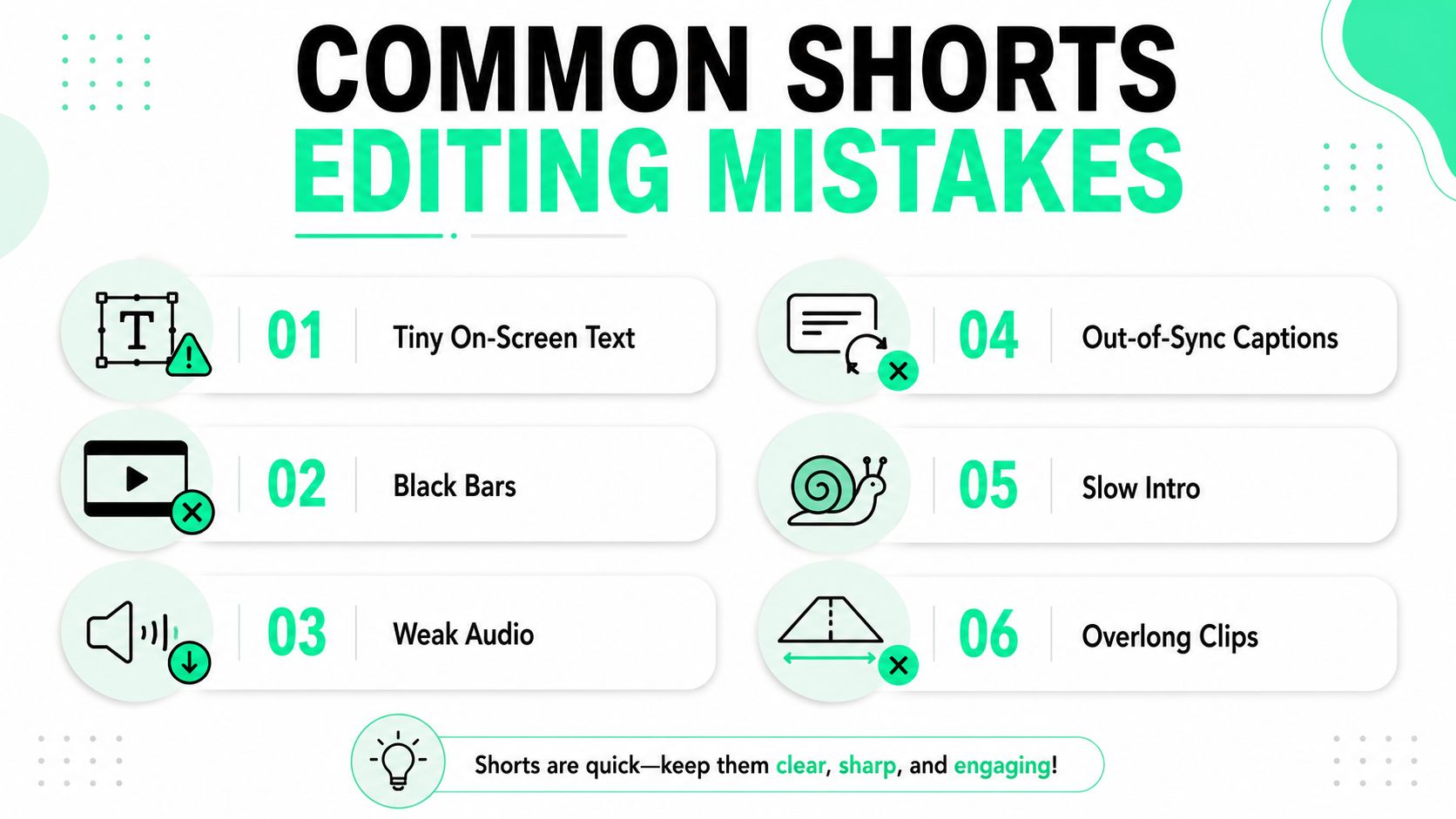
The same mistakes keep killing otherwise useful clips. Tiny text, black bars, weak audio, captions that trail the spoken line, slow intros, and clips that never reach the actual point all make a Short feel amateur before the viewer even decides what it's about. The fix is usually simple, but only if the editor catches it before publishing.
### The daily fixes that matter
- **Tiny On-Screen Text:** increase font size, then move the copy into the center safe zone before export.
- **Black Bars:** reframe the source into **9:16** instead of padding a horizontal clip.
- **Weak Audio:** clean the track and rebalance levels before captions are finalized.
- **Out-of-Sync Captions:** export the SRT again and align the timestamps to the spoken beat.
- **Slow Intro:** cut straight to the payoff line or strongest visual.
- **Overlong Clips:** remove setup until the clip reaches the value faster.
The deeper mistake is assuming editing speed is the bottleneck. It usually isn't. Diagnostic speed is. A team can publish a clip, check retention and rewatch behavior, and isolate the edit decision that changed performance, whether that was the hook, pacing, caption style, or crop. That loop matters more than shaving a minute off the edit itself.
### Build the learning loop
Weekly webinars make this easy to systematize. One clip can test a hook that starts with a question, another can test a stronger visual opening, and another can test a cleaner title overlay. Over time, the team learns which edit choices consistently hold attention for that audience, instead of guessing from one post to the next.
For channel owners who want a repeatable workflow around clipping, resizing, captioning, and export presets, [BlitzReels](https://blitzreels.com) gives teams a single place to standardize the process. It's worth using when the goal is to turn one recording into a reliable stream of Shorts, Reels, TikToks, and LinkedIn clips without rebuilding every version by hand.